
Learn to configure maven https proxy settings. By default, maven uses default network connection while running on the local systems. But sometimes we are running our application in our workplace or company. These networks shields the internet usage through proxy servers or firewalls, so all internet queries made from our system goes through this proxy server.
Maven by default does not detect network proxy configuration, and to use maven in these restricted areas, we must configure network proxy settings for maven.
Read More: Maven installation
1. How to configure maven proxy settings
To setup maven proxy setting, follow below steps:
- Navigate to path – {M2_HOME}/conf/settings.xml
- Open file settings.xml in edit mode in any text editor.
- Open and update <proxy> tag.
This tag will look like this:
<settings xmlns="http://maven.apache.org/SETTINGS/1.0.0"
      xmlns:xsi="http://www.w3.org/2001/XMLSchema-instance"
      xsi:schemaLocation="http://maven.apache.org/SETTINGS/1.0.0 http://maven.apache.org/xsd/settings-1.0.0.xsd">

	<!-- proxies
	| This is a list of proxies which can be used on this machine to connect to the network.
	| Unless otherwise specified (by system property or command-line switch), the first proxy
	| specification in this list marked as active will be used.
	|-->
	<proxies>
		<!-- proxy
		 | Specification for one proxy, to be used in connecting to the network.
		 |
		<proxy>
			<id>optional</id>
			<active>true</active>
			<protocol>http</protocol>
			<username>proxyuser</</username>
			<password>proxypass</password>
			<host>proxy.host.net</host>
			<port>80</port>
			<nonProxyHosts>local.net|some.host.com</nonProxyHosts>
		</proxy>
		-->
	</proxies>

</settings>
Update above proxy server fields with your network specific credentials. You can found network proxy details in your browser’s connection settings. For example, proxy settings can be found at –
Internet Explorer >> tools >> internet options >> Connections >> LAN Settings

Firefox >> tools >> options >> ADVANCED TAB >> settings
2. Maven proxy settings example
Given is sample network proxy setting entries.
<!-- proxies
| This is a list of proxies which can be used on this machine to connect to the network.
| Unless otherwise specified (by system property or command-line switch), the first proxy
| specification in this list marked as active will be used.
|-->
<proxies>
	<!-- proxy
	 | Specification for one proxy, to be used in connecting to the network.
	 |
	<proxy>
		<id>optional</id>
		<active>true</active>
		<protocol>https</protocol>
		<username>lokesh</</username>
		<password>abc123</password>
		<host>webproxy.company.com</host>
		<port>8081</port>
		<!-- <nonProxyHosts>local.net|some.host.com</nonProxyHosts> -->
	</proxy>
	-->
</proxies>
After following above steps, you should be able to use maven behind proxy servers also.
3. Maven proxy settings in Eclipse
To use proxy settings in eclipse while using maven, follow these steps:
- Open your Eclipse and go to Window -> Preferences.
- Click on the
Browsebutton ofUser Settings, and select the settings.xml.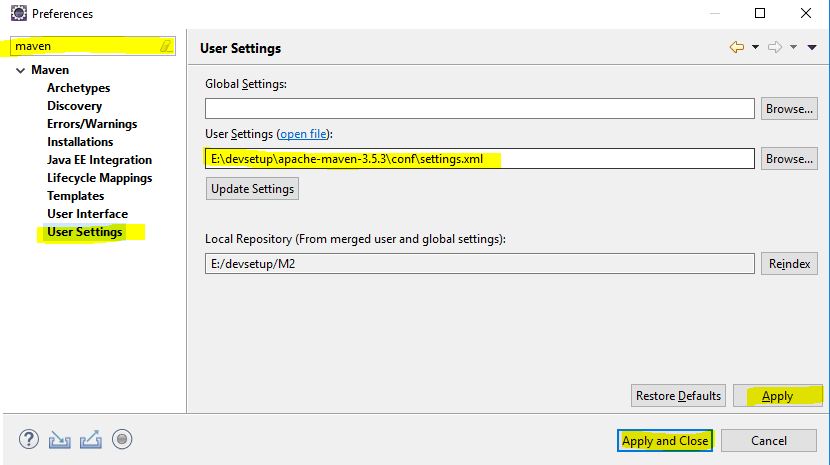
Maven proxy in eclipse - Click on the
"Update Settings"button to update the settings. If any confirmation dialog appeared, just click Yes.
4. Maven proxy settings from command line
To save time, we can append proxy details at the end of maven commands.
$ mvn clean install -DproxySet=true -DproxyHost=ur.proxy.server -DproxyPort=port
Though it’s possible to set maven proxy from command line, still it is recommended to use global proxy settings in settings.xml file.
Happy Learning !!
Reference:
Comments