

If you are working on a web application based on Spring that requires the use of org.springframework.web.context.ContextLoaderListener in the web.xml file and you are getting this exception when you start the server. This exception is more likely when you are working on Eclipse or possibly on other such IDEs.
The ContextLoaderListener class is used in the context of a web application and is part of the spring-web module.
1. The Exception
Exception log trace will look like this:
May 15, 2014 12:16:20 AM org.apache.catalina.core.StandardContext listenerStart
SEVERE: Error configuring application listener of class org.springframework.web.context.ContextLoaderListener
java.lang.ClassNotFoundException: org.springframework.web.context.ContextLoaderListener
	at org.apache.catalina.loader.WebappClassLoader.loadClass(WebappClassLoader.java:1714)
	at org.apache.catalina.loader.WebappClassLoader.loadClass(WebappClassLoader.java:1559)
	at org.apache.catalina.core.DefaultInstanceManager.loadClass(DefaultInstanceManager.java:532)
	at org.apache.catalina.core.DefaultInstanceManager.loadClassMaybePrivileged(DefaultInstanceManager.java:514)
	at org.apache.catalina.core.DefaultInstanceManager.newInstance(DefaultInstanceManager.java:133)
	at org.apache.catalina.core.StandardContext.listenerStart(StandardContext.java:4727)
	at org.apache.catalina.core.StandardContext.startInternal(StandardContext.java:5285)
	at org.apache.catalina.util.LifecycleBase.start(LifecycleBase.java:150)
	at org.apache.catalina.core.ContainerBase$StartChild.call(ContainerBase.java:1559)
	at org.apache.catalina.core.ContainerBase$StartChild.call(ContainerBase.java:1549)
	at java.util.concurrent.FutureTask$Sync.innerRun(Unknown Source)
	at java.util.concurrent.FutureTask.run(Unknown Source)
	at java.util.concurrent.ThreadPoolExecutor.runWorker(Unknown Source)
	at java.util.concurrent.ThreadPoolExecutor$Worker.run(Unknown Source)
	at java.lang.Thread.run(Unknown Source)

May 15, 2014 12:16:20 AM org.apache.catalina.core.StandardContext listenerStart
SEVERE: Skipped installing application listeners due to previous error(s)
May 15, 2014 12:16:20 AM org.apache.catalina.core.StandardContext startInternal
SEVERE: Error listenerStart
May 15, 2014 12:16:20 AM org.apache.catalina.core.StandardContext startInternal
SEVERE: Context [/Spring4Struts2HibernateIntegration] startup failed due to previous errors
May 15, 2014 12:16:20 AM org.apache.coyote.AbstractProtocol start
INFO: Starting ProtocolHandler ["http-bio-8080"]
May 15, 2014 12:16:20 AM org.apache.coyote.AbstractProtocol start
INFO: Starting ProtocolHandler ["ajp-bio-8009"]
May 15, 2014 12:16:20 AM org.apache.catalina.startup.Catalina start
INFO: Server startup in 365 ms
2. Reasons
2.1. Missing Dependency of Spring-Web Module
Possibly you have not added the spring web dependencies to your project. Just add them if you have not.
<dependency>
    <groupId>org.springframework</groupId>
    <artifactId>spring-web</artifactId>
    <version><!-- Use the version appropriate for your project --></version>
</dependency>
2.2. Missing Jars in Deployment Assembly
If you are still getting this exception then you must add these dependencies to project deployment assembly as well. Check the ‘WEB-INF/lib‘ directory of your deployed web application to ensure that the necessary Spring JAR files are present.
2.3. IDE Build Configurations
If you are using an IDE such as Eclipse or IntelliJ, try refreshing your project, cleaning the project, and rebuilding it to ensure that the IDE picks up the changes in the classpath.
Next, make sure you are adding the dependencies in the project deployment assembly as well.
To add dependencies in deployment assembly follow the below instructions.
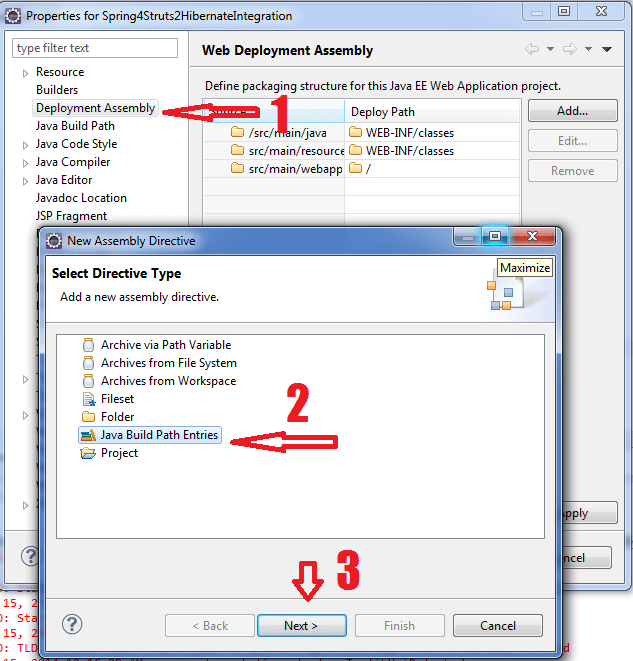
1. Open project properties and select Choose Deployment Assembly. Then select the option “Java Build Path Entries“.
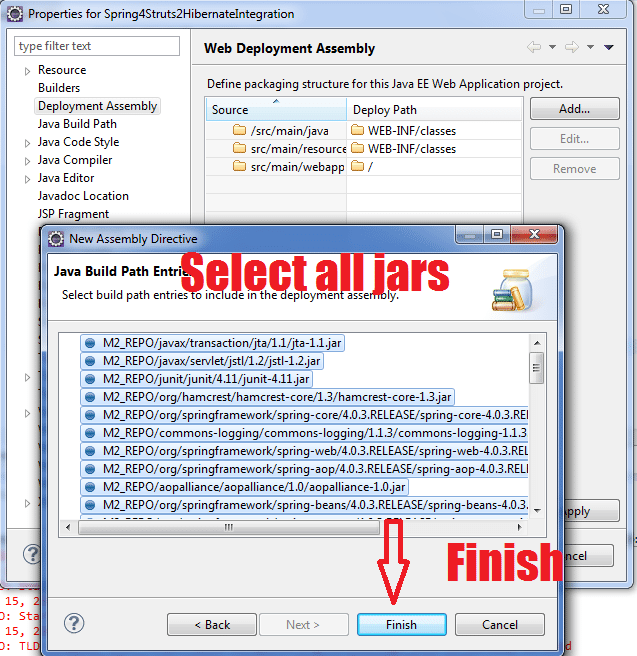
2. Click Next and select all jar files. Click Finish.
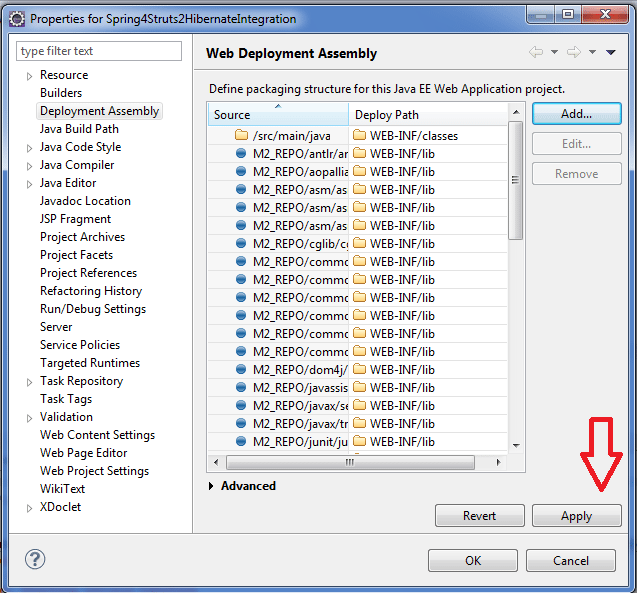
3. Deployment assembly will look like this. Click Apply.
The above fixes will solve the issue.
Happy Learning !!

You are a God thanks !!!!!, Worked !!! (if an anyone doesn’t work maybe its because yours Maven dependances was not downloaded correctly)
I haven’t getting finish option after add libraries, what should I do?
This worked for me. :)
thanks, work for me
Quickly solved my problem………….thanks
This advice solved my problem when I stared a project as a jar and changed to Dynamic Web using Project Facets in Eclipse.
Solution 2 worked for me too.
Just added the maven dependencies in the deployment assembly and then it started working. Thank you.
how can i solve this issue with intellij idea? In here there is no project properties
solution 2 works tq …
you are awesome <3 solution 2 works for me
HI , after doing these steps still my problem not solved and i am getting this :-
Solution 2 worked. Kudos!!
thanks ..it works for me…
thanks ..it works for me…
Yeah It Works… Thanks A Ton !!
Many many and many thanks to you!!! It works!!!
Thanks.Problem Resolved
Thanks.
Hi Lokesh, You have some amazing articles.
One question, we have added the jars but can you explain why it is coming so as the errors are coming only during run time and not compile time ?. Should these jars be part of ONLY your application server or ONLY jar/ear or should be part of both ?
Yes, it is work… but when I do maven update, I should do this operation againt… Other solution?
Thanks.
Thanks.
Thanks..
Thanks,problem resolved.