
Hibernate stops with “Errors in named queries” at startup when it finds a JPQL named query that it cannot parse or resolve. A named query is a query that we declare once with a name, most often with @NamedQuery on an entity. Hibernate checks every JPQL named query while it builds the SessionFactory, so one wrong entity or attribute name prevents the whole application from starting.
Hibernate 3 to 5 throw a HibernateException with this text, whereas Hibernate 6 and 7 throw NamedQueryValidationException, which names each broken query and the reason. The fix is to write JPQL with entity and attribute names, never table and column names, or to move plain SQL into a @NamedNativeQuery.
The following example shows the error on Hibernate 7.4 and on Hibernate 3, followed by the wrong query and the right one.
ERROR org.hibernate.orm.query - HHH90003001: Error in named query: Shift.findAll
org.hibernate.query.sqm.UnknownEntityException: Could not resolve root entity 'volunteer_shift'
...
jakarta.persistence.PersistenceException: Unable to build Hibernate SessionFactory  [persistence unit: volunteer-shifts]
Caused by: org.hibernate.query.NamedQueryValidationException: Errors in named queries:
  [1] Error in query named 'Shift.findAll': Could not resolve root entity 'volunteer_shift'
Initial SessionFactory creation failed.org.hibernate.HibernateException: Errors in named queries: GET_DEPARTMENT_BY_ID, UPDATE_DEPARTMENT_BY_ID
Exception in thread "main" java.lang.ExceptionInInitializerError// Wrong: volunteer_shift is the table name
@NamedQuery(name = "Shift.findAll", query = "select s from volunteer_shift s")
// Right: Shift is the entity name
@NamedQuery(name = "Shift.findAll", query = "select s from Shift s")Notice that the message names the table volunteer_shift, which JPQL does not know, whereas the entity name Shift resolves.
Next, we see why Hibernate checks named queries at startup and how to read the message. After that, we go through the common causes one by one, with the fix for each of them.
1. Why Named Query Errors Stop the Startup
A named query is written in JPQL, the query language of Jakarta Persistence, which works on entity classes and their Java fields. To check a query, Hibernate needs the metamodel (the list of entities and their attributes), so the check runs at the end of the startup.
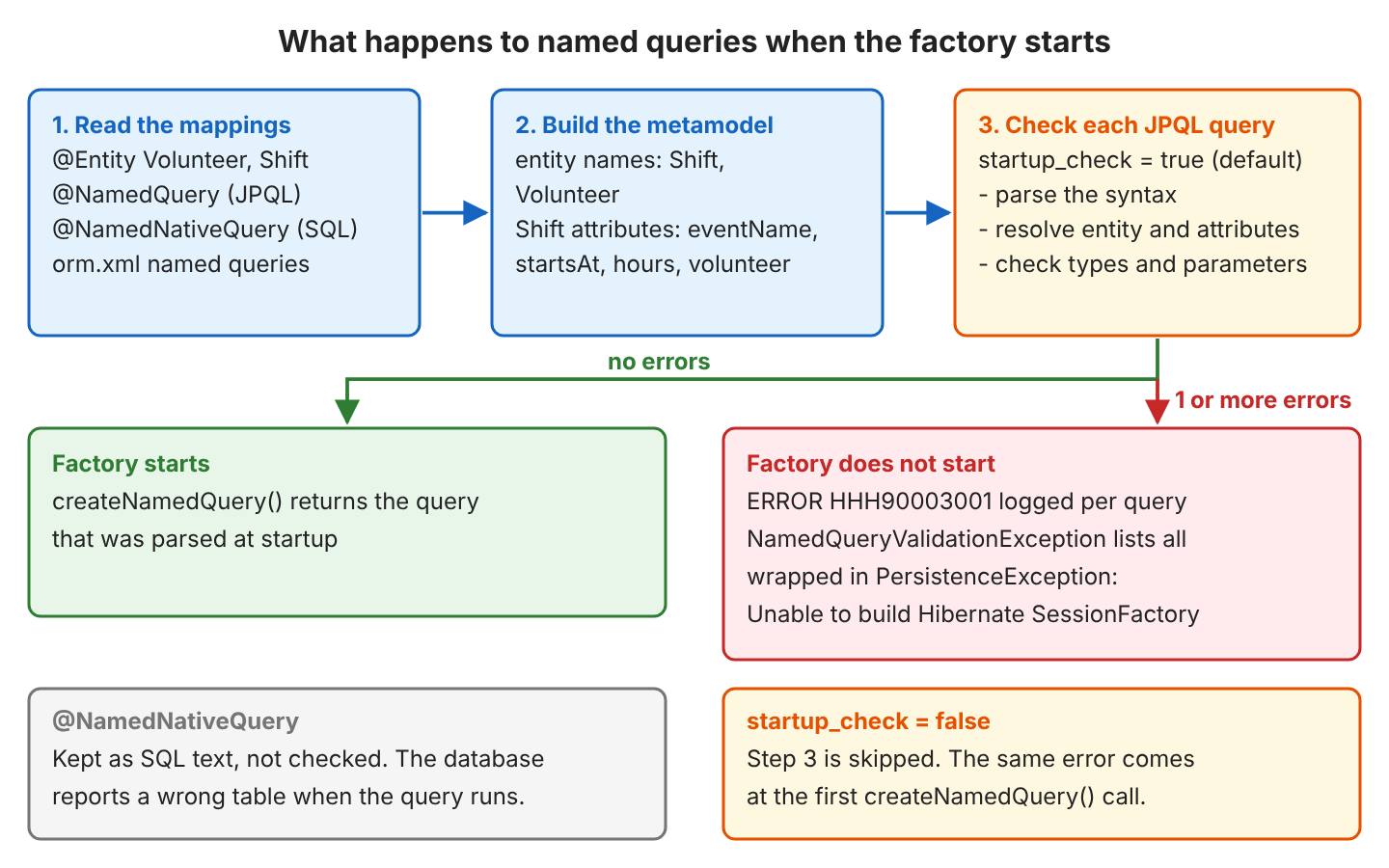
By default, the setting hibernate.query.startup_check is true, so the check always runs (FAQ 4.1 shows what happens when we turn it off). For example, when a developer renames the field startsAt to startTime and forgets the named query that filters on it, the next deployment fails at startup instead of when a volunteer opens the shift list.
1.1. Reading the Error Message
The top line only says that the startup failed. The real error is the NamedQueryValidationException in the Caused by section, which has one numbered line per broken query with the query name and the reason, and often the query text.
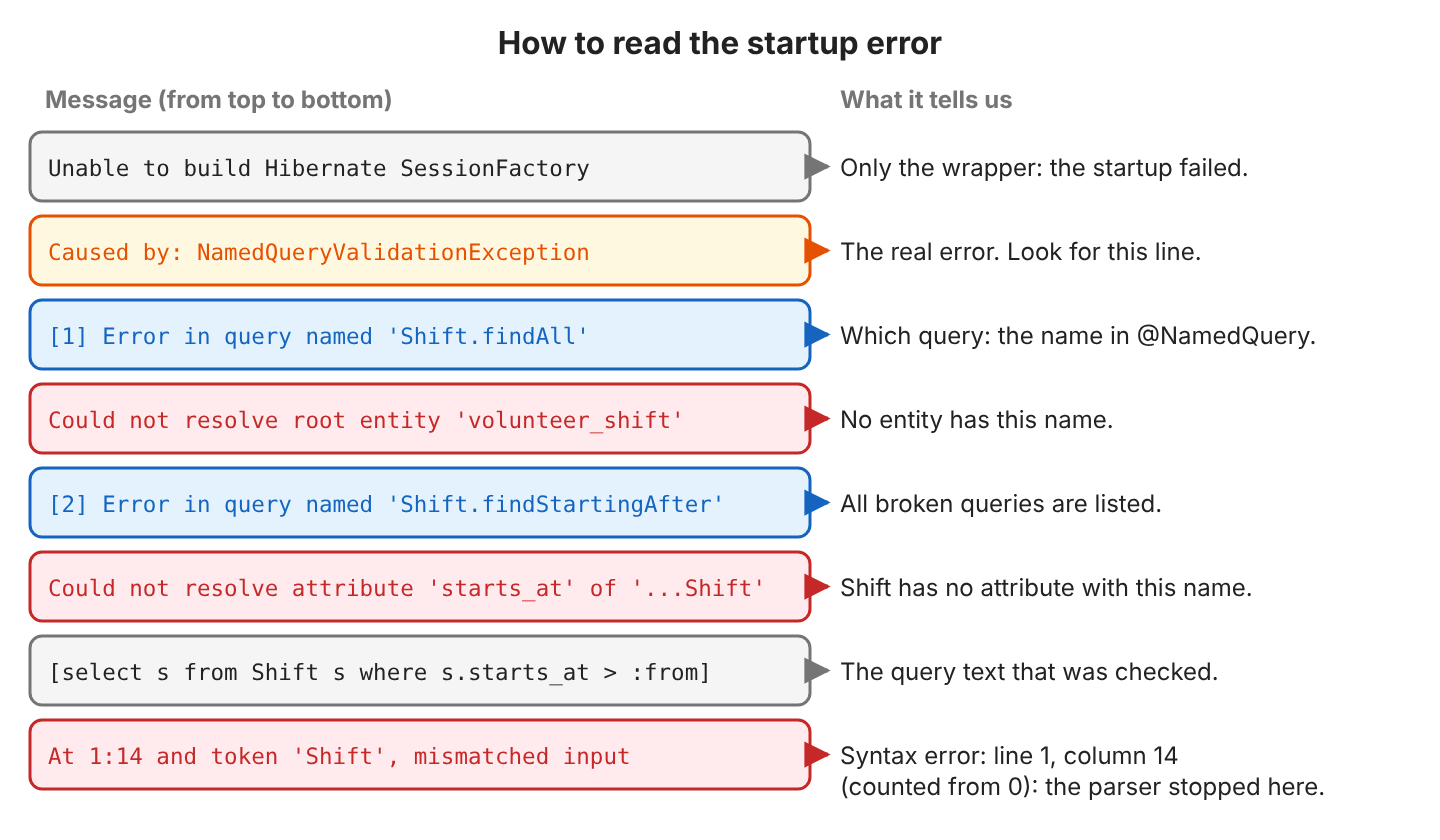
When two queries are broken, both appear in one exception, so one restart shows every mistake.
Caused by: org.hibernate.query.NamedQueryValidationException: Errors in named queries:
  [1] Error in query named 'Shift.findAll': Could not resolve root entity 'volunteer_shift'
  [2] Error in query named 'Shift.findStartingAfter': Could not resolve attribute 'starts_at' of 'com.howtodoinjava.hibernate.namedqueryerrors.Shift' [select s from Shift s where s.starts_at > :from]
In code, getErrors() returns the same information as a map from query name to exception.
try {
  emf = config.createEntityManagerFactory();
} catch (PersistenceException e) {
  if (e.getCause() instanceof NamedQueryValidationException invalid) {
    invalid.getErrors().forEach((name, error) ->
        System.out.println(name + " -> " + error.getMessage()));
    // Shift.findAll -> Could not resolve root entity 'volunteer_shift'
  }
}
2. Common Causes and Their Messages
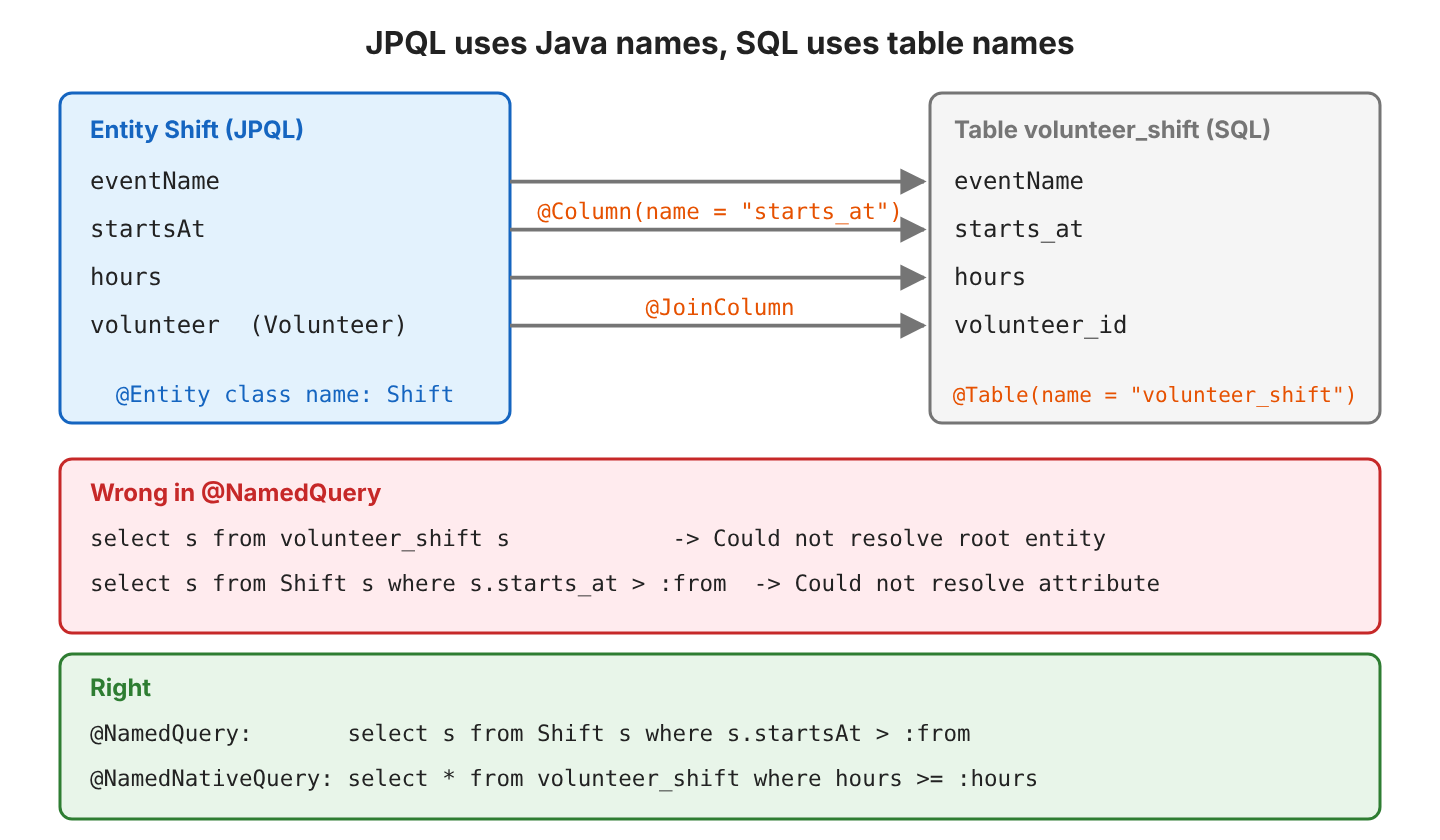
Our examples use a volunteer app with Hibernate 7.4.11, Java 25 and an in-memory H2 database. A volunteer has a name and a phone number, and each shift belongs to one volunteer. The @Table and @Column names differ from the Java names, and the most common mistake comes from mixing the two.
@Entity
@Table(name = "volunteer_shift")
public class Shift {

  @Id
  @GeneratedValue
  private Long id;

  private String eventName;

  @Column(name = "starts_at")
  private LocalDateTime startsAt;

  private int hours;

  @ManyToOne(fetch = FetchType.LAZY)
  @JoinColumn(name = "volunteer_id")
  private Volunteer volunteer;
}
The @ManyToOne association stores the volunteer’s id in the volunteer_id column, while JPQL reaches the volunteer through the volunteer attribute.
2.1. Table Name Instead of the Entity Name
The entity name is the simple class name (Shift) unless @Entity(name = “…”) sets another one, and JPQL does not know table names at all.
@NamedQuery(name = "Shift.findAll", query = "select s from volunteer_shift s")
// Error in query named 'Shift.findAll': Could not resolve root entity 'volunteer_shift'
2.2. Column Name or Misspelled Attribute
A column name or a typo in a path such as s.volunteer.name fails with Could not resolve attribute, and the message names the entity that was searched.
@NamedQuery(name = "Shift.findStartingAfter",
    query = "select s from Shift s where s.starts_at > :from")
// Could not resolve attribute 'starts_at' of '...namedqueryerrors.Shift'

@NamedQuery(name = "Shift.findByVolunteerName",
    query = "select s from Shift s where s.volunteer.nmae = :name")
// Could not resolve attribute 'nmae' of '...namedqueryerrors.Volunteer'
2.3. Entity Not Registered
When the class name is right but the class is not part of the persistence unit, Hibernate does not know the entity either. A missing registration happens when we forget to list the class in the configuration, for example in managedClasses() or in persistence.xml.
@NamedQuery(name = "Shift.findAll", query = "select s from Shift s")   // declared on another class

EntityManagerFactory emf = new HibernatePersistenceConfiguration("volunteer-shifts")
    .managedClasses(Volunteer.class, UnregisteredEntity.class)   // Shift.class is missing
    .createEntityManagerFactory();
// Error in query named 'Shift.findAll': Could not resolve root entity 'Shift'
The message is the same as in section 2.1, so we first compare the name in the quotes with the class name.
2.4. SQL Syntax in a JPQL Named Query
The annotation @NamedQuery accepts only JPQL, so a query copied from an SQL client fails at the first token that JPQL does not allow. The list of expected tokens in the message is long, but only the start of the line matters.
@NamedQuery(name = "Shift.findLongShifts",
    query = "select * from volunteer_shift where hours >= 4")
// At 1:7 and token '*', extraneous input '*' expecting {INTEGER_LITERAL, ...}
//   [select * from volunteer_shift where hours >= 4]
2.5. Keyword Typos and a Trailing Semicolon
Syntax errors carry a position, and At 1:14 means line 1, column 14, counted from 0. The token after the position is where the parser stopped, which is often right after the real mistake.
@NamedQuery(name = "Shift.findAll", query = "select s form Shift s")
// At 1:14 and token 'Shift', mismatched input 'Shift', expecting one of the following tokens:
//   <EOF>, ',', EXCEPT, FETCH, FROM, GROUP, HAVING, ... [select s form Shift s]

@NamedQuery(name = "Shift.findMinHours", query = "select s from Shift s where s.hours >= :hours;")
// At 1:45 and token ';', extraneous input ';' expecting <EOF>
In the first query, the parser reads form as an alias for s, so it complains about Shift. The trailing semicolon is valid in an SQL console but not in JPQL.
2.6. Parameter and Type Mistakes
A JPQL parameter is either named (:hours) or numbered from 1 (?1). A bare ? from JDBC code and ?0 fail at startup, and so does a literal of the wrong type.
| Query part | Message after “Error in query named …” |
|---|---|
| s.hours >= ? | Unlabeled ordinal parameter (‘?’ rather than ?1) |
| s.hours >= ?0 | Ordinal parameter labels start from ‘?0’ (ordinal parameters must be labelled from ‘?1’) |
| s.hours = ‘four’ | Cannot compare left expression of type ‘java.lang.Integer’ with right expression of type ‘java.lang.String’ |
A wrong parameter name in setParameter() is a different case. The query text is valid, so the query fails only when that line runs (see FAQ 4.3). A query that mixes named and positional parameters, such as :hours and ?1, fails as well.
3. How to Fix Each Cause
Each fix changes only the query text or the configuration, and any test that starts the factory proves it.
| Cause | Fix |
|---|---|
| Table name (volunteer_shift) | Use the entity name: from Shift s |
| Column name or typo (s.starts_at) | Use the Java field name: s.startsAt |
| Entity not registered | Add the class to managedClasses(), persistence.xml or hibernate.cfg.xml |
| SQL syntax (*select ** ) | Rewrite it in JPQL, or declare it with @NamedNativeQuery |
| Keyword typo or ; | Correct the keyword at the reported column, remove the semicolon |
| ? or ?0 | Use a named parameter (:hours) or number from ?1 |
| Wrong literal type | Compare with a value of the attribute’s type, or use a parameter |
The fixed queries on Shift start without errors and return the expected shifts.
@NamedQuery(name = "Shift.findLong",
    query = "select s from Shift s where s.hours >= :hours order by s.startsAt")
@NamedQuery(name = "Shift.findByVolunteer",
    query = "select s from Shift s where s.volunteer.name = :name order by s.startsAt")
@NamedQuery(name = "Shift.findAfter",
    query = "select s from Shift s where s.startsAt > :from order by s.startsAt")
List<Shift> longShifts = em.createNamedQuery("Shift.findLong", Shift.class)
.setParameter("hours", 4)
.getResultList(); // [Food Drive (4h), Book Fair (6h)]
// select s1_0.id,s1_0.eventName,s1_0.hours,s1_0.starts_at,s1_0.volunteer_id
// from volunteer_shift s1_0 where s1_0.hours>=? order by s1_0.starts_atTo keep the SQL, we declare it with @NamedNativeQuery, where table and column names are correct and resultClass maps each row to a Shift.
@NamedNativeQuery(name = "Shift.findLongSql",
    query = "select * from volunteer_shift where hours >= :hours order by starts_at",
    resultClass = Shift.class)

List<Shift> longShifts = em.createNamedQuery("Shift.findLongSql", Shift.class)
    .setParameter("hours", 4)
    .getResultList();             // [Food Drive (4h), Book Fair (6h)]
The complete project on GitHub reproduces every error from section 2 and checks each message and fix with 17 JUnit tests (mvn -q compile exec:java, mvn test).
4. Named Query Errors FAQs
4.1. Can I Turn Off the Named Query Check?
Yes, with hibernate.query.startup_check = false, but turning it off only moves the error to the first createNamedQuery() call for that query. So the request that uses the broken query fails in production instead of at deployment.
config.property("hibernate.query.startup_check", false);   // factory starts
TypedQuery<Shift> query = em.createNamedQuery("Shift.findStartingAfter", Shift.class);
// IllegalArgumentException: org.hibernate.query.sqm.UnknownPathException:
//   Could not resolve attribute 'starts_at' of '...Shift' [select s from Shift s where s.starts_at > :from]
We keep the default true, because the check is the main reason to use named queries.
4.2. Are Named Native Queries Checked at Startup?
No. Hibernate keeps the text of a @NamedNativeQuery as it is, and only the database can say whether it is valid. A wrong table name passes the startup and fails when the query runs.
@NamedNativeQuery(name = "Shift.findAllSql", query = "select * from shifts", resultClass = Shift.class)
// factory starts
List<Shift> shifts = em.createNamedQuery("Shift.findAllSql", Shift.class).getResultList();
// SQLGrammarException: Could not prepare statement [Table "SHIFTS" not found; SQL statement:
// select * from shifts [42102-252]] [select * from shifts]
A test that runs each native query once catches a wrong table or column name before production.
4.3. Does a Wrong Parameter Name Fail at Startup?
No. The startup check reads only the query text, so a name that does not match, or a parameter without a value, fails when the query runs.
TypedQuery<Shift> query = em.createNamedQuery("Shift.findLong", Shift.class).setParameter("hour", 4);
// IllegalArgumentException: No parameter named ':hour' in query with named parameters [hours]

List<Shift> shifts = em.createNamedQuery("Shift.findLong", Shift.class).getResultList();
// QueryParameterException: No argument for named parameter ':hours'
4.4. Where Does “Initial SessionFactory creation failed” Come From?
The text comes from the HibernateUtil helper class that old tutorials used to build one SessionFactory in a static field, not from Hibernate itself. The catch block of HibernateUtil prints the text and wraps the exception.
private static final SessionFactory sessionFactory = buildSessionFactory();

private static SessionFactory buildSessionFactory() {
  try {
    return new Configuration().addAnnotatedClass(Shift.class) ... .buildSessionFactory();
  } catch (Throwable ex) {
    System.err.println("Initial SessionFactory creation failed." + ex);
    throw new ExceptionInInitializerError(ex);
  }
}
The missing space after the period comes from the println() call. On Hibernate 7.4, the same class prints the new exception.
Initial SessionFactory creation failed.org.hibernate.query.NamedQueryValidationException: Errors in named queries:
  [1] Error in query named 'Shift.findAll': Could not resolve root entity 'volunteer_shift'
Because the error happens in a static initializer, only the first call shows the cause. The first getSessionFactory() throws ExceptionInInitializerError. Every later call throws a NoClassDefFoundError with the message “Could not initialize class …HibernateUtil”, which hides the real reason, so we look for the first error in the log.
Old Hibernate versions also reported less. Up to 5.0, the message listed only the query names, and 5.2 to 5.6 added “failed because of” with the cause for each name. New code builds the factory with HibernatePersistenceConfiguration and gets the full cause in one stack trace.
5. Conclusion
“Errors in named queries” means that a JPQL named query could not be parsed or resolved while Hibernate started, and NamedQueryValidationException names each broken query and the reason. Most often, the query uses a table or column name instead of the entity and field name. Other causes are plain SQL that belongs in a @NamedNativeQuery and typos in keywords or parameters. We fix the query text and keep hibernate.query.startup_check on, so the next mistake also shows up at startup.
6. References
- Jakarta Persistence 3.2 specification
- NamedQuery JavaDoc (Jakarta Persistence 3.2)
- NamedNativeQuery JavaDoc (Jakarta Persistence 3.2)
- Hibernate ORM 7.4 User Guide: Named queries
- Hibernate ORM 7.4 User Guide: hibernate.query.startup_check
- NamedQueryValidationException JavaDoc (Hibernate 7.4)
Happy Learning !!

The thing is, your query should be in form of HQL. And do not confuse with SQL. That’s it.