
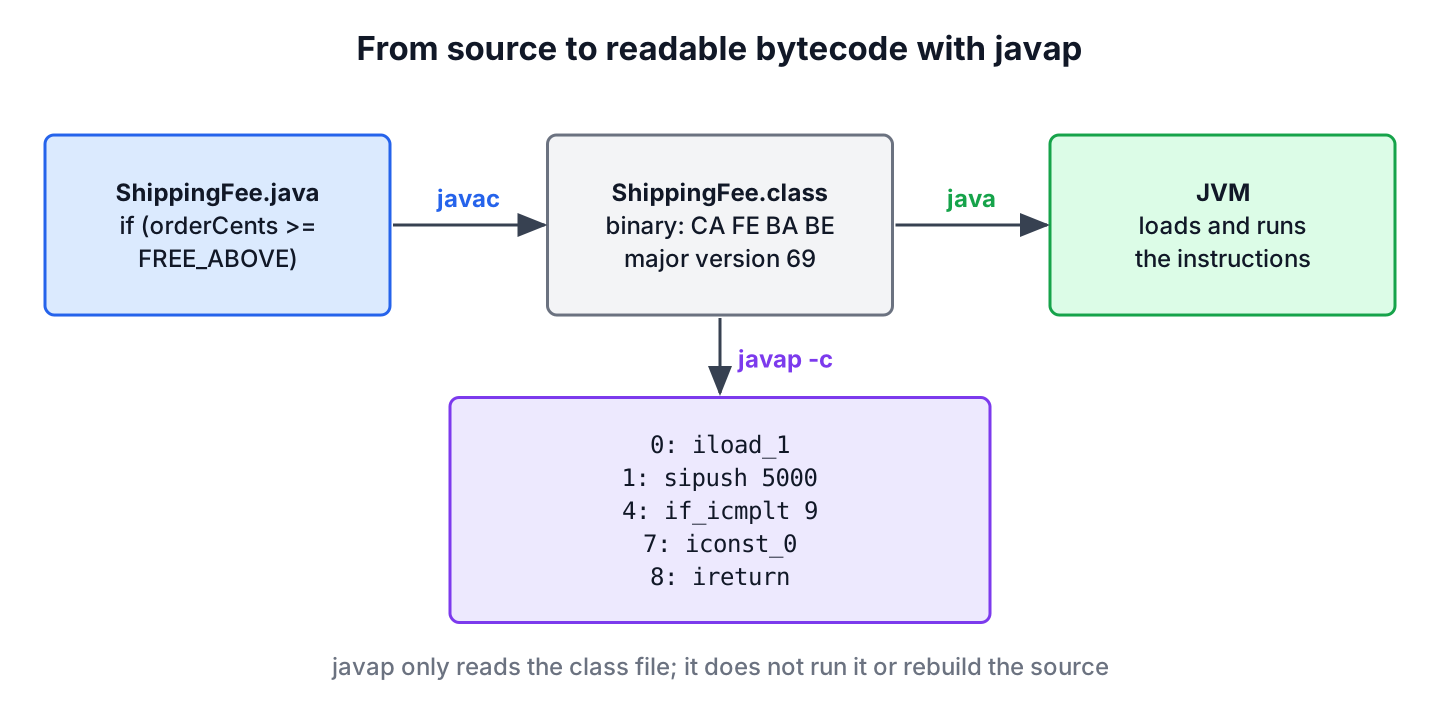
To view the bytecode of a Java class file, we run the JDK’s javap disassembler with the -c option, for example javap -c -p ShippingFee, and it prints the JVM instructions of every method in the class. The tool ships with every JDK next to javac, so no plugin or download is needed.
We read bytecode to see what the compiler generated for a piece of syntax, to find the Java version a class or library was compiled for, and to debug errors caused by mismatched jars. The following example disassembles a small class with one fee() method on JDK 25.
public class ShippingFee {

    private static final int FREE_ABOVE = 5000;

    public int fee(int orderCents) {
        if (orderCents >= FREE_ABOVE) {
            return 0;
        }
        return 499;
    }

    public String label(String city) {
        return "Ship to " + city;
    }
}
javac ShippingFee.java
javap -c -p ShippingFee public int fee(int);
Code:
0: iload_1
1: sipush 5000
4: if_icmplt 9
7: iconst_0
8: ireturn
9: sipush 499
12: ireturnNotice that the constant FREE_ABOVE does not appear in fee() at all; the compiler copied the value 5000 into the instruction. We go through the options of javap, read the output instruction by instruction, check the class file version, open classes inside jars and the JDK, and read bytecode from Java code with the ClassFile API.
1. What javap Shows and What It Does Not
The javap command is a disassembler. It reads a compiled .class file and prints its contents in a readable text form, such as fields, method signatures, instructions and the constant pool. It does not rebuild Java source code; that is the job of a decompiler, such as the one built into IntelliJ IDEA.
Without options, javap prints only the class declaration and the signatures of its non-private members. The bytecode appears only with -c, and the other options add private members, the constant pool or debug tables to the output.
| Option | Prints | Use it when |
|---|---|---|
| (none) | Package-private, protected and public members | We want a quick look at a class’s API |
| -c | The bytecode instructions of each method | We want to see what the compiler generated |
| -p or -private | Private members too | The interesting code is in private or generated methods |
| -v or -verbose | Class file version, flags, constant pool, stack sizes | We need the Java version or the full structure |
| -l | Line number and local variable tables (with -c) | We map instructions back to source lines |
| -s | Internal type descriptors such as (I)I | We read reflection, JNI or NoSuchMethodError messages |
| -constants | Values of static final constants | We check which value a library compiled in |
| -cp or –class-path | Where to find classes, including jars | The class is inside a jar or another folder |
2. Reading the Bytecode of a Method
The JVM is a stack machine. Most instructions push values onto an operand stack or pop values from it, and local variables live in numbered slots. In an instance method, slot 0 holds this and the parameters follow from slot 1, so orderCents is in slot 1.
The full javap -c -p ShippingFee output for our class shows three methods, including the constructor that javac added for us.
Compiled from "ShippingFee.java"
public class ShippingFee {
private static final int FREE_ABOVE;
public ShippingFee();
Code:
0: aload_0
1: invokespecial #1 // Method java/lang/Object."<init>":()V
4: return
  public int fee(int);
    Code:
         0: iload_1
         1: sipush        5000
         4: if_icmplt     9
         7: iconst_0
         8: ireturn
         9: sipush        499
        12: ireturn
public java.lang.String label(java.lang.String);
Code:
0: aload_1
1: invokedynamic #9, 0 // InvokeDynamic #0:makeConcatWithConstants:(Ljava/lang/String;)Ljava/lang/String;
6: areturn
}The number before each instruction is its byte offset in the method, and the jump target of if_icmplt 9 refers to such an offset. The instructions of fee() read as follows, and the full instruction set is in chapter 6 of the JVM specification.
| Offset | Instruction | What it does |
|---|---|---|
| 0 | iload_1 | Pushes the int in slot 1 (orderCents) |
| 1 | sipush 5000 | Pushes the constant 5000 |
| 4 | if_icmplt 9 | Pops both values and jumps to offset 9 if orderCents is less than 5000 |
| 7 | iconst_0 | Pushes 0 |
| 8 | ireturn | Returns the int on top of the stack |
| 9 | sipush 499 | Pushes 499 |
| 12 | ireturn | Returns 499 |
The compiler inverted our >= check into a < jump, which is normal; bytecode jumps over the if body when the condition is false. The prefix of each instruction names the type, such as i for int, a for references and l for long.
2.1. Modern Bytecode for String Concatenation and Lambdas
Since Java 9, “Ship to ” + city compiles to one invokedynamic call to makeConcatWithConstants instead of a chain of StringBuilder.append() calls (JEP 280). The JVM decides at runtime how to build the string, which is why old advice about string concatenation performance based on Java 8 bytecode no longer holds for a single concatenation expression.
A lambda body becomes a private synthetic method in the same class, and only -p shows it. The following example is a class with one lambda.
public class Discounts {

    public IntUnaryOperator halfOff() {
        return cents -> cents / 2;
    }
}
javap -c -p Discounts public java.util.function.IntUnaryOperator halfOff();
Code:
0: invokedynamic #7, 0 // InvokeDynamic #0:applyAsInt:()Ljava/util/function/IntUnaryOperator;
5: areturn
private static int lambda$halfOff$0(int);
Code:
0: iload_0
1: iconst_2
2: idiv
3: ireturnThe method lambda$halfOff$0 is static because the lambda does not use this, so its parameter sits in slot 0. The invokedynamic call in halfOff() creates the IntUnaryOperator object at runtime.
3. Private Members, Constants and Type Descriptors
A shipping team changes FREE_ABOVE from 5000 to 7500 in a shared library and deploys the new jar, but the checkout service still waives the fee above 5000. The reason is constant inlining, which we saw in the intro. A static final primitive or String initialized with a constant is copied into every class that uses it, so callers keep the old value until they are recompiled. The options -p -constants show the value a class was compiled with.
javap -p -constants ShippingFeeCompiled from "ShippingFee.java"
public class ShippingFee {
private static final int FREE_ABOVE = 5000;
public ShippingFee();
public int fee(int);
public java.lang.String label(java.lang.String);
}The option -s adds the internal descriptor of each member. Descriptors are the format the JVM uses in error messages such as NoSuchMethodError, so reading them saves time when a stack trace names a method in this form.
javap -s ShippingFee public int fee(int);
descriptor: (I)I
public java.lang.String label(java.lang.String);
descriptor: (Ljava/lang/String;)Ljava/lang/String;A descriptor lists the parameter types in parentheses, followed by the return type. Each type has a short code.
| Descriptor | Java type |
|---|---|
| I, J, Z, D | int, long, boolean, double |
| V | void (return type only) |
| Ljava/lang/String; | A class type, with slashes and a closing semicolon |
| [I | int[], one bracket per array dimension |
4. Checking the Class File Version With javap -v
The verbose output starts with the class file header. The major version tells us the lowest Java release that can load the class, and the number is the Java version plus 44, so 69 means Java 25.
javap -v ShippingFeeClassfile /home/dev/shop/target/classes/ShippingFee.class
Last modified Oct 10, 2026; size 855 bytes
SHA-256 checksum c95c53e81688606adf56d9f461d250743b89847ffe0c8fa10f031c84ff4ff488
Compiled from "ShippingFee.java"
public class ShippingFee
minor version: 0
major version: 69
flags: (0x0021) ACC_PUBLIC, ACC_SUPER
this_class: #7 // ShippingFee
super_class: #2 // java/lang/Object
interfaces: 0, fields: 1, methods: 3, attributes: 3To print only the version line, we filter the output with grep on Linux and macOS or findstr on Windows.
javap -v ShippingFee | grep "major version"
javap -v ShippingFee | findstr "major"
We use this check when a build fails with class file has wrong version or when a program fails at startup with an unsupported class file major version error. The version of the library class tells us which JDK the project needs.
5. Line Numbers and Local Variable Names
The option -l works together with -c; on its own, JDK 25 prints a warning and skips the tables. The LineNumberTable maps offsets to source lines, which is how stack traces show line numbers. The LocalVariableTable appears only when the class was compiled with javac -g, because javac leaves out local variable names by default.
javac -g ShippingFee.java
javap -c -l ShippingFee
public int fee(int);
Code:
0: iload_1
1: sipush 5000
4: if_icmplt 9
7: iconst_0
8: ireturn
9: sipush 499
12: ireturn
LineNumberTable:
line 6: 0
line 7: 7
line 9: 9
LocalVariableTable:
Start Length Slot Name Signature
0 13 0 this LShippingFee;
0 13 1 orderCents IMaven and Gradle compile with debug information by default, so classes from a normal build already contain both tables. Release jars of some libraries are built without them, and their stack traces show Unknown Source instead of line numbers.
6. Viewing Bytecode of Classes in a JAR or the JDK
The class does not have to be a loose file. The javap command accepts a class name resolved through -cp, a file path, or a jar: URL, so we can inspect a dependency without unpacking it. The jar tool and unpacking are covered in creating and extracting JAR files.
javap -c -cp shipping.jar ShippingFee
javap -c target/classes/com/example/ShippingFee.class
javap -c "jar:file:///home/lokesh/libs/shipping.jar!/ShippingFee.class"
Classes of the JDK itself need no class path, because javap finds them in the runtime image.
javap java.lang.RunnableCompiled from "Runnable.java"
public interface java.lang.Runnable {
public abstract void run();
}To keep the output for later or to compare two builds, we redirect it to a file, for example javap -c -p ShippingFee > ShippingFee.txt, and diff the files of the old and the new jar.
7. Viewing Bytecode in the IDE
IntelliJ IDEA has a built-in bytecode viewer. We open a compiled class or its source file in the editor and choose View | Show Bytecode; the panel shows the same instructions as javap -c and follows the caret. The feature comes from the bundled Bytecode Viewer plugin, which is enabled by default.
Other editors need an extension for the same view, for example the JVM Bytecode Viewer for Visual Studio Code. When the IDE is not at hand, for instance on a build server, javap gives the same information.
8. Reading Bytecode From Java Code With the ClassFile API
Since Java 24, the JDK has a standard API for reading and writing class files, java.lang.classfile (JEP 484). Tools that used to depend on the ASM library, such as a build check that rejects classes compiled for a too new Java version, can use it instead. The following example parses the class file of Runnable from the JDK.
ClassModel runnable;
try (InputStream in = Runnable.class.getResourceAsStream("Runnable.class")) {
    runnable = ClassFile.of().parse(in.readAllBytes());
}
int major = runnable.majorVersion();                   // 69
String name = runnable.thisClass().asInternalName();   // "java/lang/Runnable"
List<String> methods = runnable.methods().stream().map(m -> m.methodName().stringValue()).toList();   // [run]
The ClassModel gives access to fields, methods and each method’s CodeModel with its instructions, the same data that javap -c prints. The javap tool in JDK 25 is itself built on this API.
9. javap and Bytecode FAQs
Readers who open their first class file with javap often get stuck on the same five points.
9.1. Is javap a decompiler?
No. The javap tool is a disassembler that prints the structure and instructions of a class file. It never produces Java source code. Decompilers, such as Fernflower in IntelliJ IDEA, try to rebuild source code from the same bytecode.
9.2. Why does javap not show the bytecode of my methods?
Because javap without options prints only signatures. Add -c to see instructions, and -p as well when the method is private or generated by the compiler, such as a lambda body.
9.3. Does javap need the source file?
No. It reads only the .class file. The line Compiled from “ShippingFee.java” comes from the SourceFile attribute inside the class file, not from a source file on disk.
9.4. How do I find which Java version compiled a class?
Run javap -v and read the major version. Subtract 44 to get the Java release, so 61 is Java 17, 65 is Java 21 and 69 is Java 25.
9.5. Can javap read classes compiled by a newer JDK?
No. A JDK 25 javap reads class files up to version 69 and fails on a class from JDK 27 (version 71) with Unsupported class file version. We run the javap of the newer JDK in that case.
10. Conclusion
We view the bytecode of a Java class with javap -c, and add -p for private and generated methods, -v for the class file version and constant pool, and -l for line and variable tables. The tool reads class files from folders, jars and the JDK, and it never needs the source.
Reading the output gets easier once we know that the JVM is a stack machine with numbered local variable slots. Bytecode explains real problems, such as constants inlined into callers or a library compiled for a newer Java version, and the ClassFile API in Java 24 and later gives us the same view from code. More core topics are in the Java tutorial.
11. References
- javap command (Java 25)
- JVM Specification, The class File Format
- JVM Specification, The Java Virtual Machine Instruction Set
- JEP 484, Class-File API
- JEP 280, Indify String Concatenation
Happy Learning !!
