
Spring Boot profile-specific logging gives each environment, such as dev or prod, its own log levels, outputs and format from the same build. The shortest way is one properties file per profile, because Spring Boot reads application-dev.properties only when the dev profile is active, and application-prod.properties only when prod is active.
We use profile-specific logging to see the DEBUG lines of our own code on a laptop, while production writes only warnings and errors to a file that a log tool collects.
The following example sets the logging for two profiles of a small recipe app. The comment above each line shows its effect, because a properties file does not allow a comment after a value.
# ---- application-dev.properties ----
# DEBUG lines of our code on the console
logging.level.com.howtodoinjava=debug
# Short lines, e.g. 20:30:21 DEBUG c.h.l.r.RecipeService - Loading recipe 'pancakes'
logging.pattern.console=%d{HH:mm:ss} %-5level %logger{20} - %msg%n

# ---- application-prod.properties ----
# Only WARN and ERROR lines
logging.level.root=warn
# Also write logs/recipes.log, one JSON object per line
logging.file.name=logs/recipes.log
logging.structured.format.file=ecs
Notice that neither file names the other profile. We pick the profile when we start the app, e.g. java -jar recipes.jar –spring.profiles.active=prod, so the same JAR logs differently on each machine.
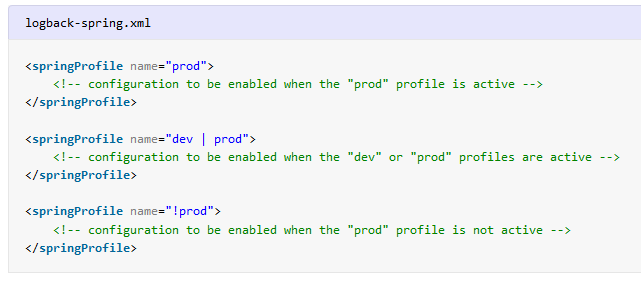
When environments need different appenders, for example a file only in production, we move the settings into <springProfile> blocks in logback-spring.xml. After the basics, we compare the two approaches, show the profile expressions such as dev | test and !prod, and explain why <springProfile> never works in logback.xml.
1. How Profile-Specific Logging Works
A profile is a named set of configuration, such as dev, test or prod, that Spring Boot uses only when the profile is active. We build the app once and choose the profile at startup, so the same JAR logs DEBUG lines on a developer laptop and only warnings on the production server.
Spring Boot always reads application.properties first. When a profile is active, Spring Boot also reads application-{profile}.properties, and its values replace the values with the same key. A key that the profile file does not set keeps its value from application.properties. After merging, Spring Boot configures Logback, the default logging library, with the merged logging.* values.
The following example is a recipe app built with Spring Boot 4.1.1 and Java 25. At startup, RecipeService cooks two recipes and writes one log line per level. The recipe waffles does not exist, so the second call logs a warning.
log.debug("Loading recipe '{}'", name);                     // printed in dev only
log.info("Cooking '{}' in {} steps", name, steps.size());   // INFO and above
log.warn("Recipe '{}' not found", name);                    // printed in every profile
Without any profile, Spring Boot activates a profile called default and says so at startup. The output uses the Spring Boot defaults, so INFO, WARN and ERROR lines go to the console and no file is written.
2026-10-04T20:30:04.889+05:30  INFO 15501 --- [recipes] [           main] c.h.logging.ProfileLoggingApplication    : No active profile set, falling back to 1 default profile: "default"
2026-10-04T20:30:10.306+05:30  INFO 15501 --- [recipes] [           main] c.h.logging.recipe.RecipeService         : Cooking 'pancakes' in 3 steps
2026-10-04T20:30:10.313+05:30  WARN 15501 --- [recipes] [           main] c.h.logging.recipe.RecipeService         : Recipe 'waffles' not found
1.1. Properties Files vs logback-spring.xml
Both approaches react to the same active profiles. The properties files change values, such as levels and the file name, whereas logback-spring.xml can also add or remove whole appenders. An appender is a Logback output, such as the console or a file.
| Need | Properties files | logback-spring.xml |
|---|---|---|
| Different log levels per profile | Yes, logging.level.* | Yes, <logger> and <root> inside <springProfile> |
| Log file in one profile only | Yes, logging.file.name | Yes, an appender inside <springProfile> |
| JSON (structured) logs per profile | Yes, logging.structured.format.* | Yes, StructuredLogEncoder |
| No console output in one profile | Yes, logging.console.enabled=false | Yes, leave the console appender out |
| Several files, async appenders, filters | No | Yes |
| One block for several profiles (dev | test, !prod) | No, one file per profile | Yes, profile expressions |
| Works with Log4j2 | Yes | Use log4j2-spring.xml with <SpringProfile> |
We start with the properties files and move to logback-spring.xml only when one console and one file are not enough. The properties files are shorter, and the IDE completes and checks the property names for us. The full list of logging.* properties is in Spring Boot logging with application.properties.
2. Activating a Spring Profile
Spring Boot reads the active profiles from the spring.profiles.active property. We can set the property in four places, and the table lists them from the highest to the lowest priority.
| Where | Example | Typical use |
|---|---|---|
| Command-line argument | java -jar recipes.jar –spring.profiles.active=prod | Manual starts, scripts |
| JVM system property | java -Dspring.profiles.active=prod -jar recipes.jar | IDE run configurations, JAVA_OPTS |
| Environment variable | SPRING_PROFILES_ACTIVE=prod java -jar recipes.jar | Docker, Kubernetes, CI servers |
| application.properties | spring.profiles.active=dev | A default for local development |
A source with a higher priority wins. For example, when the server sets SPRING_PROFILES_ACTIVE=prod and we pass –spring.profiles.active=dev to debug a problem, the app starts with dev.
20:30:45 INFO c.h.l.ProfileLoggingApplication - The following 1 profile is active: "dev"The -D option must come before -jar. Everything after the JAR name is a program argument, and Spring Boot reads only the program arguments that start with —. So java -jar recipes.jar -Dspring.profiles.active=dev starts with the default profile and prints no DEBUG lines.
We set spring.profiles.active only in application.properties or outside the app. When we put it in a profile-specific file such as application-dev.properties, the start fails with an InvalidConfigDataPropertyException.
org.springframework.boot.context.config.InvalidConfigDataPropertyException: Property 'spring.profiles.active' imported from location 'file [.../application-dev.properties]' is invalid in a profile specific resource2.1. Activating Several Profiles
We separate several profiles with commas, for example –spring.profiles.active=dev,prod. Spring Boot reads the profile files in the listed order, so for a key that both files set, the last profile wins. Keys that only one file sets are all applied.
With dev,prod, our app takes logging.level.root=warn and the JSON file from prod. The level for com.howtodoinjava comes from dev, so the DEBUG lines of RecipeService still appear on the console and in the file. A level set for a package always wins over the root level, whichever profile sets it. The Spring profiles tutorial covers profile groups and @Profile beans.
3. Profile-Specific Logging With Properties Files
We keep the settings that all environments share in application.properties. Each profile file holds only the logging values that differ for its environment.
application.properties          # shared: spring.application.name=recipes
application-dev.properties      # DEBUG for our code, short console lines
application-prod.properties     # WARN and above, JSON log file
logging.level.com.howtodoinjava=debug
logging.pattern.console=%d{HH:mm:ss} %-5level %logger{20} - %msg%nIn dev, our own package logs at DEBUG level, while the framework packages keep the default INFO level. The startup lines and the recipe lines both use the short pattern.
20:30:16 INFO  c.h.l.ProfileLoggingApplication - The following 1 profile is active: "dev"
20:30:21 INFO  c.h.l.ProfileLoggingApplication - Started ProfileLoggingApplication in 7.869 seconds (process running for 10.73)
20:30:21 DEBUG c.h.l.r.RecipeService - Loading recipe 'pancakes'
20:30:21 INFO  c.h.l.r.RecipeService - Cooking 'pancakes' in 3 steps
20:30:21 DEBUG c.h.l.r.RecipeService - Loading recipe 'waffles'
20:30:21 WARN  c.h.l.r.RecipeService - Recipe 'waffles' not found
3.1. JSON Logs Only in Production
Structured logging writes each log event as one JSON object per line, so log tools such as Elasticsearch or Graylog can read the fields without a parsing rule. Since Spring Boot 3.4, one property turns structured logging on, and we set that property only in application-prod.properties.
logging.level.root=warn
logging.file.name=logs/recipes.log
logging.structured.format.file=ecs
The console keeps the readable text format, because we set logging.structured.format.file and not logging.structured.format.console. The file logs/recipes.log gets the same WARN event as an Elastic Common Schema (ECS) JSON line.
2026-10-04T20:30:31.622+05:30 WARN 16033 --- [recipes] [ main] c.h.logging.recipe.RecipeService : Recipe 'waffles' not found{"@timestamp":"2026-10-04T15:00:31.622918392Z","log":{"level":"WARN","logger":"com.howtodoinjava.logging.recipe.RecipeService"},"process":{"pid":16033,"thread":{"name":"main"}},"service":{"name":"recipes","version":"1.0-SNAPSHOT","node":{}},"message":"Recipe 'waffles' not found","ecs":{"version":"8.11"}}A container platform such as Kubernetes collects the console output instead of a file. In that case, we set logging.structured.format.console=ecs in the prod file. The other built-in formats are logstash and gelf, and the structured logging example shows custom JSON formats.
4. Profile-Specific Logging With logback-spring.xml
When we put logback-spring.xml in src/main/resources, Spring Boot uses that file instead of its default Logback setup. Spring Boot adds two Logback extensions to the file. The <springProfile> tag includes its content only when the profile expression in its name attribute matches the active profiles, and the <springProperty> tag reads a value from the Spring Environment.
Say the recipe app runs on developer laptops, on a staging server and in production. Developers want DEBUG lines on the console, staging needs only warnings, and production must write a rotating JSON file and nothing to the console. The following file gives each of these environments its own appenders and levels.
<configuration>
<!-- Every profile except prod: a console appender -->
<springProfile name="!prod">
<appender name="CONSOLE" class="ch.qos.logback.core.ConsoleAppender">
<encoder>
<pattern>%d{HH:mm:ss} %-5level %logger{20} - %msg%n</pattern>
</encoder>
</appender>
</springProfile>
<!-- dev or test: DEBUG for our code, on the console -->
<springProfile name="dev | test">
<logger name="com.howtodoinjava" level="DEBUG"/>
<root level="INFO">
<appender-ref ref="CONSOLE"/>
</root>
</springProfile>
<!-- prod: INFO and above, only to a rolling JSON file (section 4.2) -->
<springProfile name="prod">
<appender name="FILE" class="ch.qos.logback.core.rolling.RollingFileAppender">
...
</appender>
<root level="INFO">
<appender-ref ref="FILE"/>
</root>
</springProfile>
<!-- Any other profile, or no profile: WARN and above on the console -->
<springProfile name="!dev & !test & !prod">
<root level="WARN">
<appender-ref ref="CONSOLE"/>
</root>
</springProfile>
</configuration>Spring Boot applies every block whose expression matches, in the order of the file. So with dev, two blocks apply. The !prod block defines CONSOLE, and the dev | test block attaches CONSOLE to the root logger. The diagram shows which blocks apply for each active profile.

20:31:02 DEBUG c.h.l.r.RecipeService - Loading recipe 'pancakes'
20:31:02 INFO  c.h.l.r.RecipeService - Cooking 'pancakes' in 3 steps
20:31:02 DEBUG c.h.l.r.RecipeService - Loading recipe 'waffles'
20:31:02 WARN  c.h.l.r.RecipeService - Recipe 'waffles' not found
20:31:14 WARN c.h.l.r.RecipeService - Recipe 'waffles' not foundWith prod, the console stays empty, because Spring Boot skips the !prod block and no CONSOLE appender exists.
4.1. Profile Expressions in <springProfile>
The name attribute accepts a single profile name or a profile expression. Spring Boot evaluates the expression against the active profiles with the same rules as the @Profile annotation.
| name value | Applies when |
|---|---|
| prod | prod is active |
| dev, test | dev or test is active (comma-separated list) |
| dev | test | dev or test is active |
| !prod | prod is not active, which includes no profile at all |
| prod & eu | prod and eu are both active |
| prod & (eu | us) | prod is active, together with eu or us |
| default | No profile is active |
In XML, we write the & character as &, so !dev & !test becomes !dev & !test inside the attribute. A plain & is not valid XML, so Logback cannot parse the file, and the app fails to start with IllegalStateException: Could not initialize Logback logging.
We also need parentheses when we mix & and | in one expression. Without them, Spring rejects the expression and the start fails with IllegalArgumentException: Malformed profile expression [dev & test | prod].
4.2. A Log File Only in Production
A log file on a developer laptop fills the disk and nobody reads it, whereas production needs a file that log shippers can collect. So we declare the file appender inside the prod block. In other profiles, Logback never creates the appender, and the logs folder does not appear either.
<appender name="FILE" class="ch.qos.logback.core.rolling.RollingFileAppender">
  <file>logs/recipes.log</file>
  <rollingPolicy class="ch.qos.logback.core.rolling.SizeAndTimeBasedRollingPolicy">
    <fileNamePattern>logs/recipes-%d{yyyy-MM-dd}.%i.log.gz</fileNamePattern>
    <maxFileSize>10MB</maxFileSize>
    <maxHistory>7</maxHistory>
  </rollingPolicy>
  <encoder class="org.springframework.boot.logging.logback.StructuredLogEncoder">
    <format>ecs</format>
    <charset>UTF-8</charset>
  </encoder>
</appender>
The policy SizeAndTimeBasedRollingPolicy starts a new file every day and whenever the file reaches 10MB, and keeps seven days of compressed archives. The class StructuredLogEncoder is the Spring Boot encoder behind the logging.structured.format.* properties, and its <format> element takes the same values, namely ecs, logstash or gelf. With prod, the file gets the INFO, WARN and ERROR lines as JSON.
{"@timestamp":"2026-10-04T15:01:33.417032385Z","log":{"level":"INFO","logger":"com.howtodoinjava.logging.recipe.RecipeService"},"process":{"pid":17089,"thread":{"name":"main"}},"service":{"name":"recipes","version":"1.0-SNAPSHOT","node":{}},"message":"Cooking 'pancakes' in 3 steps","ecs":{"version":"8.11"}}
{"@timestamp":"2026-10-04T15:01:33.417765588Z","log":{"level":"WARN","logger":"com.howtodoinjava.logging.recipe.RecipeService"},"process":{"pid":17089,"thread":{"name":"main"}},"service":{"name":"recipes","version":"1.0-SNAPSHOT","node":{}},"message":"Recipe 'waffles' not found","ecs":{"version":"8.11"}}
The file starts with the Spring Boot startup lines, which have the same JSON shape. The Spring Boot docs use a property placeholder for the <format> value, whereas we write ecs in the file, because each profile block has its own fixed format.
5. Why logback.xml Cannot Use <springProfile>
Logback configures itself as soon as the first logger is created, which happens before Spring Boot starts. At that moment, Logback looks for logback-test.xml and logback.xml on the classpath and reads the file with its own parser. The Logback parser does not know the Spring Boot tags, so it ignores <springProfile> and logs a warning.
<springProfile name="dev">
  <logger name="com.howtodoinjava" level="DEBUG"/>
</springProfile>
20:33:07,394 |-WARN in ch.qos.logback.core.model.processor.ImplicitModelHandler - Ignoring unknown property [springProfile] in [ch.qos.logback.classic.LoggerContext]Spring Boot 4.1.1 reads logback.xml a second time with its own parser, so the dev block does apply to the lines logged after startup. Even so, the Spring Boot docs say that we cannot use the extensions in logback.xml, because the file is loaded too early. Any line logged before Spring Boot configures logging misses the profile settings, and the extensions also do not work with Logback’s configuration scanning (scan=”true”).

The fix is to rename the file to logback-spring.xml. Logback does not look for that name, so only Spring Boot reads the file, after the active profiles are known. To keep a different file name, we set logging.config, for example logging.config=classpath:config/my-logback.xml, and Spring Boot loads that file with the extensions as well.
6. Profile-Specific Logging FAQs
6.1. Do logging.level Properties Override logback-spring.xml?
Yes. Spring Boot applies the logging.level.* properties after it loads logback-spring.xml. For example, the prod block sets the root level to INFO, and we add –logging.level.root=warn at startup. The JSON file gets only the WARN line, and the INFO line Cooking ‘pancakes’ in 3 steps is missing, so when we use both approaches, we keep the levels in one place.
6.2. What Happens When Two <springProfile> Blocks Match?
Spring Boot applies both blocks in file order. A later <root> or <logger> element changes the level that an earlier block set, and appender references are added. With dev,prod, our !prod block is skipped, so CONSOLE does not exist when the dev | test block refers to it. Logback prints a warning on System.err, and the lines go only to the file.
20:31:42,749 |-WARN in ch.qos.logback.core.model.processor.AppenderRefModelHandler - Appender named [CONSOLE] could not be found. Skipping attachment to Logger[ROOT].6.3. Does Log4j2 Support Profile-Specific Logging?
Yes, since Spring Boot 3.0. We name the file log4j2-spring.xml and use the <SpringProfile> tag, written with a capital S, which accepts the same profile expressions as the Logback version. The properties approach with application-prod.properties works the same way with Log4j2. To switch from Logback to Log4j2, follow the Log4j2 configuration steps.
6.4. Can We Use the Active Profile Name in a Log Pattern?
Yes, with <springProperty>. The tag copies a property from the Spring Environment into a Logback variable, for example <springProperty scope=”context” name=”profile” source=”spring.profiles.active” defaultValue=”default”/>. The pattern refers to the variable with the usual Logback variable syntax (a dollar sign followed by the name in braces). With –spring.profiles.active=dev, a pattern that starts with the variable in square brackets printed [dev] WARN Recipe ‘waffles’ not found, and without a profile it printed [default] WARN Recipe ‘waffles’ not found.
6.5. How Do We Test Profile-Specific Logging?
The JUnit extension OutputCaptureExtension from Spring Boot captures everything written to System.out and System.err, so a test can start the app with a profile and check the log lines. In the example project, AppRunner.run() starts the app with the given command-line arguments.
@Test
void devProfilePrintsDebugWithShortPattern(CapturedOutput output) {
  AppRunner.run("--spring.profiles.active=dev");
  assertThat(output.getOut())
      .containsPattern("\\d\\d:\\d\\d:\\d\\d DEBUG c\\.h\\.l\\.r\\.RecipeService - Loading recipe 'pancakes'");
}
Spring Boot copies the logging.pattern.* values into JVM system properties and does not overwrite them on a second start. A test class that starts the app several times with different profiles must restore the system properties after each test. The example project does that with a small RestoreSystemProperties extension.
7. Conclusion
For most apps, one properties file per profile is enough. The file application-dev.properties sets DEBUG for our package, and application-prod.properties sets WARN with a JSON log file.
When environments need different appenders, we use <springProfile> blocks with expressions such as dev | test and !prod. Those blocks go in logback-spring.xml, never in logback.xml, because Logback reads logback.xml before Spring Boot knows the active profiles.
We activate the profile with –spring.profiles.active, with -D before -jar, or with the SPRING_PROFILES_ACTIVE environment variable. The example project runs every case in 14 JUnit tests.
8. References
- Spring Boot Reference: Logging
- Spring Boot Reference: Profiles
- Spring Boot Reference: Externalized Configuration
- Logback Manual: Configuration
Happy Learning !!

is it logback.xml or logback-spring.xml
as per below answer it does not seem possible
https://stackoverflow.com/questions/29322709/unable-to-use-spring-property-placeholders-in-logback-xml/37856131#37856131
Please refer this link. The following files are scanned and loaded: logback-spring.xml, logback-spring.groovy, logback.xml, or logback.groovy.
How to do conditional processing ? Using if else tags