

A Hibernate many-to-many mapping links two entities where each row on one side can relate to many rows on the other side, for example a playlist has many songs and a song appears in many playlists. The database stores each link as a row in a third table, the join table. Both entities use @ManyToMany, where the owning side adds @JoinTable and the inverse side sets mappedBy.
We use a many-to-many mapping for links that go both ways, such as students and courses or articles and tags.
The following example maps Playlist as the owning side and Song as the inverse side, and then links, unlinks and deletes inside a transaction.
// Playlist
@ManyToMany(cascade = {CascadeType.PERSIST, CascadeType.MERGE})
@JoinTable(name = "playlist_song",
    joinColumns = @JoinColumn(name = "playlist_id"),
    inverseJoinColumns = @JoinColumn(name = "song_id"))
private Set<Song> songs = new HashSet<>();

// Song
@ManyToMany(mappedBy = "songs")
private Set<Playlist> playlists = new HashSet<>();
running.addSong(nightDrive); // insert into playlist_song (playlist_id,song_id) values (?,?)
running.removeSong(riverside); // delete from playlist_song where playlist_id=? and song_id=?
em.remove(focus); // delete from playlist_song where playlist_id=?
// delete from Playlist where id=? (the songs stay)Notice that every link change runs SQL on playlist_song only, and deleting the Focus playlist keeps its songs.
Next, we see how the join table and the owning side work and compare @ManyToMany with @OneToMany. After that, we save, read and delete links, compare Set with List and map a join entity with extra columns.
1. How Does a Many-to-Many Mapping Work?
Two entities need three tables. Playlist and Song each keep their own table, and playlist_song holds one row per link with a foreign key to each side. A song that is in two playlists is stored once in Song and twice in playlist_song.
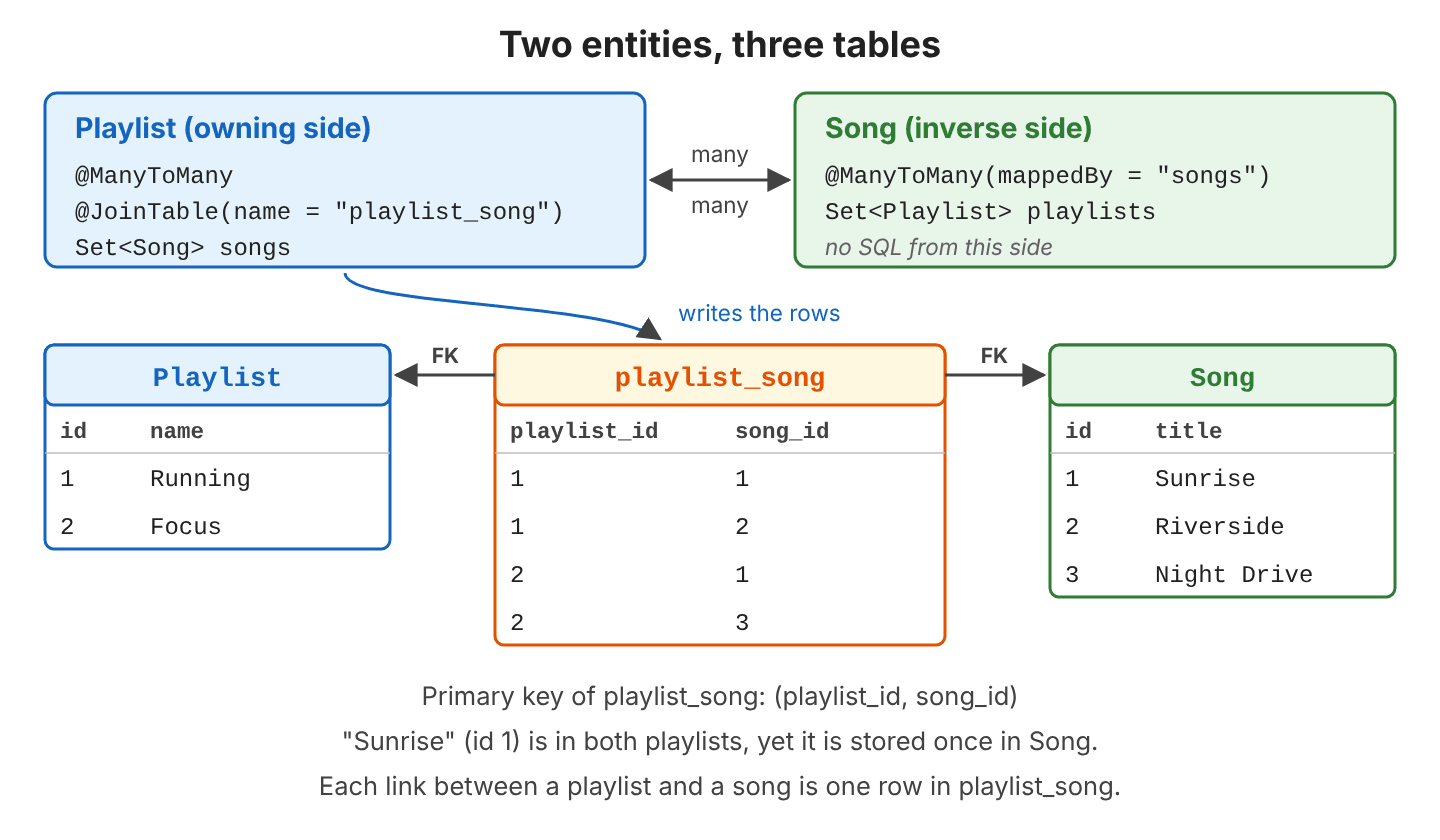
The owning side is the entity whose collection controls the join table. Hibernate writes playlist_song only from the owning side; changes made only on the mappedBy side are not saved.
| Owning side: Playlist.songs | Inverse side: Song.playlists | |
|---|---|---|
| Annotation | @ManyToMany with @JoinTable | @ManyToMany(mappedBy = “songs”) |
| Writes rows to playlist_song | Yes | No |
| Required | Yes | No, only for a bidirectional mapping |
A mapping with only the owning side is unidirectional, so we can go from a playlist to its songs, but not back. Adding the mappedBy side makes it bidirectional, so a song can list its playlists too.
The closest alternative is @OneToMany with a foreign key in the child table, which allows only one parent per child. When the link itself needs data, such as the date a song was added, we map the join table as its own entity.
| @OneToMany | @ManyToMany | Join entity | |
|---|---|---|---|
| Where the link is stored | Foreign key in the child table | Join table with two foreign keys | Join table mapped as an @Entity |
| A song in two playlists | Not possible | Two rows in playlist_song | Two PlaylistSong rows |
| Extra columns on the link | Not applicable | No | Yes, for example addedOn, position |
| Java mapping | A collection and a reference | A collection on each side | Two @ManyToOne and two @OneToMany |
2. Many-to-Many Mapping Example
Our example is a music library with playlists (“Running”, “Focus”) and songs (“Sunrise”, “Riverside”, “Night Drive”), and it runs on Hibernate 7.4.11, Java 25 and an H2 in-memory database.
2.1. Mapping Playlist and Song
In our example, Playlist is the owning side. The annotation @JoinTable names the join table and its two columns, where joinColumns points to the owning entity (playlist_id) and inverseJoinColumns to the other one (song_id).
@ManyToMany(cascade = {CascadeType.PERSIST, CascadeType.MERGE})
@JoinTable(name = "playlist_song",
    joinColumns = @JoinColumn(name = "playlist_id"),
    inverseJoinColumns = @JoinColumn(name = "song_id"))
private Set<Song> songs = new HashSet<>();

public void addSong(Song song) {
  songs.add(song);
  song.getPlaylists().add(this);
}

public void removeSong(Song song) {
  songs.remove(song);
  song.getPlaylists().remove(this);
}
The Song entity only declares mappedBy with the name of the owning field.
@ManyToMany(mappedBy = "songs")
private Set<Playlist> playlists = new HashSet<>();
The helper methods change both collections in one call. Always add and remove links through the helpers, so the objects in memory match what Hibernate writes to the database.
2.2. Saving Playlists With Shared Songs
We persist the songs and link them to the playlists with addSong() before we persist the playlists. Hibernate inserts the entity rows first and the join table rows last.
emf.runInTransaction(em -> {
  Song sunrise = new Song("Sunrise");
  Song riverside = new Song("Riverside");
  Song nightDrive = new Song("Night Drive");
  em.persist(sunrise);
  em.persist(riverside);
  em.persist(nightDrive);

  Playlist running = new Playlist("Running");
  running.addSong(sunrise);
  running.addSong(riverside);
  Playlist focus = new Playlist("Focus");
  focus.addSong(sunrise);
  focus.addSong(nightDrive);
  em.persist(running);
  em.persist(focus);
});
insert into Song (title,id) values (?,?) -- 3 times
insert into Playlist (name,id) values (?,?) -- 2 times
insert into playlist_song (playlist_id,song_id) values (?,?) -- 4 timesThe cascade types CascadeType.PERSIST and MERGE on Playlist.songs pass persist() and merge() on to the songs, so a new song added to a new playlist is saved with it. Neither of them deletes anything.
2.3. Reading the Songs of a Playlist
The collection loads with a second select that joins playlist_song and Song. To search across the association, we join it in JPQL, for example for a screen that shows which playlists contain a song.
Playlist running = em.find(Playlist.class, runningId);
Set<Song> songs = running.getSongs();   // select ... from playlist_song s1_0 join Song s1_1 on s1_1.id=s1_0.song_id
                                        //   where s1_0.playlist_id=?
                                        // 2 songs: Riverside, Sunrise

List<String> names = em.createQuery("""
    select p.name from Playlist p join p.songs s
    where s.title = :title order by p.name""", String.class)
  .setParameter("title", "Sunrise")
  .getResultList();     // names = [Focus, Running]
2.4. Removing a Song From a Playlist
Removing a song from a playlist deletes only the link, and the Song row stays because other playlists may use it.
emf.runInTransaction(em -> {
  Playlist running = em.find(Playlist.class, runningId);
  running.removeSong(running.findSong("Riverside"));
});                     // delete from playlist_song where playlist_id=? and song_id=?
2.5. Set vs List for the Collection
The collection type changes the SQL. With a List and no @OrderColumn, Hibernate treats the collection as a bag, which is an unordered collection that may contain duplicates. Hibernate cannot identify a single row of a bag, so removing one song from a List deletes every link of the playlist and inserts the remaining ones again. The same removeSong() call on both mappings gives different SQL in Hibernate 7.4.11.
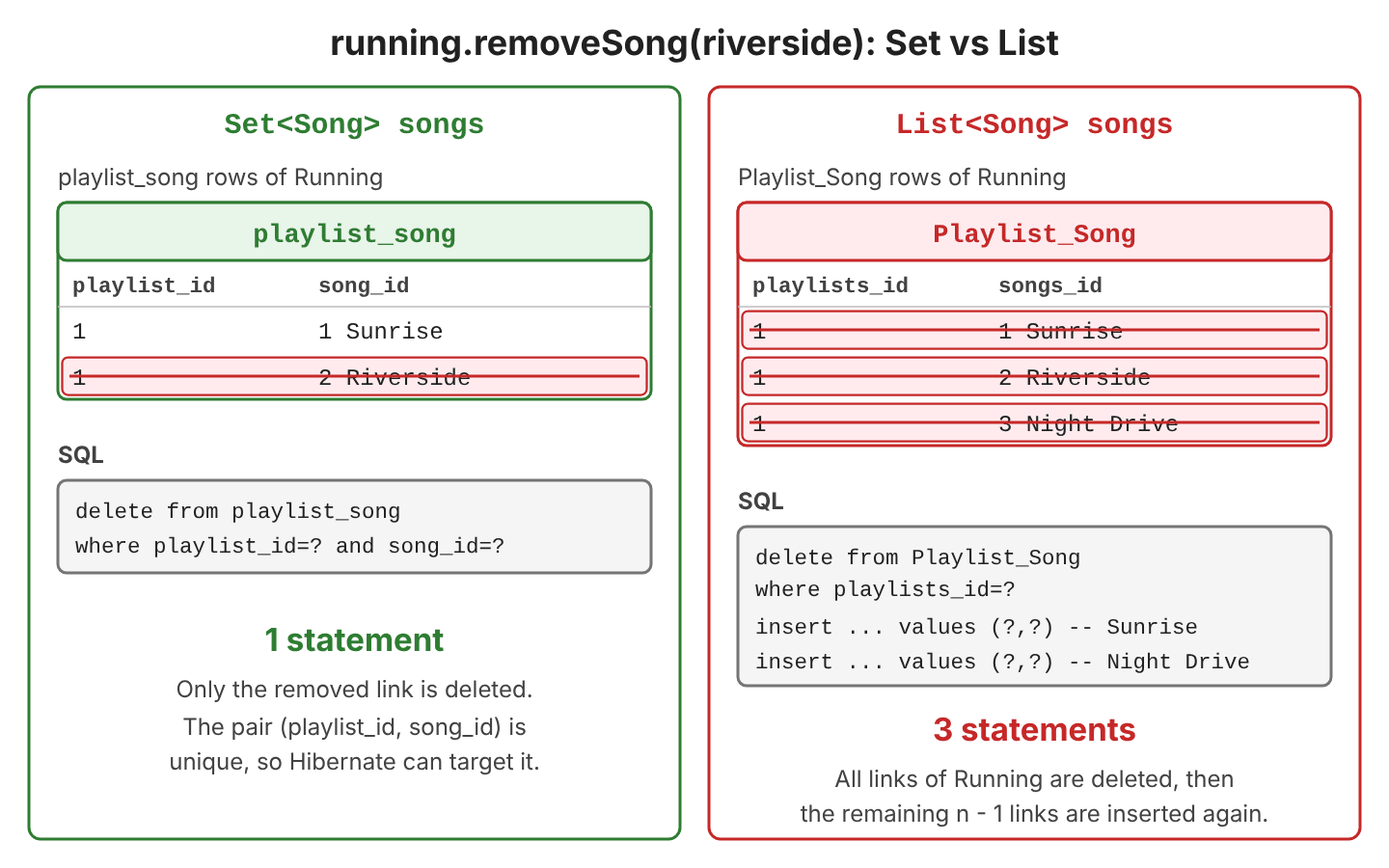
delete from playlist_song where playlist_id=? and song_id=?delete from Playlist_Song where playlists_id=?
insert into Playlist_Song (playlists_id,songs_id) values (?,?)
insert into Playlist_Song (playlists_id,songs_id) values (?,?)The join table also gets a different schema.
| Set<Song> | List<Song> (bag) | |
|---|---|---|
| Remove one song from a playlist with n songs | 1 DELETE | 1 DELETE + n – 1 INSERT |
| Primary key of the join table | (playlist_id, song_id) | None |
| Duplicate links | Not possible | Possible, no key prevents them |
Use a Set for @ManyToMany. When the songs need an order inside the playlist, store it as a column of a join entity (see section 2.8).
2.6. Deleting a Playlist or a Song
When we delete the owning entity, Hibernate removes its links first, and the songs stay.
emf.runInTransaction(em -> em.remove(em.find(Playlist.class, focusId)));
// delete from playlist_song where playlist_id=?
// delete from Playlist where id=?
Deleting a song is different. For example, the library takes down a song for licensing reasons while two playlists still contain it. Because Song is the inverse side, Hibernate does not touch playlist_song, and the foreign key stops the DELETE.
emf.runInTransaction(em -> em.remove(em.find(Song.class, sunriseId)));jakarta.persistence.RollbackException: Error while committing the transaction [could not execute statement [Referential integrity constraint violation: "FKJNOMRFNYF6ODVEDQGR3QS9WMU: PUBLIC.PLAYLIST_SONG FOREIGN KEY(SONG_ID) REFERENCES PUBLIC.SONG(ID) (CAST(1 AS BIGINT))"; SQL statement:
delete from Song where id=? [23503-252]] [delete from Song where id=?]]We remove the song from every playlist first, through the owning side.
emf.runInTransaction(em -> {
  Song sunrise = em.find(Song.class, sunriseId);
  List.copyOf(sunrise.getPlaylists()).forEach(p -> p.removeSong(sunrise));
  em.remove(sunrise);   // delete from playlist_song ... (each link)
});                     // delete from Song where id=?
The call List.copyOf() takes a copy because removeSong() changes sunrise.getPlaylists() while we loop over it.
2.7. Why CascadeType.REMOVE Is Wrong on Many-to-Many
The cascade type CascadeType.REMOVE (also part of CascadeType.ALL) passes em.remove() on to every song of the playlist. On a many-to-many association, those songs belong to other playlists too. To test it, we mapped Playlist.songs with cascade = CascadeType.ALL and deleted “Running” while “Focus” still had “Sunrise”.
@ManyToMany(cascade = CascadeType.ALL)
private List<Song> songs = new ArrayList<>();
delete from Playlist_Song where playlists_id=?
delete from Song where id=? -- fails: Focus still links to this songThe transaction fails with the same foreign key error as in section 2.6. When no other playlist uses the songs, the cascade succeeds, and the result is worse. Deleting a playlist deletes its songs from the whole library. Per the Jakarta Persistence specification, cascade=REMOVE should be applied only to @OneToOne and @OneToMany associations, so we keep PERSIST and MERGE at most.
2.8. Join Entity With Extra Columns
A plain @ManyToMany join table has only the two foreign keys. To store when a song was added and its position in the playlist, we map playlist_song as an entity, PlaylistSong, and replace the @ManyToMany with two one-to-many associations.
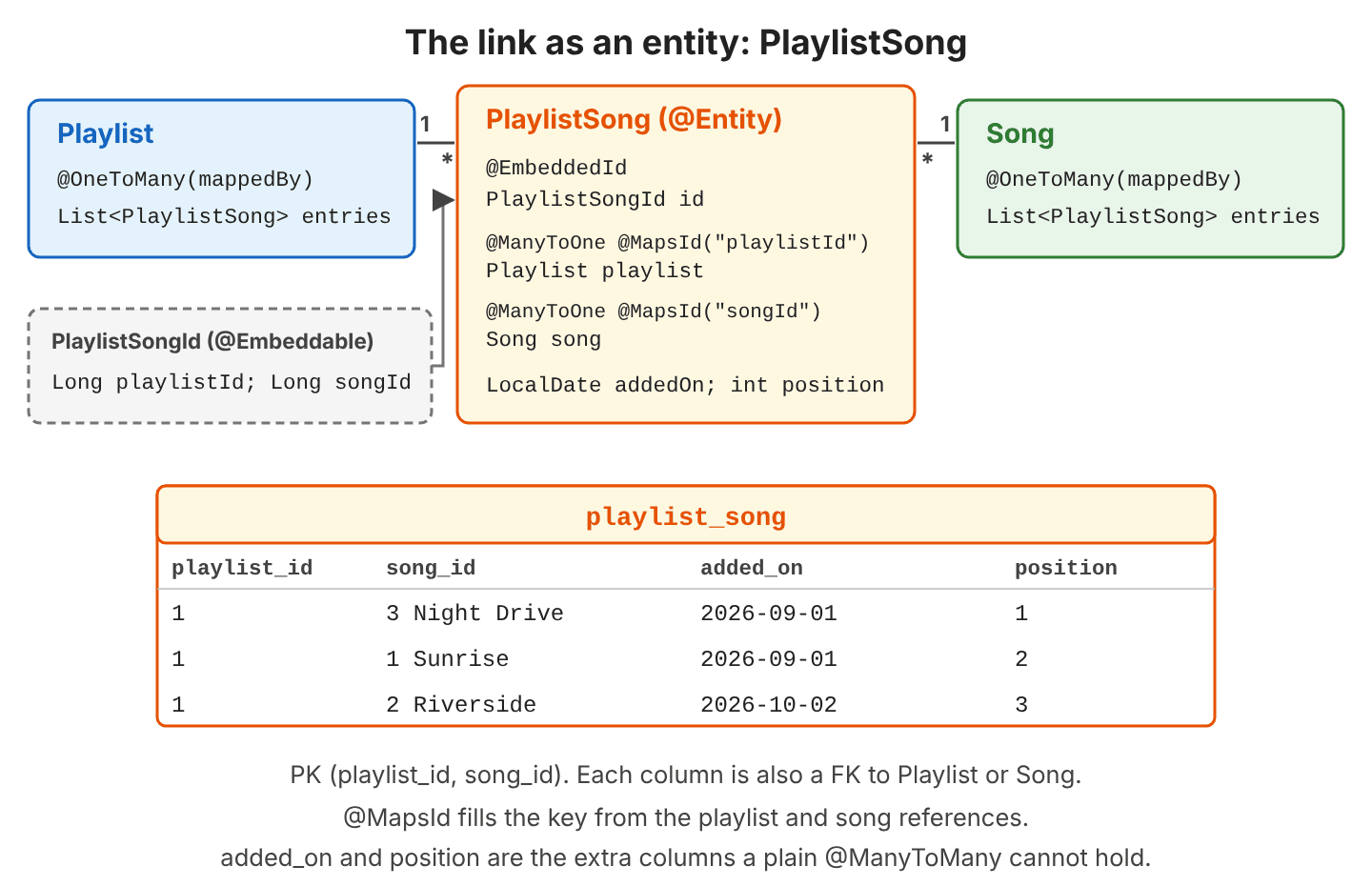
The primary key is a composite of both foreign keys. The annotation @EmbeddedId maps it as an @Embeddable class, and @MapsId tells Hibernate to fill each part of the key from the matching @ManyToOne reference.
@Embeddable
public class PlaylistSongId {
  private Long playlistId;
  private Long songId;
  // equals() and hashCode() on both fields
}
@Entity
@Table(name = "playlist_song")
public class PlaylistSong {
@EmbeddedId
private PlaylistSongId id = new PlaylistSongId();
@ManyToOne(fetch = FetchType.LAZY)
@MapsId("playlistId")
private Playlist playlist;
@ManyToOne(fetch = FetchType.LAZY)
@MapsId("songId")
private Song song;
@Column(name = "added_on")
private LocalDate addedOn;
private int position;
}The Playlist entity owns its entries, so it cascades to them and deletes removed ones with orphanRemoval. The annotation @OrderBy sorts them by position when they load, and Song maps the other side with @OneToMany(mappedBy = “song”).
@OneToMany(mappedBy = "playlist", cascade = CascadeType.ALL, orphanRemoval = true)
@OrderBy("position")
private List<PlaylistSong> entries = new ArrayList<>();

public void addSong(Song song, int position, LocalDate addedOn) {
  PlaylistSong entry = new PlaylistSong(this, song, position, addedOn);
  entries.add(entry);
  song.getEntries().add(entry);
}

public void removeSong(Song song) {
  PlaylistSong entry = entries.stream()
      .filter(e -> e.getSong().equals(song))
      .findFirst()
      .orElseThrow();
  entries.remove(entry);
  song.getEntries().remove(entry);
}
A List is fine here, because PlaylistSong is an entity with its own key, so Hibernate deletes one row at a time. The songs must be persisted before they are linked, because nothing cascades from PlaylistSong to Song.
| Action | Code | SQL or result |
|---|---|---|
| Add a song | running.addSong(nightDrive, 1, LocalDate.of(2026, 9, 1)) | insert into playlist_song (added_on,position,playlist_id,song_id) values (?,?,?,?) |
| Read in order | running.getEntries() | 1. Night Drive (2026-09-01), 2. Sunrise (2026-09-01), 3. Riverside (2026-10-02) |
| Change the position | entry.setPosition(4) | update playlist_song set added_on=?,position=? where playlist_id=? and song_id=? |
| Remove a song | running.removeSong(sunrise) | delete from playlist_song where playlist_id=? and song_id=? |
We can use the extra columns in queries like any other field. For example, a “Recently added” section of the Running playlist lists the songs added after September 15.
List<String> recent = em.createQuery("""
    select ps.song.title from PlaylistSong ps
    where ps.playlist.name = :name and ps.addedOn > :date""", String.class)
  .setParameter("name", "Running")
  .setParameter("date", LocalDate.of(2026, 9, 15))
  .getResultList();     // recent = [Riverside]
The complete project on GitHub has all three mappings (Set, List with cascade, join entity) and prints the SQL of each step, and 26 JUnit tests check the results (mvn -q compile exec:java, mvn test).
3. Many-to-Many Mapping FAQs
3.1. Why Is My Many-to-Many Link Not Saved?
The link is not saved because the code changed only the mappedBy side. Hibernate reads the owning side to write playlist_song, so a change on the inverse side produces no SQL.
nightDrive.getPlaylists().add(running);   // inverse side only: no insert
running.getSongs().add(nightDrive);       // owning side: insert into playlist_song ...
running.addSong(nightDrive);              // best: both sides in one call
3.2. What Table Names Does Hibernate Use Without @JoinTable?
Without @JoinTable, Hibernate 7 names the join table after both entities. Each column takes the name of the field that points to that entity, plus _id. For example, playlists_id comes from Song.playlists, and songs_id from Playlist.songs.
// Playlist (the mapping from section 2.7)
@ManyToMany(cascade = CascadeType.ALL)
private List<Song> songs = new ArrayList<>();

// Song
@ManyToMany(mappedBy = "songs")
private List<Playlist> playlists = new ArrayList<>();
create table Playlist_Song (playlists_id bigint not null, songs_id bigint not null)We prefer @JoinTable with explicit names, so the schema does not change when a field is renamed.
3.3. Is @ManyToMany Lazy by Default?
Yes. The default fetch of @ManyToMany is FetchType.LAZY, so the songs load when the code first reads the collection. Reading it after the transaction has closed throws a LazyInitializationException. A join fetch query loads the playlist and its songs in one query.
Playlist running = em.createQuery(
    "select p from Playlist p join fetch p.songs where p.id = :id", Playlist.class)
  .setParameter("id", runningId)
  .getSingleResult();
// select p1_0.id,p1_0.name,s1_0.playlist_id,s1_1.id,s1_1.title from Playlist p1_0
//   join playlist_song s1_0 on p1_0.id=s1_0.playlist_id join Song s1_1 on s1_1.id=s1_0.song_id
//   where p1_0.id=?
We keep LAZY loading and fetch the songs only in the queries that need them.
3.4. Can the Same Song Appear Twice in a Playlist?
Not with the composite key. Adding “Sunrise” a second time to “Running” fails with Unique index or primary key violation on playlist_song. When duplicates are allowed, we give the join entity its own generated id and keep the two references as plain @ManyToOne.
@Id
@GeneratedValue
private Long id;

@ManyToOne(fetch = FetchType.LAZY, optional = false)
@JoinColumn(name = "playlist_id")
private Playlist playlist;

@ManyToOne(fetch = FetchType.LAZY, optional = false)
@JoinColumn(name = "song_id")
private Song song;

private int position;
em.persist(new PlaylistItem(running, sunrise, 1));
em.persist(new PlaylistItem(running, sunrise, 5)); // 2 rows in playlist_item| Key of the join entity | Same pair twice | Use it when |
|---|---|---|
| @EmbeddedId with both foreign keys | Rejected by the primary key | A song is in a playlist at most once |
| Own @Id | Allowed | The link can repeat, such as a queue or a play history |
3.5. Does the Composite Key Class Need equals() and hashCode()?
Yes. The Jakarta Persistence specification requires a primary key class to define equals() and hashCode(), and the result must match the database equality of the key columns. Hibernate compares keys with them, for example when it looks up a PlaylistSong in the persistence context.
@Override
public boolean equals(Object o) {
  return o instanceof PlaylistSongId other
      && Objects.equals(playlistId, other.playlistId)
      && Objects.equals(songId, other.songId);
}

@Override
public int hashCode() {
  return Objects.hash(playlistId, songId);
}
The Playlist and Song entities keep the default equals() from Object in our example. Inside one persistence context, Hibernate returns the same object for the same row, so songs.remove(song) finds it. Entities compared across sessions need more care, because their equality then has to rely on the id or a business key.
4. Conclusion
A many-to-many association needs a join table. We map it with @ManyToMany and @JoinTable on the owning side and mappedBy on the inverse side, and change links through helper methods on the owning entity. A Set makes a removal delete one row, and CascadeType.REMOVE stays off. When the link has its own data, such as a date or a position, the join table becomes an entity with two @ManyToOne references.
5. References
- ManyToMany JavaDoc (Jakarta Persistence 3.2)
- JoinTable JavaDoc (Jakarta Persistence 3.2)
- MapsId JavaDoc (Jakarta Persistence 3.2)
- Jakarta Persistence 3.2 specification: Entity Relationships
- Hibernate ORM 7.4 User Guide: Many-to-many associations
- Hibernate ORM 7.4 User Guide: Bags
Happy Learning !!

How can I fetch a subscription for a specific reader from mapping table.
Hi Lokesh,
Some people say avoid using many-to-many as hibernate best practices. There are different explanation which are not clear to me. Is it true? Could you please explain why?
Hi Ankur, I have not read any such best practice till date so please provide any relevant link discussing the M-M relationship as avoidable best practice. I believe if someone says it to avoid it then he must give any good example where this relationship is inefficient AND then what is the alternative? Just saying M-M relationship is bad, is not enough for me.
Hi,
I have updated my project with hibernate 4 . I have tried Many to Many relationship but it is not saving in third join table.any kind of experiment in Many many relationship it giving error but does not shows what kind of error it is.It just shows error starting tomcat. need help
Hi Lokesh,
Can we make atomic transactions in hibernate.
Please guide on this.
Thanks…
hi lokesh,
I am stuck in problem related to implementing which mapping in hibernate.
Following is my scenario:-
I have user table and image table.
There are 4 images where I need to store x,y coordinates of images against each user so I have created image table as
userid,imageid,xcodnt,ycodnt.There could be no primary key in this table as imageid & userid will be multiple as:-
1 1
1 2
1 3
1 4
2 1
2 2
2 3
2 4.
Could you please help me out this.
Your help will be highly appreciated.
Thanks in advance.
thank you for very good tutorial. but i’m having a lot of problems when i try to update an entity (such as Reader) and his set (Reader_subscriptions). how can i implement the update and/or the equals and hashCode methods ? here more details: https://stackoverflow.com/questions/24737145/equals-and-hashcode-of-these-entities-spring-mvc-hibernate thank you very much for tutorial
Looks like you was able to figure out it already.
unluckily no, i can’t update my read_subscription Set
All you posts for hibernate mapping were really very useful for understanding . Can you please put up a post for many to many mapping with extra attributes in join table?