

The error “Java 8 date/time type not supported by default” means that the Jackson 2 ObjectMapper we are using has no support for java.time classes such as LocalDate, LocalDateTime or Instant. Jackson 2 keeps that support in a separate module, the JavaTimeModule from jackson-datatype-jsr310, and the failing mapper does not have it. The fix is to add the dependency and register the module on the mapper that fails. In a Spring Boot application, we inject the auto-configured mapper instead of creating a new one. In Jackson 3 the support is built in, so the error cannot happen.
We meet the error when we write a POJO or record with a date field to JSON, or when we read such JSON back. The convertValue() call that turns the object into a Map fails in the same way.
The following example adds the module to a plain ObjectMapper and writes a record with a LocalDate field.
<dependency>
  <groupId>com.fasterxml.jackson.datatype</groupId>
  <artifactId>jackson-datatype-jsr310</artifactId>
  <version>2.22.3</version>
</dependency>
ObjectMapper mapper = new ObjectMapper();
mapper.registerModule(new JavaTimeModule());
String json = mapper.writeValueAsString(reminder); // {"title":"Pay rent","dueOn":[2026,10,1],...}
Reminder back = mapper.readValue(json, Reminder.class); // Reminder[title=Pay rent, dueOn=2026-10-01, ...]Notice that the date comes out as the array [2026,10,1] and not as a string, which is the Jackson 2 default and which we change in section 2.3.
We look at why the error happens, the three ways to register the module, the Spring Boot case, Jackson 3, and what the REQUIRE_HANDLERS_FOR_JAVA8_TIMES feature in the message does.
1. Why Jackson Says Java 8 Date/Time Type Not Supported by Default
Jackson knows how to write strings, numbers, collections and plain Java beans. The classes in the java.time package are not plain beans. A LocalDate has private fields and no setters, so Jackson cannot write or read it the bean way. Jackson 2 keeps the code for these classes in a separate module, jackson-datatype-jsr310, and a mapper that does not have the module stops with the error instead of guessing. Up to version 2.11, Jackson wrote these classes through their getters, and since version 2.12 the mapper throws the error instead.
Say a reminders app stores a Reminder with a due date and time, plus a creation timestamp, and a REST endpoint returns it as JSON. The record uses three java.time types.
public record Reminder(String title, LocalDate dueOn, LocalDateTime dueAt, Instant createdAt) {
}
Writing it with a mapper that has no module fails on the first date field. Reading the JSON back fails in the same way, and convertValue() wraps the same error in an IllegalArgumentException.
ObjectMapper mapper = new ObjectMapper();   // no JavaTimeModule

String json = mapper.writeValueAsString(reminder);   // InvalidDefinitionException
Reminder back = mapper.readValue(json, Reminder.class);   // InvalidDefinitionException
Map<String, Object> map = mapper.convertValue(reminder, Map.class);   // IllegalArgumentException
The message names the first unsupported type in the object and the field where it was found, so a LocalDateTime field gives the same message with java.time.LocalDateTime in it.
com.fasterxml.jackson.databind.exc.InvalidDefinitionException: Java 8 date/time type `java.time.LocalDate` not supported by default:
add Module "com.fasterxml.jackson.datatype:jackson-datatype-jsr310" to enable handling
(or disable `MapperFeature.REQUIRE_HANDLERS_FOR_JAVA8_TIMES`)
(through reference chain: com.howtodoinjava.jackson.javatime.Reminder["dueOn"])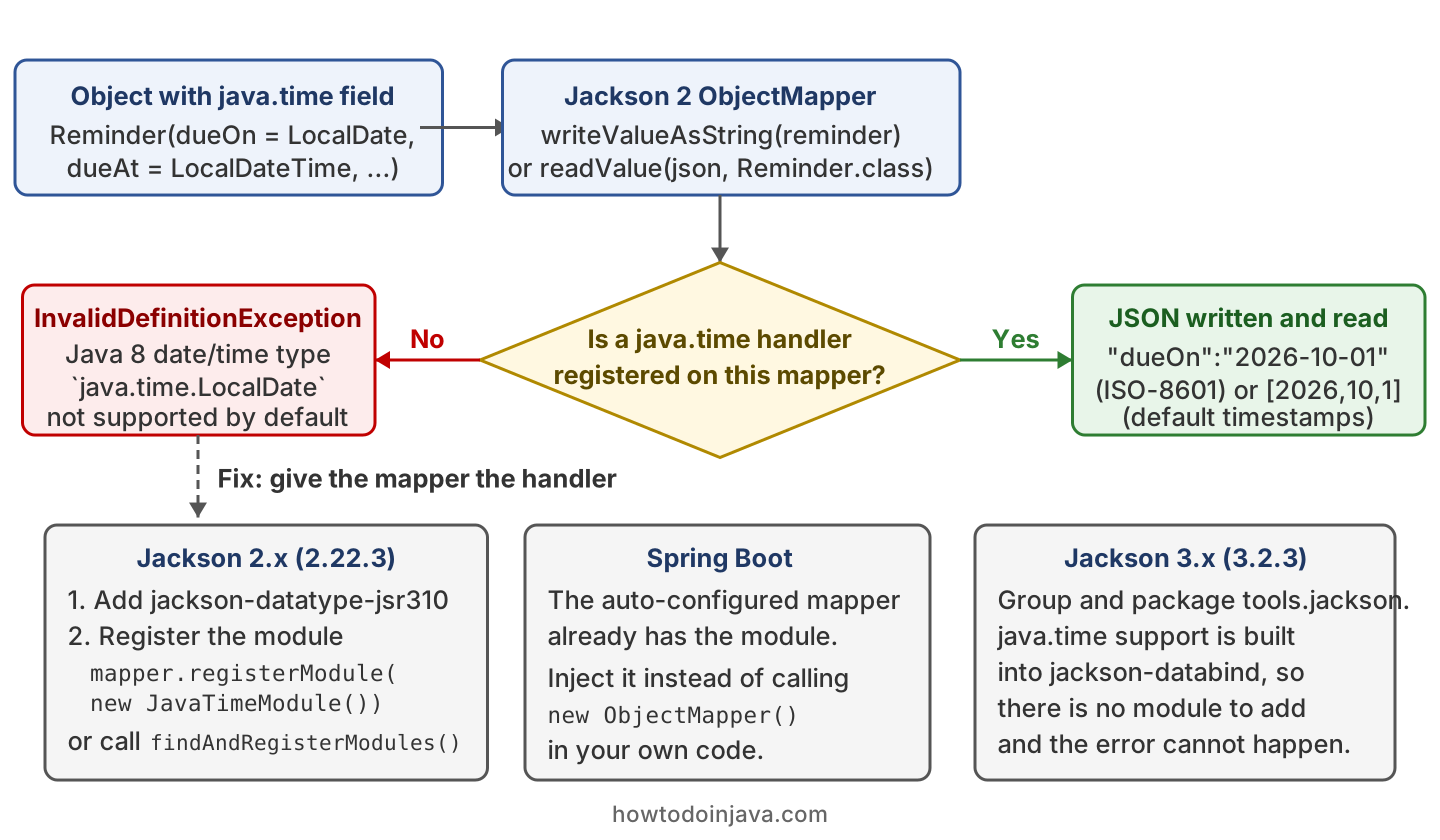
The error is per mapper instance, not per project. A project can have the dependency and a working mapper bean, and still hit the error in one class that calls new ObjectMapper(), which we come back to in section 3.
2. Fixing the Error in Jackson 2
The fix has two steps. We add jackson-datatype-jsr310 with the same version as jackson-databind, and we register its JavaTimeModule on every mapper that handles java.time values. The example project uses Jackson 2.22.3, Jackson 3.2.3, Java 25 and JUnit 6.1.3, and its tests are in the jackson-java-time-error folder.
2.1. Adding the jackson-datatype-jsr310 Dependency
The module is a separate artifact, released under the same version number as jackson-databind, and the two versions must match. Mixing a 2.22.3 jackson-databind with an older jackson-datatype-jsr310 can fail at runtime, so we keep one version property for all Jackson artifacts.
<properties>
  <jackson.version>2.22.3</jackson.version>
</properties>

<dependency>
  <groupId>com.fasterxml.jackson.core</groupId>
  <artifactId>jackson-databind</artifactId>
  <version>@{jackson.version}</version>
</dependency>
<dependency>
  <groupId>com.fasterxml.jackson.datatype</groupId>
  <artifactId>jackson-datatype-jsr310</artifactId>
  <version>@{jackson.version}</version>
</dependency>
The Gradle line is implementation(“com.fasterxml.jackson.datatype:jackson-datatype-jsr310:2.22.3”). When a project has several Jackson artifacts, the jackson-bom (a Maven bill of materials) sets one version for all of them, so we import it and drop the version tags.
2.2. Registering the JavaTimeModule
Adding the jar does nothing by itself. Jackson 2 never registers a module unless our code asks for it, so the second step is to register JavaTimeModule on the mapper. There are three ways to do that, and all three give the same result.
| Way | Code | When to use it |
|---|---|---|
| registerModule() | mapper.registerModule(new JavaTimeModule()) | We have an existing ObjectMapper and want only this module. |
| findAndRegisterModules() | mapper.findAndRegisterModules() | We want every Jackson module jar on the classpath, which Jackson finds for us. |
| JsonMapper.builder() | JsonMapper.builder().addModule(new JavaTimeModule()).build() | We build the mapper once with all its settings, which is the builder style added in Jackson 2.10. |
ObjectMapper first = new ObjectMapper();
first.registerModule(new JavaTimeModule());

ObjectMapper second = new ObjectMapper();
second.findAndRegisterModules();
Set<Object> ids = second.getRegisteredModuleIds();   // [jackson-datatype-jsr310]

JsonMapper third = JsonMapper.builder()
    .addModule(new JavaTimeModule())
    .build();

String json = first.writeValueAsString(reminder);
// {"title":"Pay rent","dueOn":[2026,10,1],"dueAt":[2026,10,1,9,30],"createdAt":1790324130.000000000}
The mapper must be the one that does the failing call. A module registered on a mapper in one class does not help a second mapper created elsewhere, so we create one configured mapper and share it. An ObjectMapper is thread-safe after configuration, so one instance for the whole app is the normal setup.
The findAndRegisterModules() call registers every module jar on the classpath, so a library can add a module we did not expect. We prefer the builder with an explicit addModule() in application code, because it shows which modules the mapper has.
2.3. Writing Dates as ISO-8601 Strings
With the module registered, Jackson 2 writes a LocalDate as the array [2026,10,1] and an Instant as the decimal number 1790324130.000000000. The reason is the SerializationFeature.WRITE_DATES_AS_TIMESTAMPS feature, which is on by default in Jackson 2. Most APIs expect the ISO-8601 string 2026-10-01 instead, so we turn the feature off.
JsonMapper mapper = JsonMapper.builder()
    .addModule(new JavaTimeModule())
    .disable(SerializationFeature.WRITE_DATES_AS_TIMESTAMPS)
    .build();

String json = mapper.writeValueAsString(reminder);
// {"title":"Pay rent","dueOn":"2026-10-01","dueAt":"2026-10-01T09:30:00","createdAt":"2026-09-25T08:15:30Z"}
The setting changes only the output. A mapper with the module reads both the ISO-8601 string and the timestamp array into the same LocalDate, so a client can send either form.
| Type | Default output (timestamps on) | Output with timestamps off |
|---|---|---|
| LocalDate | [2026,10,1] | “2026-10-01” |
| LocalDateTime | [2026,10,1,9,30] | “2026-10-01T09:30:00” |
| Instant | 1790324130.000000000 | “2026-09-25T08:15:30Z” |
2.4. Setting a Custom Pattern With @JsonFormat
When one field needs a different format, such as 01-10-2026 for a UI, we put @JsonFormat with a pattern on that field. The annotation works for writing and for reading, and it overrides the timestamp setting for that field only.
public record FormattedReminder(
    String title,
    @JsonFormat(pattern = "dd-MM-yyyy") LocalDate dueOn,
    @JsonFormat(pattern = "dd-MM-yyyy HH:mm") LocalDateTime dueAt) {
}
String json = mapper.writeValueAsString(formatted);
// {"title":"Pay rent","dueOn":"01-10-2026","dueAt":"01-10-2026 09:30"}
FormattedReminder back = mapper.readValue(json, FormattedReminder.class); // same valuesThe pattern letters are the ones from DateTimeFormatter, so HH is the hour from 00 to 23 and hh needs an a for AM or PM. More options for dates in Jackson, such as a global date format and custom serializers, are in Jackson date serialization.
3. The Error in a Spring Boot Application
Spring Boot creates one mapper bean for us, and that bean already supports java.time. In Spring Boot 3.x, the spring-boot-starter-json starter (part of spring-boot-starter-web) includes jackson-datatype-jsr310. The auto-configured ObjectMapper has the module registered and WRITE_DATES_AS_TIMESTAMPS turned off, so dates come out as ISO-8601 strings. In Spring Boot 4.x, the default Jackson is Jackson 3, where the support is built in.
So in a Spring Boot application, the error comes from a mapper that Spring Boot did not create. The typical place is a utility class or a test that calls new ObjectMapper(), often in a static field. The fix is to drop that call and inject the bean.
private final ObjectMapper mapper;

public ReminderExporter(ObjectMapper mapper) {   // Spring injects the auto-configured bean
  this.mapper = mapper;
}

String json = mapper.writeValueAsString(reminder);   // {"title":"Pay rent","dueOn":"2026-10-01",...}
When a class needs a mapper with different settings, we still start from the Spring Boot one and copy it with mapper.copy(), so the modules stay registered. In Spring Boot 3.x, the property spring.jackson.serialization.write-dates-as-timestamps in application.properties controls the date format for the whole app. When we need one more Jackson module, we declare it as a bean of type com.fasterxml.jackson.databind.Module, and Spring Boot registers it on the auto-configured mapper. The REST side of this setup is in consuming and producing JSON with Spring Boot.
4. Jackson 3 Has the Support Built In
Jackson 3 changed the Maven group id and the Java package from com.fasterxml.jackson to tools.jackson. It also built the java.time support into jackson-databind itself, together with the other two Java 8 modules. There is no JavaTimeModule class in Jackson 3 and nothing to register, so a plain JsonMapper writes and reads java.time values. Jackson 3 also writes ISO-8601 strings by default, because the default of WRITE_DATES_AS_TIMESTAMPS changed to false in 3.0.
<dependency>
  <groupId>tools.jackson.core</groupId>
  <artifactId>jackson-databind</artifactId>
  <version>3.2.3</version>
</dependency>
tools.jackson.databind.ObjectMapper mapper = new tools.jackson.databind.json.JsonMapper();
String json = mapper.writeValueAsString(reminder);
// {"title":"Pay rent","dueOn":"2026-10-01","dueAt":"2026-10-01T09:30:00","createdAt":"2026-09-25T08:15:30Z"}
Reminder back = mapper.readValue(json, Reminder.class); // Reminder[title=Pay rent, dueOn=2026-10-01, ...]The annotations stay in the com.fasterxml.jackson.annotation package, so @JsonFormat works unchanged in Jackson 3. If a project still sees the error after moving to Spring Boot 4, some code still imports com.fasterxml.jackson.databind.ObjectMapper and creates the Jackson 2 mapper by hand.
5. What MapperFeature.REQUIRE_HANDLERS_FOR_JAVA8_TIMES Does
The error message ends with “or disable MapperFeature.REQUIRE_HANDLERS_FOR_JAVA8_TIMES“, and the name shows up in searches because readers try it as a fix. The feature, added in Jackson 2.19 and on by default, decides what Jackson does when it meets a java.time value without a handler. When it is on, Jackson throws the error from section 1. When it is off, Jackson treats the value as a plain bean and reads its getters. The example writes a record DueDate with one LocalDate field.
ObjectMapper mapper = JsonMapper.builder()
    .disable(MapperFeature.REQUIRE_HANDLERS_FOR_JAVA8_TIMES)
    .build();

String json = mapper.writeValueAsString(new DueDate(LocalDate.of(2026, 10, 1)));
// {"dueOn":{"year":2026,"month":"OCTOBER","monthValue":10,"dayOfMonth":1,"leapYear":false,...}}

DueDate back = mapper.readValue("{\"dueOn\":\"2026-10-01\"}", DueDate.class);
// InvalidDefinitionException: ... InaccessibleObjectException: Unable to make field private final int java.time.LocalDate.year accessible
Turning the feature off removes the message but not the problem. The output is a nested object with every getter of LocalDate, which no client expects. Reading a date back still fails, because the JDK does not let Jackson write into the private fields of java.time classes. We leave the feature on and register the module.
6. Java 8 Date/Time Type Not Supported FAQs
6.1. Why Does the Error Stay After Adding the Dependency?
Because adding the jar is only the first step, and the module is still not registered on the mapper that fails. Three checks find the cause in most projects.
- The failing class does not create its own mapper with new ObjectMapper().
- The registerModule() or findAndRegisterModules() call runs before the first write.
- The jackson-datatype-jsr310 version matches the jackson-databind version.
When the mapper comes from a library, such as a REST client or a message broker SDK, we look for that library’s hook to pass our own mapper in.
6.2. Does the Error Also Come From Hibernate?
Yes, when an entity maps a JSON column with @JdbcTypeCode(SqlTypes.JSON) and the stored object has a java.time field. Hibernate 6.2 wrote that column with a Jackson mapper that had no modules. The only fix was our own FormatMapper class, set with the hibernate.type.json_format_mapper property. Since Hibernate 6.3, the default JacksonJsonFormatMapper finds every Jackson module on the classpath, so adding jackson-datatype-jsr310 to the project is enough. Hibernate 7 with only Jackson 3 on the classpath uses its Jackson3JsonFormatMapper, which supports java.time without the module.
spring.jpa.properties.hibernate.type.json_format_mapper=com.howtodoinjava.ReminderJsonFormatMapper6.3. Do We Also Need jackson-datatype-jdk8?
No, not for this error. The jackson-datatype-jdk8 module handles Optional and the other Java 8 types outside java.time, and Jackson reports a missing handler for those types with a different message. A project that uses Optional in its JSON classes adds both modules, and findAndRegisterModules() picks both up.
6.4. How Do We Fix the Error in Spring Data Redis?
We register the module on the mapper inside the Redis serializer. The default GenericJackson2JsonRedisSerializer in Spring Data Redis 3.5 creates its own ObjectMapper without JavaTimeModule, so caching an object with a LocalDate field throws a SerializationException with the same message. The method configure() changes that internal mapper and keeps the type information that the serializer adds as @class.
GenericJackson2JsonRedisSerializer serializer = new GenericJackson2JsonRedisSerializer();
serializer.configure(mapper -> mapper.registerModule(new JavaTimeModule()));

byte[] bytes = serializer.serialize(employee);          // {"@class":"com.howtodoinjava.app.jackson.javatime.Employee","id":1,"name":"Lokesh","dateOfBirth":[1989,5,17]}
Object cached = serializer.deserialize(bytes);          // Employee[id=1, name=Lokesh, dateOfBirth=1989-05-17]
6.5. Does @JsonFormat Fix the Error Without the Module?
No. The annotation @JsonFormat(pattern = “dd-MM-yyyy”) only sets the format for the serializer, and without the module there is no serializer for LocalDate. A plain new ObjectMapper() throws the same InvalidDefinitionException for an annotated field.
6.6. Should We Use JSR310Module or JavaTimeModule?
We use JavaTimeModule. The older JSR310Module class in the same jar is deprecated and replaced by JavaTimeModule.
7. Conclusion
The error means that the mapper doing the call has no handler for java.time types. We add jackson-datatype-jsr310 with a matching version and register JavaTimeModule on that mapper, with registerModule() or one of the other two ways from section 2.2.
In a Spring Boot application, we inject the auto-configured mapper instead of calling new ObjectMapper(). In Jackson 3 the support is part of jackson-databind, and dates come out as ISO-8601 strings by default. For Jackson 2 we turn off WRITE_DATES_AS_TIMESTAMPS to get the same strings, and we use @JsonFormat when a single field needs its own pattern.
8. References
- Jackson Release 3.0
- jackson-modules-java8 on GitHub
- MapperFeature Javadoc
- SerializationFeature Javadoc
- Customize the Jackson ObjectMapper in Spring Boot 3.5
- JSON in Spring Boot 4
Happy Learning !!

thankyou so much , it works fine this code:
ObjectMapper objectMapper = new ObjectMapper();
objectMapper.registerModule(new JavaTimeModule());
fixed it by implementing a CustomJsonProvider which uses my ObjectMapper with registered JavaTimeModule:
@Provider @Priority(value = 1) @Consumes({"application/json", "application/*+json", "text/json"}) @Produces({"application/json", "application/*+json", "text/json"}) public class CustomJsonProvider extends JacksonJsonProvider { private static final ObjectMapper OBJECT_MAPPER; static { // create the one and only instance OBJECT_MAPPER = LuminObjectMapper.getInstance(); } public CustomJsonProvider() { super(OBJECT_MAPPER); } }Thanks for sharing.
Works for me, when using Postman to send GET and PUT requests! But does not work, when using REST-Client from my WebApp to send PUT request. This results in error:
RESTEASY004655: Unable to invoke request: java.lang.RuntimeException: com.fasterxml.jackson.databind.exc.InvalidDefinitionException: Java 8 date/time type
java.time.LocalDateTimenot supported by defaultBut I have registered following modules as seen in my server.log:
a.l.m.c.r.LuminObjectMapper: registered module ‘com.fasterxml.jackson.datatype.jdk8.Jdk8Module’
a.l.m.c.r.LuminObjectMapper: registered module ‘com.fasterxml.jackson.datatype.jsr310.JavaTimeModule’
a.l.m.c.r.LuminObjectMapper: registered module ‘com.fasterxml.jackson.module.jaxb.JaxbAnnotationModule’
Probably a problem with resteasy client an Jackson ?!
Any hints welcome !
Thanx and regards,
Rainer
can we register JodaMoudle also, along with JavaTimeModule, as the project is already using the joda time, from now we need to use java time, please suggest
Yes, you can register both modules as well. It will work fine.
Thank you so much for the quick reply.
Does not work with Hibernate 6.
Thanks for sharing. Much appreciated !