

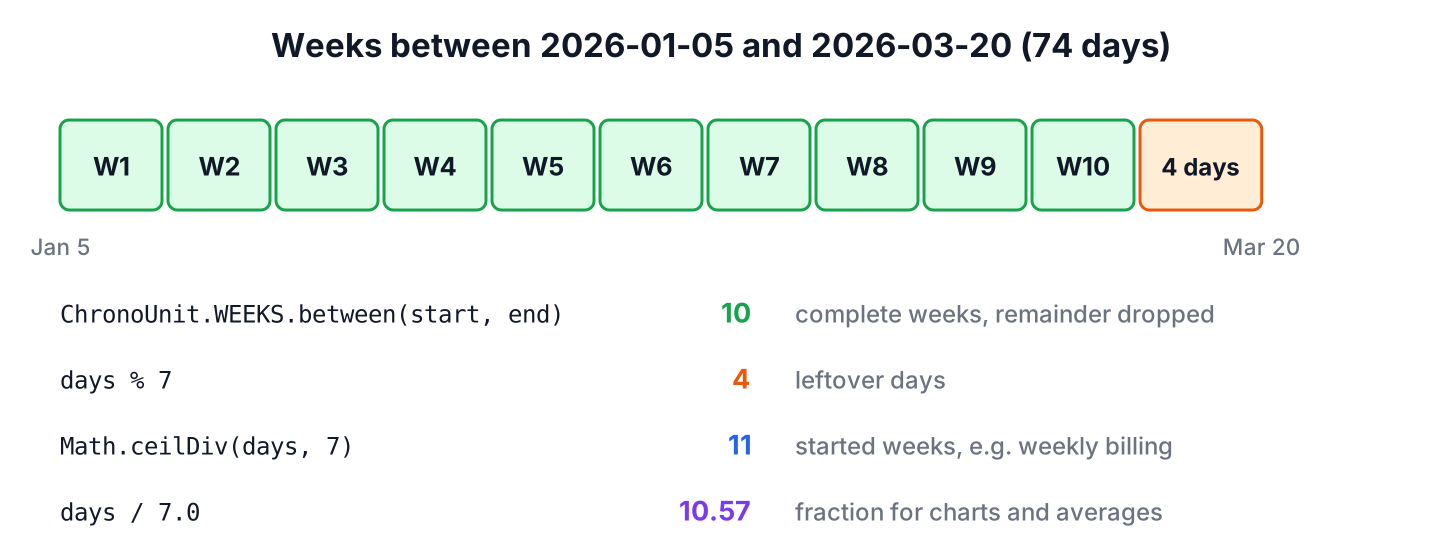
The method ChronoUnit.WEEKS.between(start, end) returns the number of complete 7-day weeks between two dates in Java as a long and drops any remaining days. For the remaining days, we take the day count modulo 7.
We count weeks for sprint plans, pregnancy and training trackers, weekly billing and age in weeks for warranties or subscriptions. Some of these need complete weeks, some need started weeks, and some need calendar weeks from Monday to Sunday.
The following example measures a project from Monday, January 5 to Friday, March 20, 2026 in all three ways.
LocalDate kickoff = LocalDate.of(2026, 1, 5);
LocalDate release = LocalDate.of(2026, 3, 20);
long weeks = ChronoUnit.WEEKS.between(kickoff, release);   // 10
long days = ChronoUnit.DAYS.between(kickoff, release);     // 74
long leftoverDays = days % 7;                               // 4
long startedWeeks = Math.ceilDiv(days, 7);                  // 11
double exactWeeks = days / 7.0;                             // 10.571428571428571
Notice that 74 days give 10 complete weeks, not 11, because between() truncates. Rounding up, calendar weeks and the effect of time zones on ZonedDateTime values each get a section, since each changes the answer.
1. Complete Weeks with ChronoUnit.WEEKS.between()
The method ChronoUnit.WEEKS.between() works on any two Temporal objects of the same kind, such as two LocalDate or two LocalDateTime values. It counts how many whole weeks fit between them, so 6 days give 0 weeks and 13 days give 1 week. As with DAYS.between(), the start date counts and the end date does not.
LocalDate start = LocalDate.of(2026, 1, 5);
long sixDays = ChronoUnit.WEEKS.between(start, start.plusDays(6));     // 0
long thirteenDays = ChronoUnit.WEEKS.between(start, start.plusDays(13)); // 1
long backwards = ChronoUnit.WEEKS.between(LocalDate.of(2026, 3, 20), start);   // -10
long viaUntil = start.until(LocalDate.of(2026, 3, 20), ChronoUnit.WEEKS);      // 10
When the end is before the start, the result is negative. The call start.until(end, ChronoUnit.WEEKS) returns the same number, so the choice is a matter of reading order. For the plain day count behind it, the days between two dates article covers DAYS.between() in detail.
2. Weeks and Remaining Days
Reports often show “10 weeks and 4 days” instead of a single number. We take the total days once and split them with integer division and the remainder operator, which avoids calling between() twice.
long totalDays = ChronoUnit.DAYS.between(LocalDate.of(2026, 1, 5), LocalDate.of(2026, 3, 20));   // 74
String label = (totalDays / 7) + " weeks and " + (totalDays % 7) + " days";   // "10 weeks and 4 days"
A Period does not help here, because it stores years, months and days but no weeks. The method Period.ofWeeks(3) converts the weeks to 21 days at once, and Period.between() returns months and days.
Period span = Period.between(LocalDate.of(2026, 1, 5), LocalDate.of(2026, 3, 20));   // P2M15D
Period threeWeeks = Period.ofWeeks(3);                                                // P21D
3. Rounding Up to Started Weeks
Most pricing rules charge for every started week, so we round up with Math.ceilDiv() instead of using WEEKS.between(). The method Math.ceilDiv(long, long), added in Java 18, divides and rounds toward positive infinity.
Say a car rental app charges a weekly rate. A customer who picks up a car on July 1, 2026 and returns it on July 16 keeps it for 15 days, which is 2 complete weeks but 3 started weeks, so the invoice shows three weekly rates.
LocalDate pickup = LocalDate.of(2026, 7, 1);
LocalDate dropOff = LocalDate.of(2026, 7, 16);
long rentalDays = ChronoUnit.DAYS.between(pickup, dropOff);    // 15
long fullWeeks = ChronoUnit.WEEKS.between(pickup, dropOff);    // 2
long billedWeeks = Math.ceilDiv(rentalDays, 7);                // 3
On Java versions before 18, (days + 6) / 7 gives the same result for non-negative day counts.
4. Calendar Weeks Between Two Dates
Elapsed weeks and calendar weeks are different questions. Sunday, January 4, 2026 and Monday, January 5 are one day apart, so WEEKS.between() returns 0, yet they belong to two different calendar weeks. A sprint board or a timesheet that groups work by week needs the calendar count.
To count calendar weeks, we move both dates back to the first day of their week with TemporalAdjusters and count the whole weeks between those two Mondays. For weeks that start on Sunday, as in the United States, we pass DayOfWeek.SUNDAY instead.
static long calendarWeeksBetween(LocalDate start, LocalDate end, DayOfWeek firstDay) {
    LocalDate startWeek = start.with(TemporalAdjusters.previousOrSame(firstDay));
    LocalDate endWeek = end.with(TemporalAdjusters.previousOrSame(firstDay));
    return ChronoUnit.WEEKS.between(startWeek, endWeek);
}
LocalDate sunday = LocalDate.of(2026, 1, 4);
LocalDate monday = LocalDate.of(2026, 1, 5);
long elapsed = ChronoUnit.WEEKS.between(sunday, monday); // 0
long isoWeeks = calendarWeeksBetween(sunday, monday, DayOfWeek.MONDAY); // 1
long usWeeks = calendarWeeksBetween(sunday, monday, DayOfWeek.SUNDAY); // 0Subtracting week numbers is a tempting shortcut that fails at the turn of the year. ISO week numbers restart at 1, and some years have 53 weeks, as 2026 does, so December 31, 2026 and January 1, 2027 are both in week 53. The first and last day of the week article shows the week boundaries for other locales.
int lastWeekOf2026 = LocalDate.of(2026, 12, 31).get(IsoFields.WEEK_OF_WEEK_BASED_YEAR);   // 53
int newYearsDay = LocalDate.of(2027, 1, 1).get(IsoFields.WEEK_OF_WEEK_BASED_YEAR);       // 53
5. Weeks Between LocalDateTime and ZonedDateTime Values
With a time part, a week is complete only when the full 7 days have passed, so the time of day can lower the result by one. From 10:00 on January 1 to 09:00 on January 8, one hour is missing, and the answer is 0 weeks.
LocalDateTime from = LocalDateTime.of(2026, 1, 1, 10, 0);
long almostAWeek = ChronoUnit.WEEKS.between(from, LocalDateTime.of(2026, 1, 8, 9, 0));   // 0
long fullWeek = ChronoUnit.WEEKS.between(from, LocalDateTime.of(2026, 1, 8, 10, 0));     // 1
For a ZonedDateTime, until() counts date-based units such as weeks on the local date and time, not on the instants. From midnight on March 2 to midnight on March 9, 2026 in New York is one week, even though the clock change on March 8 makes it only 167 hours. If the end value has a different zone, Java first converts it to the zone of the start value.
ZoneId newYork = ZoneId.of("America/New_York");
ZonedDateTime weekStart = ZonedDateTime.of(2026, 3, 2, 0, 0, 0, 0, newYork);
ZonedDateTime weekEnd = ZonedDateTime.of(2026, 3, 9, 0, 0, 0, 0, newYork);
long zonedWeeks = ChronoUnit.WEEKS.between(weekStart, weekEnd);   // 1
long hours = ChronoUnit.HOURS.between(weekStart, weekEnd);        // 167
An Instant has no calendar, so it supports units only up to DAYS. For weeks between two timestamps, we convert both to a ZonedDateTime in the zone that defines the week, or count days and divide by 7.
long instantWeeks = ChronoUnit.WEEKS.between(Instant.parse("2026-03-02T05:00:00Z"), Instant.parse("2026-03-09T04:00:00Z")); // UnsupportedTemporalTypeException: Unsupported unit: Weeks6. Weeks Between Two Dates in Java FAQs
Rounding and inclusive end dates cause most wrong week counts, so the answers start there.
6.1. Does ChronoUnit.WEEKS.between() round up?
No. The method truncates to complete weeks, so 13 days give 1 week. For started weeks, we use Math.ceilDiv(days, 7) as in section 3.
6.2. Is the end date included in the week count?
The method counts the days from the start up to the end, so the end date itself is not an extra day. To count both dates, as in “January 5 to January 11 inclusive is one week”, we pass end.plusDays(1).
6.3. How do we count weeks between two java.util.Date objects?
We convert each one with date.toInstant().atZone(zone).toLocalDate() and call ChronoUnit.WEEKS.between() on the two LocalDate values. Dividing the millisecond difference by 604,800,000 gives wrong results across daylight saving changes.
6.4. How many weeks does a year have in Java?
An ISO week-based year has 52 or 53 weeks. We read it with date.range(IsoFields.WEEK_OF_WEEK_BASED_YEAR).getMaximum(), which returns 53 for 2026.
6.5. What replaces Joda-Time Weeks.weeksBetween()?
The call ChronoUnit.WEEKS.between() from java.time. It truncates in the same way, and it needs no extra library.
7. Conclusion
The method ChronoUnit.WEEKS.between() returns complete weeks and drops the remainder, so days % 7 gives the leftover days and Math.ceilDiv(days, 7) counts started weeks. Calendar weeks need both dates moved to the first day of their week before counting.
With date-times, the time of day decides whether the last week is complete, and ZonedDateTime counts weeks on the local time-line, so a daylight saving change does not shorten a week. The Instant class does not support weeks at all. The Java date and time guide collects the related calculations.
8. References
- ChronoUnit.between() (Java SE 25 API)
- ZonedDateTime.until() (Java SE 25 API)
- Math.ceilDiv() (Java SE 25 API)
- IsoFields (Java SE 25 API)
Happy Learning !!
