
The Java Stream API (package java.util.stream) processes a sequence of elements from a source, such as a List, an array or a file, through a pipeline of operations that filter and transform the elements into a result, without changing the source. A stream describes what we want computed, and the API takes care of the loop, as every Java Stream API example on this page shows.
We use streams to filter database results, build report totals, group records by a field, convert lists to maps and read large files line by line. Most code that loops over a collection to build another collection or a single value reads shorter and clearer as a stream.
The following example runs the most common stream operations on a small playlist of song titles.
List<String> songs = List.of("Help", "Imagine", "Yesterday", "Hey Jude", "Let It Be");

List<String> picked = songs.stream()
        .filter(s -> s.length() > 4)
        .map(String::toUpperCase)
        .sorted()
        .toList();                          // [HEY JUDE, IMAGINE, LET IT BE, YESTERDAY]
long withSpace = songs.stream().filter(s -> s.contains(" ")).count();   // 2
boolean anyH = songs.stream().anyMatch(s -> s.startsWith("H"));         // true
int letters = songs.stream().mapToInt(String::length).sum();            // 37
String first = songs.stream().filter(s -> s.startsWith("Y")).findFirst().orElse("none");   // "Yesterday"
Map<Integer, List<String>> byLength = songs.stream()
        .collect(Collectors.groupingBy(String::length, TreeMap::new, Collectors.toList()));
String grouped = byLength.toString();   // "{4=[Help], 7=[Imagine], 8=[Hey Jude], 9=[Yesterday, Let It Be]}"
Notice that songs itself never changes, and each pipeline ends with one terminal call such as toList(), count() or collect(). We start with what a stream is and the ways to create one, go through the intermediate and terminal operations, and finish with a playlist report, parallel streams, the additions from Java 9 to Java 25 and the mistakes that break stream code. For the full list of tutorials, see the Java Stream tutorials page.
1. What Is a Stream in Java?
A stream is a view over a data source that we can process once. It does not store elements. Instead, each element flows from the source through the operations of the pipeline, one at a time, when a terminal operation asks for a result. The Stream interface and its primitive versions IntStream, LongStream and DoubleStream are in the java.util.stream package.
Every pipeline has three parts.
- A source provides the elements, for example list.stream(), Arrays.stream(array) or Files.lines(path).
- Zero or more intermediate operations, such as filter(), map() and sorted(), each return a new stream, so we can chain them.
- One terminal operation, such as toList(), count() or forEach(), produces the result and consumes the stream.
A collection and a stream solve different problems. A collection holds data in memory so we can add, remove and read elements again, whereas a stream computes a result from data and is gone after that.
| Feature | Collection (List, Set) | Stream |
|---|---|---|
| Stores elements | Yes | No, it reads them from the source |
| Can be traversed again | Yes, any number of times | No, a second terminal call throws IllegalStateException |
| Changes the data | add(), remove() change the collection | Never changes the source; returns a new result |
| When work happens | Elements exist before we use them | Elements are computed on demand (lazy) |
| Size | Finite | Can be infinite, cut with limit() or takeWhile() |
| Index access | list.get(i) | No index; see iterating a stream with indices |
The order of elements in a stream is called the encounter order. A stream from a List or an array keeps the source order, while a stream from a HashSet has no defined order, so findFirst() or toList() on it can return elements in any order.
2. Creating Streams
Every pipeline starts with a source, and the JDK offers a factory method for most data we meet in an app. The choice of method decides whether the stream is finite, whether it has an encounter order and whether it needs to be closed.
2.1. From a Collection or a Map
Every Collection has stream() and parallelStream(). A Map is not a collection, so we stream one of its three views, namely the keys, the values or the entries.
List<String> songs = List.of("Help", "Imagine", "Yesterday");
long count = songs.stream().count();                     // 3

Map<String, Integer> plays = new TreeMap<>(Map.of("Help", 12, "Imagine", 30));
List<String> titles = plays.keySet().stream().toList();                  // [Help, Imagine]
int totalPlays = plays.values().stream().mapToInt(Integer::intValue).sum();   // 42
List<String> lines = plays.entrySet().stream()
        .map(e -> e.getKey() + "=" + e.getValue())
        .toList();                                       // [Help=12, Imagine=30]
Filtering a map this way is common enough to have its own article, filtering a Map by keys and values.
2.2. From Values and Arrays
The static Stream.of() takes a fixed list of values, and Arrays.stream() takes an array. For an int[], Arrays.stream() returns an IntStream, whereas Stream.of(intArray) returns a stream with one element, the array itself.
Stream<String> genres = Stream.of("rock", "jazz", "pop");
String[] titles = {"Help", "Imagine", "Yesterday"};
List<String> fromArray = Arrays.stream(titles).toList();       // [Help, Imagine, Yesterday]
List<String> middle = Arrays.stream(titles, 1, 3).toList();    // [Imagine, Yesterday]
int[] ratings = {4, 5, 3};
int best = Arrays.stream(ratings).max().orElse(0);             // 5
long wrong = Stream.of(ratings).count();                       // 1, the array itself
long none = Stream.empty().count();                            // 0
When a value may be null, Stream.ofNullable() (Java 9) returns an empty stream instead of a stream with one null element. It works well inside flatMap() to skip missing values.
Map<String, String> albums = Map.of("Help", "Help!", "Imagine", "Imagine");
List<String> found = Stream.of("Help", "Yesterday", "Imagine")
        .flatMap(t -> Stream.ofNullable(albums.get(t)))
        .toList();                                       // [Help!, Imagine]
2.3. With Stream.builder()
A Stream.Builder collects elements one by one, for example inside an if block, and build() turns them into a stream. After build(), adding another element throws IllegalStateException.
boolean addBonus = true;
Stream.Builder<String> builder = Stream.builder();
builder.add("Help").add("Imagine");
if (addBonus) {
    builder.add("Bonus Track");
}
List<String> tracks = builder.build().toList();          // [Help, Imagine, Bonus Track]
2.4. Infinite Streams With iterate() and generate()
The method Stream.iterate() builds each element from the previous one, and Stream.generate() asks a Supplier for every element. Both streams are infinite, so we stop them with limit(), with takeWhile(), or with the three-argument iterate() from Java 9 that takes a condition like a for loop. More cases are in infinite streams.
List<Integer> evens = Stream.iterate(0, n -> n + 2).limit(5).toList();   // [0, 2, 4, 6, 8]
List<Integer> doubling = Stream.iterate(1, n -> n <= 100, n -> n * 2).toList();   // [1, 2, 4, 8, 16, 32, 64]
List<String> beats = Stream.generate(() -> "tick").limit(3).toList();   // [tick, tick, tick]
List<Integer> dice = new Random(42).ints(3, 1, 7).boxed().toList();      // [3, 4, 1]
A seeded Random returns the same numbers on every run, which is handy in tests. Without a seed, the values change each time, and streams of random numbers covers the range options.
2.5. From Strings and Files
Text sources have their own stream methods. The method String.chars() returns an IntStream of character codes, String.lines() (Java 11) splits on line breaks, and Pattern.splitAsStream() splits on a regex without building an intermediate array.
long vowels = "Yesterday".chars().filter(c -> "aeiou".indexOf(c) >= 0).count();   // 3
List<String> rows = "Help\nImagine".lines().toList();                         // [Help, Imagine]
List<String> tags = Pattern.compile(",\\s*").splitAsStream("rock, pop,jazz").toList();   // [rock, pop, jazz]
The method Files.lines() reads a file lazily, one line at a time, so even a large file never sits in memory as a whole. The stream holds an open file handle, so we always open it in a try-with-resources block. The article reading a file line by line compares it with BufferedReader.
Path file = Files.createTempFile("playlist", ".txt");
Files.writeString(file, "Help\nImagine\nYesterday\n");
List<String> longTitles;
try (Stream<String> lines = Files.lines(file)) {
    longTitles = lines.filter(line -> line.length() > 4).toList();
}
List<String> loaded = longTitles;                        // [Imagine, Yesterday]
3. Intermediate Operations
An intermediate operation returns a new stream and does no work until a terminal operation runs. Stateless operations such as filter() and map() look at one element at a time, while stateful ones such as sorted() and distinct() must see many elements before they can pass any on.
| Operation | What it does | Example result |
|---|---|---|
| filter() | Keeps elements that match a Predicate | [Help, Imagine] to [Imagine] |
| map() | Converts each element with a Function | “Help” to 4 |
| flatMap() | Replaces each element with a stream and joins them | [[a, b], ] to [a, b, c] |
| mapMulti() | Pushes zero or more results per element (Java 16) | Same as flatMap(), without inner streams |
| distinct() | Drops duplicates using equals() | [a, a, b] to [a, b] |
| sorted() | Sorts by natural order or a Comparator | [b, a] to [a, b] |
| limit(), skip() | Keeps the first n or drops the first n elements | Paging through results |
| takeWhile(), dropWhile() | Keeps or drops elements until a condition fails (Java 9) | Reading a sorted list up to a limit |
| peek() | Runs an action on each element and passes it on | Debug logging only |
The playlist below runs most of these operations. Each step works on the result of the previous one, so the order of the calls matters. Filtering first means the later steps handle fewer elements.
List<List<String>> albums = List.of(
        List.of("Help", "Yesterday"),
        List.of("Imagine", "Jealous Guy"),
        List.of("Help", "Let It Be"));

List<String> all = albums.stream().flatMap(List::stream).toList();   // [Help, Yesterday, Imagine, Jealous Guy, Help, Let It Be]
List<String> unique = all.stream().distinct().toList();              // [Help, Yesterday, Imagine, Jealous Guy, Let It Be]
List<Integer> lengths = unique.stream().map(String::length).toList();   // [4, 9, 7, 11, 9]
List<String> byLength = unique.stream()
        .sorted(Comparator.comparing(String::length).thenComparing(Comparator.naturalOrder()))
        .toList();                                       // [Help, Imagine, Let It Be, Yesterday, Jealous Guy]
List<String> page2 = unique.stream().skip(2).limit(2).toList();      // [Imagine, Jealous Guy]
Sorting takes a Comparator, and Comparator.comparing() with thenComparing() sorts by several keys in one call. The stream sorting article covers reverse order and null values.
The methods takeWhile() and dropWhile() differ from filter() because they stop at the first element that fails the condition. On a sorted list, takeWhile() stops reading early, which filter() cannot do.
List<Integer> seconds = List.of(120, 150, 200, 240, 180);
List<Integer> taken = seconds.stream().takeWhile(s -> s < 210).toList();     // [120, 150, 200]
List<Integer> dropped = seconds.stream().dropWhile(s -> s < 210).toList();   // [240, 180]
List<Integer> filtered = seconds.stream().filter(s -> s < 210).toList();     // [120, 150, 200, 180]
4. Terminal Operations
A terminal operation starts the pipeline, consumes the stream and returns a value, a collection, an Optional or nothing. After it runs, the stream is used up, and any further operation on it throws IllegalStateException.
List<String> songs = List.of("Help", "Imagine", "Yesterday", "Hey Jude");

long count = songs.stream().filter(s -> s.startsWith("H")).count();   // 2
boolean all = songs.stream().allMatch(s -> s.length() > 3);          // true
boolean none = songs.stream().noneMatch(String::isBlank);            // true
Optional<String> longest = songs.stream().max(Comparator.comparing(String::length));   // Optional[Yesterday]
String shortest = songs.stream().min(Comparator.comparing(String::length)).orElseThrow();   // "Help"
String firstJ = songs.stream().filter(s -> s.startsWith("J")).findFirst().orElse("none");   // "none"
String joined = songs.stream().reduce((a, b) -> a + " | " + b).orElse("");   // "Help | Imagine | Yesterday | Hey Jude"
int totalChars = songs.stream().map(String::length).reduce(0, Integer::sum);   // 28
String[] array = songs.stream().toArray(String[]::new);
String printed = Arrays.toString(array);                             // "[Help, Imagine, Yesterday, Hey Jude]"
The match methods anyMatch(), allMatch() and noneMatch() and the find methods findFirst() and findAny() are short-circuiting, so they stop as soon as the answer is known. The search results come back as an Optional, because the stream may have no matching element.
Never call get() on the Optional from findFirst(), min() or max() without a fallback, because an empty result throws NoSuchElementException. We use orElse(), orElseGet() or ifPresent(), or orElseThrow() when an empty result is a real error.
String missing = Stream.of("Help").filter(s -> s.startsWith("Z")).findFirst().get(); // NoSuchElementException: No value presentThe forEach() method runs an action for each element and returns nothing. We use it for output such as logging or sending messages, and use forEachOrdered() on a parallel stream when the order matters. Adding elements to an outside list from forEach() is a common mistake that toList() replaces.
5. Collecting Results With toList() and Collectors
The method collect() takes a Collector, which describes how to put the elements into a container. The Collectors class has ready-made collectors for lists, sets, maps, strings, counts and groups. Since Java 16, Stream.toList() is the shortest way to get a list.
| Call | Returns | Can we add to it? |
|---|---|---|
| stream.toList() (Java 16) | Unmodifiable List, allows null elements | No, add() throws UnsupportedOperationException |
| collect(Collectors.toList()) | An ArrayList today, but the type is not guaranteed | Yes in practice, not promised by the Javadoc |
| collect(Collectors.toUnmodifiableList()) (Java 10) | Unmodifiable List, rejects null | No |
| collect(Collectors.toCollection(ArrayList::new)) | The exact collection type we pass | Yes, guaranteed |
The other collectors cover the remaining shapes. A grouping collector takes a second collector that decides what to keep for each group, such as a count, a sum or a list of names.
record Song(String title, String artist, int seconds) {}List<Song> playlist = List.of(
new Song("Help", "Beatles", 139),
new Song("Imagine", "Lennon", 183),
new Song("Yesterday", "Beatles", 125),
new Song("Jealous Guy", "Lennon", 254));
Set<String> artists = playlist.stream().map(Song::artist).collect(Collectors.toCollection(TreeSet::new)); // [Beatles, Lennon]
Map<String, Integer> length = playlist.stream()
.collect(Collectors.toMap(Song::title, Song::seconds, (a, b) -> a, TreeMap::new)); // {Help=139, Imagine=183, Jealous Guy=254, Yesterday=125}
String titles = playlist.stream().map(Song::title).collect(Collectors.joining(", ", "[", "]")); // "[Help, Imagine, Yesterday, Jealous Guy]"
Map<String, Long> songsPerArtist = playlist.stream()
.collect(Collectors.groupingBy(Song::artist, TreeMap::new, Collectors.counting())); // {Beatles=2, Lennon=2}
Map<Boolean, List<String>> longOnes = playlist.stream()
.collect(Collectors.partitioningBy(s -> s.seconds() > 180,
Collectors.mapping(Song::title, Collectors.toList()))); // {false=[Help, Yesterday], true=[Imagine, Jealous Guy]}We pass TreeMap::new and TreeSet::new so that the results print in a fixed order, because groupingBy() and toMap() return a HashMap by default. The articles on Collectors.groupingBy() and collecting a stream to a Map go deeper, including the duplicate-key error of toMap().
6. Lazy Evaluation and Short-Circuiting
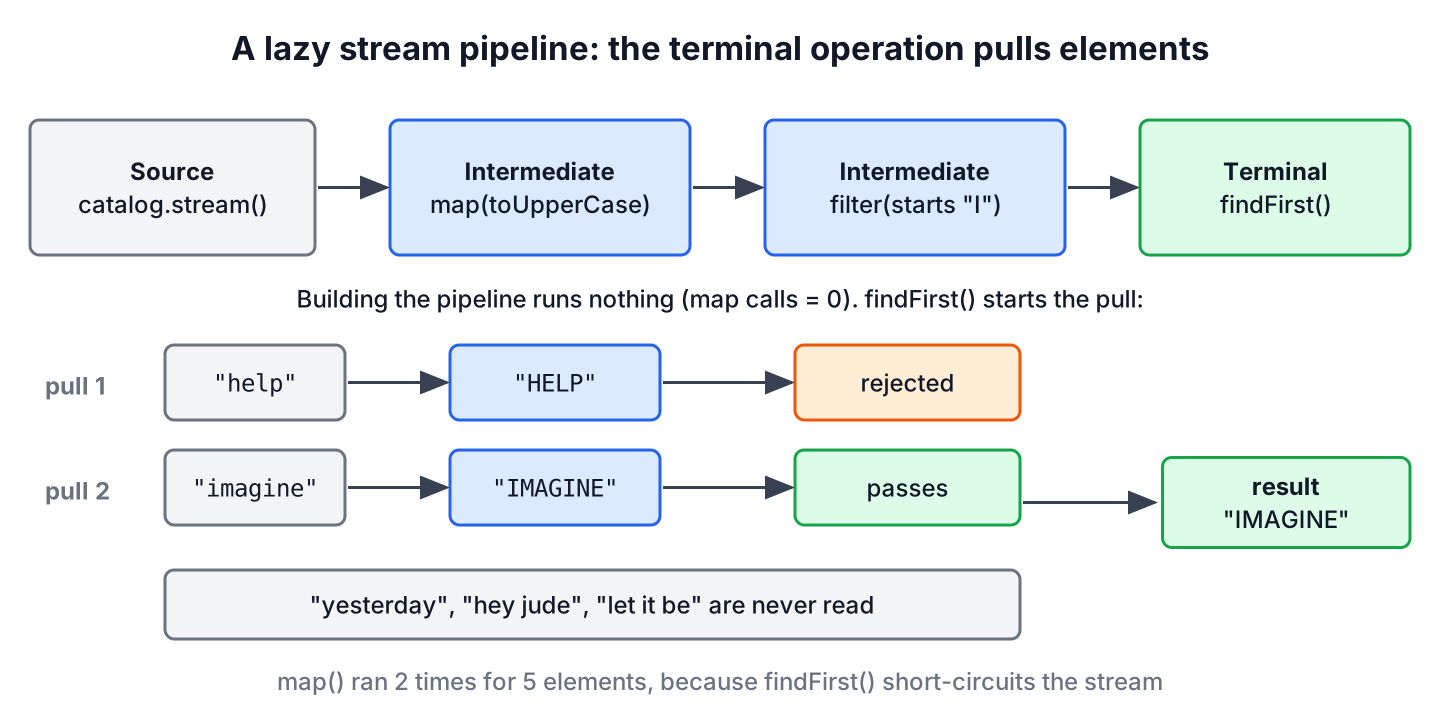
Intermediate operations are lazy. Calling filter() or map() only adds a step to the pipeline, and nothing runs until a terminal operation asks for elements. The terminal operation pulls elements one at a time through all the steps, so the first element can reach the end before the second one is read.
The following example counts how often map() runs. A search screen in a music app needs only the first title that matches, so there is no point in converting the whole catalog.
List<String> catalog = List.of("help", "imagine", "yesterday", "hey jude", "let it be");
AtomicInteger calls = new AtomicInteger();

Stream<String> pipeline = catalog.stream()
        .map(s -> { calls.incrementAndGet(); return s.toUpperCase(); })
        .filter(s -> s.startsWith("I"));
int beforeTerminal = calls.get();                        // 0
String match = pipeline.findFirst().orElse("none");      // "IMAGINE"
int afterTerminal = calls.get();                         // 2
Notice that map() ran zero times while we built the pipeline and only twice in total. The stream stopped after the second element, because findFirst() is a short-circuiting operation. Laziness is also what makes infinite streams work, since limit() stops the pull before the source runs forever.
A stateful step changes the picture. Adding sorted() before findFirst() forces the stream to read every element first, because the smallest element may be the last one in the source.
7. Java Stream API Examples From a Playlist Report
A music streaming app shows each user a weekly summary, such as the total listening time, the top artist and the three longest songs. The play history comes from the database as a list of records, and one stream per figure produces the report. The Song record from section 5 holds each play.
List<Song> history = List.of(
        new Song("Help", "Beatles", 139),
        new Song("Imagine", "Lennon", 183),
        new Song("Help", "Beatles", 139),
        new Song("Yesterday", "Beatles", 125),
        new Song("Jealous Guy", "Lennon", 254),
        new Song("Respect", "Franklin", 147));

int totalSeconds = history.stream().mapToInt(Song::seconds).sum();   // 987
String totalTime = (totalSeconds / 60) + " min " + (totalSeconds % 60) + " s";   // "16 min 27 s"
String topArtist = history.stream()
        .collect(Collectors.groupingBy(Song::artist, Collectors.summingInt(Song::seconds)))
        .entrySet().stream()
        .max(Map.Entry.comparingByValue())
        .map(Map.Entry::getKey)
        .orElse("nobody");                               // "Lennon"
List<String> longest = history.stream()
        .distinct()
        .sorted(Comparator.comparingInt(Song::seconds).reversed())
        .limit(3)
        .map(Song::title)
        .toList();                                       // [Jealous Guy, Imagine, Respect]
Map<String, Long> playsPerSong = history.stream()
        .collect(Collectors.groupingBy(Song::title, TreeMap::new, Collectors.counting()));   // {Help=2, Imagine=1, Jealous Guy=1, Respect=1, Yesterday=1}
The distinct() call removes the second play of Help before the ranking, which works because records get equals() from their components. The max() over the grouped entries returns an Optional, so an empty history gives “nobody” instead of an exception. Lennon wins with 437 seconds against 403 for the Beatles, because the total counts every play, repeats included.
8. Parallel Streams
A parallel stream splits the source into parts and processes them on several threads of the common ForkJoinPool. We get one with parallelStream() on a collection or parallel() on any stream, and the rest of the pipeline stays the same.
List<Integer> ids = IntStream.rangeClosed(1, 1_000).boxed().toList();
long evenCount = ids.parallelStream().filter(n -> n % 2 == 0).count();   // 500
List<Integer> firstFive = ids.parallelStream().map(n -> n * 10).limit(5).toList();   // [10, 20, 30, 40, 50]
boolean parallel = ids.parallelStream().isParallel();    // true
Results such as toList() and findFirst() keep the encounter order even in parallel, while forEach() and findAny() do not. Parallel streams pay off only for large data sets with CPU-heavy work per element, and they can be slower for small lists because splitting and merging cost time.
Never use a parallel stream for blocking I/O or for code that changes shared state, because the common pool is shared by the whole JVM and unsynchronized writes lose data. The article on concurrency vs parallelism explains the difference between the two models.
9. Stream API Additions From Java 9 to Java 25
The Stream API has changed in several releases since Java 8, and many older tutorials still miss the newer methods. Each row names the release where the method became final.
| Java | Addition | Use it for |
|---|---|---|
| 9 | takeWhile(), dropWhile(), ofNullable(), three-argument iterate() | Stopping early, skipping null, loop-like streams (Java 9 stream improvements) |
| 10 | Collectors.toUnmodifiableList(), toUnmodifiableSet(), toUnmodifiableMap() | Read-only results (collecting into immutable collections) |
| 12 | Collectors.teeing() | Two collectors over one pass (teeing()) |
| 16 | Stream.toList(), mapMulti() | Short list collection, one-to-many mapping |
| 22 | Unnamed variable _ in lambdas | Ignoring a parameter, such as (_, v) -> v |
| 24 | Stream.gather() and Gatherers (JEP 485) | Custom intermediate operations such as windows and running totals |
A gatherer is a custom intermediate operation, in the same way that a Collector is a custom terminal operation for collect(). The Gatherers class has ready-made ones for fixed windows, sliding windows, folds and running scans, which we previously had to write with index loops.
List<Integer> plays = List.of(3, 5, 2, 8, 6);
List<List<Integer>> pairs = plays.stream().gather(Gatherers.windowFixed(2)).toList();   // [[3, 5], [2, 8], [6]]
List<List<Integer>> sliding = plays.stream().gather(Gatherers.windowSliding(3)).toList();   // [[3, 5, 2], [5, 2, 8], [2, 8, 6]]
List<Integer> running = plays.stream().gather(Gatherers.scan(() -> 0, Integer::sum)).toList();   // [3, 8, 10, 18, 24]
10. Mistakes That Break Stream Code
Most stream bugs come from treating a stream like a collection or like a loop. Each case below compiles, so the problem shows up only at runtime or in wrong results.
- A stream allows one terminal operation. A second call throws IllegalStateException, and the fix is to create a new stream from the source or keep a Supplier<Stream<T>>. See stream has already been operated upon or closed.
- Adding to or removing from the source list in filter() or forEach() throws ConcurrentModificationException. Use removeIf() or collect a new list, as removing and updating list elements shows.
- A lambda passed to map() cannot throw IOException, so we wrap the call or use a helper, as described in handling exceptions in streams.
- The JDK may skip peek() when the result is known without it, for example count() on a sized source. Keep it for debugging streams.
Stream<String> once = Stream.of("Help", "Imagine");
long size = once.count();                                // 2
long again = once.count();                               // IllegalStateException: stream has already been operated upon or closed
11. Java Stream API FAQs
Developers search for these Stream API questions most often, and each answer links to the article with the details.
11.1. Are Java Streams Faster Than for Loops?
Not by default. A sequential stream does the same work as a loop plus some setup, so a tight loop over a small array is often a little faster. The difference rarely matters next to database or network calls, and streams win on readability. Measure with JMH before rewriting code for speed.
11.2. When Do We Use flatMap() Instead of map()?
The method map() turns each element into one new element, while flatMap() turns each element into a stream and joins those streams into one. The article map() vs flatMap() shows both with nested lists.
11.3. Should I Use toList() or collect(Collectors.toList())?
Use toList() on Java 16 and later when the result is read-only, which covers most cases. Use collect(Collectors.toCollection(ArrayList::new)) when the code adds to the list afterwards, because only that form guarantees a modifiable ArrayList.
11.4. Does a Stream Change the Original List?
No. Operations such as filter(), sorted() and map() return new streams and leave the source unchanged. Only code inside a lambda that calls a setter or modifies an outside object can change data, and we avoid such side effects.
11.5. How Do We Get a Stream From an Iterator or Iterable?
We use StreamSupport.stream(iterable.spliterator(), false), or call stream() when the object is already a Collection. The article converting an Iterable or Iterator to a Stream covers both.
11.6. Can a Stream Be Infinite?
Yes. Stream.iterate() and Stream.generate() create infinite streams, and laziness keeps them safe as long as a short-circuiting operation such as limit(), takeWhile() or findFirst() ends the pipeline. A pipeline that calls count() or sorted() on an infinite stream never finishes.
12. Conclusion
A stream is a one-time pipeline over a source, built from lazy intermediate operations and ended by one terminal operation. We create it from a collection, an array, a value list, a generator or a file, and we always close streams that read files.
For everyday code, filter(), map(), sorted() and toList() cover most needs, and Collectors.groupingBy() handles the reports. On a current JDK, we prefer toList(), takeWhile() and gatherers over the Java 8 workarounds, and we keep parallel streams for large CPU-bound jobs.
13. References
- Stream Javadoc (Java 25)
- java.util.stream package summary
- Collectors Javadoc
- JEP 485: Stream Gatherers
- The Stream API on dev.java
Happy Learning !!

Its an informative post.
But I have one query here, in terms of performance streams are better or for-loops. As much I have read online, answer is for loops then why should we prefer using streams?
The gains are so much for most of the real-world examples. In most applications, we will not iterate over collections having 1 million or more records. If that is ever needed, it is done on the database side.
The lambda expressions are amazing in writing complex logic in a single line.
Hi,
How to breakout from loop from 2.4
I have thought to apply break statement but in consumer we can’t apply as its not a loop statement.
or is it stream should have only fixed size.?
not working ?what is the error
the syntax is wrong
it is
try this
Parallelism in Java Steam
public class StreamBuilders {
public static void main(String[] args){
List list = new ArrayList();
for(int i = 1; i< 10; i++){
list.add(i);
}
//Here creating a parallel stream
Stream stream = list.parallelStream();
Integer[] evenNumbersArr = stream.filter(i -> i%2 == 0).toArray(Integer[]::new);
System.out.print(evenNumbersArr);
}
}
OUTPUT
[Ljava.lang.Integer;@7cca494b
Below is the correct implementaion
—————————————
import java.util.ArrayList;
import java.util.List;
import java.util.stream.Stream;
public class StreamBuildersParallelStream {
public static void main(String[] args) {
// TODO Auto-generated method stub
List list = new ArrayList();
for(int i = 1; i< 10; i++){
list.add(i);
}
//Here creating a parallel stream
Stream stream = list.parallelStream();
//Integer[] evenNumbersArr = stream.filter(i -> i%2 == 0).toArray(Integer[]::new);
Stream highNums = stream.filter(i -> i%2 == 0);
//System.out.print(highNums);
highNums.forEach(p -> System.out.println(“Even Nums parallel=”+p));
}
}
OUTPUT:
——–
Even Nums parallel=6
Even Nums parallel=4
Even Nums parallel=8
Even Nums parallel=2
Hi ,
Thanks for a wonderful post. I saw a different post on streams and according to them sequential streams are slower than traditional loops. What are you inputs on this.
Secondly, in another post i saw that we should not use parallel streams specially in big applications beacause it uses fork()/join framework . Then why should streams be used at all. Just for the future to make something parallel down the line?
If we consider performance and easiness in debugging, loops can not be beaten. Loops are much light weight and definitely perform better than streams.
But the performance is not so much that we do not consider the streams at all. Streams are more of a coding style where we can express our logic/intent in more declarative way. Stream operations are more cleaner and redable.
So it’s more of coding/syntax style why we choose streams. Otherwise everything can be achieved via loops/if-else statements as well, but they may be hard to understand and may look ugly in comparison.
Question regarding Stream, in the following code once the findFirst() method is reached, why are other elements being evaluated? for example I though “116, 345” these will not get printed because after the filter is evaluated and found the first the stream will be closed.
OutPut:
[11, 12, 11113, 116, 345]
11
12
11113
11113
116
345
–str–Optional[11113]
Excellent question. I will do the research on my side and let you know. Please share if you get anything.
List list1 = Arrays.asList(“11”, “12”, “11113”, “116”, “345”);
Optional str = list1.stream()
.peek(System.out::println)
.filter(x -> x.length() > 3)
.peek(System.out::println)
.findFirst();
System.out.println(“–str– ” + str);
I guess flat map is the culprit here, the simple map represents one-one check whereas flat map is one-many check when you use a flat map I am thinking it will create a new stream with same values, that why it is printing.
Sorry, I don’t know much about java8, the above code will not evaluate “116” and “345”
Output:
11
12
11113
11113
–str– Optional[11113]
Laxminarsaiah Ragi :
The flatMap is also not the culprit. In fact the code is not evaluating further once it filters x->x.length()>3. Since you are printing the list before that, it gets displayed. If you execute below code, you will see it prints only 1113 .
List list1 = Stream.of("11", "12", "11113", "116", "345").collect(Collectors.toList());
		List list2 = Stream.of("23333", "33", "433", "5").collect(Collectors.toList());

		Optional str = Stream.of(list1 , list2 )
		   // .peek(System.out::println)
		    .flatMap(x -> x.stream())
		    //.peek(System.out::println)
		    .filter(x -> x.length() > 3)
		    .peek(System.out::println)
		    .findFirst();

		System.out.println("--str--" + str);
Output :
11113
–str–Optional[11113]
//I am looking for loop using streams as follows:
int inputArray[] = {4, 6, 5, -10, 8, 1, 2};
for (int i : inputArray)
{
for (int j = i+1; j {
IntStream.range(i+1,… ).forEach(j -> {
});
});
Stream intData = Stream.of(new Integer[] {4, 6, 5, -10, 8, 1, 2});
intData.forEach(n->System.out.println(n));
Example four –
public class StreamBuilders {
     public static void main(String[] args){
         Stream stream = Stream.generate(() -> { return new Date();});
         stream.forEach(p -> System.out.println(p));
     }
}
This is going in infinite loop…. why ??
Because:
generate(Supplier s) Returns an infinite sequential unordered stream where each element is generated by the provided Supplier. This is suitable for generating constant streams, streams of random elements, etc.
You can use limit to handle it –
Stream stream = Stream.generate(() -> { return new Date();}).limit(5);
stream.forEach(p -> System.out.println(p));