
Java password hashing turns a password into a fixed-length value with a slow, salted, one-way function such as Argon2id, bcrypt, scrypt or PBKDF2, so the app can check a login without ever storing the password itself. Fast hash functions such as MD5, SHA-1 and SHA-256 are the wrong tool, because an attacker with a leaked database can test billions of guesses against them.
We hash passwords in every app that has its own login, and also for API keys and PINs that users choose. The JDK ships PBKDF2, and Spring Security Crypto adds bcrypt, scrypt and Argon2 in a few lines.
The following example hashes a password with PBKDF2 from the JDK and checks two login attempts. The methods hash() and verify() come from section 3.
String stored = hash("s3cret-Pa55".toCharArray());           // "pbkdf2-sha256$600000$" + salt + "$" + hash, new every time
boolean login = verify("s3cret-Pa55".toCharArray(), stored);   // true
boolean typo = verify("s3cret-pa55".toCharArray(), stored);    // false
Notice that the stored string contains the algorithm, the iteration count and the salt, so verify() needs nothing except the typed password. We start with why fast hashes fail, explain salt and work factor, and build PBKDF2 by hand before we use bcrypt, scrypt and Argon2 from Spring Security Crypto and pick one.
1. Why MD5 and SHA-256 Are Not for Passwords
Hashing matters on the day a database backup leaks. The attacker has every user row, including the stored hashes, and tries common passwords offline, as fast as the hardware allows. A hash function that is fast by design helps the attacker, not us.
MD5 and the SHA-2 family were built to hash files and messages fast. On a 2-core cloud VM with JDK 25, after a warm-up loop, one thread computed about 6 million SHA-256 hashes per second, and a gaming GPU computes billions. The MD5 hash of the word password is also in every public lookup table, so searching the hash on the web reveals the password.
HexFormat hex = HexFormat.of();
byte[] word = "password".getBytes(StandardCharsets.UTF_8);
String md5 = hex.formatHex(MessageDigest.getInstance("MD5").digest(word));       // "5f4dcc3b5aa765d61d8327deb882cf99"
String sha256 = hex.formatHex(MessageDigest.getInstance("SHA-256").digest(word)); // "5e884898da28047151d0e56f8dc6292773603d0d6aabbdd62a11ef721d1542d8"
A longer hash such as SHA-512 does not make a password safer, because the attacker guesses the password, not the hash. What protects users is a unique salt per password plus a function that costs real time and memory for every guess. MD5 and SHA-256 still have their place, for example in a file checksum, where speed is what we want.
2. Salt, Work Factor and Pepper
Three ideas turn a hash into a password hash. Each one blocks a different attack, so a good scheme uses the first two always and the third when the infrastructure allows it.
- A salt is a random value, at least 16 bytes, created with SecureRandom for each password and stored next to the hash. Two users with the same password get different hashes, and precomputed tables become useless.
- A work factor, such as an iteration count, a cost or a memory size, makes every hash slow on purpose. We raise it as hardware gets faster, and the stored hash records the value used.
- A pepper is one secret key for all passwords, kept outside the database in a vault or HSM and mixed in with HMAC. A database dump alone is not enough to start guessing.
Salts must come from SecureRandom, and they are bytes, not text. A common bug, also in many older tutorials, calls toString() on the salt array, which returns the array’s type and identity hash instead of its content.
byte[] salt = new byte[16];
new SecureRandom().nextBytes(salt);
String wrong = salt.toString();                       // "[B@..." the array identity, not the 16 random bytes
String right = HexFormat.of().formatHex(salt);         // 32 hex characters
int saltHexLength = right.length();                    // 32
We also do not pick the old SHA1PRNG algorithm by name. A plain new SecureRandom() uses the default algorithm of the platform, such as NativePRNG on Linux, and the post on secure random number generation explains the choices.
3. PBKDF2 With the JDK Only
PBKDF2 (RFC 8018) runs an HMAC over the password and the salt many thousands of times. The JDK provides it through SecretKeyFactory as PBKDF2WithHmacSHA256, so it needs no dependency, and it is the algorithm to choose when a FIPS-140 validated setup is required. The OWASP Password Storage Cheat Sheet recommends 600,000 iterations for HMAC-SHA256.
The following helper derives 32 bytes from a password. It clears the password copy inside PBEKeySpec when it is done, which is why the methods take a char[] instead of a String.
static byte[] pbkdf2(char[] password, byte[] salt, int iterations) throws GeneralSecurityException {
    PBEKeySpec spec = new PBEKeySpec(password, salt, iterations, 256);
    try {
        return SecretKeyFactory.getInstance("PBKDF2WithHmacSHA256").generateSecret(spec).getEncoded();
    } finally {
        spec.clearPassword();
    }
}

static final int ITERATIONS = 600_000;
static final SecureRandom RANDOM = new SecureRandom();
The method hash() creates a new salt and writes all parameters into one string, in the same spirit as the bcrypt format. Storing the iteration count with each hash lets us raise the count later without breaking existing users.
static String hash(char[] password) throws GeneralSecurityException {
    byte[] salt = new byte[16];
    RANDOM.nextBytes(salt);
    byte[] derived = pbkdf2(password, salt, ITERATIONS);
    HexFormat hex = HexFormat.of();
    return "pbkdf2-sha256$" + ITERATIONS + "$" + hex.formatHex(salt) + "$" + hex.formatHex(derived);
}
The method verify() reads the parameters back, hashes the typed password the same way and compares the two arrays with MessageDigest.isEqual(). That method takes the same time no matter where the first difference is, so response times do not leak how much of the hash matched.
static boolean verify(char[] password, String stored) throws GeneralSecurityException {
    String[] parts = stored.split("\\$");
    int iterations = Integer.parseInt(parts[1]);
    byte[] salt = HexFormat.of().parseHex(parts[2]);
    byte[] expected = HexFormat.of().parseHex(parts[3]);
    byte[] actual = pbkdf2(password, salt, iterations);
    return MessageDigest.isEqual(expected, actual);
}
String first = hash("blue-river-42".toCharArray());
String second = hash("blue-river-42".toCharArray());
boolean differentSalts = !first.equals(second); // true
boolean matches = verify("blue-river-42".toCharArray(), second); // true
int parts = first.split("\\$").length; // 4On the same 2-core VM, one PBKDF2 hash with 600,000 iterations took about 250 milliseconds. A login form barely notices that delay, while an attacker’s guess rate drops from millions per second per core to about four.
4. bcrypt With Spring Security Crypto
The bcrypt algorithm has been the default password hash of many frameworks for two decades. Its cost parameter is a power of two, so cost 12 does 212 rounds of key setup, and it creates and stores the salt itself. The JDK does not include it, so we use Spring Security Crypto, which also works outside Spring apps.
<dependency>
    <groupId>org.springframework.security</groupId>
    <artifactId>spring-security-crypto</artifactId>
    <version>7.1.1</version>
</dependency>
Version 7 of the module needs Apache Commons Logging (commons-logging) on the classpath at runtime. Every Spring app already has it through spring-core, and a plain Java app adds it next to the crypto module. The encoder API is the same for every algorithm, encode() to hash and matches() to check.
PasswordEncoder bcrypt = new BCryptPasswordEncoder(12);
String bcryptHash = bcrypt.encode("blue-river-42");          // "$2a$12$" + 22-char salt + 31-char hash
int bcryptLength = bcryptHash.length();                       // 60
boolean bcryptOk = bcrypt.matches("blue-river-42", bcryptHash);   // true
The bcrypt algorithm reads at most 72 bytes of the password. Older libraries cut longer input without any warning, so two long passwords with the same first 72 bytes matched each other. The Spring Security 7 encoder refuses such input instead.
PasswordEncoder strict = new BCryptPasswordEncoder(12);
String longPassword = "x".repeat(73);
String tooLong = strict.encode(longPassword);                // IllegalArgumentException: password cannot be more than 72 bytes
OWASP lists bcrypt for legacy systems with a cost of at least 10. On our VM, cost 12 took about 750 milliseconds per hash, so we measure on the production hardware and pick the highest cost that keeps a login under about one second.
5. scrypt
The scrypt algorithm makes each guess expensive in memory as well as CPU time, which hurts GPU and ASIC attackers more than PBKDF2 or bcrypt does. Its parameters are the CPU and memory cost N, the block size r and the parallelism p, and the memory per hash is about 128 times N times r bytes. Spring’s SCryptPasswordEncoder uses Bouncy Castle (org.bouncycastle:bcprov-jdk18on), which we add as a second dependency.
PasswordEncoder scrypt = new SCryptPasswordEncoder(131072, 8, 1, 32, 16);
String scryptHash = scrypt.encode("blue-river-42");          // "$" + parameters + "$" + salt + "$" + hash
boolean scryptOk = scrypt.matches("blue-river-42", scryptHash);   // true
The arguments are N = 217, r = 8, p = 1, a 32-byte hash and a 16-byte salt, the OWASP minimum, which needs 128 MiB per hash. One hash took about 1.2 seconds on our VM, so a busy login service needs enough memory for parallel logins.
6. Argon2id
Argon2 won the Password Hashing Competition in 2015 and is specified in RFC 9106. The variant Argon2id mixes protection against GPU cracking and side-channel attacks, and OWASP lists it first. It takes a memory size in KiB, a number of iterations and a degree of parallelism, which we can tune separately.
PasswordEncoder argon2 = new Argon2PasswordEncoder(16, 32, 1, 19456, 2);
String argonHash = argon2.encode("blue-river-42");           // "$argon2id$v=19$m=19456,t=2,p=1$" + salt + "$" + hash
boolean argonOk = argon2.matches("blue-river-42", argonHash);  // true
boolean argonWrong = argon2.matches("blue-river-43", argonHash);   // false
The constructor arguments are the salt length, the hash length, the parallelism, the memory of 19,456 KiB (19 MiB) and 2 iterations, which is the OWASP minimum for Argon2id. One hash took about 100 milliseconds on our VM, so there is room to raise the memory or the iterations on a real server.
7. Choosing a Password Hashing Algorithm
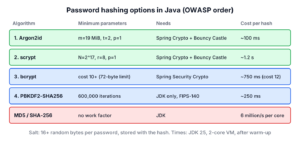
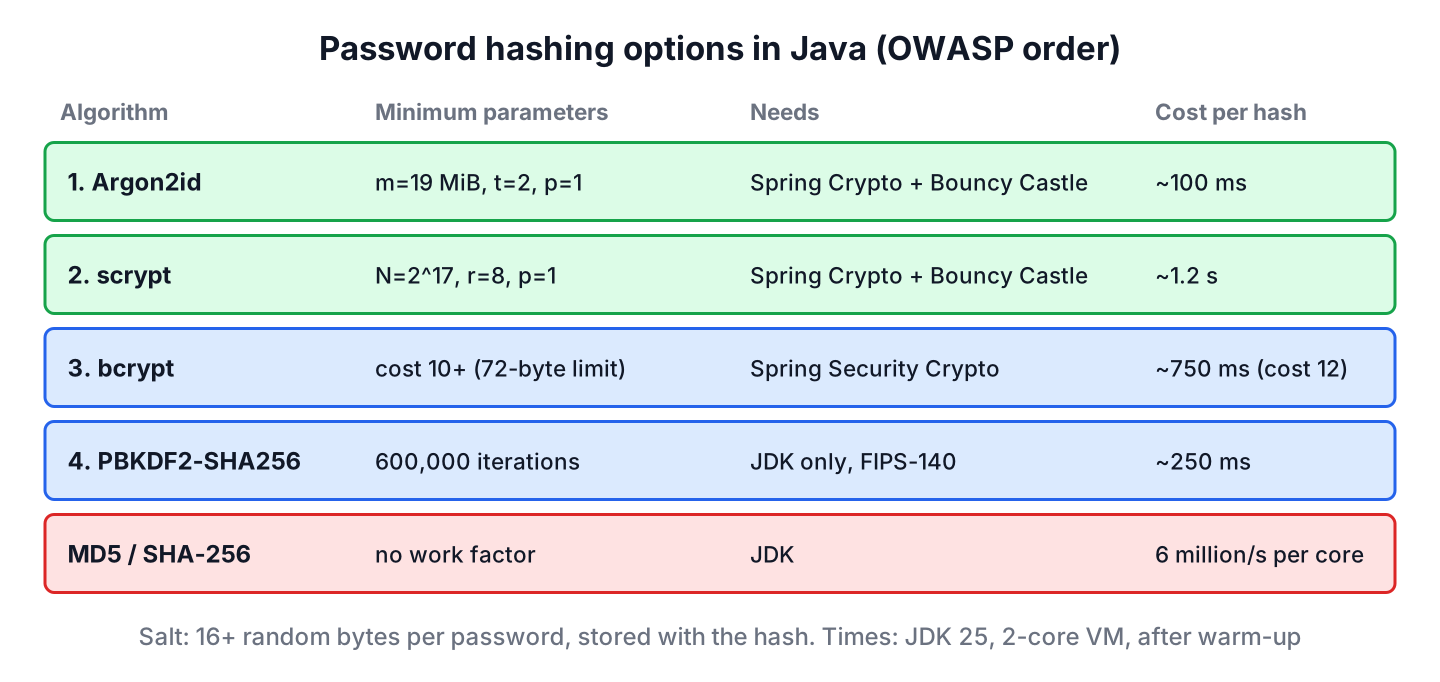
All four algorithms are acceptable when they run with current parameters. The choice depends mostly on compliance rules and on the dependencies a project accepts. The parameters in the table are the OWASP minimums as of 2026, and the times come from our 2-core VM.
| Algorithm | Minimum parameters | Needs | Time per hash | Pick it when |
|---|---|---|---|---|
| Argon2id | m=19 MiB, t=2, p=1 | Spring Security Crypto, Bouncy Castle | ~100 ms | Default for new apps |
| scrypt | N=217, r=8, p=1 | Spring Security Crypto, Bouncy Castle | ~1.2 s | Argon2 is not available |
| bcrypt | cost 10 or more | Spring Security Crypto | ~750 ms at cost 12 | Existing bcrypt data or frameworks |
| PBKDF2-HMAC-SHA256 | 600,000 iterations | JDK only | ~250 ms | FIPS-140 rules or no dependencies |
| MD5, SHA-1, SHA-256, SHA-512 | none | JDK | microseconds | Never for passwords |
In a Spring app, we do not build encoders by hand. A Spring Security password encoder bean, often the delegating encoder from the next section, plugs into the login flow, and the JDBC form login example shows it with a user table.
8. Upgrading Old MD5 or SHA Hashes
Many apps still have users whose passwords were stored as MD5 or salted SHA hashes. We cannot rehash them without the plain passwords, but every successful login gives us the plain password for a moment. Spring’s DelegatingPasswordEncoder uses that moment, because it stores an ID prefix such as {bcrypt} with each hash and reports old formats through upgradeEncoding().
PasswordEncoder encoder = PasswordEncoderFactories.createDelegatingPasswordEncoder();
String legacy = "{MD5}5f4dcc3b5aa765d61d8327deb882cf99";
boolean legacyOk = encoder.matches("password", legacy);       // true
boolean needsUpgrade = encoder.upgradeEncoding(legacy);       // true

String upgraded = encoder.encode("password");                 // "{bcrypt}$2a$10$..."
boolean upgradedOk = encoder.matches("password", upgraded);   // true
boolean stillOld = encoder.upgradeEncoding(upgraded);         // false
After a successful login, the app checks upgradeEncoding() and saves encode(rawPassword) when it returns true. Spring Security does it with a UserDetailsPasswordService. Users who never log in keep their old hash, so a common last step is to force a password reset for those accounts after a few months.
9. Java Password Hashing FAQs
Moving off MD5 or designing a new user table raises the same handful of questions, mostly about reversibility, iteration counts and where the salt goes.
9.1. Can a Password Hash Be Decrypted?
No. A hash is one-way, so there is no key and no decrypt operation. Attackers recover passwords only by guessing and hashing each guess, which is why the hash must be slow. Data that the app must read back, such as an API token, needs AES encryption instead.
9.2. Is SHA-256 With a Salt Enough for Passwords?
No. The salt stops precomputed tables, but SHA-256 stays fast, so every user’s password can still be guessed at millions of attempts per second per core. Use PBKDF2 with 600,000 iterations if SHA-256 is a requirement.
9.3. How Many PBKDF2 Iterations Should I Use?
OWASP recommends 600,000 iterations for PBKDF2WithHmacSHA256, 220,000 for HMAC-SHA512 and 1,400,000 for the legacy HMAC-SHA1 variant. Store the count with each hash, as hash() does, so we can raise it later.
9.4. Where Should I Store the Salt?
Next to the hash, in the same column or row. The salt is not a secret; its job is to make each hash unique. Only a pepper is kept apart from the database.
9.5. Should I Use bcrypt or Argon2?
Argon2id for new systems, because it is memory-hard and its costs can be tuned separately. bcrypt with cost 10 or more is still acceptable, has no extra dependency on Bouncy Castle and is the default of the Spring delegating encoder.
9.6. Why Does My Login Take Almost a Second?
The work factor is doing its job. A delay of several hundred milliseconds is normal for an interactive login, so we lower the cost only if the server cannot handle the peak login rate, and never below the OWASP minimums.
10. Conclusion
Password hashing in Java means a slow, salted, one-way function with parameters that we can raise over time. PBKDF2 with 600,000 iterations works with the JDK alone, while Spring Security Crypto gives us bcrypt, scrypt and Argon2id behind one PasswordEncoder interface.
MD5, SHA-1 and SHA-256 are fine for checksums but not for passwords, whatever the hash length or salt. For existing data, a delegating encoder upgrades each user to the current algorithm at the next login.
11. References
- OWASP Password Storage Cheat Sheet
- SecretKeyFactory Javadoc (Java 25)
- Spring Security Password Storage
- RFC 9106 Argon2
- RFC 8018 PKCS #5 (PBKDF2)
- NIST SP 800-63B Authentication Guidelines
Happy Learning !!

If you want to use Argon2 I used Password4j for my company and what is interesting is that can help to choose the algorithm’s configuration depending on desired security level and business requirements (fast login).
Thanks for your tutorial.
How to reverse the process with PBKDF2WithHmacSHA1 and salt?
Not possible
private String hashPassword(String password) {
try {
byte[] salt = new byte[32];
SecretKeyFactory secretKeyFactory = SecretKeyFactory.getInstance(“PBKDF2WithHmacSHA1”);
PBEKeySpec pbeKeySpec = new PBEKeySpec(password.toCharArray(), salt, 10000, 512);
SecretKey secretKey = secretKeyFactory.generateSecret(pbeKeySpec);
return new String(secretKey.getEncoded());
} catch (NoSuchAlgorithmException exp) {
throw new RuntimeException(exp);
} catch (InvalidKeySpecException exp){
throw new RuntimeException(exp);
}
}
For the above code , JDK6 and JDK8 producing different results. Results are not matching, we are in migration from JDK6 to JDK8. Password already been used by multiple users, when we migrated to JDK8 users are not able to authenticate because of above code producing different results.
Right, so I’ve managed to hash my passwords and insert them into my database. But now how will I read from the database and allow users to login? Any help would be greatly appreciated!
Kind Regards,
Martin
you hmac/bcrypt/scrypt the type password and compare to the one in the db.
hi i have a proble like Mohammed Nadeem but i don’t know how it works for him.
please help. always validatePassword return false.
try{ con = DriverManager.getConnection(url,user,password); String query = "select * from user where ID=?"; pst = con.prepareStatement(query); pst.setString(1, id.getText()); rs = pst.executeQuery(); while(rs.next()){ if(id.getText().equals(rs.getString("ID")) && validatePassword(pass.getText(),rs.getString("Pass"))){ Login... } else{ Login Failed! } }catch(SQLException m){ m.printStackTrace(); } }Hey there, I got a quick question:
I have removed the iterations from the output (1000:) and I use
instead in the validatePassword method. Now I am wondering if it is safe to store the salt and the hashed password with the colon (:) or together in an sql database. If I do store them together, then I will always need to split them whenever validating, so that would mean I need to split after 16th byte, or after 32th character to get my salt. What do you suggest?
MD5 has been utilized in a wide variety of cryptographic applications, and is also commonly used to verify data integrity. It is widely used in java , Thanks for sharing.
currently, md5 is not considered secure anymore. sha and bcrypt are the ways to go see https://security.stackexchange.com/questions/19906/is-md5-considered-insecure
Instead of using validatePassword() method, I want to decrypted method for getting the original password , incase of forgot password option,,can any one get this method for me please.
It is not possible in above discussed techniques because You’re HASHING, not ENCRYPTING!
The difference is that hashing is a one way function, where encryption is a two-way function.
Awesome post
PBKDF2 can be also used to generate a salt to use in SHA functions, making the output of the PBKDF2 public.
The salt need to be public, and secret key private.
And HMAC is better to check integrity and authenticity, no to hash passwords. Am i right bro?
Hi,
Excellent post. I want to use PBKDF2 when generating password hash. When i used “PBKDF2” algorithm as “PBKDF2WithHmacSHA1“ you wrote, i generate password with PBKDF2 but when i validated it for the same password i get false respond. Why i get false respond , i should take true respond. Do you now why i took false respond.
Thank you!!
Seda,
I think you need to store the salt generated in the first time. When you validates password, use the same salt.
Amazing Article, I just have one question, is there a point in adding salt to BCrypt or SCrypt?
Of course, salt always adds some random to the algorithms, preventing dictionary attacks.
Thanks for sharing.
private static String getSalt() throws NoSuchAlgorithmException
{
SecureRandom sr = SecureRandom.getInstance(“SHA1PRNG”);
byte[] salt = new byte[16];
sr.nextBytes(salt);
return salt.toString(); // maybe there is some error here
}
The getSalt() always gives you a new random salt. You should store this once and then use it while validating!
Hi
Thanks for your Post I successfully implements the BCrypt Hashing and store in database but when we fetched it from database and compare it will give an error “Password not Match” or not be able to login successfully.
How to overcome with that problem?
I have written password matching code as well. Are you doing something different?
No i did not . I run that password matching code well but i got the error when I fetched it from database.
Can you please print generated password, and from database and see if they are generated differently. If yes, then please post the code you are using.
String user_name=request.getParameter("userName"); String originalPassword=request.getParameter("password"); String generatedSecuredPasswordHash = BCrypt.hashpw(originalPassword, BCrypt.gensalt(12)); System.out.println(generatedSecuredPasswordHash); try{ con=DBUtility.getConnection(); stmt=con.prepareStatement("select * from login where userName=? and Password=?"); stmt.setString(1, user_name); stmt.setString(2,generatedSecuredPasswordHash ); rs=stmt.executeQuery(); while(rs.next()){ un=rs.getString("UserName"); pwd=rs.getString("Password"); } if(user_name.equals(un) && BCrypt.checkpw(originalPassword, pwd)){ session.setAttribute("check", user_name); response.sendRedirect("Success.jsp"); }else{ System.out.print("Login Error"); } }catch(SQLException ex){ ex.printStackTrace(); } }Hi, I have the same problem. I would like to know how you solved it. Thank you
Where is my posted code you didnot reply for that ?
its horrible ?
Not sure what do mean by ‘horrible’ here.
Can you please execute query only on username i.e. “select * from login where userName=?” and then compare generated password and password fetched from database. Also print them in logs to compare yourself. Also verify column size of password column.
Hi Lokesh
Thanks its working Great..
The Word Horrible we used is for my coding not for your content.
Thanks Alot..
hi i have the same problem like Mohammed Nadeem but i don’t know how it works for him.
please help always false even if it is true.
try{ con = DriverManager.getConnection(url,user,password); String query = "select * from user where ID=?"; pst = con.prepareStatement(query); pst.setString(1, id.getText()); rs = pst.executeQuery(); while(rs.next()){ if(id.getText().equals(rs.getString("ID")) && validatePassword(pass.getText(),rs.getString("Pass"))){ Login... } else{ Login Failed! } }catch(SQLException m){ m.printStackTrace(); } }public static int check_user(String user_name, String password)
{
ArrayList arr = get_users();
int x=1;
for(int i=0; i< arr.size();i++)
{
if (arr.get(i).getUser_name().equals(user_name.toLowerCase()))
{
if(arr.get(i).getPassword().equals(password))
{
x=1;
break; // True login
}
else
{
x=2; // False password
break;
}
}
else
{
x=0; // False username
}
}
return x;
}
Your post is very helpful is but you have a SERIOUS BUG in your implementation, (which was already pointed some comments above)
1) Your getSalt() method returns “salt.toString()”. This will return the hashcode of the byte-Array not the string representation, so it will always return something like “[B@1ce56f8”. In other words your current getSalt() implementation makes nothing else than “new Object().hashCode()”
This is the main serious bug.
2) Generally converting a random byte array to String is not the right idea. Some byte sequences can’t be converted to a valid utf8 text.
This is a minor bug.
My advice: use the salt as byte[]. If you don’t want to handle a byte array, convert it to a long (e.g. using ByteBuffer). If you really need a string , convert the salt to a hex representation of the byte sequence.
Thanks for your thoughts. I agree. Will update soon.
Also , what would be size of key length below line return, what I Understand the key length we are passing is 64*8 = 512, but the password length it it return after hashing is 128.
PBEKeySpec spec = new PBEKeySpec(chars, salt, iterations, 64 * 8);
Can you please explain how it is determining key length.
Can any one explain why we are using fromHex and toHex method.
I also confuse why should we use fromHex and toHex method? is it necessary?
I’m curious about why validatePassword method, why not just hash the new pw with the same salt and see if the answer is the same? Is there a reason to do it the way you’re doing it (it just seems a little more complicated)?
validatePassword()method does exactly he same thing. You can choose to do it differently .. may be compare using database query.. but the logic remains the same : hash the new password with the same salt and compare with stored password.Hello Lokesh,
Great article. My question if you store the string from generateStrongPasswordHash which contains the PBKDF2 work factor and salt in the string does this make the algorithm weak again in the sense the hacker would know both the salt and the work factor?
Thanks,
Lloyd
Work factor is for delaying the computation speed.. even if hacker know it’s value.. he can’t manipulate the execution speed in runtime.
Salt also will not help in guessing the password. How it can?
Why there is no date for the article? I can see it’s in the URL, and from the comments I could have guessed, but why is there no date to clearly show at what time this was written? Computer science is moving fast enough, that stuff that was written 2 years ago, might not be true today.
Date is in fact part of URL. Check again.
I want to encrypt zip file that i generated. inside the zip file I have files.
So I want to encrypt the zip file. Its my first time to work with encryption. I did my own research, I seem to understand but not clearly on how it works.
Can anyone help with a clear example, and good way of encrypting, please explain to me. And how do I implement it.
Example of encrypting a zip file will be a good one.
Your help will be appreciated.
Thanks in advanced
I will recommend to go with a proper library to do this job e.g. zip4j. A sample program is given here : SO link.
Lokesh Thanks, But I tried that one, it leave a file that is corrupt. I cant access it to see if its encrypted or not.
I tried to open the file using double click, and it was format error as you said. But when I tried 7-zip software, it asked for password and accepted correct password also. Let me try few things.
I tried with
in place of
And it worked like charm. Have you tried it?
This one also seems good. https://code.google.com/archive/p/winzipaes/
Lokesh, its work as a charm after I replace the parameters.setEncryptionMethod(Zip4jConstants.ENC_METHOD_AES);
with
parameters.setEncryptionMethod(Zip4jConstants.ENC_METHOD_STANDARD);
Thanks a lot, but now in my case. I generate two files in my app on android. The format of the files are .txt and .mp4, i than zip them together. Which happens successfully. Now I want to encrypt the zip file to another extension (.ecz) and put a password to it. So I will be having the zip file, which is not encrypted and the encrypted file which is the one I need. Zip file and the two files, I will delete them. I will be left with encrypted file with this extension .ecz
I will be happy if you help me accomplish this, i battle this for three days now.
I will try to find time for it.
I will be happy if you help me on this one Lokesh.
i need a java program for generating HMAC values for sha-1 results ,can you send me?thanks
I will work on it.
Thanks for a great tutorial.
I wanna send encrypted to image to server(android).Now please can you help me out how can i achieve this???
Perfectly simple and clear
Hi,
In the function specified to get salt.
private static String getSalt() throws NoSuchAlgorithmException
{
SecureRandom sr = SecureRandom.getInstance(“SHA1PRNG”);
byte[] salt = new byte[16];
sr.nextBytes(salt);
return salt.toString();
}
You are generating the salt by using “SHA1PRNG” but while returning you are sending the hashcode of salt. So all the efforts made to generate the secure random salt is ruined.
Instead construct new string from the salt and return.
private static String getSalt() throws NoSuchAlgorithmException
{
SecureRandom sr = SecureRandom.getInstance(“SHA1PRNG”);
byte[] salt = new byte[16];
sr.nextBytes(salt);
return new String(salt);
}
Hi Lokesh,
I have gone thru one of the website which discourage use of “SHA1-PRNG” Algo. for using Random Generator.
Please have a look
Himansu, the only reason I found on quick google search is “sha1prng” is slightly slower than native algorithms like ‘Windows-PRNG’ on windows and ‘NativePRNG’ in linux. No where I could find any bench-mark data about their performances.
So my take is that you can go with sha1prng as long as you do not hit any performance roadblock, specifically due to random generator. In all normal real life scenarios, sha1prng is more than enough.
Great post! One question though. If I wanted to display the hashed password as a String to the user, how would I get that value if I am using JUST the hashed password from a database? I am using the advanced technique to store a password
I have not mis-understood your question then you need to fetch the password from database, just like you fetch any other field. I really doubt what you mean by “hashed password as a String”? Isn’t hashed password a string itself?
I am sorry I should be more clear. I have an administrative user and a student user. I would like the administrator to have access to all of the student’s original passwords. So when I query my database, how can I decode the hashed password back to the original, plain text password for the admin to view? After reading some other comments, I see that it is impossible to get the original password after using the advanced hash function that you provided. Can you suggest a way around this?
No, using functions in this post, u cannot get back the original password.
How to validate entered password with securePassword SHA-512?
Please re-read the third para in starting “Note: Please remember that once this password hash is generated and stored in database, you can not convert it back to original password. Each time user login into application, you have to regenerate password hash again, and match with hash stored in database.”
Thank you! I understand it! But, hash each time is the different for the same strings. So, hashes of stored and input strings constantly would be different, even strings are the same. Maybe, it is because of using salt. So this code will not work correctly.
String passwordToHash = "password";

String salt = getSalt();

String securePassword = get_SHA_1_SecurePassword(passwordToHash, salt);
String passwordEntered = "password";
String salt2 = getSalt();
String securePasswordEntered = get_SHA_1_SecurePassword(passwordEntered, salt2);
securePasswordEntered.equals(securePassword);
Another similar note is written in “Making MD5 more secure using salt” section:
Please note that now you have to store this salt value for every password you hash. Because when user login back in system, you must use only originally generated salt to again create the hash to match with stored hash. If a different salt is used (we are generating random salt), then generated hash will be different.
Thanks a lot!!
Well explained..
Hi in the article about Md5 and generating salts
shouldn’t you use
new String(salt, “UTF-8”);
rather than
return salt.toString();
Any particular reason?
It will make you use the hash code of byte array ‘object’ rather than the generated random byte values themselves.
More precisely, it is getClass().getName() + ‘@’ + Integer.toHexString(hashCode()).
I think your getSalt() should be revised like below.
    private static byte[] getSalt() throws NoSuchAlgorithmException

    {

        SecureRandom sr = SecureRandom.getInstance("SHA1PRNG");

        byte[] salt = new byte[16];

        sr.nextBytes(salt);

        return salt;

    }
It looks SecureRandom.getInstance(“SHA1PRNG”) returns a new instance of SecureRandom every time you call it. Just wonder, if it is a good approach to create a new SecureRandom everytime we need a salt??
Not sure if there is any secured ThreadLocalSecuredRandom? Just puzzled about making it singleton or thread local…
Hi, If I would be using SHA 256
will i need to change something here in the getSalt()? like change the SHA1PRNG to SHA256PRNG? and the byte size? or Is it okay to use this on SHA 256 w/o changing anything
//Add salt
private static String getSalt() throws NoSuchAlgorithmException
{
SecureRandom sr = SecureRandom.getInstance(“SHA1PRNG”);
byte[] salt = new byte[16];
sr.nextBytes(salt);
return salt.toString();
}
MessageDigest digest = MessageDigest.getInstance(“SHA-256”);
Above is enough. SecureRandom support only SHA1PRNG algo. No change needed here:
https://docs.oracle.com/javase/7/docs/technotes/guides/security/StandardNames.html#SecureRandom
Hi Lokesh,
Thanks for the reply, got it work but somehow I cannot make it to work with jboss login module with these options
Do you have any suggestion to make it work with it?
On vacation for next 3 days. Let me know if still have something I have work on. May be by tuesday.
A comment about your PBKDF2WithHmacSHA1 solution:
private static String generateStorngPasswordHash(String password) throws NoSuchAlgorithmException, InvalidKeySpecException
{
int iterations = 1000;
char[] chars = password.toCharArray();
byte[] salt = getSalt().getBytes();
PBEKeySpec spec = new PBEKeySpec(chars, salt, iterations, 64 * 8);
SecretKeyFactory skf = SecretKeyFactory.getInstance(“PBKDF2WithHmacSHA1”);
byte[] hash = skf.generateSecret(spec).getEncoded();
return iterations + “:” + toHex(salt) + “:” + toHex(hash);
}
private static String getSalt() throws NoSuchAlgorithmException
{
SecureRandom sr = SecureRandom.getInstance(“SHA1PRNG”);
byte[] salt = new byte[16];
sr.nextBytes(salt);
return salt.toString();
}
You could just return salt without converting it to String in
return salt.toString();
and then converting it back to byte array here:
byte[] salt = getSalt().getBytes();
By just using
return salt;
in getSalt(), and then:
byte[] salt = getSalt();
in generateStorngPasswordHash().
Yes, it also can be done.
Also
PBEKeySpec spec = new PBEKeySpec(chars, salt, iterations, 64 * 8);
would be better as
KeySpec spec = new PBEKeySpec(chars, salt, iterations, 64 * 8);
Awesome article by the way! I am using it right now for an app and it’s clear, well explained and easy to follow!
I am glad to hear that it is making someone’s work a bit easier.
Great post.
Got question, SCryptUtil.scrypt(originalPassword, 16, 16, 16);
what this numbers actually do?
thanks!
I don’t like the implementation of the getSalt function. You convert the byte array to string (which does not make any sense at all, as a random variable will not have any sensible string representation), to convert the value back to byte array in the next step. More to it, you create an object with cryptographic data in memory you will not be able to override (because of immutability). This might be acceptable in this example, but it is a very bad idea in crypto. No FIPS 140-2 for you. ;)
Useful
Excelente Post, very ilustrative
Thanks for your explication
Comment from Lima Peru.
WOW!! that one with the PBKDF2 algorithm is so neat :D
Nice post!! I’ll translate it to Chinese.
Hi Pradeep,
Nice article bro.