
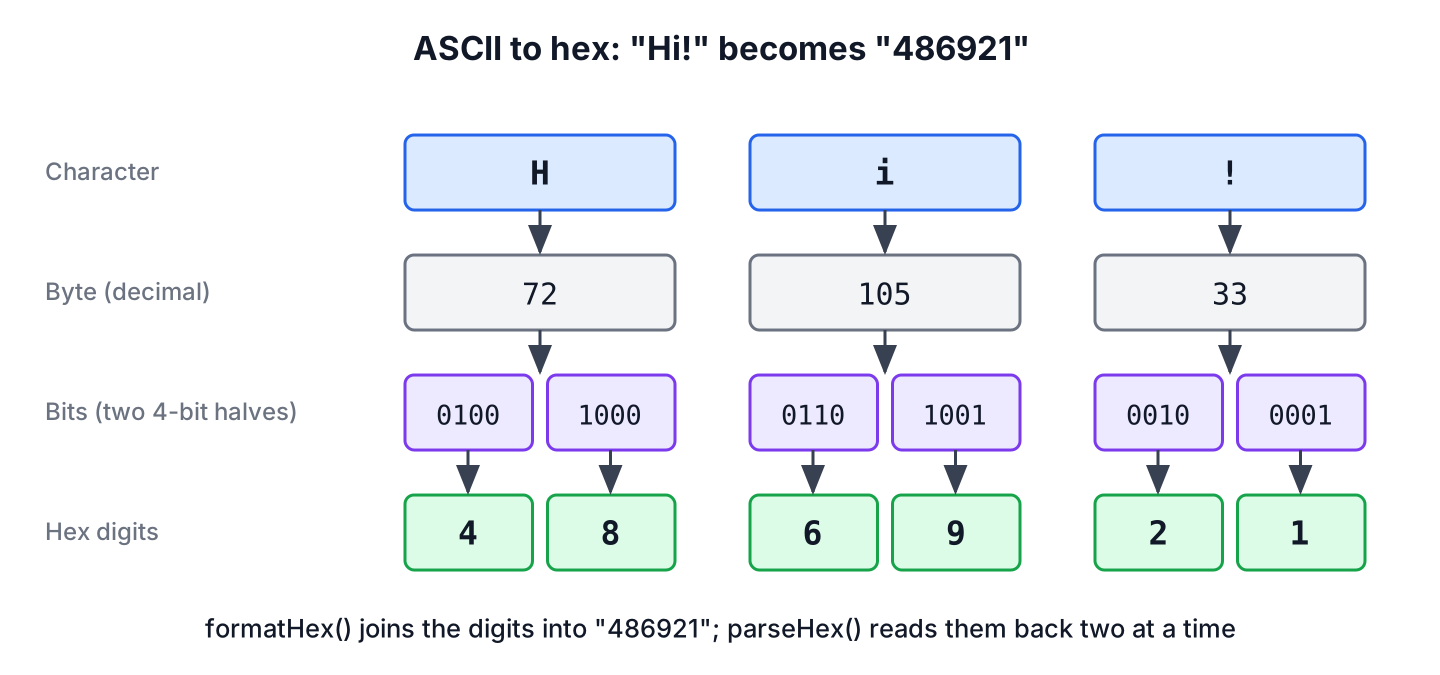
To convert hex to ASCII in Java, we read every pair of hex digits as one byte and decode the bytes as US-ASCII text, and ASCII to hex goes the other way, writing each character’s byte value as two hex digits. Since Java 17, the HexFormat class does both steps in one call.
We need hex to ASCII conversion when a device, a protocol or a log file gives us bytes as hex text, for example a payload from a sensor, a packet capture or a hex dump in a support ticket. The reverse direction helps when we debug what our code sends, because hex shows invisible characters such as tabs and line breaks.
The following example converts the text Hi! to hex and back with HexFormat.
HexFormat hex = HexFormat.of();
String encoded = hex.formatHex("Hi!".getBytes(StandardCharsets.US_ASCII));        // "486921"
String decoded = new String(hex.parseHex("486921"), StandardCharsets.US_ASCII);   // "Hi!"
Each character becomes two hex digits, so the hex string is always twice as long as the ASCII text. We look at how the mapping works, the HexFormat options, a manual version for Java 8 to 16, the classic padding bug, input validation and text that is not ASCII.
1. How ASCII Characters Map to Hex Digits
ASCII assigns a number from 0 to 127 to each character, such as 72 for H and 105 for i. One byte holds that number, and one hex digit stands for 4 bits, so two hex digits describe one byte. For example, 72 is 0100 1000 in binary, which is 48 in hex.
A few values are worth knowing by heart, because they show up in every hex dump. Digits start at hex 30, uppercase letters at 41, lowercase letters at 61, and the control characters below hex 20 are invisible in normal output.
| Character | Decimal | Hex | Note |
|---|---|---|---|
| 0 to 9 | 48 to 57 | 30 to 39 | Digit characters, not the numbers 0 to 9 |
| A to Z | 65 to 90 | 41 to 5a | Uppercase letters |
| a to z | 97 to 122 | 61 to 7a | Lowercase letters, uppercase plus hex 20 |
| Space | 32 | 20 | Shows up between words in a hex dump |
| Tab, line feed, carriage return | 9, 10, 13 | 09, 0a, 0d | Control characters, invisible in a console |
2. ASCII to Hex With HexFormat
The HexFormat.of() factory returns a formatter that writes lowercase hex without separators. The method formatHex(byte[]) takes bytes and not a String, so we first turn the text into bytes with getBytes(StandardCharsets.US_ASCII), and that call decides how each character becomes a byte.
byte[] bytes = "Java".getBytes(StandardCharsets.US_ASCII);
String plain = HexFormat.of().formatHex(bytes);                                // "4a617661"
String upper = HexFormat.of().withUpperCase().formatHex(bytes);                // "4A617661"
String spaced = HexFormat.ofDelimiter(" ").formatHex(bytes);                   // "4a 61 76 61"
String listed = HexFormat.ofDelimiter(", ").withPrefix("0x").formatHex(bytes); // "0x4a, 0x61, 0x76, 0x61"
String single = HexFormat.of().toHexDigits((byte) 'J');                        // "4a"
A HexFormat object is immutable and thread-safe, so we can keep one in a static final field and reuse it. The methods withUpperCase(), withPrefix() and withSuffix() return a new formatter and leave the original unchanged.
3. Hex to ASCII With HexFormat
The method parseHex(CharSequence) reads the hex digits back into a byte[], and the String constructor decodes those bytes with the charset we pass. It accepts uppercase and lowercase digits, and a formatter created with ofDelimiter() expects the same delimiter between the pairs.
HexFormat hex = HexFormat.of();
String word = new String(hex.parseHex("4A617661"), StandardCharsets.US_ASCII);    // "Java"
byte[] dump = HexFormat.ofDelimiter(" ").parseHex("4f 4b");
String spaced = new String(dump, StandardCharsets.US_ASCII);                       // "OK"
char letter = (char) HexFormat.fromHexDigits("4a");                                // J
The parseHex() method throws an IllegalArgumentException either for an odd number of digits or, as its subclass NumberFormatException, for a character that is not a hex digit. Hex text often comes from outside our app, so we validate it first or catch the exception.
byte[] odd = HexFormat.of().parseHex("4a6");     // IllegalArgumentException: string length not even: 3
byte[] bad = HexFormat.of().parseHex("4g");      // NumberFormatException: not a hexadecimal digit
A small helper returns an empty Optional instead of failing, and HexFormat.isHexDigit() checks each character. We also strip surrounding whitespace, because copied hex often ends with a line break.
static Optional<String> hexToAscii(String hex) {
    String clean = hex.strip();
    if (clean.length() % 2 != 0 || !clean.chars().allMatch(HexFormat::isHexDigit)) {
        return Optional.empty();
    }
    byte[] bytes = HexFormat.of().parseHex(clean);
    return Optional.of(new String(bytes, StandardCharsets.US_ASCII));
}
Optional<String> ok = hexToAscii(" 4f4b\n"); // Optional[OK]
Optional<String> odd = hexToAscii("4f4"); // Optional.empty
Optional<String> bad = hexToAscii("zz"); // Optional.empty4. Manual Conversion for Java 8 to 16
Before Java 17, the JDK had no hex formatter for byte arrays, so most projects wrote a loop or used Apache Commons Codec. A loop is also a common interview task. Our loop converts each character to two hex digits with Character.forDigit(), and it parses each pair with Integer.parseInt(CharSequence, int, int, int) (Java 9) to avoid a substring() per pair.
static String asciiToHex(String text) {
    StringBuilder hex = new StringBuilder(text.length() * 2);
    for (char c : text.toCharArray()) {
        if (c > 127) {
            throw new IllegalArgumentException("Not an ASCII character: " + c);
        }
        hex.append(Character.forDigit(c >> 4, 16))
           .append(Character.forDigit(c & 0xF, 16));
    }
    return hex.toString();
}
static String hexToAsciiManual(String hex) {
if (hex.length() % 2 != 0) {
throw new IllegalArgumentException("Odd number of hex digits: " + hex.length());
}
StringBuilder text = new StringBuilder(hex.length() / 2);
for (int i = 0; i < hex.length(); i += 2) {
text.append((char) Integer.parseInt(hex, i, i + 2, 16));
}
return text.toString();
}String encoded = asciiToHex("Tab\there"); // "5461620968657265"
boolean roundTrip = hexToAsciiManual(encoded).equals("Tab\there"); // true
String broken = hexToAsciiManual("4a6"); // IllegalArgumentException: Odd number of hex digits: 3On Java 8, the call Integer.parseInt(hex.substring(i, i + 2), 16) does the same as the Java 9 overload. The expression c >> 4 takes the upper 4 bits of the character and c & 0xF the lower 4 bits, which matches the diagram in section 1.
5. The Missing Leading Zero Bug
Many examples on the web build the hex string with Integer.toHexString(). That method writes no leading zeros, so a character below hex 10, such as a tab (9) or a line feed (hex a), produces one digit instead of two. The result looks fine for letters and digits and breaks as soon as the text contains a control character.
static String toHexNaive(String text) {
    StringBuilder hex = new StringBuilder();
    for (char c : text.toCharArray()) {
        hex.append(Integer.toHexString(c));
    }
    return hex.toString();
}
String letters = toHexNaive("OK"); // "4f4b"
String withTab = toHexNaive("A\tB"); // "41942"
String padded = String.format("%02x", (int) '\t'); // "09"The string 41942 has five digits, so the pair-by-pair decoder either rejects it or reads the wrong characters. The format pattern %02x pads every value to two digits, and HexFormat always writes two digits per byte, so neither has the bug. The same problem appears with new BigInteger(1, bytes).toString(16), which drops the leading zeros of the first byte.
6. Converting Text That Is Not ASCII
ASCII covers only 128 characters, while a Java String holds any Unicode text. The charset we pass to getBytes() decides what happens to a character such as the accented e in the word cafe written with \u00e9, and the reader of our hex must use the same charset.
String word = "caf\u00e9";
String utf8 = HexFormat.of().formatHex(word.getBytes(StandardCharsets.UTF_8));      // "636166c3a9"
String ascii = HexFormat.of().formatHex(word.getBytes(StandardCharsets.US_ASCII));  // "6361663f"
String chars = toHexNaive(word);                                                    // "636166e9"
String back = new String(HexFormat.of().parseHex("636166c3a9"), StandardCharsets.UTF_8);
boolean same = back.equals(word);                                                   // true
In UTF-8, the accented letter takes two bytes, c3 and a9. With US-ASCII, Java replaces it with a question mark (hex 3f), so the information is lost. The char loop writes the UTF-16 code e9, which no byte-based decoder reads back correctly. We use UTF-8 for any text that can contain names, addresses or symbols, and US-ASCII only for protocols that allow nothing else. Our post on reading and writing UTF-8 files covers the same charset rules for files.
7. Real-World Example With a Sensor Payload
A greenhouse controller receives readings from a temperature sensor over a serial line, and the vendor library hands each message over as a hex string with spaces between the bytes. The app decodes the message, splits it at the equals sign and stores the number.
String payload = "54 45 4d 50 3d 32 31 2e 35";
byte[] bytes = HexFormat.ofDelimiter(" ").parseHex(payload);
String message = new String(bytes, StandardCharsets.US_ASCII);     // "TEMP=21.5"
double celsius = Double.parseDouble(message.split("=")[1]);         // 21.5
When a message looks wrong in the logs, we print the raw bytes with HexFormat.ofDelimiter(” “) instead of the decoded text. A stray carriage return shows up as 0d in the hex, while the decoded String hides it.
8. Choosing a Hex Conversion Approach
All the approaches produce the same output for plain letters and digits, and they differ in padding, charset handling and the Java version they need. For new code on Java 17 or later, HexFormat is the shortest correct choice.
| Approach | Java version | Pads to two digits | Notes |
|---|---|---|---|
| HexFormat.of().formatHex() / parseHex() | 17+ | Yes | Delimiters, prefix, uppercase, validation built in |
| Loop with Character.forDigit() | Any | Yes | No dependency, good for interviews |
| Loop with String.format(“%02x”) | Any | Yes | Short, slower for large data |
| Loop with Integer.toHexString() | Any | No | Breaks for values below hex 10 |
| new BigInteger(1, bytes).toString(16) | Any | No | Drops leading zeros of the first byte |
| Apache Commons Codec Hex.encodeHexString() | Any | Yes | Third-party dependency |
The same digits also describe numbers rather than text. For converting a number such as 255 to ff and back, the post on binary, octal and hex conversions covers Integer.parseInt() with a radix, and decimal and hexadecimal conversion focuses on that pair alone.
9. Hex and ASCII Conversion FAQs
Hex strings from other systems rarely decode on the first try, and each answer handles one typical problem.
9.1. How do we convert a hex string to a byte array?
We call HexFormat.of().parseHex(hex) on Java 17 or later. It returns the bytes without decoding them as text, which is what we need for binary data such as hashes or keys.
9.2. How do we convert one hex value to a char?
We parse the two digits and cast the result, either with (char) HexFormat.fromHexDigits(“41”) or with (char) Integer.parseInt(“41”, 16). Both return the character A.
9.3. Should hex output be uppercase or lowercase?
Both are valid, and every decoder in the JDK accepts either. HexFormat writes lowercase by default, and withUpperCase() switches to uppercase when a protocol or a test fixture expects it.
9.4. Why does decoding print strange characters?
The hex most likely holds bytes in a different charset, such as UTF-8, or binary data that is not text at all. We decode with the charset the sender used, and we print binary data as hex instead of as a String.
10. Conclusion
Hex to ASCII conversion works on bytes, two hex digits per byte. On Java 17 and later, HexFormat handles both directions, writes two digits for every byte and rejects odd-length or invalid input with an IllegalArgumentException.
On older versions, a loop with Character.forDigit() or %02x gives the same result, while Integer.toHexString() drops the leading zero and breaks round trips. We pick the charset on purpose, US-ASCII for strict protocols and UTF-8 for real text. More string and number tasks are collected in the Java tutorial.
11. References
Happy Learning !!

i want to convert string to short[] in java any answer.
ex: short[] data = { 0x6162,0x6364};
abcd output
I have tried the above code in my example but the problem is when converting back to hex from ASCII few of the characters were skipped.
String bitmapString = “B0308101400080000000000004000020”;
System.out.println(“bitmapString := “+bitmapString);
String asciiValue = hexToASCII(bitmapString);
System.out.println(“ASCII value := “+asciiValue);
System.out.println(“Orginal bitMap value := “+asciiToHex(asciiValue));
o/p : B0308101400080000000000004000020 converted as b030811400800000040020
Appreciate your help here !!
I hope you are passing the right arguments to right methods.
Because i tried with your value its working fine for me