
Java Hashtable is a legacy hash table class from Java 1.0 that maps non-null keys to non-null values and synchronizes every public method. It is not deprecated and still works, but its own Javadoc recommends HashMap for single-threaded code and ConcurrentHashMap for code that shares the map between threads.
We meet Hashtable in old code bases and in a few JDK APIs that predate the Collections Framework, such as java.util.Properties, which still extends Hashtable. Knowing how it behaves helps us read that code and replace it safely.
The following example uses a Hashtable and shows the two classes that replace it.
Hashtable<String, Integer> legacy = new Hashtable<>();
legacy.put("visits", 10);
Integer visits = legacy.get("visits");                                // 10
Integer missing = legacy.put("clicks", null);                         // NullPointerException
Map<String, Integer> local = new HashMap<>(legacy);                   // single-threaded replacement
ConcurrentMap<String, Integer> shared = new ConcurrentHashMap<>(legacy); // replacement for shared state
shared.merge("visits", 1, Integer::sum);
Integer updated = shared.get("visits");                               // 11
Notice that a null value fails at once. We look at why Hashtable is considered legacy, how it stores entries, why its synchronization does not make our code thread-safe, and how it differs from HashMap, and we finish with a migration table.
1. Why Hashtable Is a Legacy Class
Java 1.0 shipped Hashtable together with its abstract parent class Dictionary. Java 1.2 introduced the Collections Framework with the Map interface and HashMap, and Hashtable was retrofitted to implement Map so that old code kept working. The Dictionary class is marked obsolete in its Javadoc, while Hashtable is not deprecated, because too much existing code depends on it.
The design choice that makes Hashtable outdated is its locking. Every public method is synchronized on the table object, so only one thread at a time can read or write, and single-threaded code pays for a lock it does not need. For that reason, the JDK recommends HashMap and ConcurrentHashMap instead.
2. How Hashtable Stores Its Entries
A Hashtable keeps an array of buckets. To place a key, it takes the key’s hashCode(), clears the sign bit and computes the remainder modulo the array length. Keys that land in the same bucket form a linked chain of entries, and equals() finds the right one in that chain.
- The default capacity is 11 buckets and the default load factor is 0.75.
- When the number of entries reaches capacity times load factor, the table rehashes into 2n + 1 buckets, so 11 buckets grow to 23, and 23 grow to 47.
- A bucket stays a linked chain however long it gets, whereas HashMap turns long chains into balanced trees since Java 8.
Average get() and put() time is O(1) for both classes. The difference in speed comes from the lock that every Hashtable call takes, not from the hashing.
3. Working With Hashtable in Existing Code
A Hashtable supports all Map methods, plus a few legacy methods from Dictionary. The methods keys() and elements() return an Enumeration, and contains(value) checks the values, not the keys, which surprises many readers of old code.
Hashtable<String, Integer> sessions = new Hashtable<>();
sessions.put("anna", 3);
sessions.put("bob", 1);
Integer annaCount = sessions.get("anna");                  // 3
boolean hasBobKey = sessions.containsKey("bob");           // true
boolean hasValue3 = sessions.contains(3);                  // true, checks values
Integer removed = sessions.remove("bob");                  // 1
Enumeration<String> names = sessions.keys();
String firstName = names.nextElement();                    // "anna"
Integer nullKey = sessions.put(null, 5);                   // NullPointerException
The iteration order of a Hashtable depends on the bucket positions and is not guaranteed, so code that prints a Hashtable must not rely on the order. In our example, only one key is left when we read the Enumeration.
4. Synchronized Methods Do Not Make Compound Actions Safe
A synchronized Hashtable protects each single call, but not a sequence of calls. Code that checks a key and writes a value in two steps can lose updates, because another thread can run between the check and the write. For example, a web app counts page hits from many request threads.
Hashtable<String, Integer> hits = new Hashtable<>();
// not atomic: two threads can both read 7 and both write 8
Integer current = hits.getOrDefault("home", 0);
hits.put("home", current + 1);
Integer homeHits = hits.get("home");                       // 1 in a single thread
Use atomic methods such as merge() or compute() of ConcurrentHashMap for read-modify-write updates, because they update a key in one step. The following example runs 20,000 increments on two threads and never loses one.
ConcurrentHashMap<String, Integer> pageHits = new ConcurrentHashMap<>();
try (ExecutorService pool = Executors.newFixedThreadPool(2)) {
    for (int t = 0; t < 2; t++) {
        pool.submit(() -> {
            for (int i = 0; i < 10_000; i++) {
                pageHits.merge("home", 1, Integer::sum);
            }
        });
    }
}
Integer total = pageHits.get("home");                      // 20000
The ExecutorService is AutoCloseable since Java 19, so the try-with-resources block waits for both tasks before we read the total. A ConcurrentHashMap also lets readers run without blocking each other, which Hashtable cannot do. The article on thread safety explains compound actions in more detail.
5. Iterator vs Enumeration on a Hashtable
A Hashtable offers two ways to walk its keys, and they react differently to changes. The iterators from keySet(), values() and entrySet() are fail-fast and throw ConcurrentModificationException when the table changes after they were created. The Enumeration from keys() and elements() is not fail-fast, so it keeps going and may or may not show the change.
Hashtable<String, Integer> table = new Hashtable<>(Map.of("a", 1, "b", 2));
Iterator<String> iterator = table.keySet().iterator();
table.put("c", 3);
String next = iterator.next();                             // ConcurrentModificationException
Enumeration<String> keys = table.keys();
table.put("d", 4);
boolean more = keys.hasMoreElements();                     // true, no exception
Silent iteration over changing data is a bug source, so the fail-fast Iterator is the safer choice even in legacy code. In new code, a for loop over entrySet() or forEach() replaces both.
6. HashMap vs Hashtable
HashMap and Hashtable store entries in the same kind of bucket array and implement the same Map interface. They differ in locking, null handling, their parent class and a few legacy methods.
| Feature | HashMap | Hashtable |
|---|---|---|
| Introduced | Java 1.2, Collections Framework | Java 1.0, retrofitted to Map in 1.2 |
| Synchronization | None | Every public method is synchronized |
| Null key and values | One null key, any number of null values | NullPointerException for both |
| Parent class | AbstractMap | Dictionary (obsolete) |
| Iteration | Fail-fast iterators | Fail-fast iterators, plus non-fail-fast Enumeration |
| Legacy methods | None | keys(), elements(), contains(), rehash() |
| Long collision chains | Converted to trees (Java 8+) | Stay linked chains |
| Default capacity | 16, always a power of two | 11, grows to 2n + 1 |
| Single-threaded speed | No locking cost | Takes a lock on every call |
Map<String, String> hashMap = new HashMap<>();
hashMap.put(null, "guest");
hashMap.put("theme", null);
int hashMapSize = hashMap.size();                          // 2
Map<String, String> hashtable = new Hashtable<>();
String nullValue = hashtable.put("theme", null);           // NullPointerException
Hashtable rejects null because get() returning null must mean “no mapping”. ConcurrentHashMap follows the same rule for the same reason, so code that moves from Hashtable to ConcurrentHashMap keeps its null behavior, while code that moves to HashMap starts accepting null.
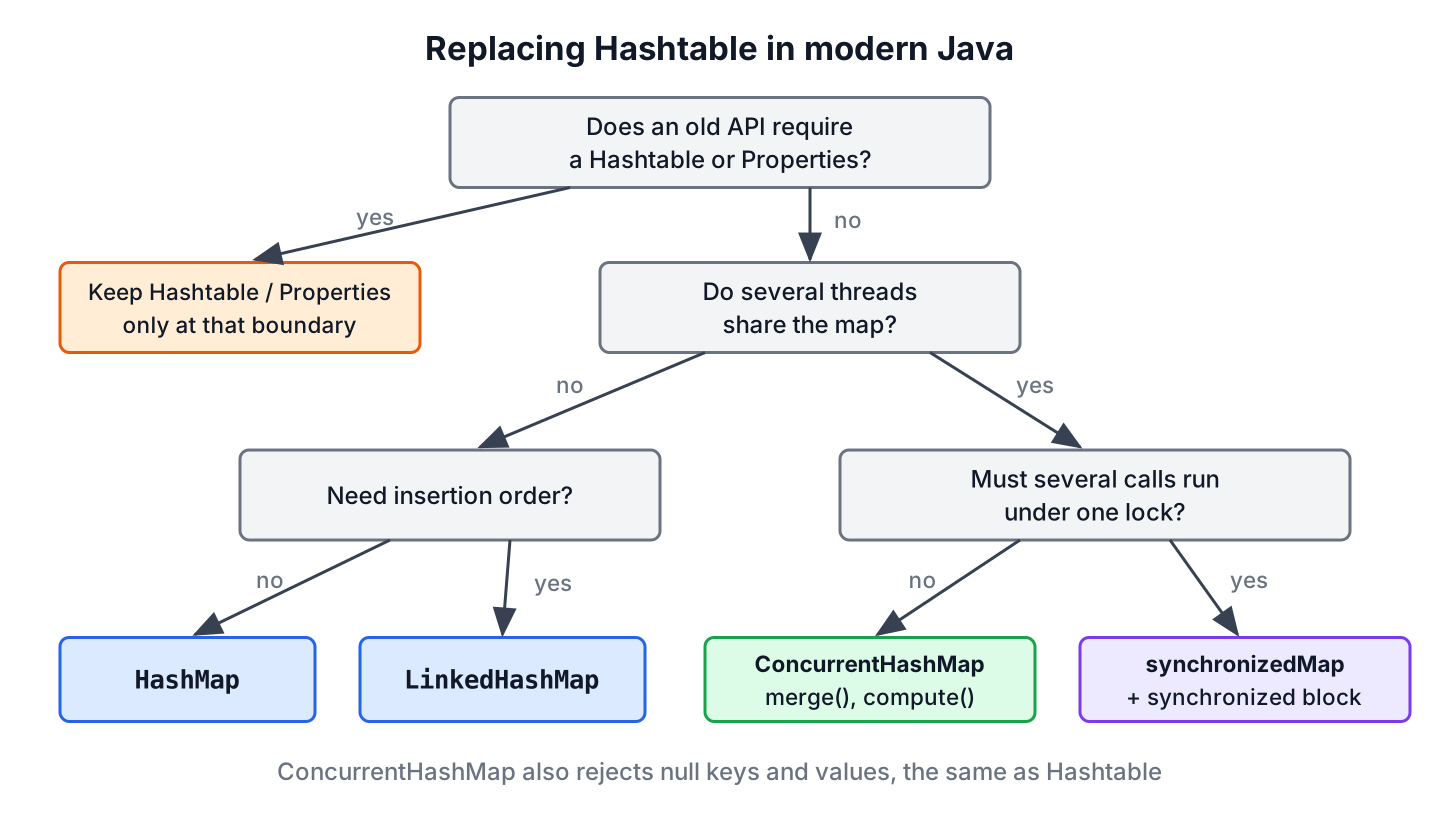
7. Replacing Hashtable in Modern Java
The replacement depends on whether threads share the map and whether the code needs a stable order. The following example is a typical migration of a session registry from a 2005-era service.
ConcurrentMap<String, Integer> registry = new ConcurrentHashMap<>();
registry.put("anna", 3);
registry.putIfAbsent("anna", 9);
Integer anna = registry.get("anna");                       // 3
Set<String> users = registry.keySet();                     // [anna]
boolean hasThree = registry.containsValue(3);              // true
Each legacy call has a direct modern equivalent.
| Hashtable code | Modern replacement |
|---|---|
| new Hashtable<>() used by one thread | new HashMap<>(), or LinkedHashMap for a stable order |
| new Hashtable<>() shared by threads | new ConcurrentHashMap<>() |
| Code that locks the whole table for several calls | Collections.synchronizedMap(new HashMap<>()) with synchronized (map) { … } |
| keys(), elements() | keySet(), values() |
| contains(value) | containsValue(value) |
| if (!t.containsKey(k)) t.put(k, v); | map.putIfAbsent(k, v) or computeIfAbsent() |
The Collections.synchronizedMap() wrapper keeps the one-lock behavior of Hashtable, which matters when old code holds the lock across several calls. The comparison of synchronizedMap vs ConcurrentHashMap helps pick between the two.
The class Properties still extends Hashtable<Object, Object>. When we read and write properties files, we use getProperty() and setProperty(), because put() accepts any object and breaks store() for non-String values.
8. Hashtable FAQs
Most Hashtable questions ask whether it is deprecated and what replaces it.
8.1. Is Hashtable deprecated in Java?
No. Hashtable is not annotated with @Deprecated in Java 25, but it is a legacy class, and its Javadoc recommends HashMap or ConcurrentHashMap for new code. Only its parent class Dictionary is called obsolete.
8.2. What is the difference between Hashtable and ConcurrentHashMap?
Both are thread-safe and reject null keys and values. Hashtable locks the whole table on every call, whereas ConcurrentHashMap lets reads run without locking and locks only one bucket for a write. ConcurrentHashMap also offers atomic merge(), compute() and bulk operations, and its iterators never throw ConcurrentModificationException.
8.3. Is Hashtable thread-safe?
Each method call is thread-safe, but a sequence of calls is not, as section 4 shows. Code that checks a key and writes it in two calls needs an atomic method or an external lock.
8.4. Why does Hashtable not allow null keys or values?
Because get() returns null to mean “no mapping”. If null values were allowed, a missing key and a key mapped to null would look the same, and in shared code another thread could change the answer between get() and a follow-up containsKey(). The method put() checks the value on purpose and calls hashCode() on the key, so both fail with NullPointerException.
8.5. What is the default capacity of a Hashtable?
The default capacity is 11 with a load factor of 0.75, so the table rehashes into 23 buckets when we add the 9th entry.
9. Conclusion
Hashtable is a Java 1.0 class that synchronizes every method and rejects null keys and values. It still works and is not deprecated, but the lock on every call slows single-threaded code, and it does not make compound updates atomic.
For new code, we use HashMap or LinkedHashMap when one thread owns the map, and ConcurrentHashMap with merge() or compute() when threads share it. The Java Collections guide covers the other map types we can pick from.
10. References
- Hashtable Javadoc (Java 25)
- ConcurrentHashMap Javadoc (Java 25)
- Dictionary Javadoc (Java 25)
- OpenJDK 25 source, Hashtable.java
Happy Learning !!

Why is it essential for a HashTable class to allow the user to determine the initial size?
Resizing is an expensive operation. So, if I can predict the initial size based on number of elements I am going to put in it, it saves some resources.
Why hashtable is slow?
Because Hashtable is synchronized.
performance of HashMap should be O(1) instead of O(logn) right?
O(1) is the best case. However, worst case is O(logn) for HashMap’s as if more entries are present in a bucket, then the bucket is transformed from a linked list to a tree. Traversing a tree takes O(logn) time.