
The CopyOnWriteArrayList class is a thread-safe List from java.util.concurrent that makes a fresh copy of its internal array on every write, so readers and iterators never need a lock. Every iterator works on the array that existed when it was created, which means it never throws ConcurrentModificationException.
We use CopyOnWriteArrayList for small lists that many threads read often and change rarely, such as event listeners, subscriber lists and configuration entries that a background job refreshes from time to time.
The following example takes an iterator, writes to the list and reads the iterator afterward, with the result of each line as a comment.
CopyOnWriteArrayList<String> channels = new CopyOnWriteArrayList<>(List.of("email", "sms"));
Iterator<String> snapshot = channels.iterator();
boolean added = channels.add("push");                  // true, copies the array
boolean addedTwice = channels.addIfAbsent("sms");      // false, already present
String first = channels.getFirst();                    // "email"
int size = channels.size();                            // 3
List<String> seen = new ArrayList<>();
snapshot.forEachRemaining(seen::add);
List<String> fromSnapshot = seen;                      // [email, sms]
Notice that the iterator created before add(“push”) still returns two elements. We look at how the copy happens, the snapshot iterator, the constructors and methods, a listener registry from a real app, and the cost of writes compared with a synchronized ArrayList.
1. Copy-on-Write in CopyOnWriteArrayList
Internally, CopyOnWriteArrayList keeps a single volatile Object[] field. A read such as get(), contains() or iterator() reads that field and works on the array it finds. A write such as add(), set() or remove() takes an internal lock, copies the array into a new one with the change applied, and stores the new array in the field.
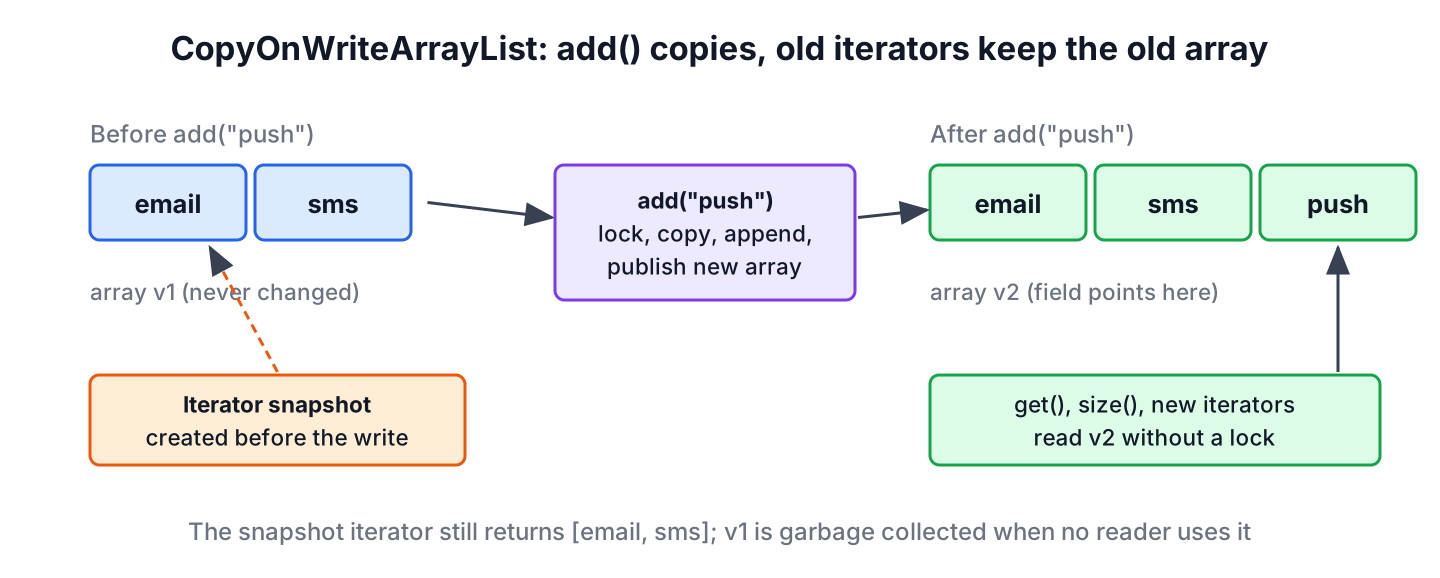
Because no array is ever changed after it is published, a thread that reads it needs no lock and can never see a half-finished write. Writers still run one at a time, because they all take the same lock. The old array stays in memory until the last iterator that uses it is finished, and after that the garbage collector removes it.
Every write copies the whole array, so a write costs O(n) time and O(n) extra memory, while reads cost the same as on an ArrayList. That trade-off decides when the class fits, as we will see in section 7.
2. CopyOnWriteArrayList Hierarchy and Features
The class has been part of java.util.concurrent since Java 5. It implements List, RandomAccess, Cloneable and Serializable, and since Java 21 it is also a SequencedCollection through the List interface.
// does not compile: excerpt of the JDK declaration, body left out
public class CopyOnWriteArrayList<E>
        implements List<E>, RandomAccess, Cloneable, java.io.Serializable {
    // single volatile array, replaced on every write
}
The features that matter in daily work are few.
- It is thread-safe without any external synchronization, and reads take no lock.
- Iterators are snapshots. They never throw ConcurrentModificationException, and they do not show changes made after they were created.
- The iterator methods remove(), set() and add() throw UnsupportedOperationException.
- It allows duplicates and null, and it keeps insertion order like any List.
- It has two extra methods, addIfAbsent() and addAllAbsent(), that run the check and the add as one atomic step.
3. Snapshot Iterator Example
A snapshot iterator is the main reason to pick CopyOnWriteArrayList over a plain ArrayList. An ArrayList iterator is fail-fast, which means it throws ConcurrentModificationException as soon as it notices that the list changed behind its back.
The following example creates an iterator over a plain ArrayList, adds an element and asks the iterator for the next value.
List<Integer> plain = new ArrayList<>(List.of(1, 2, 3));
Iterator<Integer> plainIt = plain.iterator();
Integer one = plainIt.next();                          // 1
boolean grew = plain.add(4);                           // true
Integer two = plainIt.next();                          // ConcurrentModificationException
The same steps on a CopyOnWriteArrayList work fine. The first iterator keeps reading the array with three elements, and a second iterator created after the write sees four.
CopyOnWriteArrayList<Integer> numbers = new CopyOnWriteArrayList<>(List.of(1, 2, 3));
Iterator<Integer> itr1 = numbers.iterator();
boolean added = numbers.add(4);                        // true
Iterator<Integer> itr2 = numbers.iterator();
List<Integer> seenBy1 = new ArrayList<>();
itr1.forEachRemaining(seenBy1::add);
List<Integer> seenBy2 = new ArrayList<>();
itr2.forEachRemaining(seenBy2::add);
List<Integer> first = seenBy1;                         // [1, 2, 3]
List<Integer> second = seenBy2;                        // [1, 2, 3, 4]
We can also change the list inside a for-each loop over it. The loop runs over the snapshot, so it visits the two original elements and stops, and the list ends up with four elements.
CopyOnWriteArrayList<String> queue = new CopyOnWriteArrayList<>(List.of("a", "b"));
for (String item : queue) {
    queue.add(item + "-retry");
}
List<String> result = queue;                           // [a, b, a-retry, b-retry]
Removing through the iterator does not work, because the iterator holds an array that nobody may change. To remove matching elements, we call removeIf() on the list itself, which runs as one atomic write.
CopyOnWriteArrayList<String> tags = new CopyOnWriteArrayList<>(List.of("java", "old", "spring"));
Iterator<String> tagIt = tags.iterator();
String firstTag = tagIt.next();                        // "java"
tagIt.remove();                                        // UnsupportedOperationException
boolean removed = tags.removeIf(t -> t.equals("old")); // true
List<String> left = tags;                              // [java, spring]
4. CopyOnWriteArrayList Constructors
The class has three constructors. Each one copies its input, so later changes to the source collection or array do not affect the new list.
CopyOnWriteArrayList<String> empty = new CopyOnWriteArrayList<>();                 // []
CopyOnWriteArrayList<String> fromList = new CopyOnWriteArrayList<>(List.of("a", "b"));  // [a, b]
CopyOnWriteArrayList<String> fromArray = new CopyOnWriteArrayList<>(new String[] {"x"}); // [x]
There is no constructor with an initial capacity, because the array always has the exact size of the list. When we need many elements at the start, we pass them to the constructor or call addAll() once, which copies the array one time instead of once per element.
5. CopyOnWriteArrayList Methods
All List methods work as on an ArrayList, including sort(), replaceAll() and removeIf(). Each of these bulk methods copies the array once, so it is much cheaper than a loop of single writes.
5.1. addIfAbsent() and addAllAbsent()
A check with contains() followed by add() is two separate steps, and another thread can add the same element between them. The method addIfAbsent() does both steps while holding the lock, so the element is added at most once. The method addAllAbsent() does the same for a collection and returns how many elements it added.
CopyOnWriteArrayList<String> users = new CopyOnWriteArrayList<>(List.of("alex"));
boolean addedSam = users.addIfAbsent("sam");           // true
boolean addedAlex = users.addIfAbsent("alex");         // false
int count = users.addAllAbsent(List.of("sam", "kim", "lee")); // 2
List<String> all = users;                              // [alex, sam, kim, lee]
5.2. getFirst(), getLast() and reversed()
Java 21 added sequenced collections, so CopyOnWriteArrayList got getFirst(), getLast(), addFirst(), addLast(), removeFirst(), removeLast() and reversed(). The getters read the current array once, which avoids the race in list.get(list.size() – 1) when another thread removes an element between the two calls.
CopyOnWriteArrayList<Integer> scores = new CopyOnWriteArrayList<>(List.of(10, 20, 30));
Integer lowest = scores.getFirst();                    // 10
Integer latest = scores.getLast();                     // 30
scores.addFirst(5);
List<Integer> reversed = scores.reversed();            // [30, 20, 10, 5]
Integer removedLast = scores.removeLast();             // 30
List<Integer> current = scores;                        // [5, 10, 20]
The list returned by reversed() is a view, not a copy. Writes through the view change the original list, and writes to the original list show up in the view.
CopyOnWriteArrayList<String> empty = new CopyOnWriteArrayList<>();
String none = empty.getFirst();                        // NoSuchElementException
6. Use Cases for CopyOnWriteArrayList
The class fits only when three conditions hold at the same time.
- The list is small, from a handful to a few thousand elements.
- Reads and iterations happen far more often than writes.
- Several threads use the list at the same time, and some of them iterate while others write.
A typical case is a listener registry. Say an order service notifies its listeners on every placed order, which happens thousands of times per minute, while listeners register only at startup or when a plugin is loaded. With CopyOnWriteArrayList, the notify loop runs without a lock, and a listener that unregisters itself during the loop does not break it.
record OrderPlaced(long id, double total) {}class OrderEvents {
private final CopyOnWriteArrayList<Consumer<OrderPlaced>> listeners = new CopyOnWriteArrayList<>();
void register(Consumer<OrderPlaced> listener) {
listeners.addIfAbsent(listener);
}
void publish(OrderPlaced event) {
for (Consumer<OrderPlaced> listener : listeners) {
listener.accept(event);
}
}
}List<String> log = new CopyOnWriteArrayList<>();
Consumer<OrderPlaced> audit = e -> log.add("audit " + e.id());
Consumer<OrderPlaced> mail = e -> log.add("mail " + e.id());
OrderEvents events = new OrderEvents();
events.register(audit);
events.register(mail);
events.register(audit);
events.publish(new OrderPlaced(7, 49.9));
List<String> calls = log; // [audit 7, mail 7]We can see that registering audit twice did not add it twice, because register() uses addIfAbsent(). The log list is also a CopyOnWriteArrayList here, but a log that grows with every event is a poor fit in real code, as the next section explains.
7. Performance and Alternatives
Reads on CopyOnWriteArrayList cost about the same as on an ArrayList, because get(i) reads one array slot. Writes are the problem. Adding to a list of 100,000 elements copies 100,000 references, and a loop that adds 100,000 elements one by one copies the array 100,000 times. For write-heavy or large lists, other thread-safe collections fit better.
| Collection | Reads | Writes | Iteration while others write | Good fit |
|---|---|---|---|---|
| CopyOnWriteArrayList | No lock | Copy the array, O(n) | Snapshot, never fails | Small, read-mostly lists such as listeners |
| Collections.synchronizedList() | One shared lock | One shared lock, amortized O(1) append | Must lock the list by hand, else ConcurrentModificationException | Mixed reads and writes, low contention |
| ConcurrentLinkedQueue / ConcurrentLinkedDeque | No lock | No lock, O(1) at the ends | Weakly consistent, never fails | Producer and consumer queues, no index access |
| List.copyOf() in a volatile field | No lock | Build a new list and replace the field | Immutable, never fails | Config that a job swaps as a whole |
For a queue of work items, a Queue implementation such as ConcurrentLinkedDeque or a BlockingQueue is the better choice. For a growing log, a synchronized list or a concurrent queue avoids copying the whole log on every entry.
8. CopyOnWriteArrayList FAQs
Developers who start using the class ask these questions most often.
8.1. Is CopyOnWriteArrayList thread-safe?
Yes. Every method is safe to call from many threads, and reads see the latest array that a completed write stored. Compound actions such as “check and add” are not atomic when we write them as two calls, so we use addIfAbsent() or removeIf() instead.
8.2. Why does iterator.remove() throw UnsupportedOperationException?
The iterator reads a snapshot array that must never change, so it cannot remove anything from it. We call list.remove(element) or list.removeIf(predicate) on the list itself.
8.3. What is the difference between CopyOnWriteArrayList and Collections.synchronizedList()?
A synchronized list wraps every call in one shared lock, so readers block writers and each other, and iteration still needs a manual synchronized block. A CopyOnWriteArrayList lets readers run without a lock and iterates over a snapshot, but every write copies the array. We pick the synchronized list when writes are frequent and the copy-on-write list when reads dominate.
8.4. Does CopyOnWriteArrayList allow null and duplicates?
Yes, both. It behaves like an ArrayList in what it accepts. For a thread-safe list without duplicates, we either add through addIfAbsent() or use CopyOnWriteArraySet.
9. Conclusion
The CopyOnWriteArrayList class trades cheap writes for lock-free reads. Each write copies the internal array, and each iterator keeps the array it started with, so iteration never fails and never needs a lock.
The class is the right tool for small, read-mostly lists shared between threads, such as listener registries. For large lists, frequent writes or queues, a synchronized list or a concurrent queue from the Java Collections framework fits better.
10. References
- CopyOnWriteArrayList Javadoc (Java 25)
- java.util.concurrent package summary
- JEP 431, Sequenced Collections
Happy Learning !!
