
The Java ListIterator interface traverses a List in both forward and backward directions and adds, replaces or removes elements during the loop. It is part of the Java Collections Framework and works with every List implementation, such as ArrayList and LinkedList, and we get one from the listIterator() method of the list.
We use a ListIterator when a loop must edit a list in place, for example to replace one item with several, or when it moves back and forth, such as a step-by-step wizard with Back and Next buttons. The following example walks through recipe steps and edits the list on the way.
List<String> steps = new ArrayList<>(List.of("chop", "fry", "serve"));
ListIterator<String> it = steps.listIterator();
String s1 = it.next();                        // "chop"
int nextIdx = it.nextIndex();                 // 1
it.add("wash");                               // inserts "wash" after "chop"
String s2 = it.next();                        // "fry"
it.set("bake");                               // replaces "fry" with "bake"
String back = it.previous();                  // "bake"
boolean hasPrev = it.hasPrevious();           // true
String recipe = String.join(" > ", steps);    // "chop > wash > bake > serve"
Notice that add() inserts at the cursor and set() replaces the element returned last. We look at forward and backward traversal, the cursor model that explains every method, the rules for add(), set() and remove(), fail-fast behavior, and the differences from a plain Iterator.
1. Java ListIterator Example
To get a ListIterator, we call listIterator() on the list. The ListIterator interface extends Iterator, so hasNext(), next() and remove() behave the same, and it adds hasPrevious() and previous() to move back.
In the following example, we have a list of four steps. We iterate first in the forward direction with the same iterator, and after that in the backward direction from where the first loop stopped.
List<String> steps = new ArrayList<>(List.of("chop", "fry", "plate", "serve"));
ListIterator<String> it = steps.listIterator();
StringJoiner forward = new StringJoiner(" ");
while (it.hasNext()) {
    forward.add(it.next());
}
StringJoiner backward = new StringJoiner(" ");
while (it.hasPrevious()) {
    backward.add(it.previous());
}
String f = forward.toString();                // "chop fry plate serve"
String b = backward.toString();               // "serve plate fry chop"
The backward loop works only because the first loop left the cursor at the end. A new iterator from listIterator() starts before the first element, so its hasPrevious() returns false and a backward loop on it visits no element.
1.1. Starting at an Index with listIterator(int)
The overloaded listIterator(int index) method starts the cursor at a given position. The first next() call returns the element at index, and the first previous() call returns the element at index – 1. The index may be anything from 0 to size(), and any other value throws IndexOutOfBoundsException.
List<String> steps = new ArrayList<>(List.of("chop", "fry", "plate", "serve"));
ListIterator<String> fromSecond = steps.listIterator(1);
String nextStep = fromSecond.next();          // "fry"
ListIterator<String> fromEnd = steps.listIterator(steps.size());
String lastStep = fromEnd.previous();         // "serve"
ListIterator<String> bad = steps.listIterator(5);    // IndexOutOfBoundsException
Starting at size() is the classic way to walk a list backward. Since Java 21, steps.reversed() returns a reversed view that works in a plain for-each loop, so we keep the ListIterator for loops that also edit the list or change direction.
2. ListIterator Methods
A ListIterator has no current element, because its cursor always sits between two elements. A list of n elements has n + 1 cursor positions, from before the first element to after the last. The next() method returns the element to the right of the cursor and moves right, and previous() returns the element to the left and moves left.
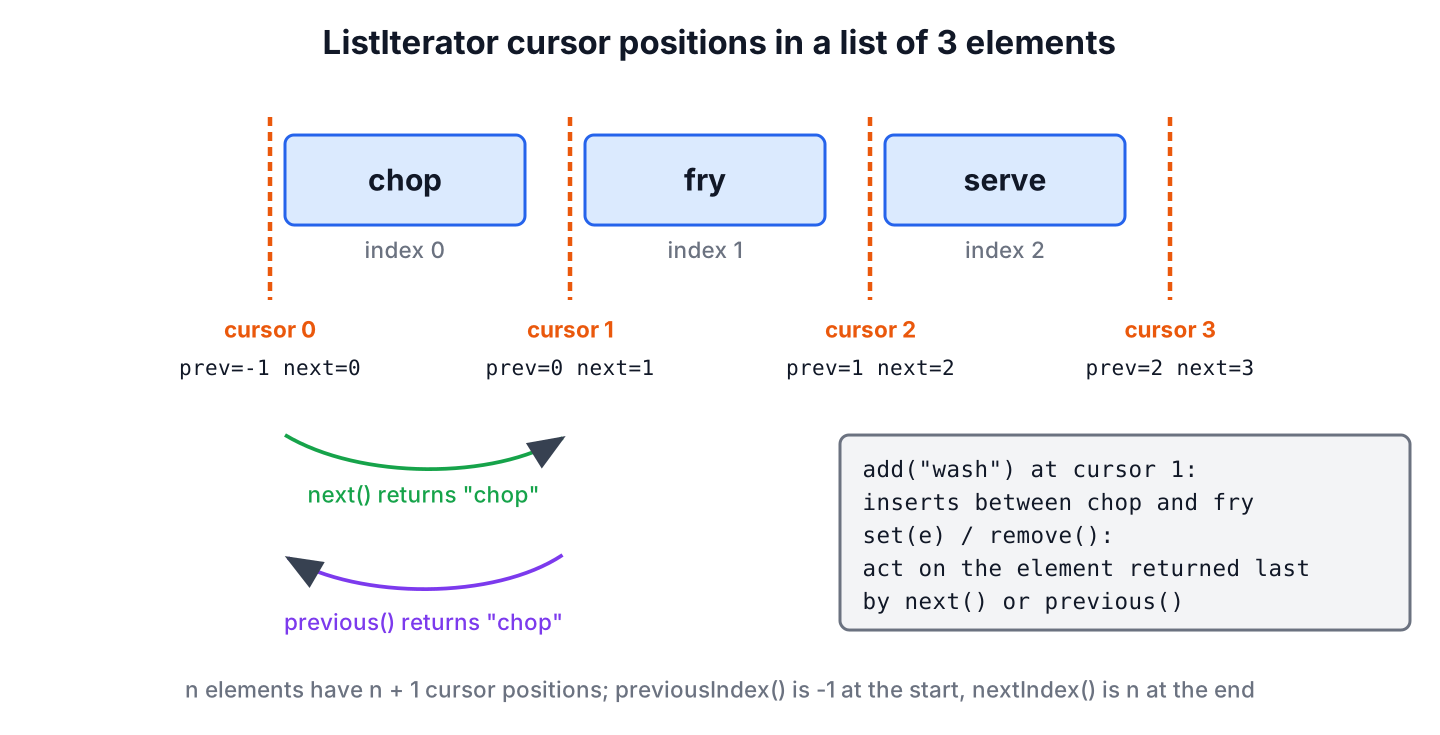
The ListIterator interface defines nine methods. The first six move the cursor or report its position, and the last three change the list.
| Method | Description |
|---|---|
| hasNext() | Returns true if there is another element ahead in the list |
| next() | Returns the next element in the list and moves the cursor forward by one |
| hasPrevious() | Returns true if there is a previous element in the list |
| previous() | Returns the previous element in the list and moves the cursor backward by one |
| nextIndex() | Returns the index of the element that next() would return, or size() at the end |
| previousIndex() | Returns the index of the element that previous() would return, or -1 at the start |
| add(E e) | Inserts an element at the cursor, before the element next() would return |
| remove() | Removes the last element returned by next() or previous() |
| set(E e) | Replaces the last element returned by next() or previous() |
The index methods let us know where we are without a separate counter. Because the cursor sits between elements, calling next() and previous() one after the other returns the same element twice.
ListIterator<String> pos = List.of("chop", "fry").listIterator();
int beforeAny = pos.previousIndex();          // -1
int upcoming = pos.nextIndex();               // 0
String step = pos.next();                     // "chop"
int afterStep = pos.nextIndex();              // 1
String again = pos.previous();                // "chop"
3. Modifying a List with add(), set() and remove()
The three editing methods change the list through the iterator, so the iterator stays valid. They follow strict rules about the order of calls, because set() and remove() work on the element that the last next() or previous() returned.
| Method | Allowed when | Otherwise |
|---|---|---|
| add(e) | At any time | Never throws IllegalStateException |
| set(e) | After next() or previous(), with no add() or remove() since | IllegalStateException |
| remove() | After next() or previous(), with no add() or remove() since | IllegalStateException |
ListIterator<String> edit = new ArrayList<>(List.of("chop")).listIterator();
edit.set("dice");                             // IllegalStateException: no next() call yet
String current = edit.next();                 // "chop"
edit.add("rinse");
edit.set("dice");                             // IllegalStateException: add() was called after next()
Say a shopping list app lets users add a salad kit, and the store wants the kit expanded into its parts when the list is sent. The loop replaces the kit with the first part and inserts the rest after it, which neither a for-each loop nor replaceAll() can do.
List<String> shopping = new ArrayList<>(List.of("bread", "salad kit", "milk"));
ListIterator<String> items = shopping.listIterator();
while (items.hasNext()) {
    if (items.next().equals("salad kit")) {
        items.set("lettuce");
        items.add("tomato");
        items.add("dressing");
    }
}
String sent = String.join(", ", shopping);    // "bread, lettuce, tomato, dressing, milk"
The inserted elements land before the cursor, so the loop does not visit them again and goes on with milk. Removing works the same way, and items.remove() after next() deletes the item without breaking the loop.
The editing methods depend on the list. A fixed-size list from Arrays.asList() supports set(), because the size stays the same, but add() and remove() throw UnsupportedOperationException. A list from List.of() rejects all three.
List<String> fixedSize = Arrays.asList("chop", "fry");
ListIterator<String> fs = fixedSize.listIterator();
String firstFixed = fs.next();                // "chop"
fs.set("dice");                               // allowed, the size does not change
fs.add("rinse");                              // UnsupportedOperationException
4. ListIterator Is Fail-Fast
The ListIterator of ArrayList and LinkedList is fail-fast. If the list changes structurally after the iterator was created, by any call other than the iterator’s own add() or remove(), the next call to next() or previous() throws ConcurrentModificationException.
List<String> menu = new ArrayList<>(List.of("soup", "salad", "cake"));
ListIterator<String> menuIt = menu.listIterator();
String course1 = menuIt.next();               // "soup"
boolean added = menu.add("tea");              // true
String course2 = menuIt.next();               // ConcurrentModificationException
The fix is to make every change through the iterator, as in section 3. Replacing an element with menu.set(0, “stew”) does not change the size, so it does not trip the check.
5. Iterator vs. ListIterator
Both cursors belong to the same interface family but target different jobs. A plain Iterator is enough for reading and removing, and ListIterator is the better choice when a loop needs direction changes, positions or insertions.
| Feature | Iterator | ListIterator |
|---|---|---|
| Traversal direction | Only forward | Forward and backward |
| Collections supported | Every Collection, including sets and queues | Only List implementations such as ArrayList and LinkedList |
| Obtained through | iterator() | listIterator() or listIterator(int index) |
| Changing elements | remove() only | add(), set() and remove() |
| Index access | Not supported | nextIndex() and previousIndex() |
| Changes made outside the iterator | ConcurrentModificationException in fail-fast lists | The same, ConcurrentModificationException in fail-fast lists |
| Primary use case | General-purpose iteration over collections | Bidirectional navigation and editing a list in place |
The Iterator vs ListIterator vs Spliterator article adds Spliterator and the legacy Enumeration to the comparison.
6. ListIterator FAQs
Developers ask these questions about ListIterator most often.
6.1. Can we use ListIterator with a Set or a Map?
No. Only List declares listIterator(). A Set or a map view gives a plain Iterator, and a TreeSet or Deque offers descendingIterator() for backward traversal.
6.2. Why does set() throw IllegalStateException?
Because no element is selected. The set() method needs a preceding next() or previous() call, and an add() or remove() call in between clears that selection.
6.3. Where does add() insert the element?
Right before the element that next() would return, which is at the cursor. A following next() call is not affected, and a following previous() call returns the new element.
6.4. How do we iterate a list backward in Java?
Since Java 21, loop over list.reversed(). Before Java 21, or when the loop also edits the list, start a ListIterator at the end with list.listIterator(list.size()) and call previous() while hasPrevious() returns true.
6.5. Is ListIterator faster on ArrayList or on LinkedList?
Moving the cursor is O(1) on both. The add() and remove() calls are O(1) on a LinkedList but O(n) on an ArrayList, because the array shifts every element after the cursor.
7. Conclusion
The ListIterator interface moves through a list in both directions and edits it in place with add(), set() and remove(). Its cursor sits between elements, which explains the index methods and why next() followed by previous() returns the same element.
We start it at any position with listIterator(int), keep every change inside the iterator to avoid ConcurrentModificationException, and use reversed() instead when a loop only reads a list backward.
8. References
- Java SE 25 API, ListIterator
- Java SE 25 API, List.listIterator(int)
- Java SE 25 API, SequencedCollection.reversed()
Happy Learning !!
