
Two LocalDateTime instances are compared with isBefore(), isAfter() and isEqual(), which check the date and the time down to the nanosecond, or with compareTo(), which returns a negative number, zero or a positive number for sorting. A LocalDateTime has no time zone, so the comparison looks only at the wall-clock values.
We need these checks for deadlines, opening hours and audit logs, for example to accept an exam answer submitted before 17:00, or to find the most recent login of a user.
The following example compares a submission time with a deadline using each method.
LocalDateTime deadline = LocalDateTime.of(2025, 3, 21, 17, 0);
LocalDateTime submitted = LocalDateTime.of(2025, 3, 21, 16, 58, 30);
boolean inTime = submitted.isBefore(deadline);             // true
boolean late = submitted.isAfter(deadline);                // false
boolean atDeadline = submitted.isEqual(deadline);          // false
int order = submitted.compareTo(deadline);                 // -1
boolean sameDay = submitted.toLocalDate().isEqual(deadline.toLocalDate());   // true
Notice that the two values are on the same day but are not equal, because the time is part of the comparison. The rest of the article covers what compareTo() returns, equals(), comparing at minute or day precision, values from different time zones, and a deadline check with a grace period.
1. isAfter(), isBefore() and isEqual() on LocalDateTime
The three boolean methods compare the position of two values on the local timeline, first the date and after that the time. They are the preferred way to write a rule, because the condition in the code reads like the rule in the requirements.
LocalDateTime opened = LocalDateTime.parse("2025-03-21T09:15:30.250");
LocalDateTime closed = LocalDateTime.parse("2025-03-21T09:15:45");
boolean isBefore = opened.isBefore(closed);       // true
boolean isAfter = opened.isAfter(closed);         // false
boolean isEqual = opened.isEqual(closed);         // false
Both isBefore() and isAfter() return false for equal values. For “at or before”, we write !a.isAfter(b), and for “at or after”, !a.isBefore(b).
2. What compareTo() Returns for LocalDateTime
The method compareTo() compares the date part first and the time part only when the dates are the same. The sign is the contract, but the size of the number depends on which part differs, which surprises developers who print it.
- When the dates differ, the result is the difference of the first different date field, so two years apart gives 2.
- When only the times differ, the result is -1 or 1, because the time part uses Integer.compare() on each field.
- When both parts are the same, the result is 0.
LocalDateTime base = LocalDateTime.parse("2017-01-14T15:32:56");
int yearsLater = LocalDateTime.parse("2019-04-28T22:32:38.536").compareTo(base);   // 2
int daysLater = LocalDateTime.parse("2017-01-20T08:00").compareTo(base);           // 6
int hoursLater = LocalDateTime.parse("2017-01-14T20:00").compareTo(base);          // 1
int same = LocalDateTime.parse("2017-01-14T15:32:56").compareTo(base);             // 0
We read only the sign of compareTo(); for the time between two values, we use Duration.between() or ChronoUnit. The article on the difference between two dates covers both.
Since LocalDateTime implements Comparable, a list sorts in time order without a comparator, and Collections.max() returns the latest value.
List<LocalDateTime> logins = List.of(LocalDateTime.parse("2025-03-20T08:10"), LocalDateTime.parse("2025-03-21T07:55"), LocalDateTime.parse("2025-03-19T22:40"));
LocalDateTime lastLogin = Collections.max(logins);                     // 2025-03-21T07:55
List<LocalDateTime> newestFirst = logins.stream().sorted(Comparator.reverseOrder()).toList();   // [2025-03-21T07:55, 2025-03-20T08:10, 2025-03-19T22:40]
3. LocalDateTime equals() Method
The method equals() returns true when the other object is a LocalDateTime with the same date and the same time. It accepts any Object and returns false for null, whereas isEqual() throws a NullPointerException.
LocalDateTime ldt1 = LocalDateTime.of(2019, 4, 9, 10, 10, 50);
LocalDateTime ldt2 = LocalDateTime.of(2019, 4, 9, 10, 10, 50);
LocalDateTime ldt3 = LocalDateTime.of(2019, 4, 9, 11, 12, 50);
boolean same = ldt1.equals(ldt2);            // true
boolean different = ldt1.equals(ldt3);       // false
boolean withNull = ldt1.equals(null);        // false
boolean crash = ldt1.isEqual(null);          // NullPointerException
For ISO values, equals() and isEqual() agree. The method isEqual() ignores the calendar system, whereas equals() also compares it, which matters only when the app mixes the ISO calendar with another one, such as the Japanese calendar.
4. Comparing at Minute or Day Precision
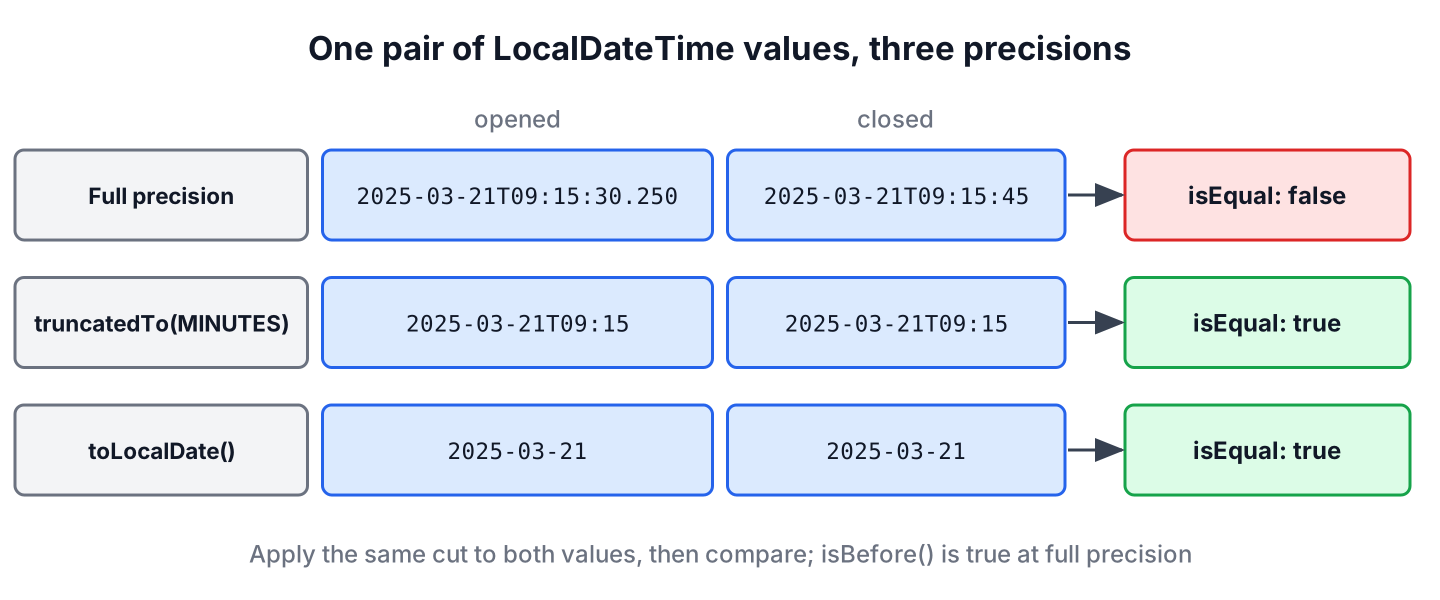
A LocalDateTime often carries seconds and nanoseconds that the rule does not care about. A timestamp from LocalDateTime.now() has microseconds on most systems, so two events in the same minute are almost never equal at full precision.
The method truncatedTo() sets every field smaller than the given unit to zero, and toLocalDate() or toLocalTime() drops one half of the value. We apply the same cut to both sides before comparing.
LocalDateTime opened = LocalDateTime.parse("2025-03-21T09:15:30.250");
LocalDateTime closed = LocalDateTime.parse("2025-03-21T09:15:45");
boolean sameMinute = opened.truncatedTo(ChronoUnit.MINUTES).isEqual(closed.truncatedTo(ChronoUnit.MINUTES));   // true
boolean sameHour = opened.truncatedTo(ChronoUnit.HOURS).isEqual(closed.truncatedTo(ChronoUnit.HOURS));         // true
boolean sameDay = opened.toLocalDate().isEqual(closed.toLocalDate());                                           // true
boolean timeBefore = opened.toLocalTime().isBefore(LocalTime.of(10, 0));                                        // true
The method truncatedTo() accepts units up to DAYS. For a month or a year, we compare YearMonth.from(value) or the result of getYear().
LocalDateTime a = LocalDateTime.parse("2025-03-02T10:00");
LocalDateTime b = LocalDateTime.parse("2025-03-30T18:45");
boolean sameMonth = YearMonth.from(a).equals(YearMonth.from(b));     // true
LocalDateTime bad = a.truncatedTo(ChronoUnit.MONTHS);                 // UnsupportedTemporalTypeException
5. Comparing LocalDateTime Values From Different Time Zones
A LocalDateTime does not know where it was recorded, so 09:00 in Berlin and 09:00 in Chicago compare as equal, although they are several hours apart. When the values come from different zones, we attach each zone with atZone() and compare the resulting instants.
LocalDateTime berlinClock = LocalDateTime.parse("2025-03-21T09:00");
LocalDateTime chicagoClock = LocalDateTime.parse("2025-03-21T09:00");
boolean looksEqual = berlinClock.isEqual(chicagoClock);                        // true
ZonedDateTime berlin = berlinClock.atZone(ZoneId.of("Europe/Berlin"));
ZonedDateTime chicago = chicagoClock.atZone(ZoneId.of("America/Chicago"));
boolean berlinFirst = berlin.isBefore(chicago);                                // true
long hoursApart = Duration.between(berlin, chicago).toHours();                 // 6
The usual gap is 7 hours, but it is 6 hours on this date, because the United States had already switched to daylight saving time on March 9, 2025, and Europe switched on March 30. The rules for comparing zoned values are in the article on ZonedDateTime comparison. To avoid the question, many apps store an Instant or a UTC value and convert to ZonedDateTime only for display.
6. Accepting Exam Submissions Before a Deadline
An online exam closes at 17:00 local exam time, and the platform gives a two-minute grace period for slow uploads. A submission counts as on time at or before 17:00, as late inside the grace period, and as rejected after it.
static String classify(LocalDateTime submitted, LocalDateTime deadline) {
    LocalDateTime graceEnd = deadline.plusMinutes(2);
    if (!submitted.isAfter(deadline)) {
        return "on time";
    }
    return submitted.isAfter(graceEnd) ? "rejected" : "late";
}
LocalDateTime deadline = LocalDateTime.of(2025, 3, 21, 17, 0);
String early = classify(LocalDateTime.of(2025, 3, 21, 16, 59, 59), deadline); // "on time"
String exact = classify(deadline, deadline); // "on time"
String late = classify(LocalDateTime.of(2025, 3, 21, 17, 1, 30), deadline); // "late"
String rejected = classify(LocalDateTime.of(2025, 3, 21, 17, 2, 1), deadline); // "rejected"The condition !submitted.isAfter(deadline) includes the deadline itself, so an answer saved at 17:00:00.000 is on time. Both values must use the same clock and zone, which is the exam’s zone here; for an exam taken in several countries, we compare Instant values instead.
7. LocalDateTime Comparison FAQs
Precision, null handling and time zones decide whether two timestamps compare as expected.
7.1. How do we compare only the time of two LocalDateTime values?
We call toLocalTime() on both values and compare the LocalTime results with isBefore() or isAfter(). The dates are ignored, so 23:00 on Monday is after 08:00 on Friday.
7.2. How do we check if a LocalDateTime is in the past?
We compare it with LocalDateTime.now(zone), using the zone in which the value was recorded. A server in UTC that calls LocalDateTime.now() without a zone compares a Tokyo value with UTC wall-clock time and gets the wrong answer.
7.3. Why is compareTo() returning 2 instead of 1?
Because the dates differ by two years, and LocalDateTime.compareTo() returns the difference of the first different date field. Only the sign has a meaning, as section 2 shows.
7.4. Can we compare LocalDateTime with LocalDate?
Not without a conversion. We call toLocalDate() on the LocalDateTime, or atStartOfDay() on the LocalDate, and compare values of the same class. The article on comparing two dates in Java shows both.
8. Conclusion
A LocalDateTime comparison checks the date and the time to the nanosecond. We write rules with isBefore(), isAfter() and isEqual(), use compareTo() only for its sign, and keep equals() for null-safe checks and collections.
When the rule cares about the minute or the day, we cut both values with truncatedTo() or toLocalDate() first. When the values come from different zones, we compare instants. More examples are linked from the Java date and time tutorial.
9. References
Happy Learning !!
