
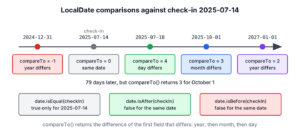
We compare two LocalDate instances in Java with isBefore(), isAfter() and isEqual(), which return a boolean, or with compareTo(), which returns a negative number, zero or a positive number. A LocalDate has no time of day and no time zone, so the comparison looks only at the year, the month and the day.
A booking form uses these methods to reject a check-out date that is not after the check-in date, an invoice job uses them to find overdue invoices, and a report uses compareTo() to sort rows by date.
The following example checks a hotel booking with every comparison method that LocalDate offers.
LocalDate checkIn = LocalDate.of(2025, 7, 14);
LocalDate checkOut = LocalDate.of(2025, 7, 18);
boolean valid = checkOut.isAfter(checkIn);           // true
boolean before = checkOut.isBefore(checkIn);         // false
boolean sameDay = checkOut.isEqual(checkIn);         // false
int order = checkOut.compareTo(checkIn);             // 4
boolean equal = checkIn.equals(LocalDate.parse("2025-07-14"));   // true
Notice that compareTo() returned 4, which happens to be the day gap here but is not a day count in general. We go through the boolean methods first, followed by the exact values that compareTo() returns, the difference between equals() and isEqual(), and comparisons with today’s date.
1. LocalDate Comparison Methods at a Glance
The comparison methods of LocalDate come from the ChronoLocalDate interface, so they accept any ChronoLocalDate, including dates in other calendar systems. They differ in the return type and in how they treat other calendar systems, which matters only for apps that use the Thai Buddhist or Japanese calendars.
| Method | Returns | Use it for |
|---|---|---|
| isBefore(other) | boolean | Rules such as “must happen before” |
| isAfter(other) | boolean | Rules such as “must happen after” or “is overdue” |
| isEqual(other) | boolean | Checking for the same day on the timeline, in any calendar system |
| compareTo(other) | int | Sorting and three-way decisions; read only the sign |
| equals(object) | boolean | Same day and same calendar system; safe with null |
All methods except equals() throw a NullPointerException when the argument is null, as section 5 shows.
2. Checking Order with isBefore() and isAfter()
The methods isBefore() and isAfter() are the clearest way to write a rule, because the code reads like the rule. Both return false for two equal dates, so a check-out on the check-in day fails the isAfter() check, which is what a hotel wants for an overnight stay.
LocalDate checkIn = LocalDate.of(2025, 7, 14);
boolean sameDayCheckOut = LocalDate.of(2025, 7, 14).isAfter(checkIn);       // false
boolean nextDayCheckOut = LocalDate.of(2025, 7, 15).isAfter(checkIn);       // true
boolean notBefore = !LocalDate.of(2025, 7, 14).isBefore(checkIn);           // true, on or after
For “on or after” and “on or before”, we negate the opposite method. The expression !date.isBefore(start) means the date is on or after start, which saves an extra isEqual() call.
3. LocalDate compareTo() Method
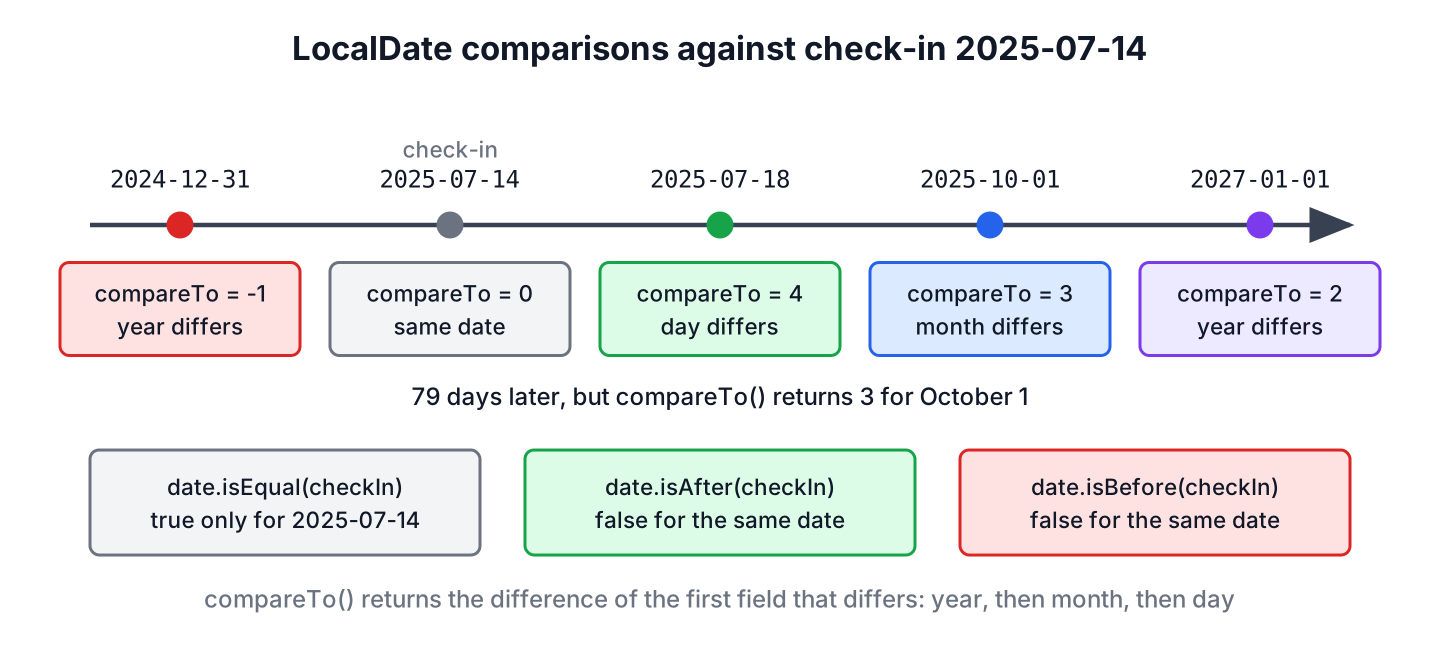
The method compareTo(ChronoLocalDate other) returns zero for the same date, a positive number when this date is later, and a negative number when it is earlier. For two LocalDate values, it returns the difference of the first field that differs, checking the year, the month and the day in that order.
LocalDate base = LocalDate.of(2025, 7, 14);
int days = LocalDate.of(2025, 7, 18).compareTo(base);     // 4
int months = LocalDate.of(2025, 10, 1).compareTo(base);   // 3
int years = LocalDate.of(2027, 1, 1).compareTo(base);     // 2
int same = LocalDate.of(2025, 7, 14).compareTo(base);     // 0
int earlier = LocalDate.of(2024, 12, 31).compareTo(base); // -1
The value of compareTo() is a field difference, not a distance, so we test only > 0, < 0 or == 0. October 1 is 79 days after July 14, but the method returns 3 because the months differ first. For a real distance, we use ChronoUnit.DAYS.between(), which the article on days between two dates covers.
Because LocalDate implements Comparable, sorting needs no comparator, and Comparator.comparing() sorts records by a date field.
record Booking(String guest, LocalDate checkIn) {}List<Booking> bookings = List.of(new Booking("Anna", LocalDate.of(2025, 8, 2)), new Booking("Ravi", LocalDate.of(2025, 7, 14)));
List<String> byDate = bookings.stream().sorted(Comparator.comparing(Booking::checkIn)).map(Booking::guest).toList(); // [Ravi, Anna]
LocalDate first = bookings.stream().map(Booking::checkIn).min(Comparator.naturalOrder()).orElseThrow(); // 2025-07-144. LocalDate equals() vs isEqual()
For two LocalDate values, equals() and isEqual() give the same result. The difference shows up in two cases.
- The method equals() accepts any Object and returns false for null, whereas isEqual() throws a NullPointerException.
- The method isEqual() compares the position on the timeline, so a LocalDate and a ThaiBuddhistDate for the same day are equal. The method equals() also compares the calendar system, so it returns false for the same pair.
LocalDate checkIn = LocalDate.of(2025, 7, 14);
ThaiBuddhistDate thai = ThaiBuddhistDate.from(checkIn);   // ThaiBuddhist BE 2568-07-14
boolean sameDay = checkIn.isEqual(thai);                  // true
boolean sameObject = checkIn.equals(thai);                // false
boolean nullSafe = checkIn.equals(null);                  // false
In everyday code with ISO dates only, we pick isEqual() for readability next to isBefore() and isAfter(). We keep equals() for collections, because HashSet and HashMap call it together with hashCode().
5. Comparing a LocalDate With Today and With Null
To check whether a date is in the past or the future, we compare it with LocalDate.now(zone). The zone matters, because a server in UTC and a hotel in Sydney can be on different dates for up to 11 hours a day. A test passes a fixed Clock instead, so its result stays the same on every run.
Clock clock = Clock.fixed(Instant.parse("2025-07-14T22:00:00Z"), ZoneOffset.UTC);
LocalDate todayUtc = LocalDate.now(clock);                                          // 2025-07-14
LocalDate todaySydney = LocalDate.now(clock.withZone(ZoneId.of("Australia/Sydney")));   // 2025-07-15
boolean inPast = LocalDate.of(2025, 7, 14).isBefore(todaySydney);                   // true
LocalDate realToday = LocalDate.now(ZoneId.of("Australia/Sydney"));                 // the current date in Sydney
An optional date, such as a check-out that the guest has not picked yet, can be null. We check it before calling a comparison method, or wrap it in an Optional.
LocalDate checkIn = LocalDate.of(2025, 7, 14);
LocalDate checkOut = null;
boolean crash = checkOut.isAfter(checkIn);                                     // NullPointerException
boolean safe = checkOut != null && checkOut.isAfter(checkIn);                  // false
boolean viaOptional = Optional.ofNullable(checkOut).map(d -> d.isAfter(checkIn)).orElse(false);   // false
6. Validating a Hotel Booking Request
A hotel booking API gets the check-in and check-out dates as ISO strings, such as 2025-07-14. The API rejects a stay in the past, a check-out that is not after the check-in, and a stay longer than 30 nights. Parsing with LocalDate.parse() comes first, so a malformed string fails before any comparison.
static String validateStay(String checkInText, String checkOutText, LocalDate today) {
    try {
        LocalDate checkIn = LocalDate.parse(checkInText.strip());
        LocalDate checkOut = LocalDate.parse(checkOutText.strip());
        if (checkIn.isBefore(today)) {
            return "check-in is in the past";
        }
        if (!checkOut.isAfter(checkIn)) {
            return "check-out must be after check-in";
        }
        if (checkOut.isAfter(checkIn.plusDays(30))) {
            return "stay is longer than 30 nights";
        }
        return "ok";
    } catch (DateTimeParseException e) {
        return "invalid date: " + e.getParsedString();
    }
}
LocalDate today = LocalDate.of(2025, 7, 1);
String ok = validateStay("2025-07-14", "2025-07-18", today); // "ok"
String sameDay = validateStay("2025-07-14", "2025-07-14", today); // "check-out must be after check-in"
String past = validateStay("2025-06-30", "2025-07-02", today); // "check-in is in the past"
String tooLong = validateStay("2025-07-14", "2025-08-20", today); // "stay is longer than 30 nights"
String typo = validateStay("2025-07-41", "2025-07-45", today); // "invalid date: 2025-07-41"The 30-night limit uses plusDays() and isAfter(), so a check-out on day 30 passes and day 31 fails, without counting days by hand.
7. LocalDate Comparison FAQs
Null values, other calendar systems and date ranges need a little extra care.
7.1. Does LocalDate.compareTo() return the number of days?
No. It returns the difference of the first field that differs, so it matches the day gap only when both dates are in the same month and year. We call ChronoUnit.DAYS.between(a, b) for the number of days.
7.2. How do we check if a LocalDate is between two dates?
We combine two checks. For an inclusive range, !date.isBefore(start) && !date.isAfter(end) returns true for the start and the end dates too.
LocalDate start = LocalDate.of(2025, 7, 1);
LocalDate end = LocalDate.of(2025, 7, 31);
LocalDate day = LocalDate.of(2025, 7, 31);
boolean inJuly = !day.isBefore(start) && !day.isAfter(end);   // true
7.3. Can we compare a LocalDate with a LocalDateTime?
No, not without a conversion, because isBefore() expects a ChronoLocalDate. We call toLocalDate() on the LocalDateTime first. The article on comparing dates in Java shows the same conversion for ZonedDateTime and legacy Date values.
7.4. Is LocalDate comparison affected by time zones?
No. A LocalDate has no zone, so two values compare the same way on every server. The zone matters only when we create the date from the clock or from an Instant, as in LocalDate.now(zone) or LocalDate.ofInstant(instant, zone).
8. Conclusion
For LocalDate values, isBefore(), isAfter() and isEqual() express business rules, and their negations cover “on or after” and “on or before”. Equal dates give false from isBefore() and from isAfter().
The compareTo() method orders dates for sorting, and only its sign has a meaning. We keep equals() for collections and null-safe checks, and we read today’s date with an explicit zone. More date operations are listed in the Java date and time guide.
9. References
Happy Learning !!
