

To get the quarter from a date in Java, we read the field IsoFields.QUARTER_OF_YEAR from a LocalDate, and we get the quarter’s start and end dates from IsoFields.DAY_OF_QUARTER, by setting it to 1 for the first day and to the maximum of its range for the last day. A year has four quarters of three months each, from Q1 (January to March) to Q4 (October to December).
Quarters show up in sales dashboards, quarterly tax returns, financial reports and subscription plans billed every three months. The same fields work for the current quarter, any given date and any quarter of any year.
The following example reads the quarter of August 20, 2026 and its first and last day.
LocalDate date = LocalDate.of(2026, 8, 20);
int quarter = date.get(IsoFields.QUARTER_OF_YEAR);                                                  // 3
LocalDate quarterStart = date.with(IsoFields.DAY_OF_QUARTER, 1);                                    // 2026-07-01
LocalDate quarterEnd = date.with(IsoFields.DAY_OF_QUARTER, date.range(IsoFields.DAY_OF_QUARTER).getMaximum());   // 2026-09-30
String label = date.format(DateTimeFormatter.ofPattern("QQQ uuuu", Locale.US));                     // "Q3 2026"
Notice that the end date needs no month arithmetic, because the range of DAY_OF_QUARTER already knows that the third quarter has 92 days. We cover the quarter number, the boundaries of any quarter, labels such as Q3, counting quarters, fiscal quarters that start in April, and a report query.
1. Getting the Quarter From a Date
The class java.time.temporal.IsoFields contains fields and units that follow the ISO-8601 calendar. Its field QUARTER_OF_YEAR returns 1, 2, 3 or 4 for any date-based object, such as a LocalDate, a LocalDateTime or a ZonedDateTime.
int fromDate = LocalDate.of(2026, 8, 20).get(IsoFields.QUARTER_OF_YEAR);                    // 3
int fromDateTime = LocalDateTime.of(2026, 2, 10, 9, 0).get(IsoFields.QUARTER_OF_YEAR);         // 1
ZonedDateTime order = ZonedDateTime.of(2027, 1, 1, 0, 30, 0, 0, ZoneId.of("Asia/Kolkata"));
int inIndia = order.get(IsoFields.QUARTER_OF_YEAR);                                             // 1
int inUtc = order.withZoneSameInstant(ZoneOffset.UTC).get(IsoFields.QUARTER_OF_YEAR);           // 4
int current = LocalDate.now(ZoneId.of("UTC")).get(IsoFields.QUARTER_OF_YEAR);                  // the current quarter in UTC
int byFormula = (LocalDate.of(2026, 8, 20).getMonthValue() - 1) / 3 + 1;                        // 3
The formula in the last line is what the field replaces, and code that has only a month number can use it. Because an Instant carries no calendar date, instant.get(IsoFields.QUARTER_OF_YEAR) throws an UnsupportedTemporalTypeException, and we convert it with atZone() first. The zone decides the quarter at a year end, because 00:30 on January 1 in India is still 19:00 on December 31 in UTC, which is Q4 of the previous year.
2. Quarter Start and End Dates
The field DAY_OF_QUARTER numbers the days inside a quarter from 1. Setting it to 1 moves any date to the first day of its quarter. The last day is the maximum of the field’s range for that date, which is 90 or 91 in Q1 depending on leap years, 91 in Q2 and 92 in Q3 and Q4.
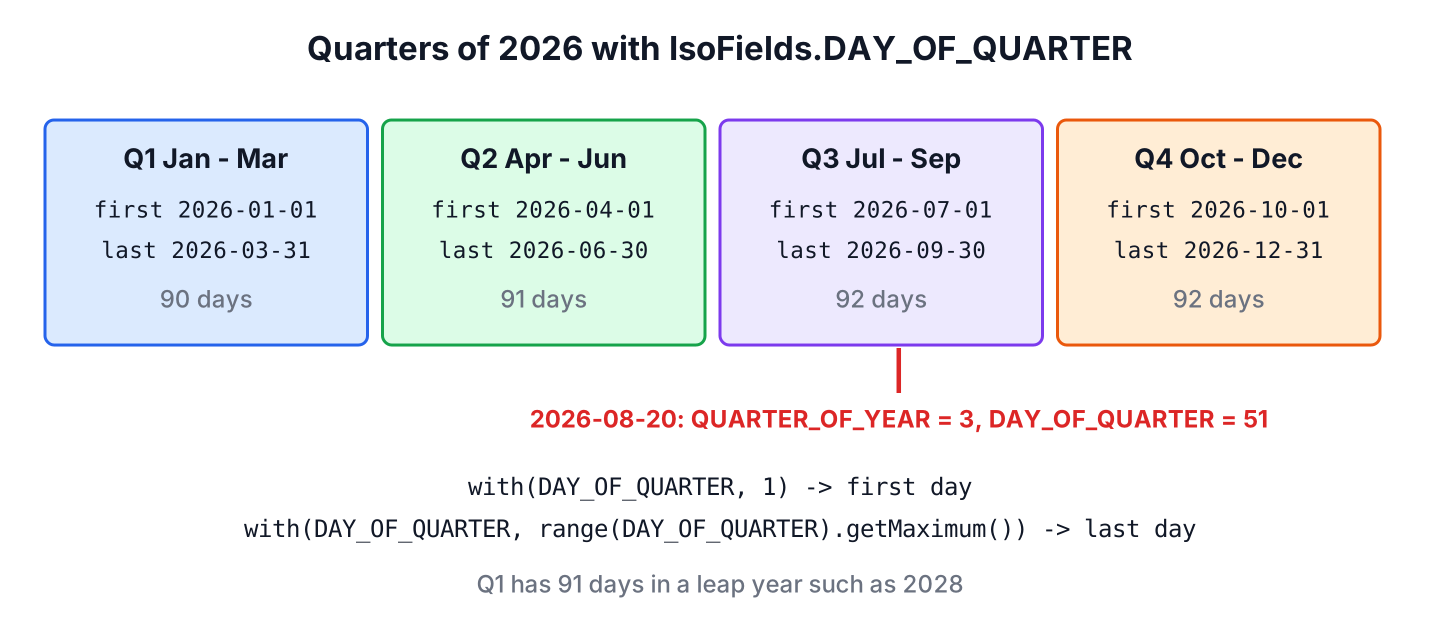
LocalDate date = LocalDate.of(2026, 8, 20);
int dayInQuarter = date.get(IsoFields.DAY_OF_QUARTER);                    // 51
ValueRange days = date.range(IsoFields.DAY_OF_QUARTER);                   // 1 - 92
LocalDate first = date.with(IsoFields.DAY_OF_QUARTER, 1);                 // 2026-07-01
LocalDate last = date.with(IsoFields.DAY_OF_QUARTER, days.getMaximum());  // 2026-09-30
LocalDate alsoLast = first.plusMonths(3).minusDays(1);                    // 2026-09-30
Both ways to get the last day give the same result. The range() version reads as “last day of the quarter”, whereas plusMonths(3).minusDays(1) is the usual choice when we already hold the first day. The method Month.firstMonthOfQuarter() returns the first month, such as JULY for AUGUST, when we work with months instead of dates.
2.1. Start and End of a Specific Quarter
A tax app lets the user pick “Q1 2027” from a list and needs the dates of that quarter. We start from January 1 of the year and set QUARTER_OF_YEAR, which keeps the day-of-quarter at 1 and gives us the first day.
static LocalDate quarterStart(int year, int quarter) {
    return Year.of(year).atDay(1).with(IsoFields.QUARTER_OF_YEAR, quarter);
}

static LocalDate quarterEnd(int year, int quarter) {
    return quarterStart(year, quarter).plusMonths(3).minusDays(1);
}
LocalDate q1Start = quarterStart(2027, 1); // 2027-01-01
LocalDate q1End = quarterEnd(2027, 1); // 2027-03-31
LocalDate q4End = quarterEnd(2026, 4); // 2026-12-31
LocalDate invalid = quarterStart(2026, 5); // DateTimeException: Invalid value for QuarterOfYearFor the previous or the next quarter, we move the date by the unit IsoFields.QUARTER_YEARS, which is three months, and apply the same boundaries.
LocalDate date = LocalDate.of(2026, 8, 20);
LocalDate previousStart = date.minus(1, IsoFields.QUARTER_YEARS).with(IsoFields.DAY_OF_QUARTER, 1);   // 2026-04-01
LocalDate nextStart = date.plus(1, IsoFields.QUARTER_YEARS).with(IsoFields.DAY_OF_QUARTER, 1);        // 2026-10-01
3. Printing and Parsing Quarter Labels
The DateTimeFormatter has the pattern letter Q for the quarter. One or two letters print the number, three letters print the short label and four letters print the full text in the formatter’s language.
LocalDate date = LocalDate.of(2026, 8, 20);
String number = date.format(DateTimeFormatter.ofPattern("Q"));                           // "3"
String shortLabel = date.format(DateTimeFormatter.ofPattern("QQQ uuuu", Locale.US));     // "Q3 2026"
String fullLabel = date.format(DateTimeFormatter.ofPattern("QQQQ", Locale.US));          // "3rd quarter"
String german = date.format(DateTimeFormatter.ofPattern("QQQQ", Locale.GERMAN));         // "3. Quartal"
String isoStyle = date.format(DateTimeFormatter.ofPattern("uuuu-'Q'Q"));                 // "2026-Q3"
A label such as “2026-Q3” in a URL or a file name parses back into a date when we tell the formatter which day of the quarter to use. The builder method parseDefaulting() fills in DAY_OF_QUARTER with 1, so the result is the first day of the quarter.
DateTimeFormatter quarterLabel = new DateTimeFormatterBuilder()
        .appendPattern("uuuu-'Q'Q")
        .parseDefaulting(IsoFields.DAY_OF_QUARTER, 1)
        .toFormatter();
LocalDate parsed = LocalDate.parse("2026-Q3", quarterLabel);     // 2026-07-01
4. Counting Quarters Between Two Dates
The unit QUARTER_YEARS counts complete quarter-years of three months, in the same way as ChronoUnit.MONTHS counts complete months. It does not count calendar quarter boundaries, so March 31 and April 1 are 0 quarters apart.
long sameYearDay = IsoFields.QUARTER_YEARS.between(LocalDate.of(2025, 8, 20), LocalDate.of(2026, 8, 20));   // 4
long partial = IsoFields.QUARTER_YEARS.between(LocalDate.of(2026, 1, 15), LocalDate.of(2026, 10, 14));       // 2
long acrossBoundary = IsoFields.QUARTER_YEARS.between(LocalDate.of(2026, 3, 31), LocalDate.of(2026, 4, 1)); // 0
A report that lists the calendar quarters a contract touched needs the difference of quarter indexes instead. We number each quarter as year * 4 + quarter – 1 and subtract.
static long quarterIndex(LocalDate date) {
    return date.getYear() * 4L + date.get(IsoFields.QUARTER_OF_YEAR) - 1;
}
long calendarQuarters = quarterIndex(LocalDate.of(2026, 4, 1)) - quarterIndex(LocalDate.of(2026, 3, 31)); // 15. Fiscal Quarters That Start in Another Month
Many companies and governments use a fiscal year that does not start in January. India and Japan start it in April, and the US federal government starts it in October, so April 2026 is fiscal Q1 in India and fiscal Q3 in the US government. IsoFields knows only calendar quarters, so we shift the month by the first month of the fiscal year.
static int fiscalQuarter(LocalDate date, Month fiscalYearStart) {
    int shifted = (date.getMonthValue() - fiscalYearStart.getValue() + 12) % 12;
    return shifted / 3 + 1;
}

static LocalDate fiscalQuarterStart(LocalDate date, Month fiscalYearStart) {
    int shifted = (date.getMonthValue() - fiscalYearStart.getValue() + 12) % 12;
    return date.withDayOfMonth(1).minusMonths(shifted % 3);
}
LocalDate invoiceDate = LocalDate.of(2026, 8, 20);
int indiaQuarter = fiscalQuarter(invoiceDate, Month.APRIL); // 2
int usGovQuarter = fiscalQuarter(invoiceDate, Month.OCTOBER); // 4
LocalDate indiaStart = fiscalQuarterStart(invoiceDate, Month.APRIL); // 2026-07-01
LocalDate fiscalEnd = indiaStart.plusMonths(3).minusDays(1); // 2026-09-30
int januaryQuarter = fiscalQuarter(LocalDate.of(2027, 1, 10), Month.APRIL); // 4A fiscal quarter shares its months with a calendar quarter only when the fiscal year starts in January, April, July or October, so we never mix IsoFields results with fiscal quarter numbers. For a fiscal year that starts in another month, such as February, fiscalQuarterStart() still returns the right first day. If an app needs a quarter as a value type, the YearQuarter class of the ThreeTen-Extra library holds a year and a quarter together, much like YearMonth does for months.
6. Quarter Boundaries in a Sales Report Query
A sales dashboard shows the revenue of the current quarter from a timestamp column. We take the report date in the company’s zone, which is LocalDate.now(company) in production, compute the first day of the quarter and the first day of the next quarter, and use them as an inclusive start and an exclusive end.
ZoneId company = ZoneId.of("Europe/Berlin");
LocalDate reportDay = LocalDate.of(2026, 8, 20);
ZonedDateTime from = reportDay.with(IsoFields.DAY_OF_QUARTER, 1).atStartOfDay(company);                   // 2026-07-01T00:00+02:00[Europe/Berlin]
ZonedDateTime to = reportDay.plus(1, IsoFields.QUARTER_YEARS).with(IsoFields.DAY_OF_QUARTER, 1).atStartOfDay(company);   // 2026-10-01T00:00+02:00[Europe/Berlin]
The query reads sold_at >= :from AND sold_at < :to, so no sale at 23:59:59.5 on the last day falls between two quarters. The same pattern for weeks, months and years is shown in first and last day of week, month or year.
7. Quarter FAQs
The current quarter, the previous quarter, instants and a quarter class are the common follow-up questions.
7.1. How do I get the current quarter in Java?
We call LocalDate.now(zone).get(IsoFields.QUARTER_OF_YEAR) with the zone of the business, such as ZoneId.of(“America/New_York”). Without a zone, now() uses the JVM default zone, which gives a different quarter for a few hours around midnight on a quarter boundary.
7.2. How do I get the start and end dates of the previous quarter?
We subtract one IsoFields.QUARTER_YEARS from the date, set DAY_OF_QUARTER to 1 for the start, and add three months minus one day for the end, as in section 2.1. For August 20, 2026, the previous quarter runs from 2026-04-01 to 2026-06-30.
7.3. Why does Instant throw UnsupportedTemporalTypeException for QUARTER_OF_YEAR?
The class Instant represents a point on the timeline without a calendar date, and a quarter depends on the date in a time zone. We call instant.atZone(zone) and read the quarter from the ZonedDateTime. The Instant to ZonedDateTime article covers the conversion.
7.4. Is there a Quarter class in Java?
No. The JDK has the fields and the unit in IsoFields and the pattern letter Q, but no class that holds a year and a quarter. The ThreeTen-Extra library has Quarter and YearQuarter classes for that purpose.
8. Conclusion
The field IsoFields.QUARTER_OF_YEAR returns the quarter of any date, and IsoFields.DAY_OF_QUARTER gives its first day with the value 1 and its last day with the maximum of its range. The unit QUARTER_YEARS moves a date to the previous or next quarter and counts complete quarters.
Labels such as Q3 and “3rd quarter” come from the pattern letter Q, and parseDefaulting() parses them back. Fiscal quarters need a small method that shifts the month by the start of the fiscal year. The Java date and time guide lists the other date calculations.
9. References
- IsoFields (Java SE 25 API)
- DateTimeFormatter (Java SE 25 API)
- Month.firstMonthOfQuarter() (Java SE 25 API)
- ThreeTen-Extra YearQuarter
Happy Learning !!
