
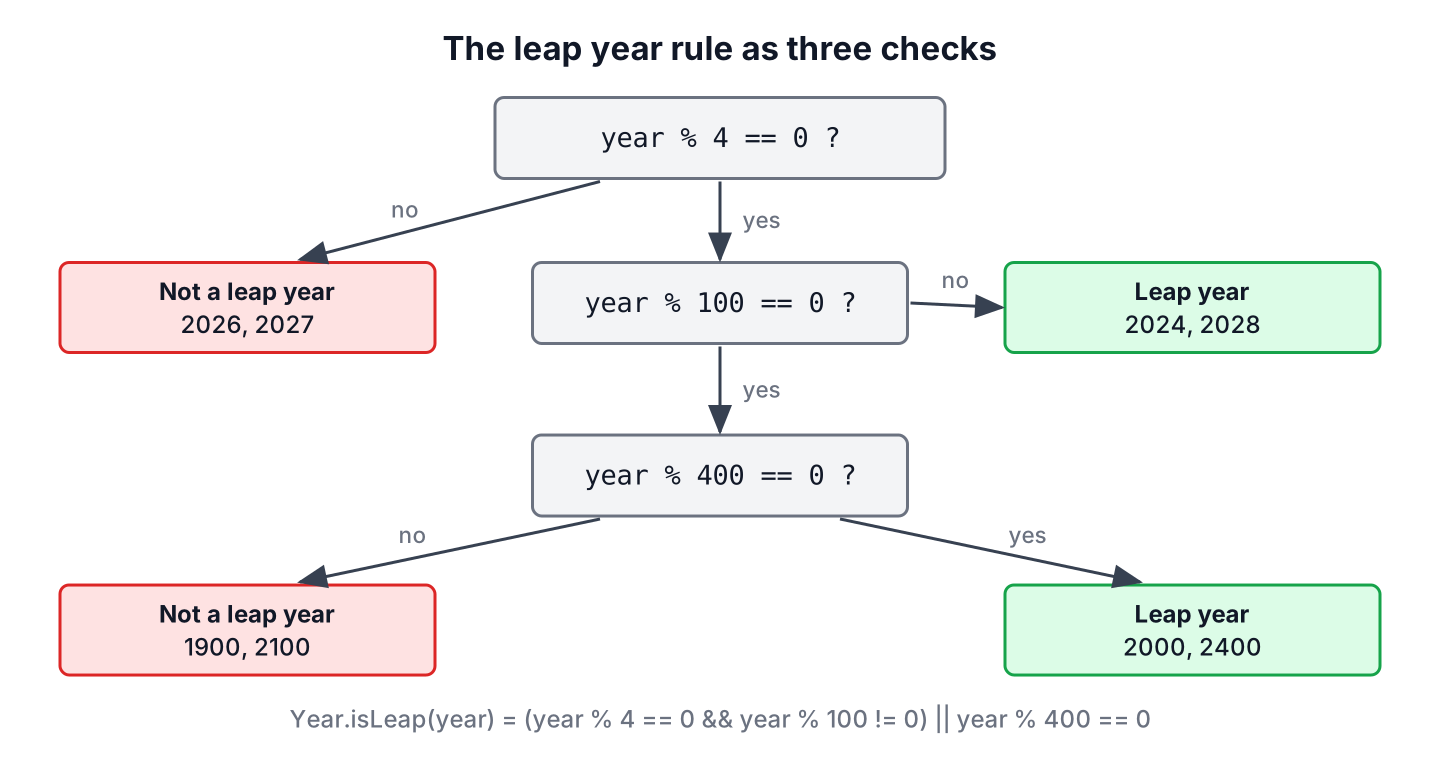
To check leap year in Java, we call Year.isLeap(year), which returns true when the year is divisible by 4, except for century years, which must also be divisible by 400. For a date we already have, LocalDate.isLeapYear() gives the same answer for the year of that date.
Leap years matter wherever a date can be February 29 or a year can have 366 days, such as date validation in forms, interest calculated per day, birthdays and yearly subscriptions. The JDK methods apply the full Gregorian rule, so we never need to code it ourselves in application code.
The following example tests a few years and a date.
boolean y2024 = Year.isLeap(2024);                            // true
boolean y2026 = Year.isLeap(2026);                            // false
boolean y1900 = Year.isLeap(1900);                            // false
boolean y2000 = Year.isLeap(2000);                            // true
boolean fromDate = LocalDate.of(2028, 3, 1).isLeapYear();    // true
int days = Year.of(2024).length();                            // 366
Notice that 1900 is not a leap year although it is divisible by 4, whereas 2000 is. We explain the rule first, cover the java.time methods and a hand-written check, handle February 29 in date math, and compare Year.isLeap() with the legacy GregorianCalendar.
1. The Leap Year Rule
A year in the Gregorian calendar has 365 days, but the Earth needs about 365.2422 days to go around the Sun. Adding one day every fourth year overshoots a little, so century years skip the leap day unless they are divisible by 400. Over 400 years, this gives 97 leap years and an average year of 365.2425 days.
| Year | Divisible by 4 | Divisible by 100 | Divisible by 400 | Leap year |
|---|---|---|---|---|
| 2026 | No | No | No | No |
| 2024 | Yes | No | No | Yes |
| 1900 | Yes | Yes | No | No |
| 2000 | Yes | Yes | Yes | Yes |
| 2100 | Yes | Yes | No | No |
A year is a leap year when it is divisible by 400, or when it is divisible by 4 and not by 100. The order of the checks matters in code, as we see in section 3.
2. Check Leap Year in Java With Year and LocalDate
The class java.time.Year has a static isLeap(long) method for a plain number, and the classes Year, YearMonth and LocalDate have an instance method for the year they hold. All of them follow the ISO calendar, which is the Gregorian calendar.
boolean staticCheck = Year.isLeap(2028);                         // true
boolean yearObject = Year.of(2028).isLeap();                      // true
boolean yearMonth = YearMonth.of(2028, 2).isLeapYear();           // true
boolean localDate = LocalDate.of(2027, 12, 31).isLeapYear();      // false
boolean thisYear = Year.now(ZoneId.of("UTC")).isLeap();           // whether the current year is a leap year
We rarely need the boolean alone. Most code wants the number of days in the year or in February, and these methods already include the leap year rule.
int daysIn2024 = LocalDate.of(2024, 6, 1).lengthOfYear();      // 366
int february2024 = YearMonth.of(2024, 2).lengthOfMonth();         // 29
int february2026 = YearMonth.of(2026, 2).lengthOfMonth();         // 28
int februaryLeap = Month.FEBRUARY.length(Year.isLeap(2026));      // 28
For a year typed by a user, we parse the text safely before the check. The method isLeapYear(String) returns an empty Optional for text that is not a number, instead of throwing a NumberFormatException.
static Optional<Boolean> isLeapYear(String text) {
    if (text == null) {
        return Optional.empty();
    }
    try {
        return Optional.of(Year.isLeap(Long.parseLong(text.strip())));
    } catch (NumberFormatException e) {
        return Optional.empty();
    }
}
Optional<Boolean> typed = isLeapYear(" 2032 "); // Optional[true]
Optional<Boolean> garbage = isLeapYear("20x2"); // Optional.empty3. Writing the Leap Year Check Ourselves
Interviews and programming exercises ask for the rule without library methods. The whole rule fits into one boolean expression, with the 400 check joined by || to the 4 and 100 checks.
static boolean isLeap(int year) {
    return (year % 4 == 0 && year % 100 != 0) || year % 400 == 0;
}
boolean leap2024 = isLeap(2024); // true
boolean leap2100 = isLeap(2100); // false
boolean leap2000 = isLeap(2000); // trueA common mistake is an if chain that tests the 100 rule before the 400 rule, so the 400 branch never runs and 2000 comes out as a normal year. The method isLeapWrong() compiles and passes for 2024 and 1900, which is why the bug survives simple tests.
static boolean isLeapWrong(int year) {
    if (year % 4 != 0) {
        return false;
    } else if (year % 100 == 0) {
        return false;               // also catches 2000
    } else if (year % 400 == 0) {
        return true;                // never reached
    }
    return true;
}
boolean wrong2000 = isLeapWrong(2000); // false
boolean right2000 = Year.isLeap(2000); // trueA test with 1900, 2000, 2024 and 2026 catches the usual mistakes, because these four years take every branch of the rule. In application code, Year.isLeap() is the better choice anyway, because its name tells the reader what the line does.
4. February 29 in Date Calculations
A health insurance app stores the start date of every policy and renews it every year on the same day. A policy that starts on February 29, 2024 has no matching day in 2025, so the app must decide what “the same day” means. The java.time classes never create an invalid date, and each method has a defined behavior for February 29.
LocalDate start = LocalDate.of(2024, 2, 29);
LocalDate nextYear = start.plusYears(1);                     // 2025-02-28
LocalDate fourYears = start.plusYears(4);                    // 2028-02-29
LocalDate sameDay2026 = start.withYear(2026);                // 2026-02-28
boolean validIn2026 = MonthDay.of(2, 29).isValidYear(2026);  // false
LocalDate invalid = LocalDate.of(2023, 2, 29);               // DateTimeException: Invalid date 'February 29' as '2023' is not a leap year
The methods plusYears() and withYear() move February 29 to February 28 in a common year, whereas LocalDate.of() throws a DateTimeException. If the business rule says March 1 instead, we check with MonthDay.isValidYear() and add one day ourselves.
static LocalDate renewal(LocalDate start, int year) {
    MonthDay day = MonthDay.from(start);
    return day.isValidYear(year) ? day.atYear(year) : LocalDate.of(year, 3, 1);
}
LocalDate renewal2025 = renewal(LocalDate.of(2024, 2, 29), 2025); // 2025-03-01
LocalDate renewal2028 = renewal(LocalDate.of(2024, 2, 29), 2028); // 2028-02-29Parsing text such as 2023-02-29 fails with a DateTimeParseException, which is how date validation rejects the day for common years.
5. Listing Leap Years in a Range
Reports and calendars sometimes need every leap year in a period or the next one after a given year. A stream of years filtered with Year::isLeap handles both.
List<Integer> leapYears = IntStream.rangeClosed(2020, 2040).filter(Year::isLeap).boxed().toList();   // [2020, 2024, 2028, 2032, 2036, 2040]
long count = IntStream.rangeClosed(1901, 2000).filter(Year::isLeap).count();                         // 25
int nextLeap = IntStream.iterate(2097, y -> y + 1).filter(Year::isLeap).findFirst().getAsInt();      // 2104
Notice in the last line that the next leap year after 2096 is 2104 and not 2100, so “add 4 years” is not a safe way to find it.
6. Year.isLeap() vs GregorianCalendar.isLeapYear()
The legacy method GregorianCalendar.isLeapYear() switches to the Julian calendar for years before October 1582, where every fourth year is a leap year. The ISO calendar in java.time is proleptic, which means it applies the Gregorian rule to all years, so the two methods disagree for old century years such as 1500.
boolean modern1500 = Year.isLeap(1500);                               // false
boolean legacy1500 = new GregorianCalendar().isLeapYear(1500);        // true
boolean legacy2000 = new GregorianCalendar().isLeapYear(2000);        // true
Both agree for every year after 1582, so the difference matters only for historical data. New code uses Year.isLeap(), and legacy Date values are converted to LocalDate first, as shown in converting between LocalDate and Date.
7. Leap Year FAQs
Specific years, day counts and year 0 are the questions that follow the rule.
7.1. Is 2100 a leap year?
No. The year 2100 is divisible by 100 but not by 400, so Year.isLeap(2100) returns false. The next leap year after 2096 is 2104.
7.2. How many days does a leap year have in Java?
The method Year.of(2024).length() returns 366, and lengthOfYear() on a LocalDate or a YearMonth does the same. To count the days between two dates across a leap day, read days between two dates.
7.3. How do I get the number of days in February?
We call YearMonth.of(year, 2).lengthOfMonth(), which returns 29 in a leap year and 28 otherwise. Without a year, Month.FEBRUARY.maxLength() returns 29.
7.4. Is year 0 a leap year in Java?
Yes. The ISO calendar has a year 0, which is 1 BC, and Year.isLeap(0) returns true because 0 is divisible by 400. Negative years follow the same rule, so Year.isLeap(-4) is also true.
8. Conclusion
The method Year.isLeap() applies the full Gregorian rule, and LocalDate.isLeapYear() and YearMonth.isLeapYear() do the same for a date or a month. Length methods such as lengthOfYear() and lengthOfMonth() already include the rule.
For a hand-written check, the one-line expression with the 400 test joined by || avoids the common ordering bug. In date math, plusYears() moves February 29 to February 28, and MonthDay.isValidYear() lets us choose another rule. More date topics are listed in the Java date and time guide.
9. References
- Year.isLeap() (Java SE 25 API)
- LocalDate.isLeapYear() (Java SE 25 API)
- IsoChronology.isLeapYear() (Java SE 25 API)
- GregorianCalendar.isLeapYear() (Java SE 25 API)
Happy Learning !!
