
The difference between two dates in Java is calculated with Period.between() for years, months and days, with Duration.between() for hours, minutes and seconds, and with ChronoUnit.between() for a total in one unit. All three are in the java.time API and work on LocalDate, LocalDateTime and ZonedDateTime values.
We use a Period to show an age or a contract length, a Duration to measure a shift or a delivery time, and a ChronoUnit total when a rule needs one number, such as “older than 90 days”.
The following example measures the tenure of an employee and the length of a night shift.
LocalDate joined = LocalDate.of(2019, 3, 18);
LocalDate today = LocalDate.of(2026, 10, 10);
Period tenure = Period.between(joined, today);                   // P7Y6M22D
int years = tenure.getYears();                                   // 7
long totalMonths = ChronoUnit.MONTHS.between(joined, today);     // 90
long totalDays = ChronoUnit.DAYS.between(joined, today);         // 2763
LocalDateTime shiftStart = LocalDateTime.of(2026, 10, 9, 22, 15);
LocalDateTime shiftEnd = LocalDateTime.of(2026, 10, 10, 6, 40);
Duration shift = Duration.between(shiftStart, shiftEnd);         // PT8H25M
long shiftMinutes = shift.toMinutes();                           // 505
Notice that the Period keeps the parts apart, 7 years, 6 months and 22 days, whereas each ChronoUnit call returns one total. We look at each of the three classes, combine them for a full years-to-minutes breakdown, handle time zones and legacy Date values, and build an HR example.
1. Date Difference using Java 8 APIs
The three classes answer different questions about the same two dates, and picking the wrong one is a common bug. A Period counts calendar units, so one month can be 28 or 31 days. A Duration counts exact seconds, so one day is always 24 hours. A ChronoUnit returns the number of complete units between two values.
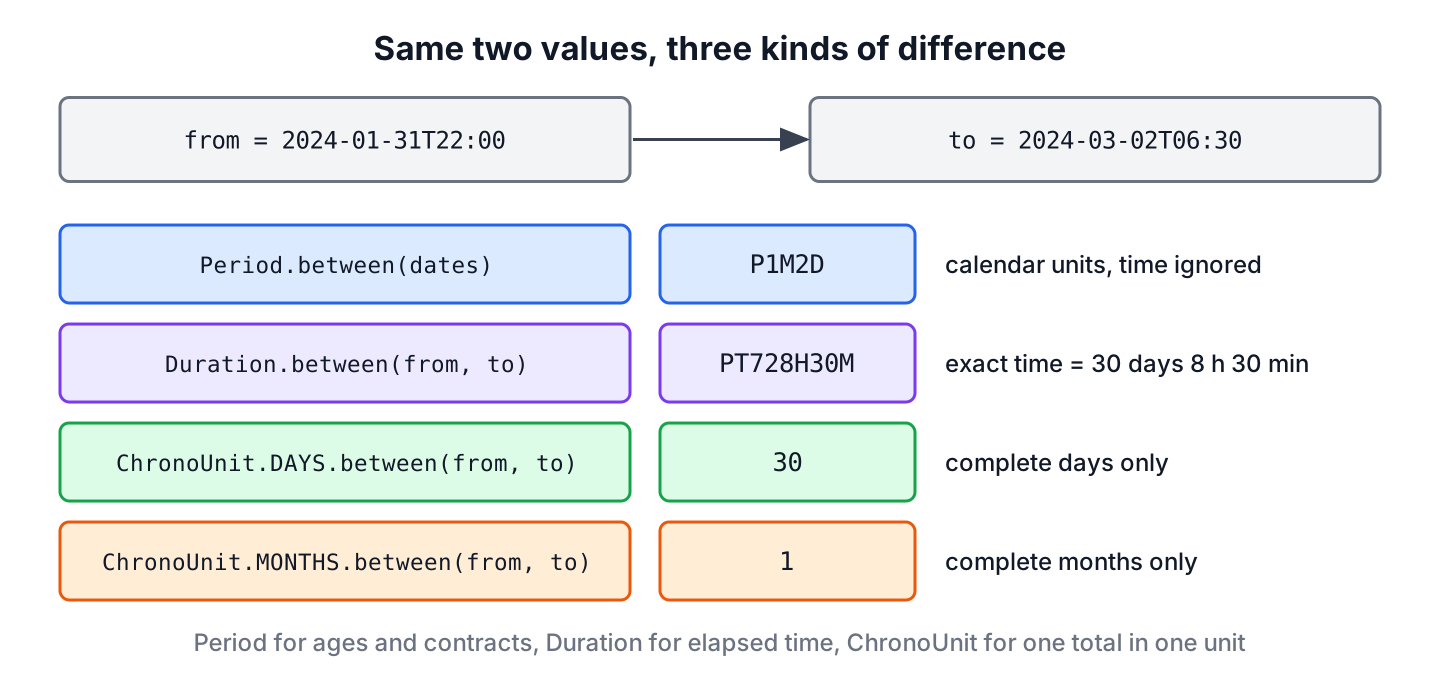
For the pair January 31, 2024 at 22:00 and March 2, 2024 at 06:30, the three answers look different, although all of them are correct.
LocalDateTime from = LocalDateTime.of(2024, 1, 31, 22, 0);
LocalDateTime to = LocalDateTime.of(2024, 3, 2, 6, 30);
Period calendar = Period.between(from.toLocalDate(), to.toLocalDate());   // P1M2D
Duration exact = Duration.between(from, to);                              // PT728H30M
long fullDays = ChronoUnit.DAYS.between(from, to);                        // 30
long fullMonths = ChronoUnit.MONTHS.between(from, to); // 1| Class | Result type | Units | Best for |
|---|---|---|---|
| Period.between() | Period | Years, months and days | Ages, contract lengths, “2 years 3 months” |
| Duration.between() | Duration | Seconds and nanoseconds | Shifts, timeouts, elapsed time |
| ChronoUnit.X.between() | long | One unit, from nanoseconds to millennia | Rules such as “more than 30 days” |
1.1. ChronoUnit.between() for Difference in All Time Units
Each constant of ChronoUnit has a between() method that returns the number of complete units as a long. A partial unit is cut off, so 11 months and 30 days count as 0 years. The call start.until(end, unit) gives the same result.
LocalDate joined = LocalDate.of(2019, 3, 18);
LocalDate today = LocalDate.of(2026, 10, 10);
long days = ChronoUnit.DAYS.between(joined, today);       // 2763
long weeks = ChronoUnit.WEEKS.between(joined, today);     // 394
long months = ChronoUnit.MONTHS.between(joined, today);   // 90
long years = joined.until(today, ChronoUnit.YEARS);       // 7
A LocalDate has no time, so time units such as HOURS throw an UnsupportedTemporalTypeException. For hours, minutes or milliseconds, we use LocalDateTime, ZonedDateTime or Instant values.
LocalDateTime shiftStart = LocalDateTime.of(2026, 10, 9, 22, 15);
LocalDateTime shiftEnd = LocalDateTime.of(2026, 10, 10, 6, 40);
long hours = ChronoUnit.HOURS.between(shiftStart, shiftEnd);       // 8
long minutes = ChronoUnit.MINUTES.between(shiftStart, shiftEnd);   // 505
long millis = ChronoUnit.MILLIS.between(shiftStart, shiftEnd);     // 30300000
long dateHours = ChronoUnit.HOURS.between(LocalDate.of(2026, 10, 9), LocalDate.of(2026, 10, 10));   // UnsupportedTemporalTypeException
When only the number of days matters, the article on counting days between two dates covers inclusive counts and the off-by-one cases in more detail.
1.2. Period.between() for Difference in Days, Months and Years
The method Period.between(start, end) returns a Period of years, months and days. The start date is included and the end date is excluded, and the result is negative when the end is before the start.
The getDays() method returns only the days part of the period, not the total number of days. In our example, getDays() returns 22, whereas the two dates are 2763 days apart.
Period tenure = Period.between(LocalDate.of(2019, 3, 18), LocalDate.of(2026, 10, 10));
int years = tenure.getYears();               // 7
int months = tenure.getMonths();             // 6
int days = tenure.getDays();                 // 22
long totalMonths = tenure.toTotalMonths();   // 90
String text = "%d years, %d months and %d days".formatted(years, months, days);   // "7 years, 6 months and 22 days"
The Period class has more methods, such as normalized() and plus(), and the same class adds a period to a date.
1.3. Duration.between() for Difference in Hours, Minutes and Seconds
The method Duration.between(start, end) returns the exact time between two date-times or instants. The toXxx() methods convert the whole duration to one unit, and since Java 9, the toXxxPart() methods return the parts for display.
Duration shift = Duration.between(LocalDateTime.of(2026, 10, 9, 22, 15), LocalDateTime.of(2026, 10, 10, 6, 40));
long totalMinutes = shift.toMinutes();     // 505
long totalHours = shift.toHours();         // 8
int minutePart = shift.toMinutesPart();    // 25
long seconds = shift.getSeconds();         // 30300
int nanoPart = shift.getNano();            // 0
String hhmm = "%02d:%02d".formatted(shift.toHours(), shift.toMinutesPart());   // "08:25"
The method getNano() returns only the nanosecond part of the last second, not the total in nanoseconds. For the total, we call toNanos(). The article on formatting a duration as hh:mm:ss shows more display formats.
1.4. Years, Months, Days, Hours and Minutes Together
Neither Period nor Duration covers the full breakdown from years down to minutes. We get it by taking the largest unit first with until(), adding that amount to the start, and repeating with the next smaller unit. Each step uses complete units, so the parts are always correct, also when the end time of day is earlier than the start time.
static String difference(LocalDateTime start, LocalDateTime end) {
    LocalDateTime cursor = start;
    long years = cursor.until(end, ChronoUnit.YEARS);
    cursor = cursor.plusYears(years);
    long months = cursor.until(end, ChronoUnit.MONTHS);
    cursor = cursor.plusMonths(months);
    long days = cursor.until(end, ChronoUnit.DAYS);
    cursor = cursor.plusDays(days);
    long hours = cursor.until(end, ChronoUnit.HOURS);
    cursor = cursor.plusHours(hours);
    long minutes = cursor.until(end, ChronoUnit.MINUTES);
    return "%dy %dm %dd %dh %dmin".formatted(years, months, days, hours, minutes);
}
String exact = difference(LocalDateTime.of(2024, 1, 31, 22, 0), LocalDateTime.of(2024, 3, 2, 6, 30)); // "0y 1m 1d 8h 30min"
String tenure = difference(LocalDateTime.of(2019, 3, 18, 9, 0), LocalDateTime.of(2026, 10, 10, 17, 45)); // "7y 6m 22d 8h 45min"The first result is 1 day, not the 2 days of Period.between(), because the time 06:30 on March 2 is earlier than 22:00, so the last day is not complete.
2. Differences Across Time Zones and Daylight Saving Time
For ZonedDateTime values, the date-based units and the time-based units behave differently. ChronoUnit.DAYS counts calendar days on the local timeline of the start zone, whereas Duration and ChronoUnit.HOURS count real elapsed time. On the day the clocks change, one calendar day is 23 or 25 hours long.
ZoneId newYork = ZoneId.of("America/New_York");
ZonedDateTime before = ZonedDateTime.of(2024, 3, 9, 12, 0, 0, 0, newYork);
ZonedDateTime after = ZonedDateTime.of(2024, 3, 10, 12, 0, 0, 0, newYork);
long days = ChronoUnit.DAYS.between(before, after);         // 1
long hours = ChronoUnit.HOURS.between(before, after);       // 23
Duration elapsed = Duration.between(before, after);         // PT23H
long durationDays = elapsed.toDays();                       // 0
So a billing rule “charge per calendar day” uses ChronoUnit.DAYS, and a rule “charge per 24 hours” uses Duration. When the two values are in different zones, between() converts the end value to the zone of the start value first, so the result is the same as for two values in one zone.
3. Converting Legacy Date Values Before Subtracting
Old APIs and JDBC code can still hand us a java.util.Date or a java.sql.Timestamp. Subtracting getTime() values and dividing by 86,400,000 gives wrong day counts across daylight saving changes, and it cannot give months or years. We convert to Instant for an exact duration, or to LocalDate in a chosen zone for calendar units.
Date legacyStart = Date.from(Instant.parse("2024-03-09T17:00:00Z"));
Date legacyEnd = Date.from(Instant.parse("2024-04-15T16:00:00Z"));
Duration exact = Duration.between(legacyStart.toInstant(), legacyEnd.toInstant());   // PT887H
ZoneId zone = ZoneId.of("America/New_York");
LocalDate startDay = LocalDate.ofInstant(legacyStart.toInstant(), zone);             // 2024-03-09
LocalDate endDay = LocalDate.ofInstant(legacyEnd.toInstant(), zone);                 // 2024-04-15
Period calendar = Period.between(startDay, endDay);                                  // P1M6D
long millisDays = (legacyEnd.getTime() - legacyStart.getTime()) / 86_400_000L;       // 36
The last line returns 36, but the two values are 37 calendar days apart in New York. Both are at noon local time, and the range crosses the switch to daylight saving time, so only 36 days and 23 hours pass. The article on converting between Date and LocalDate shows the other conversions.
4. Tenure and Overtime in an HR App
An HR app shows each employee’s tenure as text, such as “7 years, 6 months”, and flags night shifts longer than 8 hours for an overtime payment. The tenure uses Period, because people count anniversaries by the calendar, and the overtime check uses Duration, because pay depends on worked time.
static String tenureText(LocalDate joined, LocalDate today) {
    Period p = Period.between(joined, today);
    if (p.isNegative()) {
        return "starts on " + joined;
    }
    return p.getYears() + " years, " + p.getMonths() + " months";
}
static boolean overtime(ZonedDateTime start, ZonedDateTime end) {
return Duration.between(start, end).compareTo(Duration.ofHours(8)) > 0;
}String veteran = tenureText(LocalDate.of(2019, 3, 18), LocalDate.of(2026, 10, 10)); // "7 years, 6 months"
String future = tenureText(LocalDate.of(2026, 11, 2), LocalDate.of(2026, 10, 10)); // "starts on 2026-11-02"
ZoneId berlin = ZoneId.of("Europe/Berlin");
boolean normal = overtime(ZonedDateTime.of(2026, 10, 24, 22, 0, 0, 0, berlin), ZonedDateTime.of(2026, 10, 25, 6, 0, 0, 0, berlin)); // true
boolean summer = overtime(ZonedDateTime.of(2026, 7, 24, 22, 0, 0, 0, berlin), ZonedDateTime.of(2026, 7, 25, 6, 0, 0, 0, berlin)); // falseBoth shifts run from 22:00 to 06:00 on the clock, but the October shift crosses the end of daylight saving time in Berlin and lasts 9 hours. With LocalDateTime, the app would pay 8 hours for both.
5. Date Difference FAQs
The follow-up questions concern the days part of a Period, the order of the two dates, Joda-Time and weeks.
5.1. Why is Period.getDays() smaller than the number of days?
Because a Period stores years, months and days apart, and getDays() returns only the days part. For the total, we call ChronoUnit.DAYS.between(start, end).
5.2. How do we get a positive difference when the order is unknown?
We call abs() on a Duration, or compare the dates and swap them before Period.between(). Negating a reversed period can give a different result, because months have different lengths.
LocalDate a = LocalDate.of(2019, 3, 18);
LocalDate b = LocalDate.of(2026, 10, 10);
Period reversed = Period.between(b, a);              // P-7Y-6M-23D
Period negated = reversed.negated();                 // P7Y6M23D
Period swapped = a.isBefore(b) ? Period.between(a, b) : Period.between(b, a);   // P7Y6M22D
5.3. Should we still use Joda-Time for date differences?
No. The Joda-Time project asks its users to move to java.time, whose specification was led by the Joda-Time author, and which covers the same calculations with Period, Duration and ChronoUnit.
5.4. How do we find the difference in weeks?
We call ChronoUnit.WEEKS.between(start, end), which returns complete weeks, so 13 days count as 1 week. The article on weeks between two dates covers partial weeks.
6. Conclusion
A Period gives the difference in calendar years, months and days, a Duration gives exact hours, minutes and seconds, and ChronoUnit.between() gives one total in any unit. For a breakdown from years to minutes, we call until() unit by unit.
Across daylight saving changes, calendar days and 24-hour periods differ, so the business rule decides between ChronoUnit.DAYS and Duration. Legacy Date values become Instant or LocalDate values first. Adding days, finding the next weekday and the other date calculations have their own articles in the Java date and time tutorial.
7. References
- Period (Java SE 25 API)
- Duration (Java SE 25 API)
- ChronoUnit (Java SE 25 API)
- Joda-Time project home
Happy Learning !!

How to return DateTime or LocalDate in this diferrence(dates)