
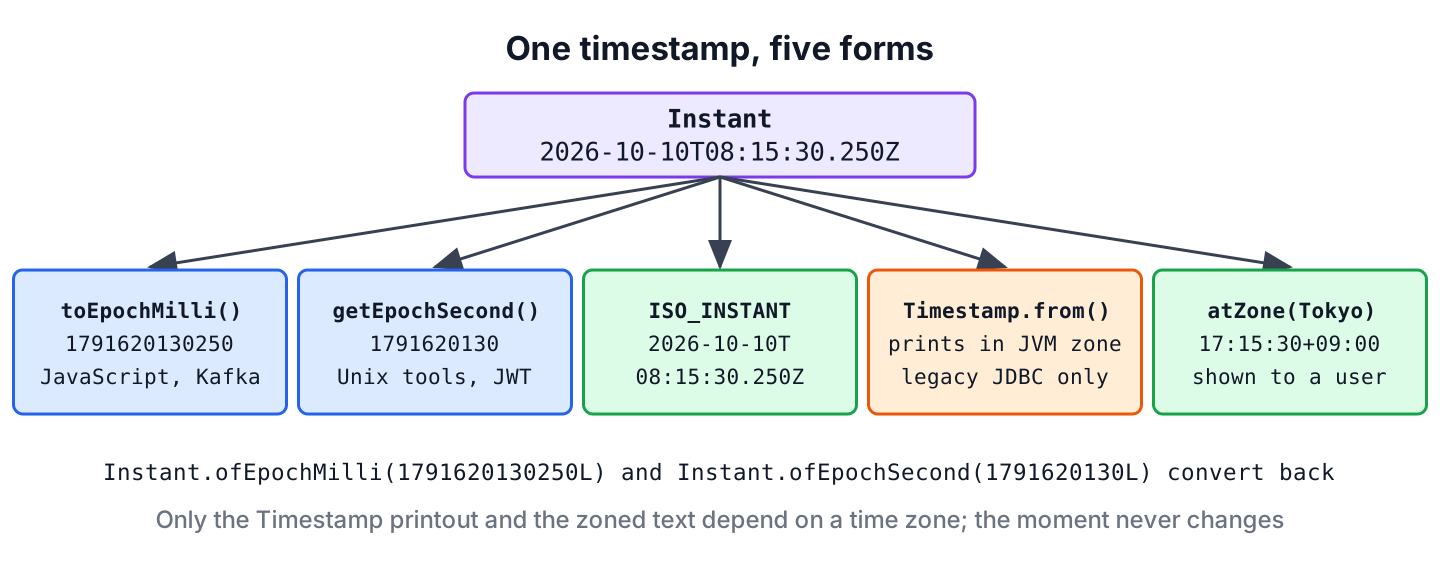
The current timestamp in Java comes from Instant.now(), which returns the current moment on the UTC timeline, or from System.currentTimeMillis(), which returns the same moment as the number of milliseconds since 1970-01-01T00:00:00Z. Both values are the same everywhere in the world at a given moment, because neither depends on a time zone.
We take a timestamp to record when something happened, such as an order placed, a login, a log line or a message sent to Kafka, and to compare or sort those events later.
The following example takes the current timestamp in its common forms and converts one fixed timestamp to epoch milliseconds and seconds.
Instant now = Instant.now();                                  // current moment in UTC
long nowMillis = System.currentTimeMillis();                  // current epoch milliseconds
Instant fixed = Instant.parse("2026-10-10T08:15:30.250Z");
long millis = fixed.toEpochMilli();                           // 1791620130250
long seconds = fixed.getEpochSecond();                        // 1791620130
Instant fromMillis = Instant.ofEpochMilli(1791620130250L);    // 2026-10-10T08:15:30.250Z
An Instant prints in ISO-8601 format with a trailing Z, which stands for UTC. We explain what an Instant holds, convert it to and from epoch numbers, format it for logs and file names, write it to a database with JDBC, and stamp records in a testable way.
1. Instant Is the Timestamp Class in java.time
An Instant stores a number of seconds since the epoch, 1970-01-01T00:00:00Z, plus a nanosecond part. It has no year, month or hour fields of its own, so it is the right type for a moment that must mean the same thing on every server.
The precision of Instant.now() depends on the operating system clock. Java 8 returned milliseconds only, whereas newer versions read finer clocks, so on Linux Java 25 prints nine fraction digits. When a value must match a system that keeps milliseconds, such as a JavaScript client or a TIMESTAMP(3) column, we cut off the extra digits with truncatedTo().
Instant precise = Instant.parse("2026-10-10T08:15:30.250123456Z");
Instant toMillis = precise.truncatedTo(ChronoUnit.MILLIS);      // 2026-10-10T08:15:30.250Z
Instant toSeconds = precise.truncatedTo(ChronoUnit.SECONDS);    // 2026-10-10T08:15:30Z
int nanos = precise.getNano();                                  // 250123456
1.1. Instant vs ZonedDateTime
An Instant and a ZonedDateTime can stand for the same moment, but only the ZonedDateTime knows the local date and time of a place. Instant.now() returns the same value in Tokyo and in New York, whereas ZonedDateTime.now() shows the local clock of each zone.
Instant moment = Instant.parse("2026-10-10T08:15:30Z");
ZonedDateTime tokyo = moment.atZone(ZoneId.of("Asia/Tokyo"));              // 2026-10-10T17:15:30+09:00[Asia/Tokyo]
ZonedDateTime newYork = moment.atZone(ZoneId.of("America/New_York"));      // 2026-10-10T04:15:30-04:00[America/New_York]
boolean sameMoment = tokyo.toInstant().equals(newYork.toInstant());       // true
As a rule, we store and send timestamps as Instant values and convert them to a ZonedDateTime only to show them to a user. The conversion is covered in Instant to ZonedDateTime.
2. Timestamps as Epoch Milliseconds and Seconds
Many systems exchange timestamps as plain numbers. JavaScript’s Date.now(), Kafka record timestamps and many REST APIs use epoch milliseconds, while Unix tools, JWT tokens and many database functions use epoch seconds.
For example, a REST API returns the createdAt field of a comment as epoch milliseconds, because the JavaScript front end passes the number straight to new Date(createdAt).
Instant created = Instant.parse("2026-10-10T08:15:30.250Z");
long createdAt = created.toEpochMilli();                         // 1791620130250
Instant parsedBack = Instant.ofEpochMilli(createdAt);            // 2026-10-10T08:15:30.250Z
long unixSeconds = created.getEpochSecond();                     // 1791620130
Instant fromSeconds = Instant.ofEpochSecond(1791620130L);        // 2026-10-10T08:15:30Z
long secondsFromMillis = TimeUnit.MILLISECONDS.toSeconds(createdAt);   // 1791620130
Both System.currentTimeMillis() and Instant.now().toEpochMilli() return the current epoch milliseconds. The first one avoids creating an object, and the second one is clearer when we need an Instant anyway. The article on converting an Instant to LocalDateTime shows how to turn the number into local date fields.
3. Formatting the Current Timestamp for Logs and File Names
A DateTimeFormatter pattern needs fields such as the year and the hour, which an Instant only has after a time zone is applied. We either call withZone() on the formatter, or we convert the Instant to a ZonedDateTime first. Without a zone, format() throws an UnsupportedTemporalTypeException.
Instant moment = Instant.parse("2026-10-10T08:15:30.250Z");
DateTimeFormatter logFormat = DateTimeFormatter.ofPattern("yyyy-MM-dd HH:mm:ss.SSS").withZone(ZoneOffset.UTC);
String logText = logFormat.format(moment);                                            // "2026-10-10 08:15:30.250"
String fileName = "backup-" + DateTimeFormatter.ofPattern("yyyyMMdd-HHmmss").withZone(ZoneOffset.UTC).format(moment) + ".zip";   // "backup-20261010-081530.zip"
String iso = DateTimeFormatter.ISO_INSTANT.format(moment);                            // "2026-10-10T08:15:30.250Z"
String noZone = DateTimeFormatter.ofPattern("yyyy-MM-dd HH:mm").format(moment);       // UnsupportedTemporalTypeException: Unsupported field: YearOfEra
A file name built from yyyyMMdd-HHmmss sorts in time order and contains no colons, which Windows does not allow in file names. More patterns are in the article on formatting LocalDateTime to a String.
4. java.sql.Timestamp Only for Legacy JDBC Code
The class java.sql.Timestamp extends java.util.Date and adds nanoseconds, and it exists for the JDBC TIMESTAMP type. It is not a general timestamp class. Since JDBC 4.2 (Java 8), drivers accept LocalDateTime and OffsetDateTime values with setObject() and getObject(), so new code does not need Timestamp at all.
static void saveLogin(Connection con, String user, Instant at) throws SQLException {
    String sql = "INSERT INTO logins (username, login_at) VALUES (?, ?)";
    try (PreparedStatement ps = con.prepareStatement(sql)) {
        ps.setString(1, user);
        ps.setObject(2, at.atOffset(ZoneOffset.UTC));    // TIMESTAMP WITH TIME ZONE column
        ps.executeUpdate();
    }
}
JDBC 4.2 does not list Instant among the required types, so we pass it as an OffsetDateTime in UTC, as the method shows. Hibernate and Spring Data JPA map Instant fields without any conversion.
When an older API still takes or returns a Timestamp, we convert at the call with Timestamp.from() and toInstant(). Its toString() prints the value in the JVM default zone, so the printed text changes with the server zone while the stored moment does not.
Instant moment = Instant.parse("2026-10-10T08:15:30.250Z");
Timestamp legacy = Timestamp.from(moment);                       // the same moment as a java.sql.Timestamp
Instant back = legacy.toInstant();                               // 2026-10-10T08:15:30.250Z
Timestamp current = Timestamp.from(Instant.now());               // current moment for an old JDBC API
Timestamp local = Timestamp.valueOf(LocalDateTime.of(2026, 10, 10, 13, 45, 30));
LocalDateTime localBack = local.toLocalDateTime();               // 2026-10-10T13:45:30
The old pattern new Timestamp(System.currentTimeMillis()) still works and returns the same moment as Timestamp.from(Instant.now()). The article on LocalDateTime and Date conversions covers the other legacy types.
5. Stamping Audit Records in a Service
A service that writes audit records reads the clock in one place. If it calls Instant.now() inside the method, a test cannot check the stored value, so we pass an InstantSource into the service. This interface came in Java 17, and Clock implements it.
For example, an expense app writes one audit record each time a manager approves a claim.
record AuditEntry(String action, String user, Instant at) {}class AuditLog {
private final InstantSource source;
private final List<AuditEntry> entries = new ArrayList<>();
AuditLog(InstantSource source) {
this.source = source;
}
AuditEntry record(String action, String user) {
AuditEntry entry = new AuditEntry(action, user, source.instant());
entries.add(entry);
return entry;
}
}InstantSource fixedSource = InstantSource.fixed(Instant.parse("2026-10-10T08:15:30Z"));
AuditEntry approved = new AuditLog(fixedSource).record("APPROVE_CLAIM", "maria");
Instant stamped = approved.at(); // 2026-10-10T08:15:30Z
long stampedMillis = approved.at().toEpochMilli(); // 1791620130000
AuditLog production = new AuditLog(InstantSource.system()); // stamps the real current timeIn production, InstantSource.system() returns the same values as Instant.now(). The test passes a fixed source and checks the exact timestamp. The article on the current date and time in Java shows the same idea with a Clock and a time zone.
6. Current Timestamp FAQs
Precision, time zones and storage decide which timestamp form fits a given job.
6.1. What is the difference between Instant.now() and System.currentTimeMillis()?
Both read the same system clock. System.currentTimeMillis() returns a long in milliseconds, whereas Instant.now() returns an object with up to nanosecond precision that formats, compares and converts to other java.time types.
6.2. Is Instant.now() affected by the time zone?
No. Every Instant is a point on the UTC timeline, so the JVM default zone does not change its value or its toString() output. The zone matters only when we format it or convert it to a ZonedDateTime.
6.3. How do we get the current timestamp as a yyyy-MM-dd HH:mm:ss string?
We format the current moment with a pattern and a zone. For a user, we use the user’s zone instead of UTC.
DateTimeFormatter formatter = DateTimeFormatter.ofPattern("yyyy-MM-dd HH:mm:ss").withZone(ZoneOffset.UTC);
String current = formatter.format(Instant.now());          // current UTC timestamp as text
6.4. Can we measure elapsed time with Instant.now()?
Only roughly. Instant.now() follows the wall clock, which can jump when the system time is corrected. For the time a piece of code takes, we use System.nanoTime(), as the article on measuring elapsed time explains.
6.5. Should we store timestamps as epoch milliseconds or as a date-time column?
A TIMESTAMP WITH TIME ZONE column is easier to query and read, so we prefer it in relational databases. Epoch milliseconds fit systems that only store numbers, such as message headers and some key-value stores.
7. Conclusion
Instant.now() is the current timestamp in Java, a moment in UTC with a precision that depends on the system clock. We convert it to epoch milliseconds with toEpochMilli() and to epoch seconds with getEpochSecond(), and format it only after adding a zone.
The java.sql.Timestamp class is for old JDBC code. New code passes OffsetDateTime or LocalDateTime to the driver, or lets Hibernate map an Instant. Parsing, formatting and zone conversions each have their own article in the Java date and time tutorial.
8. References
- Instant (Java SE 25 API)
- InstantSource (Java SE 25 API)
- Timestamp (Java SE 25 API)
- JSR 221, JDBC 4.2 Specification
Happy Learning !!
