

To parse a string to UTC in Java, we parse it into a date/time class that keeps the offset, such as OffsetDateTime or ZonedDateTime, and then convert the value to UTC with withOffsetSameInstant(ZoneOffset.UTC) or withZoneSameInstant(ZoneOffset.UTC). The offset is the difference between the local clock and UTC, such as +05:30 for India, and UTC itself has the offset +00:00. When the string ends in Z or, since Java 12, carries an offset, Instant.parse() gives the UTC moment in one call.
GMT shows the same clock time as UTC, and the letter Z (Zulu) at the end of a timestamp also means UTC. When a string has no zone at all, we tell the parser that the text is UTC with DateTimeFormatter.withZone(ZoneOffset.UTC).
We convert timestamps to UTC when they come from users or servers in different zones, for example before we store an order time in the database or compare two log entries.
The following example parses the common string shapes to UTC, with the result of each line as a comment.
Instant i1 = Instant.parse("2026-10-04T10:15:30Z");                 // 2026-10-04T10:15:30Z
Instant i2 = Instant.parse("2026-10-04T15:45:30+05:30");            // 2026-10-04T10:15:30Z

OffsetDateTime odt = OffsetDateTime.parse("2026-10-04T15:45:30+05:30")
    .withOffsetSameInstant(ZoneOffset.UTC);                          // 2026-10-04T10:15:30Z

ZonedDateTime zdt = ZonedDateTime.parse("2026-10-04T15:45:30+05:30[Asia/Kolkata]")
    .withZoneSameInstant(ZoneOffset.UTC);                            // 2026-10-04T10:15:30Z

// no zone in the string: declare it UTC
DateTimeFormatter f = DateTimeFormatter.ofPattern("yyyy-MM-dd HH:mm:ss")
    .withZone(ZoneOffset.UTC);
ZonedDateTime utc = ZonedDateTime.parse("2026-10-04 10:15:30", f);   // 2026-10-04T10:15:30Z
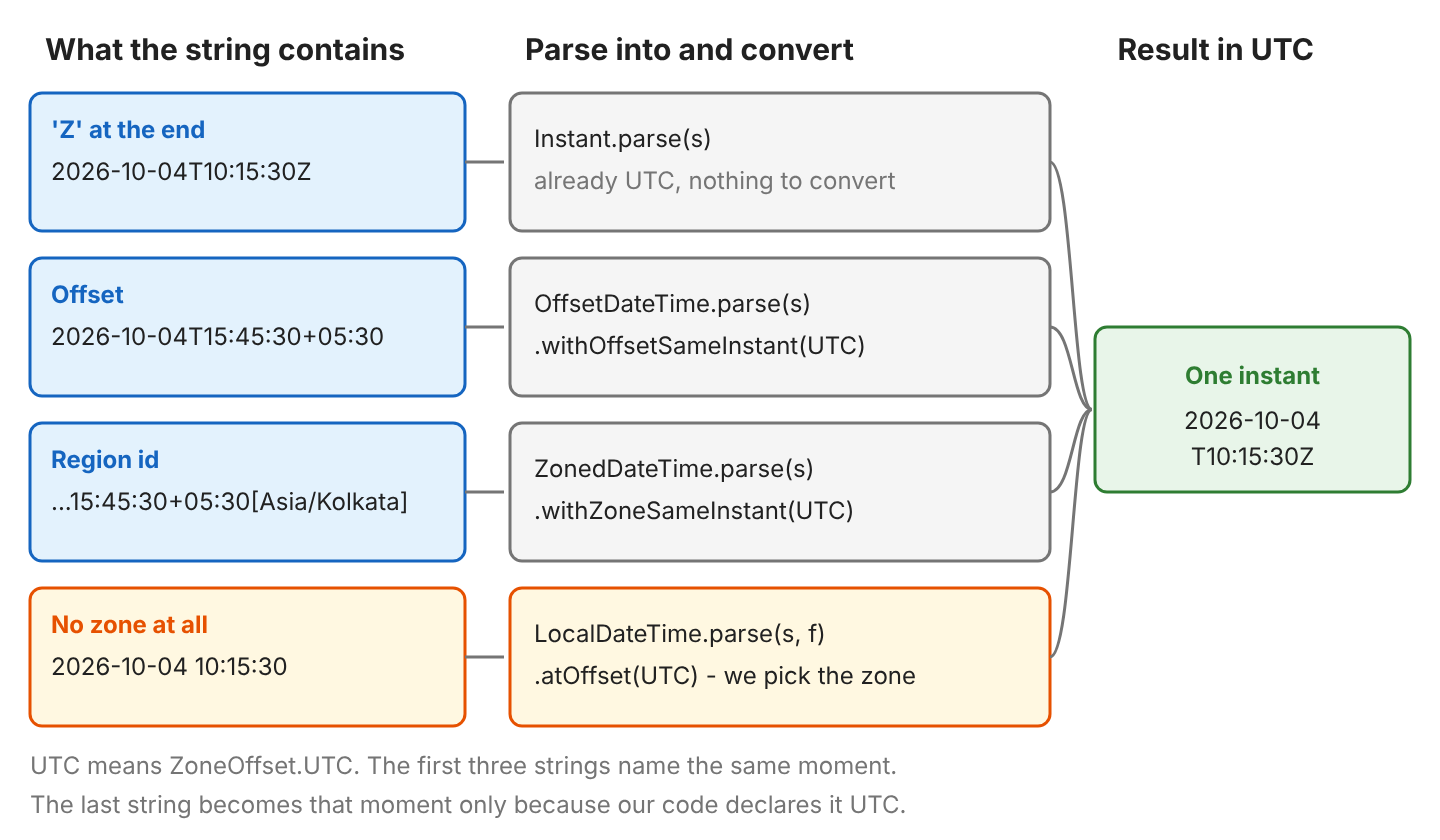
Notice that every line gives the same UTC moment, 2026-10-04T10:15:30Z, whatever the input shape.
Next, we pick the right class for each string shape, and after that we handle patterns like “2026-10-04 10:15:30 GMT”, RFC 1123 dates, other zones, old SimpleDateFormat code and DateTimeParseException.
1. Instant, OffsetDateTime and ZonedDateTime Classes
Java 8 added three classes that can hold a UTC moment, namely Instant, OffsetDateTime and ZonedDateTime. All three store one exact point in time, down to the nanosecond, and they differ in how much zone information they keep next to that point.
- Instant keeps only the moment, and Instant.toString() always prints it in UTC with a Z at the end. We use Instant for timestamps in logs, databases and APIs.
- OffsetDateTime also keeps a fixed offset from UTC, such as +05:30, so we can still read the local date and time from the value. We use OffsetDateTime when we store values in a database column or send them over a network protocol.
- ZonedDateTime keeps a region id such as Asia/Kolkata, which names a place whose clock rules Java knows. These rules include DST (Daylight Saving Time), when clocks move forward or back by an hour, so the offset of a region can change during the year. The DST rules make ZonedDateTime the right choice for times shown to users.
For example, a flight booking app stores the departure time as an Instant and shows it to each traveler as a ZonedDateTime in the airport’s zone. The shape of the input string decides which class we parse into. Each input shape has one class that reads it and one method call that gives the UTC value.
| String looks like | Parse into | Get UTC with |
|---|---|---|
| 2026-10-04T10:15:30Z | Instant.parse(s) | Already UTC |
| 2026-10-04T15:45:30+05:30 | OffsetDateTime.parse(s) or Instant.parse(s) | withOffsetSameInstant(ZoneOffset.UTC) |
| 2026-10-04T15:45:30+05:30[Asia/Kolkata] | ZonedDateTime.parse(s) | withZoneSameInstant(ZoneOffset.UTC) |
| 2026-10-04 10:15:30 GMT | ZonedDateTime.parse(s, formatter) with pattern letter z | withZoneSameInstant(ZoneOffset.UTC) |
| Tue, 3 Jun 2008 11:05:30 GMT | ZonedDateTime.parse(s, RFC_1123_DATE_TIME) | Already UTC |
| 2026-10-04 10:15:30 (no zone) | LocalDateTime.parse(s, formatter) | atOffset(ZoneOffset.UTC) or atZone(…) |
2. Parse String to OffsetDateTime in UTC
A string with an offset can use any custom pattern, not only the ISO-8601 one, as long as our DateTimeFormatter pattern matches it. For example, “03/08/2019T16:20:17:717+05:30” is 16:20 on a clock that runs 5 hours 30 minutes ahead of UTC. The method withOffsetSameInstant(ZoneOffset.UTC) keeps the same moment and changes the offset to UTC, so the clock time moves back by 5 hours 30 minutes, to 10:50.
DateTimeFormatter formatter = DateTimeFormatter.ofPattern("dd/MM/uuuu'T'HH:mm:ss:SSSXXXXX");

OffsetDateTime odt = OffsetDateTime.parse("03/08/2019T16:20:17:717+05:30", formatter);
                                                    // 2019-08-03T16:20:17.717+05:30
OffsetDateTime odtUtc = odt.withOffsetSameInstant(ZoneOffset.UTC);
                                                    // 2019-08-03T10:50:17.717Z
String text = odtUtc.format(formatter);             // 03/08/2019T10:50:17:717Z
Instant instant = odt.toInstant();                  // 2019-08-03T10:50:17.717Z
An ISO-8601 string (the standard shape yyyy-MM-ddTHH:mm:ss+hh:mm) needs no formatter, so OffsetDateTime.parse(“2026-10-04T15:45:30+05:30”) reads it as it is.
The pattern letters X and XXX print Z for a zero offset and read Z back when parsing. ‘Z’ is short for Zulu and means UTC+00:00.
3. Parse String to ZonedDateTime in UTC
A string with full zone information comes in several shapes, and ZonedDateTime.parse() reads each of them, with or without a DateTimeFormatter.
- The ISO shape with a region id, such as “2026-10-04T15:45:30+05:30[Asia/Kolkata]”, which ZonedDateTime.parse(s) reads without a formatter.
- The pattern dd/MM/uuuu’T’HH:mm:ss:SSSXXXXX, for example “03/08/2019T16:20:17:717+05:30”.
- The pattern MM/dd/yyyy’T’HH:mm:ss:SSS z, for example “08/03/2019T16:20:17:717 UTC+05:30”.
The method withZoneSameInstant(ZoneOffset.UTC) returns the same moment in the UTC zone, so in the example, 16:20 at +05:30 becomes 10:50 in UTC.
DateTimeFormatter formatter = DateTimeFormatter.ofPattern("MM/dd/yyyy'T'HH:mm:ss:SSS z");

ZonedDateTime zdt = ZonedDateTime.parse("08/03/2019T16:20:17:717 UTC+05:30", formatter);
                                                    // 2019-08-03T16:20:17.717+05:30[UTC+05:30]
ZonedDateTime zdtUtc = zdt.withZoneSameInstant(ZoneOffset.UTC);
                                                    // 2019-08-03T10:50:17.717Z
String text = zdtUtc.format(formatter);             // 08/03/2019T10:50:17:717 Z
Instant instant = zdt.toInstant();                  // 2019-08-03T10:50:17.717Z
ZoneOffset.UTC and ZoneId.of(“UTC”) give the same moment, but the printed text differs, because ZoneOffset.UTC prints only Z, whereas ZoneId.of(“UTC”) adds [UTC] at the end.
ZonedDateTime zdt = ZonedDateTime.parse("2026-10-04T15:45:30+05:30[Asia/Kolkata]");

ZonedDateTime viaOffset = zdt.withZoneSameInstant(ZoneOffset.UTC);   // 2026-10-04T10:15:30Z
ZonedDateTime viaZoneId = zdt.withZoneSameInstant(ZoneId.of("UTC"));  // 2026-10-04T10:15:30Z[UTC]
The same ofPattern() approach works for other ZonedDateTime patterns.
4. Parse a String Ending With Z to Instant
Instant.parse() reads the ISO instant format, such as 2026-10-04T10:15:30Z, which most JSON APIs and log files use. Since Java 12, Instant.parse() also accepts an offset such as +05:30 and converts the value to UTC. In the example, both strings give the same Instant, so equals() returns true.
Instant a = Instant.parse("2026-10-04T10:15:30Z");          // 2026-10-04T10:15:30Z
Instant b = Instant.parse("2026-10-04T15:45:30+05:30");     // 2026-10-04T10:15:30Z
boolean same = a.equals(b);                                 // true

Date date = Date.from(a);                                   // date.getTime() = 1791108930000
When an older API still needs a java.util.Date, Date.from() creates one from the Instant, and the Date has no zone of its own. To keep the zone instead, we attach a zone to the Instant.
5. Parse a String Without Time Zone as UTC
A string such as “2026-10-04 10:15:30” does not say which zone the time belongs to, and Java cannot guess it. So we parse the text into a LocalDateTime (a date and time with no zone) and attach the zone ourselves. For example, a CSV export from an old billing system has times without a zone, and the team knows that the billing system runs in UTC.
DateTimeFormatter formatter = DateTimeFormatter.ofPattern("yyyy-MM-dd HH:mm:ss");
LocalDateTime ldt = LocalDateTime.parse("2026-10-04 10:15:30", formatter);
                                                    // 2026-10-04T10:15:30
OffsetDateTime odt = ldt.atOffset(ZoneOffset.UTC);  // 2026-10-04T10:15:30Z (OffsetDateTime)
ZonedDateTime zdt = ldt.atZone(ZoneOffset.UTC);     // 2026-10-04T10:15:30Z (ZonedDateTime)
Instant instant = ldt.toInstant(ZoneOffset.UTC);    // 2026-10-04T10:15:30Z (Instant)

ZonedDateTime utc = ZonedDateTime.parse("2026-10-04 10:15:30",
    formatter.withZone(ZoneOffset.UTC));            // 2026-10-04T10:15:30Z
When the text is local time in another place, such as New York, we attach that zone with atZone(ZoneId.of(“America/New_York”)) and then convert the value with withZoneSameInstant(ZoneOffset.UTC). In October, New York is 4 hours behind UTC, so 10:15 becomes 14:15 in UTC.
ZonedDateTime nyUtc = ldt.atZone(ZoneId.of("America/New_York"))   // 2026-10-04T10:15:30-04:00[America/New_York]
    .withZoneSameInstant(ZoneOffset.UTC);                         // 2026-10-04T14:15:30Z
Avoid ZoneId.systemDefault() for strings that come from other systems. It returns the JVM time zone of the machine that runs the code, so the same string can give a different result on another server.
6. Custom Patterns With UTC, GMT and Offsets
Many logs and older APIs write the zone after the time, for example “2026-10-04 10:15:30 GMT”. To read strings with a zone suffix, we build a DateTimeFormatter with a pattern, and the pattern letter for the zone decides which zone texts the parser accepts.
| Pattern letter | Reads | Example input |
|---|---|---|
| z | Zone name or id | UTC, GMT, PST, UTC+05:30 |
| XXX | Offset, Z for zero | Z, +05:30 |
| xxx | Offset, never Z | +00:00, +05:30 |
| Z | Offset without colon | +0000, +0530 (not the letter Z) |
| O | GMT followed by an offset | GMT+5:30, GMT |
| VV | Region id | Asia/Kolkata |
Each formatter reads a different kind of zone text, but every line describes the same moment, 10:15:30 in UTC.
DateTimeFormatter withName = DateTimeFormatter.ofPattern("yyyy-MM-dd HH:mm:ss z", Locale.ENGLISH);
ZonedDateTime utcName = ZonedDateTime.parse("2026-10-04 10:15:30 UTC", withName);   // 2026-10-04T10:15:30Z[UTC]
ZonedDateTime gmtName = ZonedDateTime.parse("2026-10-04 10:15:30 GMT", withName);   // 2026-10-04T10:15:30Z[GMT]
ZonedDateTime pstName = ZonedDateTime.parse("2026-10-04 03:15:30 PST", withName);   // 2026-10-04T03:15:30-07:00[America/Los_Angeles]

DateTimeFormatter withOffset = DateTimeFormatter.ofPattern("yyyy-MM-dd HH:mm:ss XXX");
OffsetDateTime zulu = OffsetDateTime.parse("2026-10-04 10:15:30 Z", withOffset);        // 2026-10-04T10:15:30Z
OffsetDateTime india = OffsetDateTime.parse("2026-10-04 15:45:30 +05:30", withOffset);  // 2026-10-04T15:45:30+05:30

DateTimeFormatter withGmt = DateTimeFormatter.ofPattern("yyyy-MM-dd HH:mm:ss O", Locale.ENGLISH);
OffsetDateTime gmtUtc = OffsetDateTime.parse("2026-10-04 15:45:30 GMT+5:30", withGmt)
    .withOffsetSameInstant(ZoneOffset.UTC);                                             // 2026-10-04T10:15:30Z
Java reads PST as America/Los_Angeles, and in October that region is on daylight time, so the offset is -07:00. Short names such as PST, EST or IST are ambiguous, because one short name can belong to more than one zone, so we prefer offsets or region ids in data we control.
HTTP headers and emails write dates in the RFC 1123 format, such as “Tue, 3 Jun 2008 11:05:30 GMT”, and Java has a ready-made formatter for it, DateTimeFormatter.RFC_1123_DATE_TIME.
ZonedDateTime old = ZonedDateTime.parse("Tue, 3 Jun 2008 11:05:30 GMT",
    DateTimeFormatter.RFC_1123_DATE_TIME);          // 2008-06-03T11:05:30Z
ZonedDateTime today = ZonedDateTime.parse("Sun, 4 Oct 2026 10:15:30 GMT",
    DateTimeFormatter.RFC_1123_DATE_TIME);          // 2026-10-04T10:15:30Z
7. Convert the UTC Value to Another Time Zone
Once we have an Instant or a UTC date-time, atZone() shows the same moment in another time zone, so 10:15 in UTC is 15:45 in Kolkata and 06:15 in New York.
Instant instant = Instant.parse("2026-10-04T10:15:30Z");

ZonedDateTime kolkata = instant.atZone(ZoneId.of("Asia/Kolkata"));       // 2026-10-04T15:45:30+05:30[Asia/Kolkata]
ZonedDateTime newYork = instant.atZone(ZoneId.of("America/New_York"));   // 2026-10-04T06:15:30-04:00[America/New_York]
ZonedDateTime london = instant.atZone(ZoneId.of("Europe/London"));       // 2026-10-04T11:15:30+01:00[Europe/London]
To turn the result back into text, we give a formatter a zone with withZone(), and a formatter with a zone can format an Instant. ISO_INSTANT works differently, because it always prints the value in UTC, whatever offset the input had.
DateTimeFormatter out = DateTimeFormatter.ofPattern("yyyy-MM-dd HH:mm:ss z", Locale.ENGLISH)
    .withZone(ZoneId.of("America/New_York"));
String nyText = out.format(instant);                // 2026-10-04 06:15:30 EDT

String isoText = DateTimeFormatter.ISO_INSTANT.format(
    OffsetDateTime.parse("2026-10-04T15:45:30+05:30")); // 2026-10-04T10:15:30Z
8. Legacy Code With SimpleDateFormat and setTimeZone
Code written before Java 8 uses SimpleDateFormat. A SimpleDateFormat reads the string in the JVM default time zone unless we call setTimeZone(), so a server in India and a server in the US read the same string as two different moments. In the example, the same text gives 10:15 UTC with the UTC zone and 04:45 UTC with the Kolkata zone.
SimpleDateFormat sdf = new SimpleDateFormat("yyyy-MM-dd HH:mm:ss");
sdf.setTimeZone(TimeZone.getTimeZone("UTC"));
Date date = sdf.parse("2026-10-04 10:15:30");
long millis = date.getTime();                       // 1791108930000
Instant utcInstant = date.toInstant();              // 2026-10-04T10:15:30Z

sdf.setTimeZone(TimeZone.getTimeZone("Asia/Kolkata"));
Instant kolkataInstant = sdf.parse("2026-10-04 10:15:30").toInstant();   // 2026-10-04T04:45:30Z

SimpleDateFormat iso = new SimpleDateFormat("yyyy-MM-dd'T'HH:mm:ssXXX");
Instant fromIso = iso.parse("2026-10-04T15:45:30+05:30").toInstant();   // 2026-10-04T10:15:30Z
Date.toString() always prints in the JVM default zone, so a correct UTC value can look wrong in the logs, and we print date.toInstant() or format with a UTC formatter instead. SimpleDateFormat is also not thread-safe, so two threads that share one instance can get wrong results, which is why new code uses DateTimeFormatter instead of the older Date parsing API.
9. Parsing to UTC FAQs
Most UTC parsing bugs come from a wrong pattern letter or a missing zone, and 9.1 lists the exact error message for each case.
9.1. What Causes DateTimeParseException When Parsing a UTC String?
DateTimeParseException means the text does not match what the parser expects, and the index in the message is the position where reading stopped, counting from 0. The messages are the same in Java 21 and Java 25.
| Code | Message (shortened) | Fix |
|---|---|---|
| Instant.parse(“2026-10-04T10:15:30”) | could not be parsed at index 19 | Add Z or an offset, or use LocalDateTime |
| Instant.parse(“2026-10-04 10:15:30Z”) | could not be parsed at index 10 | ISO needs T between date and time |
| LocalDateTime.parse(“2026-10-04T10:15:30Z”) | unparsed text found at index 19 | Use Instant or OffsetDateTime |
| ZonedDateTime.parse(“2026-10-04T10:15:30”) | could not be parsed at index 19 | Add a zone, or use formatter.withZone() |
| ZonedDateTime.parse(s, ofPattern(“yyyy-MM-dd HH:mm:ss”)) | Unable to obtain ZonedDateTime from TemporalAccessor | Add withZone(ZoneOffset.UTC) to the formatter |
| Pattern “… Z” with input “… Z” | could not be parsed at index 20 | Use XXX. Pattern Z expects +0000 |
| Pattern “hh:mm:ss” without a | Unable to obtain LocalDateTime from TemporalAccessor: {HourOfAmPm=10, …} | Use HH for 24-hour time (12-hour patterns) |
| “Sun, 4 Oct …” with Locale.GERMAN | could not be parsed at index 0 | Pass Locale.ENGLISH for English day and month names |
| “Mon, 4 Oct 2026 …” with RFC_1123_DATE_TIME | Conflict found: Field DayOfWeek 7 differs from DayOfWeek 1 | The day name must match the date |
The locale problem shows up only on machines whose default language is not English, so the bug can be hard to reproduce. Java can also reject or adjust invalid dates such as February 30, depending on the resolver style.
9.2. Does a Quoted ‘Z’ in the Pattern Mean UTC?
No. In the pattern “yyyy-MM-dd’T’HH:mm:ss’Z'”, the quotes make Z a plain character, so the parser checks that the letter is there but ignores its meaning. LocalDateTime.parse() with that pattern succeeds and returns 2026-10-04T10:15:30 with no zone, whereas ZonedDateTime.parse() with the same pattern throws DateTimeParseException with “Unable to obtain ZonedDateTime”. We use the unquoted letter X (or XXX) to read Z as UTC.
9.3. Is GMT the Same as UTC in Java?
Yes, for parsing and converting. GMT and UTC both have the offset +00:00, so they give the same Instant. The zone ids are different, though, so ZonedDateTime prints [GMT] or [UTC] after the time and equals() on the two ZonedDateTime values returns false. To compare the moments, we use toInstant() or isEqual().
9.4. How Do I Get the Current Time in UTC?
Instant.now() returns the current moment in UTC. OffsetDateTime.now(ZoneOffset.UTC) returns the same moment with UTC date and time fields, such as the hour and the minute. The now() methods of the other date/time classes return the current timestamp in the same way.
10. Conclusion
To parse a string to UTC in Java, we pick the class that matches the string. Instant reads strings that end in Z, and OffsetDateTime reads strings with an offset, whereas ZonedDateTime reads strings with a region id or a zone name. When the string has no zone, we use LocalDateTime and add the zone ourselves. Then withOffsetSameInstant(ZoneOffset.UTC) or withZoneSameInstant(ZoneOffset.UTC) moves the value to UTC without changing the moment, and in old code, SimpleDateFormat needs setTimeZone() before parse().
11. References
- DateTimeFormatter JavaDoc (Java 25)
- Instant JavaDoc (Java 25)
- OffsetDateTime JavaDoc (Java 25)
- ZonedDateTime JavaDoc (Java 25)
- DateTimeParseException JavaDoc (Java 25)
- SimpleDateFormat JavaDoc (Java 25)
- RFC 3339: Date and Time on the Internet
- RFC 1123: Requirements for Internet Hosts
Happy Learning !!

Text ‘2023-01-18T01:43:54.194UTC+05:00’ could not be parsed at index 2
The examples use dd/MM/uuuu and MM/dd/yyyy. In your input, year comes first, hence error.
Hi Lokesh,
Thanks for giving this option here.
I have datetime as String “2020-02-02T09:01:21.507Z” and want to convert into java.util.Date.
So, Could you help me on that.
Thanks,
Ravindra
You may use the code from this post.