
A Java Period (java.time.Period) is an immutable amount of time stored as separate years, months and days, such as 2 years, 6 months and 0 days, which ISO-8601 writes as P2Y6M. A Period follows the calendar, so adding one month to a date moves to the same day of the next month, whatever the length of that month.
We use a Period for amounts that people count in calendar units, such as a warranty term, a subscription length, a notice period or a person’s age. For exact hours, minutes and seconds, the matching class is Duration.
The following example creates a warranty period, adds it to a purchase date, parses a period from text and reads an age.
LocalDate purchased = LocalDate.of(2026, 1, 31);
Period warranty = Period.of(2, 6, 0);                    // P2Y6M
LocalDate expires = purchased.plus(warranty);            // 2028-07-31
Period parsed = Period.parse("P1Y2M3D");                 // P1Y2M3D
Period age = Period.between(LocalDate.of(1990, 5, 14), LocalDate.of(2026, 10, 10));   // P36Y4M26D
int years = age.getYears();                              // 36
Period fourteenMonths = Period.ofMonths(14).normalized();   // P1Y2M
Notice that a Period keeps its three parts apart and never turns months into days. We start with the way the class stores its values, go through creating, reading and changing a period, add periods to dates, and compare Period with Duration before a shop example.
1. What a Java Period Stores
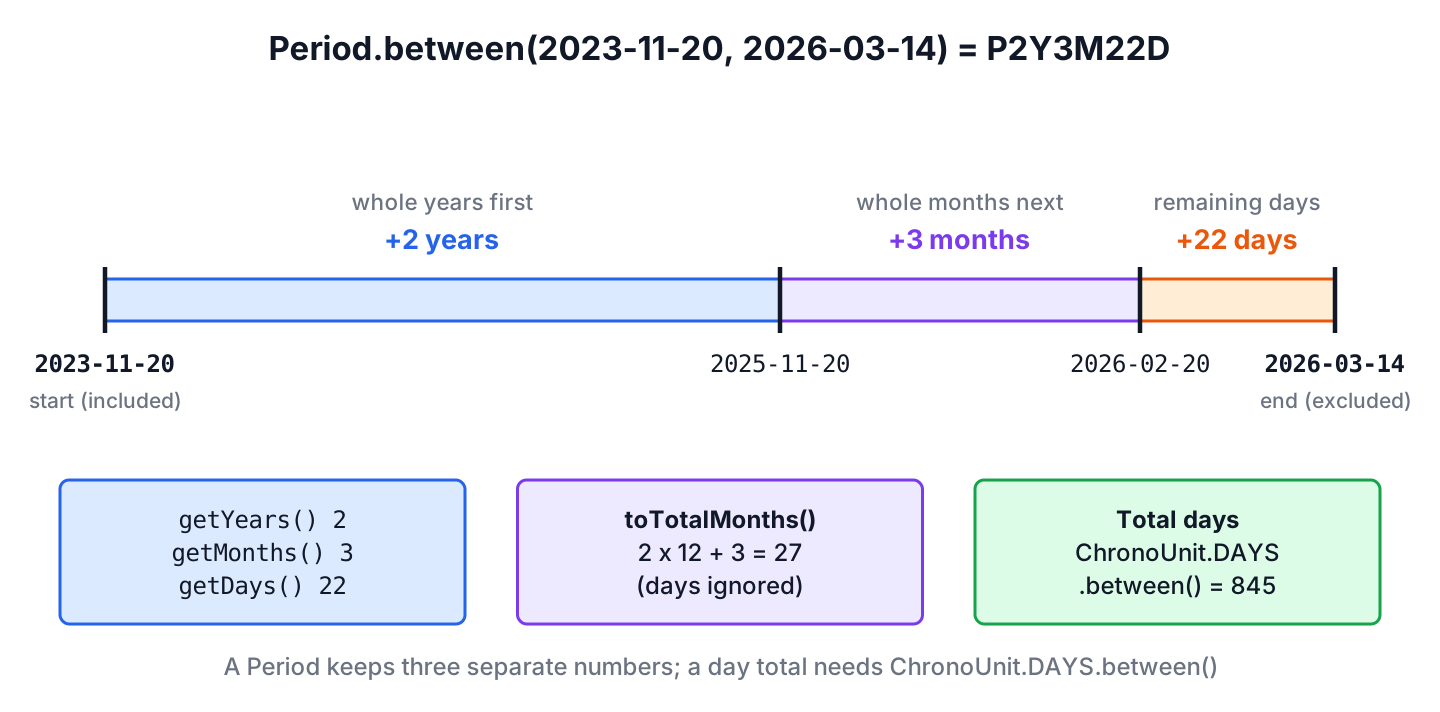
A Period has three int fields, years, months and days, and each field can be zero or negative. The class does not convert between the fields, because a month has 28 to 31 days and a year has 365 or 366 days. Only a start date decides how long a month is, so a Period gets a fixed length in days only when we add it to a date.
The method Period.between() shows how the three parts come together. It takes whole years first, whole months second and the remaining days last, as the diagram shows for November 20, 2023 to March 14, 2026.
The text form follows the ISO-8601 duration format PnYnMnD. The letter P starts the text, and a part that is zero is left out, so toString() prints P2Y6M instead of P2Y6M0D. A period of zero prints P0D.
| Period | toString() | Meaning |
|---|---|---|
| Period.of(1, 2, 3) | P1Y2M3D | 1 year, 2 months and 3 days |
| Period.ofWeeks(2) | P14D | 14 days, because weeks are stored as days |
| Period.ofMonths(-1) | P-1M | Minus 1 month |
| Period.of(1, -3, 0) | P1Y-3M | 1 year minus 3 months, which is not simplified to 9 months |
| Period.ZERO | P0D | No time at all |
Two periods are equal only when all three fields are equal, so Period.ofYears(1) is not equal to Period.ofMonths(12), although both move a date by the same amount. We call normalized() on both sides before comparing when 12 months and 1 year must count as the same value.
2. Creating a Period
The class has no public constructor. We create a Period from field values with the of methods, from ISO text with parse(), or from two dates with between().
2.1. Creating a Period with Values
The factory methods take one value per field. The method ofWeeks() multiplies the weeks by 7 and stores the result as days, so the period does not remember that it was created from weeks.
Period plan = Period.of(1, 3, 15);          // P1Y3M15D
Period trial = Period.ofDays(14);            // P14D
Period quarter = Period.ofMonths(3);         // P3M
Period term = Period.ofYears(2);             // P2Y
Period sprint = Period.ofWeeks(2);           // P14D
Period none = Period.ZERO;                   // P0D
2.2. Parsing an ISO-8601 String to a Period
The method Period.parse() reads the formats PnYnMnD and PnW, and both can be combined, as in P1Y2M3W4D. The letters can be upper or lower case, each number can be negative, and a minus sign before the P negates the whole period.
Period full = Period.parse("P1Y2M3D");          // P1Y2M3D
Period weeks = Period.parse("P52W");            // P364D
Period mixed = Period.parse("P1Y2M3W4D");       // P1Y2M25D
Period lower = Period.parse("p1y2m");           // P1Y2M
Period negative = Period.parse("-P1Y2M");       // P-1Y-2M
Period hours = Period.parse("PT5H");            // DateTimeParseException
A Period has no time part, so text with hours such as PT5H throws a DateTimeParseException; that text belongs to Duration.parse(). When the text comes from a user or a config file, we catch the exception and return an Optional, so a bad value does not stop the request.
static Optional<Period> parsePeriod(String text) {
    if (text == null) {
        return Optional.empty();
    }
    try {
        return Optional.of(Period.parse(text.strip()));
    } catch (DateTimeParseException e) {
        return Optional.empty();
    }
}
Optional<Period> ok = parsePeriod(" P30D "); // Optional[P30D]
Optional<Period> bad = parsePeriod("30 days"); // Optional.empty2.3. Getting the Period Between Two Dates
The method Period.between(start, end) and its twin start.until(end) return the years, months and days from the start date to the end date. The start date is included and the end date is excluded, and the result is negative when the end comes first.
LocalDate start = LocalDate.of(2020, 3, 12);
LocalDate end = LocalDate.of(2020, 7, 20);
Period between = Period.between(start, end);    // P4M8D
Period until = start.until(end);                // P4M8D
Period reversed = Period.between(end, start);   // P-4M-8D
Period shortMonth = Period.between(LocalDate.of(2026, 1, 31), LocalDate.of(2026, 3, 1));   // P1M1D
The last line shows the month rule. January 31 plus one month is February 28, and one more day reaches March 1, so the result is P1M1D. Both methods accept only LocalDate values; for date-times, we call toLocalDate() first. To count the total number of days instead, we use the methods in days between two dates, and the full years-to-seconds breakdown is in difference between two dates.
3. Reading Years, Months and Days
The getters getYears(), getMonths() and getDays() return the fields as they are stored. The generic get(unit) method accepts only ChronoUnit.YEARS, MONTHS and DAYS, which is the list that getUnits() returns; any other unit throws an UnsupportedTemporalTypeException.
Period period = Period.of(1, 14, 40);
int years = period.getYears();                    // 1
int months = period.getMonths();                  // 14
int days = period.getDays();                      // 40
long viaUnit = period.get(ChronoUnit.MONTHS);     // 14
long totalMonths = period.toTotalMonths();        // 26
List<TemporalUnit> units = period.getUnits();     // [Years, Months, Days]
long weeks = period.get(ChronoUnit.WEEKS);        // UnsupportedTemporalTypeException
The method toTotalMonths() returns years times 12 plus months and ignores the days. A period of 1 year and 14 months is a valid Period, because Period.of() does not check the ranges of the fields.
Two checks help in conditions. The method isZero() returns true when all three fields are zero, and isNegative() returns true when at least one field is negative, so P1M-1D counts as negative.
boolean zero = Period.ZERO.isZero();                    // true
boolean negative = Period.of(0, 1, -1).isNegative();    // true
boolean positive = Period.ofDays(3).isNegative();       // false
4. Modifying a Period
A Period is immutable, so every method that changes a value returns a new Period and leaves the original as it is. The changes work field by field, and none of them moves days into months.
- The methods plus(amount) and minus(amount) add or subtract another period, field by field.
- The methods plusYears(), plusMonths(), plusDays() and the matching minus methods change one field.
- The methods withYears(), withMonths() and withDays() replace one field.
- The method multipliedBy(n) multiplies all three fields, and negated() flips their signs.
- The method normalized() moves whole multiples of 12 months into years and keeps the days as they are.
Period base = Period.of(1, 2, 3);
Period longer = base.plus(Period.ofDays(10));        // P1Y2M13D
Period shorter = base.minus(Period.ofMonths(5));     // P1Y-3M3D
Period noDays = base.withDays(0);                    // P1Y2M
Period doubled = base.multipliedBy(2);               // P2Y4M6D
Period flipped = base.negated();                     // P-1Y-2M-3D
Period tidy = Period.of(1, 14, 40).normalized();     // P2Y2M40D
Period borrow = Period.of(1, -3, 0).normalized();    // P9M
The line with minus() gives P1Y-3M3D, a mix of signs, and normalized() turns such a value into one sign for years and months. The days stay at 40 in the tidy line, because the number of days in a month depends on the date.
The method plus() takes a TemporalAmount, not a number, so code that passes an int does not compile. We write plusDays(5) for a plain number.
// does not compile: incompatible types, int cannot be converted to TemporalAmount
Period period = Period.ofDays(5);
Period added = period.plus(5);
5. Adding a Period to LocalDate and Other Dates
We add a period to a LocalDate with date.plus(period) and subtract it with date.minus(period). The Period adds the years and months together first and the days second, and when the target month is shorter, the day of month moves back to the last valid day.
LocalDate endOfJanuary = LocalDate.of(2024, 1, 30);
LocalDate monthsFirst = endOfJanuary.plus(Period.of(0, 1, 1));        // 2024-03-01
LocalDate daysFirst = endOfJanuary.plusDays(1).plusMonths(1);         // 2024-02-29
LocalDate leapDay = LocalDate.of(2024, 2, 29).plus(Period.ofYears(1));   // 2025-02-28
LocalDate lastMonth = LocalDate.of(2026, 10, 10).minus(Period.ofMonths(1));   // 2026-09-10
The first two lines add the same month and day in a different order and get different dates. When a rule says “one month and one day”, we use the Period so that every caller gets the same order.
Month-end dates also matter for repeated additions. Adding one month at a time to January 31 drops to the 28th in February and stays there, whereas adding a multiplied period to the original date keeps the 31st whenever the month has one.
LocalDate anchor = LocalDate.of(2026, 1, 31);
LocalDate stepByStep = anchor.plusMonths(1).plusMonths(1);                // 2026-03-28
LocalDate fromAnchor = anchor.plus(Period.ofMonths(1).multipliedBy(2));   // 2026-03-31
A Period also works with date-time types. A LocalDateTime keeps its time of day, and a ZonedDateTime keeps the local time across a daylight saving change. An Instant accepts a period of days only, and a LocalTime accepts none, because it has no date.
LocalDateTime meeting = LocalDateTime.of(2026, 1, 31, 18, 0).plus(Period.ofMonths(1));   // 2026-02-28T18:00
Instant nextDay = Instant.parse("2026-03-07T12:00:00Z").plus(Period.ofDays(1));         // 2026-03-08T12:00:00Z
Instant nextMonth = Instant.parse("2026-03-07T12:00:00Z").plus(Period.ofMonths(1));     // UnsupportedTemporalTypeException
LocalTime noon = LocalTime.NOON.plus(Period.ofDays(1));                                 // UnsupportedTemporalTypeException
6. Period vs Duration
Both classes implement TemporalAmount, so both can be added to a date-time, but they count different things. A Period counts calendar years, months and days, whereas a Duration counts an exact number of seconds and nanoseconds.
| Period | Duration | |
|---|---|---|
| Fields | Years, months, days | Seconds and nanoseconds |
| ISO text | P1Y2M3D | PT51H |
| One day is | One calendar day, 23 to 25 hours on a DST change | Always 24 hours |
| Works with | LocalDate and date-time types | LocalTime, date-time types, Instant |
| Typical use | Ages, terms, plans, notice periods | Timeouts, shift lengths, elapsed time |
The difference shows up on a daylight saving day. In New York, clocks move forward on March 8, 2026, so that calendar day has 23 hours. A Period of one day keeps 12:00, while a Duration of one day adds 24 hours and ends at 13:00.
ZonedDateTime saturdayNoon = ZonedDateTime.of(2026, 3, 7, 12, 0, 0, 0, ZoneId.of("America/New_York"));
ZonedDateTime calendarDay = saturdayNoon.plus(Period.ofDays(1));     // 2026-03-08T12:00-04:00[America/New_York]
ZonedDateTime exactDay = saturdayNoon.plus(Duration.ofDays(1));      // 2026-03-08T13:00-04:00[America/New_York]
We pick Period when a person would say “in one month” or “after two years”, and Duration when a machine measures time, such as a cache entry that expires after 30 minutes. The method Period.from() refuses a Duration with a DateTimeException, because seconds cannot become calendar units.
7. Warranty and Subscription Terms in a Shop App
An online electronics shop sells products with different warranty terms, such as 2 years for a laptop and 6 months for headphones, and a monthly subscription for extended support. The shop stores each term as ISO text in the product table, for example P2Y or P6M, so the terms can change without a code change.
The code parses the text once, adds the period to the purchase date and compares the result with today’s date. The renewal dates use the anchor rule from section 5, so a plan bought on January 31 renews on the last day of shorter months and returns to the 31st afterwards.
static boolean underWarranty(LocalDate purchased, String term, LocalDate today) {
    LocalDate expires = purchased.plus(Period.parse(term));
    return today.isBefore(expires);
}
static List<LocalDate> renewals(LocalDate start, Period plan, int count) {
return IntStream.rangeClosed(1, count)
.mapToObj(i -> start.plus(plan.multipliedBy(i)))
.toList();
}LocalDate bought = LocalDate.of(2025, 4, 2);
boolean laptop = underWarranty(bought, "P2Y", LocalDate.of(2026, 10, 10)); // true
boolean headphones = underWarranty(bought, "P6M", LocalDate.of(2026, 10, 10)); // false
List<LocalDate> support = renewals(LocalDate.of(2026, 1, 31), Period.ofMonths(1), 4); // [2026-02-28, 2026-03-31, 2026-04-30, 2026-05-31]The method takes today’s date as a parameter, so tests pass fixed dates. In production, the caller passes LocalDate.now(zone) with the shop’s time zone.
8. Java Period FAQs
Leap years, day totals, ordering and storage come up as soon as a Period meets real data.
8.1. Does Period take leap years into account?
Yes, when we add the period to a date. The period itself only stores numbers, and the date decides the length. February 29, 2024 plus one year gives February 28, 2025, and Period.between() of those two dates is P11M30D, not one year.
8.2. How do we convert a Period to days?
We need a start date, because the length of a month depends on it. We add the period to the start date and count the days with ChronoUnit.DAYS.between().
LocalDate from = LocalDate.of(2026, 1, 1);
long days = ChronoUnit.DAYS.between(from, from.plus(Period.of(0, 2, 10)));   // 69
8.3. Can we compare two Period objects?
Only with equals(), because Period does not implement Comparable. For an order, we compare toTotalMonths() first and the days second, or we add both periods to the same date and compare the resulting dates.
8.4. How do we store a Period in a database or JSON?
We store the ISO text from toString(), such as P1Y2M, in a string column and read it back with Period.parse(). Jackson’s Java time support writes and reads a Period in the same ISO text form.
9. Conclusion
A Period holds years, months and days as separate fields and turns them into a real length only when we add it to a date. We create it with of(), parse() or between(), read it with the getters and toTotalMonths(), and change it with methods that return new instances.
Month ends, leap days and daylight saving changes all follow the calendar, which is the reason to choose Period over Duration for terms and plans. The other classes of the API are covered in our Java date and time guide.
10. References
Happy Learning !!
