
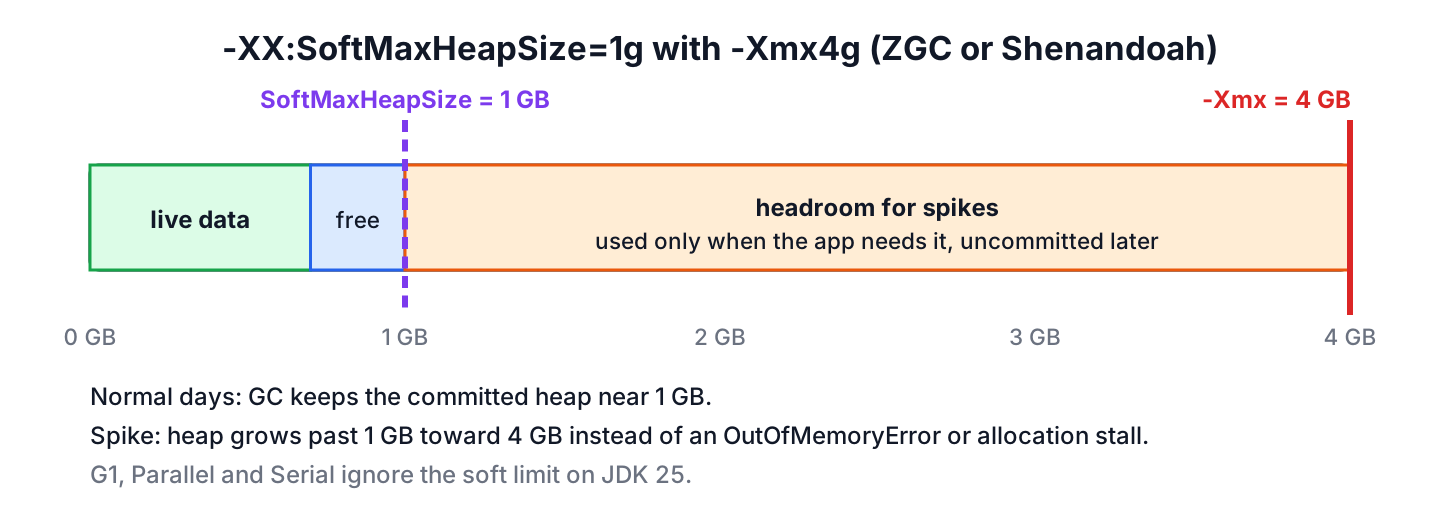
The -XX:SoftMaxHeapSize option sets a soft limit on the Java heap, so the garbage collector tries to keep the heap below that size but can still grow it up to -Xmx when the app needs more memory. The hard limit stays at -Xmx, which is what keeps us away from an OutOfMemoryError.
We use it to keep the normal memory footprint of a service small while leaving room for short spikes, such as a month-end report or a burst of traffic. The flag was added in JDK 13, and on JDK 25 only ZGC and Shenandoah act on it.
The following example starts an app with a 4 GB hard limit and a 1 GB soft limit, and changes the soft limit later without a restart.
# start with ZGC, 4 GB hard limit, 1 GB soft limit
java -XX:+UseZGC -Xmx4g -XX:SoftMaxHeapSize=1g -jar reports.jar

# raise the soft limit of the running JVM (process id 8927) to 2 GB, in bytes
jcmd 8927 VM.set_flag SoftMaxHeapSize 2147483648

# check the current value
jcmd 8927 VM.flags | grep -o "SoftMaxHeapSize=[0-9]*"    # SoftMaxHeapSize=2147483648
Notice that the soft limit is a target for the collector and not a cap, and that jcmd needs the value in bytes. We look at the rules for the value, which collectors honour it, what it does to the committed heap, how to change it at runtime, and how it compares with -Xms and -Xmx.
1. Using SoftMaxHeapSize Flag
The JVM reserves heap memory up to -Xmx but commits (that is, takes from the operating system) only what it needs. When SoftMaxHeapSize is set, the GC tries not to grow the committed heap beyond this limit, but it is allowed to outgrow it when it must, for example to avoid an OutOfMemoryError or an allocation stall. Once the spike is over, the collector shrinks the heap toward the soft limit again.
The value follows a few rules that the JVM checks at startup.
- The value is a size in bytes, and the usual suffixes work on the command line, such as -XX:SoftMaxHeapSize=2048m or -XX:SoftMaxHeapSize=2g.
- The value cannot be greater than the maximum heap size. A value above -Xmx stops the JVM with the message SoftMaxHeapSize must be less than or equal to the maximum heap size.
- By default, the value is equal to the maximum heap size, so the flag has no effect until we set a smaller value.
- The flag is manageable, so we can change it while the JVM runs, as we see in section 2.
The option was added for ZGC by JDK-8222145 in JDK 13. The ZGC team explains the design in ZGC and SoftMaxHeapSize, with the same idea of a 2 GB normal size and a 5 GB ceiling.
1.1. Which Garbage Collectors Honour SoftMaxHeapSize
Every HotSpot JVM accepts the flag, but only some collectors read it. The default collector on most servers is G1, and on JDK 25 G1 ignores the flag, so adding -XX:SoftMaxHeapSize without changing the collector does nothing.
| Collector | Honours SoftMaxHeapSize | Notes |
|---|---|---|
| ZGC (-XX:+UseZGC) | Yes, since JDK 13 | Generational only since JDK 24 (JEP 490) |
| Shenandoah (-XX:+UseShenandoahGC) | Yes, since JDK 16 | Added by JDK-8252660, backported to 11.0.10 and 15.0.2 |
| G1 (default) | No | Support is tracked in JDK-8236073 |
| Parallel, Serial | No | Use -Xmx and the heap free ratio flags |
We checked the effect with a small program that keeps 100 MB of live data and allocates garbage for six seconds, run with -Xmx2g on JDK 25. The table shows the committed heap at the end of one run, with and without -XX:SoftMaxHeapSize=256m. The numbers change from run to run and from machine to machine, but the pattern stays the same.
| Collector | Committed heap without the flag | Committed heap with 256m soft limit |
|---|---|---|
| G1 | 1259 MB | 1259 MB |
| ZGC | 1810 MB | 344 MB |
| Shenandoah | 1592 MB | 513 MB |
We can see that ZGC and Shenandoah both stay well below their usual size, and both go above 256 MB because the live data plus the allocation rate need more room. G1 commits the same amount in both runs. On JDK 26 and 27, the same test showed the same picture, with G1 still ignoring the flag.
2. Changing Heap Limit in Runtime
The flag is manageable, which means it can be written while the JVM runs through the JDK management interface, the HotSpotDiagnosticMXBean. Three tools use that interface, namely the jcmd command, JConsole and our own Java code.
From a terminal, jcmd is the shortest way. Unlike the command line, VM.set_flag does not understand size suffixes, so 2g is read as 2 bytes. On JDK 25, jcmd <pid> VM.set_flag SoftMaxHeapSize 2g reports success and sets the soft limit to 2 bytes, which makes the collector work as hard as it can to shrink the heap.
# 2 GB written in bytes
jcmd <pid> VM.set_flag SoftMaxHeapSize 2147483648

# a value above -Xmx is rejected
jcmd <pid> VM.set_flag SoftMaxHeapSize 8589934592
# SoftMaxHeapSize error: value violates its flag's constraint.
From Java code, for example an admin endpoint of the service, we get the MXBean from ManagementFactory and call setVMOption(). The value must be a plain number of bytes here too, but the MXBean at least rejects a suffix with an exception.
HotSpotDiagnosticMXBean hotspot = ManagementFactory.getPlatformMXBean(HotSpotDiagnosticMXBean.class);
hotspot.setVMOption("SoftMaxHeapSize", String.valueOf(256L * 1024 * 1024));
String softMax = hotspot.getVMOption("SoftMaxHeapSize").getValue();               // "268435456"
String origin = hotspot.getVMOption("SoftMaxHeapSize").getOrigin().name();         // "MANAGEMENT"
hotspot.setVMOption("SoftMaxHeapSize", "512m");                             // IllegalArgumentException: expects numeric value
The last call fails with an IllegalArgumentException because of the size suffix. A value above the maximum heap size also throws an IllegalArgumentException, with the same constraint message that jcmd prints.
JConsole offers the same operation without code. In the MBeans tab, we choose com.sun.management, HotSpotDiagnostic, Operations and setVMOption, and enter SoftMaxHeapSize with a value in bytes. ZGC and Shenandoah use the new value in their next GC cycles, and the value is lost when the JVM restarts.
3. SoftMaxHeapSize in a Container
Memory in a cloud deployment costs money per gigabyte, and a pod that reserves 4 GB for a spike that happens once a month wastes most of it. The soft limit together with uncommit lets the JVM hand that memory back to the operating system between spikes.
Say a reporting service in Kubernetes needs about 700 MB of heap during the day, but the month-end export holds 2.5 GB of rows for ten minutes. We give the container enough memory for the spike and let ZGC run small the rest of the time.
java -XX:+UseZGC \
     -Xmx3g \
     -XX:SoftMaxHeapSize=1g \
     -XX:ZUncommitDelay=120 \
     -jar reports.jar
With these settings, the heap stays near 1 GB on normal days. During the export, ZGC grows the heap toward 3 GB instead of failing, and two minutes after the export finishes it uncommits the unused memory, because ZUncommitDelay is set to 120 seconds (the default is 300). The container limit still has to cover the full -Xmx plus metaspace, thread stacks and other native memory, otherwise the container memory limit kills the process during the spike.
The soft limit is not a fix for a heap that keeps growing. If the live data itself grows past the soft limit and stays there, the collector runs more often while still using more memory, and the right step is to find the leak or raise the limit.
4. SoftMaxHeapSize vs Xmx vs Xms
Developers often mix up the heap flags because all of them take a size. The difference is whether the JVM must respect the value or only tries to.
| Flag | Meaning | What happens at the limit | Changeable at runtime |
|---|---|---|---|
| -Xms | Initial (and minimum) heap size | The heap starts here | No |
| -XX:SoftMaxHeapSize | Soft target for the committed heap | GC works harder and grows past it if needed | Yes |
| -Xmx | Maximum heap size | OutOfMemoryError when full after GC | No |
| -XX:MaxRAMPercentage | -Xmx as a share of the container memory | Same as -Xmx | No |
A common setup in containers uses -XX:MaxRAMPercentage=75 for the hard limit and a soft limit of about half of that. The garbage collection algorithms article explains how the collectors themselves work.
5. SoftMaxHeapSize FAQs
Once the flag runs on a real service, the memory graphs raise questions about G1, spikes, the current value and the difference from -Xms.
5.1. Does G1 support SoftMaxHeapSize?
No, not on JDK 25. G1 accepts the flag without an error but does not use it to size the heap. To get the soft limit behavior, we switch to ZGC or Shenandoah, or keep G1 and use -Xmx with the MinHeapFreeRatio and MaxHeapFreeRatio flags to control shrinking.
5.2. What happens when the app needs more heap than the soft limit?
The collector grows the heap past the soft limit, up to -Xmx. The app keeps running, and an OutOfMemoryError is thrown only when the heap is full at -Xmx and a GC cannot free enough space.
5.3. How do we check the current SoftMaxHeapSize value?
We run jcmd <pid> VM.flags for a running JVM, or java -XX:+PrintFlagsFinal -version for the default. The default equals the maximum heap size and shows the {manageable} marker.
java -XX:+PrintFlagsFinal -version | grep SoftMaxHeapSize
#   size_t SoftMaxHeapSize = 1568669696   {manageable} {ergonomic}
5.4. Is SoftMaxHeapSize the same as -Xms?
No. The -Xms value is the size the heap starts with and never shrinks below, while the soft limit is an upper target that the heap may cross. A heap with -Xms equal to -Xmx is fully committed from the start, so a soft limit cannot return any memory.
5.5. Can the soft limit be lowered while the app is running?
Yes. Because the flag is manageable, a lower value in bytes set with jcmd or the MXBean makes ZGC and Shenandoah shrink the heap toward the new target over the next GC cycles, as long as the live data fits.
6. Conclusion
The -XX:SoftMaxHeapSize flag gives the heap a soft upper target below -Xmx. ZGC and Shenandoah try to stay under it and cross it only when the app needs the memory, while G1, Parallel and Serial ignore it on JDK 25.
The flag is most useful for services with rare memory spikes in containers, where it keeps the usual footprint small and leaves the spike headroom up to -Xmx. Because it is manageable, we can tune it on a running JVM with jcmd or HotSpotDiagnosticMXBean. More JVM topics are in the Java tutorial.
7. References
- JDK-8222145, Add -XX:SoftMaxHeapSize flag
- Per Liden, ZGC and SoftMaxHeapSize
- JDK-8252660, Shenandoah support for SoftMaxHeapSize
- Java 25 GC Tuning Guide, The Z Garbage Collector
- HotSpotDiagnosticMXBean Javadoc
Happy Learning !!
