
Counting the days between two dates in Java takes one call, ChronoUnit.DAYS.between(start, end), which counts the start date and leaves out the end date, so June 1 to June 15 gives 14. The call start.until(end, ChronoUnit.DAYS) returns the same long value.
Day counts drive payment terms, trial periods, hotel nights, countdowns and “days since the last login” rules. For a breakdown into years, months and days, the article on the difference between two dates covers Period and Duration.
The following example counts the days of an invoice period in three ways.
LocalDate issued = LocalDate.parse("2023-06-01");
LocalDate due = LocalDate.parse("2023-06-15");
long days = ChronoUnit.DAYS.between(issued, due);           // 14
long viaUntil = issued.until(due, ChronoUnit.DAYS);         // 14
long viaEpochDay = due.toEpochDay() - issued.toEpochDay();  // 14
long inclusive = ChronoUnit.DAYS.between(issued, due) + 1;  // 15
Notice that the result is 14, not 15, because the end date is excluded; we add 1 when both dates count. The sections cover the end-date rule, date-times and time zones, the Period trap, and an overdue-invoice example.
1. Using ChronoUnit to Find the Number of Days between Two Dates
The constant ChronoUnit.DAYS has a between() method that returns the number of complete days from the first value to the second. For two LocalDate values, it subtracts their epoch days, which are the day numbers counted from 1970-01-01, so it is exact for any range and any leap year.
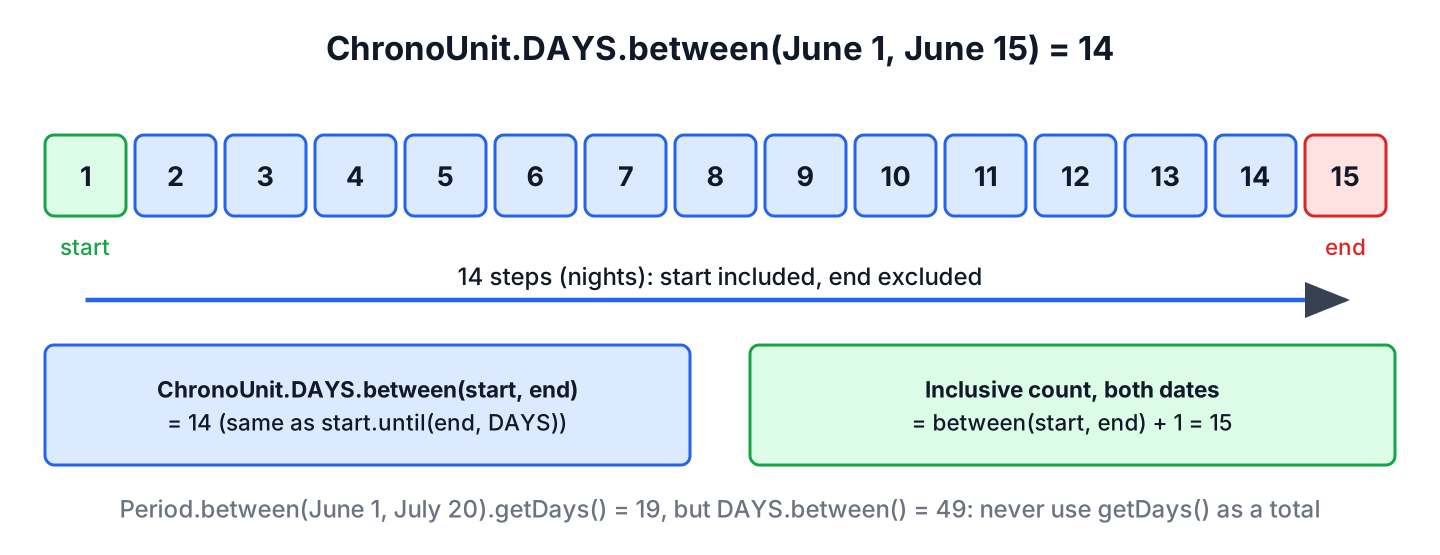
Think of the result as the number of nights between the two dates. A stay from June 1 to June 15 has 14 nights, which is what between() returns.
LocalDate start = LocalDate.of(2024, 2, 1);
LocalDate end = LocalDate.of(2024, 3, 1);
long leapFebruary = ChronoUnit.DAYS.between(start, end);                                 // 29
long year2024 = ChronoUnit.DAYS.between(LocalDate.of(2024, 1, 1), LocalDate.of(2025, 1, 1));   // 366
long sameDay = ChronoUnit.DAYS.between(start, start);                                    // 0
long backwards = ChronoUnit.DAYS.between(end, start);                                    // -29
The result is negative when the end is before the start. When the order of the two dates is unknown, we wrap the call in Math.abs().
2. Using LocalDate.until()
The method until(end, unit) on LocalDate does the same calculation as ChronoUnit.DAYS.between(); in fact, between() calls until(). We choose the form that reads better in the code, for example today.until(eventDate, DAYS) for a countdown.
LocalDate today = LocalDate.of(2026, 10, 10);
LocalDate conference = LocalDate.of(2026, 12, 3);
long daysLeft = today.until(conference, ChronoUnit.DAYS);   // 54
String banner = daysLeft + " days to go";                   // "54 days to go"
The method until() also works on LocalDateTime and ZonedDateTime. Without the unit argument, LocalDate.until(end) returns a Period, which is the trap in section 5.
3. Counting Both the Start and the End Date
Some rules count both dates. A conference from June 1 to June 3 has 3 conference days, and a sick leave from Monday to Friday is 5 days. For these inclusive counts, we add 1 to the result of between().
LocalDate first = LocalDate.of(2025, 6, 1);
LocalDate last = LocalDate.of(2025, 6, 3);
long nights = ChronoUnit.DAYS.between(first, last);          // 2
long eventDays = ChronoUnit.DAYS.between(first, last) + 1;   // 3
long listed = first.datesUntil(last.plusDays(1)).count();    // 3
The method datesUntil() returns a stream of the dates themselves, which helps when some days must be skipped, such as weekends. The articles on all dates between two dates and on business days between two dates build on it. For a plain count, between() does less work, because it subtracts two numbers instead of creating a date object per day.
4. Days Between LocalDateTime and ZonedDateTime Values
With date-times, ChronoUnit.DAYS.between() counts complete 24-hour days on the local timeline, so the time of day matters. From 10:00 on June 1 to 09:00 on June 15 is 13 days, because the fourteenth day is one hour short.
LocalDateTime pickup = LocalDateTime.parse("2023-06-01T10:00:00");
LocalDateTime dropOff = LocalDateTime.parse("2023-06-15T09:00:00");
long fullDays = ChronoUnit.DAYS.between(pickup, dropOff);                                  // 13
long calendarDays = ChronoUnit.DAYS.between(pickup.toLocalDate(), dropOff.toLocalDate());  // 14
When the rule is about calendar dates, we call toLocalDate() on both values first, so the time of day cannot remove a day from the count.
For ZonedDateTime values, DAYS counts days on the local timeline, so a day with a daylight saving change still counts as one day, although it has 23 or 25 hours. Dividing hours by 24 gives a different answer.
ZoneId paris = ZoneId.of("Europe/Paris");
ZonedDateTime from = ZonedDateTime.of(2025, 3, 29, 12, 0, 0, 0, paris);
ZonedDateTime to = ZonedDateTime.of(2025, 4, 1, 12, 0, 0, 0, paris);
long days = ChronoUnit.DAYS.between(from, to);              // 3
long hours = ChronoUnit.HOURS.between(from, to);            // 71
long fromHours = ChronoUnit.HOURS.between(from, to) / 24;   // 2
The start and end values must also be of compatible types. A LocalDate start can take a LocalDateTime end, because the end is converted to a date, but the reverse order throws an exception.
long mixed = ChronoUnit.DAYS.between(LocalDate.of(2024, 1, 1), LocalDateTime.of(2024, 1, 5, 10, 0));   // 4
long reverse = ChronoUnit.DAYS.between(LocalDateTime.of(2024, 1, 5, 10, 0), LocalDate.of(2024, 1, 1));   // DateTimeException
5. Avoid Using Period.getDays() for a Day Count
If we leave out the unit, until() returns a Period, and so does Period.between(). A Period stores years, months and days separately, and its getDays() method returns only the days part. Whenever the range crosses a month boundary, the result is wrong as a day count.
LocalDate start = LocalDate.parse("2023-06-01");
LocalDate end = LocalDate.parse("2023-07-20");
long correct = ChronoUnit.DAYS.between(start, end);   // 49
Period period = start.until(end);                     // P1M19D
int daysPart = period.getDays();                      // 19
The period is 1 month and 19 days, so getDays() returns 19, whereas the real count is 49. A Period has no method that converts months to days, because months have different lengths, so we use ChronoUnit.DAYS for totals.
6. Showing Days Left or Overdue for an Invoice
A billing app sends reminders for invoices with net-30 payment terms, which means the payment is due 30 days after the invoice date. The app shows the days left before the due date or the days overdue after it, based on today’s date in the customer’s zone.
static String paymentStatus(LocalDate invoiced, LocalDate today) {
    LocalDate due = invoiced.plusDays(30);
    long days = ChronoUnit.DAYS.between(today, due);
    if (days > 0) {
        return days + " days left";
    }
    return days == 0 ? "due today" : -days + " days overdue";
}
LocalDate invoiced = LocalDate.of(2026, 9, 1);
String early = paymentStatus(invoiced, LocalDate.of(2026, 9, 21)); // "10 days left"
String dueToday = paymentStatus(invoiced, LocalDate.of(2026, 10, 1)); // "due today"
String late = paymentStatus(invoiced, LocalDate.of(2026, 10, 10)); // "9 days overdue"
LocalDate realToday = LocalDate.now(ZoneId.of("America/Chicago")); // the current date in ChicagoBecause paymentStatus() gets today’s date from its caller, a unit test can pass any fixed date. The production code calls it with LocalDate.now(zone) for the customer’s zone, so a customer in Chicago does not see an invoice as overdue while it is still the due date for them.
7. Days Between Dates FAQs
The end date, legacy values and month lengths are where day counts most often go wrong.
7.1. Is the end date included in ChronoUnit.DAYS.between()?
No. The count starts at the start date and stops before the end date, so June 1 to June 2 gives 1. We add 1 for an inclusive count.
7.2. How do we count the days between two java.util.Date objects?
We convert both to LocalDate in a chosen zone and call ChronoUnit.DAYS.between(). Dividing the millisecond difference by 86,400,000 gives a wrong count when the range crosses a daylight saving change.
Date sent = Date.from(Instant.parse("2024-03-09T17:00:00Z"));
Date paid = Date.from(Instant.parse("2024-03-12T16:00:00Z"));
ZoneId zone = ZoneId.of("America/New_York");
long days = ChronoUnit.DAYS.between(LocalDate.ofInstant(sent.toInstant(), zone), LocalDate.ofInstant(paid.toInstant(), zone));   // 3
long millisDays = (paid.getTime() - sent.getTime()) / 86_400_000L;   // 2
7.3. How do we count only working days?
We stream the dates with datesUntil() and filter out Saturdays, Sundays and holidays. The business days article linked in section 3 has the full method, including holidays.
7.4. How many days are in a given month?
We call lengthOfMonth() on any date in that month, or YearMonth.of(year, month).lengthOfMonth(). For example, February 2024 has 29 days, because 2024 is a leap year.
8. Conclusion
The number of days between two dates is ChronoUnit.DAYS.between(start, end) or start.until(end, DAYS). Both count the start date and exclude the end date, and both return a negative value when the dates are in reverse order.
For date-times, we convert to LocalDate first when calendar days matter, because complete 24-hour days can be one fewer. We never use Period.getDays() as a total. Other date calculations are collected in the Java date and time tutorial.
9. References
Happy Learning !!

LocalDateTime startLdt = LocalDateTime.parse(“2023-06-01T00:00:00”);
LocalDateTime endLdt = LocalDateTime.parse(“2023-06-15T23:59:00”);
long diffInDays = ChronoUnit.DAYS.between(startLdt, endLdt);
If I take calender days I expect 15 days here but I am getting 14 days as result.
The endDate is exclusive, so it counts only 1 to 14. The 15 is excluded.