
The Java Stream interface has no contains(), containsAny() or containsAll() method, so we check for elements with the terminal operation anyMatch(), and for several elements we compare the stream against a Set. Each check returns a boolean and consumes the stream.
We need these checks when the data arrives as a stream instead of a collection, for example lines from Files.lines(), tokens from Pattern.splitAsStream(), the result of a longer pipeline or a stream returned by a repository method. For a List or a Set that we already hold, the collection methods contains() and containsAll() are shorter.
The following example runs all three checks on a stream of pizza toppings.
List<String> toppings = List.of("cheese", "olive", "basil", "ham");

boolean hasOlive = toppings.stream().anyMatch("olive"::equals);                     // true

Set<String> meats = Set.of("ham", "salami");
boolean anyMeat = toppings.stream().anyMatch(meats::contains);                      // true

Set<String> required = Set.of("cheese", "basil");
boolean hasAll = toppings.stream().collect(Collectors.toSet()).containsAll(required);   // true
Notice that every line opens a new stream with toppings.stream(), because a stream can run only one terminal operation. We wrap the three checks into reusable contains(), containsAny() and containsAll() methods, look at empty inputs and null elements, and compare them with the collection methods that do the same job.
1. Why Stream Has No contains() Method
A Collection holds its elements, so contains() can look at them as often as we like. A Stream holds nothing; it pulls elements from a source once, in one pass, and some streams never end. Answering “is x in here” means running a terminal operation that reads elements until it finds the answer, and the Stream API already has that operation in anyMatch().
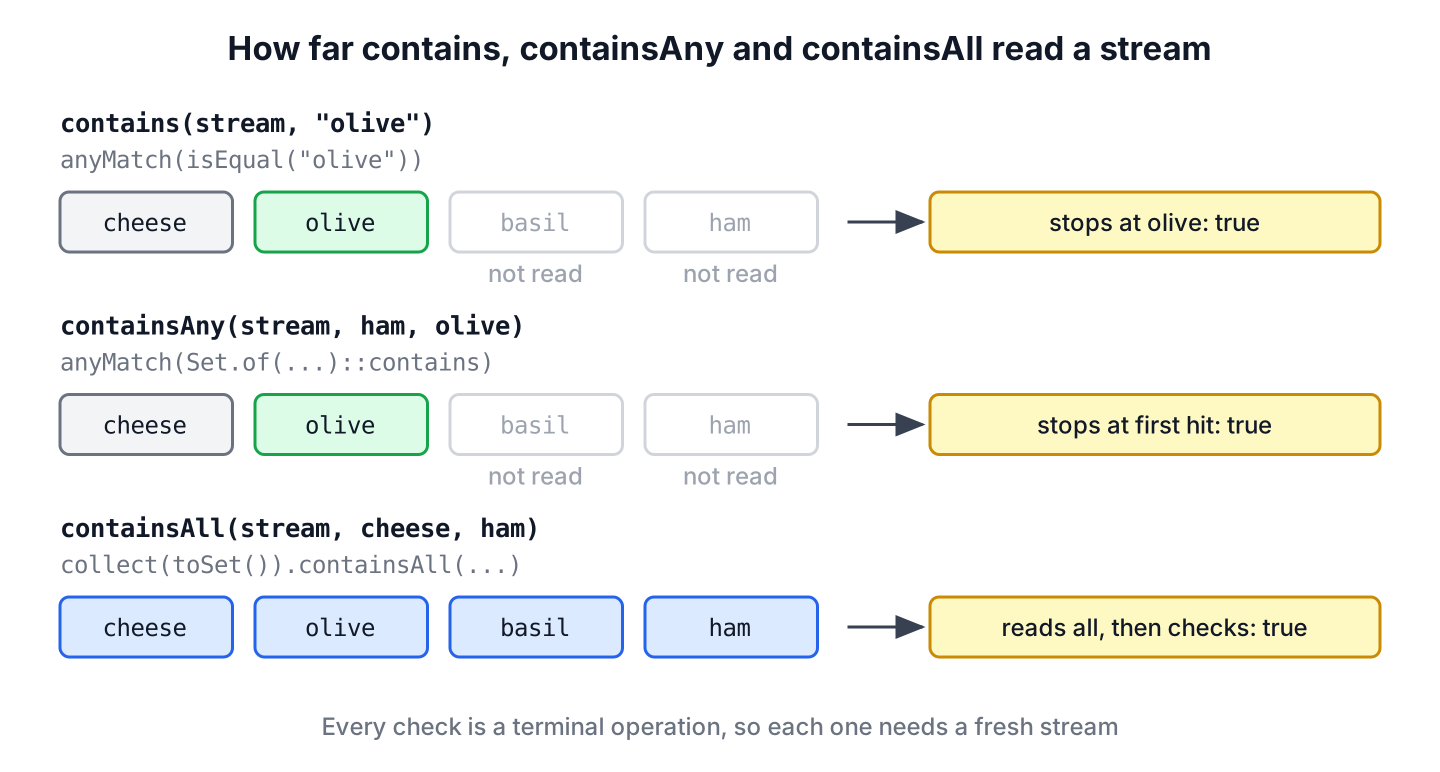
Both anyMatch() and allMatch() are short-circuiting terminal operations. The method anyMatch() stops at the first element that matches, and allMatch() stops at the first element that does not, so neither one reads more of the stream than it needs.
2. Checking One Element With contains()
For a single element, the check is anyMatch() with an equality predicate. The factory Predicate.isEqual(element) compares with equals() and also handles a null argument, so we can wrap it in a small generic method without extra null checks.
static <T> boolean contains(Stream<? extends T> stream, T element) {
    return stream.anyMatch(Predicate.isEqual(element));
}
boolean olive = contains(Stream.of("cheese", "olive", "basil"), "olive"); // true
boolean corn = contains(Stream.of("cheese", "olive", "basil"), "corn"); // false
boolean infinite = contains(Stream.iterate(1, n -> n + 2), 7); // trueThe last line checks an infinite stream of odd numbers and still returns, because anyMatch() stops at 7. A search for an even number in the same stream would never return, so a bounded stream or a limit() is the safe choice for checks that can fail.
3. Checking Several Candidates With containsAny()
The method containsAny() returns true when at least one candidate appears in the stream. The efficient way is to put the candidates into a HashSet and call anyMatch(set::contains) on the stream. Each lookup is a constant-time hash check, and the stream stops at the first hit.
static <T> boolean containsAny(Stream<? extends T> stream, Collection<? extends T> candidates) {
    Set<T> wanted = new HashSet<>(candidates);
    return stream.anyMatch(wanted::contains);
}
@SafeVarargs
static <T> boolean containsAny(Stream<? extends T> stream, T... candidates) {
return containsAny(stream, Arrays.asList(candidates));
}boolean meat = containsAny(Stream.of("cheese", "olive", "ham"), List.of("ham", "salami")); // true
boolean fish = containsAny(Stream.of("cheese", "olive", "ham"), "tuna", "anchovy"); // false
boolean none = containsAny(Stream.of("cheese", "olive"), List.of()); // falseThe varargs overload carries @SafeVarargs, which removes the “possible heap pollution” warning that a generic T… parameter produces. The method only reads the array, so the annotation is safe. We use Arrays.asList() instead of List.of() because List.of() throws NullPointerException for a null candidate.
4. Checking Every Candidate With containsAll()
The method containsAll() returns true only when every candidate appears in the stream at least once. Here the stream has to be read as a whole in the worst case, because the last candidate can be the last element. We collect the stream into a Set and call Set.containsAll().
static <T> boolean containsAll(Stream<? extends T> stream, Collection<? extends T> candidates) {
    Set<T> present = stream.collect(Collectors.toSet());
    return present.containsAll(candidates);
}
@SafeVarargs
static <T> boolean containsAll(Stream<? extends T> stream, T... candidates) {
return containsAll(stream, Arrays.asList(candidates));
}boolean margherita = containsAll(Stream.of("cheese", "tomato", "basil"), "cheese", "basil"); // true
boolean hawaii = containsAll(Stream.of("cheese", "tomato", "basil"), "ham", "cheese"); // false
boolean nothing = containsAll(Stream.of("cheese"), List.of()); // trueA candidate list with duplicates such as (“cheese”, “cheese”) still returns true for a stream with one cheese, because the check asks about presence, not counts. To compare counts, group both sides with Collectors.groupingBy(Function.identity(), Collectors.counting()).
An overload that accepts a second Stream as the candidates also works, but it only saves the caller a toList() call, so the Collection and varargs overloads cover the real cases.
5. Matching by a Field Instead of equals()
In app code, streams mostly hold objects, and the question is about one field, for example whether any topping is not vegetarian. We pass a lambda that reads the field to anyMatch(), or map the stream to the field first and reuse the methods above.
record Topping(String name, boolean vegetarian) {}List<Topping> pizza = List.of(new Topping("cheese", true), new Topping("ham", false), new Topping("basil", true));
boolean hasMeat = pizza.stream().anyMatch(t -> !t.vegetarian()); // true
boolean allVeg = pizza.stream().allMatch(Topping::vegetarian); // false
boolean noTuna = pizza.stream().noneMatch(t -> t.name().equals("tuna")); // true
boolean byName = containsAll(pizza.stream().map(Topping::name), "ham", "basil"); // trueRecords generate equals() from all components, so contains(pizza.stream(), new Topping(“ham”, false)) also works. With a class that does not override equals(), the same call compares references and returns false for an equal-looking object, which is a common bug with plain classes that only declare fields and getters.
6. Empty Inputs and null Elements
On an empty stream, anyMatch() returns false and allMatch() returns true, and our methods inherit that logic for an empty candidate list. The rule follows from the math, because “all of no candidates are present” is true and “one of no candidates is present” is false.
| Check | Empty stream | Empty candidates | null in stream or candidates |
|---|---|---|---|
| contains(stream, x) | false | not applicable | works, Predicate.isEqual(null) matches null |
| containsAny(stream, candidates) | false | false | works, HashSet accepts null |
| containsAll(stream, candidates) | false, unless candidates are empty | true | works, Collectors.toSet() accepts null |
| stream.allMatch(p) | true | not applicable | depends on the predicate |
| stream.noneMatch(p) | true | not applicable | depends on the predicate |
boolean anyEmpty = Stream.<String>empty().anyMatch(s -> true);           // false
boolean allEmpty = Stream.<String>empty().allMatch(s -> false);         // true
boolean nullFound = contains(Stream.of("cheese", null), null);          // true
boolean nullAny = containsAny(Stream.of("cheese", null), "corn", null); // true
If an empty candidate list should count as a caller error, check it at the start of the method and throw IllegalArgumentException, so a forgotten argument does not turn into a permission check that always passes.
7. A Stream Can Be Checked Only Once
Each of these methods runs a terminal operation, so the stream we pass in is used up afterwards. A second check on the same stream object throws IllegalStateException with the message “stream has already been operated upon or closed”.
Stream<String> toppings = Stream.of("cheese", "olive", "basil");
boolean olive = toppings.anyMatch("olive"::equals);                  // true
boolean basil = toppings.anyMatch("basil"::equals);                  // IllegalStateException
To run several checks, keep the data in a collection and call stream() for each check, or collect the stream once into a Set and call contains() and containsAll() on it as often as needed. A Supplier<Stream<T>> also works when the stream comes from a method that we can call again. The error itself is explained in stream has already been operated upon or closed.
Set<String> onPizza = Stream.of("cheese", "olive", "basil").collect(Collectors.toSet());
boolean olive = onPizza.contains("olive");                           // true
boolean both = onPizza.containsAll(List.of("cheese", "basil"));      // true
8. Collection Methods That Do the Same Job
When the data is already in a collection, turning it into a stream for a contains check adds code and no new capability. The JDK and Apache Commons Collections cover every case with one call.
| Question | Stream | Collection |
|---|---|---|
| Is x present? | stream.anyMatch(Predicate.isEqual(x)) | list.contains(x) |
| Is any of b present? | stream.anyMatch(setOfB::contains) | !Collections.disjoint(a, b) |
| Are all of b present? | stream.collect(toSet()).containsAll(b) | a.containsAll(b) |
| Is none of b present? | stream.noneMatch(setOfB::contains) | Collections.disjoint(a, b) |
| Any element passes a test? | stream.anyMatch(p) | a.stream().anyMatch(p) |
List<String> pizza = List.of("cheese", "olive", "basil");

boolean basil = pizza.contains("basil");                                         // true
boolean anyMeat = !Collections.disjoint(pizza, Set.of("ham", "salami"));         // false
boolean classic = pizza.containsAll(List.of("cheese", "basil"));                 // true
boolean anyGreen = CollectionUtils.containsAny(pizza, List.of("basil", "rucola"));   // true
For contains() and containsAll() on a List, each lookup scans the list, so a large argument list against a large ArrayList is slow. Copy the bigger side into a HashSet first. More detail on list lookups is in ArrayList contains(). The class CollectionUtils needs the commons-collections4 dependency, so we use it only when the project already has it.
9. Checking User Roles From a Request Header
Say an internal admin tool receives the caller’s roles as a comma-separated header such as viewer, editor. The “publish article” endpoint allows callers with any of the roles editor or admin, and the “delete user” endpoint requires both admin and auditor. The header parses into a stream, and the stream is checked once per request.
static Stream<String> roles(String header) {
    return Pattern.compile(",").splitAsStream(header == null ? "" : header)
            .map(String::strip)
            .filter(r -> !r.isEmpty());
}
boolean canPublish = containsAny(roles("viewer, editor"), "editor", "admin"); // true
boolean canDelete = containsAll(roles("admin, editor"), "admin", "auditor"); // false
boolean anonymous = containsAny(roles(null), "editor", "admin"); // falseThe method roles() creates a fresh stream on every call, so each check gets its own stream and nothing throws IllegalStateException. A missing header becomes an empty stream, and both checks return false, which denies access instead of failing with a NullPointerException.
10. Stream contains FAQs
Readers most often ask about the missing method, list-to-list checks, speed, duplicates and primitive streams.
10.1. Does Java Stream have a contains() method?
No. Up to Java 25, Stream has no contains(). Use stream.anyMatch(Predicate.isEqual(x)) or stream.anyMatch(x::equals) when x is not null.
10.2. How do we check if a list contains any element of another list?
Call !Collections.disjoint(list1, list2). With streams, write list1.stream().anyMatch(new HashSet<>(list2)::contains). Both stop at the first common element.
10.3. Is anyMatch() faster than filter().findFirst().isPresent()?
Neither is faster. They do the same amount of work, because both stop at the first match. The method anyMatch() says what we mean in one call, so it is the better choice for a yes or no answer.
10.4. How do we check if a stream contains duplicates?
Add each element to a HashSet inside filter(e -> !seen.add(e)) and call findAny(), or compare count() with distinct().count() on two streams. Both approaches are covered in finding duplicates in a stream.
10.5. Can we use these methods with IntStream?
Yes. The primitive streams have their own anyMatch(), so IntStream.of(3, 5, 7).anyMatch(n -> n == 5) returns true. For containsAll(), call boxed() first and collect into a Set<Integer>.
11. Conclusion
Streams have no contains() method because a stream can be read only once. The anyMatch() operation checks for one element, and a HashSet of candidates makes containsAny() a single pass over the stream. The containsAll() check needs the whole stream, so we collect it into a Set.
Keep the empty-input rules in mind, open a new stream for every check, and prefer contains(), containsAll() and Collections.disjoint() when the data already sits in a collection. Other stream operations are grouped by task in the Java Streams guide, and anyMatch() has its own anyMatch() tutorial.
12. References
- Stream.anyMatch() Javadoc
- java.util.stream package summary
- Collections.disjoint() Javadoc
- Predicate.isEqual() Javadoc
- Apache Commons CollectionUtils Javadoc
Happy Learning !!
