

Java streams filter a nested collection in one of two ways, either by flattening the inner lists with flatMap() and filtering the inner elements, or by keeping the outer elements and testing their inner list with filter() plus anyMatch(). The first way returns the matching children, and the second way returns the parents that own at least one matching child.
Nested data is everywhere in app code, for example orders with order lines, playlists with songs, courses with lessons or a JSON response with arrays inside objects. The question decides the pipeline, so we first name what we want back and pick the operation after that.
The following example asks three questions about playlists that contain songs, using songs longer than 6 minutes as the condition.
record Song(String title, int minutes, boolean explicit) {}
record Playlist(String name, List<Song> songs) {}
static List<Playlist> library() {
return List.of(
new Playlist("Road Trip", List.of(new Song("Drive", 4, false), new Song("Highway", 7, true), new Song("Exit", 3, false))),
new Playlist("Focus", List.of(new Song("Rain", 2, false), new Song("Calm", 3, false))),
new Playlist("Party", List.of(new Song("Jump", 9, true), new Song("Dance", 5, false))));
}List<Playlist> library = library();
List<String> longSongs = library.stream()
.flatMap(p -> p.songs().stream())
.filter(s -> s.minutes() > 6)
.map(Song::title)
.toList(); // [Highway, Jump]
List<String> withLongSong = library.stream()
.filter(p -> p.songs().stream().anyMatch(s -> s.minutes() > 6))
.map(Playlist::name)
.toList(); // [Road Trip, Party]
List<Playlist> trimmed = library.stream()
.map(p -> new Playlist(p.name(), p.songs().stream().filter(s -> s.minutes() > 6).toList()))
.filter(p -> !p.songs().isEmpty())
.toList();
int trimmedSongs = trimmed.get(0).songs().size(); // 1Notice that the condition s.minutes() > 6 is the same in all three pipelines, while the result type changes from songs to playlists to trimmed playlists. We go through each pipeline, add mapMulti() as an alternative to flatMap(), cover allMatch() and noneMatch(), two levels of nesting and null lists, and finish with a clean-mode feature from a music app.
1. Three Ways to Filter Nested Collections
A stream of playlists has one element per playlist, and the songs sit one level down inside each element. A filter() on that stream can only keep or drop whole playlists, so it never returns songs on its own. To work with songs, we either open each inner list into the main stream or run a small inner stream inside the lambda.
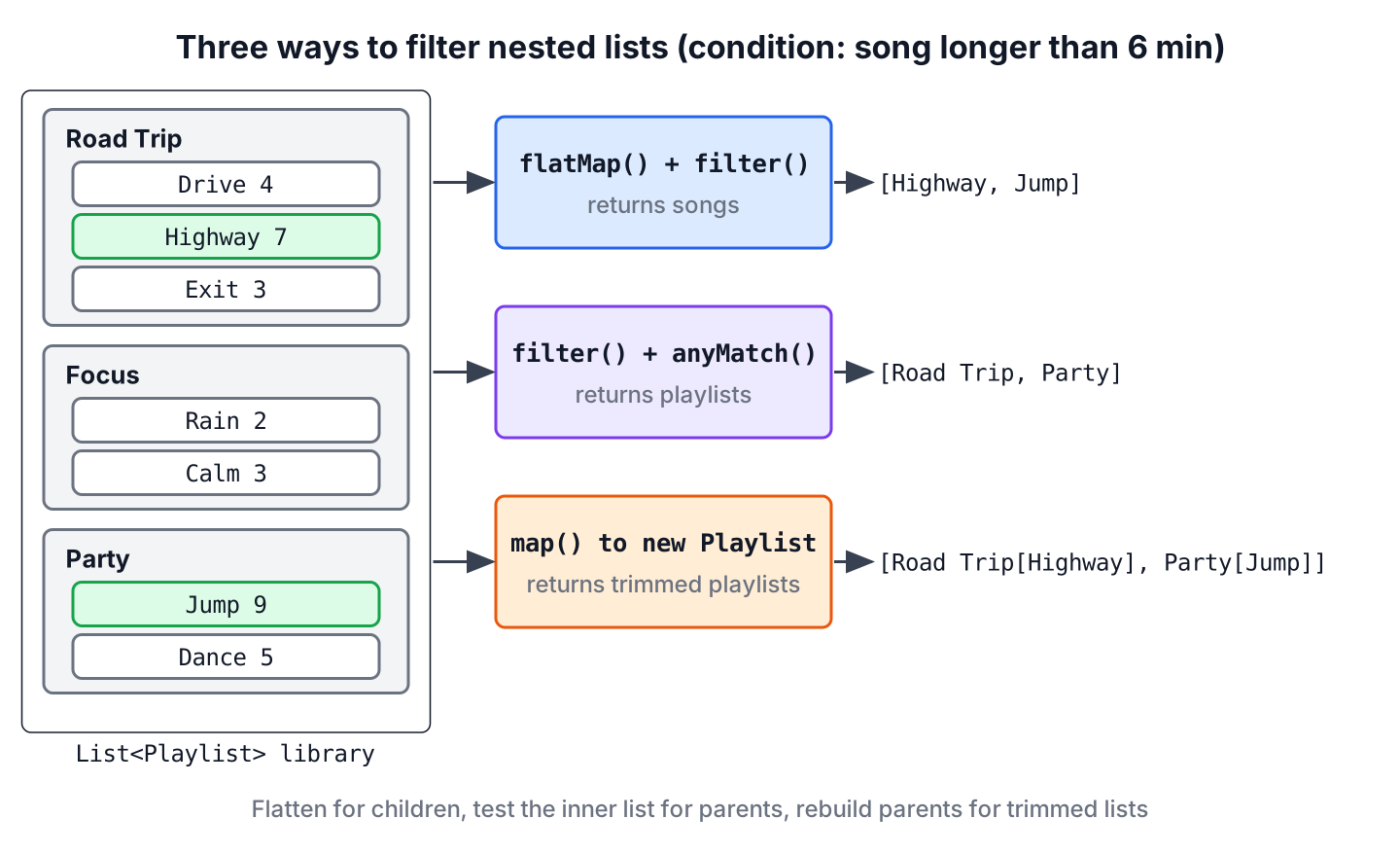
Each result needs its own operation, and picking the wrong one is the most common mistake with nested data.
- Matching inner elements, such as all long songs, come from flatMap() or mapMulti() followed by filter().
- Matching outer elements, such as playlists with a long song, come from filter() with anyMatch(), allMatch() or noneMatch() on the inner list.
- Outer elements with filtered inner lists come from map() that builds a new parent object around a filtered copy of the list.
2. Collecting the Matching Inner Elements
When the result is a list of children, the parents only hold the children. We open every inner list into one flat stream and apply the condition to the children.
2.1. Using flatMap() and filter()
The flatMap() operation replaces each playlist with the stream of its songs, so the next operation sees songs instead of playlists. The filter() after it works on individual songs.
List<Playlist> library = library();

List<Song> explicitSongs = library.stream()
        .flatMap(p -> p.songs().stream())
        .filter(Song::explicit)
        .toList();
List<String> titles = explicitSongs.stream().map(Song::title).toList();   // [Highway, Jump]
int totalMinutes = library.stream().flatMap(p -> p.songs().stream()).mapToInt(Song::minutes).sum();   // 33
The order of the result follows the order of the playlists and of the songs inside them. When the same song can appear in several playlists, add distinct() after flatMap(), which relies on equals(), and records generate equals() from their components.
2.2. Using mapMulti()
Since Java 16, mapMulti() can flatten and filter in one step. The lambda gets a playlist and a consumer, loops over the songs and passes only the matching ones to the consumer. The type witness <Song> tells the compiler the element type of the resulting stream.
List<Playlist> library = library();

List<String> longTitles = library.stream()
        .<Song>mapMulti((playlist, sink) -> {
            for (Song song : playlist.songs()) {
                if (song.minutes() > 6) {
                    sink.accept(song);
                }
            }
        })
        .map(Song::title)
        .toList();
List<String> result = longTitles;                           // [Highway, Jump]
The mapMulti() version does not create an inner stream per playlist, which saves work when each parent gives only a few results. The flatMap() version is shorter and better known, so we keep it as the default and choose mapMulti() when the inner loop needs extra logic, such as an early break.
2.3. Keeping the Parent Next to Each Match
A flat list of songs loses the information about where each song came from. When the result must show “Highway from Road Trip”, we create a small record inside flatMap() that holds both the parent and the child.
record Hit(String playlist, String song) {}List<Playlist> library = library();
List<Hit> hits = library.stream()
.flatMap(p -> p.songs().stream()
.filter(s -> s.minutes() > 6)
.map(s -> new Hit(p.name(), s.title())))
.toList(); // [Hit, Hit]In this version, the filter runs inside flatMap(), where the playlist variable p is still in scope. A filter after flatMap() would see only songs and could not read the playlist name.
3. Finding Parents With a Matching Child
When the result is a list of parents, we do not flatten anything. The outer filter() runs a short inner stream over each parent’s list and keeps the parent when the inner check returns true.
3.1. Using filter() and anyMatch()
The anyMatch() method returns true as soon as one song matches, so it reads only as many songs as it needs. The playlist objects in the result are the same instances as in the input, with all their songs.
List<Playlist> library = library();

List<String> withExplicit = library.stream()
        .filter(p -> p.songs().stream().anyMatch(Song::explicit))
        .map(Playlist::name)
        .toList();                                          // [Road Trip, Party]
We can get the same playlists with flatMap() plus distinct() on a parent-child pair, but that pipeline is longer and reads every song. For “parents that have a matching child”, anyMatch() is the direct tool.
3.2. Using allMatch() and noneMatch()
The other two match methods answer related questions. A playlist that is safe for a family car needs noneMatch(Song::explicit), and a playlist of short songs needs allMatch().
List<Playlist> library = library();

List<String> familySafe = library.stream()
        .filter(p -> p.songs().stream().noneMatch(Song::explicit))
        .map(Playlist::name)
        .toList();                                          // [Focus]
List<String> allShort = library.stream()
        .filter(p -> p.songs().stream().allMatch(s -> s.minutes() <= 4))
        .map(Playlist::name)
        .toList();                                          // [Focus]
On an empty inner list, allMatch() and noneMatch() return true, so a playlist without songs passes both filters. Add !p.songs().isEmpty() to the condition when empty parents must not count.
4. Keeping Parents but Trimming Their Lists
Sometimes we need the parents in the result, but each parent must hold only the matching children, for example a playlist view that hides explicit songs. Records and lists from List.of() or toList() are unmodifiable, so we build a new parent with a filtered copy of the list instead of removing songs from the original.
List<Playlist> library = library();

List<Playlist> clean = library.stream()
        .map(p -> new Playlist(p.name(), p.songs().stream().filter(s -> !s.explicit()).toList()))
        .toList();
List<Integer> sizes = clean.stream().map(p -> p.songs().size()).toList();   // [2, 2, 1]
int originalSize = library.get(0).songs().size();                           // 3
The original library still has three songs in Road Trip, so other parts of the app that share it are not affected. To drop parents whose list became empty, add .filter(p -> !p.songs().isEmpty()) after the map(), as in the intro.
When a parent has many fields, a with method on the record keeps the call site short, for example p.withSongs(filtered) that returns new Playlist(name, filtered).
5. Filtering Two Levels of Nesting
Real data often nests deeper, such as users that own playlists that hold songs. Each extra level needs one more flatMap(), and the condition always goes after the last one, where the stream holds the innermost elements.
Map<String, List<Playlist>> byUser = Map.of("lokesh", library(), "alex", List.of());

List<String> longSongs = byUser.values().stream()
        .flatMap(List::stream)
        .flatMap(p -> p.songs().stream())
        .filter(s -> s.minutes() > 6)
        .map(Song::title)
        .toList();                                          // [Highway, Jump]
The method reference List::stream flattens the list of playlists, and the lambda flattens the songs. For maps whose values are maps, see nested maps in Java, and to flatten any depth into a single list, see flattening nested lists.
6. Handling null and Empty Inner Lists
An empty inner list is harmless, because flatMap() contributes nothing for it and anyMatch() returns false. A null inner list is not, because p.songs().stream() throws NullPointerException. Data mapped from JSON or a database can contain null lists when a field is missing.
List<Playlist> raw = new ArrayList<>(library());
raw.add(new Playlist("Draft", null));

List<String> broken = raw.stream().flatMap(p -> p.songs().stream()).map(Song::title).toList();   // NullPointerException
The safest fix is to normalize the list once, when the record is created, with a compact constructor. After that, no pipeline needs a null check.
record Album(String name, List<Song> songs) {
    Album {
        songs = songs == null ? List.of() : List.copyOf(songs);
    }
}
List<Album> albums = List.of(new Album("Demo", null), new Album("Live", List.of(new Song("Encore", 8, false))));
List<String> titles = albums.stream()
.flatMap(a -> a.songs().stream())
.map(Song::title)
.toList(); // [Encore]When we cannot change the class, use Stream.ofNullable(p.songs()).flatMap(List::stream) inside the outer flatMap(), which produces an empty stream for a null list.
7. Matching the Pipeline to the Result Type
The result type decides the pipeline. The table maps each question to the operation that answers it with the least code.
| We want | Pipeline | Result |
|---|---|---|
| All matching inner elements | flatMap(p -> p.songs().stream()).filter(…) | List<Song> |
| Matching inner elements with extra loop logic | <Song>mapMulti((p, sink) -> …) | List<Song> |
| Inner elements with their parent | flatMap(p -> … .map(s -> new Hit(p, s))) | List<Hit> |
| Parents with at least one match | filter(p -> p.songs().stream().anyMatch(…)) | List<Playlist> |
| Parents where every child or no child matches | allMatch(…) or noneMatch(…) in filter() | List<Playlist> |
| Parents with only matching children | map(p -> new Playlist(p.name(), filtered)) | List<Playlist>, new objects |
8. Clean Mode in a Music App
Say a music streaming app has a “clean mode” setting for younger listeners. When it is on, the home screen must show each playlist without its explicit songs, hide playlists that end up empty and show how many songs were hidden in total.
record CleanView(List<Playlist> playlists, int hiddenSongs) {}static CleanView cleanMode(List<Playlist> library) {
List<Playlist> visible = library.stream()
.map(p -> new Playlist(p.name(), p.songs().stream().filter(s -> !s.explicit()).toList()))
.filter(p -> !p.songs().isEmpty())
.toList();
int hidden = (int) library.stream()
.flatMap(p -> p.songs().stream())
.filter(Song::explicit)
.count();
return new CleanView(visible, hidden);
}List<Playlist> library = new ArrayList<>(library());
library.add(new Playlist("Late Night", List.of(new Song("Neon", 4, true))));
CleanView view = cleanMode(library);
List<String> shown = view.playlists().stream().map(Playlist::name).toList(); // [Road Trip, Focus, Party]
int hidden = view.hiddenSongs(); // 3The method combines two of the patterns, trimming parents for the visible list and flattening children for the count. The Late Night playlist is missing from the visible list because its only song is explicit, and the original library stays untouched for listeners who turn clean mode off.
9. Nested Collection Filtering FAQs
Removing songs in place, grouping matches and the difference between the two main operations come up most often with nested data.
9.1. How do we filter a list of objects by a property of a nested list?
Use filter() on the outer stream with anyMatch() on the inner list, for example playlists.stream().filter(p -> p.songs().stream().anyMatch(s -> s.minutes() > 6)). Replace anyMatch() with allMatch() or noneMatch() for the other two questions.
9.2. What is the difference between flatMap() and anyMatch() for nested filtering?
The flatMap() operation changes the stream element type to the inner type, so the result holds children. The anyMatch() call inside filter() keeps the outer type, so the result holds parents. More on flatMap() is in map() vs flatMap().
9.3. Can we remove inner elements in place with removeIf()?
Only when the inner list is mutable, such as an ArrayList. Calling playlist.songs().removeIf(…) either changes data that other code may share or, for lists from List.of() or toList(), throws UnsupportedOperationException, so building new parents as in section 4 is safer.
9.4. How do we group the matching inner elements by their parent?
Collect the parent-child pairs from section 2.3 with Collectors.groupingBy(Hit::playlist). The groupingBy() collector returns a Map from playlist name to its matching songs.
10. Conclusion
Filtering nested collections with streams starts with the question of what the result holds. Children come from flatMap() or mapMulti() plus filter(), parents come from filter() with anyMatch(), allMatch() or noneMatch(), and trimmed parents come from map() that builds new objects.
Normalize null lists when the objects are created, remember that empty lists pass allMatch() and noneMatch(), and keep the input unchanged by building new records. Other stream recipes are grouped by task in the Java Streams guide.
11. References
Happy Learning !!
