
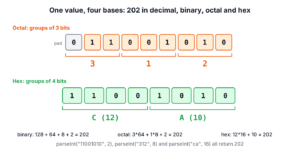
Binary, octal, hex and decimal conversion in Java uses two kinds of methods on the Integer class, Integer.parseInt(text, radix) to read digits in any base into an int, and Integer.toString(value, radix) or the shortcuts toBinaryString(), toOctalString() and toHexString() to write an int in that base. The radix is the base of the number system, such as 2 for binary or 16 for hex.
We need binary, octal, hex and decimal conversion when we read bit flags, file permissions, color codes, memory addresses or hash values, and when we print a number in a form that a protocol or a person expects.
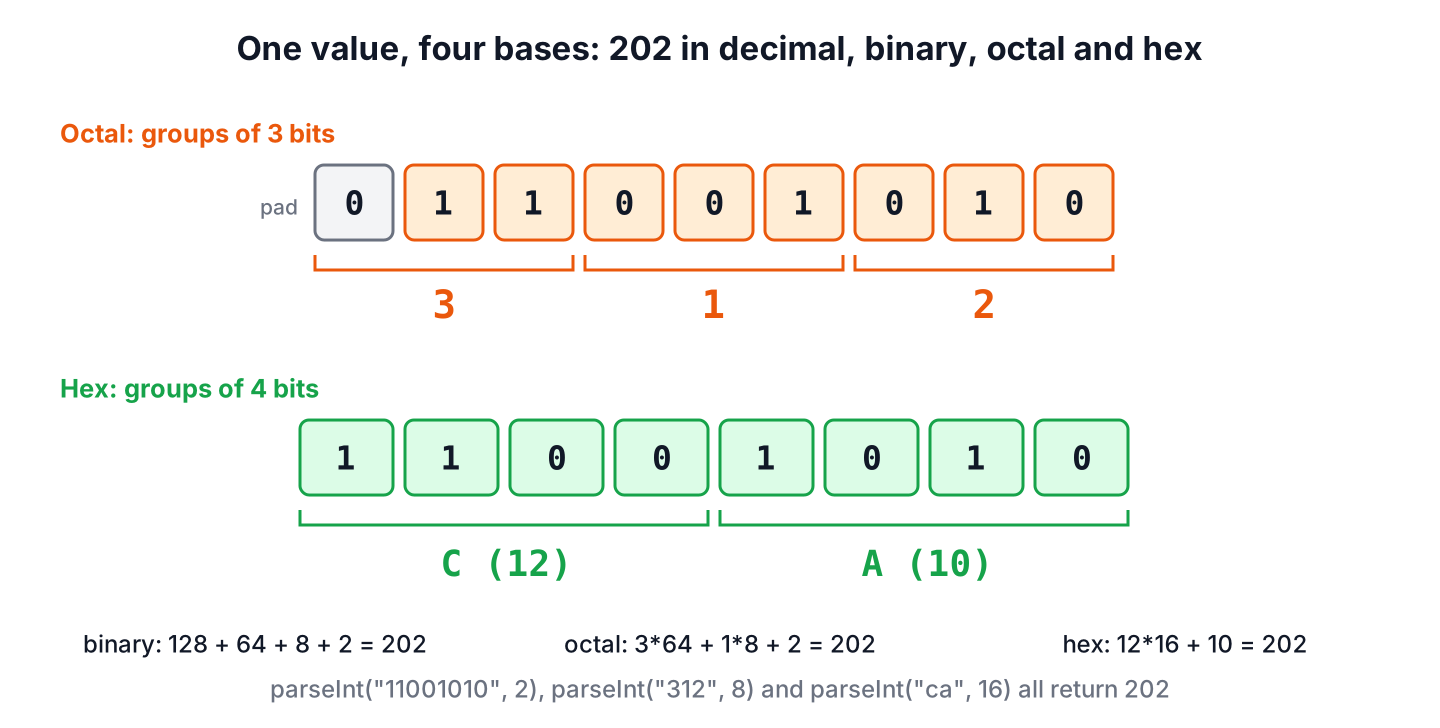
The following example converts the number 202 from and to each base.
int fromBinary = Integer.parseInt("11001010", 2);   // 202
int fromOctal = Integer.parseInt("312", 8);         // 202
int fromHex = Integer.parseInt("ca", 16);           // 202
String binary = Integer.toBinaryString(202);        // "11001010"
String octal = Integer.toOctalString(202);          // "312"
String hex = Integer.toHexString(202);              // "ca"
String base36 = Integer.toString(202, 36);          // "5m"
An int has no base of its own, and the base only exists in the String we parse or print. We go through number literals, parsing with validation, formatting with padding, direct conversion between bases, negative numbers, large values and a manual algorithm.
1. Binary, Octal, Hex and Decimal Number Systems
A number system with base n uses n digits, and each position is worth n times the position to its right. Binary uses 0 and 1, octal uses 0 to 7, and hex uses 0 to 9 plus a to f for 10 to 15. Java methods accept any radix from Character.MIN_RADIX (2) to Character.MAX_RADIX (36), where the letters go up to z.
Each row of the table shows one value in all four bases. The last column shows the Java literal for the same value, so we can write constants in the base that fits the domain.
| Decimal | Binary | Octal | Hex | Java literals |
|---|---|---|---|---|
| 10 | 1010 | 12 | a | 10, 0b1010, 012, 0xA |
| 202 | 11001010 | 312 | ca | 202, 0b1100_1010, 0312, 0xCA |
| 255 | 11111111 | 377 | ff | 255, 0b1111_1111, 0377, 0xFF |
| 493 | 111101101 | 755 | 1ed | 493, 0b1_1110_1101, 0755, 0x1ED |
Binary literals with the 0b prefix and underscores in integer literals exist since Java 7. A leading zero makes a literal octal, so 010 is 8 and not 10, which surprises anyone who pads numbers with zeros for alignment.
int mask = 0b1100_1010;                // 202
int permissions = 0755;                 // 493
int color = 0xCA;                       // 202
int padded = 010;                       // 8
2. Binary, Octal or Hex String to Decimal
The method Integer.parseInt(String, int) reads the digits in the given radix and returns an int. It accepts uppercase and lowercase letters and a leading minus or plus sign. The related Integer.valueOf(String, int) returns an Integer object instead of a primitive.
int fromBinary = Integer.parseInt("10101", 2);      // 21
int fromOctal = Integer.parseInt("456", 8);         // 302
int fromHex = Integer.parseInt("ABCD", 16);         // 43981
int negative = Integer.parseInt("-ff", 16);         // -255
Integer boxed = Integer.valueOf("777", 8);          // 511
The parseInt() method throws a NumberFormatException for any character that is not a digit in the radix, including a prefix such as 0x. When the text carries a prefix, Integer.decode() reads it and picks the radix, but it understands only hex (0x, 0X, #), octal (leading 0) and decimal.
int badDigit = Integer.parseInt("102", 2);         // NumberFormatException: For input string: "102" under radix 2
int prefixed = Integer.parseInt("0x1F", 16);        // NumberFormatException: For input string: "0x1F" under radix 16
int decodedHex = Integer.decode("0x1F");            // 31
int decodedCss = Integer.decode("#1F");             // 31
int decodedOctal = Integer.decode("017");           // 15
Input from a form, a file or a config value often has stray spaces or a wrong digit. A small helper strips the text and returns an empty OptionalInt instead of throwing, so the caller decides what to do with bad input. The general rules for reading numbers from text are in String to int conversion.
static OptionalInt parseInBase(String text, int radix) {
    try {
        return OptionalInt.of(Integer.parseInt(text.strip(), radix));
    } catch (NumberFormatException e) {
        return OptionalInt.empty();
    }
}
OptionalInt ok = parseInBase(" 1010 ", 2); // OptionalInt[10]
OptionalInt wrong = parseInBase("12", 2); // OptionalInt.empty3. Decimal to Binary, Octal or Hex String
The method Integer.toString(int, int) writes a number in any radix from 2 to 36. The three shortcuts toBinaryString(), toOctalString() and toHexString() take only the number, with no radix parameter, and they differ from toString() for negative numbers, as section 5 shows.
String binary = Integer.toString(21, 2);            // "10101"
String octal = Integer.toString(302, 8);            // "456"
String hex = Integer.toString(43981, 16);           // "abcd"
String shortcut = Integer.toHexString(43981);       // "abcd"
String upper = Integer.toHexString(43981).toUpperCase();  // "ABCD"
None of these methods writes leading zeros. For a fixed width, the format specifiers %x, %X and %o take a width with a zero flag. There is no binary specifier, and %b prints a boolean, so for binary we pad the string ourselves.
String byteBits = String.format("%8s", Integer.toBinaryString(5)).replace(' ', '0');  // "00000101"
String twoDigits = String.format("%02X", 10);       // "0A"
String eightDigits = String.format("%08x", 48879);  // "0000beef"
String octalText = String.format("%o", 493);        // "755"
String notBinary = String.format("%b", 5);          // "true"
Since Java 17, HexFormat also writes fixed-width hex for primitives, such as HexFormat.of().toHexDigits((byte) 10) for 0a. For whole byte arrays and text, see hex to ASCII conversion.
4. Converting Between Binary, Octal and Hex
The JDK has no method that turns binary text into hex text in one step. We parse the digits in the source radix and format the int in the target radix, and the decimal value in the middle never shows up as text.
static String convert(String digits, int fromRadix, int toRadix) {
    return Integer.toString(Integer.parseInt(digits, fromRadix), toRadix);
}
String hexFromBinary = convert("11001010", 2, 16); // "ca"
String octalFromHex = convert("1ed", 16, 8); // "755"
String binaryFromOctal = convert("755", 8, 2); // "111101101"A design tool exports colors as hex, such as 1E90FF for a light blue, and our chart library expects three numbers from 0 to 255. We parse the hex once and take each 8-bit part with a shift and a mask, using the bitwise operators >> and &.
int rgb = Integer.parseInt("1E90FF", 16);          // 2003199
int red = (rgb >> 16) & 0xFF;                       // 30
int green = (rgb >> 8) & 0xFF;                      // 144
int blue = rgb & 0xFF;                              // 255
String css = String.format("#%02X%02X%02X", red, green, blue);  // "#1E90FF"
5. Negative Numbers and Two’s Complement
An int stores negative numbers in two’s complement, where the highest of the 32 bits is the sign. The shortcut methods print those 32 bits as an unsigned value, whereas Integer.toString(value, radix) prints a minus sign followed by the digits of the absolute value.
String twos = Integer.toBinaryString(-5);          // "11111111111111111111111111111011"
String signed = Integer.toString(-5, 2);            // "-101"
String allOnes = Integer.toHexString(-1);           // "ffffffff"
The two forms need different parse methods. The method parseInt() reads the signed form only, so 32-bit unsigned text such as ffffffff is out of range for it, and Integer.parseUnsignedInt() (Java 8) reads it back into the same bits.
int fromSigned = Integer.parseInt("-101", 2);      // -5
int tooBig = Integer.parseInt("ffffffff", 16);      // NumberFormatException: For input string: "ffffffff" under radix 16
int fromUnsigned = Integer.parseUnsignedInt("ffffffff", 16);  // -1
String unsigned = Integer.toUnsignedString(-1);     // "4294967295"
We pick one form per data source and use the matching pair of methods. Bit masks, checksums and hardware registers use the unsigned form, and values that a person reads, such as an offset of -5, use the signed form.
6. Larger Values With Long and BigInteger
An int holds 32 bits, which is 8 hex digits. The class Long has the same methods for 64 bits, and BigInteger takes a radix in its constructor and in toString() for values of any size, such as a hash or a long ID in hex.
long maxLong = Long.parseLong("7fffffffffffffff", 16);              // 9223372036854775807
long hash = Long.parseUnsignedLong("cbf29ce484222325", 16);         // -3750763034362895579
String hashHex = Long.toHexString(hash);                            // "cbf29ce484222325"
BigInteger huge = new BigInteger("ffffffffffffffffffff", 16);       // 1208925819614629174706175
String hugeOctal = huge.toString(8);                                // "377777777777777777777777777"
A cache library prints a 64-bit hash as 16 hex digits, and the value has its highest bit set. The method Long.parseLong() rejects that text, whereas Long.parseUnsignedLong() returns a negative long with the same bits, and Long.toHexString() prints the original digits again.
7. Real-World Example With Unix File Permissions
Unix file permissions are three groups of 3 bits, for the owner, the group and everyone else, which is why tools such as chmod write them as three octal digits. A deployment tool reads the mode 755 from a config file and has to apply it to a script it creates.
static String toRwx(int mode) {
    StringBuilder text = new StringBuilder();
    for (int shift = 6; shift >= 0; shift -= 3) {
        int bits = (mode >> shift) & 7;
        text.append((bits & 4) != 0 ? 'r' : '-')
            .append((bits & 2) != 0 ? 'w' : '-')
            .append((bits & 1) != 0 ? 'x' : '-');
    }
    return text.toString();
}
int mode = Integer.parseInt("755", 8); // 493
String rwx = toRwx(mode); // "rwxr-xr-x"
boolean groupCanWrite = (mode & 0020) != 0; // false
Set<PosixFilePermission> perms = PosixFilePermissions.fromString(toRwx(0644));
String applied = PosixFilePermissions.toString(perms); // "rw-r--r--"The set of PosixFilePermission values goes to Files.setPosixFilePermissions(path, perms) on Linux and macOS. Reading the mode with radix 8 is the important step, because Integer.parseInt(“755”) would return the decimal 755, which is a different set of bits.
8. Converting Without Library Methods
Interviews and course exercises often ask for the conversion by hand. To write a number in base n, we divide by n repeatedly and collect the remainders from last to first, and to read digits, we multiply the running value by n and add each digit. The helpers Character.forDigit() and Character.digit() map between digit values and characters.
static String toBase(int number, int radix) {
    if (number == 0) {
        return "0";
    }
    long n = Math.abs((long) number);
    StringBuilder digits = new StringBuilder();
    while (n > 0) {
        digits.append(Character.forDigit((int) (n % radix), radix));
        n /= radix;
    }
    return (number < 0 ? "-" : "") + digits.reverse();
}
static int fromBase(String text, int radix) {
int value = 0;
for (char c : text.toCharArray()) {
int digit = Character.digit(c, radix);
if (digit < 0) {
throw new NumberFormatException("Not a base-" + radix + " digit: " + c);
}
value = value * radix + digit;
}
return value;
}String manualBinary = toBase(202, 2); // "11001010"
String manualHex = toBase(-255, 16); // "-ff"
int manualValue = fromBase("312", 8); // 202
int manualBad = fromBase("19", 8); // NumberFormatException: Not a base-8 digit: 9The cast to long before Math.abs() matters, because Math.abs(Integer.MIN_VALUE) is still negative. The manual fromBase() skips overflow checks and signs, so in real code we call Integer.parseInt(), which handles both.
9. Binary, Octal and Hex Conversion FAQs
A missing leading zero, a negative value or a prefix in the input explains most failed conversions.
9.1. How do we convert binary to hex in Java?
We parse the binary text with radix 2 and format the result with radix 16, for example Integer.toHexString(Integer.parseInt(“11001010”, 2)) for ca. For more than 31 bits, we use Long.parseLong() or new BigInteger(text, 2).toString(16).
9.2. How do we pad a binary string with leading zeros?
We format the string to a width and replace the spaces, as in String.format(“%8s”, Integer.toBinaryString(5)).replace(‘ ‘, ‘0’), which returns 00000101. For hex and octal, %08x and %03o pad without the extra step.
9.3. Why does Integer.toBinaryString(-5) print 32 digits?
The method prints the two’s complement bits of the int as an unsigned number. For a signed result such as -101, we call Integer.toString(-5, 2).
9.4. Why does Integer.parseInt(“0x1F”, 16) throw an exception?
The method expects digits only, and x is not a hex digit. We remove the prefix first, or call Integer.decode(“0x1F”), which reads the prefix and returns 31.
10. Conclusion
All base conversions in Java go through a number. We read text with Integer.parseInt(text, radix), Integer.decode() for prefixed values or parseUnsignedInt() for unsigned bits, and we write text with Integer.toString(value, radix) or the binary, octal and hex shortcuts.
Padding comes from String.format(), values beyond 32 bits from Long and BigInteger, and negative numbers need a deliberate choice between the signed and the two’s complement form. For converting a single decimal value to hex and back, see decimal to hexadecimal conversion, and the Java tutorial lists more number basics.
11. References
Happy Learning !!
