

A synchronized ArrayList is a list that several threads can use safely, and in Java we get one by wrapping the list with Collections.synchronizedList() or by using CopyOnWriteArrayList. A plain ArrayList is not thread-safe, so we need one of these options whenever threads share a list, for example request threads that record events or tasks that collect results.
The following example shows both options and the one rule that the wrapper adds, which is to hold the list’s lock while iterating.
List<String> events = Collections.synchronizedList(new ArrayList<>());
events.add("login");                                         // thread-safe, locks the wrapper
events.add("search");
List<String> copy;
synchronized (events) {                                      // required for iteration and streams
    copy = List.copyOf(events);
}
int copied = copy.size();                                    // 2
CopyOnWriteArrayList<String> listeners = new CopyOnWriteArrayList<>(List.of("audit"));
boolean added = listeners.addIfAbsent("email");              // true, no external lock needed
The single calls need no extra code, while reading the whole list does. We first see what goes wrong with a plain ArrayList, walk through both options, compare them and look at designs that avoid a shared list altogether.
1. Why a Plain ArrayList Breaks with Several Threads
An ArrayList changes two things on every add(), the backing array slot and the size field, without any lock. When two threads add at the same moment, both can read the same size, write to the same slot and store the same new size, so one element is lost. If the array is full at that moment, one thread can also write past the end and fail with ArrayIndexOutOfBoundsException.
In the next snippet, four tasks each add 10,000 numbers to one shared list. With a plain ArrayList, the final size changes from run to run.
List<Integer> unsafe = new ArrayList<>();
try (ExecutorService pool = Executors.newFixedThreadPool(4)) {
    for (int t = 0; t < 4; t++) {
        pool.submit(() -> {
            for (int i = 0; i < 10_000; i++) {
                unsafe.add(i);
            }
        });
    }
}
int lost = unsafe.size();                                    // varies, often below 40000
List<Integer> safe = Collections.synchronizedList(new ArrayList<>());
try (ExecutorService pool = Executors.newFixedThreadPool(4)) {
for (int t = 0; t < 4; t++) {
pool.submit(() -> {
for (int i = 0; i < 10_000; i++) {
safe.add(i);
}
});
}
}
int all = safe.size(); // 40000The try-with-resources block waits for all tasks, because ExecutorService implements AutoCloseable since Java 19. The broken version does not crash or log anything, since the exceptions stay inside the tasks’ futures, and the only symptom is wrong data. That is why races on lists are hard to find in production, and why an ArrayList must be synchronized externally when any thread modifies it.
2. Synchronizing with Collections.synchronizedList()
The method Collections.synchronizedList() returns a wrapper that implements List and runs every method inside a synchronized block on one lock object, by default the wrapper itself. Single calls such as add(), get(), remove() and size() become thread-safe without any change to the calling code.
We wrap the list at creation and never keep a reference to the original. A thread that calls methods on the original ArrayList bypasses the lock, and the wrapper cannot protect against it.
List<String> wrong = new ArrayList<>();
List<String> wrapped = Collections.synchronizedList(wrong);  // "wrong" still bypasses the lock
List<String> right = Collections.synchronizedList(new ArrayList<>());   // only the wrapper exists
2.1. Locking the List While Iterating
Iterating a synchronized list needs a synchronized block on the list, because the lock covers each call but not the whole loop. Between two calls to next(), another thread can add an element, and the iterator throws ConcurrentModificationException. The same rule applies to Spliterator and to stream().
List<String> visitors = Collections.synchronizedList(new ArrayList<>(List.of("ana", "raj", "lee")));
long threeLetter;
synchronized (visitors) {
    threeLetter = visitors.stream().filter(n -> n.length() == 3).count();
}
long counted = threeLetter;                                    // 3
In the OpenJDK implementation, forEach(), removeIf(), replaceAll() and sort() take the lock internally, so a single call to them is safe. A long loop inside a synchronized block blocks every other thread, so for slow work such as sending emails, we copy the list under the lock and process the copy outside it.
2.2. Making Check-and-Add Atomic
Two thread-safe calls in a row are not one thread-safe operation. Code that checks the list and changes it based on the result needs the lock around both calls.
static boolean addOnce(List<String> list, String value) {
    synchronized (list) {
        if (list.contains(value)) {
            return false;
        }
        return list.add(value);
    }
}
List<String> sessions = Collections.synchronizedList(new ArrayList<>());
boolean firstLogin = addOnce(sessions, "ana"); // true
boolean secondLogin = addOnce(sessions, "ana"); // false, already in the listFor example, a chat server keeps a list of online users. Without the lock in addOnce(), two quick reconnects by the same user on two threads can both pass the contains() check, and the user appears twice in the online list.
3. Using CopyOnWriteArrayList
A CopyOnWriteArrayList creates a new copy of its array on every write and replaces the old one, so readers never take a lock and never see a half-finished change. An iterator works on the array that existed when it was created, which means it never throws ConcurrentModificationException and does not see later writes.
CopyOnWriteArrayList<String> handlers = new CopyOnWriteArrayList<>(List.of("audit", "email"));
Iterator<String> snapshot = handlers.iterator();
handlers.add("sms");
int seen = 0;
while (snapshot.hasNext()) {
    snapshot.next();
    seen++;
}
int seenByIterator = seen;                                   // 2, created before "sms" was added
int current = handlers.size();                               // 3
Because the iterator works on a snapshot, its remove(), set() and add() methods throw UnsupportedOperationException. Removing through the list inside a for-each loop works, and removeIf() does the same in one call.
CopyOnWriteArrayList<String> hooks = new CopyOnWriteArrayList<>(List.of("audit", "email", "sms"));
Iterator<String> it = hooks.iterator();
String firstHook = it.next();                                // "audit"
it.remove();                                                 // UnsupportedOperationException
for (String hook : hooks) {
    if (hook.equals("email")) {
        hooks.remove(hook);                                  // allowed, no ConcurrentModificationException
    }
}
String remaining = hooks.toString();                         // "[audit, sms]"
The cost is on the write side. Each add(), set() or remove() copies the whole array, so a list of 10,000 elements copies 10,000 references per write. CopyOnWriteArrayList is meant for lists where traversals vastly outnumber mutations.
An event bus fits that pattern. The app registers a handful of listeners at startup, and every event loops over them thousands of times per second on many threads. Adding a listener later is rare, so the copy on write costs nothing that matters, and the hot loop runs without any lock.
4. synchronizedList vs CopyOnWriteArrayList vs Vector
The right option depends on the ratio of reads to writes and on how the list is iterated. The legacy Vector class appears in the table only because older code still uses it, and ArrayList vs Vector explains why we replace it.
| Feature | Collections.synchronizedList() | CopyOnWriteArrayList | Vector |
|---|---|---|---|
| Reads | Take the lock | No lock | Take the lock |
| Writes | Take the lock, O(1) append | Copy the whole array, O(n) | Take the lock, O(1) append |
| Iteration | Needs a synchronized block | Snapshot, no lock, no exception | Needs a synchronized block |
| Iterator remove() | Supported | UnsupportedOperationException | Supported |
| Atomic check-and-add | Manual synchronized block | addIfAbsent() | Manual synchronized block |
| Best for | Frequent writes, few full scans | Many reads, rare writes | Legacy APIs only |
5. When a Shared List Is the Wrong Tool
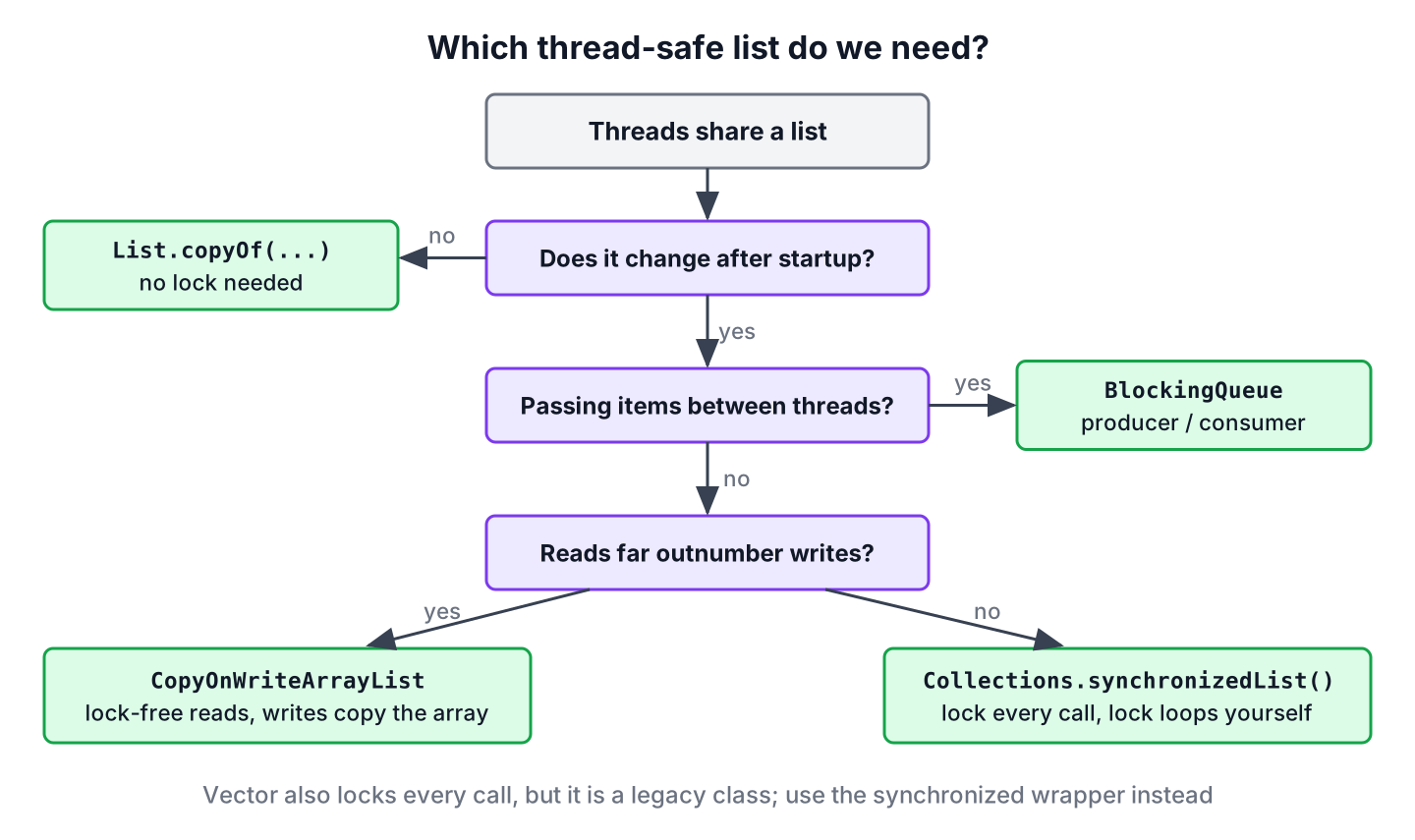
Many shared lists exist only to collect results from parallel work or to pass items between threads. Both jobs have better tools that need no synchronized list at all.
To collect results, we let each task return its value and combine the results at the end, either with a parallel stream or with invokeAll() on an ExecutorService. The stream keeps the encounter order, so the result list is ordered even though the work runs on several threads.
List<Integer> squares = IntStream.rangeClosed(1, 5).parallel().map(n -> n * n).boxed().toList(); // [1, 4, 9, 16, 25]To hand items from producer threads to consumer threads, a BlockingQueue lets consumers wait for the next item instead of polling a list. And when the data never changes after startup, an unmodifiable list from List.copyOf() is safe to share without any lock, as long as it is published safely, for example through a final field.
6. Synchronized ArrayList FAQs
Questions about thread-safe lists come up in code reviews and interviews whenever a list is shared between threads.
6.1. Is ArrayList Thread-Safe in Java?
No. ArrayList has no locking, so concurrent writes can lose elements or throw exceptions. Reading from several threads is safe only when no thread modifies the list after it was safely published.
6.2. Do We Need to Synchronize Iteration over Collections.synchronizedList()?
Yes. We must hold a synchronized block on the returned list when we traverse it with an Iterator, a Spliterator or a Stream, and the enhanced for loop uses an Iterator.
6.3. What Is the Difference Between synchronizedList and CopyOnWriteArrayList?
The wrapper locks every call and needs a manual lock for iteration, whereas CopyOnWriteArrayList copies the array on writes and lets readers and iterators run without any lock. We choose the wrapper for write-heavy lists and CopyOnWriteArrayList for read-heavy ones, as the table in section 4 shows.
6.4. Does CopyOnWriteArrayList Throw ConcurrentModificationException?
No. Its iterators work on a snapshot of the array, so changes made after the iterator was created never affect it. The iterator does not see those changes either.
6.5. Should We Use Vector Instead of a Synchronized ArrayList?
No. Vector locks every method the same way as the wrapper, so it has the same iteration and check-and-add rules, plus legacy methods we do not need. Collections.synchronizedList(new ArrayList<>()) is the modern equivalent.
6.6. How Do We Share a Read-Only List Between Threads?
We create it with List.copyOf() or List.of() and publish it through a final field. Nobody can modify an unmodifiable list, so threads can read it without any lock.
7. Conclusion
A plain ArrayList loses data when several threads write to it. Collections.synchronizedList() fixes single calls with one lock, but loops, streams and check-and-add sequences still need a synchronized block on the list.
CopyOnWriteArrayList removes the locking from reads and iteration at the price of copying the array on every write, so it suits listener lists and configuration that rarely changes. Before choosing either, we check whether the threads need a shared list at all, because a parallel stream, invokeAll(), a BlockingQueue or an unmodifiable list is often the cleaner design.
8. References
- Collections.synchronizedList() Javadoc (Java 25)
- CopyOnWriteArrayList Javadoc (Java 25)
- ArrayList Javadoc (Java 25)
- ExecutorService.close() Javadoc (Java 25)
Happy Learning !!
