
We merge two maps in Java by copying the entries of one map into the other, with first.putAll(second) when the second map may overwrite the values of duplicate keys, or with second.forEach((key, value) -> first.merge(key, value, Integer::sum)) when the values of duplicate keys must be combined. The methods differ only in what they do with keys that exist in both maps.
We merge maps when data for the same keys comes from two sources, for example sales per product from two stores, default settings overridden by user settings, or word counts from two files.
The following example merges the daily sales of two stores in the four common ways. Both stores sold ink, so ink is the duplicate key, and we use TreeMap targets to keep the printed order sorted.
Map<String, Integer> berlin = Map.of("pen", 5, "ink", 2);
Map<String, Integer> munich = Map.of("ink", 3, "pad", 4);

Map<String, Integer> overwrite = new TreeMap<>(berlin);
overwrite.putAll(munich);
Map<String, Integer> lastWins = overwrite;                    // {ink=3, pad=4, pen=5}

Map<String, Integer> keepFirst = new TreeMap<>(berlin);
munich.forEach(keepFirst::putIfAbsent);
Map<String, Integer> firstWins = keepFirst;                   // {ink=2, pad=4, pen=5}

Map<String, Integer> totals = new TreeMap<>(berlin);
munich.forEach((product, sold) -> totals.merge(product, sold, Integer::sum));
Map<String, Integer> summed = totals;                         // {ink=5, pad=4, pen=5}

Map<String, Integer> viaStream = Stream.concat(berlin.entrySet().stream(), munich.entrySet().stream()).collect(Collectors.toMap(Map.Entry::getKey, Map.Entry::getValue, Integer::sum, TreeMap::new));   // {ink=5, pad=4, pen=5}
We can see that only the value of ink changes between the four results, while pen and pad appear once in every result. We start with the rule for duplicate keys, cover putAll() and merge() in detail, and finish with merges that leave the inputs unchanged, merges of many maps and maps with list values.
1. What Happens to Duplicate Keys
A map holds each key only once, so a merge has to decide which value a duplicate key gets. Keys that appear in only one map are copied as they are by every merge method.
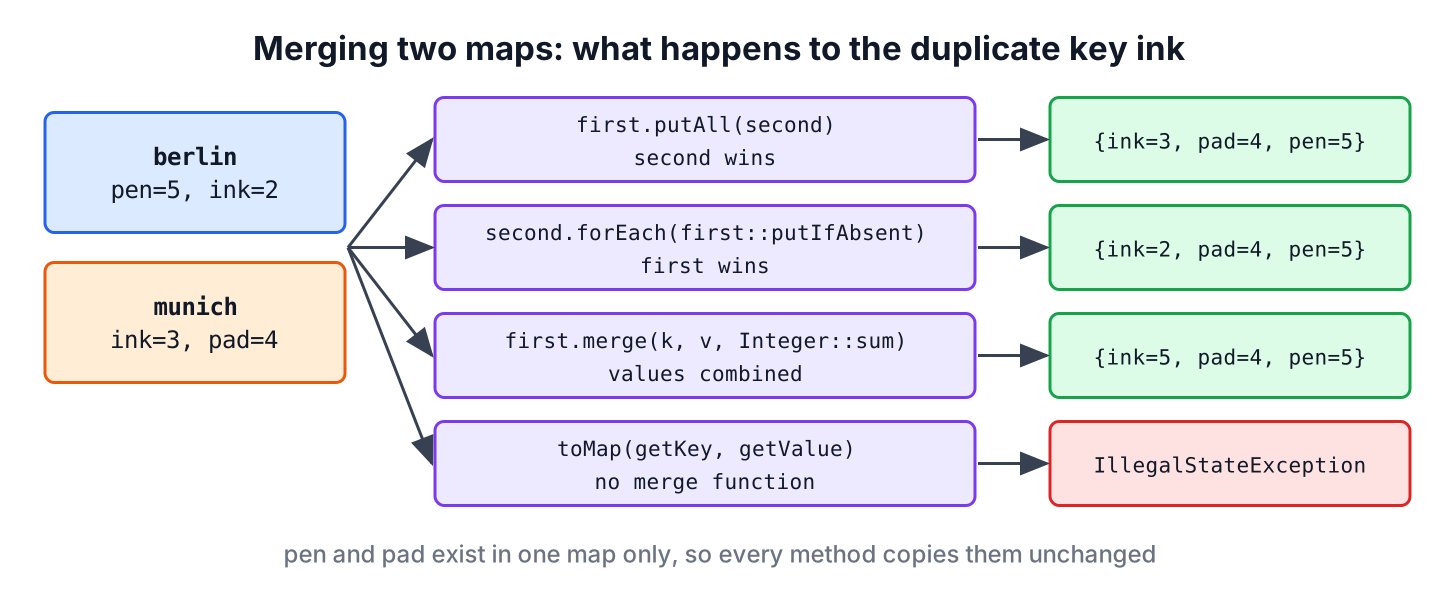
There are four possible rules for a duplicate key, and each one has its own JDK method.
| Rule for a duplicate key | Method | Value of ink |
|---|---|---|
| The second map wins | first.putAll(second) | 3 |
| The first map wins | second.forEach(first::putIfAbsent) | 2 |
| Combine both values | first.merge(key, value, function) | 5 with Integer::sum |
| Fail on duplicates | Collectors.toMap(key, value) without a merge function | IllegalStateException |
2. Merge Two Maps by Overwriting Duplicate Keys
The method putAll() copies every mapping of the argument into the target map. For a key that already exists, the new value replaces the old one, so the map passed as the argument wins. The method changes the target map and returns nothing.
Map<String, String> defaults = Map.of("theme", "light", "lang", "en");
Map<String, String> userPrefs = Map.of("theme", "dark");
Map<String, String> settings = new TreeMap<>(defaults);
settings.putAll(userPrefs);
Map<String, String> effective = settings;                     // {lang=en, theme=dark}
Default values overridden by user values are the classic use of putAll(). The order of the calls decides the winner, so we copy the defaults first and put the user preferences on top of them.
To keep the value of the first map instead, we call putIfAbsent() for each entry of the second map. The method adds a mapping only when the key is missing, so values that already exist stay as they are.
Map<String, String> defaults = Map.of("theme", "light", "lang", "en");
Map<String, String> userPrefs = Map.of("theme", "dark");
Map<String, String> settings = new TreeMap<>(userPrefs);
defaults.forEach(settings::putIfAbsent);
Map<String, String> effective = settings;                     // {lang=en, theme=dark}
3. Merge Two Maps by Combining Values for Duplicate Keys
A reporting job in an online shop reads the sales per product from two stores and needs the total per product. Overwriting would lose the sales of one store, so the job adds the two values for every product that both stores sold.
The method Map.merge(), added in Java 8, takes a key, a value and a remapping function. If the key is missing, it stores the value. If the key exists, it calls the function with the old and the new value and stores the result.
Map<String, Integer> berlin = Map.of("pen", 5, "ink", 2);
Map<String, Integer> munich = Map.of("ink", 3, "pad", 4);
Map<String, Integer> totals = new TreeMap<>(berlin);
munich.forEach((product, sold) -> totals.merge(product, sold, Integer::sum));
Map<String, Integer> result = totals;                         // {ink=5, pad=4, pen=5}
The remapping function can hold any logic. The method references Integer::max and String::concat keep the larger number or join two strings, and a lambda can add a separator.
Map<String, String> notes = new TreeMap<>(Map.of("ink", "blue"));
notes.merge("ink", "black", (oldValue, newValue) -> oldValue + ", " + newValue);
notes.merge("pen", "red", (oldValue, newValue) -> oldValue + ", " + newValue);
Map<String, String> joined = notes;                           // {ink=blue, black, pen=red}

Map<String, Integer> best = new TreeMap<>(Map.of("ink", 2));
best.merge("ink", 3, Integer::max);
Integer highest = best.get("ink");                            // 3
The merge() method throws a NullPointerException when the new value is null, and it removes the key when the function returns null. The removal rule is useful for stock levels, where a product whose count drops to zero should disappear from the map.
Map<String, Integer> stock = new TreeMap<>(Map.of("ink", 3, "pen", 5));
stock.merge("ink", -3, (have, change) -> have + change == 0 ? null : have + change);
Map<String, Integer> afterSale = stock;                       // {pen=5}
Integer failed = stock.merge("pad", null, Integer::sum);      // NullPointerException
4. Merging Without Changing the Original Maps
Both putAll() and merge() change the map they are called on, and a Map.of() map throws an UnsupportedOperationException because it is unmodifiable. When the inputs must stay unchanged, we either copy the first map and merge into the copy, as the earlier examples do, or build a new map from a stream.
The stream version joins the entries of both maps with Stream.concat() and collects them with Collectors.toMap(). The third argument is the merge function for duplicate keys, and the optional fourth argument chooses the map type.
Map<String, Integer> berlin = Map.of("pen", 5, "ink", 2);
Map<String, Integer> munich = Map.of("ink", 3, "pad", 4);
Map<String, Integer> summed = Stream.concat(berlin.entrySet().stream(), munich.entrySet().stream()).collect(Collectors.toMap(Map.Entry::getKey, Map.Entry::getValue, Integer::sum, TreeMap::new));   // {ink=5, pad=4, pen=5}
Map<String, Integer> lastWins = Stream.concat(berlin.entrySet().stream(), munich.entrySet().stream()).collect(Collectors.toMap(Map.Entry::getKey, Map.Entry::getValue, (first, second) -> second, TreeMap::new));   // {ink=3, pad=4, pen=5}
Without the merge function, toMap() throws an IllegalStateException as soon as it meets a duplicate key, and the message names the key and both values. That is a good default when duplicates mean bad data, but a surprise when they are expected. The collector also throws a NullPointerException for a null value.
Map<String, Integer> berlin = Map.of("pen", 5, "ink", 2);
Map<String, Integer> munich = Map.of("ink", 3, "pad", 4);
Map<String, Integer> strict = Stream.concat(berlin.entrySet().stream(), munich.entrySet().stream()).collect(Collectors.toMap(Map.Entry::getKey, Map.Entry::getValue));   // IllegalStateException: Duplicate key ink (attempted merging values 2 and 3)
5. Merging More Than Two Maps
For three or more maps, Stream.of() with flatMap() turns all the entry sets into one stream of entries, and the same toMap() call merges them. The loop version calls merge() for every entry of every map.
Map<String, Integer> berlin = Map.of("pen", 5, "ink", 2);
Map<String, Integer> munich = Map.of("ink", 3, "pad", 4);
Map<String, Integer> hamburg = Map.of("pen", 1);
Map<String, Integer> all = Stream.of(berlin, munich, hamburg).flatMap(m -> m.entrySet().stream()).collect(Collectors.toMap(Map.Entry::getKey, Map.Entry::getValue, Integer::sum, TreeMap::new));   // {ink=5, pad=4, pen=6}
List<Map<String, Integer>> stores = List.of(Map.of("pen", 5, "ink", 2), Map.of("ink", 3, "pad", 4), Map.of("pen", 1));
Map<String, Integer> totals = new TreeMap<>();
for (Map<String, Integer> store : stores) {
store.forEach((product, sold) -> totals.merge(product, sold, Integer::sum));
}
Map<String, Integer> result = totals; // {ink=5, pad=4, pen=6}6. Merging Maps With List Values
An access control service gives each user the permissions of two roles, and each role maps a resource to a list of allowed actions. Merging the two role maps must keep the actions from both lists for the same resource, not replace one list with the other.
With merge(), the remapping function creates a new list that holds both lists. Creating a new list matters, because adding to the old list would change the role map that the list came from.
Map<String, List<String>> editor = Map.of("posts", List.of("read", "write"));
Map<String, List<String>> reviewer = Map.of("posts", List.of("read", "approve"), "users", List.of("read"));
Map<String, List<String>> permissions = new TreeMap<>(editor);
reviewer.forEach((resource, actions) -> permissions.merge(resource, actions, (a, b) -> Stream.concat(a.stream(), b.stream()).distinct().toList()));
Map<String, List<String>> merged = permissions;               // {posts=[read, write, approve], users=[read]}
The distinct() call removes the duplicate read action. For maps that grow one value at a time, computeIfAbsent() with a mutable list per key is the usual alternative.
7. Merge Two Maps in Java FAQs
Developers who merge maps for the first time often ask how the methods treat existing values and threads.
7.1. Does putAll() Overwrite Existing Values?
Yes. For every key that exists in both maps, putAll() replaces the value in the target with the value from the argument. To keep the existing values, we use putIfAbsent() for each entry, as section 2 shows.
7.2. What Is the Difference Between putAll() and merge()?
The putAll() method copies a whole map and always lets the new value win. The merge() method works on one key at a time and calls our function for duplicate keys, so it can add, join or pick values. To merge a whole map with merge(), we call it inside forEach().
7.3. Is Map.merge() Thread-Safe?
Only on a thread-safe map. In a ConcurrentHashMap, each merge() call runs atomically, so several threads can add counts to the same key without losing updates. In a HashMap, concurrent calls can lose updates.
7.4. How Do I Merge Maps and Keep All Values for Duplicate Keys?
We collect the values into a list per key with groupingBy(), so no value is lost and the result type is Map<K, List<V>>.
Map<String, Integer> berlin = Map.of("pen", 5, "ink", 2);
Map<String, Integer> munich = Map.of("ink", 3, "pad", 4);
Map<String, List<Integer>> perStore = Stream.of(berlin, munich).flatMap(m -> m.entrySet().stream()).collect(Collectors.groupingBy(Map.Entry::getKey, TreeMap::new, Collectors.mapping(Map.Entry::getValue, Collectors.toList())));   // {ink=[2, 3], pad=[4], pen=[5]}
8. Conclusion
Merging two maps comes down to one decision per duplicate key. The putAll() method lets the second map win, putIfAbsent() keeps the first value, and merge() combines both values with a function such as Integer::sum.
When the inputs must stay unchanged, we copy the first map or build a new map with Stream.concat() and Collectors.toMap(), always passing a merge function when duplicate keys are possible. The same stream pattern with Stream.of() and flatMap() merges any number of maps.
9. References
Happy Learning !!
