

An OutputStream cannot be turned into an InputStream, because an output stream only accepts bytes and has no methods to read them back. To convert OutputStream to InputStream in Java, we either write into a ByteArrayOutputStream and wrap its toByteArray() result in a ByteArrayInputStream, or connect a PipedOutputStream to a PipedInputStream so that another thread reads the bytes while we write them.
We need OutputStream to InputStream conversion when one library writes its result to an OutputStream, such as a CSV writer, a PDF generator or Apache POI’s workbook.write(out), and the next step reads from an InputStream, such as an upload client, an email attachment or a parser.
The following example writes a small CSV report into memory and reads it back as an InputStream.
ByteArrayOutputStream out = new ByteArrayOutputStream();
out.write("apple,5\nbanana,3\n".getBytes(StandardCharsets.UTF_8));

InputStream in = new ByteArrayInputStream(out.toByteArray());
byte[] firstLine = in.readNBytes(7);
String head = new String(firstLine, StandardCharsets.UTF_8);   // "apple,5"
Notice that the conversion happens through the byte[], so the whole report sits in memory. After a closer look at the byte array approach, we cover streaming with piped streams and threads, a temporary file for very large data, and how to pick between them.
1. Using a Byte Array With ByteArrayInputStream
A ByteArrayOutputStream collects every byte written to it in an internal array that grows as needed. Its method toByteArray() returns a copy of that array, and a ByteArrayInputStream reads from the copy. Both classes work only in memory, so neither needs closing and neither throws an IOException on read().
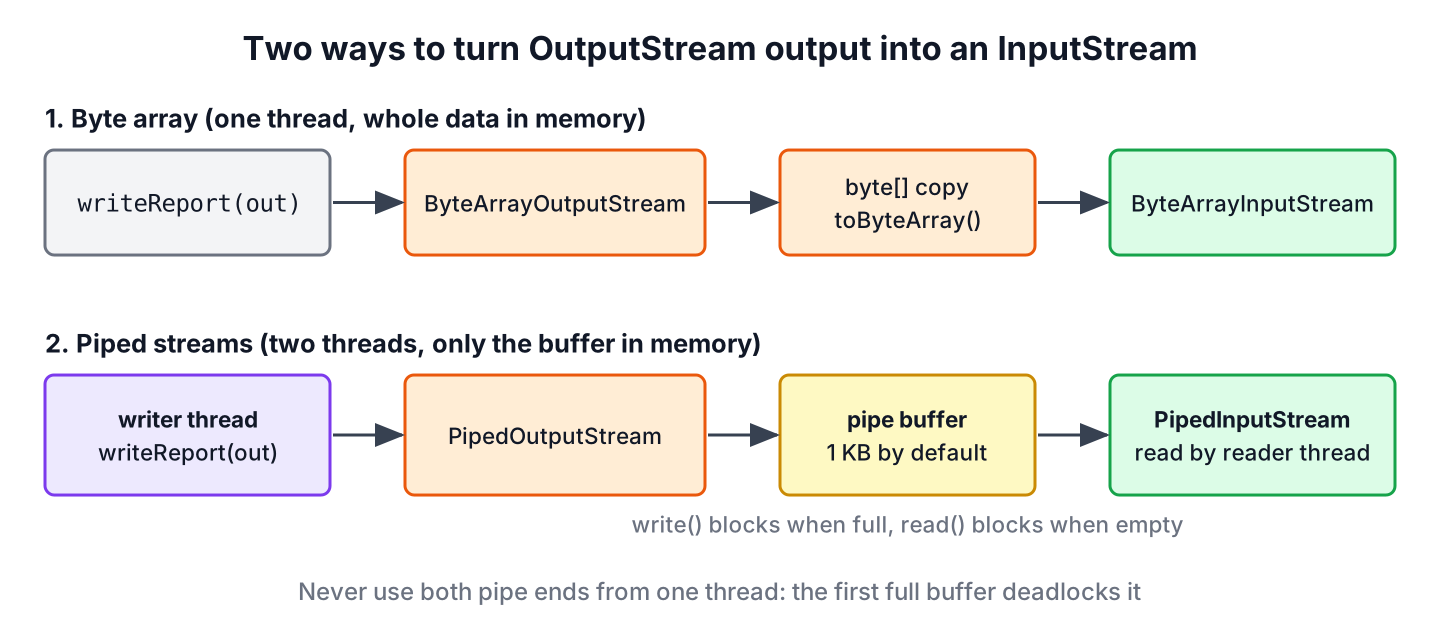
Say an invoicing service generates a monthly CSV with a library method that writes to an OutputStream, and the storage client uploads from an InputStream. The following example uses a small method in place of that library.
static void writeReport(OutputStream out) throws IOException {
    Writer writer = new OutputStreamWriter(out, StandardCharsets.UTF_8);
    writer.write("customer,amount\n");
    writer.write("Lokesh,120\n");
    writer.flush();
}
ByteArrayOutputStream buffer = new ByteArrayOutputStream();
writeReport(buffer);
int size = buffer.size(); // 27
InputStream upload = new ByteArrayInputStream(buffer.toByteArray());
long uploaded = upload.transferTo(OutputStream.nullOutputStream()); // 27
String asText = buffer.toString(StandardCharsets.UTF_8).lines().findFirst().orElseThrow(); // "customer,amount"The method toString(Charset) (Java 10) decodes the buffer when we need the content as text, for example in a log message or a test assertion. If the next step accepts an OutputStream too, buffer.writeTo(out) writes the bytes there without the extra copy from toByteArray().
The byte array approach holds the data in memory at least twice, once in the buffer and once in the copy. That is fine for reports of a few megabytes. For hundreds of megabytes, it can cause an OutOfMemoryError, and the next two sections avoid it.
2. Streaming With PipedInputStream and PipedOutputStream
A PipedOutputStream connected to a PipedInputStream forms a pipe. Bytes written to the output side land in a circular buffer of 1024 bytes by default, and the input side reads them from there. When the buffer is full, write() blocks until the reader takes bytes out; when it is empty, read() blocks until the writer adds more. Only the buffer is in memory, so the data can be of any size.
Because both sides block, the writer and the reader must run in different threads. The following example writes the report in a virtual thread and reads it in the current thread.
PipedInputStream in = new PipedInputStream(64 * 1024);
PipedOutputStream out = new PipedOutputStream(in);

Thread producer = Thread.ofVirtual().start(() -> {
    try (out) {
        writeReport(out);
    } catch (IOException e) {
        throw new UncheckedIOException(e);
    }
});

String received;
try (in) {
    received = new String(in.readAllBytes(), StandardCharsets.UTF_8);
}
producer.join();
long lines = received.lines().count();   // 2
The constructor argument sets a 64 KB buffer, which cuts down on thread switches for larger data. Closing the output stream in the writer thread is what makes readAllBytes() return, because the reader sees the end of the stream only after close(). In a real upload, the reader thread passes in to the client, for example to HttpRequest.BodyPublishers.ofInputStream(() -> in) of the Java HTTP client.
The pipe has two failure modes. Using both ends from a single thread may deadlock it, because the first write() that fills the buffer waits forever for a reader that never runs. And if the writer thread ends without closing its stream, the reader gets an IOException instead of the end of the stream.
PipedInputStream in = new PipedInputStream();
PipedOutputStream out = new PipedOutputStream(in);

Thread crashed = Thread.ofVirtual().start(() -> {
    try {
        out.write('A');   // no close(), the thread ends
    } catch (IOException e) {
        throw new UncheckedIOException(e);
    }
});
crashed.join();

int first = in.read();                  // 65
int next = in.read();                   // IOException: Write end dead
The IOException is useful here, because it tells the reader that the data is incomplete. We keep it that way by closing the output stream in a try-with-resources block in the writer, so a writer that fails with an exception still lets the reader finish, and by reporting the writer’s exception to the caller.
3. Using a Temporary File for Large Data
When the data is too large for memory and we prefer to avoid a second thread, a temporary file sits between the two streams. We write the whole output into the file and open an input stream on it afterward. The option StandardOpenOption.DELETE_ON_CLOSE deletes the file when the input stream is closed, so no temporary files pile up.
Path temp = Files.createTempFile("report", ".csv");
try (OutputStream out = Files.newOutputStream(temp)) {
    writeReport(out);
}

long size;
try (InputStream in = Files.newInputStream(temp, StandardOpenOption.DELETE_ON_CLOSE)) {
    size = in.transferTo(OutputStream.nullOutputStream());
}
long fileSize = size;                    // 27
boolean stillThere = Files.exists(temp); // false
The disk is slower than memory, but the approach is simple and survives data of many gigabytes. It also allows reading the data twice, for example to compute a checksum before the upload. The article on creating a temporary file covers the file location and cleanup rules.
4. Which Conversion Fits the Job
The size of the data and the threads available decide the approach. Apache Commons IO also offers QueueOutputStream and QueueInputStream, a pair that works like a pipe over a BlockingQueue. Unlike the JDK pipe, it also works in a single thread, but its default queue is unbounded, so unread bytes pile up in memory as they do with a byte array.
| Approach | Memory | Threads | Best for |
|---|---|---|---|
| ByteArrayOutputStream + ByteArrayInputStream | Whole data, twice | One | Small and medium data, tests |
| PipedOutputStream + PipedInputStream | Pipe buffer only | Two | Large data streamed to an upload or parser |
| Temporary file + DELETE_ON_CLOSE | Disk, not memory | One | Large data, or data read more than once |
| Pass an OutputStream to the next step | None | One | Targets that can accept an OutputStream |
The last row is often the best answer. If the next step can write to an OutputStream itself, for example a servlet response, we pass that stream to the writer and skip the conversion entirely.
5. OutputStream to InputStream FAQs
A cast the compiler rejects, a pipe that hangs and a report that comes out as garbled text lead to most OutputStream to InputStream questions.
5.1. Can I Cast an OutputStream to an InputStream?
No. The two are separate abstract classes and neither extends the other, so the compiler rejects the cast with an incompatible types error. A Java class can extend only one class, so no object is both streams at once. The bytes have to be stored or piped, as shown in section 1 and section 2.
5.2. Does toByteArray() Copy the Data?
Yes. Each call returns a new array with the current content of the buffer, so later writes do not change it. The method writeTo(OutputStream) writes the content without the copy, and size() returns the byte count without one.
5.3. How Do I Avoid a Deadlock With Piped Streams?
We run the writer and the reader in different threads, and we close the PipedOutputStream when writing ends. A virtual thread per writer costs little, so Thread.ofVirtual().start(…) or a virtual thread executor is a good fit.
5.4. How Do I Get a String From a ByteArrayOutputStream?
We call toString(StandardCharsets.UTF_8). The method without arguments uses the default charset, which is UTF-8 since Java 18, but naming it keeps the result the same on any JVM setting.
ByteArrayOutputStream out = new ByteArrayOutputStream();
out.write("pear,7".getBytes(StandardCharsets.UTF_8));
String text = out.toString(StandardCharsets.UTF_8);   // "pear,7"
6. Conclusion
An OutputStream never becomes an InputStream by itself, so the bytes have to be kept somewhere in between. For small and medium data, a ByteArrayOutputStream with a ByteArrayInputStream is the simplest bridge. For large data, piped streams pass bytes through a fixed buffer, as long as the writer runs in its own thread and closes its stream, and a temporary file with DELETE_ON_CLOSE works without a second thread.
The opposite task, copying an input stream into an output stream, needs only transferTo(), as shown in converting InputStream to OutputStream. The Java IO tutorial lists the other stream conversions.
7. References
- ByteArrayOutputStream Javadoc
- ByteArrayInputStream Javadoc
- PipedInputStream Javadoc
- PipedOutputStream Javadoc
- StandardOpenOption Javadoc
Happy Learning !!

There is no constructor for ByteArrayOutputStream that accepts File objects as formal arguments
this article title’s “Convert OutputStream to InputStream using byte array”, but in fact what is being shown is how to convert a FileOutputStream (a subtype of OutputStream); I wanted to get know it with an OutputStream itself
OutputStreamis an abstract class. You must use one of its subtypes.