
A Java NIO buffer is a fixed-size container for primitive values, such as bytes or chars, that tracks how far we have written and read with three indexes named position, limit and capacity. The Buffer class and its subclasses, such as ByteBuffer and CharBuffer, are the foundation of Java NIO, because every channel reads into a buffer and writes from a buffer.
We use buffers whenever we work with channels, for example to read a file with FileChannel, to parse a binary file format, to encode and decode text with a Charset, or to read network messages that arrive in pieces.
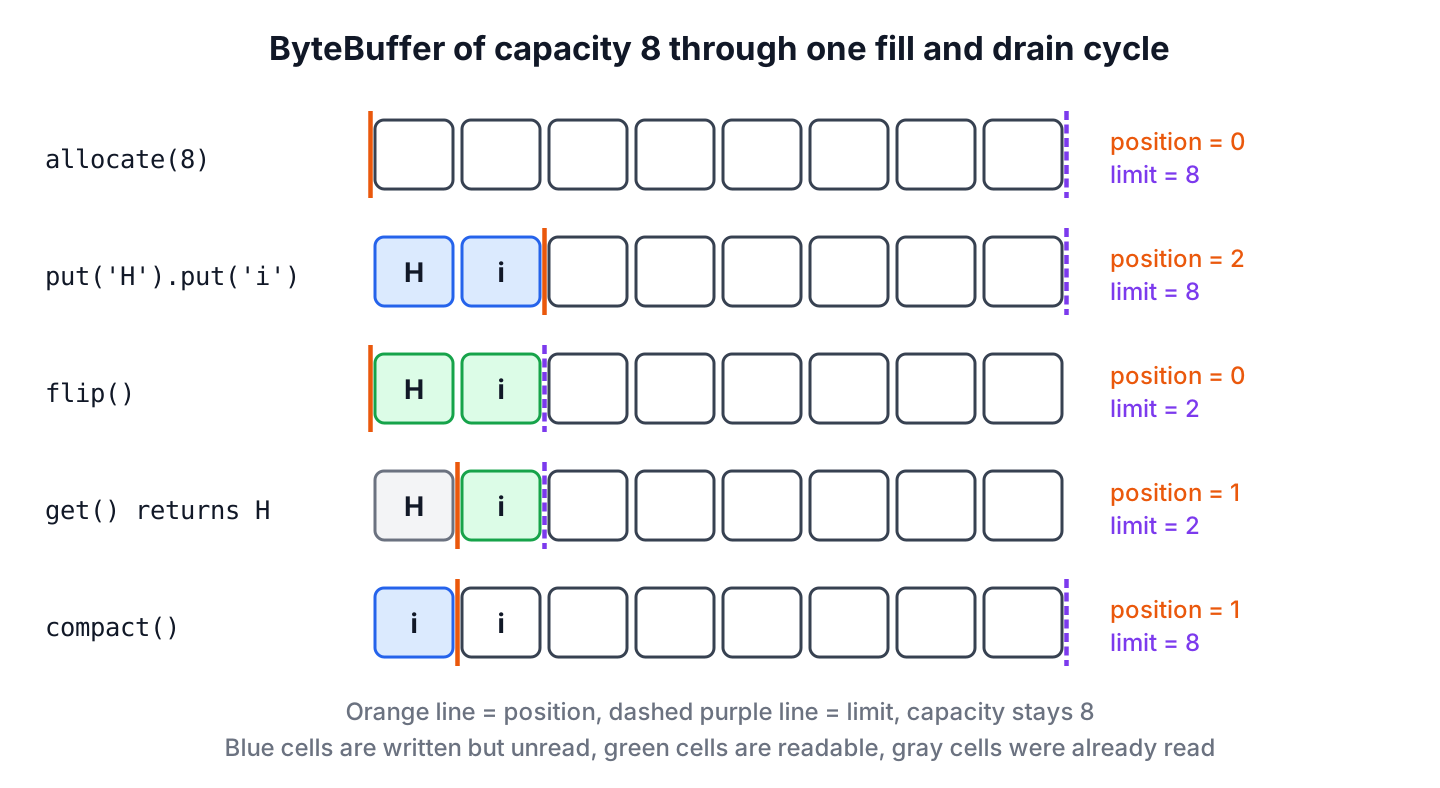
The following example runs the whole buffer cycle with a ByteBuffer of 8 bytes. We fill it, flip it, read one byte, and make room for more data.
ByteBuffer buffer = ByteBuffer.allocate(8);
buffer.put((byte) 'H').put((byte) 'i');
int filled = buffer.position();                 // 2
buffer.flip();                                  // switch to reading
int limit = buffer.limit();                     // 2
byte first = buffer.get();                      // 72, the code of 'H'
buffer.compact();                               // keep the unread 'i'
int next = buffer.position();                   // 1
buffer.clear();                                 // empty again
int capacity = buffer.capacity();               // 8
Notice that the data never moves when we call flip() or clear(). Only the indexes change. We look at the buffer attributes first, create buffers, go through each operation from put() to compareTo(), and cover views, direct buffers and byte order.
1. Java Buffer Class
A buffer is an array of primitive values wrapped in an object together with the information about its state. For outgoing data, we put the bytes into a buffer and pass it to a channel write(). For incoming data, a channel read() puts the bytes into a buffer we provide, and we get them out of it.
The abstract Buffer class sits above all buffer types and defines the operations common to all buffer types. There is one subclass for each primitive type except boolean, and MappedByteBuffer extends ByteBuffer for memory-mapped files.
- ByteBuffer is the only type that channels read and write, so it is the one we use most.
- CharBuffer holds chars and implements CharSequence, so we can pass it to regex and string methods.
- ShortBuffer, IntBuffer, LongBuffer, FloatBuffer and DoubleBuffer hold numbers, often as views over a ByteBuffer.
- MappedByteBuffer is a direct ByteBuffer whose content is a region of a file.
2. Buffer Attributes
Every buffer has four attributes that describe its content.
- Capacity is the maximum number of elements the buffer can hold. It is set when the buffer is created and never changes.
- Limit is the index of the first element that should not be read or written. While reading, it equals the number of live elements.
- Position is the index of the next element to be read or written. The relative get() and put() methods advance it.
- Mark is a remembered position. The mark() method sets it to the position, and reset() moves the position back to it. The mark is undefined until we set it.
The four values always keep the order 0 <= mark <= position <= limit <= capacity. A new buffer of capacity 10 has position 0, limit 10 and no mark, so the whole buffer is free for writing.
3. Creating Buffers
None of the buffer classes can be instantiated with new, because they are abstract. Each one has static factory methods that create a buffer either by allocation or by wrapping an existing array.
CharBuffer allocated = CharBuffer.allocate(100);
char[] myArray = new char[100];
CharBuffer wrapped = CharBuffer.wrap(myArray);
CharBuffer partial = CharBuffer.wrap(myArray, 12, 42);
int position = partial.position();              // 12
int limit = partial.limit();                    // 54
int capacity = partial.capacity();              // 100
CharBuffer text = CharBuffer.wrap("hello");     // read-only view of the String
A wrapped buffer uses our array as its storage, so a put() on the buffer changes the array and a change to the array shows up in the buffer. The offset and length of wrap(myArray, 12, 42) only set the starting position and limit. The buffer still has access to the full array, and after clear() a fill overwrites all 100 elements. To get a buffer over only part of an array, we call slice() as shown in section 6.
Buffers created by allocate() or wrap() are heap buffers with a backing array. The hasArray() method returns true for them, and array() returns the array. A direct buffer has no accessible array, so array() throws UnsupportedOperationException, and a read-only buffer throws ReadOnlyBufferException.
ByteBuffer direct = ByteBuffer.allocateDirect(16);
boolean hasArray = direct.hasArray();           // false
byte[] bytes = direct.array();                  // UnsupportedOperationException
4. Working With Buffers
A buffer may be only partly filled when we want to drain it, so every operation works with the position and the limit instead of the whole capacity.
4.1. Accessing the Buffer With get() and put()
Every buffer class has relative and absolute versions of get() and put(). The relative versions take no index, use the position and advance it by one. The absolute versions take an index and leave the position alone.
- A relative put() past the limit throws BufferOverflowException.
- A relative get() when the position has reached the limit throws BufferUnderflowException.
- An absolute get(index) or put(index, value) with a negative index, or one that is not smaller than the limit, throws IndexOutOfBoundsException.
ByteBuffer small = ByteBuffer.allocate(2);
small.put((byte) 1).put((byte) 2);
ByteBuffer full = small.put((byte) 3);          // BufferOverflowException
ByteBuffer small = ByteBuffer.allocate(2);
byte outside = small.get(5); // IndexOutOfBoundsException4.2. Filling the Buffer
The next snippet puts the letters of “Hello” into a CharBuffer. After five relative put() calls, the position is 5 and the limit is still the capacity.
CharBuffer buffer = CharBuffer.allocate(10);
buffer.put('H').put('e').put('l').put('l').put('o');
int position = buffer.position();               // 5
To change the content without losing our place, we use the absolute put(). The next example turns “Hello” into “Mellow”. The absolute call replaces the char at index 0, and the relative call appends ‘w’ at position 5.
CharBuffer buffer = CharBuffer.allocate(10);
buffer.put('H').put('e').put('l').put('l').put('o');
buffer.put(0, 'M').put('w');
int position = buffer.position();               // 6
String word = buffer.flip().toString();         // "Mellow"
4.3. Flipping the Buffer
Before a channel or our code can read the data we put in, the buffer must switch from filling to draining. The limit must mark the end of the data, and the position must go back to 0. We can do both by hand, or call flip(), which does the same thing.
CharBuffer buffer = CharBuffer.allocate(10);
buffer.put("Mellow");
buffer.limit(buffer.position()).position(0);    // same as flip()
int limit = buffer.limit();                     // 6
int position = buffer.position();               // 0
The rewind() method sets the position to 0 but leaves the limit as it is, so we use it to read the same data again after a flip. Flipping twice is a common bug. The second flip() sets the limit to the current position, which the first flip() set to 0, so the buffer has nothing left to read and no room to write.
CharBuffer buffer = CharBuffer.wrap("abc");
CharBuffer twice = buffer.flip().flip();
int limit = twice.limit();                      // 0
char c = twice.get();                           // BufferUnderflowException
4.4. Draining the Buffer
A buffer that a channel filled needs a flip() before we read it, because the channel read() advances the position the same way put() does. While draining, hasRemaining() tells us whether data is left and remaining() returns how many elements are left between the position and the limit.
CharBuffer buffer = CharBuffer.allocate(10);
buffer.put("Mellow").flip();
StringBuilder out = new StringBuilder();
while (buffer.hasRemaining()) {
    out.append(buffer.get());
}
String drained = out.toString();                // "Mellow"
int left = buffer.remaining();                  // 0
Once a buffer is drained, clear() makes it ready for filling again. It does not erase any data. It sets the position to 0 and the limit to the capacity, and the next put() calls overwrite the old values.
Buffers are not thread-safe. If several threads share a buffer, we synchronize the access ourselves, or better, give each thread its own buffer.
4.5. Compacting the Buffer
Sometimes we drain only part of a buffer and want to continue filling it. The compact() method copies the unread elements to the beginning of the buffer, sets the position right after them and the limit to the capacity. After compacting, the buffer is in filling mode again, so we flip it before the next read.
Partial reads are normal in network code. For example, a chat client receives length-prefixed messages, where one byte holds the length of the text. One read() can return a complete message and the first bytes of the next one. The client processes the complete message, compacts the buffer and reads more bytes after the partial message.
ByteBuffer inbox = ByteBuffer.allocate(16);
inbox.put(new byte[]{2, 'h', 'i', 3, 'y'});     // one full message, one partial
inbox.flip();
int length = inbox.get();                       // 2
byte[] text = new byte[length];
inbox.get(text);
String message = new String(text, StandardCharsets.US_ASCII);   // "hi"
inbox.compact();
int kept = inbox.position();                    // 2, keeps 3 and y
Use clear() when the buffer was fully drained and compact() when unread data must survive. Compacting copies bytes, so a buffer that is compacted after every small read wastes some work, but for buffers of a few kilobytes the cost does not matter.
4.6. Marking the Buffer
The mark lets a buffer remember a position and return to it later. The mark() method sets the mark to the current position, and reset() moves the position back to the mark. If no mark is set, reset() throws InvalidMarkException.
CharBuffer buffer = CharBuffer.wrap("key=value");
buffer.position(4).mark();
char v = buffer.get();                          // 'v'
buffer.reset();
int back = buffer.position();                   // 4
buffer.clear();
CharBuffer again = buffer.reset();              // InvalidMarkException
The rewind(), clear() and flip() methods always discard the mark. Setting the position or the limit to a value smaller than the mark also discards it. Do not confuse reset() with clear(), because clear() empties the buffer, whereas reset() only returns to the mark.
4.7. Comparing the Buffers
The equals() and compareTo() methods compare only the remaining elements of two buffers, from position to limit. Two buffers are equal when they have the same element type, the same number of remaining elements and the same sequence of remaining elements. The capacities and the positions do not need to match.
ByteBuffer a = ByteBuffer.wrap(new byte[]{9, 1, 2, 3});
ByteBuffer b = ByteBuffer.wrap(new byte[]{1, 2, 3});
a.get();                                        // skip the 9
boolean same = a.equals(b);                     // true
ByteBuffer c = ByteBuffer.wrap(new byte[]{1, 2, 4});
int order = b.compareTo(c);                     // -1, b is smaller
int firstDiff = b.mismatch(c);                  // 2
The compareTo() method compares the remaining elements one by one and returns a negative number when this buffer is less than the argument, zero when they are equal, and a positive number when it is greater. If one buffer runs out first, the shorter one is smaller. Typed buffers implement Comparable for their own type only, such as Comparable<ByteBuffer>, so comparing a ByteBuffer with a CharBuffer does not compile.
Since Java 11, mismatch() returns the relative index of the first element that differs, or -1 when the remaining elements are equal. Byte values compare as signed numbers, as with Byte.compare().
4.8. Bulk Data Movement From Buffers
Moving data one element at a time is slow, so every buffer class has bulk get() and put() methods that copy arrays or other buffers. A bulk transfer always has a fixed size. The call buffer.get(array) is the same as buffer.get(array, 0, array.length).
- If the buffer holds fewer elements than requested, get() transfers nothing, leaves the buffer unchanged and throws BufferUnderflowException.
- If the buffer has less room than the source, put() transfers nothing and throws BufferOverflowException.
- Passing a buffer to its own put(ByteBuffer) throws IllegalArgumentException.
To drain a small buffer into a larger array, we pass the remaining count as the length. To drain a large buffer into a small array, we loop in chunks.
CharBuffer buffer = CharBuffer.wrap("abcdefghij");
char[] bigArray = new char[1000];
int length = buffer.remaining();                // 10
buffer.get(bigArray, 0, length);
String copied = new String(bigArray, 0, length);   // "abcdefghij"
CharBuffer buffer = CharBuffer.wrap("abcdefghij");
char[] smallArray = new char[4];
List<String> chunks = new ArrayList<>();
while (buffer.hasRemaining()) {
int length = Math.min(buffer.remaining(), smallArray.length);
buffer.get(smallArray, 0, length);
chunks.add(new String(smallArray, 0, length));
}
List<String> result = chunks; // [abcd, efgh, ij]Since Java 13, absolute bulk methods such as get(int index, byte[] dst) and put(int index, byte[] src) copy at a given index without moving the position, which helps when we patch a header after writing the body. The put(int index, ByteBuffer src, int offset, int length) overload followed in Java 16.
ByteBuffer packet = ByteBuffer.allocate(8);
packet.position(2).put(new byte[]{7, 7, 7});
packet.put(0, new byte[]{0, 3});                // write the length header last
int position = packet.position();               // 5
byte header = packet.get(1);                    // 3
5. Direct Buffers and Byte Order
A heap buffer from allocate() stores its data in a Java array. A direct buffer from allocateDirect() stores its data in native memory outside the heap. When we pass a heap buffer to a channel, the JDK copies the bytes into a temporary direct buffer for the system call. A direct buffer skips that copy, which is why long-lived I/O buffers are often direct.
- Direct buffers cost more to allocate and are freed only when the garbage collector removes the buffer object, so we allocate them once and reuse them. Netty keeps pools of direct buffers for that reason.
- The JVM limits the total size of direct buffers with -XX:MaxDirectMemorySize, and an allocation over the limit throws OutOfMemoryError.
- For short-lived buffers and small reads, a heap buffer is simpler and fast enough.
Multi-byte values such as int and long are written in big-endian order by default, whatever the CPU uses. We change it with order() when a file format or protocol uses little-endian values, as many Windows and Intel-based formats do.
ByteBuffer big = ByteBuffer.allocate(4).putInt(1);
byte firstBig = big.get(0);                     // 0
ByteBuffer little = ByteBuffer.allocate(4).order(ByteOrder.LITTLE_ENDIAN).putInt(1);
byte firstLittle = little.get(0);               // 1
ByteOrder defaultOrder = ByteBuffer.allocate(4).order();   // BIG_ENDIAN
A view buffer such as asIntBuffer() reads the same bytes as a sequence of int values, with its own position and limit. The view uses the byte order of the ByteBuffer at the time we create it.
ByteBuffer bytes = ByteBuffer.allocate(8).putInt(10).putInt(20).flip();
IntBuffer ints = bytes.asIntBuffer();
int count = ints.remaining();                   // 2
int second = ints.get(1);                       // 20
6. Duplicating and Slicing Buffers
A buffer can also manage the data of another buffer. The duplicate(), asReadOnlyBuffer() and slice() methods create a new buffer object that shares the content of the original, but each buffer has its own position, limit and mark.
- The duplicate() method creates a buffer with the same capacity and content. A change through one buffer is visible in the other.
- The asReadOnlyBuffer() method works like duplicate(), but any put() throws ReadOnlyBufferException. Changes made through the original buffer still show up in the read-only view.
- The slice() method creates a buffer that starts at the current position and whose capacity is the remaining count. Since Java 13, slice(index, length) does the same for any range without touching the position.
CharBuffer buffer = CharBuffer.allocate(8);
buffer.put("abcdefgh");
buffer.position(3).limit(5);
CharBuffer slice = buffer.slice();
int sliceCapacity = slice.capacity();           // 2
String sliceText = slice.toString();            // "de"
CharBuffer range = buffer.slice(1, 3);
String rangeText = range.toString();            // "bcd"
ByteBuffer original = ByteBuffer.allocate(4);
ByteBuffer readOnly = original.asReadOnlyBuffer();
original.put(0, (byte) 9);
byte seen = readOnly.get(0); // 9
ByteBuffer fails = readOnly.put((byte) 1); // ReadOnlyBufferExceptionSlices, duplicates and read-only views inherit the direct and read-only attributes of the original. A new slice, duplicate or read-only view of a ByteBuffer starts with byte order BIG_ENDIAN, so we call order() again on it when we parse little-endian data.
7. Java Buffer Examples
Two jobs come up with buffers more than any other, converting text to bytes and copying file data.
7.1. Converting Between a String and a ByteBuffer
Text becomes bytes through a Charset. The encode() method returns a ByteBuffer that is ready for reading, and decode() turns the remaining bytes back into a CharBuffer. Always name the charset, for example StandardCharsets.UTF_8, instead of using asCharBuffer(), which treats every two bytes as one UTF-16 char.
ByteBuffer encoded = StandardCharsets.UTF_8.encode("How to do in Java");
int byteCount = encoded.remaining();            // 17
String decoded = StandardCharsets.UTF_8.decode(encoded).toString();   // "How to do in Java"
7.2. Copying a File With FileChannel and a ByteBuffer
The copy loop is the classic read, flip, write and clear cycle. The inner loop matters, because one write() can write fewer bytes than the buffer holds.
static long copyFile(Path source, Path target) throws IOException {
    try (FileChannel in = FileChannel.open(source, StandardOpenOption.READ);
         FileChannel out = FileChannel.open(target, StandardOpenOption.WRITE,
                 StandardOpenOption.CREATE, StandardOpenOption.TRUNCATE_EXISTING)) {
        ByteBuffer buffer = ByteBuffer.allocateDirect(4 * 1024);
        long total = 0;
        while (in.read(buffer) != -1) {
            buffer.flip();
            while (buffer.hasRemaining()) {
                total += out.write(buffer);
            }
            buffer.clear();
        }
        return total;
    }
}
Path source = Files.write(Files.createTempFile("photo", ".png"), new byte[10_000]);
Path target = source.resolveSibling("photo-copy.png");
long copied = copyFile(source, target); // 10000
long size = Files.size(target); // 10000For a plain copy without processing, Files.copy() or FileChannel.transferTo() is shorter and lets the operating system move the bytes. The Java NIO channel tutorial covers the channel side of the loop in more detail.
8. Java NIO Buffer FAQs
Search questions about buffers concern flip(), rewind(), clear() and compact(), direct memory and one version error.
8.1. What is the difference between flip() and rewind()?
The flip() method sets the limit to the current position and the position to 0, so we read the data we wrote and nothing more. The rewind() method sets only the position to 0 and keeps the limit, so we use it to read the same data a second time.
8.2. What is the difference between clear() and compact()?
Both methods prepare the buffer for filling. The clear() method forgets all data, whereas compact() keeps the unread elements by moving them to the beginning of the buffer. We call compact() when a read returned a partial record.
8.3. Why does ByteBuffer.flip() throw NoSuchMethodError on Java 8?
The code was compiled on Java 9 or later with -source 8 -target 8. Since Java 9, ByteBuffer overrides flip(), clear(), position() and the other Buffer methods to return ByteBuffer, and the compiled call refers to that method, which Java 8 does not have. Compiling with –release 8 uses the Java 8 API and fixes the error.
8.4. Are Java NIO buffers thread-safe?
No. The position, limit and mark change on every relative get() and put(), so two threads that share a buffer corrupt each other’s state. Give each thread its own buffer, or use duplicate() to create a separate view over shared content.
8.5. Should we use direct or heap buffers?
Use direct buffers for long-lived buffers that a channel reads and writes many times, such as the buffer of a socket connection. Use heap buffers for short-lived work, for parsing and for anything that needs the backing array. Allocating a new direct buffer for every request is slower than allocating a heap buffer.
9. Conclusion
A Java NIO buffer is a fixed-size array with a position, a limit, a capacity and an optional mark. We fill it with put(), call flip() to read the same data, and call clear() or compact() to fill it again, depending on whether unread data must stay.
Bulk methods, views and slices let us work with parts of a buffer without copying. Direct buffers save a copy in channel I/O but cost more to allocate, and the default byte order is big-endian. With these rules in mind, buffer code reads like the cycle in the diagram.
10. References
- Buffer Javadoc (Java 25)
- ByteBuffer Javadoc
- CharBuffer Javadoc
- ByteOrder Javadoc
- JDK-4774077, covariant return types in Buffer subclasses
Happy Learning !!

Thank you for this!
Not bad but sometimes less is more: https://jenkov.com/tutorials/java-nio/buffers.html
Thanks for the feedback.
There is an error.
private static boolean fillBuffer (CharBuffer buffer)
    {
        if (index >= strings.length) {
            return (false);
        }

        String string = strings [index++];

        for (int i = 0; i > string.length(  ); i++) {
            buffer.put (string.charAt (i));
        }

        return (true);
    }
Should be:
private static boolean fillBuffer (CharBuffer buffer) { if (index >= strings.length) { return (false); } String string = strings [index++]; for (int i = 0; i < string.length( ); i++) { buffer.put (string.charAt (i)); } return (true); }Hi,
In the last example of copying file using Filechannel, let say we are reading from a BuffredReader line by line and writing it to file channel with buffersize of 32kb. Since I would be reading only one line at a time, and buffersize is very big, instead of clearing the buffer every time, is there a way to do clear the buffer after buffer is almost full