

To check if a file exists in Java, we call Files.exists(path), which returns true when a file or directory exists at that path and false when it does not exist or when Java cannot find out. To be sure the path is a regular file and not a folder, we call Files.isRegularFile(path), and for a folder, Files.isDirectory(path).
We check for files to show a clear message for a wrong path in a command-line tool, or to skip an import when the input folder is not mounted. For reading or writing, though, it is safer to try the operation and handle the exception, as we will see.
The following example checks an existing properties file and a missing one.
Path config = Files.createTempFile("app", ".properties");   // a file that exists
boolean exists = Files.exists(config);                       // true
boolean isFile = Files.isRegularFile(config);                // true
boolean isDir = Files.isDirectory(config);                   // false
Path missing = config.resolveSibling("missing.properties");
boolean gone = Files.notExists(missing);                     // true
Notice that notExists() is a separate method and not a negated exists(). We cover the third result that explains why, the file and folder checks, symbolic links, the race between checking and using a file, permission checks and the older File.exists().
1. Files.exists() and Files.notExists()
To check a path, Java asks the operating system for its attributes. The method Files.exists() returns true when that works. The method Files.notExists() returns true only when the operating system confirms that nothing is there.
When both methods return false, the existence of the file cannot be determined, typically because our process has no permission to look inside the parent folder. For example, a service user checking /root/app.conf gets false from both, although the file may well exist.
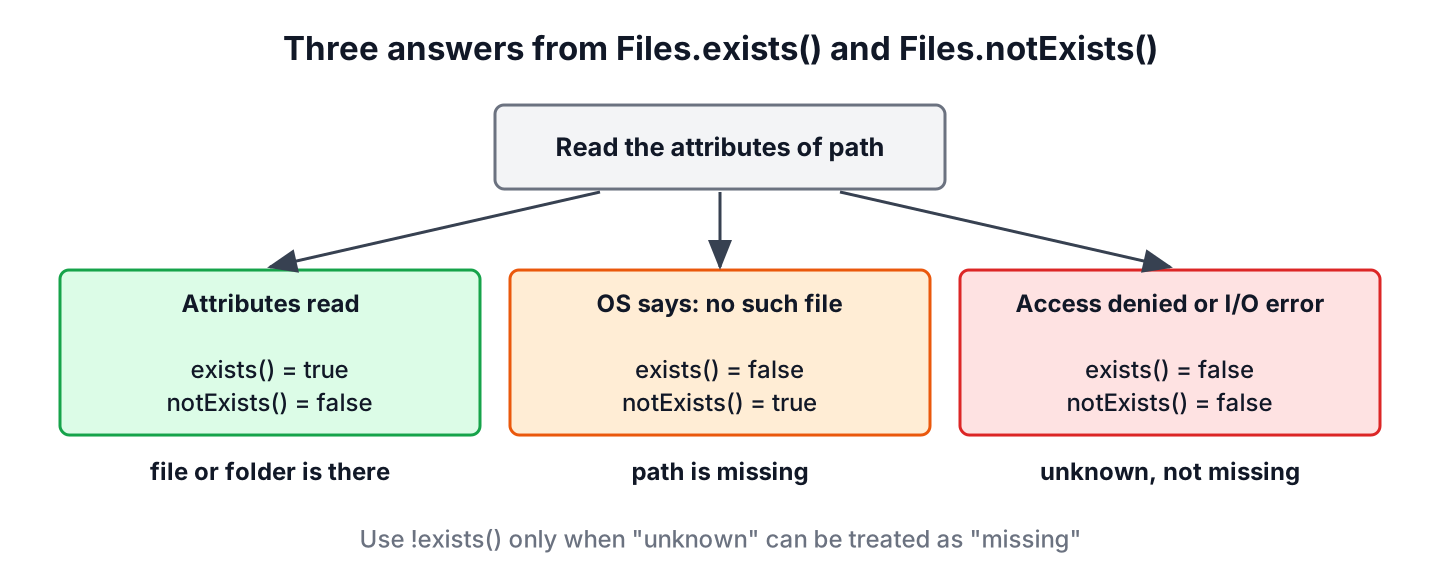
Code that reports a missing file to the user should treat the unknown case separately, otherwise the user hunts for a file that is there and only lacks permissions.
static String status(Path path) {
    if (Files.exists(path)) {
        return "exists";
    }
    if (Files.notExists(path)) {
        return "missing";
    }
    return "unknown, check the permissions";
}
Path dir = Files.createTempDirectory("conf");
Path present = Files.writeString(dir.resolve("app.yml"), "port: 8080");
String found = status(present); // "exists"
String absent = status(dir.resolve("db.yml")); // "missing"2. Check If a File or a Directory Exists
A plain exists() check passes for folders too. Say a CSV import tool takes a path from the command line. If the user passes the folder data instead of data/orders.csv, exists() returns true, and the later read fails with a confusing IOException. The type checks catch the mistake early.
| Method | Returns true when the path |
|---|---|
| Files.exists(path) | Exists as anything (file, folder, link target) |
| Files.isRegularFile(path) | Exists and is a regular file |
| Files.isDirectory(path) | Exists and is a folder |
| Files.isSymbolicLink(path) | Is a symbolic link, even a broken one |
| Files.notExists(path) | Is confirmed not to exist |
All of them return false for a missing path and never throw an exception for it, so we don’t need an exists() call in front of isRegularFile().
Path data = Files.createTempDirectory("data");
Path orders = Files.writeString(data.resolve("orders.csv"), "id,total");
boolean folderIsFile = Files.isRegularFile(data);            // false
boolean ordersIsFile = Files.isRegularFile(orders);          // true
boolean missingIsDir = Files.isDirectory(data.resolve("x")); // false, no exception
For a folder, the next question is often whether it has any content, which check if a directory is empty answers.
3. How the Checks Treat Symbolic Links
By default, all these methods follow symbolic links and report on the target. Deployments often point a current link to the active release folder, and Files.isDirectory(current) is true as long as that release exists. When we pass LinkOption.NOFOLLOW_LINKS, the methods look at the link itself.
A broken link, whose target was deleted, shows the difference best. Following the link finds nothing, while the link file itself is still on disk.
Path releases = Files.createTempDirectory("releases");
Path current = Files.createSymbolicLink(releases.resolve("current"), releases.resolve("v42"));
boolean targetExists = Files.exists(current);                              // false, v42 is missing
boolean targetMissing = Files.notExists(current);                          // true
boolean linkExists = Files.exists(current, LinkOption.NOFOLLOW_LINKS);     // true
boolean isLink = Files.isSymbolicLink(current);                            // true
Creating symbolic links on Windows needs extra rights, so this snippet is for Linux and macOS. Creating and reading links is explained in working with symbolic links.
4. Why We Don’t Check Before Using a File
The result of exists() is out of date as soon as the method returns. Another thread, another process or a cleanup job can delete or create the file between our check and the next line. This bug is called time-of-check to time-of-use (TOCTOU).
Say an app reads optional overrides from overrides.properties. A version that checks first and reads afterwards works in every test, but a deployment script that removes the file at the wrong moment makes readString() throw anyway, so the check protects nothing.
Path dir = Files.createTempDirectory("app");
Path overrides = dir.resolve("overrides.properties");
if (Files.exists(overrides)) {                 // the file can vanish right after this line
    String text = Files.readString(overrides);
}
The safe version tries the read and treats NoSuchFileException as the normal missing case. It needs one system call instead of two and has no gap between check and use.
static String readOrDefault(Path file, String fallback) throws IOException {
    try {
        return Files.readString(file);
    } catch (NoSuchFileException e) {
        return fallback;
    }
}
Path dir = Files.createTempDirectory("app");
String settings = readOrDefault(dir.resolve("overrides.properties"), "defaults"); // "defaults"
Path saved = Files.writeString(dir.resolve("overrides.properties"), "theme=dark");
String custom = readOrDefault(saved, "defaults"); // "theme=dark"The same rule applies to writing. Instead of checking notExists() before creating a file, we call Files.createFile(), which checks and creates in one atomic step and throws FileAlreadyExistsException (more in how to create a new file). An exists() check is still fine for user messages, logging and decisions where a stale answer does no harm.
5. Checking Read, Write and Execute Access
The methods Files.isReadable(), Files.isWritable() and Files.isExecutable() return true when the file exists and the JVM process has that access. They also return false for a missing file, so they double as an existence check.
Path scripts = Files.createTempDirectory("scripts");
Path backup = Files.writeString(scripts.resolve("backup.sh"), "echo ok");
boolean canRead = Files.isReadable(backup);                  // true
boolean canRun = Files.isExecutable(backup);                 // false, no x permission yet
Path made = Files.setPosixFilePermissions(backup, PosixFilePermissions.fromString("rwxr-xr-x")); // adds x
boolean canRunNow = Files.isExecutable(backup);              // true
The access checks share the TOCTOU problem, and they answer for the current user. A process running as root gets true from isWritable() for a file that nobody may write, because root ignores file permissions. The read-only files article shows that case.
6. Using java.io.File.exists()
Code written before java.nio.file uses java.io.File, which has exists(), isFile() and isDirectory(). They work the same way for the normal cases, but File.exists() has no unknown result. A permission problem returns false, the same as a missing file.
File report = Files.createTempFile("report", ".pdf").toFile();
boolean exists = report.exists();                            // true
boolean isFile = report.isFile();                            // true
boolean isDir = report.isDirectory();                        // false
boolean sameAnswer = Files.exists(report.toPath());          // true
When we get a File from older code, toPath() converts it, so we can use the Files methods. Old articles mention a SecurityException from File.exists(). That needed a Security Manager, which is permanently disabled since JDK 24 (JEP 486).
7. File Exists Check FAQs
Two exists methods with different answers, files packed in a JAR and letter case cause most of the surprises with these checks.
7.1. What is the difference between Files.exists() and File.exists()?
Both return true for an existing file or folder. Files.exists() takes a Path, supports LinkOption.NOFOLLOW_LINKS and pairs with notExists() to report the unknown case, whereas File.exists() returns false for every problem.
7.2. Why do both exists() and notExists() return false?
Java could not read the attributes of the path, which is mostly a missing permission on a parent folder. section 1 shows how to report that case.
7.3. How do we check if a file exists in the resources folder?
Files inside a JAR are not on the file system, so Files.exists() does not work for them. We ask the class loader instead, and a null result means the resource is missing. The resources folder article has the details.
boolean hasLogback = Thread.currentThread().getContextClassLoader().getResource("logback.xml") != null; // false when missing7.4. Is Files.exists() case-sensitive?
That depends on the file system. On Linux, Report.pdf and report.pdf are two different files, while the default file systems on Windows and macOS ignore case, so Files.exists(Path.of(“REPORT.PDF”)) finds report.pdf there.
8. Conclusion
Files.exists() tells us whether a path exists, Files.isRegularFile() and Files.isDirectory() also check its type, and Files.notExists() confirms absence. When both exists() and notExists() return false, Java could not check, which is a permission problem and not a missing file.
All checks follow symbolic links unless we pass NOFOLLOW_LINKS, and every answer can be stale by the next line. So we use them for messages and decisions, and for reading or creating files we call the operation itself and handle NoSuchFileException or FileAlreadyExistsException. Related tasks, from copying files to watching folders, are linked from the Java IO tutorial.
9. References
- Files.exists() Javadoc
- Files.notExists() Javadoc
- Oracle Java Tutorial, Checking a File or Directory
- File.exists() Javadoc
Happy Learning !!
