

A memory-mapped file is a file whose content the operating system maps into the memory of our process, so Java code reads and writes the file through a MappedByteBuffer as if it were an array in memory. We create the mapping with FileChannel.map(), and since Java 22 we can also map a file into a MemorySegment of the Foreign Function and Memory API.
We use memory-mapped files for large files with random access, such as index files, binary record files and database pages, and for files that several processes read at the same time. Kafka keeps its offset index files mapped, and search engines map their index files for the same reason.
The following example maps the first 1,024 bytes of a file, writes an int at offset 0 and reads it back.
Path file = Files.createTempFile("readings", ".bin");
try (FileChannel channel = FileChannel.open(file, StandardOpenOption.READ, StandardOpenOption.WRITE)) {
    MappedByteBuffer map = channel.map(FileChannel.MapMode.READ_WRITE, 0, 1024);
    map.putInt(0, 42);
    int value = map.getInt(0);                  // 42
    map.force();                                // write the change to the storage device
}
long size = Files.size(file);                   // 1024
Notice that there is no read() or write() call. The putInt() call changes memory, and the operating system writes the changed page to the file. We cover how mapping works, the three map modes, reading and writing mapped files, the MemorySegment alternative that can be unmapped on demand, and the limits that decide when mapping is the wrong choice.
1. Java Memory-Mapped IO
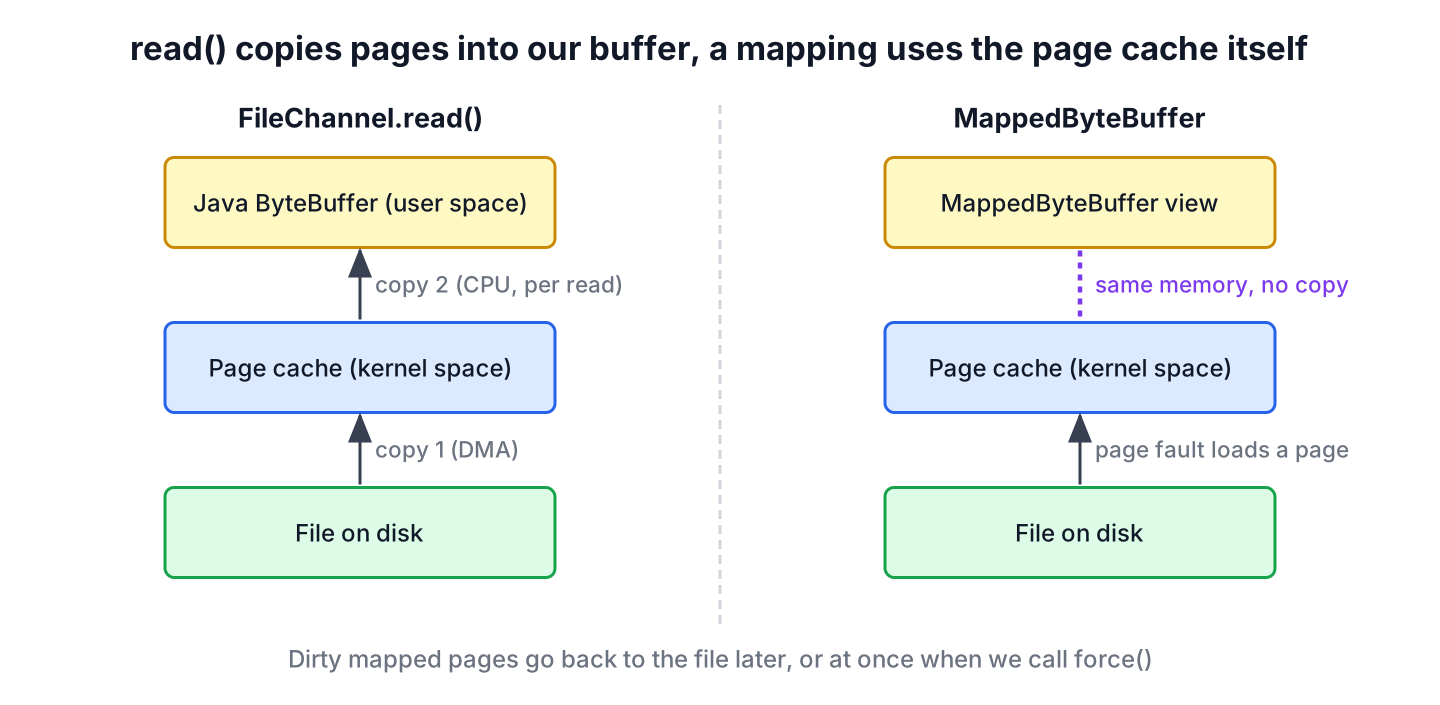
With conventional file I/O, a read() system call copies the data twice. The disk data first lands in the page cache of the operating system in kernel space, and the kernel copies it again into the buffer of our process. A write() copies in the opposite direction.
Memory-mapped I/O removes the second copy. The operating system maps the pages of the file into the virtual address space of our process, so the page cache and our buffer are the same memory. When the code touches a page that is not loaded yet, the CPU raises a page fault and the operating system loads that page from disk. When the code changes a page, the page is marked dirty and written back to the file later.
2. Java Memory-Mapped Files With MappedByteBuffer
To map a file, we open a FileChannel and call map(mode, position, size). The method returns a MappedByteBuffer, a direct ByteBuffer with position 0 and a limit and capacity equal to size. The position and the size let us map only a region of a large file.
A mapping does not depend on the channel that created it. Closing the channel has no effect on the buffer, so we can close the channel right after map() and keep using the buffer. The mapping stays valid until the garbage collector removes the buffer object.
Path file = Files.write(Files.createTempFile("scores", ".bin"), new byte[16]);
MappedByteBuffer map;
try (FileChannel channel = FileChannel.open(file, StandardOpenOption.READ, StandardOpenOption.WRITE)) {
    map = channel.map(FileChannel.MapMode.READ_WRITE, 0, 16);
}
map.putLong(8, 99L);                            // the channel is closed, the mapping is not
byte[] onDisk = Files.readAllBytes(file);
long stored = ByteBuffer.wrap(onDisk).getLong(8);   // 99
Mapping a region larger than the file has unspecified behavior. The JDK grows the file to the mapped size for a read/write mapping, as the intro example showed with its 1,024 bytes, but portable code sets the file size first, for example by writing zeros or calling RandomAccessFile.setLength().
3. File Mapping Modes
Like file handles, file mappings can be writable or read-only. The FileChannel.MapMode class defines three modes, and each one requires the channel to be opened with matching options.
| Mode | Writes allowed | Changes reach the file | Channel must be opened with |
|---|---|---|---|
| READ_ONLY | No, put() throws ReadOnlyBufferException | Not applicable | READ |
| READ_WRITE | Yes | Yes, eventually, and other processes that map the file may see them | READ and WRITE |
| PRIVATE | Yes, copy-on-write | No, changes stay in a private copy of the touched pages | READ and WRITE |
A private mapping is useful when we want to patch values in memory, for example to test a modified configuration block, without touching the file. The channel still needs write access, because the buffer must allow put() calls.
Path file = Files.writeString(Files.createTempFile("config", ".bin"), "AAAA");
try (FileChannel channel = FileChannel.open(file, StandardOpenOption.READ, StandardOpenOption.WRITE)) {
    MappedByteBuffer copy = channel.map(FileChannel.MapMode.PRIVATE, 0, 4);
    copy.put(0, (byte) 'B');
    char inMemory = (char) copy.get(0);         // 'B'
    MappedByteBuffer readOnly = channel.map(FileChannel.MapMode.READ_ONLY, 0, 4);
    MappedByteBuffer changed = (MappedByteBuffer) readOnly.put((byte) 'C');   // ReadOnlyBufferException
}
String onDisk = Files.readString(file);         // "AAAA"
4. How to Read a Memory-Mapped File
To read a file through a mapping, we open the channel for reading and map the region in READ_ONLY mode. A text file is decoded with a named charset. Printing each byte as a char breaks every character that takes more than one byte in UTF-8.
static String readMapped(Path file) throws IOException {
    try (FileChannel channel = FileChannel.open(file, StandardOpenOption.READ)) {
        MappedByteBuffer buffer = channel.map(FileChannel.MapMode.READ_ONLY, 0, channel.size());
        return StandardCharsets.UTF_8.decode(buffer).toString();
    }
}
Path file = Files.writeString(Files.createTempFile("menu", ".txt"), "soup\nsalad\n");
String text = readMapped(file); // "soup\nsalad\n"For a small text file that we read once, Files.readString() is the better choice, because the mapping setup and the page faults have a cost of their own that a short read does not win back. Mapping pays off when the file is large and we jump around in it.
For example, a price history service stores one long price per minute in a binary file, which is about 4 MB per year. To show one day on a chart, the service computes the offset of the first minute and reads 1,440 values. The mapping loads only the pages it touches, so the rest of the file stays on disk.
static long[] readPrices(Path file, int fromMinute, int count) throws IOException {
    try (FileChannel channel = FileChannel.open(file, StandardOpenOption.READ)) {
        MappedByteBuffer prices = channel.map(FileChannel.MapMode.READ_ONLY, 0, channel.size());
        long[] result = new long[count];
        for (int i = 0; i < count; i++) {
            result[i] = prices.getLong((fromMinute + i) * Long.BYTES);
        }
        return result;
    }
}
Path file = Files.createTempFile("prices", ".bin");
ByteBuffer data = ByteBuffer.allocate(5 * Long.BYTES);
for (long price = 100; price < 105; price++) {
data.putLong(price);
}
Files.write(file, data.array());
long[] window = readPrices(file, 2, 3); // [102, 103, 104]5. How to Write Into a Memory-Mapped File
To write, we open the channel with READ and WRITE and map the region in READ_WRITE mode. The relative and absolute put() methods of ByteBuffer change the mapped memory. The operating system decides when the dirty pages reach the disk, so a crash of the machine can lose recent changes.
The force() method writes all changes of the buffer to the storage device and returns when they are written. Since Java 13, force(index, length) writes only one range, which is cheaper when we change a few bytes in a large mapping.
Path file = Files.write(Files.createTempFile("ledger", ".bin"), new byte[4096]);
try (FileChannel channel = FileChannel.open(file, StandardOpenOption.READ, StandardOpenOption.WRITE)) {
    MappedByteBuffer ledger = channel.map(FileChannel.MapMode.READ_WRITE, 0, channel.size());
    ledger.put(StandardCharsets.UTF_8.encode("balance=250"));
    ledger.force(0, 11);                        // write only the first 11 bytes
}
String header = Files.readString(file).substring(0, 11);   // "balance=250"
The guarantee of force() holds only for READ_WRITE mappings of files on a local device. A file on a network share has no such guarantee, and for read-only and private mappings the call may have no effect.
6. Mapping Files With MemorySegment (Java 22)
Since Java 22, FileChannel.map(mode, offset, size, arena) maps a file into a MemorySegment, which has a long size and is unmapped when its arena is closed. The MemorySegment and Arena classes are part of the Foreign Function and Memory API, which became final in JEP 454. This is the modern option for new code that maps files.
Path file = Files.write(Files.createTempFile("segment", ".bin"), new byte[4096]);
try (Arena arena = Arena.ofConfined();
     FileChannel channel = FileChannel.open(file, StandardOpenOption.READ, StandardOpenOption.WRITE)) {
    MemorySegment segment = channel.map(FileChannel.MapMode.READ_WRITE, 0, channel.size(), arena);
    segment.set(ValueLayout.JAVA_LONG, 8, 123L);
    long value = segment.get(ValueLayout.JAVA_LONG, 8);   // 123
    long bytes = segment.byteSize();            // 4096
    segment.force();
}
Closing the arena unmaps the file at that point, not when the garbage collector runs. Any later access to the segment throws IllegalStateException instead of reading freed memory, and on Windows the file can be deleted or truncated right after the arena closes.
Path file = Files.write(Files.createTempFile("closed", ".bin"), new byte[64]);
MemorySegment escaped;
try (Arena arena = Arena.ofConfined();
     FileChannel channel = FileChannel.open(file, StandardOpenOption.READ)) {
    escaped = channel.map(FileChannel.MapMode.READ_ONLY, 0, 64, arena);
}
byte first = escaped.get(ValueLayout.JAVA_BYTE, 0);   // IllegalStateException: Already closed
A MappedByteBuffer is limited to Integer.MAX_VALUE bytes, which is about 2 GB, because buffer indexes are int values. A MemorySegment maps a 3 GB file in one piece.
Path file = Files.createTempFile("huge", ".bin");
try (RandomAccessFile raf = new RandomAccessFile(file.toFile(), "rw")) {
    raf.setLength(3L * 1024 * 1024 * 1024);     // sparse 3 GB file
}
try (Arena arena = Arena.ofConfined();
     FileChannel channel = FileChannel.open(file, StandardOpenOption.READ)) {
    long mapped = channel.map(FileChannel.MapMode.READ_ONLY, 0, channel.size(), arena).byteSize();   // 3221225472
    MappedByteBuffer tooBig = channel.map(FileChannel.MapMode.READ_ONLY, 0, channel.size());   // IllegalArgumentException
} finally {
    Files.delete(file);
}
Two details differ from ByteBuffer. The ValueLayout.JAVA_LONG layout uses the native byte order of the CPU, which is little-endian on x86 and ARM, whereas a ByteBuffer is big-endian by default. A confined arena allows access only from the thread that created it, and Arena.ofShared() creates a segment that several threads can read.
| Feature | MappedByteBuffer | MemorySegment (Java 22+) |
|---|---|---|
| Maximum size of one mapping | About 2 GB (Integer.MAX_VALUE) | Limited by the address space |
| Unmapping | When the buffer is garbage collected | When the arena is closed |
| Access after unmapping | Not possible from Java code | IllegalStateException |
| Default byte order | Big-endian | Native order of the layout |
| Flush to disk | force(), force(index, length) | force() |
| Works with channels and older APIs | Yes, it is a ByteBuffer | Through asByteBuffer() |
7. Benefits and Limits of Memory-Mapped Files
Memory-mapped I/O has several advantages over conventional file I/O when the file is large and the access is random or repeated.
- The process sees the file as memory, so there is no read() or write() system call per access.
- The data is not copied from the page cache into a Java buffer, and it does not use heap memory, so the garbage collector does not scan it.
- Only the pages we touch are loaded, so a mapped 10 GB file does not need 10 GB of RAM.
- Several processes that map the same file in READ_WRITE mode share the same pages, which works as a simple form of shared memory.
The limits matter as much as the benefits.
- A MappedByteBuffer has no unmap() method. The mapping stays until garbage collection, and on Windows the file cannot be deleted or truncated while it is mapped.
- If another program truncates the file, access to the missing pages throws an unspecified exception, which is InternalError in current JDKs, instead of an IOException.
- A page fault blocks the thread while the page loads from disk, and the JVM cannot release a virtual thread from its carrier during that wait.
- For small files and one-pass sequential reads, Files.readAllBytes() or a FileChannel read loop is simpler.
The size of a mapping is rarely a problem on a 64-bit JVM. The address space holds mappings of many gigabytes, and only the int indexes of ByteBuffer cap one MappedByteBuffer at about 2 GB, as we saw in section 6.
8. Memory-Mapped File FAQs
Unmapping and the 2 GB limit lead the questions about memory-mapped files, followed by speed and flushing to disk.
8.1. How do we unmap a MappedByteBuffer in Java?
There is no public method for it. The mapping is released when the garbage collector removes the buffer. Old code called sun.misc.Unsafe.invokeCleaner(), which is an internal API. On Java 22 and later, we map the file into a MemorySegment with an Arena and close the arena to unmap it.
8.2. Can we map a file larger than 2 GB?
Yes, in two ways. A MemorySegment from FileChannel.map(mode, offset, size, arena) maps the whole file in one piece. With MappedByteBuffer, we split the file into regions of at most Integer.MAX_VALUE bytes and map each region with its own position.
8.3. Is a memory-mapped file faster than FileChannel.read()?
For large files with random or repeated access, yes, because it skips the copy into a Java buffer and the system call per read. For a single sequential pass over a small file, no, because creating the mapping and handling the page faults costs more than a few reads. We measure with our real file and access pattern before switching.
8.4. Does closing the FileChannel unmap the file?
No. A MappedByteBuffer stays valid after its channel is closed, so we can close the channel right after map(). A MemorySegment mapping ends when its arena closes, not when the channel closes.
8.5. Are changes written to disk without force()?
Yes, eventually. In READ_WRITE mode, the operating system writes dirty pages back on its own schedule, even after the JVM exits normally. A power failure or a kernel crash can lose changes that are not forced yet, so we call force() after writes that must survive.
9. Conclusion
A memory-mapped file lets Java code read and write a file as memory. We map it with FileChannel.map() in READ_ONLY, READ_WRITE or PRIVATE mode, use the ByteBuffer methods on the result, and call force() when changes must reach the disk.
On Java 22 and later, mapping into a MemorySegment removes the two main pain points of MappedByteBuffer, the 2 GB limit and the missing unmap. Mapping pays off for large files with random access, whereas small files and one-pass reads are simpler with the Java IO and NIO.2 file methods.
10. References
- MappedByteBuffer Javadoc (Java 25)
- FileChannel Javadoc
- MemorySegment Javadoc
- Arena Javadoc
- JEP 454, Foreign Function and Memory API
Happy Learning !!

You really should update your code to show how to close the RandomAccessFile and FileChannel (e.g. in try-with-resources), and set the MappedByteBuffer reference to null (to encourage GC), once you have finished with the file.
Hi,
Is there any way to access memory files like buffers , streams or … with an address ?
in an android project ,
for example I want to access to these memory objects like access to any file in phone storage with an its address
0x8FFFFFF is not 128 MB
0x8000000 is 128 MB
i am fetching data of around 15GB from a Database and creating a file from that. Will memory mapped file help me ?
Must mention that releasing the memory does not work on some unices as expected. Then you need explicitely call sun package to release memory. Off course the warning for usin sun internal api eill show up.
to use mapped memory file i need to know just the file name or all the path ??!!!!
have you heard about relative paths?
Hi,
I like to check how to read a file more that 2GB. Can I define the offset and split the file and make more than one read? I was not successful doing it. Can you please throw your ideas on it.
Thanks
Sudhagar C
Have you tried code written in “Reading a Memory-Mapped File”? How bog file it was able to handle in your system?
I’d like to add that I’ve created a library, MappedBus https://github.com/caplogic/mappedbus, which supports having multiple processes write records in order to the same memory mapped file as well as having multiple processes reading records from it.
Thanks for sharing it.
Awesome lib. Thanks Mikael!
Not sure what you learned or how chronicle inspired your. Your impl is much cleaner!
Thanks for the clear tutorial, it helped me a lot.
I was searching for a way to read quickly bytes in large file and I was using a ReadableByteChannel. I compared both methods and it seems that the MappedByteBuffer is faster.