

Java IO (java.io) reads and writes data as streams of bytes or characters with blocking calls, whereas Java NIO (java.nio) moves data through buffers and channels and can run socket channels in non-blocking mode under a Selector. NIO also includes NIO.2, the java.nio.file package with Path and Files, which is the standard file API in modern Java.
We choose between them whenever we read or write files and whenever we handle network connections. In Java 25, the short answer is Files and Path for files, java.io streams and readers for sequential data and interop, and NIO channels for random access, memory mapping and selector-based servers.
The following example opens the same playlist file with a java.io reader, with NIO.2 Files, and with an NIO channel and buffer.
Path file = Files.writeString(Files.createTempFile("songs", ".txt"), "Intro\nOutro\n");
try (BufferedReader reader = new BufferedReader(new FileReader(file.toFile(), StandardCharsets.UTF_8))) {
    String first = reader.readLine();                   // "Intro", java.io stream
}
List<String> lines = Files.readAllLines(file);          // [Intro, Outro], NIO.2
try (FileChannel channel = FileChannel.open(file)) {
    ByteBuffer buffer = ByteBuffer.allocate(64);
    int read = channel.read(buffer);                    // 12, NIO channel and buffer
}
Notice that the stream returns text line by line, the Files call does the whole job in one line, and the channel returns raw bytes in a buffer that we decode ourselves. We compare the two APIs in a table, look at streams versus buffers and blocking versus non-blocking I/O, cover NIO.2 and what virtual threads change, and finish with a decision table.
1. Java IO vs NIO at a Glance
The java.io package dates from Java 1.0, NIO arrived in Java 1.4, and NIO.2 (java.nio.file) in Java 7. The three are not competitors that replace each other. Modern code mixes them, for example by opening a BufferedReader with Files.newBufferedReader(path).
| Aspect | Java IO (java.io) | Java NIO (java.nio, java.nio.channels) | NIO.2 (java.nio.file) |
|---|---|---|---|
| Main types | InputStream, OutputStream, Reader, Writer, File | Buffer, Channel, Selector, Charset | Path, Files, FileSystem, WatchService |
| Data model | Stream of bytes or chars | Blocks of data in buffers | Whole files, lines or streams on top of IO and NIO |
| Direction | One-way, input or output | Channels are often two-way | Not applicable |
| Blocking | Always blocking | Blocking by default, socket channels can be non-blocking | Blocking |
| One thread, many connections | No | Yes, with a Selector | No |
| Random access, memory mapping, file locks | RandomAccessFile only | Yes, with FileChannel | Through FileChannel.open() |
| Errors | File methods often return false | Exceptions | Specific exceptions such as NoSuchFileException |
| Typical use today | Sequential streams, decorators, interop | Binary protocols, large files, servers | Almost all file work |
2. Streams vs Buffers
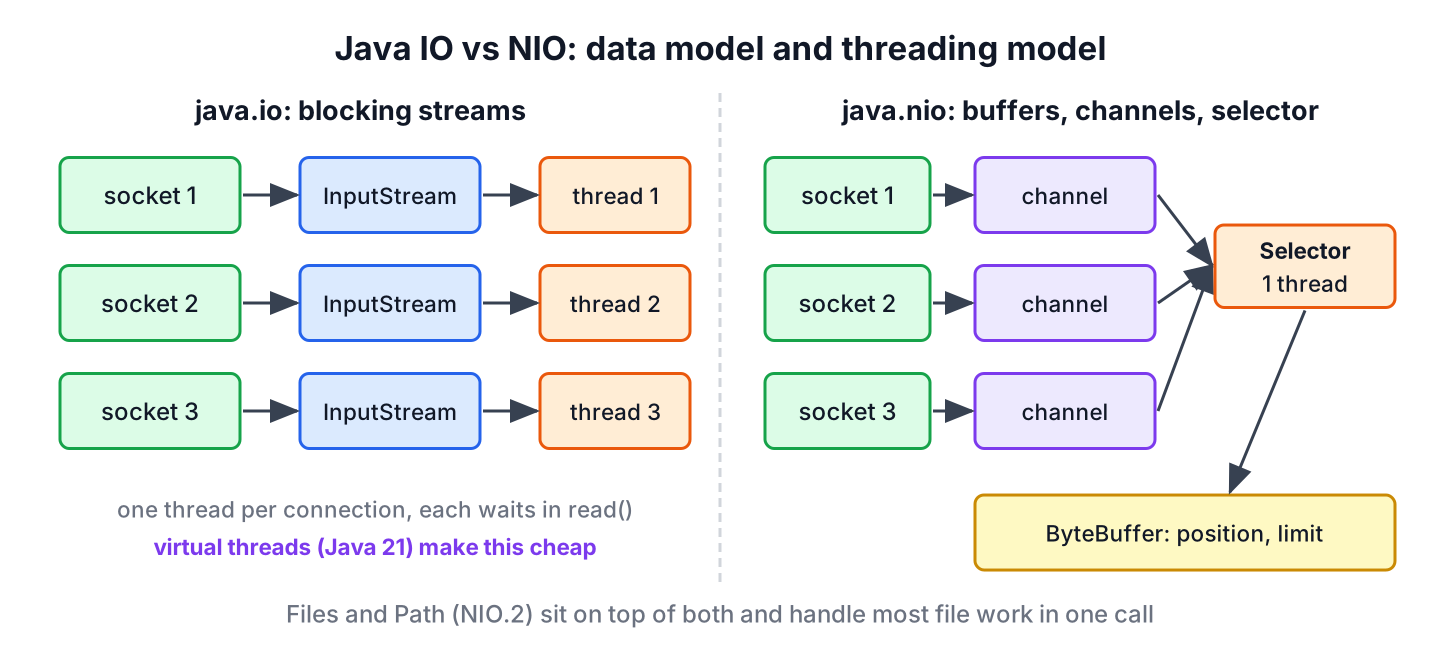
A stream-oriented API returns data in the order it arrives. An InputStream returns one byte or one array of bytes per read() call, and the bytes are gone from the stream once read. Streams chain well, so a BufferedReader wraps an InputStreamReader, which wraps a FileInputStream, and each layer adds one feature.
A buffer-oriented API reads a block of data into a ByteBuffer, and we move freely inside that block with position(), get(index) and flip(). The price is bookkeeping, because we check whether the buffer holds a complete record and keep unread bytes with compact(). The NIO buffer tutorial covers those operations.
For example, a music app stores each track as a 4-byte track number followed by a 4-byte length in seconds. Both APIs read the record, and only the API shape differs.
byte[] record = ByteBuffer.allocate(8).putInt(7).putInt(215).array();
try (DataInputStream in = new DataInputStream(new ByteArrayInputStream(record))) {
    int track = in.readInt();                           // 7, stream reads in order
}
ByteBuffer buffer = ByteBuffer.wrap(record);
int seconds = buffer.getInt(4);                         // 215, buffer reads any offset
int track = buffer.getInt(0);                           // 7
Streams are not strictly forward-only. A BufferedInputStream supports mark() and reset() within its buffer, and RandomAccessFile can seek. The real difference is that a buffer gives us the whole block as addressable memory.
3. Blocking IO vs Non-Blocking NIO
Every java.io call blocks. A thread that calls read() on a socket stream waits until data arrives, so a classic server uses one thread per connection. With platform threads, 10,000 idle connections need 10,000 OS threads, each with its own stack.
NIO socket channels can switch to non-blocking mode with configureBlocking(false). A Selector watches many channels and reports which ones are ready to read or write, so one thread serves thousands of connections. Netty, Undertow and the reactive stack of Spring are built on this model.
try (Selector selector = Selector.open();
     ServerSocketChannel server = ServerSocketChannel.open().bind(new InetSocketAddress("localhost", 0))) {
    server.configureBlocking(false);
    server.register(selector, SelectionKey.OP_ACCEPT);
    int ready = selector.selectNow();                   // 0, no client yet
    int watched = selector.keys().size();               // 1
}
Non-blocking code is harder to write, because a read can return 0 bytes or half a message, and our code must keep the state of every connection between events. File channels never take part in this model. FileChannel always blocks, and the asynchronous file API is AsynchronousFileChannel.
4. NIO.2 Files and Path for File Work
Most of the time, the question “IO or NIO” is about files, and for files the answer is NIO.2. Path replaces java.io.File, and the static methods of Files read, write, copy, move, walk and delete files in one call with explicit exceptions.
The difference shows when something goes wrong. A delete of a missing file returns false with File, and we cannot tell why it failed. The same call with Files throws an exception that names the problem.
Path missing = Files.createTempDirectory("io").resolve("gone.txt");
boolean deleted = missing.toFile().delete();            // false, no reason given
Files.delete(missing);                                  // NoSuchFileException
Path dir = Files.createTempDirectory("playlist");
Path songs = Files.writeString(dir.resolve("songs.txt"), "Intro\nOutro\n");
long count = Files.readAllLines(songs).size(); // 2
Path backup = Files.copy(songs, dir.resolve("songs.bak"));
boolean exists = Files.exists(backup); // true
File legacy = songs.toFile(); // interop with older APIs
Path back = legacy.toPath();NIO.2 also supports symbolic links, file attributes, directory walking with Files.walk(), the WatchService and other file systems such as zip files. The File class is not deprecated, and we still meet it in APIs such as ProcessBuilder.directory(), but new code converts it with toPath() right away.
JEP 400 made UTF-8 the default charset in Java 18, so new FileReader(file) and Files.readString(path) decode the same way on every operating system. We still pass StandardCharsets.UTF_8 when code must also run on older JDKs.
5. What Virtual Threads Change
Since Java 21, virtual threads make blocking I/O cheap, so a thread-per-request design with plain java.io or blocking NIO code scales without a Selector. When a virtual thread blocks on a socket, the JDK parks it and frees the carrier OS thread for other virtual threads. JEP 444 made virtual threads final in Java 21.
The legacy java.net.Socket class benefits too, because JEP 353 reimplemented it on the NIO internals in Java 13. Blocking file I/O is different. A virtual thread that reads a file holds its carrier thread during the call, and the JDK compensates by adding a carrier thread for a while. Since Java 24, JEP 491 also lets virtual threads block inside synchronized blocks without holding the carrier.
For example, a REST service that reads a customer file and calls two other services for each request can run every request in its own virtual thread with blocking calls. The code reads top to bottom, and the service still handles thousands of concurrent requests.
Path file = Files.writeString(Files.createTempFile("customer", ".json"), "{\"id\":1}");
try (ExecutorService executor = Executors.newVirtualThreadPerTaskExecutor()) {
    List<Future<Integer>> results = new ArrayList<>();
    for (int i = 0; i < 1_000; i++) {
        results.add(executor.submit(() -> Files.readString(file).length()));
    }
    int total = 0;
    for (Future<Integer> result : results) {
        total += result.get();
    }
    int sum = total;                                    // 8000
}
Selector-based NIO still has a place. Frameworks that already use it, such as Netty, keep working, and a server with hundreds of thousands of mostly idle connections uses less memory per connection with a selector. For a typical business app, virtual threads with blocking code are simpler to write and debug.
6. Which One Should We Use?
The choice depends on the task, not on which API is newer. Each row maps a common situation to the API we pick in Java 25, with the reason.
| Situation | Pick | Why |
|---|---|---|
| Read or write a text file | Files.readString(), Files.writeString(), Files.lines() | One call, explicit exceptions, UTF-8 |
| Process a large text file line by line | Files.newBufferedReader() or Files.lines() | Constant memory |
| Copy, move, delete, walk directories | Files methods | Options, symbolic links, clear errors |
| Chain filters (GZIP, Base64, data formats) | java.io streams | Decorators such as GZIPInputStream |
| Random access, file locks, large binary files | FileChannel | Position-based reads and writes |
| Huge files with random reads | FileChannel.map() or MemorySegment | No copy into the heap |
| Send files over sockets | FileChannel.transferTo() | Kernel copy |
| Thousands of concurrent blocking requests | Virtual threads with blocking IO | Simple code that scales |
| Hundreds of thousands of idle connections, custom protocol | NIO Selector or Netty | Lowest memory per connection |
For more depth, the NIO channel and read a file with channels tutorials show the NIO side, and the Java IO tutorial maps each file and stream task to its guide.
7. Java IO vs NIO FAQs
Once a project picks its file and network code, the IO versus NIO question turns into a few practical doubts about speed, deprecation and blocking.
7.1. Is Java NIO faster than Java IO?
Not in general. For sequential file reads, a BufferedInputStream and a FileChannel both end in the same read system calls, so the buffer size matters more than the API. NIO is faster for specific jobs, such as transferTo() copies, memory-mapped random access and serving many idle connections from one thread.
7.2. Is java.io deprecated?
No. The java.io streams, readers, writers and the File class are supported in Java 25. Only individual members are deprecated, such as File.toURL(). New code uses Path and Files for file system work and keeps streams for sequential data.
7.3. Is NIO non-blocking for files?
No. FileChannel always blocks and cannot register with a Selector. Only socket and pipe channels support non-blocking mode. For file operations that report their result later, we use AsynchronousFileChannel.
7.4. What is the difference between NIO and NIO.2?
NIO, added in Java 1.4, brought buffers, channels, selectors and charsets. NIO.2, added in Java 7, brought the java.nio.file package with Path, Files, file attributes, the WatchService and asynchronous channels.
7.5. Do we still need NIO selectors with virtual threads?
Rarely in application code. Virtual threads let blocking code handle many concurrent connections, so we write simple blocking servers and clients. Selectors stay useful inside frameworks and for servers with a large number of mostly idle connections.
8. Conclusion
Java IO and Java NIO differ in two ways. IO works with blocking streams, whereas NIO works with buffers and channels and can multiplex socket channels with a Selector. NIO.2 adds Path and Files, which are the default API for files in modern Java.
In Java 25, we use Files for file work, streams for decorators and interop, FileChannel for random access, mapping and transfers, and virtual threads with blocking code for concurrent network work. Selectors remain the tool for frameworks and large numbers of idle connections.
9. References
- java.io package (Java 25)
- java.nio.channels package
- Files Javadoc
- JEP 444, Virtual Threads
- JEP 353, Reimplement the Legacy Socket API
- JEP 491, Synchronize Virtual Threads without Pinning
Happy Learning !!

Thanks for the nice article
Thats really nice buddy.
Thanks for sharing new concept. :)