
To bypass SSL certificate checking in Java, we give the HTTP client an SSLContext whose trust manager accepts every server certificate, so the TLS handshake succeeds even for self-signed, expired or unknown certificates. Because the client no longer checks who it talks to, anyone between the client and the server can pretend to be the server and read or change the traffic.
We use a trust-all client only in local tests, for example when a developer laptop calls a test server that has a self-signed certificate. For every other case, Java can trust only the certificate we expect, and that fix takes the same amount of code.
The following example builds a java.net.http.HttpClient that trusts every certificate and calls a local recipes API on Java 25.
// TEST ONLY: this client also accepts an attacker's certificate
TrustManager[] trustAll = { new X509TrustManager() {
    public void checkClientTrusted(X509Certificate[] chain, String authType) {}
    public void checkServerTrusted(X509Certificate[] chain, String authType) {}
    public X509Certificate[] getAcceptedIssuers() { return new X509Certificate[0]; }
}};
SSLContext insecure = SSLContext.getInstance("TLS");
insecure.init(null, trustAll, new SecureRandom());

HttpClient client = HttpClient.newBuilder().sslContext(insecure).build();
HttpRequest request = HttpRequest.newBuilder(URI.create("https://localhost:8443/recipes")).build();
HttpResponse<String> response = client.send(request, HttpResponse.BodyHandlers.ofString());
int status = response.statusCode();             // 200
Notice that the empty checkServerTrusted() method is the whole bypass, because a trust manager rejects a certificate only by throwing an exception. We start with the error that sends developers looking for this code, show the safe fixes (a truststore and trusting one certificate), and cover Apache HttpClient 5 and Spring RestClient.
1. Why Java Rejects the Server Certificate
During the TLS handshake, the server sends its certificate, and Java checks two things before it sends any request data. The certificate chain must end at a certificate authority (CA) in the JVM truststore, a file with the CA certificates the JVM trusts. The certificate must also name the host we connect to, in its subject alternative names (SAN).
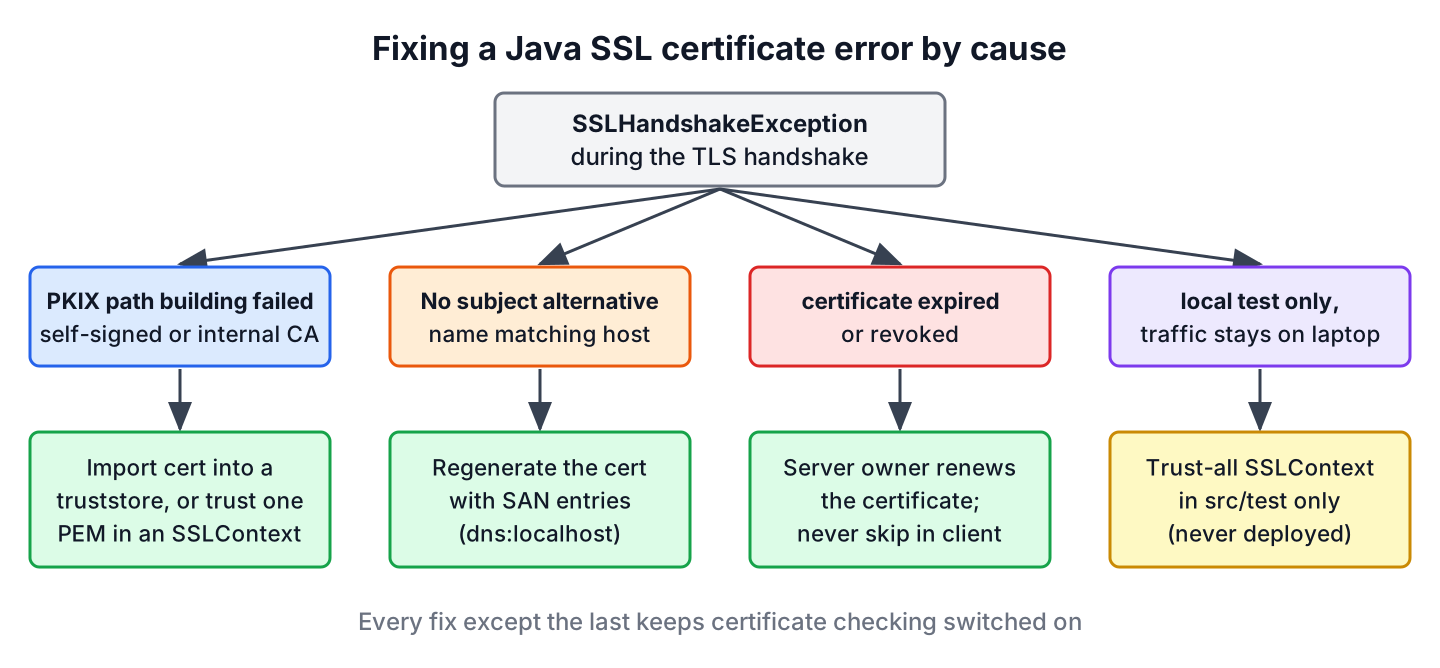
A self-signed certificate fails the first check, because no CA in the truststore signed it. The default client throws an SSLHandshakeException with the familiar PKIX message.
HttpClient defaultClient = HttpClient.newHttpClient();
HttpRequest request = HttpRequest.newBuilder(URI.create("https://localhost:8443/recipes")).build();
HttpResponse<String> failed = defaultClient.send(request, HttpResponse.BodyHandlers.ofString());   // SSLHandshakeException: PKIX path building failed
javax.net.ssl.SSLHandshakeException: PKIX path building failed:
sun.security.provider.certpath.SunCertPathBuilderException:
unable to find valid certification path to requested targetThe PKIX error means the chain is unknown, not that it is broken. For a test server, a corporate TLS inspection proxy or an internal CA, the fix is to add that one certificate to what the client trusts, as we do in section 3. An expired certificate or a wrong host name is a server problem, and the server owner fixes it with a new certificate.
2. Bypass SSL Certificate Checking in Local Tests Only
A trust manager decides whether a certificate chain is acceptable. The JDK’s default trust manager validates the chain against the truststore, whereas the trust manager in the intro accepts any chain, including one that an attacker created a minute ago.
Say a team runs a recipes service in Docker on each laptop, with a self-signed certificate generated at startup. An integration test that only checks JSON mapping can use a trust-all client, because the traffic never leaves the machine. The same code in a deployed service would accept any server on the network path.
Keep a trust-all SSLContext in test sources only, so it never ends up in a production JAR. Static analysis tools such as Semgrep and SonarQube report the empty checkServerTrusted() method as a vulnerability, so a single helper method under src/test/java keeps that warning in one place.
// src/test/java: TEST ONLY
static SSLContext insecureContext() throws GeneralSecurityException {
    TrustManager[] trustAll = { new X509TrustManager() {
        public void checkClientTrusted(X509Certificate[] chain, String authType) {}
        public void checkServerTrusted(X509Certificate[] chain, String authType) {}
        public X509Certificate[] getAcceptedIssuers() { return new X509Certificate[0]; }
    }};
    SSLContext context = SSLContext.getInstance("TLS");
    context.init(null, trustAll, new SecureRandom());
    return context;
}
2.1. Hostname Verification Is a Separate Check
Accepting every chain does not switch off the hostname check in java.net.http.HttpClient. The JDK wraps a plain X509TrustManager and still compares the host name with the certificate. A server on port 8444 that presents a certificate for api.example.org fails even with the trust-all context.
HttpRequest otherHost = HttpRequest.newBuilder(URI.create("https://localhost:8444/recipes")).build();
HttpClient trustAllClient = HttpClient.newBuilder().sslContext(insecureContext()).build();
HttpResponse<String> mismatch = trustAllClient.send(otherHost, HttpResponse.BodyHandlers.ofString());   // SSLHandshakeException: No subject alternative DNS name matching localhost found
The JDK has a system property that turns off hostname verification for every HttpClient in the JVM. It is meant for testing only, and the JVM reads it once, so we set it on the command line.
java -Djdk.internal.httpclient.disableHostnameVerification=true -jar recipe-tests.jarA better fix for a test certificate is to generate it with the right SAN entries, such as -ext SAN=dns:localhost,ip:127.0.0.1 in the keytool command of the next section. With a correct SAN, no hostname switch is needed.
3. Trusting the Certificate With a Truststore
A truststore is a keystore file that holds only certificates we trust, without private keys. Instead of trusting everything, we import the server certificate into our own truststore, and the client keeps full validation for that server.
We first get the certificate. The server team can send it as a PEM file, or we export it from the test server’s keystore. The keytool command in the JDK creates the truststore.
# 1. Test server certificate with the right host names (done once by the server team)
keytool -genkeypair -alias local-api -keyalg EC -groupname secp256r1 -validity 3650 \
  -dname "CN=localhost" -ext "SAN=dns:localhost,ip:127.0.0.1" \
  -keystore server.p12 -storetype PKCS12 -storepass changeit

# 2. Export the public certificate as PEM
keytool -exportcert -alias local-api -rfc -file server.crt -keystore server.p12 -storepass changeit

# 3. Import it into a truststore for the client
keytool -importcert -noprompt -alias local-api -file server.crt \
  -keystore truststore.p12 -storetype PKCS12 -storepass changeit
The client loads the truststore into a TrustManagerFactory, which creates the JDK’s validating trust manager for those certificates only.
KeyStore trustStore = KeyStore.getInstance("PKCS12");
try (InputStream in = Files.newInputStream(Path.of("truststore.p12"))) {
    trustStore.load(in, "changeit".toCharArray());
}
TrustManagerFactory tmf = TrustManagerFactory.getInstance(TrustManagerFactory.getDefaultAlgorithm());
tmf.init(trustStore);
SSLContext trusted = SSLContext.getInstance("TLS");
trusted.init(null, tmf.getTrustManagers(), null);

HttpClient client = HttpClient.newBuilder().sslContext(trusted).build();
HttpRequest request = HttpRequest.newBuilder(URI.create("https://localhost:8443/recipes")).build();
String body = client.send(request, HttpResponse.BodyHandlers.ofString()).body();   // ["pancakes","omelette"]
The client from the truststore trusts only the certificates in truststore.p12, so a call to a public site with a normal CA certificate fails. When one client calls both, we import the public CAs as well, or point the whole JVM to a truststore that contains the JDK CAs plus our certificate.
# Whole JVM: copy the JDK cacerts, add our certificate, start the app with it
cp "$JAVA_HOME/lib/security/cacerts" app-truststore.p12
keytool -importcert -noprompt -alias local-api -file server.crt -keystore app-truststore.p12 -storepass changeit
java -Djavax.net.ssl.trustStore=app-truststore.p12 -Djavax.net.ssl.trustStorePassword=changeit -jar app.jar
The JDK cacerts file uses the password changeit by default, and the other javax.net.ssl system properties set the truststore type and the keystore for mutual TLS.
4. Trusting One PEM Certificate in Code
Sometimes we cannot change JVM flags, for example in a shared app server, but we have the server certificate as a PEM file. We build an in-memory keystore with that certificate and create the SSLContext from it, so no file needs keytool.
static SSLContext trustOnly(Path pemFile) throws Exception {
    Certificate cert;
    try (InputStream in = Files.newInputStream(pemFile)) {
        cert = CertificateFactory.getInstance("X.509").generateCertificate(in);
    }
    KeyStore store = KeyStore.getInstance(KeyStore.getDefaultType());
    store.load(null, null);                       // empty keystore
    store.setCertificateEntry("recipe-api", cert);
    TrustManagerFactory tmf = TrustManagerFactory.getInstance(TrustManagerFactory.getDefaultAlgorithm());
    tmf.init(store);
    SSLContext context = SSLContext.getInstance("TLS");
    context.init(null, tmf.getTrustManagers(), null);
    return context;
}
The client trusts our test server and nothing else. A server with a different self-signed certificate fails with the same PKIX error as before, which is the behavior we want from certificate checking.
HttpClient pinned = HttpClient.newBuilder().sslContext(trustOnly(Path.of("server.crt"))).build();
HttpRequest ours = HttpRequest.newBuilder(URI.create("https://localhost:8443/recipes")).build();
HttpRequest other = HttpRequest.newBuilder(URI.create("https://localhost:8444/recipes")).build();
int okStatus = pinned.send(ours, HttpResponse.BodyHandlers.ofString()).statusCode();      // 200
int otherStatus = pinned.send(other, HttpResponse.BodyHandlers.ofString()).statusCode();  // SSLHandshakeException: PKIX path building failed
A real-world case is a payment provider that gives each merchant its sandbox certificate. The checkout service trusts that one certificate for the sandbox client and keeps the default truststore for every other client.
5. Apache HttpClient 5 SSL Configuration
Apache HttpClient 5.4 and later configure TLS through a TlsSocketStrategy on the connection manager, and the older setSSLSocketFactory() style is deprecated. The SSLContexts.custom().loadTrustMaterial() builder reads a truststore file in one call. The examples use HttpClient 5.6.
SSLContext sslContext = SSLContexts.custom()
        .loadTrustMaterial(Path.of("truststore.p12"), "changeit".toCharArray())
        .build();
PoolingHttpClientConnectionManager manager = PoolingHttpClientConnectionManagerBuilder.create()
        .setTlsSocketStrategy(ClientTlsStrategyBuilder.create().setSslContext(sslContext).buildClassic())
        .build();
CloseableHttpClient http = HttpClients.custom().setConnectionManager(manager).build();
int code = http.execute(new HttpGet("https://localhost:8443/recipes"), resp -> resp.getCode());   // 200
http.close();
The test-only variant replaces the truststore with TrustAllStrategy and the hostname check with NoopHostnameVerifier. Since version 5.4, HttpClient also asks the JDK to check the host name (the default policy is HostnameVerificationPolicy.BOTH), so NoopHostnameVerifier alone still fails with a hostname error. The policy CLIENT leaves the check to our verifier only.
// TEST ONLY: trusts every certificate and every host name
SSLContext trustAllContext = SSLContexts.custom().loadTrustMaterial(TrustAllStrategy.INSTANCE).build();
PoolingHttpClientConnectionManager testManager = PoolingHttpClientConnectionManagerBuilder.create()
        .setTlsSocketStrategy(ClientTlsStrategyBuilder.create()
                .setSslContext(trustAllContext)
                .setHostnameVerifier(NoopHostnameVerifier.INSTANCE)
                .setHostVerificationPolicy(HostnameVerificationPolicy.CLIENT)
                .buildClassic())
        .build();
CloseableHttpClient testHttp = HttpClients.custom().setConnectionManager(testManager).build();
int testCode = testHttp.execute(new HttpGet("https://localhost:8444/recipes"), resp -> resp.getCode());   // 200
testHttp.close();
6. Spring RestClient and RestTemplate
Since Spring Framework 6.1, RestClient and RestTemplate can run on the JDK client through JdkClientHttpRequestFactory. Any SSLContext from section 3 or section 4 plugs in through the HttpClient builder.
HttpClient jdkClient = HttpClient.newBuilder().sslContext(trustOnly(Path.of("server.crt"))).build();
RestClient restClient = RestClient.builder()
        .requestFactory(new JdkClientHttpRequestFactory(jdkClient))
        .baseUrl("https://localhost:8443")
        .build();
String recipes = restClient.get().uri("/recipes").retrieve().body(String.class);   // ["pancakes","omelette"]
In a Spring Boot application, an SSL bundle does the same from configuration. We declare the certificate under a bundle name and apply the bundle to the auto-configured RestClient.Builder with RestClientSsl.
spring.ssl.bundle.pem.recipe-api.truststore.certificate=classpath:server.crt@Bean
RestClient recipeClient(RestClient.Builder builder, RestClientSsl ssl) {
return builder.apply(ssl.fromBundle("recipe-api")).baseUrl("https://localhost:8443").build();
}For a WebClient on Reactor Netty, the matching safe call is SslContextBuilder.forClient().trustManager(pemFile). The InsecureTrustManagerFactory class that many answers show is the Netty version of trust-all and belongs in tests only.
7. SSL Certificate Bypass FAQs
The usual trigger is a PKIX handshake failure in a corporate network or a test setup, so each answer points to the fix that keeps validation on.
7.1. Is it safe to disable SSL certificate verification in production?
No. Without verification, an attacker on the same Wi-Fi, a compromised router or a malicious proxy can present any certificate and read tokens, passwords and personal data in clear text. Trust the specific certificate or CA instead, as shown in section 4.
7.2. How do I fix PKIX path building failed in Java?
Add the missing certificate or CA to the truststore that the client uses, with keytool -importcert. If the error appears only inside a company network, a TLS inspection proxy is replacing certificates, and IT can give us its root CA to import. The SSLHandshakeException guide covers protocol mismatches, which cause a different handshake error.
7.3. Can Java use the Windows certificate store?
Yes. On Windows, the JVM flag -Djavax.net.ssl.trustStoreType=Windows-ROOT makes Java trust the CAs that Windows trusts, which includes corporate root CAs that IT has installed. It is the fastest fix for a TLS inspection proxy on a company laptop.
7.4. What is the difference between a keystore and a truststore?
A keystore holds our own private key and certificate, which a server or a client with mutual TLS presents. A truststore holds other parties’ certificates that we accept. Both use the same file formats, such as PKCS12, and the JVM reads them through different properties, javax.net.ssl.keyStore and javax.net.ssl.trustStore.
7.5. Why does trust-all still fail with a hostname error?
Because Java checks the host name separately from the certificate chain. As we saw in section 2, a plain X509TrustManager does not disable the check in java.net.http.HttpClient. Regenerate the certificate with the correct SAN entries instead of disabling the check.
8. Conclusion
A trust-all trust manager bypasses SSL certificate checking in Java with a few lines, and the same few lines remove the protection that HTTPS gives. It belongs in local test code, never in a deployed service.
For real fixes, we import the certificate into a truststore, build an SSLContext that trusts one PEM certificate, or use the Windows certificate store for a corporate proxy. The same SSLContext works with java.net.http.HttpClient, Apache HttpClient 5 and Spring RestClient, and a hostname error is fixed on the certificate, not in the client.
9. References
- Java Secure Socket Extension (JSSE) Reference Guide
- HttpClient.Builder Javadoc
- keytool command
- Apache HttpClient 5.6
- Spring Boot SSL bundles
Happy Learning !!

Excellent post!!! The strategy you have posted on this technology helped me to get into the next level and had lot of information in it.
i am new to concepts of whatever you explain above. can you explain me with scree shot of work how to do it?
i am not that much knowledge about SSL Certificate can you give some more details about SSL certification and how can it perform?
Regards,
Harini.