
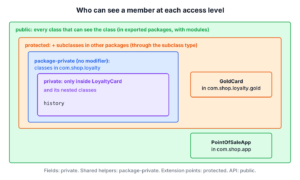
Java access modifiers are the keywords public, protected and private, plus the package-private level we get by writing no modifier, and they decide which other classes can use a class, field, method or constructor.
We use them to hide the internal state of a class, to give subclasses controlled extension points, and to keep helper classes inside a package. Since Java 9, modules add one more boundary on top of public.
The following example is a loyalty card class for a coffee shop app that uses all four access levels.
public class LoyaltyCard {
    public static final int MAX_POINTS = 10_000;    // public: every class
    protected int points;                           // protected: package + subclasses
    String ownerEmail;                              // no modifier: same package only
    private final List<Integer> history = new ArrayList<>();  // private: this class only

    public void addPoints(int amount) {
        points = Math.min(points + amount, MAX_POINTS);
        history.add(amount);
    }

    public int visits() { return history.size(); }
}
Because the list of past purchases is private, other classes can read the number of visits through visits() but cannot change the list. After a summary table, we go from the most restricted level to the most open one, with the protected trap across packages, overriding, interfaces and modules along the way, and close with practical rules.
1. The Four Access Levels
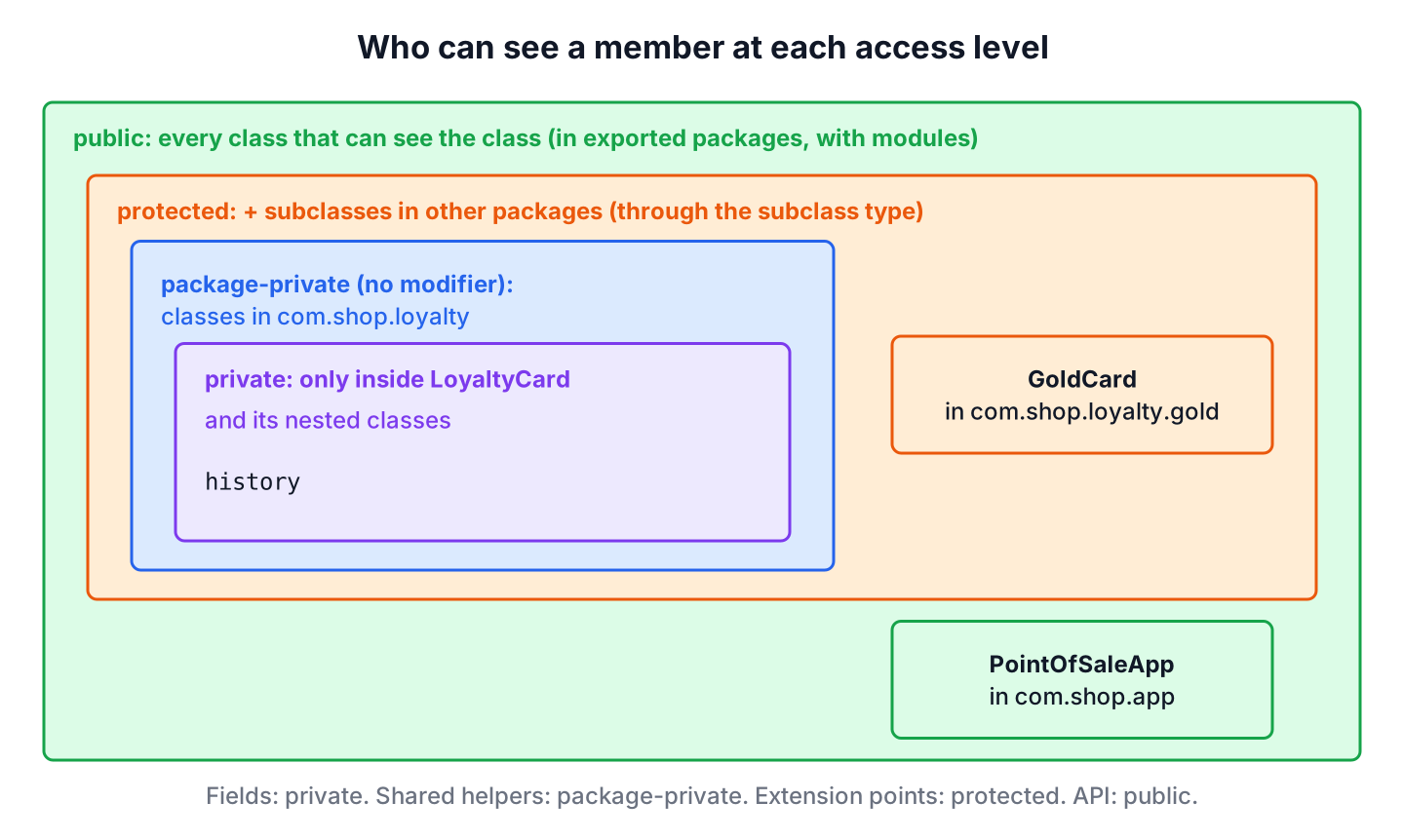
Each access level adds or removes one group of classes that can see a member. A member is always visible inside its own class, and each step toward public opens it to a wider group.
| Modifier | Same class | Same package | Subclass in another package | Any class | Class in another module |
|---|---|---|---|---|---|
| public | Yes | Yes | Yes | Yes | Only if the package is exported |
| protected | Yes | Yes | Yes, through inheritance | No | Subclass only, if the package is exported |
| No modifier (package-private) | Yes | Yes | No | No | No |
| private | Yes | No | No | No | No |
The levels can be ordered from the least to the most restrictive as public, protected, package-private and private. The classic four-column version of this grid predates modules, so its World column assumes the classpath.
Not every declaration accepts every modifier. A top-level class, interface, enum or record can be public or package-private only, and a file can contain one public top-level type whose name matches the file name. Nested types, fields, methods and constructors accept all four levels. Local variables and parameters take no access modifier at all, because they exist only inside their method.
// does not compile: modifier private not allowed here
private class Voucher { }
2. private Members
A private member is visible only inside the top-level class that declares it, including all classes nested in it. That makes private the right default for fields, because the class can validate every change and can rename or replace its internals without breaking callers. This idea is called encapsulation.
LoyaltyCard card = new LoyaltyCard();
card.addPoints(120);
card.addPoints(80);
int visits = card.visits();                 // 2
int points = card.points;                   // 200, allowed in the same package
Code in another class cannot read history, so the compiler rejects card.history with the error history has private access in LoyaltyCard. A private constructor blocks new from outside the class, which we use for utility classes and for static factory methods that validate input first.
public class Coupon {
    private final int percent;

    private Coupon(int percent) { this.percent = percent; }

    public static Coupon of(int percent) {
        if (percent < 1 || percent > 50) {
            throw new IllegalArgumentException("percent must be 1-50");
        }
        return new Coupon(percent);
    }

    public int percent() { return percent; }
}
Coupon tenOff = Coupon.of(10);
int percent = tenOff.percent(); // 10
Coupon tooMuch = Coupon.of(90); // IllegalArgumentException: percent must be 1-50Nested classes can use each other’s private members, and since Java 11 the JVM checks this through nest-based access control (JEP 181) instead of hidden bridge methods. A builder nested inside its class can set the class’s private fields for that reason.
3. Package-Private Access (No Modifier)
When we write no modifier, the member is visible to every class in the same package and to nothing else. This level is often called “default access”, but there is no default keyword for it. The default keyword is reserved for interface methods and for switch labels.
Package-private access fits helper classes and methods that several classes of one feature share but that the rest of the app should not call. For example, a PointsCalculator in the package com.shop.loyalty can stay package-private, so only LoyaltyCard and its neighbors use it. Unit tests placed in the same package (in src/test/java) can call package-private methods too, which is a common reason to choose this level over private.
class PointsCalculator {
    static int pointsFor(double amount) {
        return (int) Math.floor(amount);    // one point per full dollar
    }
}
int earned = PointsCalculator.pointsFor(7.80); // 7A subclass in a different package does not inherit package-private members. Moving a subclass of LoyaltyCard to another package is therefore a common reason for a sudden error such as ownerEmail is not public in LoyaltyCard; cannot be accessed from outside package.
4. protected Members and Subclasses in Other Packages
A protected member is visible in its own package and in subclasses anywhere. Outside the package, though, the subclass may use the member only on objects of its own type, never through a reference of the parent type. The protected access rule only shows up when the two classes live in different packages.
The following example places GoldCard in the package com.shop.loyalty.gold, while LoyaltyCard stays in com.shop.loyalty.
public class GoldCard extends LoyaltyCard {
    @Override
    public void addPoints(int amount) {
        super.addPoints(amount * 2);        // double points for gold members
    }

    int balance() {
        return points;                      // allowed: inherited protected field
    }

    int balanceOf(GoldCard other) {
        return other.points;                // allowed: reference of the subclass type
    }
}
GoldCard gold = new GoldCard();
gold.addPoints(50);
int goldBalance = gold.balance(); // 100Reading the same field through a LoyaltyCard reference fails, because that object could be a plain card or a card subclass from someone else’s code. The same rule makes a protected constructor callable through super(…) but not through new LoyaltyCard() from another package.
// does not compile in com.shop.loyalty.gold: points has protected access in LoyaltyCard
int balanceOf(LoyaltyCard other) {
    return other.points;
}
5. public Members and Java Modules
A public member is visible to every class that can see its class. Before Java 9 that meant every class on the classpath. In a modular application, a public type is visible outside its module only when module-info.java exports its package, so a library can keep public classes for its own packages and still hide them from users.
Say the loyalty code ships as the module com.shop.loyalty with an api package for the point-of-sale app and an internal package for the ledger. Only the api package is exported.
// does not compile: package com.shop.loyalty.internal is not visible
// module-info.java of the library
module com.shop.loyalty {
    exports com.shop.loyalty.api;
}

// module-info.java of the app
module com.shop.app {
    requires com.shop.loyalty;
}

// in a class of com.shop.app
int total = com.shop.loyalty.internal.Ledger.total();
error: package com.shop.loyalty.internal is not visible
(package com.shop.loyalty.internal is declared in module com.shop.loyalty, which does not export it)Reflection follows the same boundary. Frameworks that read private fields, such as Hibernate or Jackson, need the package to be opened with opens in module-info.java, otherwise setAccessible(true) throws InaccessibleObjectException. On the classpath, all packages are open, which is why most Spring Boot applications never see this error.
6. Access Rules for Overriding and Interfaces
An overriding method can keep or widen the access of the method it overrides, but it can never narrow it. Code that calls the method through the parent type expects it to be reachable, so a public method stays public, and a protected one can become public.
// does not compile: attempting to assign weaker access privileges; was public
class TrialCard extends LoyaltyCard {
    @Override
    void addPoints(int amount) { }
}
A private method is not inherited, so a subclass method with the same name is a new method, not an override, and @Override on it is a compile error. Interfaces have their own defaults, which often surprise developers who move code between a class and an interface.
- Abstract, default and static interface methods are implicitly public, so the implementing method in a class must be declared public.
- Interface fields are implicitly public static final constants.
- Since Java 9, an interface can declare private methods to share code between its default methods; protected is never allowed in an interface.
- Enum constructors are implicitly private, and a record canonical constructor must be at least as accessible as the record class, otherwise the compiler reports invalid canonical constructor.
The compiler-generated default constructor also gets the access of its class, so a package-private class gets a package-private no-argument constructor, as described in the guide to Java constructors.
7. Choosing an Access Level in Practice
A good rule is to start every member as private and open it only when a concrete caller needs it. Each wider level becomes part of the API that other code depends on, and a public method in a shared library is hard to remove later.
- Fields are private, except public static final constants.
- Methods that only the class uses are private; helpers shared inside one feature are package-private.
- Use protected only for methods designed as extension points for subclasses, and document what an override must do.
- Make a class public only when code outside its package needs it, and in a modular library export only the API packages.
Access levels support two of the four OOP concepts, encapsulation and inheritance, because they decide what a subclass or a caller is allowed to touch.
8. Java Access Modifiers FAQs
The package and subclass edge cases cause frequent compile errors, which makes access modifiers a favorite interview topic.
8.1. What is the default access modifier in Java?
Package-private. A class, field, method or constructor without a modifier is visible only inside its package. Interface members are the exception, because they are public when no modifier is given.
8.2. What is the difference between protected and package-private?
Both allow access from the same package. Only protected also allows access from subclasses in other packages, and only through references of the subclass type.
8.3. Can a top-level class be private or protected?
No. A top-level type can only be public or package-private, and the compiler reports modifier private not allowed here. Nested classes can use all four levels.
8.4. Can we override a private method?
No. A private method is not inherited, so a method with the same signature in a subclass is a separate method. Calls inside the parent class still run the parent’s private version.
8.5. Does reflection ignore access modifiers?
Partly. On the classpath, setAccessible(true) lets code read private members of other classes. In a named module, the package must be opened to the caller, otherwise the call throws InaccessibleObjectException.
9. Conclusion
Java has four access levels. The private level limits a member to its top-level class, package-private to its package, protected adds subclasses in other packages, and public opens it to everyone who can see the class.
Two rules cause most surprises. Cross-package protected access works only through the subclass type, and in a modular app public types stay hidden unless their package is exported. Starting from private and widening only on demand keeps the API of each class small.
10. References
- JLS 25, Access Control
- JLS 25, Requirements in Overriding and Hiding
- JLS 25, Module Declarations
- JEP 181, Nest-Based Access Control
- Oracle Java Tutorial, Controlling Access to Members of a Class
Happy Learning !!
