
A Canadian postal code is six characters in the pattern letter-digit-letter, space, digit-letter-digit, as in “A1A 1A1”, and the Java regex ^[ABCEGHJ-NPRSTVXY][0-9][ABCEGHJ-NPRSTV-Z] [0-9][ABCEGHJ-NPRSTV-Z][0-9]$ checks that format together with the Canada Post letter rules. Canada Post never uses the letters D, F, I, O, Q or U, and the first letter is never W or Z, so a shape-only pattern such as [A-Z][0-9][A-Z] [0-9][A-Z][0-9] accepts codes that can never exist.
We use this Canadian postal code regex in checkout and sign-up forms, in address imports and in any service that ships to Canada. With a small normalization step, the same pattern also accepts the lowercase and unspaced codes that people type.
The following example checks a few codes with the strict pattern and the two helper methods from section 4 and section 5.
Pattern postalCode = Pattern.compile(
    "^[ABCEGHJ-NPRSTVXY][0-9][ABCEGHJ-NPRSTV-Z] [0-9][ABCEGHJ-NPRSTV-Z][0-9]$");

boolean plain = postalCode.matcher("A1A 1A1").matches();      // true
boolean wzLater = postalCode.matcher("T2W 3Z4").matches();    // true, W and Z after position 1
boolean wFirst = postalCode.matcher("W1A 1A1").matches();     // false, W cannot come first
boolean letterO = postalCode.matcher("A1A 1O1").matches();    // false, O is never used
boolean noSpace = postalCode.matcher("A1A1A1").matches();     // false, the space is required

Optional<String> clean = PostalCodes.normalize("a1a-1a1");    // Optional[A1A 1A1]
String province = PostalCodes.region("K1K 1K1");              // "Ontario"
Notice that the strict pattern rejects “A1A1A1”, whereas normalize() accepts “a1a-1a1” and returns it in the Canada Post form. We first look at the structure of the code, build the regex step by step, test it against valid and invalid inputs, and finish with normalization, the province lookup and the limits of a format check. The regex syntax itself is covered in our Java regex tutorial.
1. Structure of a Canadian Postal Code
The Canada Post addressing guidelines describe the postal code as a six-character code in the form “ANA NAN”, where A is a letter and N is a digit. The code has two halves.
- The forward sortation area (FSA) is the first three characters, such as “T2W”. It names a region and is used for the first sort of the mail.
- The local delivery unit (LDU) is the last three characters, such as “3Z4”. It narrows the address down to a block, a building or a rural community.
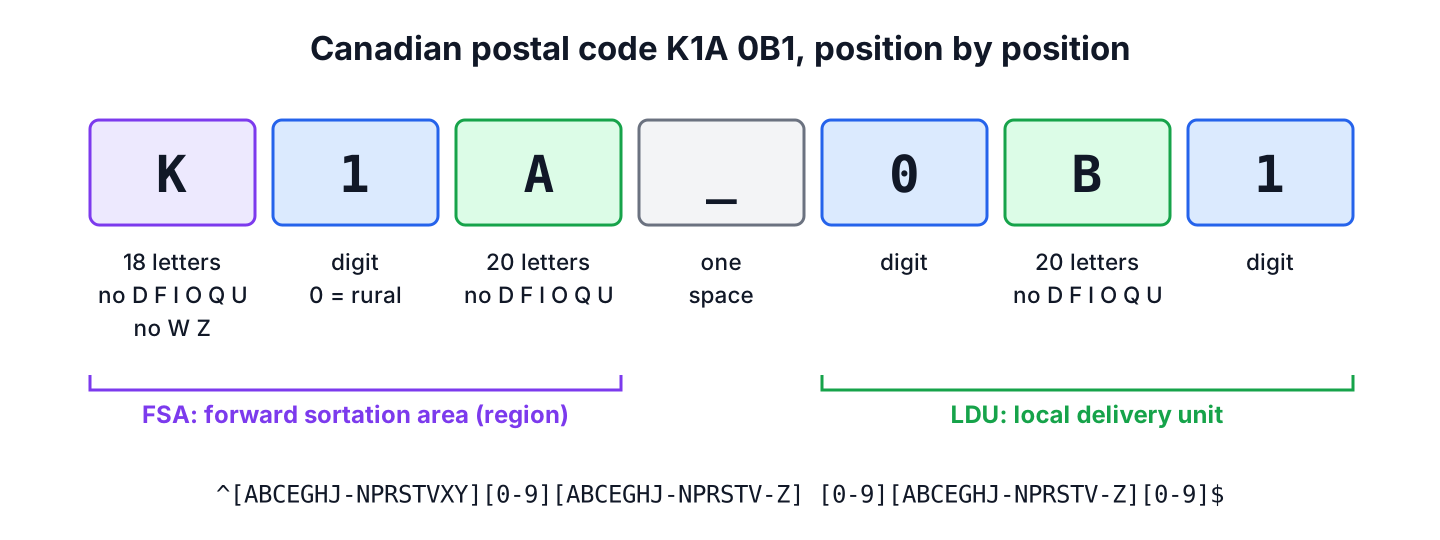
Each position accepts a different set of characters. The Canada Post guide lists the 18 letters that can start a postal code. The article Postal codes in Canada adds that the letters D, F, I, O, Q and U do not appear in any position, which leaves 20 letters for positions 3 and 5.
| Position | Allowed | Rule |
|---|---|---|
| 1 | A B C E G H J K L M N P R S T V X Y | 18 letters, each assigned to a province or territory |
| 2 | 0 to 9 | 0 means a rural area, 1 to 9 an urban area |
| 3 | 20 letters (all except D F I O Q U) | W and Z are allowed here |
| (space) | one space | Canada Post writes one space and no hyphen |
| 4 | 0 to 9 | |
| 5 | 20 letters (all except D F I O Q U) | |
| 6 | 0 to 9 |
Canada Post asks for the postal code in uppercase, with one space between the two halves and no hyphen. The strict regex in this article follows that written form, and section 4 shows how to accept the other ways people type it.
2. Building the Regex Step by Step
A first attempt that checks only the shape uses [A-Z] for each letter and [0-9] for each digit.
Pattern shapeOnly = Pattern.compile("^[A-Z][0-9][A-Z] [0-9][A-Z][0-9]$");

boolean ok = shapeOnly.matcher("A1A 1A1").matches();          // true
boolean letterD = shapeOnly.matcher("D1A 1A1").matches();     // true, but D is never used
boolean wFirst = shapeOnly.matcher("W1A 1A1").matches();      // true, but W cannot come first
boolean letterO = shapeOnly.matcher("A1A 1O1").matches();     // true, but O is never used
The shape-only pattern is fine for a quick sanity check, but it lets through codes that Canada Post can never assign. We can add the letter rules to the pattern in two different forms.
2.1. Allowed Letters as Character Classes
The first way lists the allowed letters in each class. A hyphen inside square brackets defines a range, so J-N means J, K, L, M and N, and V-Z means V, W, X, Y and Z.
| Part | Meaning |
|---|---|
| ^ and $ | Start and end of the input |
| [ABCEGHJ-NPRSTVXY] | First letter, one of the 18 letters that start an FSA |
| [0-9] | A digit |
| [ABCEGHJ-NPRSTV-Z] | Any of the 20 allowed letters, W and Z included |
| a space | One space between FSA and LDU |
Pattern postalCode = Pattern.compile(
    "^[ABCEGHJ-NPRSTVXY][0-9][ABCEGHJ-NPRSTV-Z] [0-9][ABCEGHJ-NPRSTV-Z][0-9]$");

boolean firstD = postalCode.matcher("D1A 1A1").matches();     // false
boolean thirdD = postalCode.matcher("A1D 1A1").matches();     // false
boolean yukon = postalCode.matcher("Y1A 9V9").matches();      // true
2.2. Excluded Letters With a Negative Lookahead
The second way, known from the Regular Expressions Cookbook, keeps the simple [A-Z] classes and adds a negative lookahead at the start. A lookahead is a zero-width test, which means it checks the text ahead of the current position without consuming any of it. The lookahead (?!.*[DFIOQU]) means “from here, the rest of the input does not contain D, F, I, O, Q or U”, and the class [A-VXY] excludes W and Z from the first position.
Pattern lookahead = Pattern.compile("^(?!.*[DFIOQU])[A-VXY][0-9][A-Z] [0-9][A-Z][0-9]$");

boolean ok = lookahead.matcher("A1A 1A1").matches();          // true
boolean letterU = lookahead.matcher("A1A 1U1").matches();     // false
boolean zFirst = lookahead.matcher("Z1A 1A1").matches();      // false
Both patterns accept the same codes, and the test class in the example project checks every first and third letter combination against both. The lookahead version is shorter to type. The character-class version is easier to change when a rule applies to one position only, and each class reads on its own, so we use it in the rest of the article.
3. Valid and Invalid Inputs
The inputs in the table cover each rule from section 1, and both patterns from section 2 give the result in the second column.
| Input | Result | Reason |
|---|---|---|
| “A1A 1A1” | true | Allowed letters and digits |
| “T2W 3Z4” | true | W and Z are fine after the first position |
| “X0A 1B2” | true | Rural code (0 in position 2) |
| “Y9Z 9Z9” | true | Allowed format, though no such code may exist |
| “D1A 1A1” | false | D is never used |
| “W1A 1A1” | false | W cannot be the first letter |
| “Z1A 1A1” | false | Z cannot be the first letter |
| “A1A 1O1” | false | O is never used |
| “A1A1A1” | false | No space |
| “A1A-1A1” | false | Hyphen instead of a space |
| “A1A 1A1” | false | Two spaces |
| “a1a 1a1” | false | Lowercase letters |
| “1A1 A1A” | false | Letters and digits swapped |
| “A1A 1A” | false | Five characters |
The four rows from “A1A1A1” to “a1a 1a1” are not wrong postal codes. They are the right code typed in a different way, and for a form field, rejecting them only annoys the user.
4. Lowercase, Missing Spaces and Hyphens
Say an online store ships to Toronto, and its checkout form gets “m5v3l9”, “M5V-3L9” and “m5v 3l9” from three customers on the same day. All three are the same valid postal code. There are two quick ways to loosen the strict pattern for input like that.
- We replace the space with ? (a space followed by ?), so that the space becomes optional.
- We compile the pattern with Pattern.CASE_INSENSITIVE, so that lowercase letters match. The flag also applies to character classes, so “d1a 1a1” is still rejected.
boolean noSpace = "A1A1A1".matches(
    "[ABCEGHJ-NPRSTVXY][0-9][ABCEGHJ-NPRSTV-Z] ?[0-9][ABCEGHJ-NPRSTV-Z][0-9]");   // true

Pattern ci = Pattern.compile(
    "^[ABCEGHJ-NPRSTVXY][0-9][ABCEGHJ-NPRSTV-Z] [0-9][ABCEGHJ-NPRSTV-Z][0-9]$",
    Pattern.CASE_INSENSITIVE);
boolean lower = ci.matcher("a1a 1a1").matches();              // true
boolean lowerD = ci.matcher("d1a 1a1").matches();             // false
Accepting loose input is only half the job, because we also store the code in the Canada Post form so that every saved value passes the strict pattern. The next pattern puts each half in a named group, allows a space, a hyphen or nothing between them with [ -]?, and ignores case. The method normalize() rebuilds the code from the two groups in uppercase and returns an empty Optional for anything else.
final class PostalCodes {
    static final Pattern PARTS = Pattern.compile(
        "(?<fsa>[ABCEGHJ-NPRSTVXY][0-9][ABCEGHJ-NPRSTV-Z])[ -]?(?<ldu>[0-9][ABCEGHJ-NPRSTV-Z][0-9])",
        Pattern.CASE_INSENSITIVE);

    static Optional<String> normalize(String input) {
        if (input == null) {
            return Optional.empty();
        }
        Matcher m = PARTS.matcher(input.strip());
        if (!m.matches()) {
            return Optional.empty();
        }
        return Optional.of((m.group("fsa") + " " + m.group("ldu")).toUpperCase(Locale.ROOT));
    }

    static String region(String postalCode) {
        return switch (Character.toUpperCase(postalCode.charAt(0))) {
            case 'A' -> "Newfoundland and Labrador";
            case 'B' -> "Nova Scotia";
            case 'C' -> "Prince Edward Island";
            case 'E' -> "New Brunswick";
            case 'G', 'H', 'J' -> "Quebec";
            case 'K', 'L', 'M', 'N', 'P' -> "Ontario";
            case 'R' -> "Manitoba";
            case 'S' -> "Saskatchewan";
            case 'T' -> "Alberta";
            case 'V' -> "British Columbia";
            case 'X' -> "Northwest Territories or Nunavut";
            case 'Y' -> "Yukon";
            default -> "unknown";
        };
    }
}
Optional<String> joined = PostalCodes.normalize("a1a1a1"); // Optional[A1A 1A1]
Optional<String> hyphen = PostalCodes.normalize("a1a-1a1"); // Optional[A1A 1A1]
Optional<String> padded = PostalCodes.normalize(" t2w 3z4 "); // Optional[T2W 3Z4]
Optional<String> twoSpaces = PostalCodes.normalize("A1A 1A1"); // Optional.empty, two spaces
Optional<String> wFirst = PostalCodes.normalize("W1A 1A1"); // Optional.empty, W first
Optional<String> missing = PostalCodes.normalize(null); // Optional.emptyWe call toUpperCase(Locale.ROOT) instead of toUpperCase(), so the result does not depend on the default locale of the server. With a Turkish default locale, for example, a plain toUpperCase() changes “i” to a dotted capital I.
5. Reading the Province From the First Letter
Because the pattern PARTS has named groups, the two halves are available after a match. The first letter tells us the province or territory, and the second character tells us whether the area is rural. The method region() in the class PostalCodes maps the letter to a region with a switch expression, following the table in the Canada Post guidelines.
Matcher m = PostalCodes.PARTS.matcher("K1K 1K1");
boolean found = m.matches();                                  // true
String fsa = m.group("fsa");                                  // "K1K"
String ldu = m.group("ldu");                                  // "1K1"

String alberta = PostalCodes.region("T2W 3Z4");               // "Alberta"
String north = PostalCodes.region("X0A 1B2");                 // "Northwest Territories or Nunavut"
boolean rural = "X0A 1B2".charAt(1) == '0';                   // true, a rural area
A practical use is a cross-field check. When a form has both a province field and a postal code field, the first letter must belong to the selected province, so “T2W 3Z4” with the province set to Ontario is a typo in one of the two fields.
6. Limits of Format Validation
The regex proves that a value can be a Canadian postal code, not that it is one. The code “Y9Z 9Z9” passes every rule above, yet that code may not be assigned. To confirm that a postal code exists and belongs to an address, we need Canada Post data, for example the Find a postal code tool or the postal code address data that Canada Post licenses.
The regex is also specific to Canada. A shop that ships to several countries keeps one pattern per country and picks it by the country field, as we do for US ZIP codes and UK postcodes.
7. Canadian Postal Code Regex FAQs
Postal code fields raise the same handful of questions in forums and search results.
7.1. Which letters are not used in Canadian postal codes?
The letters D, F, I, O, Q and U never appear in any position, and W and Z never appear as the first letter. Canada Post leaves them out because people confuse them with digits or other letters in handwriting and in optical character recognition, for example O with 0 and I with 1.
7.2. Is the space in a Canadian postal code required?
Yes, in the official written form. Canada Post writes one space between the FSA and the LDU. For user input, we make the space optional and add it back when we store the value, as normalize() does in section 4.
7.3. How do we accept lowercase postal codes?
We compile the pattern with Pattern.CASE_INSENSITIVE, or add the inline flag (?i) at the start of the regex. The flag also applies inside character classes, so lowercase letters that are not allowed, such as “d”, are still rejected.
7.4. Can we find postal codes inside a longer text?
Yes. We remove the ^ and $ anchors, put \b on both ends and call find() or results() instead of matches().
Pattern inText = Pattern.compile(
    "\\b[ABCEGHJ-NPRSTVXY][0-9][ABCEGHJ-NPRSTV-Z] ?[0-9][ABCEGHJ-NPRSTV-Z][0-9]\\b");
String order = "Ship to K1A 0B1, bill to T2W3Z4.";
List<String> codes = inText.matcher(order).results().map(MatchResult::group).toList();   // [K1A 0B1, T2W3Z4]
7.5. Does the regex work for US ZIP codes too?
No. A US ZIP code has five digits, or five digits, a hyphen and four more digits, so it needs its own pattern. A form for both countries picks the pattern by the selected country.
8. Conclusion
A Canadian postal code follows the form “A1A 1A1”, and two extra rules make a regex accurate. D, F, I, O, Q and U never appear, and W and Z never come first. We can write those rules as character classes or with a negative lookahead, and both accept the same codes.
For user input, a case-insensitive pattern with an optional separator, followed by normalization to the uppercase, single-space form, keeps stored data clean. Whether the code exists is a question for Canada Post data, not for a regex.
9. References
- Canada Post Addressing Guidelines (PDF)
- Postal codes in Canada (Wikipedia)
- Pattern (Java SE 25 API)
- Matcher (Java SE 25 API)
Happy Learning !!

Thx that was what im looking for.