
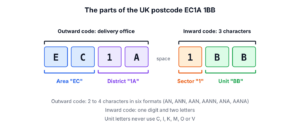
A UK postcode has two parts separated by one space, an outward code of two to four characters and an inward code of one digit and two letters, as in “M1 1AA” or “EC1A 1BB”. A practical Java regex for UK postcode validation is ^[A-Z]{1,2}[0-9R][0-9A-Z]? [0-9][ABD-HJLNP-UW-Z]{2}$. It accepts all six formats that Royal Mail uses and rejects the letters that never appear in the inward code.
We use a UK postcode regex on address forms, in checkout flows that calculate delivery zones, and when we import customer lists. The following example compiles the practical pattern and tests valid postcodes, a forbidden inward letter and a postcode without the space.
Pattern postcode = Pattern.compile("^[A-Z]{1,2}[0-9R][0-9A-Z]? [0-9][ABD-HJLNP-UW-Z]{2}$");

boolean manchester = postcode.matcher("M1 1AA").matches();       // true
boolean london = postcode.matcher("EC1A 1BB").matches();         // true
boolean doncaster = postcode.matcher("DN55 1PT").matches();      // true
boolean letterC = postcode.matcher("M1 1CA").matches();          // false, C is not used in the inward code
boolean noSpace = postcode.matcher("EC1A1BB").matches();         // false
Notice that “EC1A1BB” fails only because the space is missing, which is why we normalize typed input first. The sections cover the six formats, a stricter regex with Royal Mail’s rules for each position, cleaning up typed postcodes, splitting a postcode into its parts, an anchor bug in the regex published on gov.uk, and the postcodes that no regex of this kind accepts.
1. What a UK Postcode Looks Like
The outward code tells Royal Mail which delivery office gets the mail. It starts with a postcode area of one or two letters (for example “DN”) followed by a district (for example “55”). The inward code is used inside that office. Its digit is the sector and its two letters are the unit, which identifies a street, part of a street or a single large address.
Royal Mail’s Programmers’ Guide to the Postcode Address File defines six formats. In the table, A stands for a letter and N for a digit.
| Format | Outward code | Example |
|---|---|---|
| AN NAA | Letter, digit | M1 1AA |
| ANN NAA | Letter, two digits | B33 8TH |
| AAN NAA | Two letters, digit | CR2 6XH |
| AANN NAA | Two letters, two digits | DN55 1PT |
| ANA NAA | Letter, digit, letter | W1A 0AX |
| AANA NAA | Two letters, digit, letter | EC1A 1BB |
The guide also lists the letters that are never used. Royal Mail explains that these rules exist because people and sorting machines can confuse some letters, for example “O” and “Q”.
- The letters Q, V and X do not appear in the first position.
- The letters I and Z do not appear in the second position (the Wikipedia list of UK postcode rules adds J).
- The inward code never contains the letters C, I, K, M, O or V.
- Within the UK, the only postcode outside these formats is “GIR 0AA”, the historic postcode of Girobank.
2. A Practical Regex for UK Postcodes
The regex from the introduction covers the six formats in one line. The same pattern appears in the Regular Expressions Cookbook by Jan Goyvaerts and Steven Levithan.
| Part | Meaning |
|---|---|
| ^ | Start of the input |
| [A-Z]{1,2} | The area, one or two uppercase letters |
| [0-9R] | A digit, or “R” so that “GIR” also matches |
| [0-9A-Z]? | An optional second district character, a digit or a letter |
| a space | One space between outward and inward code |
| [0-9] | The sector digit |
| [ABD-HJLNP-UW-Z]{2} | Two unit letters, every letter except C, I, K, M, O and V |
| $ | End of the input |
The last class is the hard one to read. Inside square brackets, D-H means D, E, F, G and H, so the full class lists A, B, D to H, J, L, N, P to U, and W to Z. The letters it skips are the six that the inward code never uses.
final class Postcodes {
    static final Pattern POSTCODE =
            Pattern.compile("^[A-Z]{1,2}[0-9R][0-9A-Z]? [0-9][ABD-HJLNP-UW-Z]{2}$");

    static boolean isValidPostcode(String input) {
        return input != null && POSTCODE.matcher(input).matches();
    }
}
boolean ana = Postcodes.isValidPostcode("W1A 0AX"); // true
boolean giro = Postcodes.isValidPostcode("GIR 0AA"); // true
boolean letterO = Postcodes.isValidPostcode("M1 1AO"); // false, O in the inward code
boolean digits = Postcodes.isValidPostcode("123 4AB"); // false, the area must be lettersThe practical regex checks the inward code fully but the outward code only roughly. It accepts letters that Royal Mail never uses in the outward code, such as Q at the start. For most forms that is acceptable, because an address lookup catches such a postcode later.
3. A Stricter Regex With Position Rules
When the outward code must follow the position rules too, each of the formats gets its own branch. In Java regex syntax, alternation, written with |, tries each branch in turn, and the group (?:…) around the branches keeps the anchors outside them.
final class StrictPostcodes {
    static final Pattern POSTCODE_STRICT = Pattern.compile(
            "^(?:(?:[A-PR-UWYZ][0-9]{1,2}"
                    + "|[A-PR-UWYZ][A-HK-Y][0-9]{1,2}"
                    + "|[A-PR-UWYZ][0-9][A-HJKPSTUW]"
                    + "|[A-PR-UWYZ][A-HK-Y][0-9][ABEHMNPRV-Y])"
                    + " [0-9][ABD-HJLNP-UW-Z]{2}"
                    + "|GIR 0AA)$");
}
boolean strictOk = StrictPostcodes.POSTCODE_STRICT.matcher("EC1A 1BB").matches(); // true
boolean strictQ = StrictPostcodes.POSTCODE_STRICT.matcher("QA1 1AA").matches(); // false, Q is never the first letterEach character class encodes one rule.
| Class | Position | Allowed letters |
|---|---|---|
| [A-PR-UWYZ] | First letter | Any letter except Q, V and X |
| [A-HK-Y] | Second letter | Any letter except I, J and Z |
| [A-HJKPSTUW] | Third character in ANA | A to H, J, K, P, S, T, U, W |
| [ABEHMNPRV-Y] | Fourth character in AANA | A, B, E, H, M, N, P, R, V, W, X, Y |
The cookbook version of this pattern leaves P out of the ANA class. Both Royal Mail’s guide and the Wikipedia list include P, so we keep it. The lists for the third and fourth positions differ slightly between sources, and Royal Mail can open new districts, so a strict regex needs a review from time to time. That maintenance cost is the main reason to prefer the practical regex plus an address lookup.
The two patterns agree on well-formed input and disagree only on letters that Royal Mail does not use.
| Input | POSTCODE | POSTCODE_STRICT | Note |
|---|---|---|---|
| “M1 1AA” | true | true | AN NAA |
| “B33 8TH” | true | true | ANN NAA |
| “CR2 6XH” | true | true | AAN NAA |
| “DN55 1PT” | true | true | AANN NAA |
| “W1A 0AX” | true | true | ANA NAA |
| “EC1A 1BB” | true | true | AANA NAA |
| “GIR 0AA” | true | true | Girobank |
| “QA1 1AA” | true | false | Q cannot be the first letter |
| “AI1 1AA” | true | false | I cannot be the second letter |
| “W1L 1AA” | true | false | L is not used in the ANA format |
| “SW1C 1AA” | true | false | C is not used in the AANA format |
| “M1 1CA” | false | false | C in the inward code |
| “SW1A1BB” | false | false | No space |
| “sw1a 1bb” | false | false | Lowercase |
| “M1 1AA” | false | false | Two spaces |
| “M1 1AAA” | false | false | Inward code too long |
| “ASCN 1ZZ” | false | false | Overseas territory, see section 7 |
4. Cleaning Up Typed Postcodes
Users type postcodes in lowercase, with no space, or with extra spaces. The inward code always has three characters, so we can rebuild the standard form without a regex. We remove all whitespace, convert to uppercase and insert one space before the last three characters, and the practical check runs on the result.
final class PostcodeNormalizer {
    static Optional<String> normalizePostcode(String input) {
        if (input == null) {
            return Optional.empty();
        }
        String compact = input.replaceAll("\\s+", "").toUpperCase(Locale.ROOT);
        if (compact.length() < 5 || compact.length() > 7) {
            return Optional.empty();
        }
        String spaced = compact.substring(0, compact.length() - 3) + " "
                + compact.substring(compact.length() - 3);
        return Postcodes.isValidPostcode(spaced) ? Optional.of(spaced) : Optional.empty();
    }
}
Optional<String> london = PostcodeNormalizer.normalizePostcode(" ec1a1bb "); // Optional[EC1A 1BB]
Optional<String> croydon = PostcodeNormalizer.normalizePostcode("Cr2 6xh"); // Optional[CR2 6XH]
Optional<String> shortOne = PostcodeNormalizer.normalizePostcode("m11aa"); // Optional[M1 1AA]
Optional<String> badUnit = PostcodeNormalizer.normalizePostcode("M1 1CA"); // Optional.empty
Optional<String> tooLong = PostcodeNormalizer.normalizePostcode("SW1A 1BBX"); // Optional.emptyThe regex \s+ matches one or more whitespace characters, so replaceAll() removes spaces and tabs anywhere in the value. The length check rejects input that cannot be a postcode before we cut it into two parts. We pass Locale.ROOT to toUpperCase(), so a server with a Turkish default locale does not turn “i” into a dotted capital I.
An online florist in Leeds gets orders typed on phones, where “ls11ab” and “LS1 1AB ” are common. After normalization, both reach the order table as “LS1 1AB”, and the delivery-zone lookup works on one form.
5. Splitting a Postcode Into Its Parts
Named groups, written (?<name>…), give each part of the postcode a name. Groups can be nested, so the outward group contains the area and district groups.
Pattern parts = Pattern.compile(
        "(?<outward>(?<area>[A-Z]{1,2})(?<district>[0-9][0-9A-Z]?)) "
                + "(?<inward>(?<sector>[0-9])(?<unit>[A-Z]{2}))");

Matcher m = parts.matcher("DN55 1PT");
boolean matched = m.matches();                           // true
String outward = matched ? m.group("outward") : "";      // "DN55"
String area = matched ? m.group("area") : "";            // "DN"
String district = matched ? m.group("district") : "";    // "55"
String inward = matched ? m.group("inward") : "";        // "1PT"
String sector = matched ? m.group("sector") : "";        // "1"
String unit = matched ? m.group("unit") : "";            // "PT"
A typical use is grouping customers by postcode area or district, for example to calculate delivery zones. We run this pattern only on values that already passed validation, so it can stay simple. The check on matched keeps group() from throwing an IllegalStateException when the input does not match.
6. The Anchor Bug in the gov.uk Regex
A UK government document for sponsor bulk data uploads publishes a regex that is widely copied. Its outline is ^(GIR 0AA)|(… [0-9][A-Za-z]{2})$. The | operator has the lowest precedence in a regex, so ^ belongs only to the first branch and $ only to the second. With matches() the bug does not show, because matches() always compares the whole input. With find(), both branches match inside longer text.
String body = "([Gg][Ii][Rr] 0[Aa]{2})|((([A-Za-z][0-9]{1,2})|(([A-Za-z][A-Ha-hJ-Yj-y][0-9]{1,2})"
        + "|(([A-Za-z][0-9][A-Za-z])|([A-Za-z][A-Ha-hJ-Yj-y][0-9]?[A-Za-z])))) [0-9][A-Za-z]{2})";
Pattern govUk = Pattern.compile("^" + body + "$");
Pattern govUkFixed = Pattern.compile("^(?:" + body + ")$");

boolean exact = govUk.matcher("EC1A 1BB").matches();               // true
boolean lower = govUk.matcher("ec1a 1bb").matches();               // true, the pattern allows lowercase
boolean refBefore = govUk.matcher("Ref 99 EC1A 1BB").find();       // true, nothing anchors the start
boolean textAfter = govUk.matcher("GIR 0AA, flat 2").find();       // true, nothing anchors the end

boolean fixedBefore = govUkFixed.matcher("Ref 99 EC1A 1BB").find();   // false
boolean fixedAfter = govUkFixed.matcher("GIR 0AA, flat 2").find();    // false
The fix wraps the whole alternation in a non-capturing group, ^(?:GIR 0AA|…)$. The same rule applies to any pattern with | at the top level, and the article on regex start and end of string anchors covers anchors in general.
7. Postcodes a Regex Cannot Handle
A few groups of real addresses fall outside the six formats, and a format check says nothing about whether a postcode exists.
- Most British overseas territories use codes such as “ASCN 1ZZ” (Ascension Island). Both regexes reject it, because the outward code has four letters. Gibraltar’s “GX11 1AA” already fits the AANN format and passes. When these addresses matter, we add the territory codes as explicit alternatives.
- British Forces Post Office addresses use the form “BFPO” plus a number, which is not a postcode format.
- A well-formed postcode may not exist. “QA1 1AA” passes the practical regex but is not a real postcode. Royal Mail’s Postcode Address File, available through licensed lookup services and the Royal Mail postcode finder, is the only way to confirm that a postcode exists and matches the address.
For postal codes in other countries, the US ZIP code regex and Canadian postal code validation articles cover the rules and the Java code.
8. Trying the Postcode Patterns
The UK postcode project on GitHub contains every pattern from this article. Running it prints each example with its result, and the JUnit 6 tests assert both columns of the table in section 3, the normalization results, the named groups and the gov.uk anchor bug. Any JDK 25 with Maven 3.9 runs it.
mvn -q compile exec:java
mvn test
9. UK Postcode Regex FAQs
The space, letter case, the Girobank code and whether a postcode exists are the usual follow-ups on UK postcodes.
9.1. Is the Space in a UK Postcode Mandatory?
Yes, in the written standard form, and both regexes in this article require one space. On a form we accept input without the space and add it ourselves with normalizePostcode() from section 4, because the inward code always has three characters.
9.2. How Do We Accept Lowercase Postcodes?
We convert the input with toUpperCase(Locale.ROOT) before the check and store the uppercase form. Adding (?i) to the pattern also works, but the database ends up with mixed case, and “ec1a 1bb” and “EC1A 1BB” no longer compare as equal.
9.3. Does the Regex Accept GIR 0AA?
Yes. The practical regex allows “R” as the third character for this case, and the strict regex lists “GIR 0AA” as its own branch. The postcode belonged to Girobank and still appears in old test data.
9.4. Can a Regex Tell Whether a UK Postcode Exists?
No. A regex checks the format only. “QA1 1AA” and “ZZ99 9ZZ” look valid but are not real addresses. A lookup against Royal Mail’s Postcode Address File, through a licensed address service, confirms that a postcode exists.
10. Conclusion
For most applications, ^[A-Z]{1,2}[0-9R][0-9A-Z]? [0-9][ABD-HJLNP-UW-Z]{2}$ is the right UK postcode regex. It accepts the six Royal Mail formats and “GIR 0AA”, and it rejects the letters that the inward code never uses. When the outward code must follow the position rules too, the strict pattern adds them, at the cost of occasional updates.
Normalizing input to uppercase with one space before the last three characters removes most user errors. A Postcode Address File lookup remains the only proof that a postcode is real.
11. References
- Royal Mail Programmers’ Guide to the Postcode Address File (PDF)
- Bulk Data Transfer, additional validation for CAS upload (gov.uk, PDF)
- Postcodes in the United Kingdom (Wikipedia)
- Pattern (Java SE 25 API)
Happy Learning !!
