
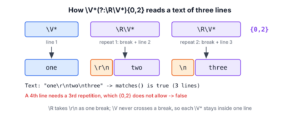
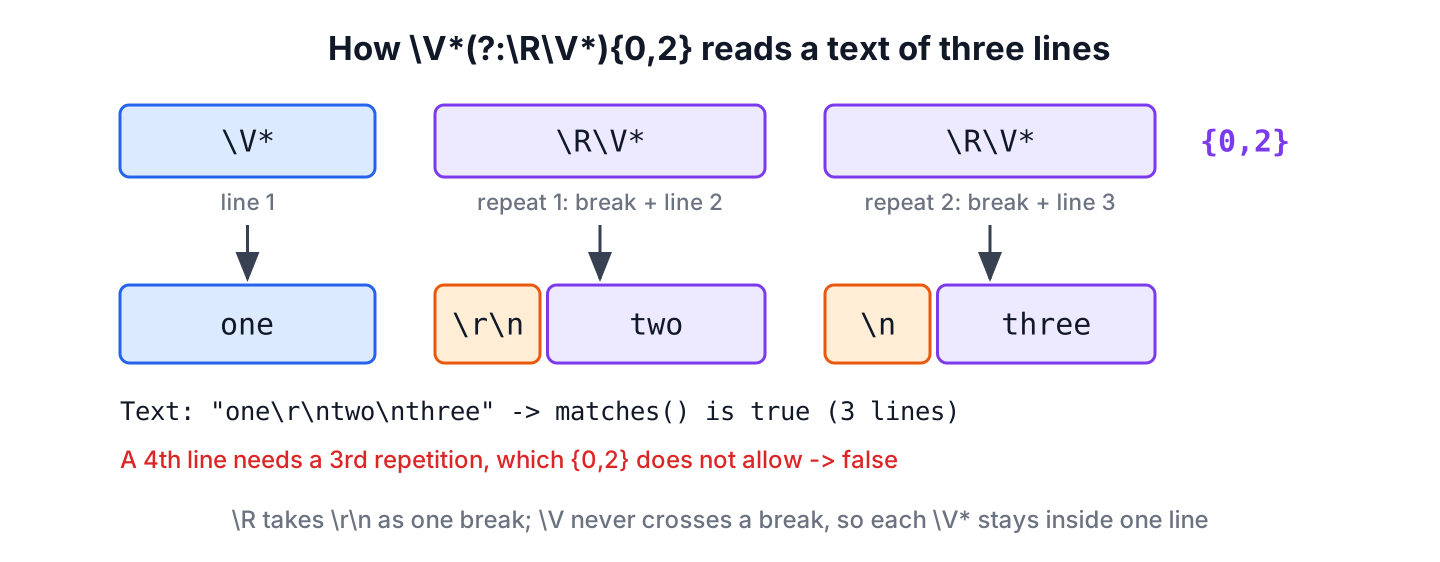
A regex to limit the number of lines in a text counts the line breaks, because a text with at most N lines contains at most N-1 line breaks. In Java, \V*(?:\R\V*){0,2} accepts at most 3 lines. The escape \R matches any line break (Unix \n, Windows \r\n, old Mac \r and the Unicode separators), and \V matches any character that is not a line break.
We use such a limit for a delivery address field with at most 3 lines, an SMS template, a printed label, or a commit message summary. The total number of characters does not matter, only the number of lines. The following example compiles two limits once and checks several texts with matches().
Pattern max3 = Pattern.compile("\\V*(?:\\R\\V*){0,2}");               // at most 3 lines
boolean three = max3.matcher("one\ntwo\nthree").matches();            // true
boolean four = max3.matcher("one\ntwo\nthree\nfour").matches();       // false
boolean mixed = max3.matcher("one\r\ntwo\rthree").matches();          // true

Pattern twoToFour = Pattern.compile("\\V*(?:(?>\\R)\\V*){1,3}");      // 2 to 4 lines
boolean oneLine = twoToFour.matcher("one").matches();                 // false
boolean windows = twoToFour.matcher("one\r\ntwo").matches();          // true

int bySplit = "one\ntwo\r\nthree".split("\\R", -1).length;            // 3
long byLines = "one\ntwo\n".lines().count();                          // 2
Notice that the Windows line break \r\n counts as one break in both patterns. The table sums up the patterns, and the sections that follow explain line breaks, the maximum, text blocks, the minimum, line length and counting without a fixed limit.
| Limit | Regex | Java string literal |
|---|---|---|
| At most N lines | \V*(?:\R\V*){0,N-1} | \”\\V*(?:\\R\\V*){0,2}\” for N = 3 |
| At most N lines, trailing break allowed | \V*(?:\R\V*){0,N-1}\R? | \”\\V*(?:\\R\\V*){0,1}\\R?\” for N = 2 |
| Between MIN and MAX lines | \V*(?:(?>\R)\V*){MIN-1,MAX-1} | \”\\V*(?:(?>\\R)\\V*){1,3}\” for 2 to 4 |
| At most 3 lines of at most 10 characters | \V{0,10}(?:\R\V{0,10}){0,2} | \”\\V{0,10}(?:\\R\\V{0,10}){0,2}\” |
1. Line Breaks in Java Regex With \R and \V
A line break is not always one character. Unix, Linux and macOS use the line feed \n, Windows uses the two-character sequence \r\n, and very old Mac files use \r alone. Unicode adds the next-line character U+0085, the line separator U+2028 and the paragraph separator U+2029, and a text pasted into a web form can contain any of them.
The Java regex engine (since Java 8) has two constructs that cover all these cases.
- The escape \R matches one line break sequence, which is \r\n or one of \n, \r, U+000B (vertical tab), U+000C (form feed), U+0085, U+2028 and U+2029.
- The class \V matches one character that is not vertical whitespace. Its set is the opposite of the single characters in \R, so a line made of \V* can never swallow a line break.
boolean crlf = "\r\n".matches("\\R");          // true, one break of two characters
boolean lineSep = "\u2028".matches("\\R");      // true
boolean vtab = "\u000b".matches("\\R");         // true, vertical tab
boolean dotVtab = "\u000b".matches(".");        // true, the dot does not stop here
boolean notV = "\u000b".matches("\\V");         // false
boolean letter = "a".matches("\\V");            // true
We use \V rather than the dot for the content of a line. The dot skips \n, \r, U+0085, U+2028 and U+2029, but it matches the vertical tab and the form feed, which \R treats as line breaks. With \V and \R, both parts of the pattern agree on where a line ends. The project tests all 65,536 char values to confirm that \V matches every character that \R does not, and no other.
2. Limit the Number of Lines to a Maximum
The pattern \V*(?:\R\V*){0,2} describes the first line and up to two more lines, each preceded by its line break.
| Part | Meaning |
|---|---|
| \V* | The first line, zero or more characters that are not line breaks |
| (?:…) | A non-capturing group, used only to apply the quantifier to both items inside it |
| \R\V* | One line break followed by the content of the next line |
| {0,2} | The group repeats zero to two times, so the text has one to three lines |
For a different maximum, we change only the upper bound of the quantifier to N-1. We call matches(), which succeeds only when the pattern covers the whole input, so we need no ^ and $ anchors.
Pattern max3 = Pattern.compile("\\V*(?:\\R\\V*){0,2}");

boolean empty = max3.matcher("").matches();                          // true, an empty text is one empty line
boolean single = max3.matcher("one").matches();                      // true
boolean three = max3.matcher("one\ntwo\nthree").matches();           // true
boolean four = max3.matcher("one\ntwo\nthree\nfour").matches();      // false
boolean mixed = max3.matcher("one\r\ntwo\rthree").matches();         // true, mixed line breaks
boolean unicode = max3.matcher("one\u2028two\u0085three").matches();  // true, Unicode line breaks
boolean blanks = max3.matcher("\n\n\n").matches();                   // false, four empty lines
With find() in place of matches(), the pattern always succeeds, because it finds the first three lines inside a longer text.
Pattern max3 = Pattern.compile("\\V*(?:\\R\\V*){0,2}");
boolean found = max3.matcher("one\ntwo\nthree\nfour").find();        // true
The classic pattern \A(?>[^\r\n]*(?>\r\n?|\n)){0,3}[^\r\n]*\z from the Regular Expressions Cookbook works for \n, \r\n and \r. It predates \R and does not see the Unicode separators, so a text of five lines separated by U+2028 passes its limit of four lines.
Pattern classicMax4 = Pattern.compile("\\A(?>[^\\r\\n]*(?>\\r\\n?|\\n)){0,3}[^\\r\\n]*\\z");

boolean classicFour = classicMax4.matcher("a\nb\nc\nd").matches();                    // true
boolean classicFive = classicMax4.matcher("a\u2028b\u2028c\u2028d\u2028e").matches(); // true, but it has 5 lines
3. Text Blocks and the Trailing Line Break
A text block (Java 15 and later) is a multi-line string literal between triple quotes, and it is the clearest way to write test input with several lines. When the closing triple quote is on its own line, the text block ends with a \n. A text that ends with a line break has an empty last line for the regex, so a two-line text block counts as three lines.
String poem = """
    roses are red
    violets are blue
    """;

boolean endsWithBreak = poem.endsWith("\n");                                        // true
boolean strict = Pattern.compile("\\V*(?:\\R\\V*){0,1}").matcher(poem).matches();     // false, 3 lines
boolean lenient = Pattern.compile("\\V*(?:\\R\\V*){0,1}\\R?").matcher(poem).matches(); // true
Files saved by most editors also end with a line break, so the optional \R? at the end of the pattern makes the regex count lines the way a person does. Text blocks always use \n as the line break, whatever the line breaks in the source file are. The multiline string article covers text blocks in more detail.
When we do not want the final line break, we put the closing quotes at the end of the last line.
String oneLine = """
    roses are red""";

boolean noTrailing = Pattern.compile("\\V*(?:\\R\\V*){0,1}").matcher(oneLine).matches();   // true
4. Requiring a Minimum and a Maximum Number of Lines
For a range, the lower bound of the quantifier becomes MIN-1. A pattern for 2 to 4 lines needs 1 to 3 line breaks, which is {1,3}.
The range form has a trap. \R can backtrack, so when the rest of the pattern fails, the regex engine may match only the \r of a \r\n pair and count the \n as a second line break. For a maximum, the split does not matter, because it only makes the count larger. For a minimum, a Windows text with two lines can pass a check for three.
boolean splitPair = "\r\n".matches("\\R\\n");                                                // true

boolean wrong = Pattern.compile("\\V*(?:\\R\\V*){2,3}").matcher("a\r\nb").matches();          // true, wrong
boolean fixed = Pattern.compile("\\V*(?:(?>\\R)\\V*){2,3}").matcher("a\r\nb").matches();      // false
The fix is the atomic group (?>\R). An atomic group keeps the first match it finds and never gives characters back, so \r\n always stays one line break, and the pattern for 2 to 4 lines behaves as expected.
Pattern twoToFour = Pattern.compile("\\V*(?:(?>\\R)\\V*){1,3}");

boolean one = twoToFour.matcher("one").matches();                // false
boolean two = twoToFour.matcher("one\ntwo").matches();           // true
boolean twoWindows = twoToFour.matcher("one\r\ntwo").matches();  // true
boolean fourLines = twoToFour.matcher("a\nb\nc\nd").matches();   // true
boolean fiveLines = twoToFour.matcher("a\nb\nc\nd\ne").matches(); // false
When the limits come from configuration, a small factory method builds the pattern.
static Pattern lineRange(int min, int max) {
    return Pattern.compile("\\V*(?:(?>\\R)\\V*){" + (min - 1) + "," + (max - 1) + "}");
}
String built = lineRange(3, 4).pattern(); // "\V*(?:(?>\R)\V*){2,3}"5. Limiting the Line Length at the Same Time
Forms for addresses, SMS text or printed labels often limit both the number of lines and the length of each line. For example, a shipping label printer fits 3 lines of 10 characters, so we replace \V* with the bounded quantifier \V{0,10}. The article on limiting the length of input text explains these length quantifiers in more detail.
Pattern label = Pattern.compile("\\V{0,10}(?:\\R\\V{0,10}){0,2}");

boolean fits = label.matcher("apple\nbanana").matches();             // true
boolean tooLong = label.matcher("apple\nwatermelons").matches();     // false, 11 characters
6. Counting Lines Without a Regex Limit
When we need the number itself, for example to show 4 of 3 lines used in an error message, counting is clearer than a fixed pattern. Java offers several ways, and they disagree about empty input and a trailing line break.
- The expression Pattern.compile(\”\\R\”).matcher(text).results().count() + 1 counts line breaks plus one, the same way as the regexes in this article.
- The expression text.split(\”\\R\”, -1).length gives the same number, because the -1 limit keeps the empty last line.
- The call text.split(\”\\R\”) without the limit drops trailing empty lines.
- The call text.lines().count() (Java 11) ignores a final line break and returns 0 for an empty string, but it recognizes only \n, \r and \r\n.
long breaksPlusOne = Pattern.compile("\\R").matcher("a\nb\r\nc").results().count() + 1;   // 3
long emptyText = Pattern.compile("\\R").matcher("").results().count() + 1;                // 1
int keepEmpty = "a\nb\n".split("\\R", -1).length;                                        // 3
int dropEmpty = "a\nb\n".split("\\R").length;                                            // 2
long viaLines = "a\nb\n".lines().count();                                                // 2
long noLines = "".lines().count();                                                       // 0
long sepIgnored = "a\u2028b".lines().count();                                            // 1, U+2028 is not a break here
In plain Java code, text.lines().count() <= 3 is easier to read and maintain than any of the patterns in this article. The regex is the right tool when the limit has to be a single pattern, for example in a Jakarta Bean Validation @Pattern annotation, in a configuration file, or in a library that accepts only a regex.
7. The Example Project
All the patterns and counts from this article are in the example project on GitHub. The main class prints each check with its result, and the JUnit 6 tests assert them, using text blocks for the multi-line input. It requires Java 25 and Maven.
mvn -q compile exec:java
mvn test
8. Line Limit Regex FAQs
Developers who validate multi-line input ask about annotations, word limits and blank lines.
8.1. Can We Limit Lines With the Bean Validation @Pattern Annotation?
Yes. The @Pattern annotation from jakarta.validation.constraints checks that the whole value matches the regex, the same as matches(). In the annotation, the pattern is a Java string, so the backslashes are doubled as in every snippet here. We write the full annotation name because it shares its simple name with java.util.regex.Pattern.
record Address(@jakarta.validation.constraints.Pattern(regexp = "\\V*(?:\\R\\V*){0,2}", message = "at most 3 lines") String lines) {}8.2. How Do We Limit the Number of Words Instead of Lines?
We count whitespace-separated tokens instead of line breaks. The article on limiting the number of words builds that pattern with \S+ and \s+ in the same way.
8.3. How Do We Ignore Blank Lines When Counting?
We count only the lines that contain a non-whitespace character. The MULTILINE flag lets ^ and $ match at every line, so (?m)^\h*\S.*$ finds each non-blank line.
long nonBlank = Pattern.compile("(?m)^\\h*\\S.*$").matcher("one\n\n \ntwo").results().count(); // 28.4. Does \R Work in JavaScript?
No. JavaScript regex has no \R escape, so client-side checks use \r\n|[\n\r\u2028\u2029] instead. When the same limit runs in the browser and in Java, both patterns need the same set of line breaks.
9. Conclusion
To limit a text to N lines, we match the first line with \V* and allow N-1 repetitions of \R\V*, and we call matches() so the whole text is checked. The escape \R accepts every kind of line break, and \V keeps the line content from crossing one.
For a minimum number of lines, the atomic group (?>\R) stops \r\n from counting twice, and an optional \R? at the end accepts the final line break that text blocks and editors add. Where no single pattern is required, String.lines().count() is the simpler check.
10. References
- Pattern (Java SE 25 API)
- String (Java SE 25 API), including lines() and split()
- Programmer’s Guide to Text Blocks
- JEP 378, Text Blocks
- Atomic Grouping (regular-expressions.info)
Happy Learning !!
