

The trademark symbol is the Unicode character U+2122 (TRADE MARK SIGN), and in a Java regex we match it with the escape \u2122, written as "\\u2122" in a string literal. Java also accepts \x{2122} and the character name \N{TRADE MARK SIGN}. An escape keeps the source file plain ASCII, so the pattern works whatever encoding the editor, the compiler or the build server uses.
We match the trademark sign to find product names in marketing copy, to check that legal text uses the sign correctly, and to clean the sign out of search keys and file names. The following example finds, counts, captures and removes the sign in a sample text with two trademark signs.
String text = "Java\u2122 and Duke\u2122 rule";
Pattern tm = Pattern.compile("\\u2122");

boolean exact = "Java\u2122".matches("Java\\u2122");                                        // true
boolean found = tm.matcher(text).find();                                                    // true
boolean missing = tm.matcher("Java").find();                                                // false
long count = tm.matcher(text).results().count();                                            // 2
List<String> brands = Pattern.compile("(\\w+)\\s?\\u2122").matcher(text).results().map(r -> r.group(1)).toList();   // [Java, Duke]
String removed = text.replaceAll("\\u2122", "");                                            // "Java and Duke rule"
Notice that the pattern string has two backslashes, so the regex engine reads the escape, not the Java compiler. The sections that follow cover positions, the escape forms that work and fail, brand capture, the related legal symbols and other spellings such as (TM). For the Pattern and Matcher basics, see the Java regex tutorial.
1. Finding the Trademark Symbol and Its Index
The trademark sign is a single char in Java, so a pattern with only that character finds each occurrence. The method Matcher.results() returns the matches with their start() and end() indexes, where end() is the index after the match.
String text = "Java\u2122 and Duke\u2122 rule";
Pattern tm = Pattern.compile("\\u2122");

List<String> spans = tm.matcher(text).results().map(r -> r.start() + "-" + r.end()).toList();   // [4-5, 14-15]
For a single fixed character, the String methods are enough and faster than a regex.
String text = "Java\u2122 and Duke\u2122 rule";

int first = text.indexOf('\u2122');          // 4
boolean has = text.contains("\u2122");        // true
A regex becomes useful when the symbol is part of a larger rule, such as a word followed by the trademark sign, or any of the legal symbols. For example, a shop that imports product titles from suppliers uses such a rule to list every brand a supplier marks as a trademark.
2. Writing U+2122 in a Java Regex
In Java, the trademark sign can reach the regex engine in several forms, and each of these patterns matches it.
- The character itself, typed into the source file or created by the Java compiler from "\u2122" with one backslash.
- The regex escape \u2122, written "\\u2122" in Java with two backslashes, so the regex engine reads the escape.
- The form \x{2122}, the hexadecimal code point syntax available since Java 7.
- The name \N{TRADE MARK SIGN}, the Unicode character name syntax available since Java 9.
- The category \p{So} (Symbol, other), which also matches many other symbols.
boolean literal = "\u2122".matches("\u2122");                    // true, compiler escape
boolean regexEscape = "\u2122".matches("\\u2122");                // true
boolean hexForm = "\u2122".matches("\\x{2122}");                  // true
boolean byName = "\u2122".matches("\\N{TRADE MARK SIGN}");        // true
boolean category = "\u2122".matches("\\p{So}");                   // true
boolean currency = "\u2122".matches("\\p{Sc}");                   // false
The class \p{Sc} does not match the sign, because the trademark sign is not a currency symbol (for those, see the currency symbol regex). Escape forms from other languages fail in Java, and one of them fails without an error.
boolean shortHex = "\u2122".matches("\\x2122");      // false, this is \x21 ("!") followed by "22"
boolean bangTwo = "!22".matches("\\x2122");           // true
Pattern braces = Pattern.compile("\\u{2122}");        // PatternSyntaxException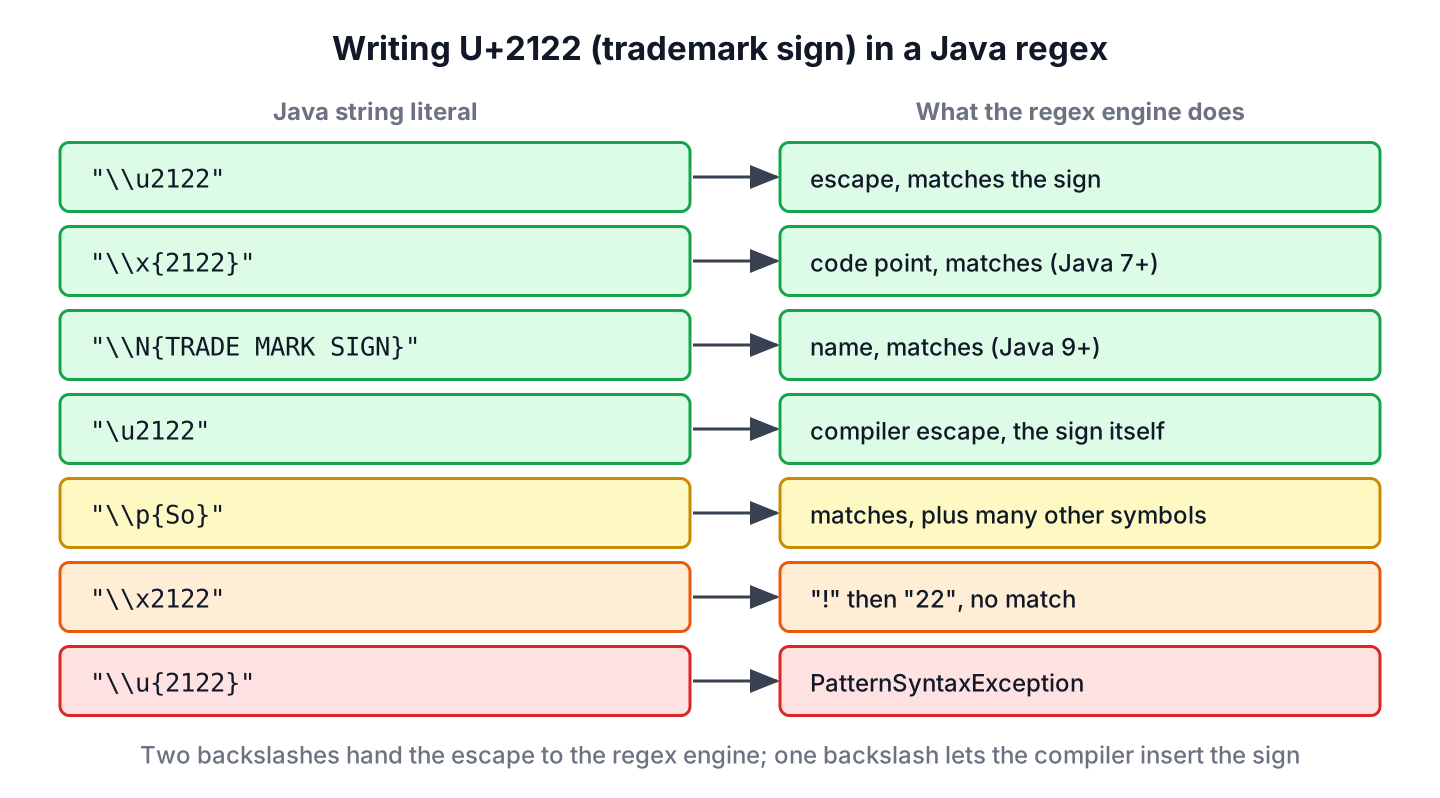
The \x form without braces takes two hex digits, no more and no less, so \x2122 means the character ! (hex 21) followed by the text 22. The braces form \u{2122} belongs to JavaScript (with the u flag) and Ruby. Java rejects it with this message.
java.util.regex.PatternSyntaxException: Illegal Unicode escape sequence near index 2
\u{2122}
  ^
3. Capturing the Brand Name Before the Symbol
Product names are written as a word followed by the trademark sign. The pattern (\w+)\s?\u2122 captures that word in group 1 and allows one optional space before the sign.
Pattern brand = Pattern.compile("(\\w+)\\s?\\u2122");

List<String> withIndex = brand.matcher("Java\u2122 and Duke\u2122 rule").results().map(r -> r.group(1) + " at " + r.start()).toList();   // [Java at 0, Duke at 10]
List<String> spaced = brand.matcher("Duke \u2122").results().map(r -> r.group(1)).toList();                                             // [Duke]
A word boundary \b after the trademark sign fails at the end of a word. The anchor \b marks a position between a word character and a non-word character. The trademark sign is not a word character, so when Java and the sign end the text, no boundary follows the sign.
boolean trailingBoundary = Pattern.compile("\\bJava\\u2122\\b").matcher("Java\u2122").find();   // false
boolean leadingOnly = Pattern.compile("\\bJava\\u2122").matcher("Java\u2122").find();          // true
boolean noLetterAfter = Pattern.compile("\\bJava\\u2122(?!\\w)").matcher("Java\u2122").find(); // true
The word boundary article explains the rule in detail. To say that no letter may follow the symbol, we use the negative lookahead (?!\w) after it, as the last line shows.
4. Trademark, Registered and Copyright Symbols Together
Legal texts and product pages mix several related symbols, and their meaning differs. The trademark sign marks a claimed, often unregistered mark. The registered sign marks a mark registered with a trademark office such as the USPTO, and the copyright sign marks creative works.
| Symbol | Code point | Escape in a Java regex | Used for |
|---|---|---|---|
| Trademark sign | U+2122 | \u2122 | Trademark, registered or not |
| Registered sign | U+00AE | \u00ae | Registered trademark |
| Copyright sign | U+00A9 | \u00a9 | Copyright |
| Service mark | U+2120 | \u2120 | Trademark for a service |
| Sound recording copyright | U+2117 | \u2117 | Copyright of a recording |
A character class with all five escapes matches any of them. It is more precise than \p{So}, which also matches arrows, emoji and many other symbols.
Pattern marks = Pattern.compile("[\\u2122\\u00ae\\u00a9\\u2120\\u2117]");
String legal = "Java\u2122, Duke\u00ae, \u00a9 2026";

List<Integer> markAt = marks.matcher(legal).results().map(MatchResult::start).toList();   // [4, 11, 14]
String cleaned = marks.matcher(legal).replaceAll("");                                     // "Java, Duke,  2026"
String tidy = cleaned.replaceAll(" {2,}", " ");                                           // "Java, Duke, 2026"
The removal leaves two spaces before 2026, so text shown to users also gets the second replacement that collapses repeated spaces.
5. Other Spellings of the Trademark Sign
Plain-text and HTML sources often write the sign without the Unicode character. We convert these spellings to U+2122 first, so later searches need only one pattern.
- The letters (TM) or ™ in plain text, sometimes after a space.
- The HTML named entity ™.
- The numeric entities ™ (decimal) and ™ (hex).
Pattern spellings = Pattern.compile("\\s?\\((?i:tm)\\)|&(?:trade|#8482|#x2122);");

String unified = spellings.matcher("Java(TM), Duke (tm), Kotlin™ and Scala™").replaceAll("\u2122");
long signs = Pattern.compile("\\u2122").matcher(unified).results().count();                                   // 4
boolean noEntity = !unified.contains("&");                                            // true
The inline group (?i:tm) turns on case-insensitive matching only for the letters tm. For HTML documents, a parser such as Jsoup decodes all entities at once, which is more reliable than a regex over raw HTML.
Two more forms appear in text from phones and from Unicode normalization.
- Text from emoji pickers can contain the variation selector U+FE0F after the sign, which asks for a colored emoji. A find() for \u2122 still succeeds, but a whole-input check needs \u2122\ufe0f?.
- The NFKC normalization form replaces the trademark sign with the letters TM and the service mark with SM, while the registered and copyright signs stay unchanged. Text that went through Normalizer with NFKC, for example in the ASCII cleaning method, no longer contains U+2122.
boolean emojiWhole = "\u2122\ufe0f".matches("\\u2122");                    // false
boolean emojiOptional = "\u2122\ufe0f".matches("\\u2122\\ufe0f?");         // true
boolean emojiFind = Pattern.compile("\\u2122").matcher("\u2122\ufe0f").find();   // true

String tmLetters = Normalizer.normalize("\u2122", Normalizer.Form.NFKC);   // "TM"
String smLetters = Normalizer.normalize("\u2120", Normalizer.Form.NFKC);   // "SM"
boolean registeredKept = Normalizer.normalize("\u00ae", Normalizer.Form.NFKC).equals("\u00ae");   // true
6. Source Code
The trademark symbol project on GitHub contains each pattern from this page and prints its result, with symbols shown as escapes. JUnit 6 tests check all values, including the exception message for \u{2122}. Build it with Java 25 and Maven.
mvn -q compile exec:java
mvn test
7. Trademark Symbol Regex FAQs
The same questions come up whenever the trademark sign meets real input such as files, forms and CMS content.
7.1. How Do We Add the Trademark Sign After a Brand Name?
We replace the brand name only where no sign follows yet, with a negative lookahead. The pattern \bJava\b(?!\u2122) skips Java names that already carry the sign, so running the replacement twice does not add a second sign.
Pattern bare = Pattern.compile("\\bJava\\b(?!\\u2122)");
String marked = bare.matcher("Java and Java\u2122").replaceAll("Java\u2122");
long marks2 = Pattern.compile("\\u2122").matcher(marked).results().count();                          // 2
7.2. Why Does the Regex Not Find the Sign in Text Read From a File?
The file was read with a different character encoding than it was saved with. Since Java 18 (JEP 400), the default charset is UTF-8, so Files.readString(path) reads a UTF-8 file correctly. A file saved as Windows-1252 stores the sign as the byte 0x99, which is not valid UTF-8. The method Files.readString() rejects such a file with a MalformedInputException, whereas a FileReader turns the byte into the replacement character U+FFFD, so we pass the right charset, such as Charset.forName(“windows-1252”), when reading such files.
7.3. Does \p{Punct} Match the Trademark Sign?
No. The class \p{Punct} covers only the 32 ASCII punctuation characters. The trademark sign belongs to the Unicode category So, which \p{So} matches.
boolean punct = "\u2122".matches("\\p{Punct}"); // false7.4. Is the Trademark Sign One char in Java?
Yes. U+2122 is in the Basic Multilingual Plane, so it fits in one char and length() returns 1. Symbols above U+FFFF, such as most emoji, take two char values.
8. Conclusion
To match the trademark sign in Java, we use the escape \u2122 (Java string "\\u2122"), or \x{2122} or \N{TRADE MARK SIGN}. The braces-only \u{2122} and the short \x2122 do not work.
A capturing group in front of the sign extracts the brand name, and a character class covers the registered, copyright and service mark signs as well. Before searching, we convert (TM) and HTML entities to the real symbol, and we keep in mind that NFKC normalization turns the sign into the letters TM.
9. References
- Pattern (Java SE 25 API)
- Normalizer (Java SE 25 API)
- Unicode code chart, Letterlike Symbols U+2100 to U+214F (PDF)
- HTML Standard, named character references
- JEP 400, UTF-8 by Default
Happy Learning !!
