

To match an exact word with a regex, we wrap the word in word boundaries, so \bcat\b finds “cat” but not the “cat” inside “category”. To find every word that contains some text, we let word characters appear around it, and \b\w*cat\w*\b returns “cat”, “category” and “noncategory”. In Java, we search with Matcher.find(), because String.matches() tests the whole string.
We use exact-word search for features such as search boxes, profanity filters, keyword highlighting and log scanning, where “error” must not match “terror” or “errors”.
The following example shows the most common word searches in Java, with the result of each search as a comment.
boolean exact = Pattern.compile("\\bcat\\b").matcher("The cat is cute").find();             // true
boolean inside = Pattern.compile("\\bcat\\b").matcher("The category is empty").find();      // false
boolean anyCase = Pattern.compile("(?i)\\bcat\\b").matcher("CAT and dog").find();           // true

List<String> containing = Pattern.compile("\\b\\w*cat\\w*\\b").matcher("cat, category, noncategory").results().map(MatchResult::group).toList();   // [cat, category, noncategory]
List<String> either = Pattern.compile("\\b(?:cat|dog)\\b").matcher("hotdog, a dog and a cat").results().map(MatchResult::group).toList();          // [dog, cat]

boolean bothWords = "a cat and a dog".matches("(?=.*\\bcat\\b)(?=.*\\bdog\\b).*");     // true
String replaced = "cat category cat".replaceAll("\\bcat\\b", "dog");                   // "dog category dog"
Notice that “hotdog” does not count as “dog”, because the boundary \b needs a non-word character or the end of the text on each side. The sections that follow cover exact-word search, case-insensitive search, words that contain a substring, and lists of words. We finish with words typed by a user, counting and replacing, and the cases where a plain String method is the better choice.
1. Finding One Exact Word
The anchor \b matches at the edge of a word, namely between a word character ([a-zA-Z0-9_]) and any other character, or at the start or end of the text. With \b on both sides, “cat” must stand alone.
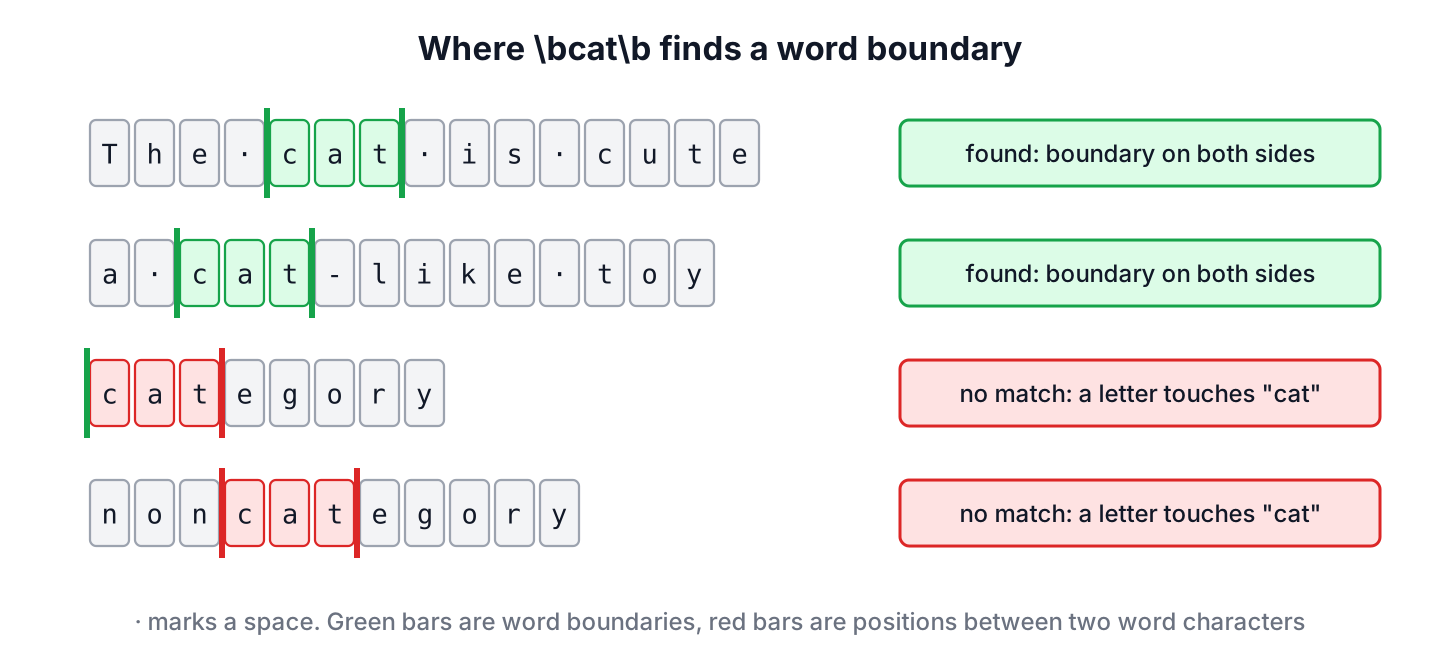
We compile the pattern once and keep it in a static final field when the search runs often, for example on every incoming chat message.
Pattern cat = Pattern.compile("\\bcat\\b");

boolean alone = cat.matcher("The cat is cute").find();               // true
boolean prefix = cat.matcher("The category is empty").find();        // false
boolean middle = cat.matcher("The noncategory is empty").find();     // false
boolean hyphen = cat.matcher("a cat-like toy").find();               // true

List<Integer> starts = cat.matcher("a cat, the cat.").results().map(MatchResult::start).toList();   // [2, 11]
The last line returns the index of each occurrence, which is what a search page needs to highlight the word in a text. Punctuation such as the comma and the period does not stop the match, because it is not a word character.
A hyphen also ends a word, so \bcat\b finds “cat” in “cat-like”. The article regex word boundaries explains which characters count as word characters and shows how to keep hyphenated words whole.
2. Exact Word vs. Exact String
An “exact match” can mean two different things, and Java has a different method for each.
- When the text contains the word as a separate word, we use \bword\b with find().
- When the whole text is the word, we use matches(), or equals() when no pattern is needed.
boolean same = "cat".matches("cat");                     // true
boolean longer = "the cat".matches("cat");               // false
boolean padded = "the cat".matches(".*\\bcat\\b.*");     // true
boolean equal = "cat".equals("cat");                     // true
The second line is false because matches() needs the whole string, and the third line works but find() is clearer. The most common bug in this area is calling String.matches() with \bcat\b and expecting a search. It returns false for “the cat”, because the pattern does not cover “the “. The method find() has no such requirement, as the matches() vs find() comparison shows.
3. Case-Insensitive Word Search
Users rarely type a word in the same case as the text. We turn on case-insensitive matching with the CASE_INSENSITIVE flag or with (?i) at the start of the pattern.
boolean flag = Pattern.compile("\\bcat\\b", Pattern.CASE_INSENSITIVE).matcher("My Cat").find();   // true
boolean inline = Pattern.compile("(?i)\\bcat\\b").matcher("CAT").find();                          // true
By default, CASE_INSENSITIVE compares only ASCII letters. For words with letters such as “e” with an accent, we add UNICODE_CASE as well, or write (?iu).
4. Words That Contain a Substring
To find whole words that contain “cat” anywhere, we allow any number of word characters on both sides with \b\w*cat\w*\b. The match covers the whole word, not only the “cat” part.
List<String> words = Pattern.compile("\\b\\w*cat\\w*\\b").matcher("The cat, a category and a noncategory").results().map(MatchResult::group).toList();   // [cat, category, noncategory]
List<String> split = Pattern.compile("\\b\\w*cat\\w*\\b").matcher("the non-category").results().map(MatchResult::group).toList();                       // [category]
List<String> mixed = Pattern.compile("(?i)\\b\\w*cat\\w*\\b").matcher("Catalog and Bobcat").results().map(MatchResult::group).toList();                 // [Catalog, Bobcat]
The second line returns only “category” because the hyphen splits “non-category” into two words. When we only need a yes or no answer, a regex is not required, because String.contains() checks for a substring anywhere. The regex pays off when we need the full words that contain the text. For words that only start or only end with some letters, the word boundary article from section 1 has the \bun\w* and \w+ing\b patterns.
5. Matching Any of Several Words
Alternation inside a group finds any word from a list. The non-capturing group (?:…) keeps both boundaries around every alternative. Without the group, \bcat|dog\b means “\bcat” or “dog\b” and matches the “dog” in “hotdog”.
List<String> grouped = Pattern.compile("\\b(?:cat|dog)\\b").matcher("hotdog, a dog and a cat").results().map(MatchResult::group).toList();   // [dog, cat]
List<String> ungrouped = Pattern.compile("\\bcat|dog\\b").matcher("hotdog, a dog and a cat").results().map(MatchResult::group).toList();   // [dog, dog, cat]
In the second result, the first “dog” comes from “hotdog”. When the words come from a list, such as a block list of banned words in a comment form, we build the pattern in code. The method Pattern.quote() escapes each word, so a word with a dot or a plus sign stays literal.
List<String> banned = List.of("cat", "dog");
String anyWord = banned.stream().map(Pattern::quote).collect(Collectors.joining("|", "\\b(?:", ")\\b"));   // "\b(?:\Qcat\E|\Qdog\E)\b"
List<String> hits = Pattern.compile(anyWord).matcher("hotdog, a dog and a cat").results().map(MatchResult::group).toList();   // [dog, cat]
6. Matching All Words in Any Order
To require that a text contains every word from a list, in any order, we use one lookahead per word. A lookahead (?=.*\bcat\b) checks that “cat” appears somewhere ahead without consuming any text, so the next lookahead starts from the same position. The (?s) flag lets .* cross line breaks.
Pattern both = Pattern.compile("(?s)(?=.*\\bcat\\b)(?=.*\\bdog\\b).*");

boolean chased = both.matcher("the dog chased the cat").matches();          // true
boolean partial = both.matcher("the dog chased the category").matches();    // false
boolean twoLines = both.matcher("a dog\nand a cat").matches();              // true
The same check is easier to read as one search per word with Stream.allMatch(). For a long list of words, the stream version is also easier to change.
List<String> required = List.of("cat", "dog");
String text = "the dog chased the cat";
boolean all = required.stream().allMatch(w -> Pattern.compile("\\b" + Pattern.quote(w) + "\\b").matcher(text).find());   // true
7. Searching for a Word Typed by a User
A search word from user input must go through Pattern.quote() before it becomes part of a regex. Otherwise, regex metacharacters in the input change the pattern. In “v1.2”, the dot means “any character”, so the unquoted pattern also finds “v152”.
String version = "v1.2";

boolean unquoted = Pattern.compile("\\b" + version + "\\b").matcher("v152").find();                       // true
boolean quoted = Pattern.compile("\\b" + Pattern.quote(version) + "\\b").matcher("v152").find();          // false
boolean inNotes = Pattern.compile("\\b" + Pattern.quote(version) + "\\b").matcher("see v1.2 notes").find();     // true
boolean longer = Pattern.compile("\\b" + Pattern.quote(version) + "\\b").matcher("see v1.25 notes").find();     // false
The first line gives a wrong match. The last line shows the value of the trailing \b, because “v1.25” contains “v1.2” but the “5” continues the word. One limit remains, since \b needs a word character at the edge of the search word. For input such as “C++” or “#java”, we replace \b with lookarounds, as section 10 shows. The Java regex metacharacters reference lists every character that Pattern.quote() protects.
8. Counting and Replacing Whole Words
The method Matcher.results() returns a stream of matches, so counting the occurrences of a word is one call to count(). For replacing, replaceAll() with word boundaries changes only the whole words, while String.replace() changes every substring.
long count = Pattern.compile("\\bcat\\b").matcher("cat category cat").results().count();   // 2

String wholeWords = "cat category cat".replaceAll("\\bcat\\b", "dog");    // "dog category dog"
String everywhere = "cat category cat".replace("cat", "dog");             // "dog dogegory dog"
9. When a Regex Is Not Needed
A regex is harder to read and costs a little more to run than a String method, so we pick the simplest tool that gives the right answer. The last column uses the text “The category is empty” and the word “cat”.
| Need | Simplest option | Result |
|---|---|---|
| Text contains the letters “cat” anywhere | text.contains(“cat”) | true |
| Text contains the separate word “cat” | \bcat\b with find() | false |
| Text is “cat” | text.equals(“cat”) | false |
| Text is “cat” in any case | text.equalsIgnoreCase(“cat”) | false |
Splitting the text into words is another option without word boundaries. It works for one-off checks, but it creates an array of every word, while a compiled Pattern scans the text once.
boolean listed = Arrays.asList("The cat, is cute".split("\\W+")).contains("cat"); // true10. Exact Word Regex FAQs
The questions in this list come from searches that follow the basic exact-word match. The Java regex tutorial links every other pattern article.
10.1. How Do I Match a Word With Symbols Such as C++?
We replace \b with the lookarounds (?<!\w) and (?!\w), which mean “no word character before” and “no word character after”. The pattern \bC\+\+\b fails, because there is no boundary between “+” and a space.
boolean withB = Pattern.compile("\\bC\\+\\+\\b").matcher("I like C++ and C#").find();               // false
boolean lookaround = Pattern.compile("(?<!\\w)C\\+\\+(?!\\w)").matcher("I like C++ and C#").find();  // true
10.2. Does \b Work With Accented Letters?
Not by default. Since Java 19, \b uses the same ASCII definition as \w, so an accented letter counts as a non-word character and \bcaf\b matches inside “cafe” with an accented “e”. The (?U) flag makes both \w and \b follow Unicode rules.
boolean ascii = Pattern.compile("\\bcaf\\b").matcher("caf\u00e9").find();         // true
boolean unicode = Pattern.compile("(?U)\\bcaf\\b").matcher("caf\u00e9").find();   // false
10.3. How Do I Get the Whole Line That Contains a Word?
We combine the word with MULTILINE anchors, as in (?m)^.*\berror\b.*$. A log scanner uses this pattern to print every line with the word “error” while skipping lines with “errors”.
List<String> errorLines = Pattern.compile("(?m)^.*\\berror\\b.*$").matcher("ok\nan error here\n2 errors").results().map(MatchResult::group).toList(); // [an error here]10.4. Is \bword\b Slower Than String.contains()?
Yes, for a single check, because the regex engine does more work per character. The difference matters only in tight loops over large texts. For a search that must respect word edges, the regex gives the correct answer, and a compiled Pattern reused across calls keeps the cost low.
11. Conclusion
For an exact word, the pattern is \bword\b with Matcher.find(), and for words that contain some text, it is \b\w*text\w*\b. We add (?i) to ignore case, use \b(?:a|b)\b for any of several words and one lookahead per word when all of them must appear.
Any word that comes from outside the code goes through Pattern.quote(). When only a yes or no answer for a substring is needed, String.contains() is simpler than a regex.
12. References
- Pattern (Java SE 25 API)
- Matcher.results() (Java SE 25 API)
- Pattern.quote() (Java SE 25 API)
- Word Boundaries (regular-expressions.info)
Happy Learning !!

HOw do i match a word “shi+” ? The word contains a cahrater plus .
Not working need help immediately.