

An ISBN (International Standard Book Number) is a 13-digit identifier for a book edition that starts with 978 or 979 and ends with a check digit, for example “978-92-95055-12-4”. Books published before 2007 also carry a 10-digit form, ISBN-10, whose last character can be the letter X. A regex can check that a value has the shape of an ISBN, but only the check digit calculation tells us whether the number is valid, so a complete Java validator uses both.
We validate ISBNs in library catalogs, bookshop inventories and imports of publisher data feeds, where one mistyped digit links a review or an order to the wrong book. The following example removes the label and separators, checks the shape with an ISBN regex, validates the check digit and converts an ISBN-10 to an ISBN-13.
String digits = IsbnText.compact("ISBN 978-92-95055-12-4");                  // "9789295055124"
boolean shape13 = "9789295055124".matches("97[89][0-9]{10}");                // true
boolean shape10 = "123456789X".matches("[0-9]{9}[0-9X]");                    // true

boolean valid13 = IsbnValidator.isValidIsbn("ISBN 978-92-95055-12-4");        // true
boolean wrongCheck = IsbnValidator.isValidIsbn("978-92-95055-12-5");          // false
boolean valid10 = IsbnValidator.isValidIsbn("ISBN-10: 0-306-40615-2");        // true
Optional<String> converted = IsbnConverter.toIsbn13("0-306-40615-2");         // Optional[9780306406157]
Notice that “978-92-95055-12-5” has a perfect ISBN shape and still fails, because its last digit does not fit the other twelve. The sample ISBN “978-92-95055-12-4” comes from the official ISBN Users’ Manual, and “123456789X” is a made-up number that happens to have a correct check digit. We go through the ISBN structure, the two short regexes, both check digit algorithms in Java, the long formatted regex and the conversion between both forms.
1. How an ISBN Is Built
An ISBN-13 has five elements, which the International ISBN Agency defines in its ISBN Users’ Manual. Three of them have a variable length, which is why hyphens appear in different places in different ISBNs.
| Element | Example | Length |
|---|---|---|
| GS1 prefix | 978 | 3 digits, 978 or 979 |
| Registration group (country or language area) | 92 | 1 to 5 digits |
| Registrant (publisher) | 95055 | Up to 7 digits |
| Publication (title or edition) | 12 | Up to 6 digits |
| Check digit | 4 | 1 digit |
The older ISBN-10 has the same structure without the GS1 prefix, and its check digit is calculated differently, so it can be 0 to 9 or X (which stands for 10). Since 2007, agencies assign only 13-digit ISBNs, but ISBN-10 values still appear in older catalogs and on the back of older books.
Hyphens and spaces in an ISBN have no meaning and only make the number easier to read. “978-92-95055-12-4”, “978 92 95055 12 4” and “9789295055124” are the same ISBN, and printed ISBNs are often preceded by the label “ISBN”.
2. Two Ways to Validate an ISBN
Because separators and the label are optional, an ISBN can be written in many ways. Code can handle that variety in one of two styles.
- One large regex accepts every formatted variant and checks the number of elements, as section 7 shows.
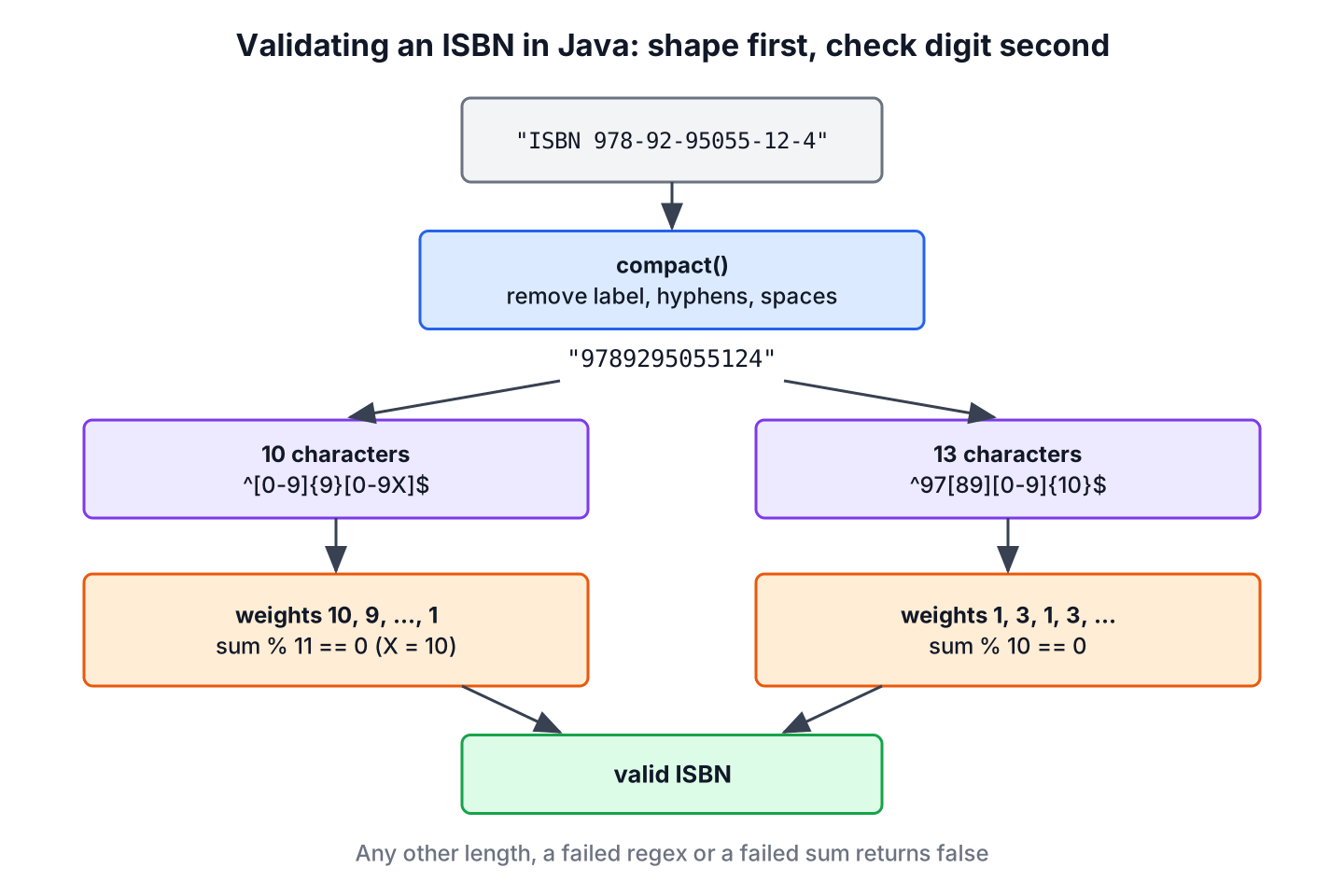
- The code removes the label and the separators first, and checks the 10 or 13 remaining characters with a short regex and the check digit.
We recommend the second approach. The regexes stay short, the check digit code works on clean input, and the stored value has one canonical form. The large regex is still useful when we must reject ISBNs whose hyphens are in impossible places, for example in a data import that has to match a strict format.
3. Regex for the Compact ISBN-10 and ISBN-13
The first step removes the optional label (“ISBN”, “ISBN-10” or “ISBN-13”, with an optional colon) and every hyphen and whitespace character. Converting to uppercase first makes a lowercase “x” check digit and an “isbn” label work too.
final class IsbnText {
    static final Pattern LABEL = Pattern.compile("^ISBN(?:-1[03])?:?\\s*");
    static final Pattern SEPARATORS = Pattern.compile("[-\\s]");
    static final Pattern ISBN10 = Pattern.compile("^[0-9]{9}[0-9X]$");
    static final Pattern ISBN13 = Pattern.compile("^97[89][0-9]{10}$");

    static String compact(String input) {
        String noLabel = LABEL.matcher(input.strip().toUpperCase(Locale.ROOT)).replaceFirst("");
        return SEPARATORS.matcher(noLabel).replaceAll("");
    }
}
String spaced = IsbnText.compact("ISBN-13: 978 92 95055 12 4"); // "9789295055124"
String lower = IsbnText.compact("isbn 978-92-95055-12-4"); // "9789295055124"
String isbn10 = IsbnText.compact("ISBN-10 0-306-40615-2"); // "0306406152"
String smallX = IsbnText.compact("12345-6789-x"); // "123456789X"The compact forms need only two short regular expressions.
| Form | Regex | Meaning |
|---|---|---|
| ISBN-10 | ^[0-9]{9}[0-9X]$ | Nine digits followed by a digit or X |
| ISBN-13 | ^97[89][0-9]{10}$ | 978 or 979 followed by ten more digits |
boolean prefix978 = IsbnText.ISBN13.matcher("9789295055124").matches();    // true
boolean prefix979 = IsbnText.ISBN13.matcher("9799295055124").matches();    // true, 979 is also an ISBN prefix
boolean prefix977 = IsbnText.ISBN13.matcher("9779295055124").matches();    // false, 977 is not
boolean xFirst = IsbnText.ISBN10.matcher("X123456789").matches();          // false, X only in the last position
4. ISBN-10 Check Digit in Java
The ISBN-10 check uses a weighted sum. The first character is multiplied by 10, the second by 9, and so on down to the check character, which is multiplied by 1. The ISBN-10 is valid when the weighted sum is divisible by 11, with X counted as 10.
For “0306406152”, the sum is 0*10 + 3*9 + 0*8 + 6*7 + 4*6 + 0*5 + 6*4 + 1*3 + 5*2 + 2*1 = 132, and 132 = 12 * 11, so the number is valid.
final class Isbn10 {
    static boolean isValid(String digits) {
        if (digits == null || !IsbnText.ISBN10.matcher(digits).matches()) {
            return false;
        }
        int sum = 0;
        for (int i = 0; i < 10; i++) {
            char c = digits.charAt(i);
            int value = (c == 'X') ? 10 : c - '0';
            sum += value * (10 - i);
        }
        return sum % 11 == 0;
    }
}
boolean ok = Isbn10.isValid("0306406152"); // true
boolean changed = Isbn10.isValid("0306406153"); // false, last digit changed
boolean swapped = Isbn10.isValid("0306406125"); // false, last two digits swapped
boolean withX = Isbn10.isValid("123456789X"); // true, X counts as 10
boolean plain = Isbn10.isValid("1234567890"); // falseThe expression c – ‘0’ converts a digit character to its number, so ‘7’ – ‘0’ is 7. Because 11 is a prime number, the ISBN-10 check detects every single wrong digit and every swap of two adjacent digits.
5. ISBN-13 Check Digit in Java
The ISBN-13 check digit uses the EAN-13 barcode algorithm, which the ISBN Users’ Manual describes in its appendix. Each of the first 12 digits is multiplied alternately by 1 and 3, and the check digit is 10 minus the remainder of the sum divided by 10 (a result of 10 becomes 0). To validate a complete ISBN-13, we include the check digit with weight 1 and test that the total is divisible by 10.
For “978-92-95055-12-?”, the weighted sum of the first 12 digits is 9 + 21 + 8 + 27 + 2 + 27 + 5 + 0 + 5 + 15 + 1 + 6 = 126. The remainder is 6, so the check digit is 10 – 6 = 4.
final class Isbn13 {
    static boolean isValid(String digits) {
        if (digits == null || !IsbnText.ISBN13.matcher(digits).matches()) {
            return false;
        }
        int sum = 0;
        for (int i = 0; i < 13; i++) {
            int value = digits.charAt(i) - '0';
            sum += (i % 2 == 0) ? value : value * 3;
        }
        return sum % 10 == 0;
    }

    static int checkDigit(String first12) {
        int sum = 0;
        for (int i = 0; i < 12; i++) {
            int value = first12.charAt(i) - '0';
            sum += (i % 2 == 0) ? value : value * 3;
        }
        return (10 - sum % 10) % 10;
    }
}
int check = Isbn13.checkDigit("978929505512"); // 4
boolean ok = Isbn13.isValid("9789295055124"); // true
boolean wrong = Isbn13.isValid("9789295055125"); // false
boolean swapped = Isbn13.isValid("9789295055142"); // false, two digits swapped
boolean missed = Isbn13.isValid("9789290555124"); // true, "50" swapped to "05" is not detectedThe last call shows a known weakness of the ISBN-13 check. It finds every single wrong digit, but it misses a swap of two adjacent digits that differ by 5, such as “5” and “0”. The weakness is a property of the standard, not a bug in the code.
6. A Complete ISBN Validator
With the compact form and both check digit methods, the full validator is a switch on the length. It rejects null first, so an empty form field returns false instead of throwing a NullPointerException.
final class IsbnValidator {
    static boolean isValidIsbn(String input) {
        if (input == null) {
            return false;
        }
        String digits = IsbnText.compact(input);
        return switch (digits.length()) {
            case 10 -> Isbn10.isValid(digits);
            case 13 -> Isbn13.isValid(digits);
            default -> false;
        };
    }
}
boolean labeled = IsbnValidator.isValidIsbn("ISBN 978-92-95055-12-4"); // true
boolean spaces = IsbnValidator.isValidIsbn("978 92 95055 12 4"); // true
boolean badCheck = IsbnValidator.isValidIsbn("0-306-40615-3"); // false
boolean prefix979 = IsbnValidator.isValidIsbn("979-12-34567-89-6"); // true
boolean empty = IsbnValidator.isValidIsbn(null); // falseThe validator ignores the position of hyphens, so “978-92-95055124” passes. That matches the standard, where separators carry no meaning. It also does not compare the label with the length, so “ISBN-13 0-306-40615-2” is accepted as a valid ISBN-10. If a label must agree with the number, we check it separately.
An online bookshop that imports a supplier’s CSV file runs isValidIsbn() on every row. Rows with a failed check digit go to a review list instead of the catalog, so a typo in one digit never attaches a price to the wrong book.
Projects that already depend on Apache Commons Validator can use its ISBNValidator class instead. It checks both forms with their check digits and can convert ISBN-10 to ISBN-13. The code in this article has no dependencies and shows how the checks work.
7. One Regex for Formatted ISBNs
The Regular Expressions Cookbook publishes regexes that validate the written form in one step, including the number of elements, but not the check digit. The combined pattern covers both forms and their optional label.
Pattern isbnFormatted = Pattern.compile(
        "^(?:ISBN(?:-1[03])?:? )?(?=[0-9X]{10}$|(?=(?:[0-9]+[- ]){3})[- 0-9X]{13}$"
                + "|97[89][0-9]{10}$|(?=(?:[0-9]+[- ]){4})[- 0-9]{17}$)"
                + "(?:97[89][- ]?)?[0-9]{1,5}[- ]?[0-9]+[- ]?[0-9]+[- ]?[0-9X]$");

boolean formatted = isbnFormatted.matcher("ISBN 978-92-95055-12-4").matches();     // true
boolean badCheck = isbnFormatted.matcher("978-92-95055-12-5").matches();           // true
boolean threeHyphens = isbnFormatted.matcher("978-92-95055124").matches();         // false
The pattern has three parts.
| Part | Meaning |
|---|---|
| (?:ISBN(?:-1[03])?:? )? | Optional label “ISBN”, “ISBN-10” or “ISBN-13”, optional colon and a space |
| (?=…) | A lookahead that checks the total length without consuming characters, namely 10 characters, 13 with three separators (ISBN-10), 13 digits, or 17 characters with four separators (ISBN-13) |
| (?:97[89][- ]?)?[0-9]{1,5}[- ]?[0-9]+[- ]?[0-9]+[- ]?[0-9X] | Optional 978 or 979 prefix, followed by the group, registrant, publication and check elements, each optionally followed by a hyphen or space |
The lookahead (?=(?:[0-9]+[- ]){4}) is the key part. It requires four “digits followed by a separator” runs before the end, so a formatted ISBN-13 must have all five elements. The article on regex metacharacters explains groups and lookaheads in general.
Comparing the formatted regex with isValidIsbn() from section 6 shows what each one checks.
| Input | Formatted regex | isValidIsbn() | Why |
|---|---|---|---|
| “ISBN 978-92-95055-12-4” | true | true | Valid |
| “ISBN-13: 978-92-95055-12-4” | true | true | Label with colon |
| “978 92 95055 12 4” | true | true | Spaces |
| “ISBN-10: 0-306-40615-2” | true | true | ISBN-10 |
| “0306406152” | true | true | Compact ISBN-10 |
| “978-92-95055-12-5” | true | false | Wrong check digit |
| “0-306-40615-3” | true | false | Wrong check digit |
| “ISBN-13 0-306-40615-2” | true | true | Label does not match the length |
| “ISBN-12: 978-92-95055-12-4” | false | false | Unknown label |
| “0-3061-40615-2” | false | false | 11 digits |
| “978-92-95055124” | false | true | Only 3 separators in an ISBN-13 |
| “ISBN 978–92-95055-12-4” | false | true | Double hyphen |
A wrong check digit passes the formatted regex, so it must always be combined with the check digit methods. The regex is stricter about separators, which matters only when the input format itself is part of the contract.
8. Converting Between ISBN-10 and ISBN-13
Every ISBN-10 has an ISBN-13 equivalent. We add the prefix 978, drop the old check digit and compute a new one with the ISBN-13 algorithm. The reverse works only for ISBNs that start with 978, because an ISBN-13 with the 979 prefix has no ISBN-10 form.
final class IsbnConverter {
    static Optional<String> toIsbn13(String isbn10) {
        if (isbn10 == null) {
            return Optional.empty();
        }
        String digits = IsbnText.compact(isbn10);
        if (!Isbn10.isValid(digits)) {
            return Optional.empty();
        }
        String first12 = "978" + digits.substring(0, 9);
        return Optional.of(first12 + Isbn13.checkDigit(first12));
    }

    static Optional<String> toIsbn10(String isbn13) {
        if (isbn13 == null) {
            return Optional.empty();
        }
        String digits = IsbnText.compact(isbn13);
        if (!digits.startsWith("978") || !Isbn13.isValid(digits)) {
            return Optional.empty();
        }
        String first9 = digits.substring(3, 12);
        int sum = 0;
        for (int i = 0; i < 9; i++) {
            sum += (first9.charAt(i) - '0') * (10 - i);
        }
        int check = (11 - sum % 11) % 11;
        return Optional.of(first9 + (check == 10 ? "X" : String.valueOf(check)));
    }
}
Optional<String> classic = IsbnConverter.toIsbn13("0-306-40615-2"); // Optional[9780306406157]
Optional<String> withX = IsbnConverter.toIsbn13("123456789X"); // Optional[9781234567897]
Optional<String> invalid = IsbnConverter.toIsbn13("92-95055-12-X"); // Optional.empty
Optional<String> back = IsbnConverter.toIsbn10("978-92-95055-12-4"); // Optional[9295055128]
Optional<String> newPrefix = IsbnConverter.toIsbn10("979-12-34567-89-6"); // Optional.emptyThe method toIsbn10() mirrors toIsbn13(). It takes digits 4 to 12 of a valid 978 ISBN and computes a new ISBN-10 check character, which is X when the result is 10.
9. ISBN Validator Source and Tests
The ISBN example on GitHub holds all the code from this article. The main method prints every expression shown above, and the JUnit 6 tests check each result, including the full comparison table from section 7 and a loop that confirms every single-digit change to an ISBN-13 is detected. Compile it with JDK 25 through Maven.
mvn -q compile exec:java
mvn test
10. ISBN Validation FAQs
Book number validation leads to a few recurring questions about check digits, the letter X, conversion and hyphens.
10.1. Can a Regex Validate the ISBN Check Digit?
No. A regex matches characters, and the check digit needs arithmetic on all the other digits. The regex checks the shape, and the code from section 4 and section 5 checks the digit.
10.2. What Does the X at the End of an ISBN-10 Mean?
The X stands for the value 10. The ISBN-10 check digit is a number from 0 to 10, and X keeps the ISBN at 10 characters. It appears only in the last position, and ISBN-13 never uses it.
10.3. How Do We Convert an ISBN-10 to an ISBN-13?
We put 978 in front of the first nine digits and compute a new check digit with the ISBN-13 algorithm. The old check digit is dropped, because the two forms use different formulas.
Optional<String> isbn13 = IsbnConverter.toIsbn13("0306406152"); // Optional[9780306406157]10.4. Do Hyphens in an ISBN Have a Meaning?
No. Hyphens and spaces only make the number easier to read. They separate the five elements, but their positions change from ISBN to ISBN, so we remove them before validation and store the compact form.
11. Conclusion
Once the label and separators are gone, two short regexes recognize an ISBN, ^[0-9]{9}[0-9X]$ for ISBN-10 and ^97[89][0-9]{10}$ for ISBN-13. The check digit decides validity, with a weighted sum divisible by 11 for ISBN-10, and weights 1 and 3 with a sum divisible by 10 for ISBN-13.
The single formatted regex from the Regular Expressions Cookbook still has a place when the written format must be enforced, but it never replaces the check digit. Converting ISBN-10 values to ISBN-13 before storing them leaves one form to search and compare.
12. References
- ISBN Users’ Manual (International ISBN Agency)
- ISBN check digits (Wikipedia)
- ISBNValidator (Apache Commons Validator)
- Pattern (Java SE 25 API)
Happy Learning !!
