
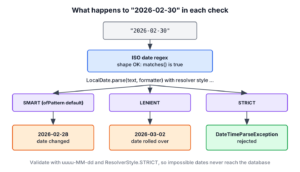
Date format validation in Java has two separate checks, a regex that confirms the text has the right shape, such as yyyy-MM-dd, and LocalDate.parse() with ResolverStyle.STRICT, which confirms that it is a real calendar date. A regex works character by character, so it accepts “2026-02-30” and “2027-02-29” without complaint. Only a date parser knows how many days each month has and which years are leap years.
We validate dates in booking forms, report filters and CSV imports, where an impossible date either crashes a later step or, worse, gets stored as a different day. The following example runs the ISO date regex, the strict parser and a method that combines both.
Pattern isoDate = Pattern.compile("^\\d{4}-(0[1-9]|1[0-2])-(0[1-9]|[12]\\d|3[01])$");

boolean valid = isoDate.matcher("2026-01-15").matches();          // true
boolean month13 = isoDate.matcher("2026-13-01").matches();        // false
boolean feb30Shape = isoDate.matcher("2026-02-30").matches();     // true, but not a real date

DateTimeFormatter strict = DateTimeFormatter.ofPattern("uuuu-MM-dd").withResolverStyle(ResolverStyle.STRICT);
LocalDate feb30 = LocalDate.parse("2026-02-30", strict);          // DateTimeParseException
LocalDate leapDay = LocalDate.parse("2028-02-29", strict);        // 2028-02-29

boolean notReal = DateFormatValidation.isValidIsoDate("2026-02-30");   // false
boolean real = DateFormatValidation.isValidIsoDate("2028-02-29");      // true
Notice that “2026-02-30” passes the regex and fails the parser. We write regexes for the ISO yyyy-MM-dd, US MM/dd/yyyy and European dd/MM/yyyy formats, list the dates those regexes wrongly accept, and set up the DateTimeFormatter that rejects them. We also cover two traps in java.time, the default resolver that changes February 30 into February 28, and the yyyy pattern letter that makes strict parsing fail for every date.
Each format needs its own regex, because the order of the parts and the separator differ between them.
| Format | Example | Regex |
|---|---|---|
| ISO yyyy-MM-dd | 2026-01-15 | ^\d{4}-(0[1-9]|1[0-2])-(0[1-9]|[12]\d|3[01])$ |
| US MM/dd/yyyy | 01/15/2026 | ^(0[1-9]|1[0-2])/(0[1-9]|[12]\d|3[01])/\d{4}$ |
| European dd/MM/yyyy | 15/01/2026 | ^(0[1-9]|[12]\d|3[01])/(0[1-9]|1[0-2])/\d{4}$ |
| US M/d/yyyy, optional zeros | 1/5/2026 | ^(0?[1-9]|1[0-2])/(0?[1-9]|[12]\d|3[01])/\d{4}$ |
1. Regex for the yyyy-MM-dd Format
The simplest regex checks only the positions of digits and hyphens, ^\d{4}-\d{2}-\d{2}$. It rejects “2026/01/15” and “2026-1-15”, but it also accepts “2026-99-99”, because \d{2} means any two digits.
Pattern isoShape = Pattern.compile("^\\d{4}-\\d{2}-\\d{2}$");

boolean normal = isoShape.matcher("2026-01-15").matches();     // true
boolean nonsense = isoShape.matcher("2026-99-99").matches();   // true
boolean oneDigit = isoShape.matcher("2026-1-15").matches();    // false
boolean slashes = isoShape.matcher("2026/01/15").matches();    // false
A regex cannot compare numbers, so it cannot say “a value from 1 to 12”. Instead, we list the allowed digit combinations with alternation, where | means “or”.
| Part | Matches |
|---|---|
| 0[1-9]|1[0-2] | Month “01” to “09”, or “10” to “12” |
| 0[1-9]|[12]\d|3[01] | Day “01” to “09”, “10” to “29”, or “30” and “31” |
| \d{4} | Year, any four digits |
Named groups, written (?<name>…), let us read each part by name after a match. We check the result of matches() before reading a group, because group() throws an IllegalStateException after a failed match.
Pattern isoDate = Pattern.compile(
        "^(?<year>\\d{4})-(?<month>0[1-9]|1[0-2])-(?<day>0[1-9]|[12]\\d|3[01])$");

boolean lastDay = isoDate.matcher("2026-12-31").matches();     // true
boolean month00 = isoDate.matcher("2026-00-10").matches();     // false
boolean day32 = isoDate.matcher("2026-01-32").matches();       // false

Matcher m = isoDate.matcher("2026-01-15");
boolean matched = m.matches();                                 // true
String year = matched ? m.group("year") : "";                  // "2026"
String month = matched ? m.group("month") : "";                // "01"
String day = matched ? m.group("day") : "";                    // "15"
2. US and European Formats
The US format puts the month first and the European format puts the day first. The regexes use the same month and day pieces in a different order.
Pattern usDate = Pattern.compile("^(0[1-9]|1[0-2])/(0[1-9]|[12]\\d|3[01])/\\d{4}$");
Pattern euDate = Pattern.compile("^(0[1-9]|[12]\\d|3[01])/(0[1-9]|1[0-2])/\\d{4}$");

boolean usOk = usDate.matcher("01/15/2026").matches();         // true
boolean euNo = euDate.matcher("01/15/2026").matches();         // false, no month 15
boolean euOk = euDate.matcher("15/01/2026").matches();         // true

boolean usBoth = usDate.matcher("03/04/2026").matches();       // true
boolean euBoth = euDate.matcher("03/04/2026").matches();       // true
A date such as “03/04/2026” is valid in both formats, as March 4 or as April 3, and no regex can decide which one the user meant. The application has to fix one format per field, for example from the user’s locale, or use ISO yyyy-MM-dd, which has only one reading.
A hotel booking site with guests from the US and the UK shows the risk. A guest from London types “03/04/2026” for April 3, a server that reads US dates books March 4, and the guest arrives to find no room. Sending the date from a date picker in ISO format avoids the problem entirely.
When users type dates without leading zeros, such as “1/5/2026”, we make the zero optional with 0?.
Pattern usFlex = Pattern.compile("^(0?[1-9]|1[0-2])/(0?[1-9]|[12]\\d|3[01])/\\d{4}$");

boolean noZeros = usFlex.matcher("1/5/2026").matches();        // true
boolean zeros = usFlex.matcher("01/05/2026").matches();        // true
boolean month13 = usFlex.matcher("13/1/2026").matches();       // false
boolean threeDigits = usFlex.matcher("001/5/2026").matches();  // false
3. Dates That a Regex Wrongly Accepts
Every regex above checks month and day separately. None of them knows that the allowed day depends on the month and, for February, on the year. Inputs such as February 30 pass the ISO regex even though no calendar has them.
| Input | ISO regex | Real date? | Why not |
|---|---|---|---|
| 2026-02-30 | true | no | February never has 30 days |
| 2026-04-31 | true | no | April has 30 days |
| 2027-02-29 | true | no | 2027 is not a leap year |
| 2100-02-29 | true | no | 2100 is divisible by 100 but not by 400 |
The month lengths can be written into a regex, at the cost of a much longer pattern.
Pattern monthLengths = Pattern.compile(
        "^\\d{4}-(?:(?:0[13578]|1[02])-(?:0[1-9]|[12]\\d|3[01])"
                + "|(?:0[469]|11)-(?:0[1-9]|[12]\\d|30)"
                + "|02-(?:0[1-9]|1\\d|2\\d))$");

boolean april31 = monthLengths.matcher("2026-04-31").matches();   // false
boolean feb30 = monthLengths.matcher("2026-02-30").matches();     // false
boolean feb29 = monthLengths.matcher("2026-02-29").matches();     // true, but 2026 is not a leap year
The leap-year rule is still missing. A regex can encode it too, but the result is several lines long, and nobody can review it with confidence. The calendar rules belong in a date parser, not in a regex.
4. Real Dates With LocalDate and ResolverStyle.STRICT
The method LocalDate.parse(text, formatter) reads the text with a DateTimeFormatter and either returns a LocalDate or throws a DateTimeParseException. How the formatter treats an impossible date depends on its resolver style, and the three styles behave very differently.
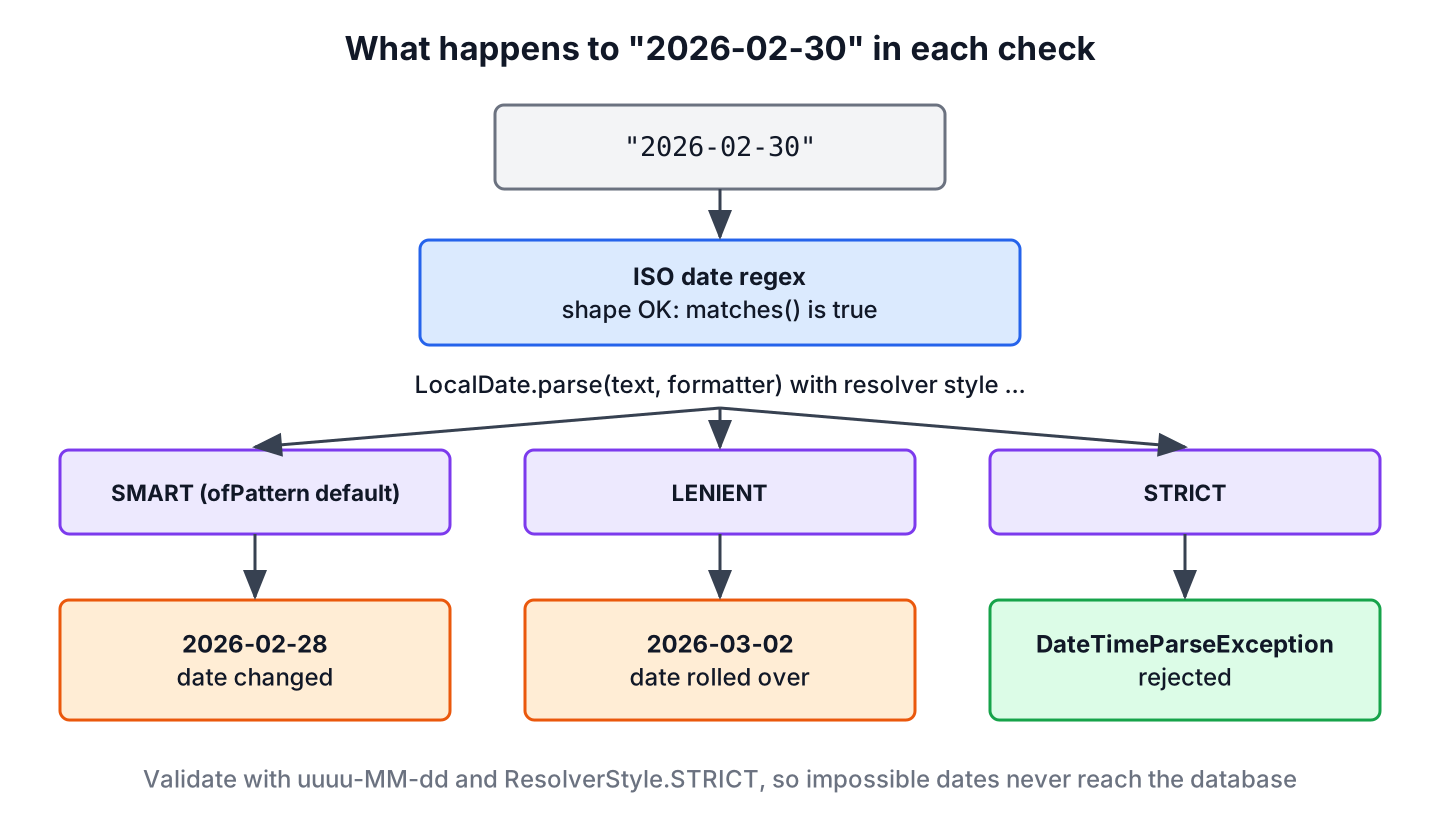
| Resolver style | “2026-02-30” becomes | Where it is the default |
|---|---|---|
| SMART | 2026-02-28 | DateTimeFormatter.ofPattern() |
| LENIENT | 2026-03-02 | none |
| STRICT | DateTimeParseException | DateTimeFormatter.ISO_LOCAL_DATE |
DateTimeFormatter smart = DateTimeFormatter.ofPattern("uuuu-MM-dd");
LocalDate moved = LocalDate.parse("2026-02-30", smart);                                          // 2026-02-28
LocalDate rolled = LocalDate.parse("2026-02-30", smart.withResolverStyle(ResolverStyle.LENIENT));  // 2026-03-02
A formatter built with ofPattern() uses SMART, which moves “2026-02-30” to February 28 and “2026-04-31” to April 30. The input is accepted and a different date is stored. For validation, we always add withResolverStyle(ResolverStyle.STRICT).
DateTimeFormatter isoStrict = DateTimeFormatter.ofPattern("uuuu-MM-dd").withResolverStyle(ResolverStyle.STRICT);

LocalDate feb30 = LocalDate.parse("2026-02-30", isoStrict);     // DateTimeParseException
LocalDate april31 = LocalDate.parse("2026-04-31", isoStrict);   // DateTimeParseException
LocalDate feb29 = LocalDate.parse("2027-02-29", isoStrict);     // DateTimeParseException
LocalDate leap = LocalDate.parse("2028-02-29", isoStrict);      // 2028-02-29
LocalDate y2k = LocalDate.parse("2000-02-29", isoStrict);       // 2000-02-29
The exception messages name the problem, which helps when we log rejected input.
Text '2026-02-30' could not be parsed: Invalid date 'FEBRUARY 30'
Text '2027-02-29' could not be parsed: Invalid date 'February 29' as '2027' is not a leap year
The pattern uses uuuu, not yyyy. In java.time, u is the proleptic year and y is the year of era, which needs an era (AD or BC) to form a date. With STRICT, a yyyy pattern without an era field fails for every input, even a valid one.
DateTimeFormatter wrong = DateTimeFormatter.ofPattern("yyyy-MM-dd").withResolverStyle(ResolverStyle.STRICT);
LocalDate never = LocalDate.parse("2026-01-15", wrong);    // DateTimeParseException: Unable to obtain LocalDate from TemporalAccessor
For yyyy-MM-dd input, LocalDate.parse(text) without a formatter uses DateTimeFormatter.ISO_LOCAL_DATE, which is already strict. The same approach works for the other formats.
DateTimeFormatter usStrict = DateTimeFormatter.ofPattern("MM/dd/uuuu").withResolverStyle(ResolverStyle.STRICT);
DateTimeFormatter usFlexStrict = DateTimeFormatter.ofPattern("M/d/uuuu").withResolverStyle(ResolverStyle.STRICT);

LocalDate isoDefault = LocalDate.parse("2026-02-28");                // 2026-02-28
LocalDate usFeb30 = LocalDate.parse("02/30/2026", usStrict);         // DateTimeParseException
LocalDate usShort = LocalDate.parse("2/3/2026", usStrict);           // DateTimeParseException, needs "02/03"
LocalDate flexShort = LocalDate.parse("2/3/2026", usFlexStrict);     // 2026-02-03
LocalDate flexLong = LocalDate.parse("02/03/2026", usFlexStrict);    // 2026-02-03
A single letter M or d accepts one or two digits, and a double letter MM or dd requires two.
5. Combining the Regex and the Parser
For one fixed format, the strict formatter alone is enough, because it checks the shape and the calendar. The regex is still useful in three places.
- The same regex can run in the browser or in a JSON schema, so the front end and the back end reject the same shapes.
- When a field accepts several formats, a regex per format picks the matching formatter.
- When dates are buried in longer text, a regex finds them, and the parser checks each one.
A validation class that uses both checks keeps the compiled pattern and the formatter as constants. Both are immutable and thread-safe, so one instance serves every request.
final class DateFormatValidation {
    static final Pattern ISO_DATE =
            Pattern.compile("^\\d{4}-(0[1-9]|1[0-2])-(0[1-9]|[12]\\d|3[01])$");
    static final DateTimeFormatter ISO_STRICT =
            DateTimeFormatter.ofPattern("uuuu-MM-dd").withResolverStyle(ResolverStyle.STRICT);

    static Optional<LocalDate> toLocalDate(String input) {
        if (input == null || !ISO_DATE.matcher(input).matches()) {
            return Optional.empty();
        }
        try {
            return Optional.of(LocalDate.parse(input, ISO_STRICT));
        } catch (DateTimeParseException e) {
            return Optional.empty();
        }
    }

    static boolean isValidIsoDate(String input) {
        return toLocalDate(input).isPresent();
    }
}
The method isValidIsoDate() returns false for anything that is not one real date in this format. When the caller needs the date itself, toLocalDate() returns it in an Optional, so the text is parsed only once.
boolean ok = DateFormatValidation.isValidIsoDate("2026-01-15");          // true
boolean feb30 = DateFormatValidation.isValidIsoDate("2026-02-30");       // false
boolean leap = DateFormatValidation.isValidIsoDate("2028-02-29");        // true
boolean oneDigit = DateFormatValidation.isValidIsoDate("2026-1-15");     // false
boolean space = DateFormatValidation.isValidIsoDate(" 2026-01-15");      // false, leading space
boolean text = DateFormatValidation.isValidIsoDate("hello");             // false
Optional<LocalDate> date = DateFormatValidation.toLocalDate("2026-01-15");   // Optional[2026-01-15]
6. Finding Valid Dates in Text
To extract dates from a log line or a document, we replace the anchors with word boundaries (\b) and collect every match with Matcher.results(). The regex finds candidates, and the parser removes the impossible ones.
Pattern isoInText = Pattern.compile("\\b\\d{4}-\\d{2}-\\d{2}\\b");
String text = "Shipped 2026-01-15, due 2026-02-30, paid 2026-02-01.";

List<String> candidates = isoInText.matcher(text).results().map(MatchResult::group).toList();   // [2026-01-15, 2026-02-30, 2026-02-01]
List<String> realDates = isoInText.matcher(text).results().map(MatchResult::group)
        .filter(DateFormatValidation::isValidIsoDate).toList();                                 // [2026-01-15, 2026-02-01]
An accounting tool that reads payment notes uses the same two steps. The regex pulls every date-like string out of the free text, and only real dates become due dates, so a typo such as “2026-02-30” ends up on a review list instead of the payment schedule.
7. Running the Date Examples
The complete example on GitHub prints every regex result, every resolver style and every exception message shown in this article. The JUnit 6 test class asserts the same values, including the leap years 2000, 2028 and 2100. The build targets Java 25, and Maven runs both commands.
mvn -q compile exec:java
mvn test
8. Date Format Validation FAQs
Developers ask these questions in searches for date validation in Java and in the comments under other tutorials.
8.1. Can a Regex Check Leap Years?
In theory yes, in practice no. A leap-year regex has to list every year divisible by 4, with exceptions for centuries not divisible by 400, which makes it several lines long and hard to review. LocalDate.parse() with STRICT applies the rule in one call.
8.2. What Is the Difference Between yyyy and uuuu in DateTimeFormatter?
The letter u is the proleptic year (year 0 is 1 BC, and negative years go further back), while y is the year of era, which needs an era to form a date. With SMART both work for modern dates, but with STRICT a pattern with yyyy and no G field throws a DateTimeParseException for every input, so validation patterns use uuuu.
8.3. How Do We Validate a dd/MM/yyyy Date in Java?
We use the pattern dd/MM/uuuu with STRICT. The regex from the introduction is only needed when the browser or a JSON schema must apply the same rule.
DateTimeFormatter euStrict = DateTimeFormatter.ofPattern("dd/MM/uuuu").withResolverStyle(ResolverStyle.STRICT);
LocalDate euDate = LocalDate.parse("15/01/2026", euStrict);      // 2026-01-15
LocalDate euFeb30 = LocalDate.parse("30/02/2026", euStrict);     // DateTimeParseException
8.4. Is SimpleDateFormat With setLenient(false) Still a Good Choice?
No, not for new code. SimpleDateFormat is not thread-safe, and with setLenient(false) it still accepts trailing text such as “2026-01-15abc” unless we check the parse position. The java.time classes since Java 8 are immutable and thread-safe, and LocalDate.parse() with STRICT rejects both impossible dates and trailing text.
9. Conclusion
A date regex checks the format, namely digits in the right places and month and day values in range. It does not know month lengths or leap years, so “2026-02-30” passes. LocalDate.parse() with a uuuu-based pattern and ResolverStyle.STRICT rejects those dates, while the default SMART style changes them without an error.
We use the regex for shape checks, format selection and text extraction, and the strict parser for the final answer.
10. References
- DateTimeFormatter (Java SE 25 API)
- ResolverStyle (Java SE 25 API)
- LocalDate (Java SE 25 API)
- Pattern (Java SE 25 API)
- RFC 3339 Date and Time on the Internet (an ISO 8601 profile)
Happy Learning !!

Does not validate the leap year like 30/02/2019 in this case it should return false but returns true.
Hi Amit, It is just validating the date format against a predefined pattern. To check if it is actual date in calendar, parse it to
LocalDateobject in strict mode.DateTimeFormatter formatter = DateTimeFormatter.ofPattern("yyyy-MM-dd"); try { LocalDate.parse("2016-02-30", formatter.withResolverStyle(ResolverStyle.STRICT)); } catch (DateTimeException ex) { System.out.println(ex.getMessage()); }how to validate the date to present date
If i want to check time as well as and along with date wat will be the regex pattern??