

To limit the number of words with a regex, we repeat a “word followed by separators” group with a bounded quantifier, as in \W*(?:\w+\b\W*){2,10}, which accepts 2 to 10 words. Each repetition consumes one word (\w+) and the punctuation or spaces after it (\W*), so the quantifier {2,10} counts words, not characters.
We use this kind of pattern for form fields such as a title, a summary or a short answer, where the limit is in words. When the program also needs the number itself, we count the words in Java and compare the count with the limit.
The following example checks three inputs against a limit of 2 to 10 words and counts words in two different ways.
Pattern words2to10 = Pattern.compile("\\W*(?:\\w+\\b\\W*){2,10}");

boolean two = words2to10.matcher("Hello, world!").matches();                          // true
boolean one = words2to10.matcher("Hello").matches();                                  // false
boolean eleven = words2to10.matcher("one two three four five six seven eight nine ten eleven").matches();   // false

Pattern tokens1to3 = Pattern.compile("\\s*(?:\\S++\\s*){1,3}");
boolean three = tokens1to3.matcher("don't stop now").matches();                       // true

long wordChars = Pattern.compile("\\w+").matcher("don't stop").results().count();     // 3
long tokens = Pattern.compile("\\S+").matcher("don't stop").results().count();        // 2
Notice that the two counts differ for the same text, because \w+ splits “don’t” at the apostrophe and \S+ does not. We read the word limit pattern part by part, see why the word boundary \b prevents both wrong results and very slow matching, handle accents, apostrophes and hyphens, and compare the regex check with counting words in Java code. Our overview of Java regular expressions covers quantifiers and character classes in more depth.
1. Reading the Word Limit Pattern
The pattern has no anchors because we call matches(), which succeeds only when the whole input fits. With find(), the same regex would find 2 to 10 words somewhere inside a longer text and accept anything.
| Part | Meaning |
|---|---|
| \W* | Optional leading non-word characters, such as spaces, punctuation and quotes |
| (?:…) | A non-capturing group, so the quantifier applies to everything inside |
| \w+ | One word, made of one or more letters, digits or underscores |
| \b | A word boundary, so the word must end here and cannot be cut in two |
| \W* | The spaces or punctuation after the word, possibly none at the end |
| {2,10} | The group, and therefore a word, repeats 2 to 10 times |
In this pattern, a “word” is a run of \w characters, which by default means [a-zA-Z0-9_]. Punctuation and hyphens are separators, so “one-two-three” is three words.
Pattern words2to10 = Pattern.compile("\\W*(?:\\w+\\b\\W*){2,10}");

boolean greeting = words2to10.matcher("Hello, world!").matches();          // true
boolean fruits = words2to10.matcher("  apple ,  banana  ").matches();      // true
boolean hyphens = words2to10.matcher("one-two-three 4 5").matches();       // true, 5 words
boolean single = words2to10.matcher("Hello").matches();                    // false, 1 word
boolean empty = words2to10.matcher("").matches();                          // false
boolean ten = words2to10.matcher("This is a really long sentence with too many words").matches();   // true, 10 words
The last line looks too long, but it contains ten words, so it passes a limit of ten. For other limits, we change the two numbers in the quantifier, and for “at most 50 words, empty allowed”, the quantifier is {0,50}.
2. Why the Word Boundary Matters
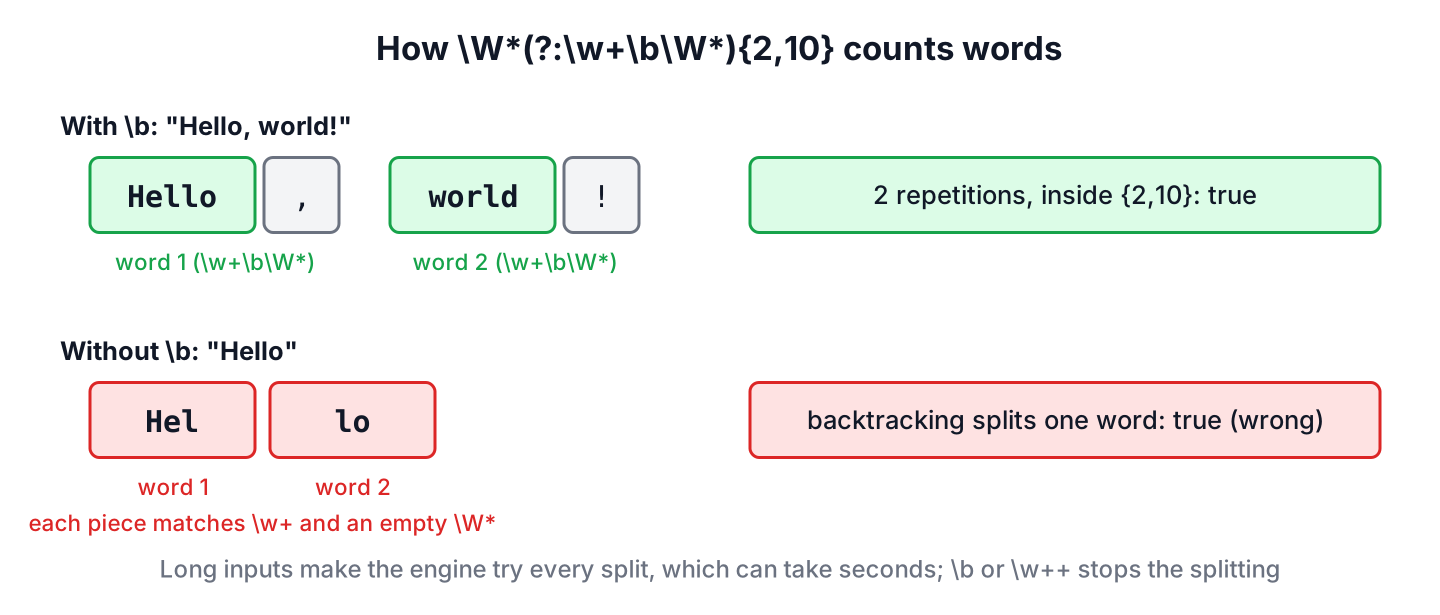
The \b after \w+ looks redundant, because \w+ is greedy and takes the whole word anyway. It is not redundant. When the rest of the pattern fails, the regex engine backtracks, which means it gives characters back and tries \w+ with shorter lengths. Without \b, it can match “Hel” as one word and “lo” as the next, because \W* may match nothing between them.
Without \b, a single word can count as several words, so a minimum check accepts input that is too short.
boolean noBoundary = Pattern.compile("\\W*(?:\\w+\\W*){2,10}").matcher("Hello").matches();       // true, wrong
boolean boundary = Pattern.compile("\\W*(?:\\w+\\b\\W*){2,10}").matcher("Hello").matches();      // false
boolean possessive = Pattern.compile("\\W*(?:\\w++\\W*){2,10}").matcher("Hello").matches();      // false
The third line shows another fix, the possessive quantifier \w++. A possessive quantifier takes as many characters as it can and never gives any back, so a word can never be split.
The same backtracking also makes the pattern slow. When the input has more words than the limit, the engine tries every way to cut the long words into pieces before it reports false. In our test on Java 25, six words of 20 letters plus three short words, checked against a limit of seven, took between half a second and one second without \b. With 30-letter words, the same check took two to four seconds, whereas the pattern with \b finished in under a millisecond every time.
Say a feedback form limits the summary to seven words, and a user pastes a paragraph of long words into it. With the pattern that has no \b, that one request keeps a server thread busy for seconds, and a few such requests in parallel slow down the whole app. This kind of attack is called regular expression denial of service (ReDoS).
3. Words With Accents, Apostrophes and Hyphens
By default, \w matches only ASCII letters. A word such as “cafe” with an accented “e” counts as the word “caf” plus a separator, and “creme” with a grave accent counts as two words. The inline flag (?U) turns on Pattern.UNICODE_CHARACTER_CLASS, which makes \w, \W and \b follow Unicode rules.
String coffee = "caf\u00e9 cr\u00e8me";

boolean ascii = Pattern.compile("\\W*(?:\\w+\\b\\W*){1,2}").matcher(coffee).matches();         // false, 3 words
boolean unicode = Pattern.compile("(?U)\\W*(?:\\w+\\b\\W*){1,2}").matcher(coffee).matches();   // true, 2 words
Apostrophes and hyphens are a different decision. With \w+, “don’t” is two words and “well-known” is two words, whereas a word counter in a text editor counts each as one word. The right rule depends on the form.
- To count everything between spaces as one word, we use \S (any non-whitespace character) in place of \w, as in section 4.
- To count only letters and digits, but keep “don’t” and “well-known” together, we define the word ourselves, as in section 5.
long wordChars = Pattern.compile("\\w+").matcher("don't stop well-known").results().count();   // 5
long tokens = Pattern.compile("\\S+").matcher("don't stop well-known").results().count();      // 3
4. Counting Whitespace-Separated Words
Many word limits in real forms mean “pieces of text separated by spaces”. The pattern \s*(?:\S++\s*){1,3} accepts one to three such pieces. A piece can contain any punctuation, so “C++” and “don’t” are single words, and the possessive \S++ does the job of \b by keeping one piece from being split into several.
Pattern tokens1to3 = Pattern.compile("\\s*(?:\\S++\\s*){1,3}");

boolean hello = tokens1to3.matcher("Hello").matches();                    // true
boolean dont = tokens1to3.matcher("don't stop now").matches();            // true
boolean tips = tokens1to3.matcher("well-known C++ tips").matches();       // true
boolean four = tokens1to3.matcher("a b c d").matches();                   // false
boolean blank = tokens1to3.matcher("   ").matches();                      // false
boolean lines = tokens1to3.matcher("first\nsecond\tthird").matches();     // true
The last line shows that \s covers spaces, tabs and line breaks, so a text with several lines is counted the same way as a text on one line.
5. Counting Words in Java Code
When the form also has to show the number, such as “120 of 100 words”, we count the words and compare the result with the limit. Matcher.results() returns a stream of all matches, so the count is one line, and the result depends on how the regex defines a word.
String sentence = "don't stop well-known, 42 caf\u00e9!";

long ascii = Pattern.compile("\\w+").matcher(sentence).results().count();         // 7
long unicode = Pattern.compile("(?U)\\w+").matcher(sentence).results().count();   // 7
long tokens = Pattern.compile("\\S+").matcher(sentence).results().count();        // 5
long words = WordLimits.WORD.matcher(sentence).results().count();                 // 5
The pattern WORD in the class WordLimits reads as letters or digits in any language (\p{L} and \p{N}), optionally followed by groups that start with an apostrophe or a hyphen and continue with more letters or digits. It counts the sentence the way a person would, and with this count, the limit check is a plain comparison.
final class WordLimits {
    static final Pattern WORD = Pattern.compile("[\\p{L}\\p{N}]+(?:['-][\\p{L}\\p{N}]+)*");

    static boolean isWithinWordLimit(String text, int min, int max) {
        if (text == null) {
            return min <= 0;
        }
        long words = WORD.matcher(text).results().count();
        return words >= min && words <= max;
    }

    static long countWithBreakIterator(String text, Locale locale) {
        BreakIterator it = BreakIterator.getWordInstance(locale);
        it.setText(text);
        long count = 0;
        for (int start = it.first(), end = it.next(); end != BreakIterator.DONE; start = end, end = it.next()) {
            if (Character.isLetterOrDigit(text.codePointAt(start))) {
                count++;
            }
        }
        return count;
    }
}
String sentence = "don't stop well-known, 42 caf\u00e9!";
boolean fits = WordLimits.isWithinWordLimit(sentence, 1, 5); // true
boolean tooMany = WordLimits.isWithinWordLimit(sentence, 1, 4); // false
long natural = WordLimits.countWithBreakIterator(sentence, Locale.ENGLISH); // 5For natural language text, the JDK class java.text.BreakIterator finds word boundaries with locale-aware rules. Counting the segments that start with a letter or digit gives 5 for the sentence, the same as the pattern WORD. The example project contains both methods with tests.
A common mistake is counting words with split() and the regex \s+. Splitting an empty string returns one empty element, and leading spaces produce an empty first element, as the guide to String.split() also shows.
int empty = "".split("\\s+").length;                 // 1
int leading = " a b".split("\\s+").length;           // 3
int stripped = " a b".strip().split("\\s+").length;  // 2
6. Word Limit Regex FAQs
Word limits in forms lead to these follow-up questions.
6.1. How Do We Limit the Number of Words to a Maximum of N?
We set the lower bound of the quantifier to 0 or 1 and the upper bound to N, for example \W*(?:\w+\b\W*){0,50} for at most 50 words, and call matches().
6.2. Why Does My Word Limit Regex Hang on Long Input?
The pattern lets the engine split one word into several, so it tries a huge number of combinations before it fails. Adding \b after \w+, or using the possessive \w++, removes the extra combinations, as section 2 shows.
6.3. How Do We Truncate a Text After N Words?
We capture the first N words with a group and replace the whole match with the group. The pattern uses (?s) so that .* also covers line breaks.
String preview = "Fresh basil makes the best pesto in summer".replaceFirst("(?s)^(\\W*(?:\\w+\\b\\W*?){3}).*", "$1"); // "Fresh basil makes"6.4. Is a Regex or split() Better for Counting Words?
Counting regex matches with Matcher.results().count() is safer, because it has no empty-element problems and the regex defines what a word is. The method split() needs strip() and a check for empty input first.
6.5. Does \w Match Letters in Other Languages?
Not by default, because \w is [a-zA-Z0-9_]. With the flag (?U) or Pattern.UNICODE_CHARACTER_CLASS, it matches letters and digits of every script.
7. Conclusion
The pattern \W*(?:\w+\b\W*){MIN,MAX}, checked with matches(), limits input to a range of words. The \b (or a possessive \w++) is part of the solution, because without it one long word can pass as several, and long input can make the check run for seconds.
The flag (?U) makes accented letters count as word characters, and \S++ counts everything between spaces as one word. When the program needs the actual number of words, counting with Matcher.results().count() and comparing it with the limit is clearer than a single pattern.
8. References
- Pattern (Java SE 25 API)
- BreakIterator (Java SE 25 API)
- Possessive Quantifiers (regular-expressions.info)
- Catastrophic Backtracking (regular-expressions.info)
- Regular expression Denial of Service (OWASP)
Happy Learning !!
