
JUnit is the testing framework for Java in which we mark methods with @Test, check results with assertions, and let a build tool or the IDE run every test and report which ones pass or fail. The current release is JUnit 6.1.3, which needs Java 17 or later. JUnit 6 keeps the JUnit 5 programming model and package names, raises the Java baseline and gives all modules one version number, as explained in JUnit 5 vs JUnit 6.
We use JUnit to test a class on its own, such as a price calculation or a validator, and to run the same checks on every build so that a change that breaks the behavior fails the build. Spring Boot, Mockito and Testcontainers all run their tests on top of JUnit.
The following example is a JUnit test for a shopping cart. It adds two items and checks the item count and the total in one test.
@Test
void itemCountSumsQuantities() {
    cart.add("apple", new BigDecimal("0.50"), 4);
    cart.add("bread", new BigDecimal("2.25"), 1);

    assertAll(
            () -> assertEquals(5, cart.itemCount()),                      // 4 apples + 1 bread
            () -> assertEquals(new BigDecimal("4.25"), cart.total()));   // 4 x 0.50 + 2.25
}
[INFO] Running com.howtodoinjava.junit.cart.ShoppingCartTest
[INFO] Tests run: 4, Failures: 0, Errors: 0, Skipped: 0, Time elapsed: 0.105 s -- in com.howtodoinjava.junit.cart.ShoppingCartTestNotice that the method is package-private and returns nothing, and that assertAll() reports both checks even if the first one fails. The examples in this JUnit tutorial run on JUnit 6.1.3 with Java 25, and most of them also compile on JUnit 5.x without changes. We start with the parts JUnit consists of, follow a reading path for beginners, and finish with an annotation table and a list of every JUnit tutorial on the site.
1. JUnit Architecture With the Platform, Jupiter and Vintage
JUnit 4 was one jar, and IDEs and build tools read its internal classes through reflection to find and run tests. A renamed private field inside JUnit could break Eclipse or Maven. JUnit 5 split the framework into separate parts with public APIs, and JUnit 6 keeps that split.
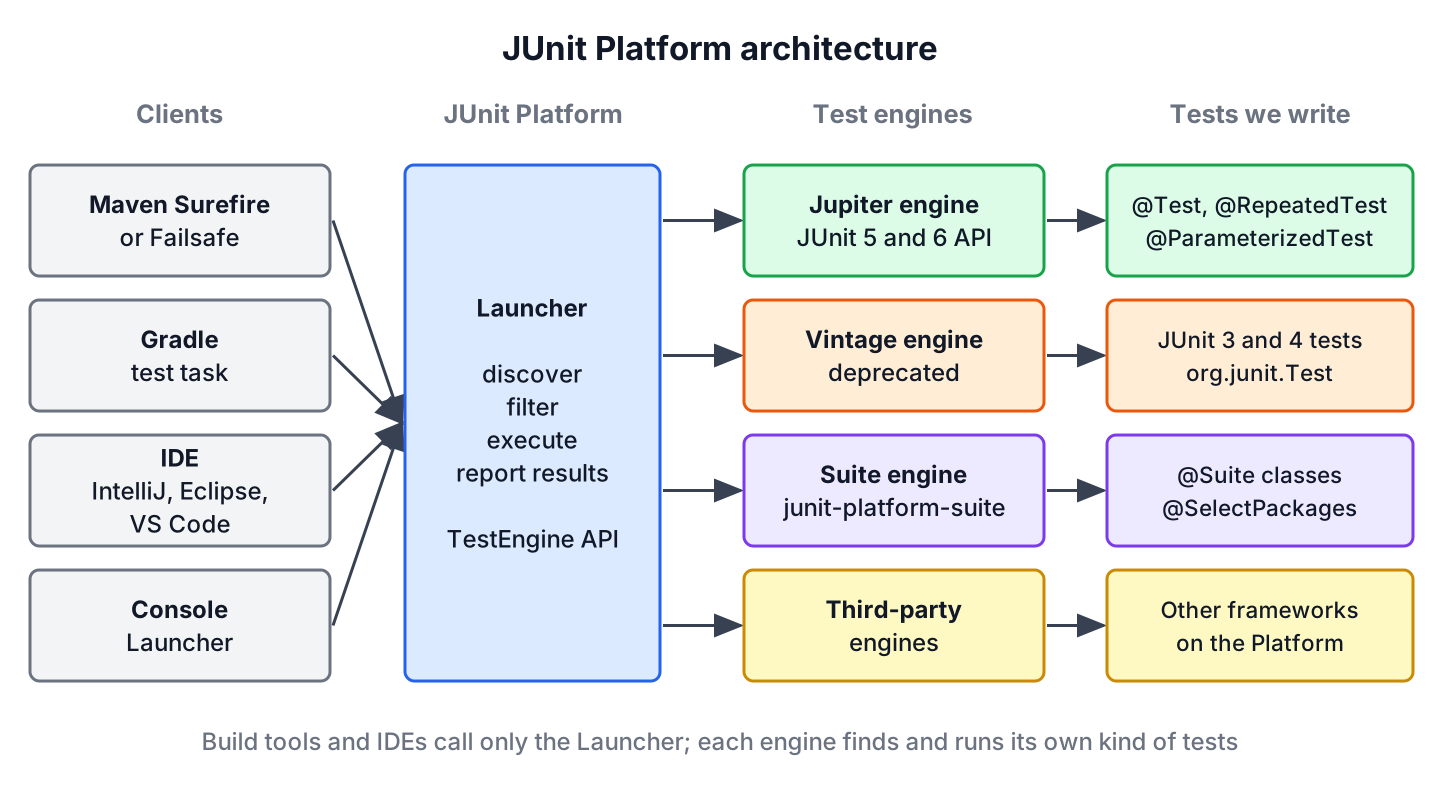
JUnit consists of three projects, and each one has its own job.
- The JUnit Platform launches testing frameworks on the JVM. Its Launcher discovers tests, filters them by class name or tag, runs them through a test engine and reports the results to Maven, Gradle or the IDE. It also defines the TestEngine API that every engine implements.
- JUnit Jupiter is the programming model and the extension model we write tests with (@Test, @BeforeEach, Assertions, @ExtendWith), plus the Jupiter test engine that runs those tests.
- JUnit Vintage is a test engine that runs JUnit 3 and JUnit 4 tests on the Platform. It needs JUnit 4.12 or later on the class path. In JUnit 6 the Vintage engine is deprecated and meant only for the time of a migration.
Because the build tool talks only to the Launcher, one mvn test run can execute Jupiter tests, old JUnit 4 tests and tests of other frameworks side by side. JUnit also ships the suite engine from junit-platform-suite, which runs @Suite classes, and other projects such as Cucumber plug their own engines into the same Platform.
In a Maven or Gradle build, these parts arrive as separate artifacts. Most projects need only the BOM and junit-jupiter.
| Artifact | Contains | When we add it |
|---|---|---|
| org.junit:junit-bom | Versions of all JUnit artifacts | Always, imported once, so every JUnit module stays on 6.1.3 |
| org.junit.jupiter:junit-jupiter | Jupiter API, parameterized tests and the Jupiter engine | Always, with test scope |
| org.junit.platform:junit-platform-launcher | The Launcher API | When an IDE or Gradle asks for it, or to run tests from Java code |
| org.junit.platform:junit-platform-suite | @Suite annotations and the suite engine | For test suites |
| org.junit.vintage:junit-vintage-engine | The deprecated Vintage engine | Only while JUnit 4 tests still exist |
1.1. Terms Used in JUnit Reports and Docs
The JUnit user guide and the IDE test views use a few terms with a precise meaning. Knowing them makes failure reports easier to read, because a report shows the tests as a tree of containers and tests. The definitions are the same in JUnit 5 and JUnit 6.
| Term | Meaning |
|---|---|
| Container | A node in the test tree that contains other containers or tests, for example a test class |
| Test | A node in the test tree that checks expected behavior when it runs, for example a @Test method |
| Lifecycle method | A method annotated or meta-annotated with @BeforeAll, @AfterAll, @BeforeEach or @AfterEach |
| Test class | A top-level class, static member class or @Nested class with at least one test method. It must not be abstract and must have a single constructor. Java records work too |
| Test method | An instance method annotated with @Test, @RepeatedTest, @ParameterizedTest, @TestFactory or @TestTemplate |
| Test engine | An implementation of TestEngine that discovers and runs one kind of tests, such as Jupiter or Vintage |
Test classes, test methods and lifecycle methods do not have to be public, but they must not be private. Test methods and lifecycle methods must not return a value, except @TestFactory methods, which return the dynamic tests.
1.2. What JUnit 6 Changed in the Architecture
The three-part design is the same as in JUnit 5, but the JUnit 6.0 release changed a few things around it that show up in a build file.
- All modules share one version number. JUnit 5 used Platform 1.x next to Jupiter 5.x, whereas JUnit 6 uses 6.x for everything.
- JUnit needs Java 17 or later at runtime. JUnit 5 ran on Java 8.
- The junit-platform-runner module is gone, so @RunWith(JUnitPlatform.class) no longer works and suites use @Suite.
- Maven Surefire and Failsafe below 3.0.0 are not supported.
- The Vintage engine is deprecated and reports an INFO-level discovery issue when it finds JUnit 4 test classes.
- The JUnit API carries JSpecify nullability annotations, and @CsvSource parsing moved to the FastCSV library.
2. A Reading Path Through This JUnit Tutorial
A developer new to JUnit learns fastest by writing one passing test first, learning the build setup next, and only after that the annotations that control how tests run. The order below follows that idea. Each step links one tutorial with a runnable Maven project.
- Write and run the first tests in getting started with JUnit, including how to read a failed test report.
- Add JUnit to the build with the JUnit Maven dependency or the JUnit Gradle dependency, and learn to run one class or one method.
- Check results with the JUnit assertions, and test error cases with assertThrows().
- Learn the order in which JUnit calls the constructor, the lifecycle methods and the extensions in the JUnit test lifecycle.
- Pick the annotations a project needs from the table in section 3, for example parameterized tests, tags and timeouts.
- Measure which lines the tests cover with JaCoCo code coverage.
- Add mocks and real databases with the libraries in section 5.
Say a team writes its first tests for an order service. Steps 1 to 4 are enough for the first week, because they cover a working build, assertions and setup code. Parameterized tests and coverage limits pay off once the test suite grows past a few dozen classes.
3. JUnit Annotations and Their Tutorials
All Jupiter annotations live in org.junit.jupiter.api and its subpackages, in JUnit 5 and JUnit 6 alike, so the table applies to both versions. Each row names what the annotation does and links the tutorial that covers it with examples.
| Annotation | What it does | Tutorial |
|---|---|---|
| @Test | Marks a method as a test | The reading path in section 2 |
| @BeforeEach | Runs before every test method of the class, for shared setup | JUnit @BeforeEach: Run Setup Code Before Every Test |
| @AfterEach | Runs after every test method, also when the test fails | JUnit @AfterEach: Clean Up After Every Test (Examples) |
| @BeforeAll, @AfterAll | Run once before and after all tests of the class; static by default | JUnit @BeforeAll and @AfterAll: Run Setup Once per Class |
| @TestInstance | Sets the test instance lifecycle; PER_CLASS allows non-static @BeforeAll | Non-Static @BeforeAll and @AfterAll in JUnit (PER_CLASS) |
| @AutoClose | Closes the annotated field after the tests that use it (since JUnit 5.11) | JUnit @AutoClose Annotation: Close Test Resources (Examples) |
| @ParameterizedTest | Runs one method with several sets of arguments from sources such as @CsvSource | JUnit 5 Parameterized Tests: @ParameterizedTest With Examples |
| @RepeatedTest | Runs a test a given number of times | JUnit 5 @RepeatedTest: Repeat Tests With RepetitionInfo |
| @Tag | Labels tests so that Maven, Gradle or a suite can include or exclude them | JUnit 5 @Tag: Filter Tests With Tags and Tag Expressions |
| @Disabled | Skips a test method or a whole test class, with an optional reason | JUnit 5 @Disabled: Skip a Test Method or a Whole Test Class |
| @EnabledOnOs, @EnabledIf and others | Run a test only when a condition holds, such as an OS or a system property | JUnit 5 Conditional Test Execution: @EnabledOnOs, @EnabledIf |
| @Timeout | Fails a test or lifecycle method that runs longer than the given duration | JUnit 5 @Timeout Annotation: Time Limits for Slow Tests |
| @TempDir | Injects a temporary directory and deletes it after the test | JUnit 5 @TempDir: Temporary Directories and Files in Tests |
| @TestMethodOrder, @Order | Set the order in which test methods run | JUnit 5 Test Execution Order With @Order and @TestMethodOrder |
| @Suite, @SelectPackages | Group test classes into a suite run by the suite engine | JUnit 5 Test Suites With @Suite: Select, Filter and Run |
A few annotations from the annotation list do not have their own tutorial yet, but they appear in many test classes.
- The annotation @DisplayName sets a readable name that IDEs and reports show instead of the method name.
- The annotation @Nested groups related tests in a non-static inner class.
- The annotation @ExtendWith registers an extension, such as the Mockito or the Spring extension.
- The annotation @TestFactory marks a method that returns dynamic tests built at runtime.
We can also combine annotations into our own composed annotation. For example, an annotation @Fast that is itself annotated with @Tag(“fast”) and @Test marks a method as a test and tags it in one step.
4. All JUnit Tutorials by Topic
The tutorials in the reading path and in the annotation table cover the core of JUnit. The remaining tutorials go deeper into one area each, grouped by the question they answer.
4.1. Assertions, Assumptions and Architecture Tests
Assertions decide whether a test passes, and assumptions decide whether it runs at all. A failed assumption aborts the test, and the report counts it as skipped, not as passed.
| Tutorial | What we learn there |
|---|---|
| JUnit 5 Assumptions: assumeTrue, assumeFalse, assumingThat | How assumeTrue(), assumeFalse() and assumingThat() skip tests when the environment is not ready |
| AssertJ Tutorial: Fluent Assertions Cheat Sheet for JUnit 6 | Fluent assertions with AssertJ as an alternative to the JUnit Assertions class |
| ArchUnit Tutorial: Test Java Architecture with JUnit 6 | Checking package dependencies and layering rules of a Java app with ArchUnit tests |
4.2. Build Tools, IDEs and Test Reports
A CI server reads test results from report files, not from the console. Surefire writes XML reports by default, and an HTML report needs one extra plugin.
| Tutorial | What we learn there |
|---|---|
| JUnit HTML Report With Maven Surefire Report and Gradle | Creating an HTML report from Surefire results with Maven or Gradle |
| JUnit XML Report: Surefire and Open Test Reporting Formats | The legacy Surefire XML format and the Open Test Reporting XML format |
| Run JUnit Tests in Eclipse: Shortcuts, JUnit View, Fixes | Running, debugging and creating tests in Eclipse IDE |
4.3. JUnit Versions and Migration
Many projects still contain JUnit 4 tests. They can run next to Jupiter tests through the Vintage engine while the team migrates them class by class.
| Tutorial | What we learn there |
|---|---|
| JUnit 5 vs JUnit 4: Differences and Migration Guide | The same test in both versions, an annotation mapping table and an OpenRewrite migration |
| JUnit 6 Nullability with JSpecify: @Nullable and @NullMarked | JSpecify @Nullable and @NullMarked in the JUnit 6 API and in our own code |
4.4. Running Tests From Java Code and Listening to Results
Tools such as custom test runners or dashboards use the Platform APIs instead of a build tool. The Launcher API replaced the JUnit 4 class JUnitCore.
| Tutorial | What we learn there |
|---|---|
| JUnitCore and Launcher API: Run JUnit Tests from Java Code | Running JUnit 4 tests with JUnitCore and JUnit 6 tests with the Launcher API |
| JUnit Test Listener: TestExecutionListener and RunListener | Reacting to test events with a TestExecutionListener, a TestWatcher or a JUnit 4 RunListener |
4.5. JUnit in Spring Boot Apps
Spring Boot manages the JUnit version through its dependency management, so a Spring Boot project does not declare the JUnit version itself. Spring’s test support runs as a JUnit extension.
| Tutorial | What we learn there |
|---|---|
| JUnit Version with Spring Boot 4: Check and Override It | Which JUnit version Spring Boot 4.1.1 brings and how to override it |
| Test Spring Security Authentication with JUnit and MockMvc | Testing login, roles, 401 and 403 responses with Spring Security test support |
5. Related Testing Tutorials
JUnit runs the tests, but real projects add libraries for mocks, HTTP calls and databases. These libraries all run on the JUnit Platform, so the setup from this tutorial stays the same.
- Mockito tutorial creates mock objects for the dependencies of the class under test.
- Spring Boot testing covers @SpringBootTest and the test slices.
- Testcontainers with JUnit and Spring Boot starts a real database in Docker for integration tests.
- REST Assured tutorial tests REST APIs over HTTP.
- WireMock stubs external HTTP services in tests.
- TestNG tutorials cover the other popular Java testing framework, which does not use the JUnit Platform by default.
6. JUnit Tutorial FAQs
Readers who start with JUnit today mostly ask which version to learn and what happens to existing JUnit 4 and JUnit 5 tests.
6.1. Should We Learn JUnit 5 or JUnit 6?
JUnit 6, if the project runs on Java 17 or later. The test code is almost the same, because JUnit 6 keeps the org.junit.jupiter.api package and its annotations, so everything learned on one version applies to the other. Projects still on Java 8 or 11 stay on JUnit 5 until they upgrade the JDK.
6.2. Do JUnit 5 Tests Run on JUnit 6 Without Changes?
In most cases yes, after changing the BOM version to 6.1.3. Code fails to compile only where it uses an API removed in 6.0, such as MethodOrderer.Alphanumeric (use MethodOrderer.MethodName) or the @RunWith(JUnitPlatform.class) runner (use @Suite). The build also needs Maven Surefire 3.0.0 or later.
6.3. Can JUnit 4 and JUnit 6 Tests Run in the Same Project?
Yes. We add junit-vintage-engine next to junit-jupiter, and keep the junit:junit 4.13.2 dependency. The Platform runs both engines in one build. The Vintage engine is deprecated in JUnit 6, so we treat it as a bridge and move the JUnit 4 classes to Jupiter over time.
6.4. Is JUnit Only for Unit Tests?
No. JUnit runs any test written as a Java method. Spring Boot integration tests, Testcontainers database tests and REST API tests all run as JUnit tests. In a Maven build, we run unit tests with Surefire in the test phase and slower integration tests with Failsafe in the integration-test phase.
7. Conclusion
JUnit consists of the Platform, which IDEs and build tools call, the Jupiter API and engine, which we write tests with, and the deprecated Vintage engine for JUnit 4 tests. JUnit 6.1.3 is the current release and needs Java 17. The Jupiter API is the same as in JUnit 5, so most JUnit 5 tests need no change beyond the version number.
A beginner gets the most out of the reading path in section 2, from the first test to code coverage. After that, the annotation table and the topic groups point to a tutorial for each feature as the project needs it.
8. References
- JUnit 6.1.3 User Guide – Overview
- JUnit 6.1.3 User Guide – Definitions
- JUnit 6.1.3 User Guide – Annotations
- JUnit 6.1.3 User Guide – Test Engines
- JUnit 6.1.3 API Javadoc
- JUnit 6.0.0 Release Notes
Happy Learning !!

hi can you explain me how to use junit with spring i have many doubt in it
for example 1) how to configure application context for testing .. and many more
Thanks for writing this blog post, it’s short and to the point!
As a test writer, you may not feel that much different but when you will go for its extension or try to develop any IDE plugin, you will praise it.
I have to say that, looking into the JUnit5 source code, I think it’s a lot more complex than JUnit4, writing an extension for JUnit5 that changes how test methods are executed seems next to impossible to me (whereas in JUnit4 that’s trivial)!
I want to be able to run every test method on a remote machine. In JUnit4, I would implement a
Runnerand be done in 5 minutes. In JUnit5, it seems I have to implement a full-blownTestEngine?! TheExtensionmechanism allows post processing a test instance, but not replacing it entirely (or at least overriding the methods).Any ideas on how to proceed other than just sticking with JUnit4?