
JaCoCo code coverage measures which lines and branches of our production code ran during the JUnit tests, and the JaCoCo Maven plugin attaches its agent to the test JVM, writes an HTML report to target/site/jacoco and can fail the build when coverage drops below a limit. JaCoCo is the standard open-source coverage tool for Java, and CI servers and SonarQube read its XML report.
The coverage report points us to the code that no test touches, such as an else branch nobody thought of. The coverage check in the pipeline fails a pull request that lowers the coverage of a module below the agreed limit.
The following example adds JaCoCo 0.8.15 to a Maven project with JUnit 6.1.3 tests on Java 25.
<plugin>
  <groupId>org.jacoco</groupId>
  <artifactId>jacoco-maven-plugin</artifactId>
  <version>0.8.15</version>
  <executions>
    <execution>
      <id>prepare-agent</id>
      <goals>
        <goal>prepare-agent</goal>        <!-- adds the agent to the Surefire argLine -->
      </goals>
    </execution>
    <execution>
      <id>report</id>
      <phase>test</phase>
      <goals>
        <goal>report</goal>               <!-- writes target/site/jacoco/index.html -->
      </goals>
    </execution>
  </executions>
</plugin>
[INFO] Tests run: 6, Failures: 0, Errors: 0, Skipped: 0
[INFO] --- jacoco:0.8.15:report (report) @ junit-jacoco-test-coverage ---
[INFO] Analyzed bundle 'junit-jacoco-test-coverage' with 1 classesNotice that the JUnit setup does not change, because JaCoCo works on the test JVM, not on JUnit. The following sections explain how the agent gets into the test run, read a real report line by line, add a coverage rule that fails the build, exclude classes, and repeat the setup in Gradle.
1. How JaCoCo Measures Coverage in a Maven Build
JaCoCo instruments the bytecode of our classes when the test JVM loads them. A Java agent, passed to the JVM with -javaagent, adds probes to each class, and every probe that runs marks its code as executed. When the test JVM exits, the agent writes the collected data to target/jacoco.exec. JaCoCo does not change the class files on disk.
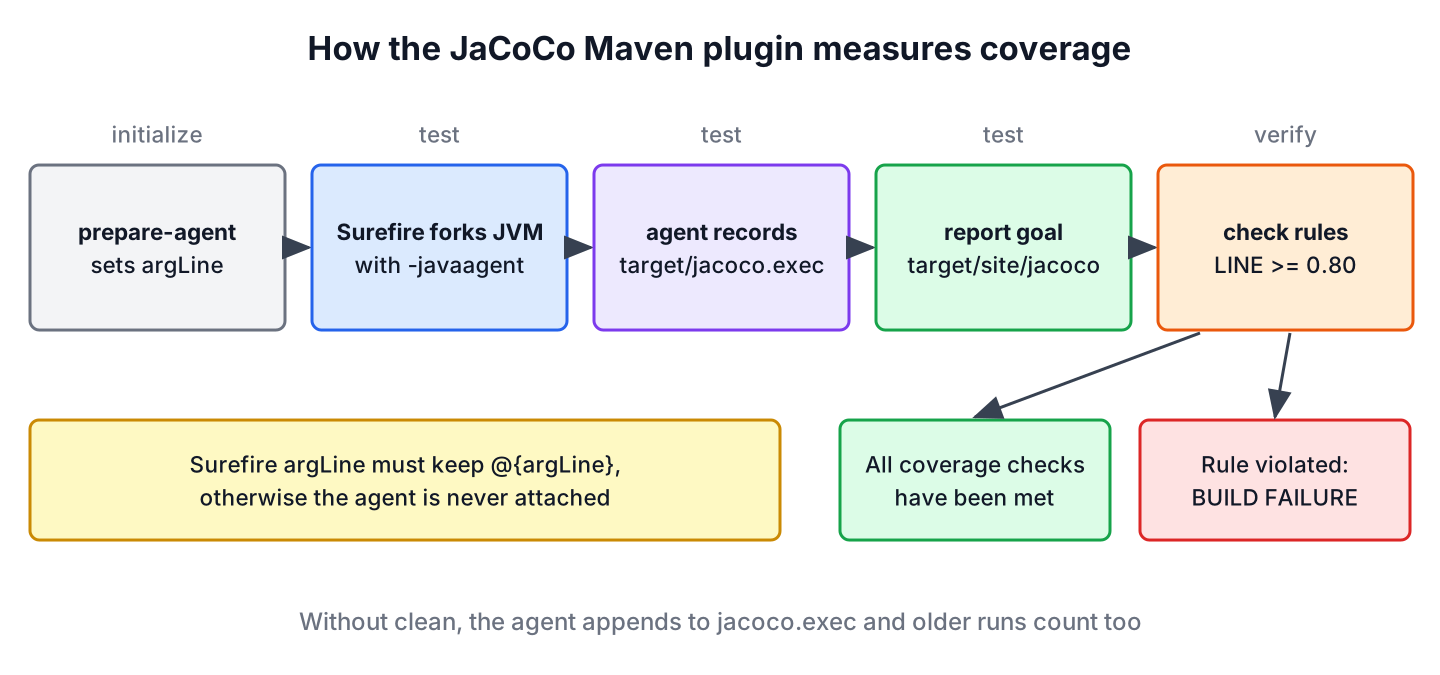
- The prepare-agent goal runs in the initialize phase and stores the -javaagent option in the Maven property argLine.
- Surefire reads argLine when it forks the test JVM, so the agent runs during mvn test.
- The report goal reads jacoco.exec together with the compiled classes and the sources and writes HTML, XML and CSV reports. Its default phase is verify, and our example binds it to test so that mvn test already writes the report.
- The check goal compares the data with our rules in the verify phase.
In the log, the prepare-agent goal runs before compilation, and its next line prints the full argLine value with the agent jar, the output file and the excluded classes.
[INFO] --- jacoco:0.8.15:prepare-agent (prepare-agent) @ junit-jacoco-test-coverage ---1.1. Keeping the Agent When Surefire Has Its Own argLine
Many projects set their own JVM options for tests, such as a time zone or more memory. If the Surefire argLine configuration replaces the property, the agent never starts and the report goal prints “Skipping JaCoCo execution due to missing execution data file”. The fix is the late property reference @{argLine}, which Surefire resolves after JaCoCo has set the property.
<plugin>
  <groupId>org.apache.maven.plugins</groupId>
  <artifactId>maven-surefire-plugin</artifactId>
  <version>3.6.0</version>
  <configuration>
    <argLine>@{argLine} -Duser.timezone=UTC</argLine>
  </configuration>
</plugin>
The build stays green in this case. With an argLine that drops the agent, the tests pass, both JaCoCo goals skip their work, and even the coverage rule from section 3 does not run.
[INFO] --- jacoco:0.8.15:report (report) @ junit-jacoco-test-coverage ---
[INFO] Skipping JaCoCo execution due to missing execution data file.
[INFO] --- jacoco:0.8.15:check (check) @ junit-jacoco-test-coverage ---
[INFO] BUILD SUCCESS
Write @{argLine} with the at sign, because the usual Maven property syntax is resolved too early, before prepare-agent has run. The same rule applies to the Failsafe plugin when JaCoCo should measure integration tests.
2. A Coverage Report for an Invoice Calculator
The example project has one production class, InvoiceCalculator. It gives first orders 10% off and orders from 500 dollars 5% off, rejects negative amounts and builds a label for the due date. A small InvoiceApplication class with a main() method prints a sample total.
public String dueLabel(int daysUntilDue) {
  if (daysUntilDue < 0) {
    return "OVERDUE";
  } else if (daysUntilDue == 0) {
    return "DUE TODAY";
  }
  return "DUE IN " + daysUntilDue + " DAYS";
}
Two test classes cover the calculator. InvoiceCalculatorTest checks the first-order discount and an overdue invoice, and InvoiceEdgeCasesTest checks the bulk discount on both sides of 500 dollars, the negative amount and an invoice due today.
@ParameterizedTest
@CsvSource({"640.00, 608.00", "499.99, 499.99"})
void bulkDiscountStartsAtFiveHundred(BigDecimal amount, BigDecimal expected) {
  assertEquals(expected, calculator.total(amount, false));
}

@Test
void dueToday() {
  assertEquals("DUE TODAY", calculator.dueLabel(0));
}
We run mvn clean verify and open target/site/jacoco/index.html in a browser. The first table of the page sums up the whole module.
Element |Missed Instructions |Cov. |Missed Branches |Cov. |Missed |Cxty |Missed |Lines |Missed |Methods |Missed |Classes |
Total |3 of 64 |95% |1 of 10 |90% |1 |9 |1 |16 |0 |4 |0 |1 |
2.1. Reading the Counters
JaCoCo counts coverage in several units, and the coverage counters page defines each one. The numbers from the run above read as follows.
| Counter | Our result | What it counts |
|---|---|---|
| Instructions | 61 of 64 covered (95%) | Java bytecode instructions; the finest unit, independent of formatting |
| Branches | 9 of 10 covered (90%) | Both outcomes of each if, switch case and boolean operator |
| Lines | 15 of 16 covered | Source lines with at least one executed instruction |
| Cyclomatic complexity (Cxty) | 9, with 1 path missed | The number of independent paths through a method, an indication of how many tests full branch coverage needs |
| Methods | 4 of 4 covered | Methods with at least one executed instruction |
| Classes | 1 of 1 covered | Classes with at least one executed method |
Notice that the report counts one class, although the project has two. The InvoiceApplication class is excluded, which we explain in section 4.
2.2. Line Colors in the Source View
Clicking through the package to InvoiceCalculator.java opens the source with colored lines. Green means fully covered, yellow means some branches were missed, and red means the line never ran. Lines with a branch also get a diamond in the margin, and hovering over such a line shows the branch count. The page of our run marks the lines of dueLabel() like this.
| Line | Code | Color | Hover text |
|---|---|---|---|
| 28 | if (daysUntilDue < 0) { | Green | All 2 branches covered. |
| 30 | } else if (daysUntilDue == 0) { | Yellow | 1 of 2 branches missed. |
| 31 | return “DUE TODAY”; | Green | |
| 33 | return “DUE IN ” + daysUntilDue + ” DAYS”; | Red |
No test calls dueLabel() with a positive number of days, so the most common case of the method is untested. The report shows such a line, and a test with dueLabel(14) would bring lines and branches to 100%.
3. Failing the Build Below a Coverage Limit
A report that nobody opens does not protect anything. The check goal turns coverage into a build rule. Each rule names an element, such as the whole module (BUNDLE), a PACKAGE or a CLASS, and one or more limits on a counter.
<execution>
  <id>check</id>
  <goals>
    <goal>check</goal>
  </goals>
  <configuration>
    <rules>
      <rule>
        <element>BUNDLE</element>
        <limits>
          <limit>
            <counter>LINE</counter>
            <value>COVEREDRATIO</value>
            <minimum>0.80</minimum>
          </limit>
          <limit>
            <counter>BRANCH</counter>
            <value>COVEREDRATIO</value>
            <minimum>0.70</minimum>
          </limit>
        </limits>
      </rule>
    </rules>
  </configuration>
</execution>
With both test classes, the module has 94% line coverage and 90% branch coverage, and the check passes.
[INFO] --- jacoco:0.8.15:check (check) @ junit-jacoco-test-coverage ---
[INFO] All coverage checks have been met.
[INFO] BUILD SUCCESS
Say a developer deletes InvoiceEdgeCasesTest because it is “slow”. We simulate that with mvn clean verify -Dtest=InvoiceCalculatorTest, and the check fails the build with the ratios it measured.
[WARNING] Rule violated for bundle junit-jacoco-test-coverage: lines covered ratio is 0.56, but expected minimum is 0.80
[WARNING] Rule violated for bundle junit-jacoco-test-coverage: branches covered ratio is 0.30, but expected minimum is 0.70
[INFO] BUILD FAILURE
Notice the clean in the command. The agent appends to an existing jacoco.exec by default, so without clean, the data of the earlier full run is still in the file and the same command reported “All coverage checks have been met”. A CI job that reuses its workspace without clean has the same problem, so the CI build command always starts with clean.
We pick limits that the module meets today and raise them over time. A limit of 100% leads to tests written for the number, such as tests for getters, and a limit set far below the current coverage protects nothing.
4. Excluding Classes From JaCoCo Coverage
Some classes have no logic worth testing, such as a main() class, generated code or configuration classes. Counting them lowers the numbers without telling us anything. JaCoCo excludes classes by the path of the class file, with * and ** wildcards, and a plugin-level configuration applies the list to all goals.
<configuration>
  <excludes>
    <exclude>com/howtodoinjava/junit/invoices/InvoiceApplication.class</exclude>
  </excludes>
</configuration>
Without the exclusion, the four untested lines of InvoiceApplication count against the module. The line ratio drops from 0.94 to 0.75, and the same rule fails the build.
[INFO] Analyzed bundle 'junit-jacoco-test-coverage' with 2 classes
[WARNING] Rule violated for bundle junit-jacoco-test-coverage: lines covered ratio is 0.75, but expected minimum is 0.80
The CSV report in target/site/jacoco/jacoco.csv shows the numbers per class, which helps to decide what to exclude. The class InvoiceApplication has 0 of 4 lines covered.
GROUP,PACKAGE,CLASS,INSTRUCTION_MISSED,INSTRUCTION_COVERED,BRANCH_MISSED,BRANCH_COVERED,LINE_MISSED,LINE_COVERED,COMPLEXITY_MISSED,COMPLEXITY_COVERED,METHOD_MISSED,METHOD_COVERED
junit-jacoco-test-coverage,com.howtodoinjava.junit.invoices,InvoiceCalculator,3,61,1,9,1,15,1,8,0,4
junit-jacoco-test-coverage,com.howtodoinjava.junit.invoices,InvoiceApplication,17,0,0,0,4,0,2,0,2,0
Exclusions are a decision of the team, not a way to pass the check. A class with business logic stays in the report even when its coverage is low, and a disabled test does not count as coverage either.
5. JaCoCo Code Coverage With Gradle
Gradle ships a JaCoCo plugin. It attaches the agent to every Test task, so the setup needs only the report and the rule. The same project also builds with Gradle 9.8.1.
plugins {
    java
    jacoco
}

jacoco {
    toolVersion = "0.8.15"
}

tasks.test {
    useJUnitPlatform()
    finalizedBy(tasks.jacocoTestReport)
}

tasks.jacocoTestCoverageVerification {
    violationRules {
        rule {
            limit {
                counter = "LINE"
                minimum = "0.80".toBigDecimal()
            }
        }
    }
}

tasks.check {
    dependsOn(tasks.jacocoTestCoverageVerification)
}
The JUnit dependencies are the usual three lines from JUnit Gradle dependency. The command ./gradlew check runs the tests, the coverage rule and the report, and the HTML report lands in build/reports/jacoco/test/html with the same numbers as the Maven run.
> Task :test
> Task :jacocoTestCoverageVerification
> Task :check
> Task :jacocoTestReport
Total |3 of 64 |95% |1 of 10 |90% |1 |9 |1 |16 |0 |4 |0 |1 |Gradle excludes classes through the classDirectories of the report and the verification task. The build file in the example project shows the fileTree exclude for InvoiceApplication.
6. JaCoCo Code Coverage FAQs
Missing execution data and the choice of a coverage limit cause most of the JaCoCo questions in Maven and Gradle builds.
6.1. Why Does JaCoCo Say Skipping JaCoCo Execution Due to Missing Execution Data File?
The agent did not run, so jacoco.exec does not exist. The usual causes are a Surefire argLine without @{argLine}, a prepare-agent execution that is missing, or tests that were skipped with -DskipTests. The fix for the first cause is in section 1.1.
6.2. Does JaCoCo Work With Java 25?
Yes. JaCoCo 0.8.15 reads Java 25 class files, and our example runs on JDK 25. Older versions such as 0.8.7 fail on class files that are newer than they know, so we keep the plugin version current when we upgrade the JDK.
6.3. Should We Aim for 100% Code Coverage?
No. Coverage shows which code ran, not whether the tests check the right results. A test without assertions still produces coverage. We set a module limit that the code meets today and review the uncovered lines of each change instead of chasing the total.
6.4. Can JaCoCo Measure Integration Tests?
Yes. The prepare-agent-integration goal sets the agent for Failsafe and writes jacoco-it.exec, and the report-integration goal reads it. The merge goal combines unit and integration data into one file. The JUnit Maven dependency article sets up Failsafe.
6.5. Where Is the JaCoCo XML Report for SonarQube?
The report goal writes target/site/jacoco/jacoco.xml next to the HTML and CSV files, and Gradle writes build/reports/jacoco/test/jacocoTestReport.xml when xml.required is true. SonarQube and most CI coverage plugins import that file.
7. Conclusion
JaCoCo measures coverage with an agent in the test JVM. In Maven, prepare-agent puts the agent into Surefire’s argLine, report turns jacoco.exec into HTML, XML and CSV, and check fails the build when a rule is not met. A custom Surefire argLine must keep @{argLine}, or the agent never runs.
The report is most useful at line level, where a yellow or red line points to a missing test case, as the unhandled due-date branch of our invoice calculator showed. We exclude classes without logic, start with limits the module meets and raise them over time. The JUnit tutorial covers the tests that produce the coverage.
8. References
- JaCoCo Maven Plugin
- jacoco:prepare-agent
- jacoco:check
- JaCoCo Coverage Counters
- JaCoCo Releases on GitHub
- Gradle 9.8.1 User Manual – The JaCoCo Plugin
- Maven Surefire – surefire:test (argLine)
Happy Learning !!
