
The JUnit @AfterEach annotation marks a method that JUnit runs after every test method in the class, whether the test passed or failed. We use it for cleanup that the next test depends on, such as clearing a static cache, deleting exported files or restoring a JVM setting that a test changed.
The following example clears an app-wide report cache after each test, so the second test does not see the report that the first test stored.
@AfterEach
void clearCache() {
  ReportCache.clear();
  System.out.println("@AfterEach: cache cleared");
}

@Test
void cachesMonthlyReport() {
  ReportCache.put("march", "total 120");
  System.out.println("@Test cachesMonthlyReport: size " + ReportCache.size());
  assertEquals(1, ReportCache.size());          // passes
}

@Test
void cachesYearlyReport() {
  ReportCache.put("2026", "total 1450");
  System.out.println("@Test cachesYearlyReport: size " + ReportCache.size());
  assertEquals(1, ReportCache.size());          // passes, not 2
}
@Test cachesYearlyReport: size 1
@AfterEach: cache cleared
@Test cachesMonthlyReport: size 1
@AfterEach: cache clearedNotice that each test prints size 1, because clearCache() empties the cache between the two tests. JUnit 6.1.3 on Java 25 runs these examples, and @AfterEach has not changed since JUnit 5.
In the rest of the post, we look at the cases where cleanup is needed even though JUnit creates a new test object for every test. After that, we cover the failure cases, the order in class hierarchies and the alternatives such as @TempDir and @AutoClose.
1. How @AfterEach Fits Into the Test Lifecycle
JUnit calls an @AfterEach method after each @Test, @RepeatedTest, @ParameterizedTest, @TestFactory and @TestTemplate method in the current class. Each repetition of a repeated test and each invocation of a parameterized test counts as a separate test, so the cleanup runs once per invocation. The method is the counterpart of @BeforeEach, and it replaces @After from JUnit 4.
JUnit checks the method signature when it discovers the test class.
- Like @BeforeEach, it has a void return type and is never static, because JUnit calls it on the test instance.
- The method can declare parameters such as TestInfo or TestReporter, and JUnit resolves them for the test that has finished.
- A private @AfterEach method still runs in JUnit 6.1.3 with a warning, because private lifecycle methods will be disallowed in a future release.
- Several @AfterEach methods in one class run in a deterministic but intentionally non-obvious order, so we keep cleanup steps that depend on each other in one method.
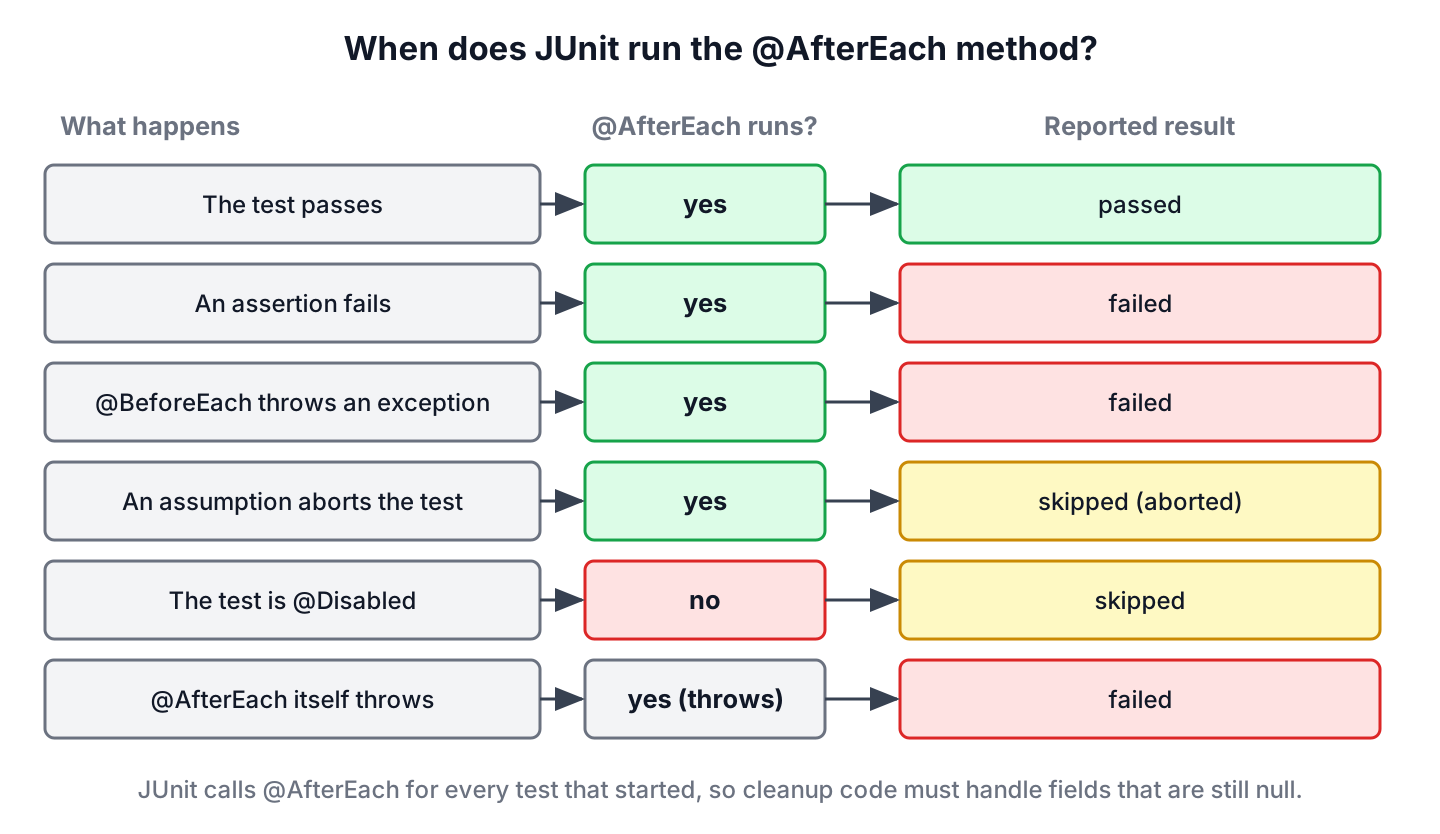
The decision of whether JUnit calls the method depends on how far the test got. A test that started always gets its @AfterEach call, and a disabled test never starts.
1.1. Why Cleanup Is Needed When Every Test Gets a New Instance
JUnit runs every test method on a fresh instance of the test class, as the JUnit test lifecycle shows. Instance fields therefore start fresh in every test, and resetting them in @AfterEach adds nothing. The new instance does not reset anything that lives outside the test object, so these are the cases that need @AfterEach.
- Static fields and singletons, such as an app-wide cache or a registry.
- JVM-wide settings, such as Locale.setDefault(), TimeZone.setDefault() and system properties.
- Files and folders written to a fixed location instead of a temporary directory.
- Rows in a shared test database, messages in an embedded broker, or stubs registered on a mock server.
The class NoCleanupDemo has the same two tests as the intro example but no @AfterEach method. The cache is static, so the second test sees two reports and fails.
@Test cachesYearlyReport: size 1
@Test cachesMonthlyReport: size 2
[ERROR] Tests run: 2, Failures: 1, Errors: 0, Skipped: 0, Time elapsed: 0.126 s <<< FAILURE! -- in com.howtodoinjava.junit.aftereach.demo.NoCleanupDemo
[ERROR] com.howtodoinjava.junit.aftereach.demo.NoCleanupDemo.cachesMonthlyReport -- Time elapsed: 0.029 s <<< FAILURE!
org.opentest4j.AssertionFailedError: expected: <1> but was: <2>
A test that passes alone and fails in the full run is the typical sign of missing cleanup. The result depends on the order in which JUnit runs the methods, so the failure can appear on a build server and not in the IDE.
2. Restoring a JVM Setting After Each Test
Say an invoicing app formats amounts with the default locale of the JVM, and one test checks the German format while another checks the US format. Each test calls Locale.setDefault(), which changes the setting for the whole JVM, including every test class that runs later in the same Maven fork. So we save the original value in @BeforeEach and put it back in @AfterEach.
Locale originalLocale;

@BeforeEach
void saveLocale() {
  originalLocale = Locale.getDefault();
}

@AfterEach
void restoreLocale() {
  Locale.setDefault(originalLocale);
}

@Test
void formatsGermanAmount() {
  Locale.setDefault(Locale.GERMANY);
  String text = InvoiceFormatter.format(new BigDecimal("1234.5"));
  assertEquals("1.234,50", text);
}

@Test
void formatsUsAmount() {
  Locale.setDefault(Locale.US);
  String text = InvoiceFormatter.format(new BigDecimal("1234.5"));
  assertEquals("1,234.50", text);
}
The same save-and-restore pattern works for TimeZone.setDefault() and for System.setProperty(), where we call System.clearProperty() in @AfterEach when the property did not exist before.
3. @AfterEach When a Test Fails, Aborts or Is Disabled
JUnit calls @AfterEach after a failed assertion too. In FailingTestDemo, the assertion expects two cached reports and finds one, and the cleanup method still prints its line before Surefire reports the failure.
@Test
void cachesReport() {
  ReportCache.put("march", "total 120");
  assertEquals(2, ReportCache.size(), "report count");
}

@AfterEach
void clearCache() {
  ReportCache.clear();
  System.out.println("@AfterEach clearCache() ran, size " + ReportCache.size());
}
@AfterEach clearCache() ran, size 0
[ERROR] Tests run: 1, Failures: 1, Errors: 0, Skipped: 0, Time elapsed: 0.154 s <<< FAILURE! -- in com.howtodoinjava.junit.aftereach.demo.FailingTestDemo
[ERROR] com.howtodoinjava.junit.aftereach.demo.FailingTestDemo.cachesReport -- Time elapsed: 0.094 s <<< FAILURE!
org.opentest4j.AssertionFailedError: report count ==> expected: <2> but was: <1>A test that an assumption aborts has also started, so its @AfterEach method runs. A test marked with @Disabled never starts, and JUnit skips its @BeforeEach and @AfterEach methods as well. The class SkippedTestsDemo has one test of each kind.
@Test
void needsMailServer() {
  assumeTrue(System.getenv("MAIL_HOST") != null, "MAIL_HOST is not set");
  System.out.println("@Test needsMailServer");
}

@Disabled("Report format changes in the next release")
@Test
void exportsPdf() {
  System.out.println("@Test exportsPdf");
}

@AfterEach
void cleanUp(TestInfo testInfo) {
  System.out.println("@AfterEach after " + testInfo.getDisplayName());
}
@AfterEach after needsMailServer()
[WARNING] Tests run: 2, Failures: 0, Errors: 0, Skipped: 2, Time elapsed: 0.202 s -- in com.howtodoinjava.junit.aftereach.demo.SkippedTestsDemoSurefire counts both tests as skipped, but only needsMailServer() printed the cleanup line.
4. An Exception Thrown by @AfterEach
An exception in @AfterEach fails the test, even when the test method itself passed. In FailingCleanupDemo, the test passes and the cleanup method throws IllegalStateException because it cannot delete a report file.
@Test
void cachesReport() {
  ReportCache.put("march", "total 120");
  System.out.println("@Test cachesReport passed");
}

@AfterEach
void deleteReportFile() {
  ReportCache.clear();
  throw new IllegalStateException("Cannot delete report file march.pdf");
}
@Test cachesReport passed
[ERROR] Tests run: 1, Failures: 0, Errors: 1, Skipped: 0, Time elapsed: 0.244 s <<< FAILURE! -- in com.howtodoinjava.junit.aftereach.demo.FailingCleanupDemo
[ERROR] com.howtodoinjava.junit.aftereach.demo.FailingCleanupDemo.cachesReport -- Time elapsed: 0.166 s <<< ERROR!
java.lang.IllegalStateException: Cannot delete report file march.pdfSurefire reports the error under the test name cachesReport, so a red test does not always mean the production code is wrong. We read the stack trace first, and when it points at the cleanup method, the bug is in the test setup. When the test method and @AfterEach both throw, JUnit reports the test exception and adds the cleanup exception to it as a suppressed exception.
org.opentest4j.AssertionFailedError: report count ==> expected: <2> but was: <1>
	at com.howtodoinjava.junit.aftereach.demo.BothFailDemo.cachesReport(BothFailDemo.java:16)
	Suppressed: java.lang.IllegalStateException: Cannot delete report file march.pdf
		at com.howtodoinjava.junit.aftereach.demo.BothFailDemo.deleteReportFile(BothFailDemo.java:21)
Cleanup code also has to cope with a half-finished setup. If @BeforeEach throws before it assigns a field, the field is still null when @AfterEach runs, so we check it before calling methods on it, as the Files.notExists() check in the next section does.
5. @AfterEach in a Superclass and a Subclass
@AfterEach methods are inherited from superclasses and interface default methods, unless the subclass overrides them. JUnit runs the subclass @AfterEach methods first and the superclass @AfterEach methods last, which is the reverse of the @BeforeEach order. For example, an invoicing app writes CSV exports into target/exports, and every export test class extends one base class that deletes the files.
abstract class AbstractExportTest {

  protected static final Path EXPORT_DIR = Path.of("target", "exports");

  protected final InvoiceExporter exporter = new InvoiceExporter(EXPORT_DIR);

  @AfterEach
  void deleteExports() throws IOException {
    if (Files.notExists(EXPORT_DIR)) {
      return;
    }
    try (Stream<Path> files = Files.list(EXPORT_DIR)) {
      for (Path file : files.toList()) {
        Files.delete(file);
      }
    }
    System.out.println("2. AbstractExportTest.deleteExports()");
  }
}
The subclass logs how many files each test exported. Its @AfterEach method also takes a TestInfo parameter to print the name of the test that has finished.
class InvoiceExportTest extends AbstractExportTest {

  @Test
  void exportsTwoInvoices() throws IOException {
    exporter.export("alex", new BigDecimal("120.00"));
    exporter.export("maria", new BigDecimal("80.50"));
    assertEquals(2, countExports());
  }

  @AfterEach
  void logExports(TestInfo testInfo) throws IOException {
    System.out.println("1. " + testInfo.getDisplayName() + " exported " + countExports() + " file(s)");
  }
}
1. exportsTwoInvoices() exported 2 file(s)
2. AbstractExportTest.deleteExports()
1. exportsOneInvoice() exported 1 file(s)
2. AbstractExportTest.deleteExports()We can see that the subclass method still finds the exported files, because the superclass deletes them afterwards. Without the cleanup, exportsOneInvoice() would count the files of the previous test and fail.
6. Choosing Between @AfterEach, @AfterAll, @TempDir and @AutoClose
@AfterEach is not the only cleanup tool in JUnit. For files and closeable objects, JUnit has annotations that do the cleanup for us, so the test class needs no cleanup method at all.
| Need | Tool | When JUnit cleans up |
|---|---|---|
| Reset static state, JVM settings or external data | @AfterEach method | After every test |
| Stop a server or a pool shared by all tests | @AfterAll method | Once, after the last test of the class |
| Delete files the test writes | @TempDir field or parameter | After the test (or the class, for a static field) |
| Close a client, stream or executor held in a field | @AutoClose field | After the test (instance field) or after the class (static field) |
| Close a resource used in one test only | try-with-resources inside the test | At the end of the try block |
Our export example writes to a fixed folder because the production code reads its path from configuration. When the code under test accepts a Path, we pass a @TempDir folder instead and delete the @AfterEach method.
7. @AfterEach FAQs
Static cleanup methods, the JUnit 4 name @After, parameterized tests and Mockito mocks cause most of the confusion around @AfterEach.
7.1. Can an @AfterEach Method Be Static?
No. JUnit reports a static @AfterEach method as a discovery error, and the JUnit Jupiter engine runs none of its tests, not even those in other classes.
(1) [ERROR] @AfterEach method 'static void com.howtodoinjava.junit.aftereach.demo.StaticAfterEachDemo.clearCache()' must not be static.7.2. What Is the Difference Between @After and @AfterEach?
The two annotations do the same job in different JUnit versions. @After comes from org.junit in JUnit 4, and @AfterEach comes from org.junit.jupiter.api in JUnit 5 and 6. When we migrate a test class, we replace the annotation and its import, and the method body stays the same. The JUnit 5 vs JUnit 4 comparison lists the other renamed annotations.
7.3. Does @AfterEach Run After Each @ParameterizedTest Invocation?
Yes. Every invocation of a parameterized test and every repetition of a repeated test is a separate test for JUnit, so @BeforeEach and @AfterEach wrap each one.
7.4. Should We Reset Mockito Mocks in @AfterEach?
No, not when the mocks are fields of the test class and the class uses the default lifecycle. MockitoExtension creates new @Mock instances for every test instance, and JUnit creates a new test instance for every test. A reset is needed only for mocks kept in static fields or shared through @TestInstance(PER_CLASS).
8. Conclusion
@AfterEach runs after every test that started, including failed and aborted tests, so it is the place to undo what a test changed outside its own object. Instance fields need no cleanup with the default lifecycle, whereas static state, JVM settings and files in fixed folders do.
Superclass cleanup runs after subclass cleanup, and an exception in @AfterEach fails the test. For temporary files and closeable fields, @TempDir and @AutoClose remove the need for a cleanup method. The JUnit tutorial has the other lifecycle and assertion guides.
9. References
- @AfterEach Javadoc (JUnit 6.1.3)
- Relative Execution Order of User Code and Extensions (JUnit User Guide)
- Test Instance Lifecycle (JUnit User Guide)
Happy Learning !!
