
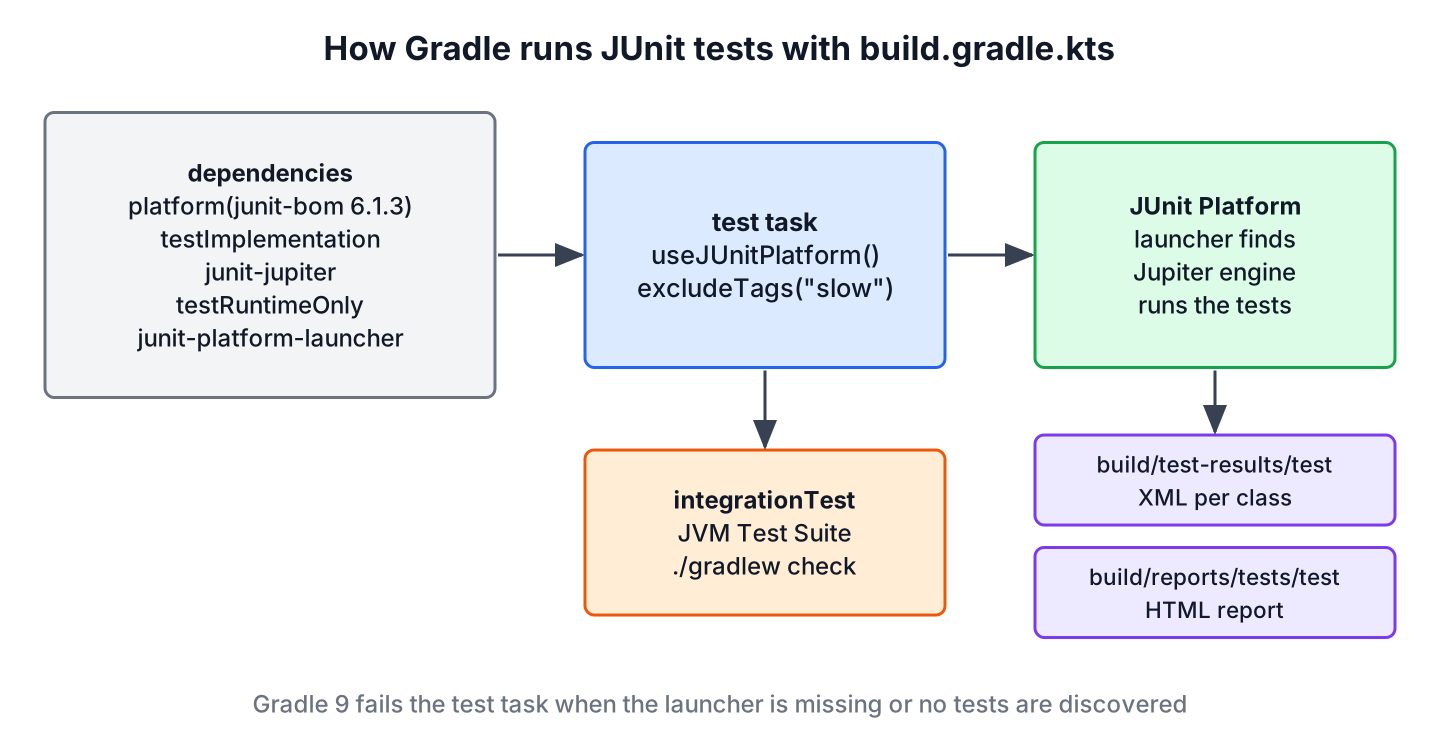
For the JUnit Gradle dependency setup, we import the junit-bom as a platform, add org.junit.jupiter:junit-jupiter to testImplementation and org.junit.platform:junit-platform-launcher to testRuntimeOnly, and call useJUnitPlatform() on the test task. Gradle has its own JUnit Platform support, so no extra plugin is involved.
We need this setup in every Gradle project with tests, and we come back to it when a Gradle 9 build fails with “Failed to load JUnit Platform” or reports that the test task discovered no tests.
The following example is the build.gradle.kts part that runs JUnit 6.1.3 tests with Gradle 9.8.1 on Java 25.
dependencies {
    testImplementation(platform("org.junit:junit-bom:6.1.3"))         // versions for all JUnit artifacts
    testImplementation("org.junit.jupiter:junit-jupiter")             // API + params + engine
    testRuntimeOnly("org.junit.platform:junit-platform-launcher")     // required by Gradle 9
}

tasks.test {
    useJUnitPlatform()                                                // run tests on the JUnit Platform
}
Only the BOM line has a version. The BOM aligns junit-jupiter and the launcher, so both resolve to 6.1.3. The same lines work for JUnit 5 projects with the BOM version 5.14.4, because the Jupiter API is the same in both versions.
After a short look at what each line does, we build the complete build file in the Kotlin and Groovy DSL, filter tests by tag and by name, add an integration test suite and run JUnit 4 tests next to JUnit 6 tests. The last part reproduces the two errors that Gradle 9 prints for a broken JUnit setup.
1. What Each JUnit Line in the Gradle Build Does
Gradle splits test dependencies into configurations, and each JUnit artifact belongs to the one that matches when it is needed. The API is needed to compile the tests, while the launcher is needed only when Gradle starts the test JVM.
| Line | Configuration | Why it is there |
|---|---|---|
| platform(“org.junit:junit-bom:6.1.3”) | testImplementation | Sets one version for all JUnit artifacts, including transitive ones |
| org.junit.jupiter:junit-jupiter | testImplementation | @Test, Assertions, @ParameterizedTest and the Jupiter engine |
| org.junit.platform:junit-platform-launcher | testRuntimeOnly | The API that the Gradle test worker calls to discover and run tests |
| useJUnitPlatform() | test task | Tells Gradle to run the tests on the JUnit Platform instead of JUnit 4 |
| org.junit.vintage:junit-vintage-engine | testRuntimeOnly | Only while JUnit 4 tests still exist |
Gradle 9 requires the junit-platform-launcher on the test runtime classpath and stops the build without it. Gradle 8 still added a launcher of its own when the line was missing, and that launcher could have a different version than the JUnit engine of the project. Declaring it through the BOM keeps the launcher at the same version as the engine. The Gradle 9 article lists the other changes of that release.
2. A Complete build.gradle.kts for JUnit 6
The Kotlin DSL is the default for new Gradle projects, so we start with it. The build file of a small loyalty-points module adds a Java 25 toolchain, excludes the tests tagged slow from the normal run and prints each test result to the console.
plugins {
    java
}

java {
    toolchain {
        languageVersion = JavaLanguageVersion.of(25)
    }
}

repositories {
    mavenCentral()
}

dependencies {
    testImplementation(platform("org.junit:junit-bom:6.1.3"))
    testImplementation("org.junit.jupiter:junit-jupiter")
    testRuntimeOnly("org.junit.platform:junit-platform-launcher")
}

tasks.test {
    useJUnitPlatform {
        excludeTags("slow")
    }
    testLogging {
        events("passed", "skipped", "failed")
    }
}
The test class LoyaltyPointsTest has a parameterized test with three rows, one @Test method and one test tagged with @Tag(“slow”), which loops over a million orders. We run the build with the Gradle wrapper.
@ParameterizedTest
@CsvSource({"45, false, 4", "45, true, 8", "9, true, 0"})
void pointsPerTenDollars(int total, boolean member, int expected) {
  assertEquals(expected, loyalty.forOrder(total, member));
}

@Tag("slow")
@Test
void largeOrderHistory() {
  int sum = 0;
  for (int i = 0; i < 1_000_000; i++) {
    sum += loyalty.forOrder(i % 500, i % 2 == 0);
  }
  assertEquals(36_750_000, sum);
}
$ ./gradlew test --console=plain
> Task :test
LoyaltyPointsTest > rejectsNegativeTotal() PASSED
LoyaltyPointsTest > pointsPerTenDollars(int, boolean, int) > [1] "45", "false", "4" PASSED
LoyaltyPointsTest > pointsPerTenDollars(int, boolean, int) > [2] "45", "true", "8" PASSED
LoyaltyPointsTest > pointsPerTenDollars(int, boolean, int) > [3] "9", "true", "0" PASSED
BUILD SUCCESSFUL in 12sNotice that largeOrderHistory() is missing from the output. The tag filter removes it before the run, so Gradle does not report it as skipped either. Without the testLogging block, Gradle prints only the task names and the final result, and the details go to the HTML test report and the XML files under build/test-results.
3. The Same Setup in the Groovy DSL
Many existing projects still use build.gradle with the Groovy DSL. The dependencies are the same, and only the syntax changes, with single quotes and method calls without parentheses.
plugins {
    id 'java'
}

dependencies {
    testImplementation platform('org.junit:junit-bom:6.1.3')
    testImplementation 'org.junit.jupiter:junit-jupiter'
    testRuntimeOnly 'org.junit.platform:junit-platform-launcher'
}

test {
    useJUnitPlatform()
    testLogging {
        events 'passed', 'skipped', 'failed'
    }
}
LoyaltyPointsTest > membersEarnDoublePoints() PASSEDOld tutorials show testCompile and testRuntime for JUnit. Gradle 7 removed both configurations, so a build file with them fails during configuration. The replacements are testImplementation and testRuntimeOnly.
4. Running One Test or a Group of Tests
The –tests option filters by class and method name, and it accepts wildcards. A filter that matches nothing fails the build, which protects us from a typo that would otherwise run zero tests and pass.
./gradlew test --tests 'LoyaltyPointsTest.rejectsNegativeTotal'
./gradlew test --tests 'LoyaltyPointsTest'
./gradlew test --tests '*Points*'
./gradlew test --rerun
> Task :test
LoyaltyPointsTest > rejectsNegativeTotal() PASSEDA misspelled method name in the filter stops the build with a clear message.
> No tests found for given includes: [LoyaltyPointsTest.noSuchMethod](--tests filter)Gradle skips the test task when nothing changed since the last run and shows it as UP-TO-DATE. The –rerun option forces the tests to run again without a clean. Tag filters such as includeTags and excludeTags are set in the build file, and the running tests with Gradle article shows more task options such as parallel forks.
5. Integration Tests With a JVM Test Suite
Integration tests, for example tests that start an embedded database, often have their own source folder so that ./gradlew test stays fast. The JVM Test Suite plugin creates the source set, the configurations and the task in one block. The Gradle 9.8.1 manual still marks the plugin as incubating, which means its DSL can change in a later Gradle release.
testing {
    suites {
        register<JvmTestSuite>("integrationTest") {
            useJUnitJupiter("6.1.3")
            dependencies {
                implementation(project())
            }
            targets.configureEach {
                testTask.configure {
                    shouldRunAfter(tasks.test)
                }
            }
        }
    }
}

tasks.check {
    dependsOn(testing.suites.named("integrationTest"))
}
The call useJUnitJupiter(“6.1.3”) adds JUnit Jupiter and the launcher to the new suite and calls useJUnitPlatform() on its task. The test class goes into src/integrationTest/java, and ./gradlew check runs the unit tests first and the suite after them.
> Task :test UP-TO-DATE
> Task :compileIntegrationTestJava
> Task :integrationTest

LoyaltyPointsIntegrationTest > pointsForAMonthOfOrders() PASSED

> Task :check

BUILD SUCCESSFUL in 5s
6. Keeping JUnit 4 Tests in a Gradle Build
During a migration, the old JUnit 4 tests and the new Jupiter tests run in the same test task. The JUnit 4 jar is needed to compile the old tests, so it goes into testImplementation, and the Vintage engine is needed only at runtime.
dependencies {
    testImplementation(platform("org.junit:junit-bom:6.1.3"))
    testImplementation("org.junit.jupiter:junit-jupiter")
    testImplementation("junit:junit:4.13.2")
    testRuntimeOnly("org.junit.vintage:junit-vintage-engine")
    testRuntimeOnly("org.junit.platform:junit-platform-launcher")
}
LegacyLoyaltyTest > smallOrderEarnsNoPoints PASSED
LoyaltyPointsTest > membersEarnDoublePoints() PASSEDGradle shows the JUnit 4 test without parentheses, because the Vintage engine reports JUnit 4 method names as they are. The Vintage engine is deprecated in JUnit 6, so we remove both extra lines once the last JUnit 4 test is migrated, as described in JUnit 5 vs JUnit 4.
7. Gradle Errors From a Broken JUnit Setup
Gradle 9 turned two silent problems of older versions into build failures. Both messages are long, so it helps to know which line of the build file each one points to.
7.1. Failed to Load JUnit Platform
When the junit-platform-launcher line is missing, the test worker cannot start the JUnit Platform, and the test task fails before any test runs.
> Task :test FAILED
Execution failed for task ':test' (registered by plugin 'org.gradle.jvm-test-suite').
> Test process encountered an unexpected problem.
   > Could not start Gradle Test Executor 4.
      > Failed to load JUnit Platform.  Please ensure that all JUnit Platform dependencies are available on the test's runtime classpath, including the JUnit Platform launcher.
The fix is the testRuntimeOnly(“org.junit.platform:junit-platform-launcher”) line from section 1. With the BOM in place, the line needs no version.
7.2. The Test Task Did Not Discover Any Tests
When useJUnitPlatform() is missing, Gradle runs the test task with its JUnit 4 support, which does not see Jupiter tests. Older Gradle versions reported a green build with zero tests. Gradle 9 fails the task instead.
> Task :test FAILED
Execution failed for task ':test'.
> There are test sources present and no filters are applied, but the test task did not discover any tests to execute. This is likely due to a misconfiguration. Please check your test configuration. If this is not a misconfiguration, this error can be disabled by setting the 'failOnNoDiscoveredTests' property to false.
We add useJUnitPlatform() to the test task. The failOnNoDiscoveredTests property is meant for modules that have test sources without tests on purpose, not for hiding a missing JUnit setup.
8. JUnit Gradle Dependency FAQs
A move to JUnit 6 or Gradle 9 brings up doubts about the launcher, the configurations, the versions and the reports.
8.1. Do We Still Need junit-platform-launcher in Gradle?
Yes, with Gradle 9. Without it, the test task fails with “Failed to load JUnit Platform”, as shown in section 7.1. We declare it as testRuntimeOnly without a version and let the BOM choose it.
8.2. What Is the Difference Between testImplementation and testRuntimeOnly?
The testImplementation configuration is on the classpath when Gradle compiles and runs the tests, so it holds the API we write tests with. The testRuntimeOnly configuration is added only when the tests run, which fits engines and the launcher, because our test code never references them.
8.3. Can We Skip the BOM and Write the Version on junit-jupiter?
Yes. JUnit publishes Gradle module metadata, so a versioned junit-jupiter dependency also aligns the other JUnit artifacts and the launcher can stay without a version. The explicit BOM line makes the intent visible and also covers JUnit artifacts that other libraries bring in.
8.4. Which Gradle Version Does JUnit 6 Need?
JUnit 6 does not name a minimum Gradle version, and Gradle supports the JUnit Platform since 4.6. JUnit 6 needs Java 17 or later, so the test JVM must run on Java 17 or newer. The examples here use Gradle 9.8.1 on Java 25.
8.5. Where Are the Gradle Test Reports?
Gradle writes one XML file per test class to build/test-results/test and an HTML report to build/reports/tests/test/index.html. The JUnit XML report article explains the XML format that CI servers read.
9. Conclusion
A JUnit setup in Gradle needs four lines. The BOM and junit-jupiter go into testImplementation, the launcher goes into testRuntimeOnly, and the test task calls useJUnitPlatform(). Gradle 9 fails the build when the launcher or the useJUnitPlatform() call is missing, which is better than the green build with zero tests that older versions produced.
Integration tests fit into a JVM Test Suite, and JUnit 4 tests run next to Jupiter tests with the Vintage engine until the migration ends. Maven users find the same setup in JUnit Maven dependency, and the JUnit tutorial goes on with writing the tests.
10. References
- JUnit 6.1.3 User Guide – Build Support
- JUnit 6.0.0 Release Notes
- Gradle 9.8.1 User Manual – Testing in Java and JVM Projects
- Gradle 9.8.1 User Manual – JVM Test Suite Plugin
- Gradle 9.8.1 Release Notes
Happy Learning !!
