
The JUnit 5 @RepeatedTest annotation runs the same test method a fixed number of times, and JUnit reports each run as a separate test with its own result. We put it in place of @Test and pass the number of repetitions, for example @RepeatedTest(5).
We repeat a test when one run proves little. Typical cases are code with threads, where a race condition shows up only in some runs, code that uses random values or the clock, and a test we suspect to be flaky and want to check before we fix it.
The following example runs a test three times and prints the lifecycle calls of each repetition.
@BeforeEach
void setUp(TestInfo testInfo) {
    generator = new OrderNumberGenerator();
    System.out.println("@BeforeEach -> " + testInfo.getDisplayName());
}

@RepeatedTest(3)
void startsAtOne() {
    long first = generator.next();
    System.out.println("  test       -> first number " + first);
    assertEquals(1, first);
}
@BeforeEach -> repetition 1 of 3
test -> first number 1
@AfterEach
@BeforeEach -> repetition 2 of 3
test -> first number 1
@AfterEach
@BeforeEach -> repetition 3 of 3
test -> first number 1
@AfterEach
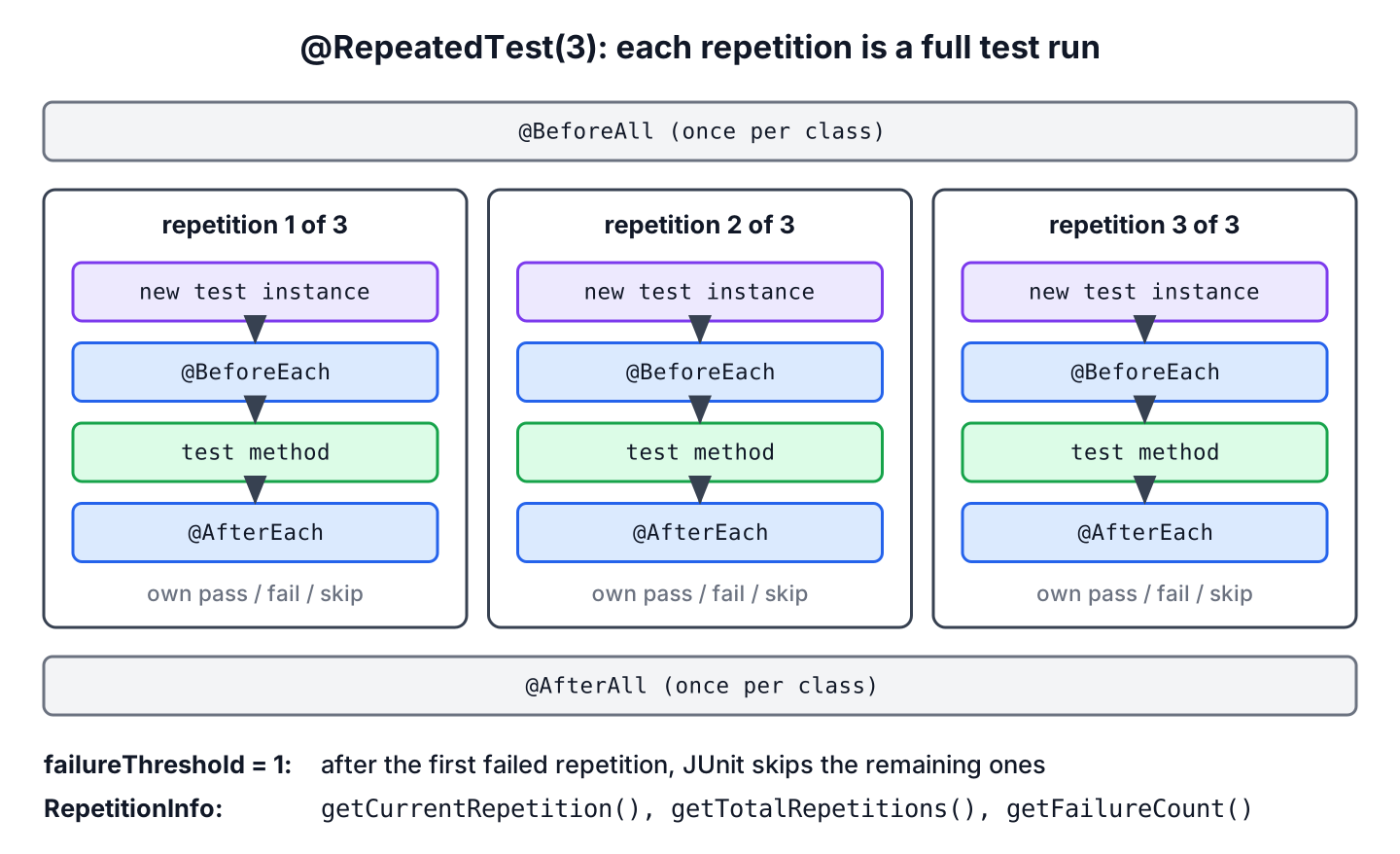
[INFO] Tests run: 3, Failures: 0, Errors: 0, Skipped: 0, Time elapsed: 0.159 s -- in com.howtodoinjava.junit.repeated.OrderNumberGeneratorTestNotice that @BeforeEach and @AfterEach run around every repetition, and Maven counts 3 tests for one method. Each repetition gets a fresh generator, so the first number is 1 every time.
The next sections cover the rules of the annotation, display names, the RepetitionInfo parameter and the failureThreshold attribute. A concurrency example shows where repeated tests find real bugs, and a comparison explains when a parameterized test fits better.
1. How @RepeatedTest Works
JUnit treats a @RepeatedTest method as a test template, that is, a method that JUnit invokes several times with a different context each time. Each invocation behaves like a regular @Test method with the full lifecycle, so JUnit creates a new test class instance (in the default per-method lifecycle), calls the @BeforeEach methods, runs the test and calls the @AfterEach methods. The @BeforeAll and @AfterAll methods still run once for the class.
The method follows the same rules as other test methods.
- A @RepeatedTest method must not be private or static, and it must return void.
- The number of repetitions in value must be greater than 0.
- The method can declare parameters that JUnit resolves, such as TestInfo, RepetitionInfo or TestReporter.
- We use @RepeatedTest instead of @Test, never both on one method.
The last rule matters in practice. A method with both annotations runs once as a regular test and once per repetition, and JUnit logs the discovery warning “Possible configuration error” about multiple competing annotations. The JUnit test lifecycle article shows the order of all callbacks, and the examples here use Java 25, JUnit 6.1.3 and Maven Surefire 3.6.0. @RepeatedTest works the same in JUnit 5, except for failureThreshold, which needs JUnit 5.10 or later. The JUnit tutorial covers the remaining JUnit features step by step.
2. Display Names of Repetitions
Each repetition gets a display name, which IDEs and build reports show. The attribute name of @RepeatedTest sets a pattern with three placeholders.
- {displayName} is the display name of the method, from @DisplayName or the method signature.
- {currentRepetition} is the number of the current repetition, starting at 1.
- {totalRepetitions} is the value of @RepeatedTest.
Two constants cover the common patterns. RepeatedTest.SHORT_DISPLAY_NAME is the default and gives repetition 1 of 2. RepeatedTest.LONG_DISPLAY_NAME adds the method’s display name in front, separated by ::.
@RepeatedTest(2)
void defaultName(TestInfo testInfo) {
    System.out.println(testInfo.getDisplayName());
}

@RepeatedTest(value = 2, name = RepeatedTest.LONG_DISPLAY_NAME)
@DisplayName("Generate order number")
void longName(TestInfo testInfo) {
    System.out.println(testInfo.getDisplayName());
}

@RepeatedTest(value = 2, name = "{displayName} - run {currentRepetition}/{totalRepetitions}")
@DisplayName("Generate order number")
void customName(TestInfo testInfo) {
    System.out.println(testInfo.getDisplayName());
}
Generate order number :: repetition 1 of 2
Generate order number :: repetition 2 of 2
Generate order number - run 1/2
Generate order number - run 2/2
repetition 1 of 2
repetition 2 of 2Maven Surefire prints the method name with an index such as chargesCard()[3] in failure messages, whereas IntelliJ IDEA, Eclipse and Gradle reports show the display names. A clear pattern pays off when a report lists 50 repetitions and two of them are red.
3. Reading the Current Repetition With RepetitionInfo
The interface RepetitionInfo tells a repeated test which repetition is running. JUnit injects it as a parameter into the @RepeatedTest method and into @BeforeEach and @AfterEach methods of repeated tests.
| Method | Returns |
|---|---|
| getCurrentRepetition() | the current repetition, starting at 1 |
| getTotalRepetitions() | the total number of repetitions |
| getFailureCount() | the number of failed repetitions so far (since JUnit 5.10) |
| getFailureThreshold() | the configured failure threshold (since JUnit 5.10) |
For example, an order system must hand out unique numbers for small and large batches. The test uses the repetition number to grow the batch, so three repetitions check 100, 200 and 300 numbers.
@BeforeEach
void logRepetition(RepetitionInfo repetitionInfo) {
    System.out.println("Batch " + repetitionInfo.getCurrentRepetition()
            + " of " + repetitionInfo.getTotalRepetitions());
}

@RepeatedTest(3)
void generatesUniqueNumbersForGrowingBatches(RepetitionInfo repetitionInfo) {
    int batchSize = repetitionInfo.getCurrentRepetition() * 100;     // 100, 200, 300
    OrderNumberGenerator generator = new OrderNumberGenerator();
    Set<Long> numbers = new HashSet<>();
    for (int i = 0; i < batchSize; i++) {
        numbers.add(generator.next());
    }
    assertEquals(batchSize, numbers.size());
}
Batch 1 of 3
Batch 2 of 3
Batch 3 of 3A RepetitionInfo parameter in a method that does not belong to a repeated test, for example a @BeforeEach method that also runs before a plain @Test, fails that test with a ParameterResolutionException. We keep such setup code in a class that contains only repeated tests.
4. Stopping Early With failureThreshold
The attribute failureThreshold (since JUnit 5.10) stops a repeated test after a number of failed repetitions. JUnit skips the remaining repetitions and reports them as skipped. By default, the threshold is Integer.MAX_VALUE, so all repetitions run no matter how many fail.
Say a payment gateway in a test environment times out on some calls. One timeout is enough to prove that the test is flaky, so failureThreshold = 1 saves the time of the remaining repetitions. The stub PaymentGateway returns TIMEOUT on every third call.
@RepeatedTest(value = 10, failureThreshold = 1)
void chargesCard() {
    assertEquals("OK", gateway.charge(4_999));
}
[ERROR] Tests run: 10, Failures: 1, Errors: 0, Skipped: 7, Time elapsed: 0.502 s <<< FAILURE! -- in com.howtodoinjava.junit.repeated.FlakyGatewayDemo
[ERROR] com.howtodoinjava.junit.repeated.FlakyGatewayDemo.chargesCard()[3] -- Time elapsed: 0.035 s <<< FAILURE!
org.opentest4j.AssertionFailedError: expected: <OK> but was: <TIMEOUT>Repetitions 1 and 2 pass, repetition 3 fails, and JUnit skips repetitions 4 to 10. The Surefire XML report gives the reason for each skipped repetition.
  <testcase name="chargesCard()[4]" classname="com.howtodoinjava.junit.repeated.FlakyGatewayDemo" time="0.0">
    <skipped message="Failure threshold [1] exceeded"/>
The threshold must be greater than 0 and less than the number of repetitions. When repetitions run in parallel, JUnit cannot guarantee the threshold, so the Javadoc recommends @Execution(ExecutionMode.SAME_THREAD) on such a method when parallel execution is on.
5. Finding a Race Condition With a Repeated Test
Concurrency bugs are the main reason to repeat a test. A race condition depends on how the threads interleave, so one run often passes. An unsafe order number generator with a plain long field shows the problem.
public class UnsafeOrderNumberGenerator {

    private long counter;

    public long next() {
        return ++counter;          // not atomic: read, add, write
    }
}
The test starts 4 threads that each take 10,000 numbers and expects 40,000 unique numbers. Repeating it 20 times gives the race condition 20 chances to show up.
@RepeatedTest(20)
void generatesUniqueNumbersUnderLoad() {
    UnsafeOrderNumberGenerator generator = new UnsafeOrderNumberGenerator();
    Set<Long> numbers = ConcurrentHashMap.newKeySet();
    try (ExecutorService executor = Executors.newFixedThreadPool(4)) {
        for (int task = 0; task < 4; task++) {
            executor.submit(() -> {
                for (int i = 0; i < 10_000; i++) {
                    numbers.add(generator.next());
                }
            });
        }
    }
    assertEquals(40_000, numbers.size());
}
[ERROR] Tests run: 20, Failures: 17, Errors: 0, Skipped: 0, Time elapsed: 0.427 s <<< FAILURE! -- in com.howtodoinjava.junit.repeated.UnsafeGeneratorDemo
[ERROR] com.howtodoinjava.junit.repeated.UnsafeGeneratorDemo.generatesUniqueNumbersUnderLoad()[1] -- Time elapsed: 0.066 s <<< FAILURE!
org.opentest4j.AssertionFailedError: expected: <40000> but was: <39755>In this run, 17 of 20 repetitions lost numbers, and 3 passed. The count changes from run to run, which is the reason why one passing run proves nothing. The fixed OrderNumberGenerator uses AtomicLong.incrementAndGet(), and the same repeated test passes all 20 repetitions.
A repeated test can show that a race condition exists, but 20 green repetitions do not prove that the code is thread-safe. We use it as a cheap first check and fix the code with the tools of Java concurrency such as atomic classes or locks.
6. @RepeatedTest vs @ParameterizedTest
Both annotations run one method several times, but they answer different questions. A repeated test runs the same input again to check that the result stays the same. A parameterized test runs different inputs once each.
| @RepeatedTest | @ParameterizedTest | |
|---|---|---|
| Input per run | the same, or derived from RepetitionInfo | a new argument set from a source such as @ValueSource or @CsvSource |
| Typical use | flaky tests, race conditions, random values | boundary values, many examples of one rule |
| Number of runs | fixed by value | one per argument set |
| Stop early | failureThreshold | no |
| Dependency | junit-jupiter-api | junit-jupiter-params (included in junit-jupiter) |
The two annotations cannot be combined on one method. JUnit builds the repetitions without arguments, so the repetitions fail with a ParameterResolutionException for the parameter that only the parameterized source can supply. To repeat each input, we either loop inside a parameterized test or derive the input from RepetitionInfo.
7. JUnit Repeated Test FAQs
Searches about repeated tests mostly ask about JUnit 4 and about combining annotations.
7.1. How Do We Repeat a Test in JUnit 4?
JUnit 4 has no @RepeatedTest. The usual workarounds are a custom TestRule that calls the statement in a loop, or a Parameterized runner with dummy parameters. After moving to JUnit 5 or 6, as described in JUnit 5 vs JUnit 4, @RepeatedTest replaces both.
7.2. Does @BeforeEach Run Before Every Repetition?
Yes. Every repetition calls the @BeforeEach and @AfterEach methods, as the output in the intro shows. A setup that should happen once for all repetitions belongs in a @BeforeAll method.
7.3. Can We Run a Test Until It Fails?
Not without a limit. We set a high value together with failureThreshold = 1, which runs the test up to value times and stops at the first failure.
7.4. Can We Create Our Own Repeated Test Annotation?
Yes. @RepeatedTest works as a meta-annotation, so an annotation such as @RepeatFiveTimes annotated with @RepeatedTest(5) and @Retention(RUNTIME) keeps the count in one place.
8. Conclusion
The @RepeatedTest annotation runs a test method a fixed number of times, and every repetition is a full test with its own lifecycle and result. The name attribute with {displayName}, {currentRepetition} and {totalRepetitions} makes the repetitions simple to tell apart, and RepetitionInfo gives the test the current repetition number.
We use repeated tests for flaky behavior and concurrency, add failureThreshold to stop after the first failure, and switch to @ParameterizedTest when the runs need different inputs.
9. References
- JUnit User Guide 6.1.3, Repeated Tests
- RepeatedTest Javadoc (JUnit 6.1.3)
- RepetitionInfo Javadoc (JUnit 6.1.3)
- JUnit 5.10.0 Release Notes
Happy Learning !!

What is the need to repeat for same input N times. Can you please elaborate if we can use different datasets for every execution?
Yes, there is no need to repeat same static thing everytime. It is useless.