
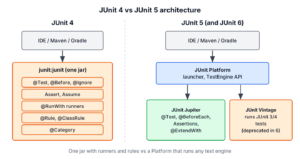
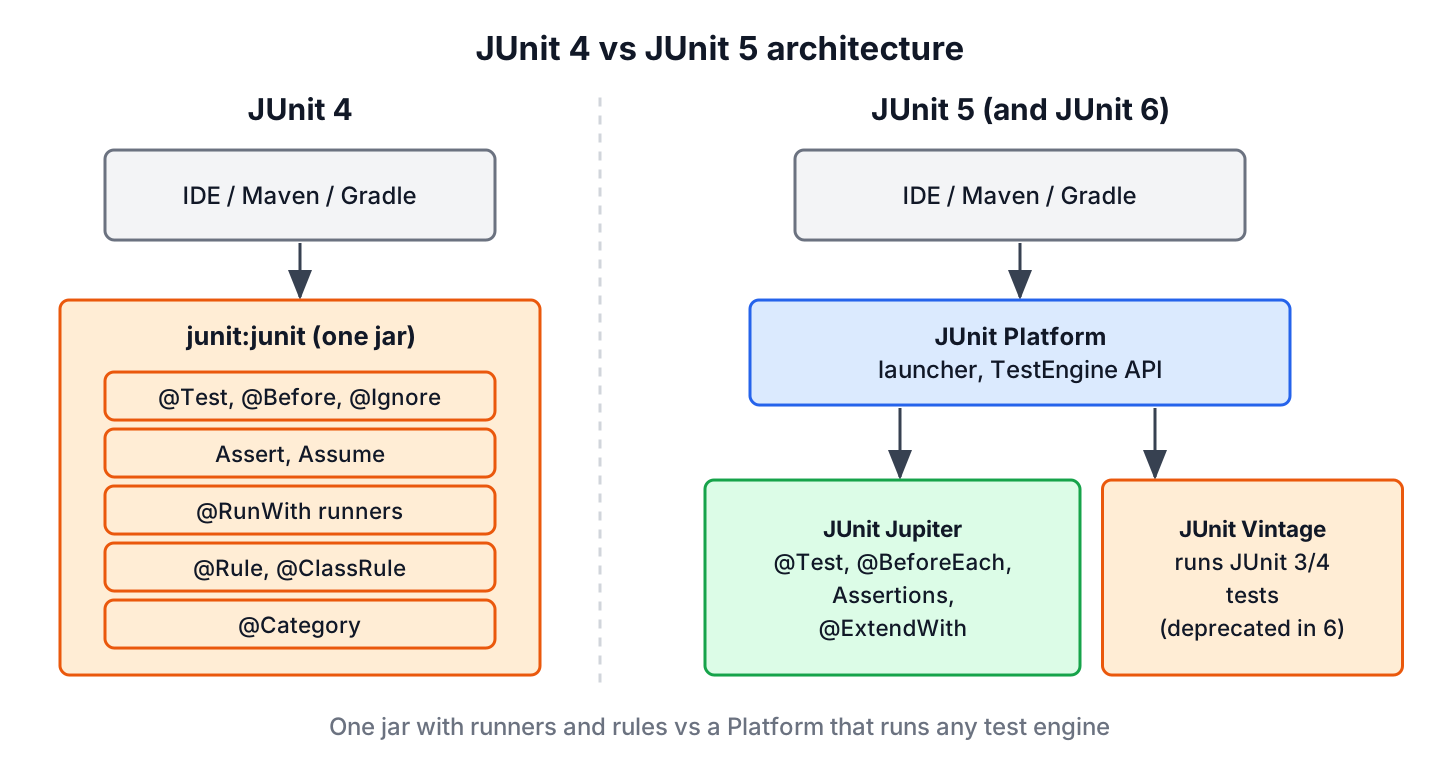
The main difference between JUnit 5 and JUnit 4 is the architecture. JUnit 4 is one jar with runners and rules, whereas JUnit 5 splits into the JUnit Platform, which launches tests, and JUnit Jupiter, a new API with its own annotations and an extension model. Most annotations got new names, assertion messages moved to the last parameter, and @RunWith and @Rule became @ExtendWith.
We compare JUnit 5 vs JUnit 4 when we maintain an old test suite and plan the move to the current API, or when we read old tests and need the Jupiter equivalent of an annotation. Both versions can run side by side in one build during the migration.
The following example is a JUnit 5 test with the JUnit 4 name of each element in the comments.
@BeforeEach                                   // JUnit 4: @Before
void setUp() {
    service = new LoanService();
}

@Test                                         // org.junit.jupiter.api.Test, JUnit 4: org.junit.Test
@Disabled("Waiting for the reservation feature")   // JUnit 4: @Ignore
void reservedBookCannotBeBorrowed() {
}
Notice that the Jupiter test class and its methods do not need to be public. We start with a summary table, compare the same test class written for both versions, map runners and rules to extensions, run JUnit 4 and JUnit 5 tests in one Maven build, and convert an old class with OpenRewrite. The examples use JUnit 6.1.3, whose Jupiter API is the same as in JUnit 5, plus JUnit 4.13.2.
1. JUnit 5 vs JUnit 4 at a Glance
JUnit 4 has a single jar, junit:junit, that contains the API and the runner. JUnit 5 separates the job of running tests from the API that we write tests with, so IDEs and build tools only need to support the Platform, and any test engine can run on it.
| Area | JUnit 4 | JUnit 5 |
|---|---|---|
| Artifacts | junit:junit plus Hamcrest | JUnit Platform, JUnit Jupiter, JUnit Vintage |
| Package | org.junit | org.junit.jupiter.api |
| Java version | Java 5 or later (class files of 4.13.2 target Java 5) | Java 8 or later (JUnit 6 needs Java 17) |
| Visibility | Test classes and methods must be public | Package-private is enough, private is not allowed |
| Assertion message | First parameter | Last parameter, also as a Supplier |
| Expected exception | @Test(expected = …), ExpectedException rule | assertThrows() |
| Extending tests | @RunWith (one runner per class), @Rule, @ClassRule | @ExtendWith, any number of extensions |
| Grouping | @Category with marker interfaces | @Tag with strings |
| Nested and dynamic tests | Not supported | @Nested, @TestFactory |
| Parameterized tests | Parameterized runner, one data set per class | @ParameterizedTest per method |
| Display names | Method name | @DisplayName, display name generators |
JUnit 4 tests still run on the JUnit Platform through the Vintage engine. That engine lets a team move class by class instead of rewriting the whole suite at once, as we see in section 5.
2. Annotation Changes
Most JUnit 4 annotations have a Jupiter counterpart with a clearer name. The Jupiter annotations live in org.junit.jupiter.api, so an import of org.junit.Test in a Jupiter class is a common migration bug. The test compiles, but Jupiter never runs it.
| Purpose | JUnit 4 | JUnit 5 |
|---|---|---|
| Declare a test | @Test (org.junit) | @Test (org.junit.jupiter.api) |
| Run before or after each test | @Before, @After | @BeforeEach, @AfterEach |
| Run once per class | @BeforeClass, @AfterClass (static) | @BeforeAll, @AfterAll (static, or not with @TestInstance(PER_CLASS)) |
| Skip a test | @Ignore | @Disabled, @EnabledIf…, @DisabledIf… |
| Group and filter | @Category | @Tag |
| Time limit | @Test(timeout = 500) | @Timeout |
| Extend behavior | @RunWith, @Rule, @ClassRule | @ExtendWith, @RegisterExtension |
| Temporary files | TemporaryFolder rule | @TempDir |
| Suites | @RunWith(Suite.class), @SuiteClasses | @Suite, @SelectClasses, @SelectPackages (junit-platform-suite) |
3. The Same Test in JUnit 4 and JUnit 5
Say a library app lends books, and a book that is already on loan cannot be borrowed again. The LoanService class keeps the open loans in a map and throws IllegalStateException for a second loan of the same ISBN. We test it once with JUnit 4 and once with Jupiter.
public void borrow(String isbn, String member) {
    if (loans.containsKey(isbn)) {
        throw new IllegalStateException("Book already on loan: " + isbn);
    }
    loans.put(isbn, member);
}
3.1. Setup, Assertions and Messages
The JUnit 4 class must be public, and the message of assertEquals() comes first.
public class LoanServiceJUnit4Test {

    private LoanService service;

    @Before
    public void setUp() {
        service = new LoanService();
    }

    @Test
    public void borrowMarksBookAsOnLoan() {
        service.borrow("978-0134685991", "lokesh");
        assertEquals("one open loan expected", 1, service.openLoans());
    }
}
In Jupiter, the class and methods are package-private, and the message moves to the end. The message can also be a Supplier<String>, which JUnit calls only when the assertion fails.
class LoanServiceTest {

    private LoanService service;

    @BeforeEach
    void setUp() {
        service = new LoanService();
    }

    @Test
    void borrowMarksBookAsOnLoan() {
        service.borrow("978-0134685991", "lokesh");
        assertEquals(1, service.openLoans(), "one open loan expected");
    }
}
When we migrate an assertion that compares two String values, we must move the message to the end by hand, because the JUnit 4 order still compiles in Jupiter. The call assertEquals(“title”, expected, actual) matches assertEquals(Object expected, Object actual, String message), so JUnit compares the message text with the expected value and the test fails with a confusing report. With numbers, the old order does not compile, because no overload takes a String first and two int values after it.
3.2. Expected Exceptions
JUnit 4 declares the expected exception on the annotation. The test passes if any line of the method throws it, so a bug in the first borrow() call would also make the test green.
@Test(expected = IllegalStateException.class)
public void borrowingTwiceFails() {
    service.borrow("978-0134685991", "lokesh");
    service.borrow("978-0134685991", "alex");
}
Jupiter uses assertThrows() around the one call that must throw, and returns the exception so we can check its message.
service.borrow("978-0134685991", "lokesh");

IllegalStateException ex = assertThrows(IllegalStateException.class,
        () -> service.borrow("978-0134685991", "alex"));
assertEquals("Book already on loan: 978-0134685991", ex.getMessage());
3.3. Timeouts, Tags, Skipped Tests and Temporary Files
The remaining JUnit 4 features in the example map one to one. The JUnit 4 version uses attributes, rules and marker interfaces.
@Rule
public TemporaryFolder tempFolder = new TemporaryFolder();

@Test(timeout = 500)
public void lateFeeIsFast() {
    assertEquals(75, service.lateFee(3));
}

@Test
@Category(SlowTests.class)
public void writesLoanReport() throws IOException {
    File report = tempFolder.newFile("loans.csv");
    assertTrue(report.exists());
}

@Test
@Ignore("Waiting for the reservation feature")
public void reservedBookCannotBeBorrowed() {
}
The Jupiter version uses annotations only. @TempDir injects a fresh directory and deletes it after the test, and @Tag takes a plain string, so there is no marker interface to maintain.
@TempDir
Path tempDir;

@Test
@Timeout(value = 500, unit = TimeUnit.MILLISECONDS)
void lateFeeIsFast() {
    assertEquals(75, service.lateFee(3));
}

@Test
@Tag("slow")
void writesLoanReport() throws IOException {
    Path report = Files.createFile(tempDir.resolve("loans.csv"));
    assertTrue(Files.exists(report));
}
One behavior differs. JUnit 4 runs a test with timeout in a separate thread and stops waiting after the limit. Jupiter’s @Timeout runs the test in the same thread by default, so the test fails after the limit only once the code returns or reacts to an interrupt. If the old behavior matters, we set threadMode = Timeout.ThreadMode.SEPARATE_THREAD.
4. Runners and Rules Become Extensions
A JUnit 4 class can have only one runner, so combining Mockito and Spring meant choosing one runner and a rule for the other. Jupiter replaces runners and rules with extensions, and a class can register as many as it needs with @ExtendWith. For example, a service test can use MockitoExtension and a Spring context in the same class.
| JUnit 4 | JUnit 5 replacement |
|---|---|
| @RunWith(MockitoJUnitRunner.class) | @ExtendWith(MockitoExtension.class) from mockito-junit-jupiter |
| @RunWith(SpringRunner.class) | @ExtendWith(SpringExtension.class), already included in @SpringBootTest |
| @RunWith(Parameterized.class) | @ParameterizedTest with a source such as @CsvSource |
| @RunWith(Suite.class) | @Suite from junit-platform-suite |
| TemporaryFolder rule | @TempDir |
| ExpectedException rule | assertThrows() |
| Timeout rule | @Timeout or junit.jupiter.execution.timeout.default |
| TestName rule | TestInfo parameter |
| ErrorCollector rule | assertAll() |
| Custom TestRule | Extension with callbacks such as BeforeEachCallback and AfterEachCallback |
Parameterized tests became much shorter, because each method declares its own data instead of a whole class with a constructor and a static @Parameters method. All argument sources are covered in JUnit parameterized tests.
5. Running JUnit 4 and JUnit 5 Tests Together
A large suite is rarely migrated in one commit. The JUnit Vintage engine runs JUnit 3 and JUnit 4 tests on the JUnit Platform, so old and new test classes run in the same mvn test. We add the engine next to junit-jupiter and keep junit:junit for compiling the old classes.
<dependency>
  <groupId>org.junit.jupiter</groupId>
  <artifactId>junit-jupiter</artifactId>
  <scope>test</scope>
</dependency>
<dependency>
  <groupId>org.junit.vintage</groupId>
  <artifactId>junit-vintage-engine</artifactId>
  <scope>test</scope>
</dependency>
<dependency>
  <groupId>junit</groupId>
  <artifactId>junit</artifactId>
  <version>4.13.2</version>
  <scope>test</scope>
</dependency>
The junit-bom import supplies the version of junit-vintage-engine, and Surefire 3.6.0 runs both test classes.
[INFO] Running com.howtodoinjava.junit.library.jupiter.LoanServiceTest
[WARNING] Tests run: 6, Failures: 0, Errors: 0, Skipped: 1, Time elapsed: 0.435 s -- in com.howtodoinjava.junit.library.jupiter.LoanServiceTest
[INFO] Running com.howtodoinjava.junit.library.junit4.LoanServiceJUnit4Test
[WARNING] Tests run: 5, Failures: 0, Errors: 0, Skipped: 1, Time elapsed: 0.174 s -- in com.howtodoinjava.junit.library.junit4.LoanServiceJUnit4Test
[INFO]
[INFO] Results:
[INFO]
[INFO] Tests run: 11, Failures: 0, Errors: 0, Skipped: 2
The Console Launcher shows which engine ran which class. In JUnit 6, the Vintage engine is deprecated and reports an INFO message once it finds a JUnit 4 class. The message is a reminder to finish the migration, and the property junit.vintage.discovery.issue.reporting.enabled=false turns it off.
INFO: TestEngine with ID 'junit-vintage' encountered a non-critical issue during test discovery:

(1) [INFO] The JUnit Vintage engine is deprecated and should only be used temporarily while migrating tests to JUnit Jupiter or another testing framework with native JUnit Platform support.
.
+-- JUnit Jupiter [OK]
| '-- LoanServiceTest [OK]
|   +-- borrowingTwiceFails() [OK]
|   +-- Returning a book closes the loan [OK]
|   '-- reservedBookCannotBeBorrowed() [S] Waiting for the reservation feature
'-- JUnit Vintage [OK]
  '-- LoanServiceJUnit4Test [OK]
    +-- borrowingTwiceFails [OK]
    '-- reservedBookCannotBeBorrowed [S] Waiting for the reservation feature
6. Migrating from JUnit 4 to JUnit 5 Step by Step
A safe migration keeps the build green after every step. We keep the steps in this order in most Maven projects.
- Import junit-bom, add junit-jupiter and junit-vintage-engine, and upgrade Surefire to 3.x. The old tests keep running.
- Write all new tests with Jupiter.
- Convert old classes one at a time. Replace imports and annotations, move assertion messages to the end, and turn expected and rules into assertThrows(), @TempDir and extensions.
- Replace Hamcrest assertThat() from org.junit.Assert with MatcherAssert.assertThat() from Hamcrest or with AssertJ, because Jupiter’s Assertions has no assertThat().
- Remove junit-vintage-engine and junit:junit once no JUnit 4 class is left. Some libraries, such as older Testcontainers versions, still pull in junit:junit transitively, so we check mvn dependency:tree.
The OpenRewrite JUnit4to5Migration recipe automates the third and fifth step. It rewrites the test sources and the pom.xml in place, so we run it on a clean Git working tree and review the diff.
mvn org.openrewrite.maven:rewrite-maven-plugin:run \
  -Drewrite.recipeArtifactCoordinates=org.openrewrite.recipe:rewrite-testing-frameworks:RELEASE \
  -Drewrite.activeRecipes=org.openrewrite.java.testing.junit5.JUnit4to5Migration
[WARNING] Changes have been made to pom.xml by:
[WARNING] org.openrewrite.java.dependencies.RemoveDependency: {groupId=junit, artifactId=junit}
[WARNING] Changes have been made to src/test/java/com/howtodoinjava/junit/library/junit4/LoanServiceJUnit4Test.java by:
[WARNING] org.openrewrite.java.testing.junit5.IgnoreToDisabled
[WARNING] org.openrewrite.java.testing.junit5.AssertToAssertions
[WARNING] org.openrewrite.java.testing.junit5.CategoryToTag
[WARNING] org.openrewrite.java.testing.junit5.TemporaryFolderToTempDir
[WARNING] org.openrewrite.java.testing.junit5.UpdateBeforeAfterAnnotations
[WARNING] org.openrewrite.java.testing.junit5.UpdateTestAnnotation
[WARNING] Please review and commit the results.The converted class compiled and passed without changes. Three spots still deserve a manual review, because the recipe keeps the JUnit 4 behavior instead of the idiomatic Jupiter style.
@Test
public void borrowingTwiceFails() {
    assertThrows(IllegalStateException.class, () -> {
        service.borrow("978-0134685991", "lokesh");
        service.borrow("978-0134685991", "alex");
    });
}

@Test
@Timeout(value = 500, unit = TimeUnit.MILLISECONDS, threadMode = Timeout.ThreadMode.SEPARATE_THREAD)
public void lateFeeIsFast() {
    assertEquals(75, service.lateFee(3));
}

@Test
@Tag("SlowTests")
public void writesLoanReport() throws IOException {
The lambda wraps both borrow() calls, as expected did, so we narrow it to the second call. The @Timeout keeps the separate thread of JUnit 4, and the tag name comes from the marker interface, so any Surefire groups filter must use SlowTests. The public modifiers can go as well.
7. JUnit 5 or Straight to JUnit 6?
A team that migrates JUnit 4 tests today can move to JUnit 6 in one step if the project runs on Java 17 or later. The Jupiter API is the same, so every Jupiter example in this article runs on JUnit 5.14 and on JUnit 6.1.3. On Java 8 or 11, JUnit 5 is the end point until the JDK upgrade. The changes between the two Jupiter generations, such as removed deprecated APIs, are in JUnit 5 vs JUnit 6.
8. JUnit 4 vs JUnit 5 FAQs
A JUnit 4 to JUnit 5 migration raises the same few questions in most teams.
8.1. Can JUnit 4 and JUnit 5 Tests Run in the Same Project?
Yes. With junit-vintage-engine on the test classpath, the JUnit Platform runs JUnit 4 classes next to Jupiter classes in one build, as the run in section 5 shows. In JUnit 6 the Vintage engine is deprecated, so it is a bridge for the migration and not a permanent setup.
8.2. Why Are My Tests Not Running After Switching to JUnit 5?
The most common cause is a mixed import. A method annotated with org.junit.Test inside a Jupiter class is a JUnit 4 test, and without the Vintage engine nothing runs it. The other cause is an old Surefire version. JUnit 5 needs Surefire 2.22.0 or later, and JUnit 6 needs 3.0.0 or later.
8.3. Is JUnit 4 Still Maintained?
JUnit 4 is in maintenance mode, and 4.13.2 is its last release. New features, such as nested and parameterized tests per method, exist only in Jupiter.
8.4. Do We Have to Rewrite Custom JUnit 4 Rules?
Yes, for the long term. The junit-jupiter-migrationsupport module runs some rules, such as ExternalResource, Verifier and ExpectedException, through @EnableRuleMigrationSupport. That support is deprecated for removal since JUnit 6.0.0, so a custom rule becomes an extension that implements the matching callback interfaces.
9. Conclusion
JUnit 5 replaced the single JUnit 4 jar with the JUnit Platform and the Jupiter API. The visible changes in test code are the new annotation names, the message as the last assertion parameter, assertThrows() instead of expected, and extensions instead of runners and rules.
The Vintage engine lets old and new tests run in one build while we convert class by class, and OpenRewrite does most of the mechanical work. The JUnit tutorial covers each Jupiter feature in its own article.
10. References
- JUnit 6.1.3 User Guide – Migrating from JUnit 4
- JUnit 6.1.3 User Guide – Overview
- JUnit 6.0.0 Release Notes
- JUnit 4 Test Javadoc
- OpenRewrite JUnit4to5Migration recipe
Happy Learning !!

@RunWith is not supported by JUnit 5 if vintage and platform is not included.
If you are using paramertized tests in Junit4 the test data is loaded before the @BeforeClass method is called, in JUnit5 it’s the other way round – @BeforeAll then the test method
One missing note about annotations, @Rule.
For example migration of springboot tests with rest documentation needs remove this rule:
@Rule
public final JUnitRestDocumentation restDocumentation = new JUnitRestDocumentation();
And annotate test class with:
@ExtendWith(RestDocumentationExtension.class)
Could you please suggest how to replace this rule in Junit5 test case?
@Rule
public EmbeddedActiveMQBroker broker = new EmbeddedActiveMQBroker();